


Have you ever spent hours crafting the perfect blog post, only to see visitors leave your site in seconds? It’s a frustrating experience, and often the hidden culprit is dense, hard-to-read text that overwhelms your audience.
Here at WPBeginner, we learned that clear, simple writing is just as important as the information itself. By focusing on our content’s readability score, we made our articles easier to understand for everyone, which keeps people reading longer.
A readability score isn’t a judgment of your writing skills. It’s a helpful tool that shows you exactly where your sentences are too long or your words are too complex for a general audience.
In this guide, we’ll show you how to check your readability score right inside WordPress. You’ll also learn how to understand the results and make simple tweaks that make a huge difference in user engagement.
Why Improve the Readability of Your WordPress Posts?
At WPBeginner, we’ve seen how readability improvements can transform a website’s performance. When we simplified our content structure and focused on clearer writing, we noticed visitors staying longer on our pages and engaging more with our content.
Here’s what happens when you improve your content’s readability:
- Better SEO rankings – Google favors content that users can easily read and understand
- Higher engagement rates – Readable content keeps visitors on your site longer
- Improved accessibility – Your content becomes inclusive for readers with different skill levels and backgrounds
- Increased conversions – Clear, simple content helps visitors take action more easily
The best part? You don’t need to be a writing expert to improve your readability scores. Modern WordPress plugins and online tools make it easy to analyze your content and get specific suggestions for improvement.
These tools will show you exactly which sentences are too long, which words are too complex, and how to make your content more engaging for your target audience.
With that being said, let’s take a look at how to add and improve the readability score in WordPress posts. We will cover two methods and also explain how to understand the scores and improve your site’s readability:
- Method 1: Adding Readability Score Analysis With All in One SEO
- Method 2: Adding Readability Score Analysis With Readable
- Understanding Readability Analysis Scores
- Tips on Improving Your Site's Readability
- Frequently Asked Questions About Readability
- Additional Resources on Optimizing Content in WordPress
Method 1: Adding Readability Score Analysis With All in One SEO
If you are already using the All in One SEO (AIOSEO) plugin, then you are in luck. All in One SEO comes with a built-in content analysis tool that checks your content’s readability and makes suggestions. It uses the popular Flesch Reading Ease score, which we’ll explain in more detail below.
As you are working on your new post, you just need to scroll down to the AIOSEO meta box, and you will find the content analysis below the focus keyword.
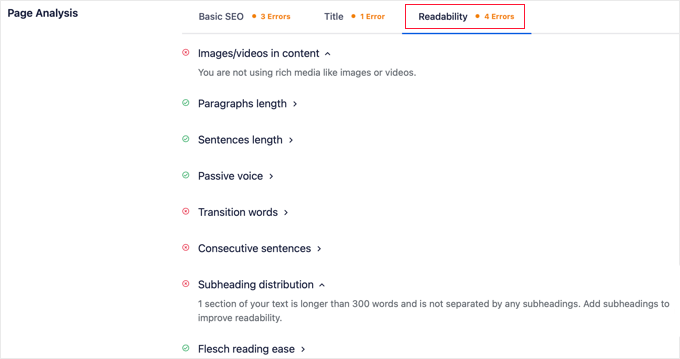
AIOSEO also has lots of other features to help you improve your readability score and boost your WordPress SEO so that you can get more traffic.
Our full review of AIOSEO goes into more detail on all its features.
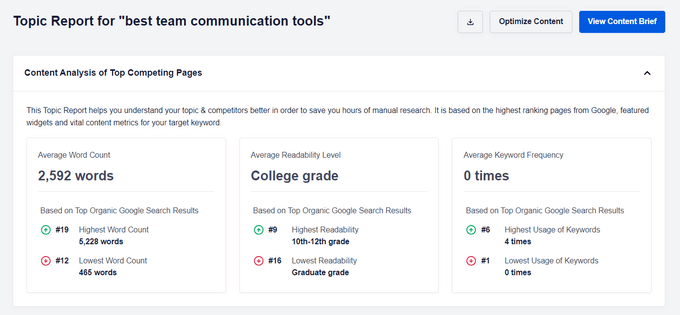
Bonus: AIOSEO also offers another powerful tool called SEOBoost that will check your content’s readability. This online content optimization tool will give your content a readability score and suggests what reading level it should be by analyzing the top-ranking articles for your keyword.
Method 2: Adding Readability Score Analysis With Readable
Some of you may not be using AIOSEO or may want to see multiple readability scores. To run a separate readability analysis on your posts, you can use an online tool like Readable.
First, you need to head over to the Readable website.
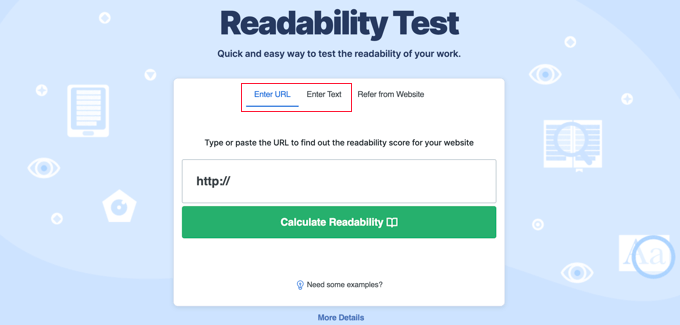
Once there, you can type or paste the URL of your post into the field in the ‘Enter URL’ tab.
Alternatively, you can click on the ‘Enter Text’ tab and paste the text of your blog post.
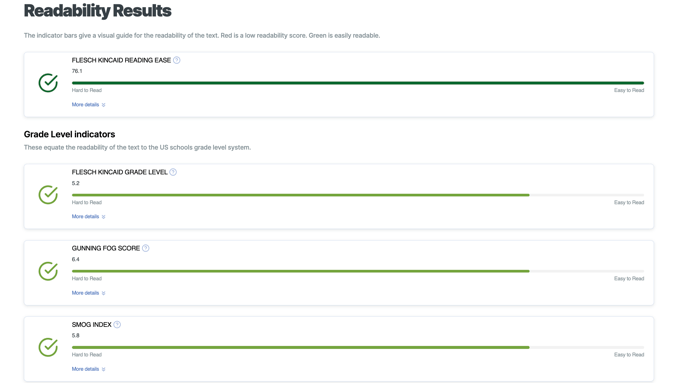
You will be shown a Readability Results page that shows the readability score of your content using Flesche Kincaid, Gunning Fog, Smog, and more readability tests. You will also get stats on the number of sentences, paragraphs, and more.
Understanding Readability Analysis Scores
Most readability tools give you a few different scores, but they usually fall into two categories: Reading Ease and Grade Level. Here’s how to understand them.
Flesch Reading Ease (A Higher Score is Better)
The Flesch Reading Ease test is one of the most popular. It scores your text on a scale from 0 to 100.
- 90-100: Very easy to read, easily understood by an average 11-year-old.
- 60-70: Plain English, easily understood by most adults. This is a great target for blog posts.
- 0-30: Very difficult to read, best understood by university graduates.
In short, for this score, you want to aim for a higher number.
Grade Level Scores (A Lower Score is Better)
Other tests, like the Flesch-Kincaid Grade Level, give you a score that corresponds to a U.S. school grade level. For example, a score of 8 means an eighth-grader can understand the content.
For a general audience, it’s best to aim for a grade level of around 7 or 8.
Tips on Improving Your Site’s Readability
Using a readability analysis tool is a great way to improve your content. However, there is a lot more you can do to improve your site’s readability further.
Use Shorter Sentences and Paragraphs
The first thing you need to understand is that users don’t always read the entire article. They scan the information to find interesting bits.
Keeping your sentences short and using fewer sentences per paragraph makes your content easy to scan. You can see how to add line breaks in WordPress.
Choose Simpler Words
You should also consider replacing difficult words with words that are more common and easy to understand.
Difficult vocabulary makes it harder to scan your pages.
Improve Your Site’s Typography and Design
Typography plays a very important role in improving readability. If your text is too small and difficult to read, then this will obviously affect user experience on your site. Even if your content is well-written, it will be hard to read.
If you are using Google Fonts on your website, then stick with one or two fonts throughout your page.
You should also make sure there is plenty of white space on your pages. If your content blocks are too close to each other, then try adding padding between them.
You can do that by using CSS in your theme’s stylesheet. If you don’t know CSS, then you can see our guide on how to use custom CSS in WordPress.
Frequently Asked Questions About Readability
Here are some of the most common questions we receive about readability scores and how they work in WordPress.
1. What is a good readability score?
For most blog posts and online articles, a Flesch reading ease score between 60 and 70 is considered a great target. This score corresponds to an 8th-grade reading level, making it easy for the vast majority of adults to understand.
2. Does readability affect SEO?
While readability is not a direct ranking factor, it strongly influences user engagement signals that Google values. Easy-to-read content keeps visitors on your site longer, which can improve dwell time and lower bounce rates, signaling to search engines that your page is high-quality.
3. What is the fastest way to improve my article’s readability?
The quickest way to improve your score is to shorten your sentences and paragraphs. Try to break up long sentences into two or three shorter ones. Using simpler words instead of complex jargon will also make a significant difference.
4. Do I need to get a perfect readability score every time?
Not at all. Think of readability scores as helpful suggestions, not strict rules. Some topics are naturally complex and require specific terminology. The main goal is to make your content as clear and accessible as possible for your intended audience.
Additional Resources on Optimizing Content in WordPress
We hope this article helped you add and improve the readability score for your WordPress posts. You may also want to see some other guides related to optimizing your content in WordPress:
- Tips to Optimize Your Blog Posts for SEO Like a Pro (Checklist)
- WordPress SEO Checklist for Beginners
- Best Online Content Optimization Tools for WordPress
- Best Writing Assistant Software for WordPress (Compared)
- How to Use the SEO Writing Assistant in WordPress to Improve SEO
- How to Add Keywords and Meta Descriptions in WordPress
- Best Online Grammar Checker Tools for WordPress
- What is Content Decay? (And How to Fix It)
- How to Rank New WordPress Content Faster
If you liked this article, then please subscribe to our YouTube Channel for WordPress video tutorials. You can also find us on Twitter and Facebook.



Samson
I am just starting up, I have to admint that wpbeginner have been like home for me in the last few weeks. Laerning and putting what I’ve learned in practice. Please help in any way possible that I may be doing wrong or where i need to improve .
Mikael Andersen
Though I can see the advantages of these readability tools, but on the other hand, I think it is a quite a dangerous way to write content. If all writers/bloggers are going to level down the standards of content and start using only easy understandable texts, then it will result in more and more people that can only understand simple written texts.
Marcelo Pedra
I want to ask: all of these tests work only for english? or are them enough trustworthy for other languages like spanish, french, german, etc?
WPBeginner Support
The formulas for readability tests were designed with English language in mind. Some components like shorter sentences, words per sentence, sentences per paragraph, etc. can work for other languages that use Latin script.
Admin