


Sometimes you need more control over how your blog posts are ordered. We’ve been there ourselves, trying to highlight an important announcement, showcase a contest, or feature a critical update.
By default, WordPress displays your posts in reverse chronological order, with the newest ones at the top. While this works great most of the time, it can be frustrating when you need to prioritize certain content.
That’s why we’ve put together this guide. We’ll walk you through several methods to re-order your WordPress posts, from quick and easy tricks to more advanced techniques.

Why Re-Order Blog Posts in WordPress?
Sometimes, there may be specific content that you want visitors to see first. For example, you may want to pin a big announcement blog to the front page, blog page, recent posts, or archive pages.
You may also need to manually re-order custom post types. For example, if you have created a WooCommerce store, then you might want to show your most popular products first or items that are on sale.
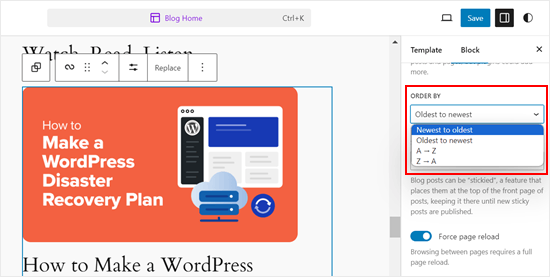
The problem is that WordPress normally shows your blog posts in reverse chronological order (most recent posts to the least), with no easy way to move a post up or down. Even if you customize the Query Loop block in the block editor or full-site editor, it gives you limited re-ordering options.
With that in mind, let’s look at some workarounds and tricks that can help you easily re-order blog posts, WooCommerce products, and more. Simply use the quick links below to jump straight to the method you want to use:
- Method 1: Change the Post's Published Date (Quick and Easy)
- Method 2: Use Post Types Order Plugin (More Control)
- Method 3: Use Drag and Drop in WooCommerce (Product Post Types)
- Method 4: Make WordPress Posts Sticky (Best for Highlighting Specific Posts)
- Method 5: Re-Order WordPress Posts Using Code (Advanced)
Video Tutorial
Method 1: Change the Post’s Published Date (Quick and Easy)
The easiest way to change the order of your posts is to simply change the published date.
By default, your WordPress site displays posts based on their publication date in reverse chronological order, so newer posts appear first.
Changing a post’s publish date will also change where it appears on your archive page, blog page, and other areas of your WordPress website.
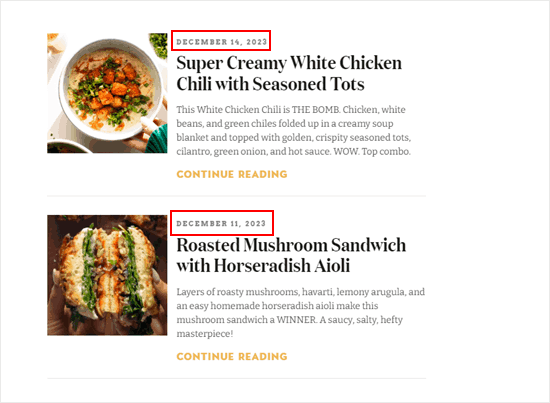
For example, if you wanted to show an older post first, then you could change its publication date to today. Similarly, if you wanted to move a post down the list, then you could simply make its publication date older.
To do this, just open the blog post in the WordPress block editor. In the right sidebar, navigate to the ‘Post’ tab, and then click on the link next to ‘Publish.’
This opens a date and time popup where you can change the publication date.
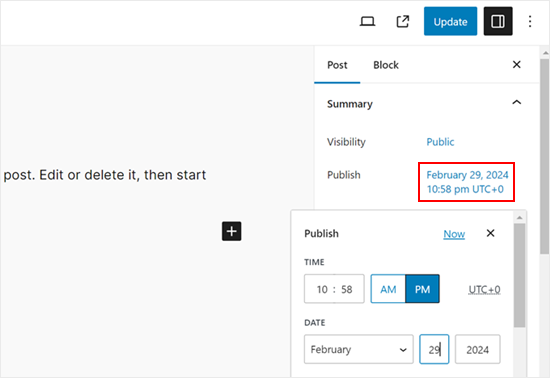
Here, it’s important to choose a date that’s relevant to other posts. For example, if you want the post to appear before a blog that was published on the 8th of March, then you’d need to change its publish date to March 9th.
After changing the date and time, click on ‘Update’ to save your changes.
Method 2: Use Post Types Order Plugin (More Control)
If you want to re-order posts without changing their publish dates, then we recommend using Post Types Order. This plugin allows you to organize blog posts, WooCommerce products, coupon codes, orders, custom post types, and more using drag and drop.
First, you need to install and activate the Post Types Order plugin. For more details, see our step-by-step guide on how to install a WordPress plugin.
Upon activation, head over to the Settings » Post Types Order page to configure the plugin’s settings.
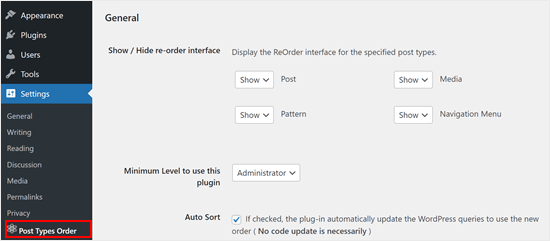
The ‘Show / Hide re-order interface’ section lists all the different content types that Post Types Order can reorganize.
You will need to make sure these dropdown menus are set to ‘Show’.
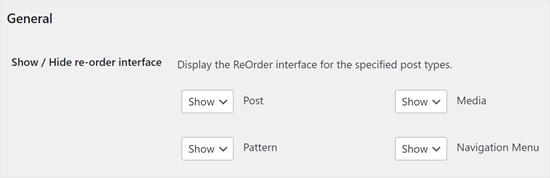
After that, scroll to the ‘Archive Drag & Drop’ section.
For each content type that you want to reorganize, open its dropdown menu and select ‘Yes’.
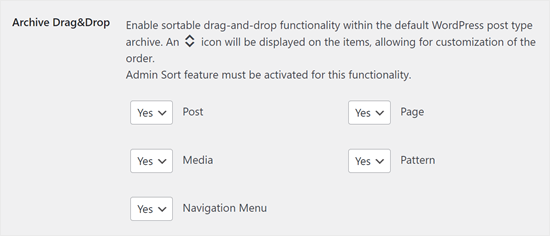
When you are happy with how the plugin is set up, click on ‘Save Settings’.
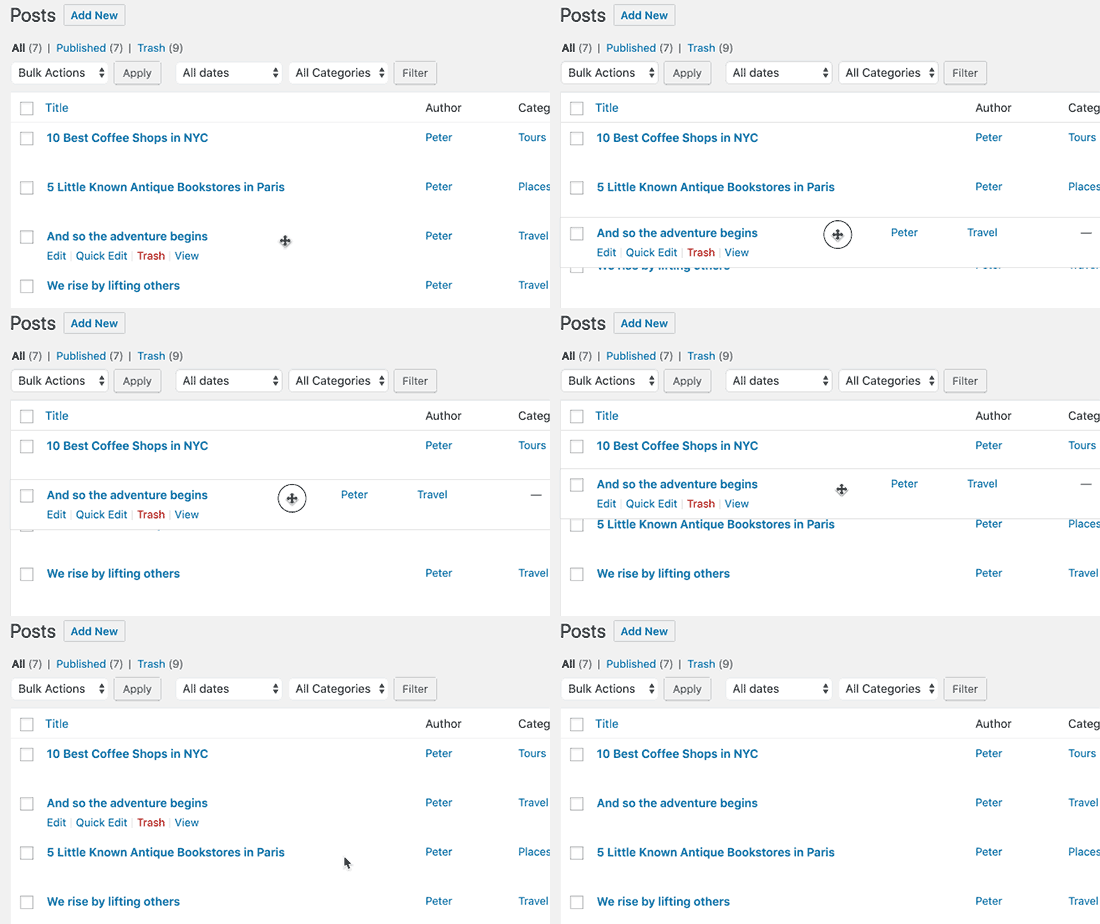
Now, go to an area with the content you want to re-order, such as Posts » All Posts. You can then create a custom order by simply dragging and dropping the posts into new positions.
Method 3: Use Drag and Drop in WooCommerce (Product Post Types)
If you run an online store, then WooCommerce already supports drag and drop natively.
To reorder your products, you must go to the Products » All Products page.
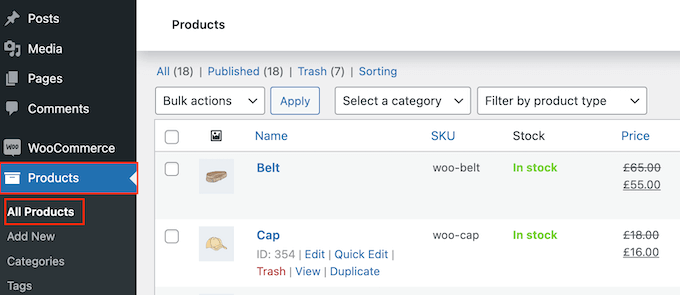
Here, click the ‘Sorting’ link at the top of the page.
You can then change the order of your products using drag and drop.
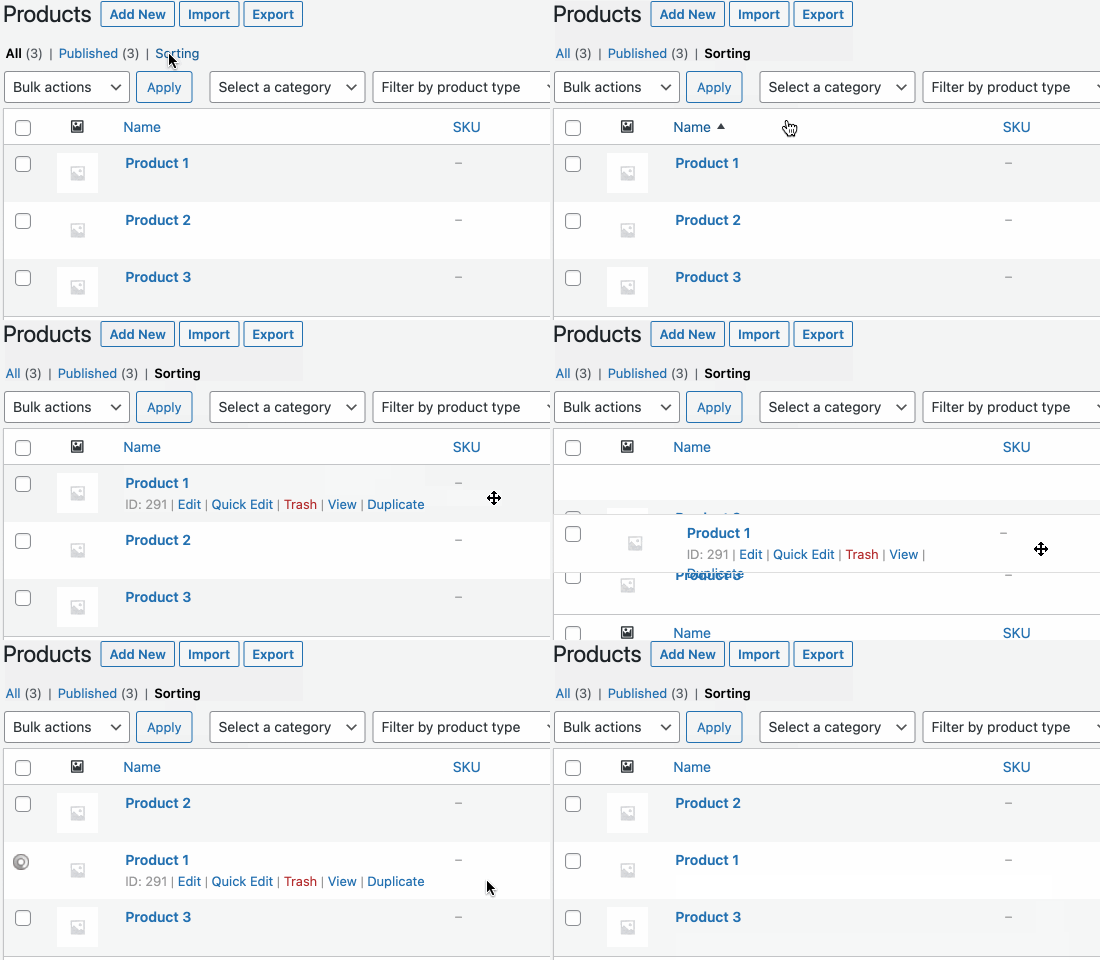
Happy with how the products are organized on your online store?
Then, just click the ‘All’ link to stop sorting.
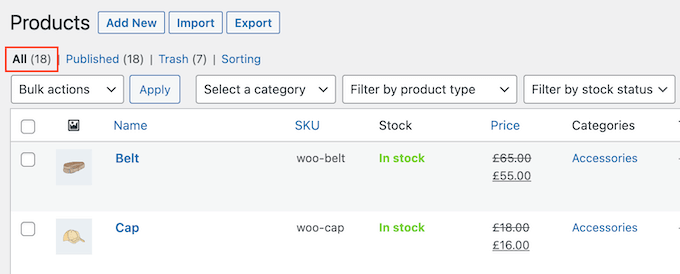
Method 4: Make WordPress Posts Sticky (Best for Highlighting Specific Posts)
Sometimes, you may want to highlight an important blog post, such as a big product announcement or a post about a giveaway or contest you are running.
WordPress allows you to make a post sticky so that it appears above all the other posts on your blog page, no matter what the publication date.
To do this, simply open the WordPress blog post that you want to highlight. In the ‘Post’ menu, check the box next to ‘Stick to the top of the blog.’
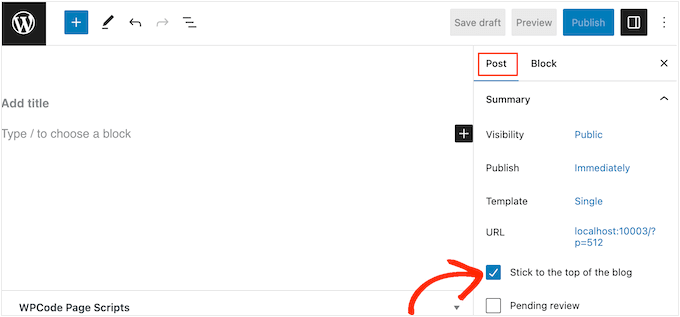
After that, click on the ‘Update’ button to save your changes.
Now, if you visit your website, you will see the post pinned to the top. The sticky post may even be highlighted differently, depending on your WordPress theme.
For more detailed instructions, please see these guides:
- How to Make Sticky Posts in WordPress (Quick and Easy)
- How to Add Sticky Posts in WordPress Custom Post Type Archives
- How to Add Sticky Posts for Categories in WordPress
- How to Display the Latest Sticky Posts in WordPress
- How to Exclude Sticky Posts from the Loop in WordPress
Method 5: Re-Order WordPress Posts Using Code (Advanced)
You may want to change how WordPress organizes all the posts across your website, including any posts you may publish in the future. The best way to do this is by adding custom code in WordPress.
Often, you will find guides with instructions to edit your theme’s functions.php file. However, this can cause all sorts of common WordPress errors or even break your site completely.
You’ll also lose the customization when you update your WordPress theme.
Instead, we recommend using the free WPCode plugin. WPCode is the best, most beginner-friendly code snippets plugin used by over 1 million WordPress websites. It allows you to easily add custom CSS, HTML, PHP, and more without putting your site at risk.
The first thing you need to do is install and activate WPCode. For more details, see our step-by-step guide on how to install a WordPress plugin.
Upon activation, head over to Code Snippets » Add Snippet.
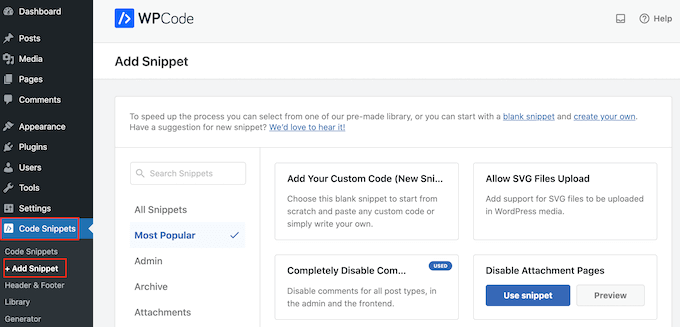
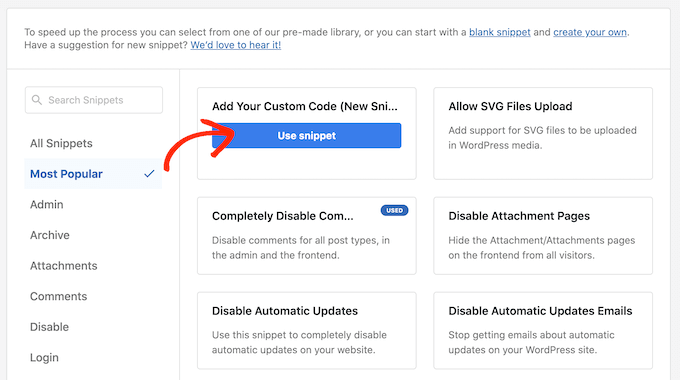
Here, simply hover your mouse over ‘Add Your Custom Code’.
When it appears, you need to click on ‘Use snippet’.
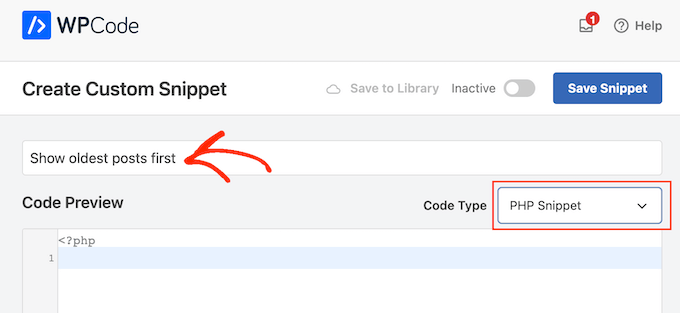
To start, type in a title for the custom code snippet. This can be anything that helps you identify the snippet in the WordPress dashboard.
After that, open the ‘Code Type’ dropdown and choose ‘PHP Snippet’.
In the code editor, add the following code snippet:
//function to modify default WordPress query
function wpb_custom_query( $query ) {

// Make sure we only modify the main query on the homepage
    if( $query->is_main_query() && ! is_admin() && $query->is_home() ) {

        // Set parameters to modify the query
        $query->set( 'orderby', 'date' );
        $query->set( 'order', 'ASC' );
    }
}

// Hook our custom query function to the pre_get_posts
add_action( 'pre_get_posts', 'wpb_custom_query' );
This code simply modifies the orderby and order parameters in the default WordPress query.
In the snippet above, we are displaying posts in chronological order so the older posts appear first. However, the orderby parameter has many options, so you can order your posts in lots of different ways.
You can see a full list of options by visiting the WP Query code reference.
Here’s another code example, where we modified the order by a completely random order:
// Function to modify default WordPress query
function wpb_custom_query( $query ) {

    // Make sure we only modify the main query on the homepage
    if( $query->is_main_query() && ! is_admin() && $query->is_home() ) {

        // Set parameters to modify the query
        $query->set( 'orderby', 'rand' );
    }
}

// Hook our custom query function to the pre_get_posts
add_action( 'pre_get_posts', 'wpb_custom_query' );
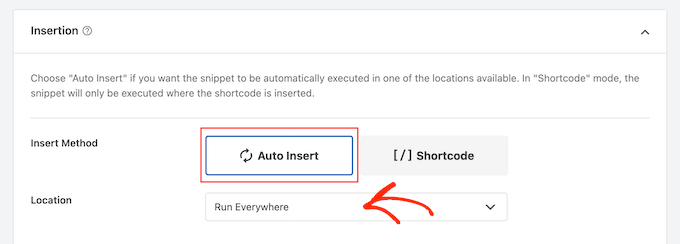
When you are happy with the snippet, you must scroll to the ‘Insertion’ section. WPCode can add your code to different locations, such as after every post, frontend only, or admin only.
We want to use the custom PHP code across our entire WordPress website, so click on ‘Auto Insert’ if it isn’t already selected.
Then, open the ‘Location’ dropdown and choose ‘Run Everywhere’.
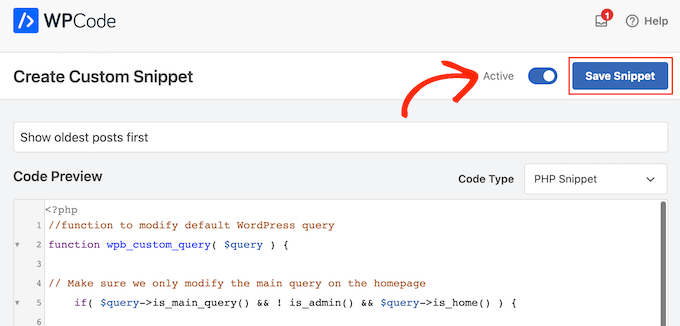
After that, you’re ready to scroll to the top of the screen and click on the ‘Inactive’ toggle so it changes to ‘Active.’
Finally, click on ‘Save Snippet’ to make the PHP snippet live.
Now, if you visit your site, you will see that the posts have been reorganized based on your code.
We hope this article helped you learn easy ways to re-order blog posts in WordPress. You may also want to see our expert picks for the best related posts plugins for WordPress and how to add a load more posts button in WordPress.
If you liked this article, then please subscribe to our YouTube Channel for WordPress video tutorials. You can also find us on Twitter and Facebook.



Vianney
Cleared my issues in an instant! Thanks.
WPBeginner Support
Glad our article was helpful!
Admin
AJ
I couldn’t figure out why one post was stuck in the first position, even after making sure the date was accurate. There is a setting in my theme, or maybe for all, under posts, where the post was “sticky”. I unchecked that and my problem went away.
WPBeginner Support
Glad to hear you resolved the issue and thank you for sharing in case others accidentally made their post sticky
Admin
Mrteesurez
Nice one, you know what, this post reordering is useful to as I have an educational website where I showed blog post in order of publishing date with as lessons after each other. I found it difficult to manually edit the post to change the date, so this solves the problem. thanks.
Jiří Vaněk
Is there some way, eg using CSS, to highlight a post that is pinned to the top of the blog like this? For example, a different background color of the block, etc.? The currently used template cannot do this.
WPBeginner Support
That would require custom CSS that would depend on your specific theme for determining what would work. We do not have a guaranteed CSS for changing that information but you may want to take a look at our guide on using Inspect element to help test CSS:
https://www.wpbeginner.com/wp-tutorials/basics-of-inspect-element-with-your-wordpress-site/
Admin
Olivier
For some reasons, the drag-and-drop options for Products did not work for me, and I did not want to install another plugin…
So I found a workaround to display my products for one specific category, by using the default woocommerce shortcode with the order attribute.
[products columns=”3″ category=”some-category-goes-here” order=”ASC”]
Now my producs for this category are display from first to last (which happened to be in my case with ascending price, which is what I wanted), and from not last to first.
Somehow a 6th method, to update your post with.
Hope this helps.
WPBeginner Support
Thank you for sharing this shortcode for those looking for other options!
Admin
Barq
Hi, how to use this code for “blog” page?
WPBeginner Support
The simplest method from this that would affect your blog page would be to change the published date for your blog posts
Admin
Jeff Moyer
Wow fantastic article thank you, I was aware of a couple of these options but not all thank you! Probably going to avoid the coding option but we’ll see lol.
WPBeginner Support
Glad our guide was helpful
Admin
Brian
I have the post reorder plugin, but do you know if there’s a plugin that allows the write to choose the post priority while in edit? For example, a dropdown that allows the user to select where on the page the post should appear (first, fifth, 10th, etc.).
WPBeginner Support
Not at the moment.
Admin
mark
First of all thank you for putting this together, your post are usually very helpful.
For some reason the theme i’m using has the blog posts order with oldest post on top. I would like to see the newest on top.
I’m running out of ideas. Any idea what to look for (and where) to get my posts sorted with the newest post on top?
WPBeginner Support
You would want to reach out to the support for your specific theme for if this is a theme setting.
Admin
Tom Grisak
Thanks for the help. I didn’t know a plugin could do that for me. I thought I’d have to go to every post and change the publish date. But I have a question, it sounds like you can put two stickies at the top. Are those also sorted by date?
WPBeginner Support
It would depend on your theme but normally they should be shown in date order
Admin
Rico
What I would like is for the sticky post to be at the top and the rest of the posts to follow the default (reverse chronological) order below it. I’ve used the sticky option but it doesn’t always put the sticky post at the top. It’s sticky on the blog page but at the bottom of the list in the sidebar for Recent Blog Posts. I’m using the Alizee template. Is there something I can do with CSS or another method to achieve this for both areas?
WPBeginner Support
You would either need to manually create your own recent posts widget or find a plugin that changes that. For creating a custom widget you would either recreate the look using an HTML or Text widget or manually creating a custom widget as we show here: https://www.wpbeginner.com/wp-tutorials/how-to-create-a-custom-wordpress-widget/
Admin
dirkthewebphoenix
What about a merely temporary reversal of order?
Example: As a visitor you have a special interest making you want to start with the oldest posts in your search, or as the site author you want to create a search URL for your menu that will present a popular post series in chronological order.
Is there any search term one could enter to reverse the order or any modification of the search URL (get request) that would do this on this one-time basis?
WPBeginner Support
For that, you would need to look into a plugin for your search to allow that type of one time re-order
Admin
Phil Smart
When ordering and displaying blog posts, my sponsor wants them ordered by the date of the event, which is the only reliable date. I am asking how to make that happen.
My sponsor considers that altering the date published just to alter the order means that no-one can count on that date to know which version of posts they are looking at.
How can we add a field to capture event-date?
WPBeginner Support
You can use a plugin like Advanced custom fields for setting up a new field: https://wordpress.org/plugins/advanced-custom-fields/
Admin
Michael Walther
Unfortunately, drag-and-drop type plugins like ‘Post Types Order’ are completely useless if you have more posts in your blog than fit on one screen.
For instance, I have > 100 posts in my blog. If I want so drag, say, post #96 all the way up to position #3, then I am out of luck because #5 and #96 do not fit on the same screen, which makes drag and drop impossible.
WPBeginner Support
If you go to your screen options in the top right of your All Posts page and you should be able to increase the number of posts to display on the page
Admin
Jo Wagner
Hi there,
I like this plugin. But find it limiting to only post types and not Pages as well. Simple Page Order works well for pages, but then you have two plugins again, which is not ideal. Is there no plugin to be able to do both?
Please let me know.
Abe
Hi there, I’m using the Wordpress.com free blog, and when I clicked on plug-ins, it’s asking me to upgrade. Is there another way of installing the re-order word press posts? Any tips would be great. I was planning on including my previously done writings, which weren’t done in this blog, but in review sites like Trip Advisor or Zomato, but the tendency of the site is that my latest posts will be the ones posted on top, so the chronological thing works only if I write my posts also based on timing of the visit, which is not feasible of how I’m going to populate my blog post.
WPBeginner Support
Hi Abe,
You’ll need a self hosted WordPress.org website or the business plan on WordPress.com. Please see our guide on the difference between WordPress.org vs WordPress.com.
Admin
Donna L Lovette
I downloaded the post oder plugin and I worked perfectly. Now my blog looks like I want it to. Thanks
Sherry
Hi – I installed the post order plug in and reordered my posts but it didn’t change the order on the site. what am I doing incorrectly?
Gert Cilliers
Your plugin works like a charm – Just what I needed – Many Thanks
Christophe Giraud
Thank you!
Lee Grainger
I have uploaded this plugin, dragged and dropped my posts in the order I want them in, but they don’t appear to have changed.
I have several blog post categories on different pages, is it possible this is the reason?
Vickie Robinson
OMG you just saved my work life.
THANK YOU so much this is just PERFECT!!!!!!!!!!!!!!!!!!!
Tony
Thank you!
Laura Sage
I’ve used this plugin many times. Very useful. Thank you. HOWEVER, I just created a custom post type, and the re-oder option isn’t showing up for it. What do I need to do in order for it to be added to my custom post type as well? The custom post type doesn’t show up in Settings.
WPBeginner Support
It does not work with hierarchical post types like Pages.
Admin
Alex Carby
Cheers, this was a very helpful post, Simple to the point.
Neooth
This plugin is amazing. But I have a question: On my front page, I’ve got a combined archive of multiple post types. Whenever I change the order of the posts/custom posts, oddly, an old post from a custom post type springs to the top.
I am guessing this happens because when I use the plugin, the rearrangement is done according to the ID, and ID’s from all custom post types start vying with each other.
Is there a way to prevent an old custom post type with an ID of 0 from appearing near the top?
Mariusz Szatkowski
Scheduled posts order would be great idea. Anyone has seen it?
Okun
You just saved my day!!!
Pixeltender
This plugin just saved me tons of time and yelling at my computer. Thanks!
Karen Johnson
this plugin removed my banner completely from my site, so I deleted it.
Subin
Installed the plugin and seeing the extra Reorder page in the admin. Reordering the posts there doesn’t have any effect though.
Can’t seem to find anything wrong and don’t have any idea to fix it other than I think the plugin needs to overrule the datestamp of each post (or something) to work.
http://wordpress.org/extend/plugins/metronet-reorder-posts/
Editorial Staff
No, you just have to edit the loop in your theme to say orderby=order.
Admin
Ankur
Useful plugin, might use it on my site.
Also, I like new layout of the site. Is it some customized genesis child theme of some completely different customized theme for your site ?
Editorial Staff
Customized theme for our site.
Admin
Ankur
It looks great, clean and elegant.
Also, I like the this default comment system compared to livefyre
bill
Wow! Wish I would’ve known about this plugin three months ago. When working on a client’s site, I had to re-date over three hundred posts; not a fun gig Thanks for the article.
Kathy Drewien
I noticed the plugin shows compatibility only up to WP 3.2.2, yet it was updated 11 days ago. Any known issues with 3.3 and higher?
Editorial Staff
Not that we are aware of.
Admin
Jaspal Singh
Wow! Excellent Plugin to have Drag & Drop ordering functionality.
Thanks for sharing.