


Readers often ask us what is better for SEO: categories or tags?
You might not be sure what WordPress categories and tags actually are and how they are different. Knowing this can help you use them correctly.
In this article, we will explain the differences between categories vs tags for organizing your content and how they can impact SEO rankings.
Here’s what we will cover in this tutorial. You can use the links below to jump to the section you are interested in:
- What’s the Difference Between Categories and Tags?
- How Can You Add Categories and Tags in WordPress?
- How Many WordPress Categories Should You Have?
- Using Categories in Your Post URLs
- Can I Assign One Post to Multiple Categories?
- Is There a Limit to How Many Tags a Post Can Have?
- Categories vs Tags: What’s Better for SEO?
- Can You Control How Categories and Tags Look in Search Results?
- Expert Guides on Categorizing WordPress Content
What’s the Difference Between Categories and Tags?
Categories and tags are both WordPress taxonomies. They are used to group your posts together in different ways.
Categories are meant to broadly group your posts. Think of these as general topics or the table of contents for your WordPress site. Categories are hierarchical, which means you can create subcategories.
On the other hand, tags are meant to describe specific details of your posts. Think of these as your site’s index words. They let you micro-categorize your content. Tags are not hierarchical.
For example, this blog post on WPBeginner is in our category’ Beginners Guide’. You can see all the posts in this category by going to Blog » Beginners Guide in our navigation menu.
This post also has the following tags: categories, categories vs tags, custom taxonomy, SEO, SEO best practices, sorting your content, and tags.
You won’t see these tags displayed anywhere in the article. However, they do help users find this article in relevant searches on our blog.
One of the biggest differences between tags and categories is that all WordPress posts must be filed under a category, but they don’t need to have tags.
If you don’t give your post a category, then WordPress will automatically assign it to the default category. This is called ‘Uncategorized’, but it’s often helpful to rename the Uncategorized category to something like ‘Other’ or ‘Miscellaneous’.
Note: By default, only blog posts have categories and tags in WordPress. However, you can add categories and tags to your WordPress pages using a plugin.
How Can You Add Categories and Tags in WordPress?
You can add categories and tags in WordPress when creating or editing a post. You will find them on the right-hand side under the ‘Post settings.
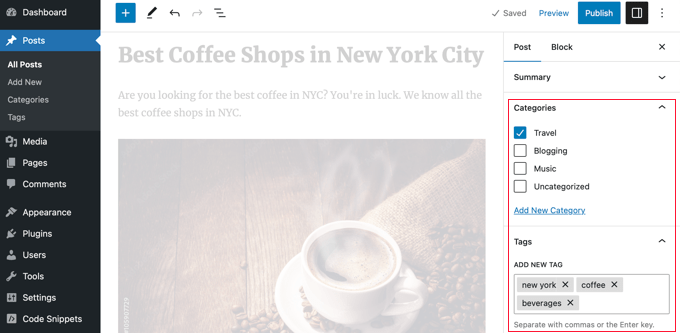
You can also go to Posts » Categories and Posts » Tags to add new categories and tags.
For more about the process of adding categories and tags, check out our explanations of What is a category? and What is a tag? for help and guidance.
How Many WordPress Categories Should You Have?
There’s no specific number of categories that you should have. In most cases, you will want somewhere between 5 and 10 in order to properly categorize your posts and make your site easy to browse.
Categories are meant to encompass a large group of posts. You can use subcategories and tags to split your posts into smaller groups.
If you are just starting a blog, then don’t worry about trying to come up with a perfect list of categories. Just choose 3-5 broad categories and add more as time goes by.
Do You Have to Use Subcategories in WordPress?
You don’t have to use subcategories, and many large blogs (including WPBeginner) don’t. However, subcategories are helpful if you have a large category with a lot of posts that could be grouped into smaller sections.
For example, you might have a ‘Recipes’ category that contains a growing number of gluten-free recipes.
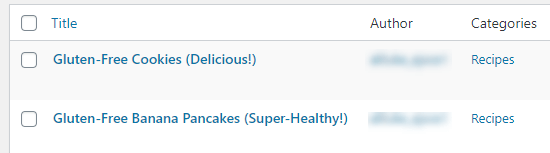
You can put these posts into their own subcategory so that it’s easy for readers to find them. You create a new child category for ‘Recipes’ called ‘Gluten-Free’ and move these posts into that category.
Using Categories in Your Post URLs
Some sites use the category name in permalinks (post URLs), which you can set up under Settings » Permalinks.
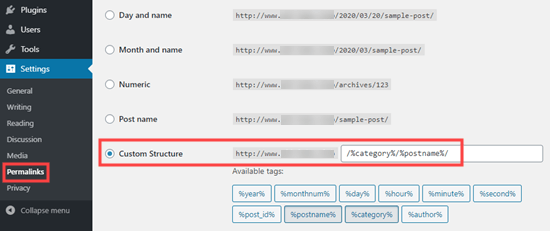
If that’s the case on your site, then your post will initially have a URL something like this:
…/recipes/gluten-free-pancakes/
After moving the post to a child category, it will have a new URL:
…/recipes/gluten-free/gluten-free-pancakes/
Normally, WordPress will try to redirect the old URL to the new one. It’s definitely worth checking that your links are still working. If necessary, you can create a 301 redirect from the old URL to the new one.
Another option is to keep the post in the parent category and also assign it to the child category, but this can have drawbacks.
Although the WPBeginner website has categories in the URL, we always recommend users use a shorter URL structure that only contains ‘Post name’. This will give you maximum flexibility to reorganize content without worrying about setting up redirects.
All of our new websites use the modern ‘Post name’ URL structure. WPBeginner is over 10 years old, so it has a legacy URL structure. Changing the URL structure is not recommended for SEO, which is why we have stuck with it.
Can I Assign One Post to Multiple Categories?
WordPress lets you put a post into multiple categories. This could be several parent categories or a parent category plus a subcategory or subcategories.
Having multiple categories won’t benefit your SEO. You should only assign posts to multiple categories if it makes the most sense for your readers.
It’s possible that having your post in multiple categories could cause some SEO issues due to duplicate content.
If you do use multiple categories, then try to avoid putting one post into two or more main (parent) categories. Each post should fit within one main category.
Is There a Limit to How Many Tags a Post Can Have?
WordPress itself doesn’t have any limit on the number of tags you can have on each post. You could potentially assign 1,000 or more tags to a post!
However, we definitely don’t recommend that.
The purpose of tags is to help link related posts together. Think of them as an index section in a book. Each tag is like a keyword in the index.
Tags are helpful for users searching your site. Some plugins that display related posts use tags to help them figure out which posts’ topics are related.
We suggest that you normally stick to a maximum of 10 tags per post.
Categories vs Tags: What’s Better for SEO?
Are there any WordPress SEO advantages of using categories over tags or vice versa?
The short answer is No.
Categories and tags both have different purposes. You have to use categories, but you don’t have to use tags if you don’t want to. However, we recommend using both appropriately to help readers navigate your site.
Ultimately, you should design your site with users in mind. All search engines want to show users the content that’ll be the most useful to them.
This means that organizing your content for the best usability will also help you get better SEO rankings.
Can You Control How Categories and Tags Look in Search Results?
You can customize the way your categories and tags appear on search engine results pages by using All in One SEO (AIOSEO), the best WordPress SEO plugin on the market.
First, install and activate either the All in One SEO Premium or AIOSEO free plugin. For more details, see our step-by-step guide on how to install a WordPress plugin.
Upon activation, you must navigate to All in One SEO » Search Appearance and click the ‘Taxonomies’ tab to configure the search appearance for categories and tags.
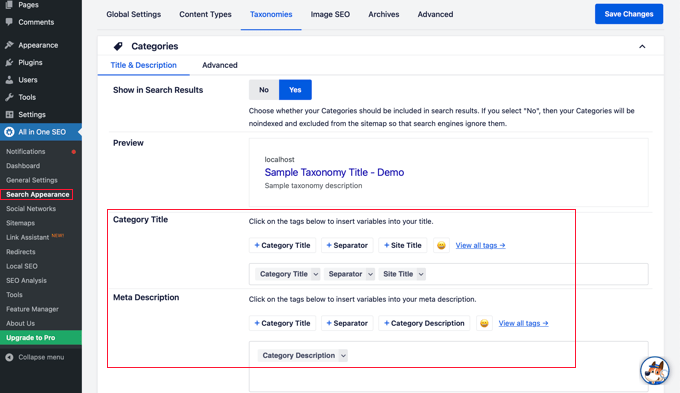
The default settings will work for most websites, but you can customize them in many ways.
For example, some users prefer to stop search engines from indexing their category and tag archive listings. This can help prevent duplicate content issues and encourages search engines to prioritize your actual posts and pages.
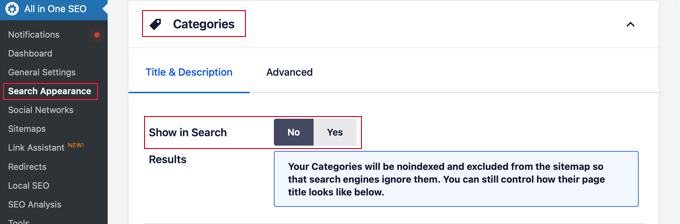
In the Categories section, simply switch the ‘Show in Search’ option to ‘No’.
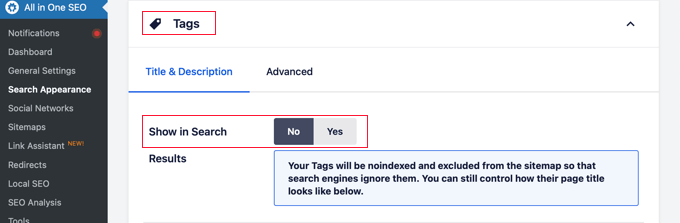
Next, you should scroll down to the Tags section and do the same thing.
Make sure you click the ‘Save Changes’ button at the top or bottom of the page to store your settings. Search engines will no longer index your category and tag archive pages.
Expert Guides on Categorizing WordPress Content
Now that you know how categories and tags affect SEO, you might like to see some other guides related to categorizing WordPress content:
- How to Add Categories and Tags for WordPress Pages
- How to Add Categories and Tags to WordPress Media Library
- How to Merge and Bulk Edit Categories and Tags in WordPress
- How to Add Categories and Subcategories in WordPress
- How to Show / Hide Categories in WordPress (Ultimate Guide)
- How to Properly Rename Categories in WordPress (Beginner’s Guide)
- How to Properly Change, Move, and Delete WordPress Categories
- How to Automatically Tag Your WordPress Posts and Save Time
- How to Display Most Popular Tags in WordPress
- How to Set Maximum Number of Tags for WordPress Posts
- How to Create Custom Taxonomies in WordPress
We hope that this article helped you understand categories vs tags and the SEO best practices for sorting your content. You may also like our guide on how to track WordPress category and tag analytics and our expert picks for the best keyword research tools for SEO.
If you liked this article, then please subscribe to our YouTube Channel for WordPress video tutorials. You can also find us on Twitter and Facebook.



Syed Balkhi says
Hey WPBeginner readers,
Did you know you can win exciting prizes by commenting on WPBeginner?
Every month, our top blog commenters will win HUGE rewards, including premium WordPress plugin licenses and cash prizes.
You can get more details about the contest from here.
Start sharing your thoughts below to stand a chance to win!
Maxwell says
/%postname%/ VS /%category%/%postname%/
Some people says that for Several hundred -or thousand- posts /%postname%/ Structure is more efficient because WordPress cannot tell the difference between Categories and Posts so when it’s looking at, say…domain.com/tutorials/how-to-ABC, it cannot tell if “Tutorials” is a category, page, or post; so it goes through all of them to find the match. Next, it goes to “How-to-ABC” and repeats the process; taking twice the time.
I’m confused and need help.
WPBeginner Support says
We use /%category%/%postname%/ in our URL structure and we don’t think it is slower.
Admin
Lorenzo says
Hi, very useful article for me!
I have a website about itineraries and craftsmen with 2 main topics: cities and materials
User must be able to search filtering the results by these 2 topics. What are the best taxonomies I can use?
I was thinking to use categories (Cities) and subcategories (Materials).
Is this the best solution? Maybe do I have to consider TAGS?
Another question: since the same articles go under one Category (City) and specific subcategories or TAG (Material), search engines will consider them as duplicate contents? May I incur in SEO penalization?
Thank you
WPBeginner Support says
Lorenzo, you got it right. Seems like you need Categories->Subcategories. As for SEO part, WordPress uses canonical for your individual entries. This allows search engines to differentiate between index pages like categories, archives, tags and individual articles. We would also recommend you to take a look at our WordPress SEO plugin by Yoast article and WordPress SEO Tips for Beginners.
Admin
cik amal says
thank you for helping me.. If u see my blog i put many categories.. btw thank you very much
طراحی سایت says
I had used the tag on my old website,
But now I’ve turned it into categories
But it still has some problems:
Zohaib says
Hi Syed,
I have a question, Currently, I am working on my Jobs blog where I share jobs from various newspapers.
So, I am using categories instead of any tags in my site and I also managed all the categorie’s link into various parts for my users. For example, I have a category name “Jobs In Karachi” so I hide the main category from the blog and take the link of this Jobs In Karachi category and make a new manually category with the same name and insert hyperlink.
Is it fine for my blog ? I am not using any tag so far in my site. My site contains only categories.
WPBeginner Support says
Yes seems fine. The real goal of taxonomies is to help you and your users sort the content so if its helping you and your users then it is alright.
Admin
Ibrahim says
Thanks for the insightful article. I got a bit carried away with my categories so I’ve gone back and restructured using your suggestions.
Thanks
shahid says
Salam Sir, thanks for this great post. I want to ask, If tags are only for users then why you don’t show tags for this post and why you have not tags width on your site?
thanks
WPBeginner Support says
On WPBeginner we cover a variety of topics and we feel that categories help our users more than tags. This is why we have Categories at the top under Blog menu.
Admin
John Els says
I found your article while looking for information on how to use custom taxonomies in a meaningful way. Thank you for taking the time to write a very nice article about categories and tags. The way that you explained the difference between the two, and what is important about them, is very useful. Now I just need to figure out if this is enough, or whether I need to implement custom taxonomies, and then how to best structure my site content. Thanks again
Matias says
Hi,
WordPress.org is using index for tag:
https://www.google.com/search?q=indexd+category%3F&ie=utf-8&oe=utf-8&aq=t&rls=org.mozilla:es-CL:official&client=firefox-a#q=author+role+tag+plugin&rls=org.mozilla:es-CL%3Aofficial
My question is: is it correct to use index for tag and category? look at this porst:
http://wordpress.org/support/topic/plugin-wordpress-seo-by-yoast-to-index-categories-or-not-when-site-or-organized-by-category?replies=2
Can be wrong Yoast in this seo question?
Best regards!
Editorial Staff says
Different SEO’s will have different take on this. If you’re super concerned about duplicate content, then add noindex. Otherwise leave it. As Yoast suggested, if you’re using excerpts then you can leave it as index.
Admin
Matias says
Gonna try indexing tag and category in one of my blogs and i will tell you the results.
Sean Nelson says
Thanks so much for this article. I’m currently building a review website for sports equipment and am trying to decide the category and tags relationship. Both were created by WordPress for a reason, and if used correctly and properly thought out ahead of time can tremendously help you in the long-run of managing your content on a blog.
I’ll definitely be back to read future posts. Thanks!
J says
Awesome article, thanks for sharing.
My question is if were there changes in WordPress that we should be aware of concerning this topic or the same principles are still relevant.
All the best,
J
Tim L says
I realize I’m late to the party here but I have two questions that were not addressed.
I have a photo blog organized geographically. Categories are usually state names (i.e., Oregon) but in some states there is enough repetition that I can divide posts into regional subcategories (i.e., Cascade Mountains). These subcategories usually start out as tags. Is there any reason not to have “Cascade Mountains” as a subcategory and a tag? It gives readers a choice of how to find the posts they are looking for.
In the example above I have two categories assigned to a post but one is a subcategory so it doesn’t violate the “one category” rule. Now let’s say I add a third category, “Bobby”, to the post because I want to make it easy for Bobby’s grandparents to find all the posts about Bobby. Not smart? Should Bobby remain a tag?
Editorial Staff says
Tim,
Geographical location is one way to go about using categories although I wouldn’t do it that way on my site. Here is why:
If I’m visiting Oregon, I will probably do it once or twice in my life maybe? So the pictures I have for that category are going to be limited and so is the life of that category. After a certain period of time, that category will never be used again. That is a big dilemma for travel bloggers too.
My personal preference as a user and as a blogger would be to categorize based on more universal themes. For example as a travel blogger, I would use categories like Food, Culture, Places, etc. Then lets say all the pictures I took while I was in Ireland, will go in their appropriate categories each with tags of Ireland.
Now there is no right/wrong way here because it essentially comes down to a personal preference. I have built large sites where we had to use geographical location as categories to organize each company branch in various location of the country. So it really depends on what you are going for.
What will happen if you go outside of United States? Then you will have all U.S. states as category and then one country? At what level should you really start with? Should you start with parent category country? To avoid all that complication on personal/travel/photoblogs, I would simply keep things simple by using universal themes.
-Syed
Admin
Ibraheem says
Thank you so much for your work. and here is my question:
I hope I am getting this right point. I need to tell search engine to not index my tags. why? They have the juice of my content!
My competitor is ranking high with his tags not categories! I am sure if he noindex his tags he will loose all of his traffic. Why are tags bringing good traffic while categories not? There is something not clear about noindex for tags.
Editorial Staff says
You can choose to index your tags instead of categories. It is your personal preference. Remember that the goal is to organize your site.
Admin
Steph M says
Great article! I was hoping for some advice. I run a blog for a bar chain with 12 locations. So say my category would be Cityname Nightlife. Would you suggest making a Nightlife category with the cities as subcategories, or 12 categories of Cityname Nightlife? (there are other terms I want to do this for besides nightlife)
I appreciate your help
Editorial Staff says
It really depends on how you want to structure your site. If you want to show content by cities, then make cities the parent category. If you want to show topics as the main thing and let users pick their cities secondary… then make cities a sub category.
Admin
Muwawu Jimmy Roderick says
Please I cannot believe the information I have found on this website. It was so well explained in that I was like watching a video tutorial. I had read alot of information from other websites, but they all failed to explain the meaning of categories and tags or pages. It only here where I have found clear info.
Thanks for the great tutorial
kusum says
Hi it is very informative
but i am just wondering to know how multiple taxonomies wil work for SEOs, for user i need to create 4 -5 taxonomies to attache with a custom post type for databse type project where user can filter the data within multiple taxonomies.
is it will also make effect on SEO , and will create a duplicate content issues.
please suggest
regards
Editorial Staff says
Just set noindex, follow tags for all the other taxonomies. Yoast’s WordPress SEO plugin has the option to do so.
Admin
RB says
Very helpful article. Do have a question:
Currently, in Yoast, I have” title template” for tag + categ are populated with (%%term_title%% Archives %%page%% %%sep%% %%sitename%%), while “meta description template” is (%%category_description%%) and (%%tag_description%%) respectively. I should point out that it’s a new blog with no real content just yet and my goal is to have elements set up correctly for smooth sailing. That said, as categories and tags get added, do I need to be filling out their descriptions so that yoast’s “description templates” pull that info? What is the benefit of naming categories? Lastly, if I don’t name and with my current set up, what would a search result end up looking like (what will meta be?)
Thanks in advance!
R
Editorial Staff says
Yes it is helpful to add category description if you want that category to rank for certain keywords. Most folks don’t add that because they don’t care enough. Some folks noindex their categories if they don’t think category archive is related.
It really depends on what you are trying to do with your site, and how you are using categories. On WPBeginner, we have meta description for our categories.
Admin
Animesh Roy says
Thanks for this great informative post. A lot of confusion related to categories and tags have been cleared. But I have a small question regarding categories. When I am entering my site’s name in Google search bar, the category archive links are also showing in search result. So my question is how to remove those category archive links from search result and is it required to remove those links from the search result. I am quite confused regarding this.
I am using Yoast WordPress SEO as my blogs SEO plugin..
Editorial Staff says
You can noindex the category archives from Yoast’s plugin settings if you like.
Admin
Aditya Nath Jha says
Awesome insight you have, I was just about to strip category base from my url! I am still confused whether should I do it or not ?
Editorial Staff says
It’s really a personal preference. We wouldn’t recommend it though because we have had some issues with redirects if your post/page and category slug are similar. It’s really weird.
Admin
arunii says
I read the whole article carefully and comments as well. what i personally learn is that
Tags should be – > No Index , Follow
Categories should be – Index, Follow
Also try to put you post in just one category. This is I personally follow and implement.
Is I am right and going in right directon ? Please reply editorial staff !
Editorial Staff says
That’s a good practice.
Admin
yMladenov says
It’s nice to see that the concept of creating sites for the people, not the search engines, is prevailing again. I am so fed up with people seeing their sites as search engine results. Furthermore, the irony in that case is that sites built with SE’s in mind usually does not rank as well as a user-friendly, (useful!) content-rich site.
Maria says
Hi!
I’m getting crazy with the problem of categories in my blog. The fact is that there are posts that I want to put into 2 categories. People told me that Google doesn’t penalize for this but could not index one of them. So, do I have to index categories or not? What do you suggest?
Thanks a lot
Editorial Staff says
Just noindex, follow your categories.
Admin
Maria says
Thanks a lot! Just the last question…if I noindex the categories, will my articles be index?
Editorial Staff says
Yes. It will only noindex the category archive pages. It will still follow all of your articles and index them.
carles says
Thanks very much to make things clear.
Charles Ott says
The information you provided on these topics for my Steel City Artist website was very helpful and the most informative that I came across this evening. Thank you!
Allii Allee says
really nice tips for new blogger as in my blogs i will have to cut down categories
George Malamidis says
Thanks for the wonderful information!!! It now makes sense!!!
Andrew Beatty says
I have been trying to make sense of this for quite a while. This really helped, many thanks.
Justine Antoinette says
Nice post, thanks for the useful information.
David Abramson says
Great article…I’ve been thinking about my tags and categories for my new blog and this definitely gives me some clarity. Thank you!
Derek Lauber says
Thank you for this very helpful article. I am in the process of restructuring my categories and using them as a Table of Contents has been a great insight. I have way too many categories and will now pair them down to the core of what my site is about and use tags like an index. Brilliant
Thanks!
Sean Vandenberg says
Thanks for posting this. I’m still undecided on whether or not to use tags for my blog. Really liked the “noindex, follow” tip!
Jim O,Brien says
This article was a big help for me as a beginner. I was hoping to see a sample website identifying the use of categories, subcategories, and posts. Just a suggestion. Thanks
Rosa Coelho says
Thank you! I didn’t really understand the point of tags. I’ve learned so much on this site already. Thank you for sharing so much information. It’s so clear and easy to understand.
BlogSetupGuide.com says
In regards to putting one post in multiple categories there is nothing wrong with it SEO wise. Personally, I have done this a number of times and didn’t even both noindexing the tags and categories.
On tags just make sure you’re adding relevant tags. If the words are not in your body then I wouldn’t bother don’t add them as a tag.
Also, for all your SEO gurus out there don’t get to hung up on noindexing these as I run a number of sites and my SEOmoz Pro account tells me there is 1000+ duplicate content. However, Google is smart enough to tell article “A” is also found in your tags and category. In this case Google will rank your article over the tags or category. If you find Google ranking otherwise then you might want to think about no indexing the culprit tags or categories.
I retweeted this article
Garen
cole says
I like to think of categories as type of posts: review, rant, tutorial, etc. Then, I use tags to fill in the content of that review or rant
Andy McIlwain says
On the subject of tags – I’m a big believer in using nouns for tagging blog posts. You don’t have to think as hard — just pull them from the content! I also think users are more inclined to search for nouns than adjectives or verbs or anything else.
Boldly Going says
Heya!
Another great little feature when using Yoast’s WordPress SEO?
Unless you have a well thought out, very specific reason for displaying a specific word as your category designation–use the WordPress SEO plugin to automatically strip that out of the URLs that get printed on your pages.
By default, WordPress will display, usually /category/, for your category pages. Something along these lines:
Your-Awesome-Website.com/category/actual-category-name/post-name/
However, hold the show!
Go to your WordPress admin area, scroll down and click on the “SEO” menu item and find the “Permalinks” sub-menu link. The very first check box option should be:
“Strip the category base (usually /category/) from the category URL.”
And that will remove that somewhat superfluous “/category/” from the URL, leaving (in our example above):
Your-Awesome-Website.com/actual-category-name/post-name/
(The above URL examples assume your awesome permlink structure was set to show /%category%/%post_name%/)
Cheers!
Editorial Staff says
We do NOT recommend removing the category base. It will cause issues with permalinks. We tried it on another site, and it was not fun fixing it.
Admin
Ally says
Thanks for an excellent post. In confirmed that categories are for helping the users to make sense out of my blog. I’m still not very keen to include the tag could into a widget. I just don’t like the look of it. (I do use tags, but if they’re not meta keywords, and I am not displaying them, what is the point of having them?)
Editorial Staff says
It helps with WordPress search.
Admin
Paul says
This is a very comprehensive post about those damn categories and tags. Really helped formulise the issues in my mind and cleared up a few things, also Im beginning to see why people favour Yoast rather than all in one seo. great work thank you, I shall share within my community.
Ahmad Awais says
Thanks for this nice article Syed bro. I ahve a question that relates to this thing.
I am using Yoast SEO plugin which employs item scope and such schema n breadcrumbs by which my Google representation of URLs changes to something like this
Subject => Post Title
URL => domain.com › Writings › NEWS
Is it good for SEO or bad?
One thing I noticed is if the keyword is in my url then it is not being displayed by this method.
What do you suggest?
Adnan Shahid says
A well elaborated article about a very big misconception. Thanks for guiding us in a beautiful way.
Brian Childers says
I have seen articles that say to no index the tags to prevent duplicate content. Based on this article, should I conclude that may be a bad idea?
Editorial Staff says
Brian as the article states, you are more than welcome to noindex, follow the tags or any other taxonomy. However, we don’t think it makes a huge difference unless ofcourse you have full-post content on all of your archive pages (which is not a good idea to begin with).
Admin
Heidi says
Thanks for a great article. I use both Categories and Tags and it looks like I am doing it right! But always room for improvement!
Vince says
Thanks for this awesome explanation. Well, actually I will still go maintaining one category per post. WHY? Simply because even Matt Cutts already made an explanation out of it. It is better to make that way than using multiple number of categories. And yes it is true that using multiple categories is simply making multiple copies of your articles.
Nonetheless, I don’t believe that it has a huge impact if you have been doing it before and just retained it. Google has so many factors to consider the ranking. That is just one… so there is not much to worry about if you are not able to rework on your categories.
Editorial Staff says
Yup. Like we say in the article, you shouldn’t have to use multiple categories. If you find yourself doing that, then your categories need restructuring. You can have multiple categories under the condition that the other category is a sub-category of your parent category.
Admin
Raza says
My strategy behind categories and tags is common sense. Categories should group the posts into certain data sets and tags should act as filters or short catchy headings to further define nature of your posts and or tempt/attract users to click on them to read more.
Categories should have proper meta tags and reflect the nature of posts. Tags on other hand should have noindex attribute to them, that should be mandatory to people who like to add tons of tags. This shall save them hassle of cleaning up their mess in the long run.
Muhammad Yaqoob says
Well explained WPB!
i uses Category with custom permalink to sort out the topics on my blogs.
Like this one:
https://www.wpbeginner.com/topic/wp-tutorials/
Saqib Ameen says
well, personally I also like to use tags due to short permalink
Editorial Staff says
Remember, these tags and categories are not for you. They are for your users. Make your decisions wisely.
Admin
Nouman Younas says
is it ok to convert category into tag?
i recently did this…
Editorial Staff says
Yes it is totally ok to do that. Just make sure that you 301 redirect your category urls to that tag url.
Admin
Nouman Younas says
Oh no.. i didnt do this … let me google… can u tell me method how i can do this?
Verde says
Be carefull convert your Tags to category,Taxonomies is for user and Google too.but the content is the first fact both of them.when choose the niche we want ,you must have the concept between category & tags for that.Let’s ask to Matt Cuts about these.
Saad says
I Think using tag is better overall
David Wang says
This is an excellent article – the best that I’ve read on the topic. Thank you for using clear and hype-free language to explain this complicated topic
John Els says
David, it makes me feel better that you also look at this as a “complicated topic.” I don’t think it’s complicated to the point where it can’t be understood (not after this nice article), but it is complicated because one needs to give careful thought to how you want to structure your information for maximum usefulness, and then use available tools to implement it in the best way.