


It is frustrating to spend hours writing a post, only to see it get zero clicks because of a weak headline. Even with years of practice, I still test different options to see what performs best.
Luckily, AI tools can fix this. They help you brainstorm catchy ideas in seconds so you never have to start from scratch.
I use AI regularly when writing headlines for tutorials, landing pages, and marketing emails. It saves time and often surfaces ideas I hadn’t considered.
In this article, I will show you how to use AI to write better headlines for your WordPress site. I will also share the favorite tools and prompts I use to get started quickly.
Quick Answer: How to Use AI for Headlines
To write headlines with AI, select a generative tool like AIOSEO or ChatGPT. Enter your article topic and keywords into a prompt that requests 5 variations based on emotional hooks, then refine the results using a headline analyzer tool.
Why Is Writing Powerful Headlines Important?
According to advertising legend David Ogilvy, on average, five times as many people read the headline as read the body copy. This means 4 out of 5 people won’t click on your website, even if it shows up on the first page of Google.
Most users scan results instead of reading them. In just a few seconds, they decide which page looks worth clicking.
Your headline is what makes that split-second impression. It’s one of the most visible parts of your listing in the search results.
That’s why writing a powerful headline is just as important as writing a great post. It helps you stand out and get noticed.
To do this effectively, you can:
- Optimize your blog post for SEO
- Add schema markup for enhanced listings
- Write a compelling SEO title that encourages clicks

Strong headlines bring more visitors to your website, increase conversions, and grow your business.
They also improve engagement. By tracking user activity with MonsterInsights, I have seen that better headlines lead users to browse the blog longer and explore related posts.
What Kind of Headlines Work Best?
You want headlines that get clicks. That means they need to stand out, spark emotion, and match what your audience is searching for.
In my experience, the best headlines usually follow a simple formula. They’re clear, specific, emotionally engaging, and include your target keyword.
- Emotion: Headlines that create curiosity or urgency tend to get more attention.
- Clarity: Avoid vague titles. Tell the reader exactly what they’ll get.
- SEO Focus: Include keyphrases that your audience is already searching for.
- Length: Keep it under 60 characters so it doesn’t get cut off in search results.
| Weak Headline | AI-Optimized Headline |
|---|---|
| Blog Tips | 7 Proven Blog Tips to Double Your Traffic |
| New SEO Feature | New SEO Feature: Everything You Need to Know (Updated) |
For example, instead of writing “Improve Your Blog,” a stronger version would be: “7 Easy Ways to Get More Readers on Your Blog Today”.
To make this easier, I use a free tool that scores your headline based on proven criteria. Try the WPBeginner Headline Analyzer to see how your title stacks up.
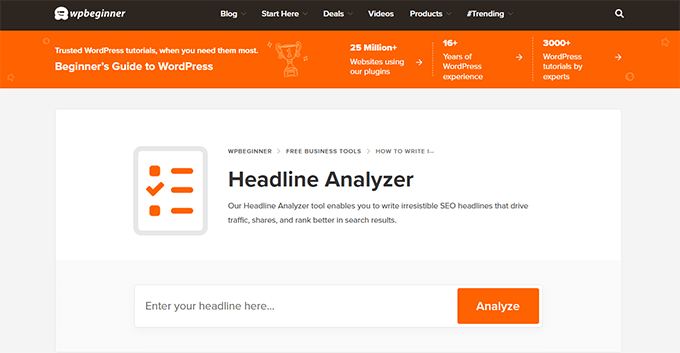
Once you understand what works, the next challenge is coming up with new headline ideas quickly. That’s where AI can help.
Let’s look at how to use AI tools like ChatGPT to generate powerful headlines and refine them using the tips above.
How to Write Better Headlines Using AI
There are many writing assistant tools available that utilize AI. Some of them can help you generate headlines using artificial intelligence.
I will cover two easy methods, and you can choose the one that works best for you.
Both methods will use OpenAI’s technology. In my tests using both GPT-3.5 and GPT-4, I found that GPT-4 provided more nuanced emotional hooks, while GPT-3.5 was sufficient for basic SEO clarity.
You can use the quick links below to jump to the method you’re most interested in:
- Method 1: Using All in One SEO to Generate AI-Powered Headlines
- Method 2: Using ChatGPT AI to Write Powerful Headlines for WordPress Posts and Pages
- Bonus: Using SeedProd to Generate AI-Powered Headlines for Custom Landing Pages
- Explore More Ways to Use AI on Your WordPress Site 🎁
- Frequently Asked Questions About AI Headlines
Note 📝: AI tools like ChatGPT are great for generating ideas, but they’re not perfect. Always review the results before publishing to make sure everything is accurate, relevant, and sounds like your voice.
I recommend using AI as a starting point, not a finished product. Edit your headlines and content to match your tone, fact-check your details, and make sure it fits your audience’s needs.
Method 1: Using All in One SEO to Generate AI-Powered Headlines
I use All in One SEO (AIOSEO) on many of my sites because it helps me write better headlines, faster. One of its newest features lets you generate headline ideas using AI, right inside the WordPress editor.
In my testing with AIOSEO version 4.x, I found that the integration drastically reduced the time spent switching between browser tabs.
This method is great if you want to skip the extra steps of copying content into a separate AI tool. AIOSEO connects directly to OpenAI and gives you suggestions tailored to your post.
To get started, install and activate the All in One SEO for WordPress plugin. If you’re new to WordPress plugins, here’s a quick guide on how to install a plugin.

Once activated, follow the setup wizard. Then, edit any post or page where you want to improve the headline.
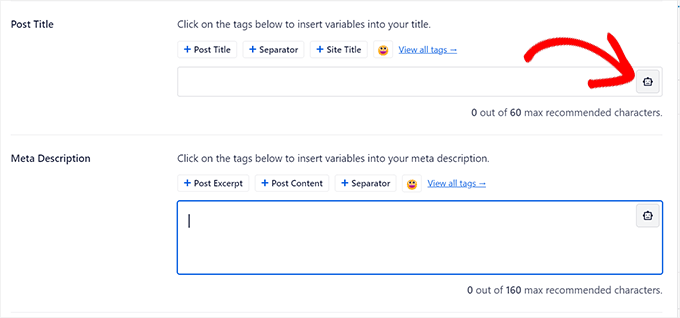
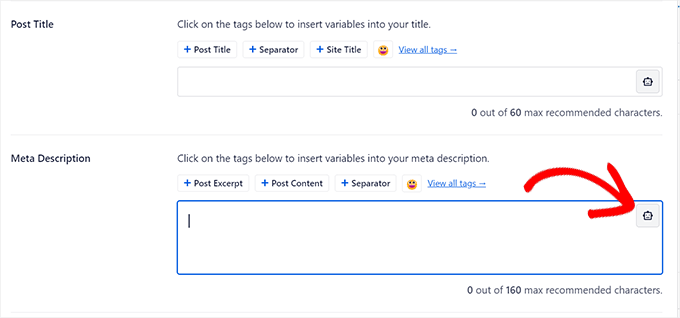
Scroll down to the AIOSEO Settings section. Click the robot icon next to the ‘Post Title’ field.
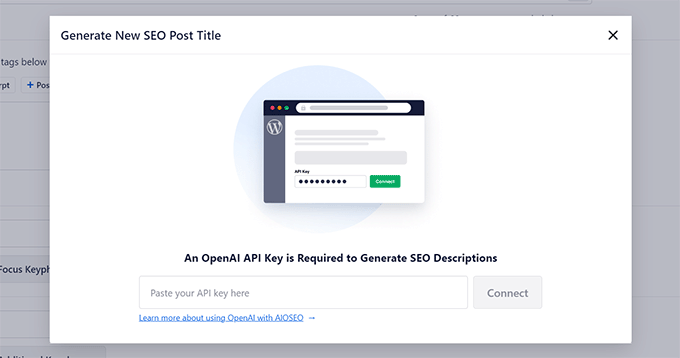
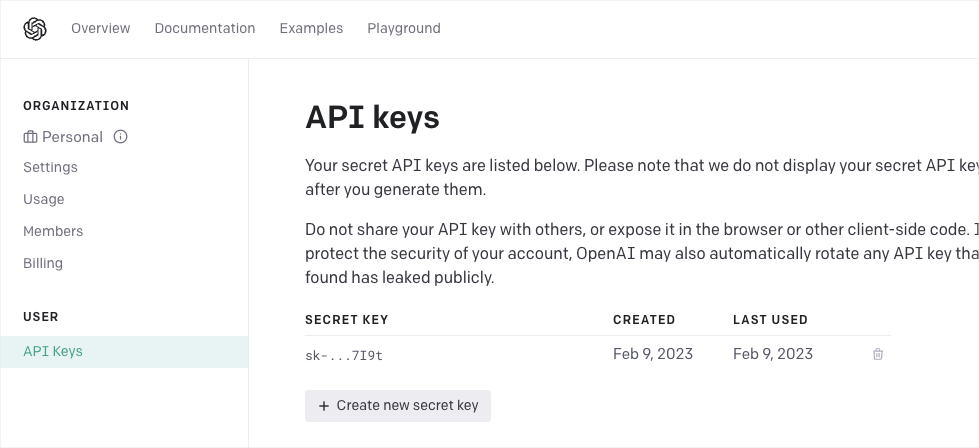
A popup will appear asking for your OpenAI API key. You will need an OpenAI account with available API credits to use this feature. Note that this is different from a ChatGPT Plus subscription; you pay for API usage separately.
You can generate your API key by visiting the OpenAI API Keys page.
Copy the key and paste it into AIOSEO.
Tip: If you see an error after pasting your key, check your billing settings in OpenAI. New accounts often have free credits that expire, so you may need to add a payment method to keep the API working.
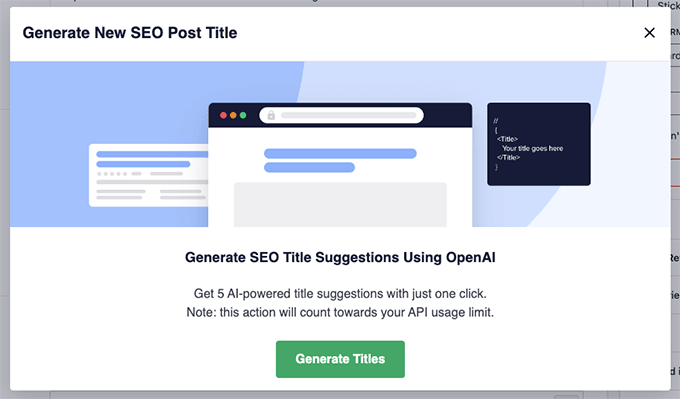
Once connected, click the ‘Generate Titles’ button.
AIOSEO will use AI to suggest several SEO-friendly headlines for your post.
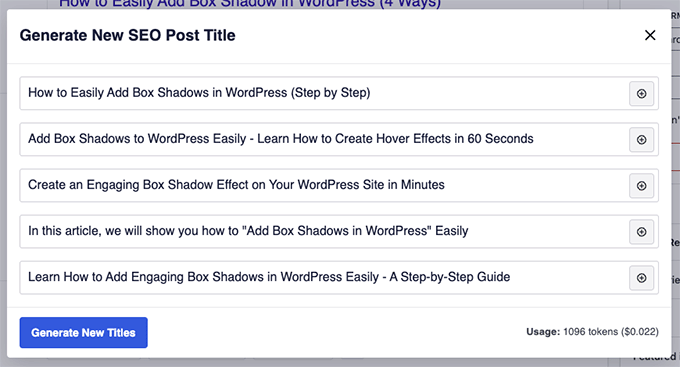
You’ll see a list of headline ideas.
Just click the ‘+’ button next to the one you like, and it will be added to your SEO Title field.
You can also generate an SEO-friendly meta description by clicking the robot icon next to that field.
Before publishing, I recommend testing your headline using AIOSEO’s built-in Headline Analyzer.
Just click the ‘Headline Analyzer’ button in the top-right corner of the editor.
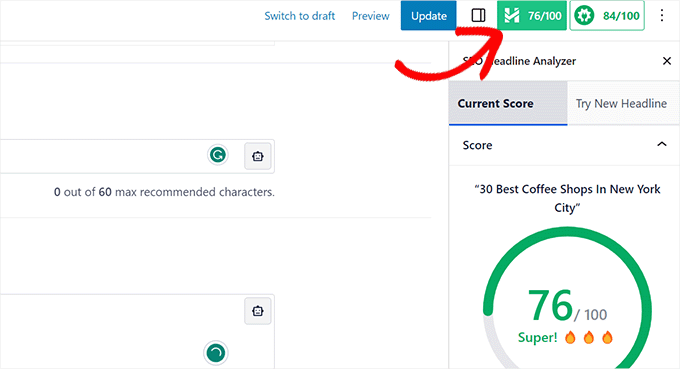
The analyzer gives your title a score and tips to improve it. A score above 70 is considered strong. For more help, see my tutorial on how to use the Headline Analyzer in WordPress.
Method 2: Using ChatGPT AI to Write Powerful Headlines for WordPress Posts and Pages
This method is great if you prefer more control or want to experiment with AI without installing a plugin. You can generate high-quality headlines using ChatGPT’s free version and a carefully written prompt.
I have tested this approach myself, and with the right prompt, it gives surprisingly good results. You’ll be able to tweak your titles and descriptions to fit your tone and keywords.
To begin, visit the ChatGPT website. You can sign up for a free account or log in if you already have one.
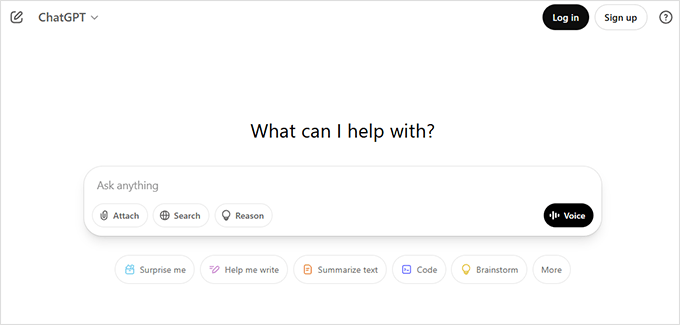
Once you’re logged in, you’ll see a chat window where you can type your request.
Just paste the following prompt to get headline and meta description ideas tailored to your content:
I want you to act as an SEO expert and copywriter.
Suggest at least 5 SEO-friendly titles and meta descriptions for the following blog post:
[Paste your blog post content (text only) here]

You must use the following focus keyword at least once in each title and description:
[Enter your focus keyword here]

Use a persuasive and intriguing tone.
Prioritize headlines that are likely to drive a high click-through rate (CTR) but avoid clickbait.
Keep titles under 60 characters.
Keep descriptions under 160 characters
Replace the placeholders with your own content and focus keyword. Then hit Enter and wait for ChatGPT to reply with your results.
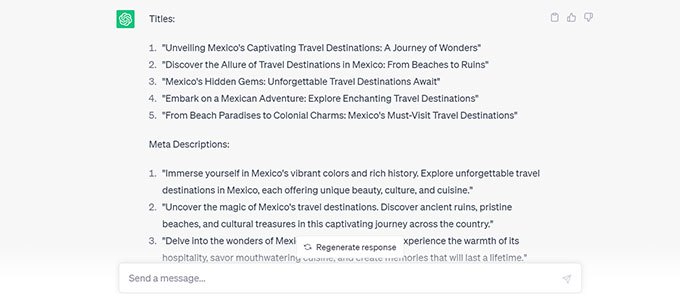
Pick a headline that stands out to you, and use the matching description for your SEO meta tag. You can always edit them to better fit your voice.
Before publishing, I recommend running your headline through the free WPBeginner Headline Analyzer to see how it scores.
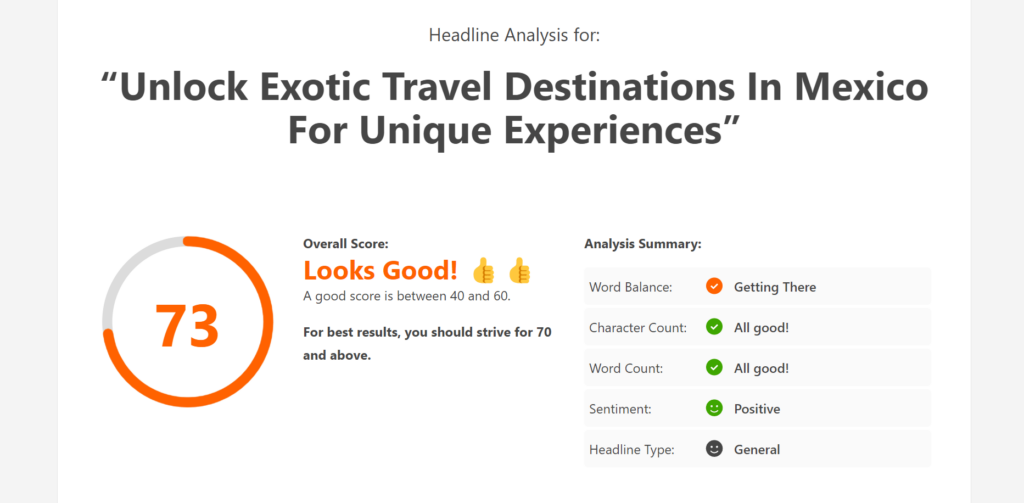
This tool checks things like word balance, length, sentiment, and clarity. With a few tweaks, you can turn a good headline into a great one.
This method gives you full flexibility and is a fun way to sharpen your headline-writing skills while using AI as your assistant.
Bonus: Using SeedProd to Generate AI-Powered Headlines for Custom Landing Pages
If you’re building custom landing pages and want to create compelling headlines quickly, SeedProd is a great option. It is the best AI website builder for WordPress.
I use SeedProd to design partner brand websites like Duplicator and WPForms. The AI features help me generate engaging, on-brand headlines without leaving the editor.
It works especially well for webinar pages, lead-generation campaigns, and product launches.
To get started, install and activate the SeedProd plugin. If you’re not sure how, see the tutorial on how to install a WordPress plugin.
Note: The free version of SeedProd is available, but to use the AI Assistant, you’ll need a premium plan with the AI addon.
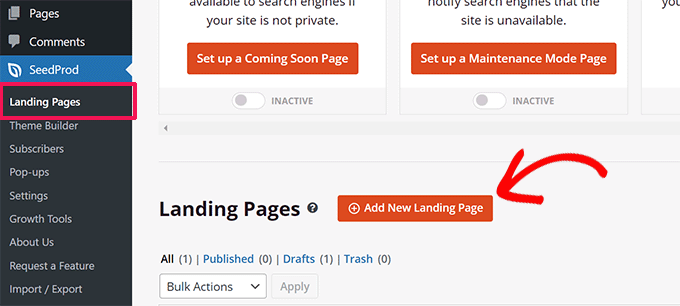
Once the plugin is active, go to SeedProd » Landing Pages and click the ‘Add New Landing Page’ button.
Choose from 300+ professionally designed templates. For step-by-step guidance, check out the full tutorial on creating a landing page in WordPress.
In the page builder, click on any Headline block and then select the ‘Edit with AI’ button to open the AI Assistant.
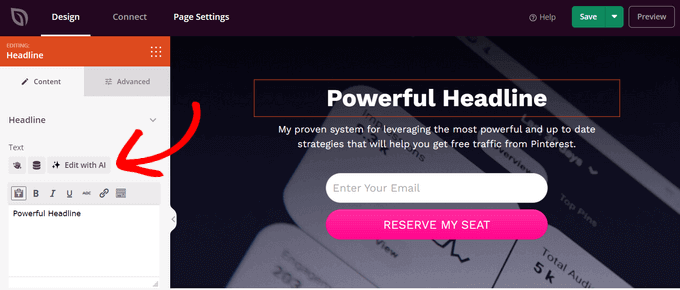
A popup will appear where you can type a short prompt. For example:
“Create an exciting page title that encourages people to sign up for my webinar about growing website traffic with Pinterest.”
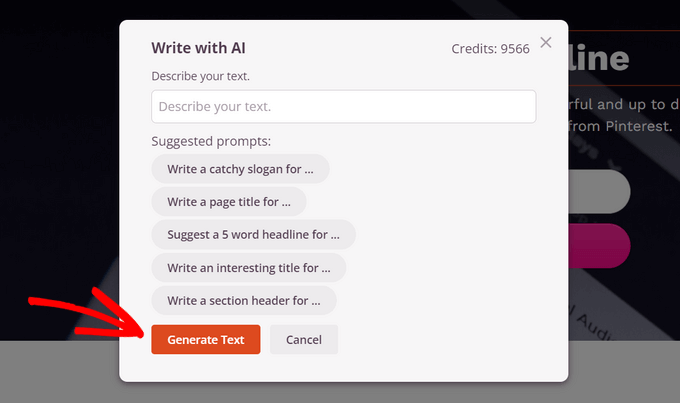
Click ‘Generate Text’ and SeedProd will instantly return a list of AI-generated headlines.
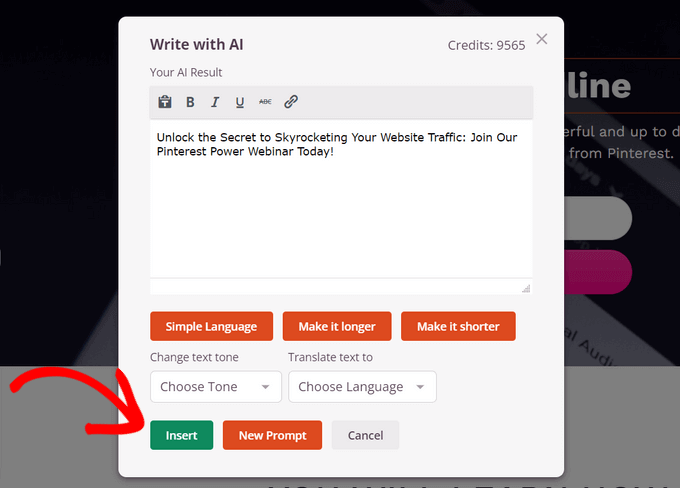
You can fine-tune the result using options like ‘Make it shorter’, ‘Simplify Language’, or ‘Change text tone’. Once you’re happy with it, click ‘Insert’ to add it to your page.
As always, I recommend testing your headline in the free Headline Analyzer tool to make sure it’s optimized for clicks and engagement.
Explore More Ways to Use AI on Your WordPress Site 🎁
If you’re excited about using AI to write better headlines, there’s a lot more you can do. From improving SEO to writing full blog posts, here are some helpful tutorials and tools to guide your next steps.
- How to Write Content Using an AI Content Generator in WordPress
- How to Use AI for SEO in WordPress (Tools)
- How to Automatically Generate Image Alt Text in WordPress Using AI
- Is AI Content Bad for WordPress SEO? (Expert Insights & Tips)
- Best AI Website Builders for WordPress (Expert Picks)
- Are AI Website Builders Worth The Hype? (Honest Review)
- How to Make Money Using AI (8 Easy Ideas)
Frequently Asked Questions About AI Headlines
1. Can ChatGPT write good headlines?
Yes, ChatGPT is excellent at generating variations, but human review is required to ensure tone alignment.
2. Is AI-generated content bad for SEO?
No, Google does not penalize AI content as long as it is high-quality, helpful, and edited for accuracy.
3. What is the best length for a headline?
Ideally, keep headlines under 60 characters so they are not truncated in Google search results.
4. Do I still need a headline analyzer if I use AI?
Yes. AI is great for creativity, but it doesn’t always understand data-driven engagement. I recommend using a headline analyzer as a final check to ensure your title has the right balance of common, uncommon, and emotional words.
5. Can I use these methods for YouTube or email subject lines?
Absolutely. The principles of a good headline are universal. You can use the same AI prompts and tools mentioned above to write catchy YouTube titles and email subject lines to boost your open rates.
If you liked this article, then please subscribe to our YouTube Channel for WordPress video tutorials. You can also find us on Twitter and Facebook.



Mrteesurez
Thank you for the insightful article! I really appreciate you introducing the topic of writing headlines with AI, especially how it integrates with AIOSEO. This was a game-changer for me in understanding the power of AI in crafting compelling headlines that drive traffic. Your explanation on how AIOSEO enhances this process was clear and very helpful because I love to be using AIOSEO method. Thanks for breaking it down and making it so accessible!
Dayo Olobayo
As a marketer, I’m always on the lookout for innovative ways to boost my content’s visibility. I’ve tried using AI tools before but I never knew how to effectively integrate them into my content creation process. The step-by-step guide provided here is incredibly helpful. Thank you!
WPBeginner Support
You’re welcome!
Admin
Dennis Muthomi
I have a question about the API key.
can we use API keys from other AI services besides just OpenAI with the AIOSEO?
WPBeginner Support
For now it is OpenAI but possibly more options will be available in the future.
Admin
Ralph
I was never good at creating headlines, but then I learned the concept of creating titles like:
How to do X
How to do X in time (for example, 5 minutes /1 hour)
How to do X to achieve Y
It’s a cool trick that lets you create something that people are attracted to.
I still use ChatGPT to improve, but I will definitely check out All In One SEO as well.
Jiří Vaněk
Yes, many people are also attracted by curiosity. Therefore, in the same principle, I also started creating titles such as X things you must know, or be careful about these x things. By not making the headline specific, many people will click on it to learn more details about the content of the article. I don’t really like clickbait but sometimes and in moderate form it really helps to increase traffic as well.
Jiří Vaněk
I use my own solution for headlines first, then try AI to see if it can improve the headline. In the end, I also use your headline analyzer, checking whether my suggestion or the one from artificial intelligence has more points. It helps a lot in creating headlines that are more likely to engage users.
WPBeginner Support
Thank you for sharing the methods you use
Admin
Adesina Tunde
This article helps a lot. Thanks.
WPBeginner Support
You’re welcome, glad you found our guide helpful!
Admin