



Let’s be honest: adding PayPal to WordPress shouldn’t feel like an advanced engineering project.
For years, I’ve watched WordPress users waste countless hours wrestling with clunky shortcodes and bloated plugins just to process a simple transaction. I knew there had to be a leaner, faster way – so we built it.
WP Payment Pal is a simple, lightweight plugin that’s designed specifically to accept PayPal payments in WordPress without the technical headaches or unnecessary complexity.
Whether you need to collect a one-time tip or set up a complex recurring subscription, this tool handles all the heavy lifting for you.
In this WP Payment Pal review, I’m sharing my hands-on experience with the plugin. I’ll break down exactly what it does and the ‘why’ behind the features we built. That said, by the end of this WP Payment Pal review, you’ll know if it’s the right PayPal payments plugin for you.
WP Payment Pal Review: Why Use It In WordPress?
WP Payment Pal is a lightweight, beginner-friendly payments plugin designed specifically for the PayPal ecosystem. Instead of forcing you to build an entire online store, it lets you create custom payment forms and then embed them anywhere on your site.
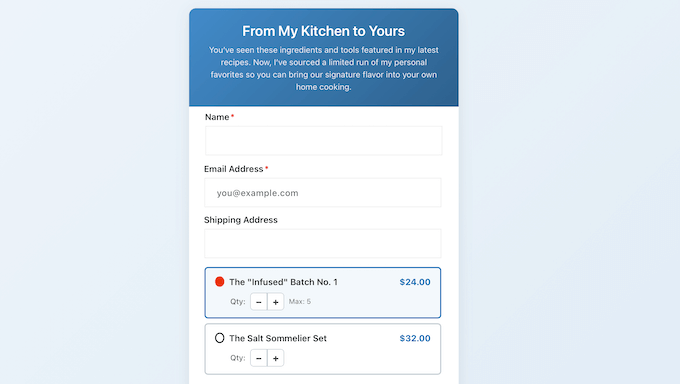
Crucially, WP Payment Pal is a cartless payment solution. This means your customers don’t have to navigate through a clunky shopping cart or a multi-step checkout process. Instead, they simply enter their details into a professional form and complete the transaction right there and then.
But it doesn’t stop there. If you want to set up a reliable income stream, then WP Payment Pal is an ideal choice. It can collect recurring payments, so you can set up daily, weekly, monthly, or yearly billing cycles. This automation ensures you get paid on time without the added work of manual invoicing.
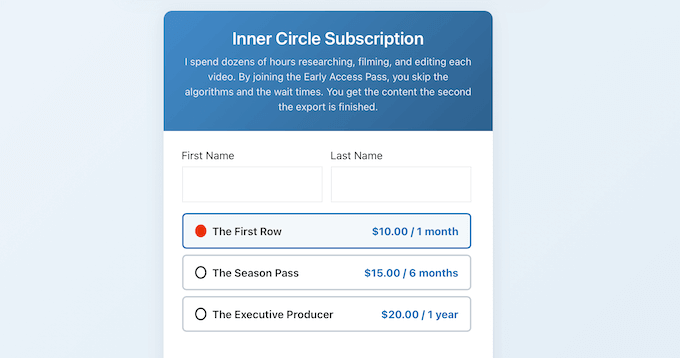
Going further, WP Payment Pal offers flexible pricing options to fit any business model. You can charge a fixed amount for a digital product, offer a list of predefined choices for service tiers, or even let your customers enter their own custom amount.
If you’re serious about growing your online business, WP Payment Pal supports advanced features like free trials and one-time setup fees. It even uses smart tags to display dynamic data such as the customer’s name. This ensures your business looks polished and professional from the very first click.
WP Payment Pal Review: Is It the Right PayPal Payments Plugin for You?
We created WP Payment Pal based on direct feedback and requests from our community.
Readers consistently expressed frustration with how difficult it was to create payment forms without installing and configuring an entire eCommerce plugin.
We listened, and WP Payment Pal is the direct result – a plugin that addresses those specific pain points by focusing on speed, simplicity, and conversion.
But, is WP Payment Pal right for your WordPress website?
In this review, I’ll walk you through its features, explain why we built specific functionalities like the cartless checkout, and share my honest thoughts on WP Payment Pal’s performance.
1. Easy to Setup and Use
At this point, you may be wondering why you need a separate payment plugin when you can just create an online store. The truth is that sometimes you don’t need to sell hundreds of products – you just need a simple way to collect a few payments.
If you just want to sell an ebook, your flagship digital toolkit, or access to a one-off private webinar, then an entire eCommerce platform like WooCommerce is complete overkill.
While these massive eCommerce plugins are powerful, they also inject a mountain of code, database tables, and configuration settings into your site.
If you’re planning to use all their features, then this is a fair trade-off. However, if you just want to create a straightforward ‘Buy Now’ button, all that extra weight will just slow your site down with no real benefit.
That’s where WP Payment Pal shines. This ‘cartless’ approach isn’t just easier for you to manage; it’s a much faster experience for your customers.
Instead of forcing visitors to complete a multi-step ‘Add to Cart’ and checkout process, you can simply embed a payment form on any page or post.
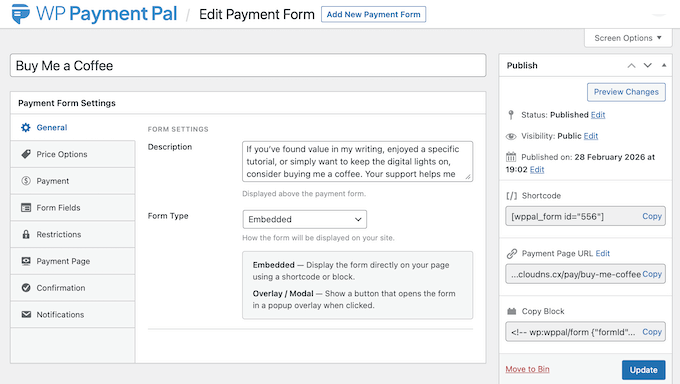
My Honest Thoughts: I’ve seen far too many website owners waste time configuring shipping zones and tax classes that they don’t even need. By using WP Payment Pal, you keep your site lean and remove the friction that threatens to kill conversions.
2. Get Started in Minutes (No Tech Skills Needed)
It’s not uncommon for a payment plugin to promise an easy setup, only to leave you struggling with API keys and complex settings for hours.
The truth is, most small business owners don’t have the time to deal with complicated configurations just to get their first payment. You need a tool that works as soon as you click ‘Activate.’
Thankfully, connecting WP Payment Pal to WordPress is incredibly straightforward.
Instead of hunting for obscure developer credentials, WP Payment Pal is designed to get you up and running quickly. Simply follow the onscreen instructions to link WordPress to PayPal, and you’ll have your first payment form ready to go within minutes.
My Honest Thoughts/Review: To put WP Payment Pal to the ultimate test, I timed the entire setup process. I managed to go from a fresh installation to a live, working payment form in under 5 minutes.
If you want to start accepting money straight away, then WP Payment Pal is the most straightforward solution I’ve come across.
3. Keep Customers on Your Site During Checkout
If you want to get more sales, then you need to make the checkout process as seamless as possible.
In my experience, nothing kills a sale faster than redirecting the customer to an unfamiliar third-party checkout page. This makes many shoppers feel uneasy, and can even cause them to abandon their purchase at the very last second.
By contrast, WP Payment Pal keeps customers on your WordPress blog or website throughout the entire transaction process.
Instead of a disruptive redirect, you can embed professional payment forms directly on your pages or posts. Your customers can then enter their details and complete the transaction without ever leaving your domain.
Keeping the checkout on your own domain is proven to reduce drop-off and helps to build more trust, especially with first-time buyers who might be wary of external links.
My Honest Thoughts/Review: If you want to increase your conversion rates and ensure your customers feel secure, then keeping them on-site is a complete no-brainer. WP Payment Pal helps you achieve this without any extra setup.
4. Secure, PCI-Compliant Processing
If you’re going to accept payments online, then WordPress security should be your top priority. The digital world is full of risks, and the thought of protecting your customers’ sensitive credit card data can feel like a massive responsibility.
Thankfully, WP Payment Pal solves this problem by offloading the entire payment process to PayPal’s own PCI-compliant servers.
This means that no credit card numbers or sensitive payment data ever touches your WordPress server. When a customer enters their details, they’re communicating directly with PayPal’s secure infrastructure.
This approach automatically gives you a layer of protection for both yourself and your customers. Essentially, you get all the benefits of world-class security without having to manage the technical liability yourself.
But it doesn’t stop there. WP Payment Pal also taps into PayPal’s advanced fraud protection. In this way, it uses machine learning to spot and block suspicious activity before it ever reaches your account.
This helps you avoid fraudulent disputes by identifying bot activity or stolen cards before the transaction is finalized. Keeping your fraud rates low is essential, as it ensures your Paypal account remains in good standing and isn’t flagged for review or even suspended.
At the same time, PayPal’s advanced fraud protection ensures that legitimate customers can complete their purchase without unnecessary hurdles.
My Honest Thoughts/Review: With WP Payment Pal, you don’t have to worry about complex security patches or compliance paperwork, because PayPal does all the heavy lifting for you.
If you want to sleep easier knowing that your customers’ credit card information is safe, then WP Payment Pal’s off-site processing model is the only way to go.
5. Build Professional Payment Forms (No Coding Required)
The thought of building a payment form might sound like a technical headache. In the past, creating a custom form often meant wrestling with complex HTML, CSS, or hiring a developer to write custom PHP just to make the form look right.
That’s why we designed WP Payment Pal to feature a built-in, user-friendly builder.
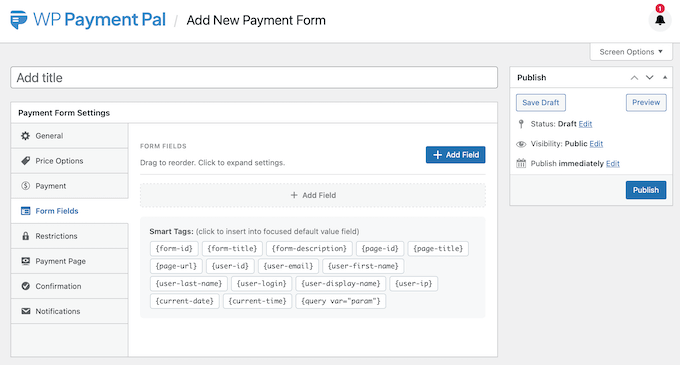
I tested the entire process and I managed to create a professional-looking PayPal payment form in just a few minutes.
The WP Payment Pal interface is designed for beginners, so it’s incredibly user-friendly. Simply select the fields you need and then configure their settings, with absolutely no coding involved.
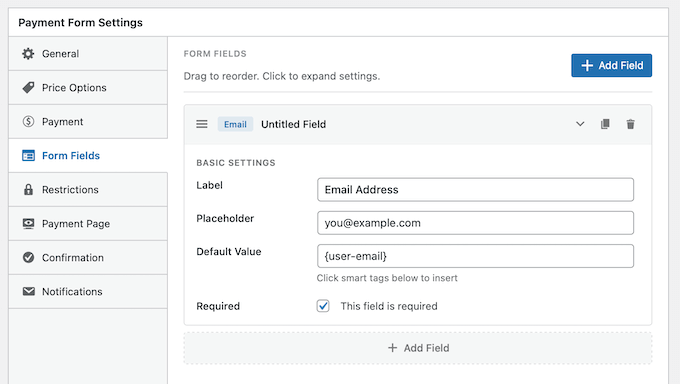
Whether you’re creating a simple ‘Buy Now’ form or a detailed registration page for an upcoming event, WP Payment Pal gives you the flexibility to customize the form to suit your exact needs.
My Honest Thoughts/Review: With WP Payment Pal, you don’t have to settle for a cookie-cutter form. You can create a custom form that collects exactly the information you need, without having to write code or hire a developer.
6. Collect More Than Just Payments with Custom Fields
If you’re running a service-based business or hosting an event, then a basic payment form may not be enough.
In the past, gathering additional information often meant chasing customers with follow-up emails or scheduling discovery calls. This created a fragmented and frustrating experience for both you and your customers.
To solve this problem, we added a range of custom fields to the WP Payment Pal builder. This includes:
- Text Fields: I recommend using these if you need to gather specific project notes, website URLs, or custom requests before starting a task.
- Dropdown Menus: This is ideal if you offer multiple service tiers and want to let clients pick an option without cluttering the form.
- Checkboxes: These are essential if you need customers to legally agree to your Terms of Service or opt-in to your email newsletter during checkout.
- Radio Buttons: I suggest using these if you have a set list of mutually exclusive options, like choosing a specific time slot or a single shirt size.
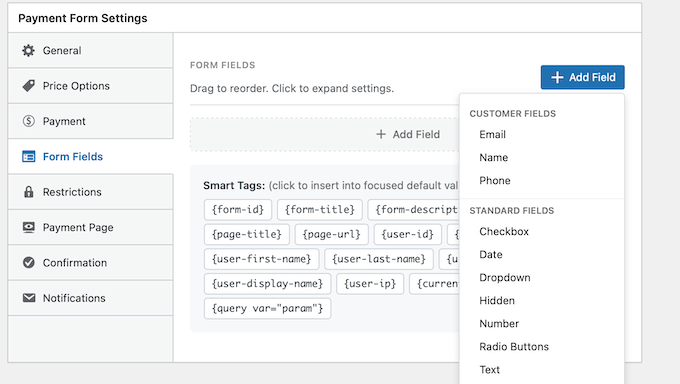
By collecting this information alongside the payment, you’ll have everything you need to fulfill the order straight away.
This is a much more efficient workflow and ensures that you don’t overlook any important details.
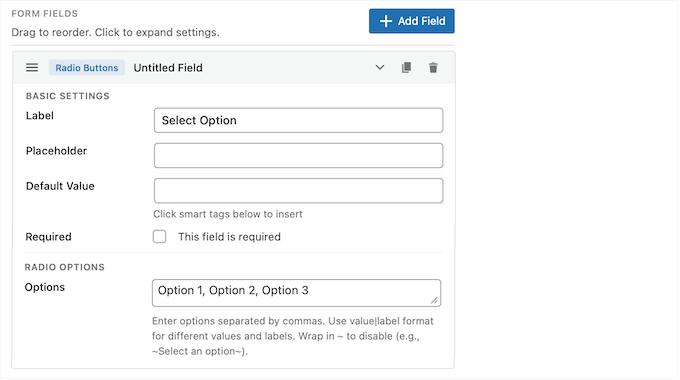
My Honest Thoughts/Review: I’ve seen too many businesses struggle with data fragmentation, where their payment information is in one place and their customer requirements are in another.
This almost always leads to mistakes and frustrated clients, which is exactly why WP Payment Pal offers a straightforward solution to this problem.
7. Offer Flexible Pricing with Predefined and Custom Amounts
If you’re running a non-profit or a service-based business, then a one-size-fits-all payment form typically won’t work for everyone.
In those scenarios, you need a way to cater to different budgets. The problem is that many payment plugins force you to create a separate form for every single price point. In my experience, this is a complete nightmare to set up and manage.
Instead, WP Payment Pal gives you total control over how you present your pricing. You can display a list of predefined amounts for your customers to choose from, or you can add a ‘Custom Amount’ field where they can enter their own price.
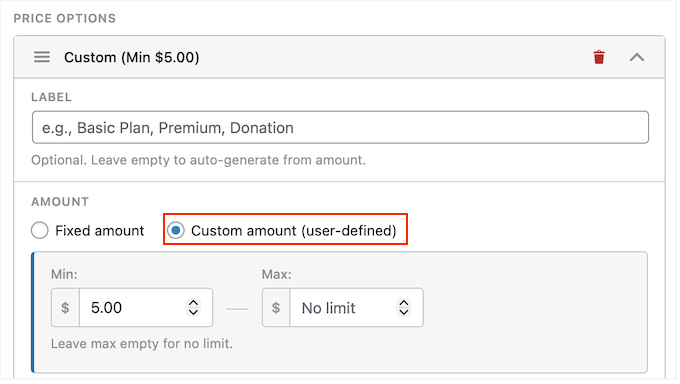
This is perfect for:
- Donation Pages: Let supporters choose to give $25, $50, or their own custom amount.
- Flexible Invoicing: Allow clients to pay the exact balance of a custom quote directly on your site.
- ‘Pay What You Want’ Products: Perfect for authors or creators who want to let fans support their work at their own comfort level.
By offering this level of flexibility, you’re removing the barriers to entry and making it as easy as possible for people to give you money.
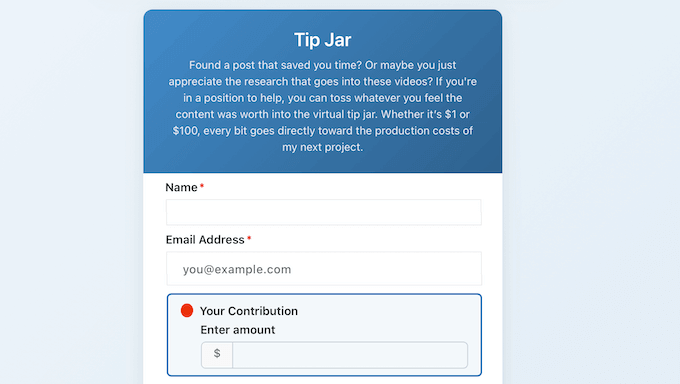
My Honest Thoughts/Review: A fixed price isn’t always the best approach. By opting for WP Payment Pal, you don’t have to worry about missing out on potential revenue because your pricing is too rigid.
If you want to increase your total donations or provide a more versatile checkout, then WP Payment Pal’s flexible pricing is a standout feature.
8. Accept One-Time and Recurring Payments
I’ve noticed that many payment plugins treat recurring revenue like an afterthought rather than a core business need. Even worse, some eCommerce plugins require you to purchase expensive add-ons just to unlock the ability to charge a customer more than once.
WP Payment Pal doesn’t just accept one-off payments; it allows you to build a stable, subscription-based business directly on your site without requiring any separate, high-priced extensions.
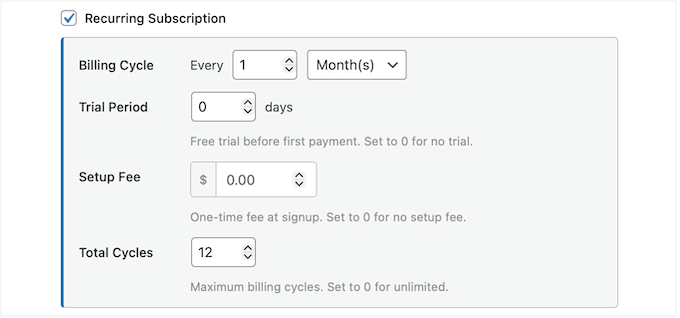
Whether you need to bill customers daily, weekly, monthly, or even yearly, WP Payment Pal handles the entire process for you. This is perfect for a wide range of different business needs, including:
- Service Retainers: Automate your monthly consulting or coaching fees so you never have to chase an invoice again.
- Software and SaaS Subscriptions: If you’re selling a digital tool, you can collect recurring license fees with zero manual work.
- Maintenance & Support Plans: This is a lifesaver for web developers or virtual assistants who charge a flat fee for ongoing monthly updates.
- Recurring Donations for Causes: If you run a non-profit, you can offer a Monthly Giving option. This provides your organization with a predictable budget, every single month.
- Sustaining ‘Patron’ Support: Instead of a one-off tip, your most loyal readers can support your blog over the long term with an automated $5 or $10 monthly contribution.
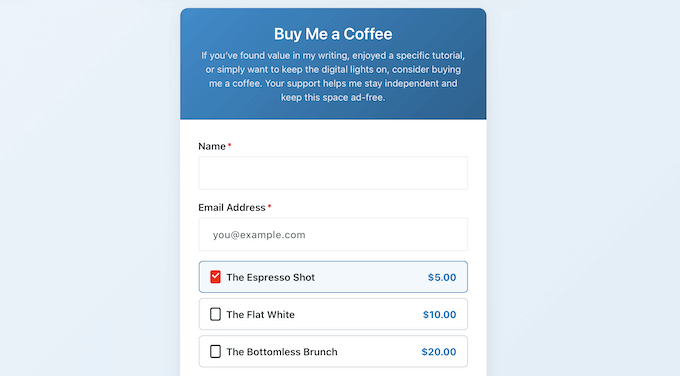
My Honest Thoughts/Review: I love that WP Payment Pal makes recurring revenue accessible to everyone, not just big companies with enterprise-level budgets.
Simply configure your billing cycle, and that’s it! You can focus on growing your business while WP Payment Pal collects your revenue automatically. It truly is a ‘set it and forget it’ tool.
9. Boost Conversions with Free Trial Periods for Subscriptions
I’ve found that the biggest hurdle for any subscription-based business isn’t keeping customers – it’s getting them to take that first step.
For many people, committing to a monthly or yearly billing cycle feels like a major risk. That mental block often stops them from signing up, especially if they haven’t had a chance to test the product or service first.
That’s exactly why WP Payment Pal lets you offer free trials.
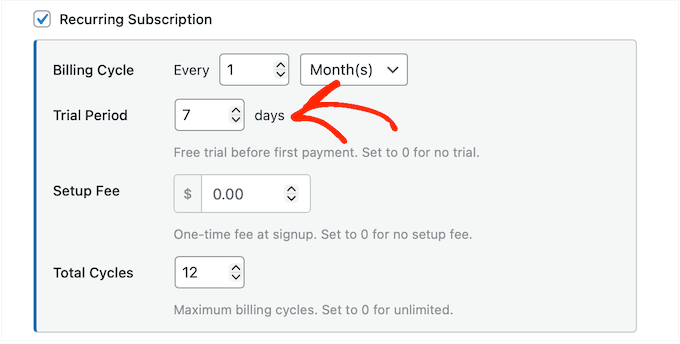
In this way, you can reduce initial friction, since customers are typically much more likely to sign up if they know they won’t be billed straight away.
It also gives visitors the chance to experience your premium content or service firsthand. In my experience, this makes visitors much more likely to commit to that first billing cycle – and beyond.
My Honest Thoughts/Review: I’ve seen far too many businesses struggle to grow because they demanded a big commitment upfront.
By offering free trials, WP Payment Pal can act as a ‘silent salesperson’ for your brand, helping to convert skeptical first-time visitors into loyal customers.
10. Cover Your Onboarding Costs with One-Time Setup Fees
In my experience, the most expensive part of a new client relationship is the onboarding process.
Whether you’re setting up a new client in your content management system, performing a UX audit, or shipping out a physical welcome kit, these onboarding tasks take time and money.
In the past, trying to bill for a one-time setup fee with a recurring subscription was a total administrative nightmare. I’ve seen business owners forced to send two separate invoices or spend hours manually hacking their first month’s bill – a ‘solution’ that adds more tedious paperwork to your already busy schedule.
WP Payment Pal offers a far better solution. It lets you collect an additional setup or activation fee on the very first payment of a subscription cycle. For example, if you offer managed WordPress hosting or website maintenance services, then you can easily charge a migration fee upfront.
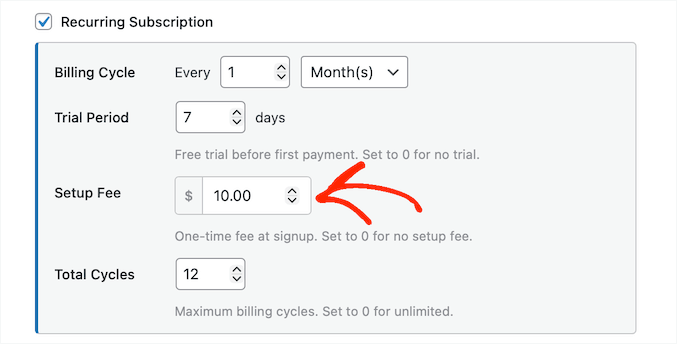
Meanwhile, if you’re a professional coach then you might use WP Payment Pal to offset the cost of an initial deep-dive session, before beginning regular monthly calls.
My Honest Thoughts/Review: By automating the setup fee, WP Payment Pal ensures you’re compensated for your initial effort without having to manage multiple transactions.
It’s a much more professional way to handle your billing and ensures that your cost of delivery is covered from day one.
11. Control Your Offers with Form Limits and Scheduling
If you’re running a limited-time promotion or selling tickets to an exclusive event, then you need a way to control when your payment forms are live.
Ideally, this should be a ‘set it and forget it’ process so you aren’t stuck manually deactivating forms at midnight or, worse, dealing with the fallout of accidentally overselling a workshop because you didn’t disable registrations in time.
With WP Payment Pal you can automate these boundaries, saving you the stress of monitoring your stock levels or tracking expiration dates.
To start, you can set a submission limit for your form. Once that limit is reached, WP Payment Pal deactivates the form automatically so you never over-commit your time or resources.
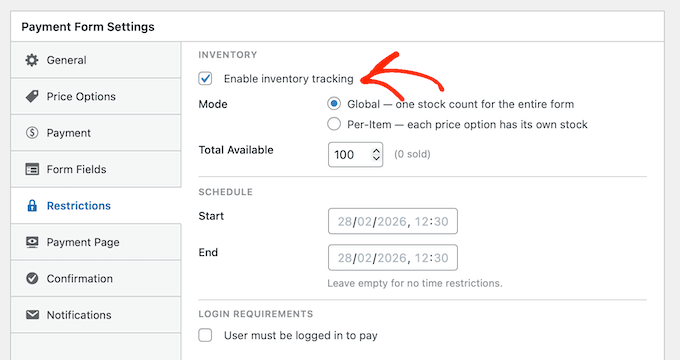
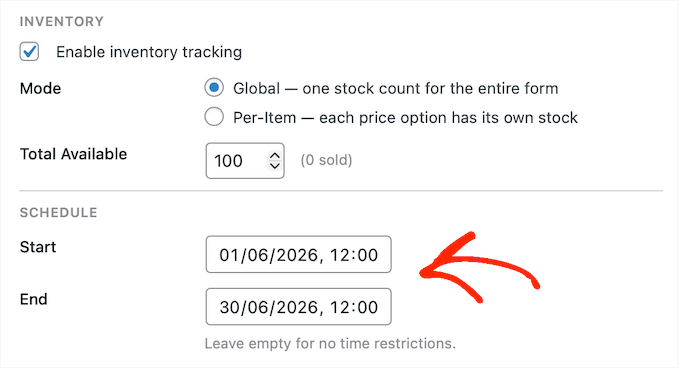
But it doesn’t stop there. You can also schedule specific Start and End times for your forms. This is essential for:
- Time-Sensitive Promotions: This feature is a lifesaver if you want your promotions to start and end at a specific time, even while you’re away from your desk.
- Event Registrations: This is a great option if you need to enforce early-bird deadlines or want to ensure payments stop automatically the moment your workshop starts.
- Limited-Edition Products: This is ideal if you have a hard cap on physical items or consulting hours; it takes the guesswork out of tracking how much you’ve sold.
My Honest Thoughts/Review: No-one wants to stay up until the early hours of the morning, just to manually deactivate a form or hide a payment page when their sale ends.
By automating this process, WP Payment Pal provides a truly hands-off system that saves you time, while helping you avoid human error and frustrated customers.
12. Personalize Your Post-Payment Communication with Smart Tags
If you want to build a long-term relationship with your customers, then communication shouldn’t end the moment they hit the ‘Pay’ button. One of the biggest mistakes I see is businesses sending cold, generic emails – or worse, no emails at all.
You need to send post-payment messages that feel personal and professional so your customers feel valued.
WP Payment Pal solves this by generating a few different automated emails every time someone submits a payment. Even better, WP Payment Pal lets you add smart tags to these emails. This lets you display dynamic data such as the buyer’s name, the total payment amount, and the purchase date.
To start, WP Payment Pal can send a payment receipt directly to the customer. This is your chance to say thank you, but it’s also an opportunity to share useful information like delivery instructions, or a download link for the product they’ve just purchased.
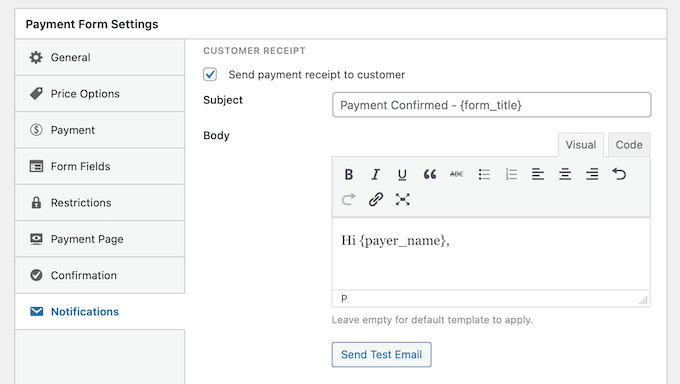
I’ve found that sharing this information proactively makes a big impact on the user experience, while also reducing the number of questions you get from confused customers.
WP Payment Pal can also send an admin notification to you or your team. This helps you act on their purchase straight away, such as scheduling a call with the new customer or shipping their item.
My Honest Thoughts/Review: If you don’t send a friendly, informative confirmation email, then your customers may start to feel ignored. They might question whether you’re actually a legitimate, professional business, or even request a refund.
With WP Payment Pal, you don’t have to worry about looking unorganized or unprofessional. It automatically creates emails that improve the overall customer experience, without requiring any extra effort from you.
13. Drive Sales with Percentage and Fixed-Amount Coupons
When it comes to boosting your conversion rates, a well-timed discount is one of the most effective tools in your marketing arsenal. Whether you’re running a holiday sale or rewarding your most loyal customers, a simple coupon code can often be the final nudge someone needs to complete their purchase.
In the past, offering coupon codes in WordPress required you to set up a dedicated eCommerce platform or a specialized marketing plugin. However, this often adds unnecessary code and complexity to your site. This is particularly frustrating if you only want to offer a simple discount, such as 10% off a single service.
To make this entire process easier, WP Payment Pal comes with a built-in coupon system. This lets you create fixed or percentage-based discounts directly within your payment forms.
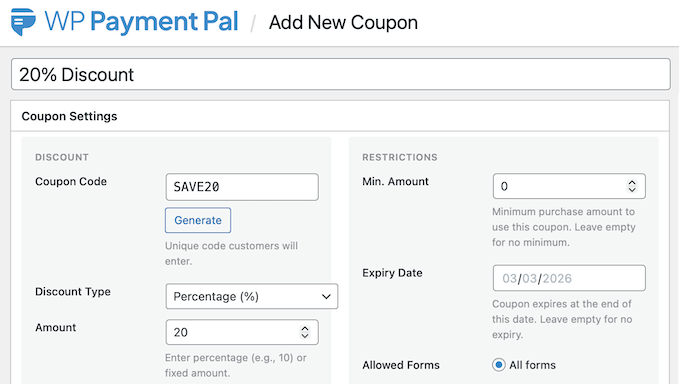
With WP Payment Pal, you can easily configure:
- Percentage Discounts: Ideal for store-wide or seasonal promotions, such as a 30% discount.
- Fixed-Amount Discounts: Perfect for specific dollar-off rewards, for example $10 off your first month.
- Limited-Time Offers: You can combine coupons with WP Payment Pal’s form scheduling feature to ensure the code only works during a specific promotional window.
By keeping your discount system integrated with your payment forms, WP Payment Pal can provide a smoother experience for your customers. At the same time, it helps to keep your WordPress dashboard clean and straightforward.
My Honest Thoughts/Review: With its built-in coupon system, you don’t have to worry about whether your coupon tool is compatible with your payment gateway.
If you want to motivate your customers to buy right now without overcomplicating your dashboard, then WP Payment Pal is the ideal solution.
14. Flexible Display Methods to Match Any Site Design
Every WordPress blog or website has unique needs, and a different layout. That said, if your payment plugin locks you into a single, rigid display option, it’s only a matter of time before you’re fighting against your site’s design.
This isn’t a problem with WP Payment Pal, as it lets you add payment forms to your site in a few distinct ways.
To start, you can embed the form into any page, post, or widget-ready area using a ready-made block. This is a great option if you want to add the form to an existing page, or display it in a recurring area such as your site’s sidebar.
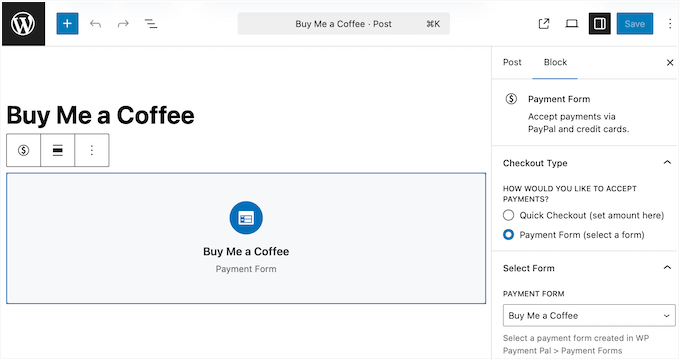
Alternatively, you can publish the form as a standalone page that WP Payment Pal creates for you.
You can change the page’s color scheme, header, footer, and more within the plugin’s settings.
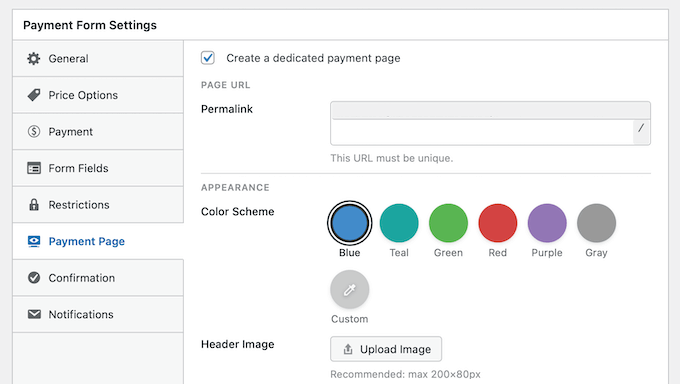
In this way, you can create a page that perfectly complements your WordPress theme and branding. Alternatively, you can create an entirely unique layout so the page stands out from the rest of your site.
This can also be a useful shortcut if you’re creating multiple payment forms. By generating dedicated pages directly within the WP Payment Pal settings, you can bypass the ‘middleman’ of the WordPress block editor entirely. This can potentially save you a lot of time and effort.
Finally, you can display the form as a modal popup. If you select this option, then WP Payment Pal will add a basic payment button to your site.
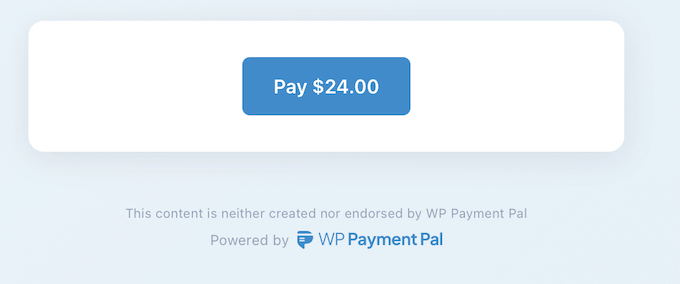
Visitors can then click this button to open the payment form in a popup that overlays your content. This option is great if you want to keep your pages clean and minimal, rather than cluttering them with payment forms.
It also lets you create a distraction-free checkout experience.
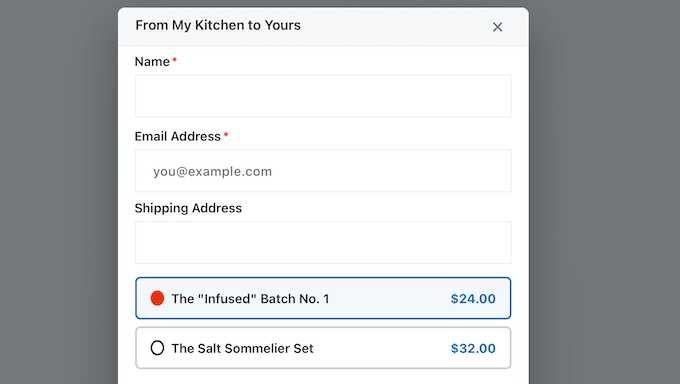
My Honest Thoughts/Review: By giving you a choice of display methods, WP Payment Pal ensures that the checkout experience feels like a natural part of your site’s design rather than a clunky add-on.
Whether you need a full-width form that can stand alone, or a subtle popup for quick, optional donations, WP Payment Pal is the ideal solution.
15. WP Payment Pal Review: Community and Professional Support
WP Payment Pal is designed with ease of use in mind. The goal here is total simplicity: just activate the plugin and follow the onscreen instructions to connect it to your PayPal account.
While the plugin is incredibly intuitive, you might want a bit of extra guidance when diving into advanced features like setup fees, form scheduling, and trial periods.
If you prefer to find answers yourself, then you can access WP Payment Pal’s detailed online documentation at any time. This covers general information such as how to install a plugin, right through to specialized guides including how to restrict a form to logged-in users.
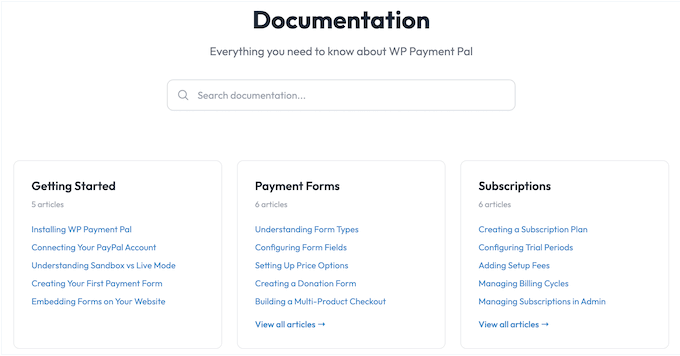
All these guides are easy to understand, no matter your level of technical expertise.
There’s also a helpful blog where the WP Payment Pal team covers a range of related topics, such as how to accept payments without WooCommerce, and how to create recurring subscriptions.
Prefer one-on-one help? Then all the premium WP Payment Pal plans include email support. This lets you get help directly from the plugin’s creators.
If you do reach out for help, then it’s important to give the team as much information as possible. Providing this detail upfront often prevents the ‘back-and-forth’ and gets you a solution much faster. If you’re unsure how, then I’ve put together a complete guide on how to properly ask for WordPress support.
WP Payment Pal Review: Pricing and Plans
Every business has different needs when it comes to accepting payments online. With that in mind, WP Payment Plan offers four distinct price plans, so you can choose the level that fits your current needs and stage of growth.
Whether you’re a solo blogger looking to accept optional donations to support your site, or a growing agency managing multiple clients, there’s a plan designed to suit you.
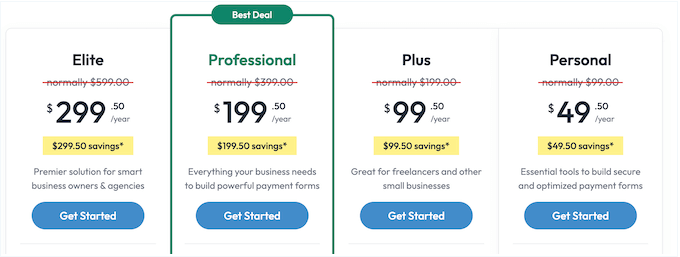
No matter which plan you choose, you can create as many payment forms as you want and process unlimited transactions. However, there’s some key differences between these plans:
- Personal: For $49.50 per year, you can use WP Payment Pal on a single website. This plan includes everything you need to create payment forms, including the user-friendly builder, custom form fields, coupon support, and the option to limit how many transactions a form can accept. In my opinion, Personal is the perfect choice for freelancers or bloggers who want a straightforward way to accept one-off payments and donations.
- Plus: Priced at $99.50 per year, the Plus plan is my top pick for small businesses. Plus lets you collect recurring payments at customizable intervals (daily, weekly, monthly, or yearly). It also automates your administrative work by sending renewal reminders and upcoming invoices to your customers. In my opinion, this makes Plus the best value if you’re looking to set up a stable, recurring income.
- Professional: For $199.50 annually, the Professional plan is designed for those who want to grow quickly. It lets you install WP Payment Pal on up to 10 sites and unlocks high-end features like form scheduling, billing cycle limits, free trials, and the option to charge a setup fee. This tier also includes priority support, ensuring your technical questions get routed to the front of the queue.
- Enterprise: For $299.50 per year, you can use WP Payment Pal on as many sites as you want. This provides the best long-term value if you’re managing a massive portfolio of sites and want to use the same payment solution across all of them.
Final Verdict: WP Payment Pal Review
After putting it to the test, I believe that WP Payment Pal is the best choice for anyone who wants a professional, high-converting checkout process without the weight of a full eCommerce platform.
WP Payment Pal lets you avoid the complexity and overhead of a solution like WooCommerce, so you can focus purely on getting paid through the trusted PayPal payment gateway.
Overall, I was really impressed by how this plugin bridges the gap between simplicity and powerful functionality. You get enterprise-level billing features like free trials, dedicated payment pages, and dynamic tags, all in a straightforward user interface that beginners can master in minutes.
Still, it’s worth noting that WP Payment Pal is focused solely on PayPal. For the millions of businesses that already rely on PayPal’s security and brand recognition, this makes it the ideal plugin. However, if you want to use an alternative provider, then you’ll need to look at other solutions such as WP Simple Pay or WPForms.
WP Payment Pal Review: Frequently Asked Questions (FAQs)
Having helped thousands of users add payments to their site, I know you likely have a few questions. To help you out, here’s the most common questions I’ve heard about WP Payment Pal, and accepting online payments in general.
Do I need a PayPal Business account to use this plugin?
Yes, you’ll need a PayPal Business account in order to use WP Payment Pal.
The good news is that it’s free and easy to create a Business account, and it gives you access to extra features like recurring billing and advanced fraud protection that aren’t available on personal accounts.
Will WP Payment Pal slow down my website?
Not at all, as WP Payment Pal is designed to be incredibly lightweight. It also offloads the actual payment processing to PayPal’s servers, so your own server doesn’t have to do any heavy lifting. This keeps your site fast and responsive.
Can I use WP Payment Pal to sell physical products?
While you can use it for physical goods, WP Payment Pal is primarily designed for services, donations, and digital products.
If you have a massive inventory of thousands of physical items with complex shipping calculations, then I recommend using an eCommerce plugin like WooCommerce instead.
Will WP Payment Pal work with my WordPress theme?
I’ve tested WP Payment Pal with all the major themes including Astra, OceanWP, and GeneratePress. During this, WP Payment Pal always worked seamlessly and adapted to my site’s existing style without needing any extra CSS.
What happens if I want to stop using PayPal later?
Because WP Payment Pal is built specifically for Paypal, your data and subscriptions are tied to your PayPal account. If you decide to switch to a different payment gateway in the future, then you’ll need to set up a new plugin for those transactions, such as WP Simple Pay or WPForms.
I hope this WP Payment Pal review helped you decide whether it’s the right PayPal payment for you. You can also check out our guide on how to get a free SSL certificate for your WordPress website, or see our expert pick of the must have plugins for business websites.
If you liked this article, then please subscribe to our YouTube Channel for WordPress video tutorials. You can also find us on Twitter and Facebook.

WP Payment Pal User Reviews
Please share your WP Payment Pal review to help others in the community.