


Event plugins make it easy to create and manage events on your WordPress site. You can display event calendars, collect RSVPs, sell tickets, manage venues, and handle registrations without relying on third-party platforms.
With so many event plugins available, choosing the right one can feel overwhelming. Some are built for simple event listings, while others focus on registrations, payments, or advanced workflows.
To help you decide, we tested popular WordPress event plugins across different use cases. We found that Sugar Calendar, WPForms, and Formidable Forms work especially well for most websites, and we also included other strong options for specific business needs.
In this article, we’ll walk you through the best WordPress event plugins and help you choose the right one for your site.

If you’re in a hurry, then here’s a quick overview of the best event plugins you can choose for your website:
| # | Event Plugin | Best For |
| 🥇 | Sugar Calendar | Complete plugin to create & manage events |
| 🥈 | WPForms | Event registration forms |
| 🥉 | Formidable Forms | Advanced event forms |
| 4 | The Events Calendar | All-in-one event management solution |
| 5 | Smash Balloon Facebook Feed Pro | Display Facebook events in WordPress |
| 6 | Event Organiser | Free and simple event plugin |
Why Use a WordPress Event Plugin?
An events plugin allows you to create, showcase, and organize events on your WordPress site.
It’s more than a simple calendar plugin. Users can easily register and buy tickets to an event in advance, which helps them better plan the occasion.
There are countless use cases for this, such as:
- Running real estate workshops
- Managing large-scale concerts for musicians and bands
- Showcasing performers at a restaurant or bar
- Raising awareness for charity events for nonprofits
Simply put, the goal of using a WordPress event plugin is to help make running events easier.
How We Test and Review WordPress Event Plugins
Overall, you need to find the best plugin for your small business website that caters to the types of events you’ll be running.
We follow a rigorous testing process to ensure we provide you with the most accurate and helpful information about WordPress event plugins. We evaluate each plugin’s functionality, ease of use, customization options, and overall performance.
- Functionality: We checked whether the plugin effectively creates, manages, and promotes events. We looked for features such as event registration, ticketing, calendar integrations, and email notifications.
- Ease of Use: The plugin’s user interface should be easy to navigate, even for users without extensive technical knowledge. We consider factors like setup time, configuration options, and overall user experience.
- Customization Options: The plugin should offer a variety of customization options to tailor events to your specific needs. We evaluate the flexibility of templates, themes, and other design elements for customizing events and calendars.
- Integration: We tested how well the event plugin integrates with other popular WordPress plugins and themes. This includes compatibility with payment gateways, email marketing services, and social media platforms.
- Performance: The plugin should be optimized for performance, ensuring it doesn’t slow down your website. When creating events on a website, we assess factors like load times, resource usage, and overall responsiveness.
- Support and Documentation: We evaluate the quality of the plugin’s support resources, including documentation, forums, and customer service responsiveness.
Why Trust WPBeginner?
At WPBeginner, we have been helping people start their own WordPress websites since 2009. We have used a bunch of different event plugins to help you pick the best option. Our recommendations are the result of extensive testing, personal experience, and regular user feedback collection. For more details, see our editorial process.
That being said, let’s take a look at the best WordPress event plugins you can use with your WordPress site.
1. Sugar Calendar
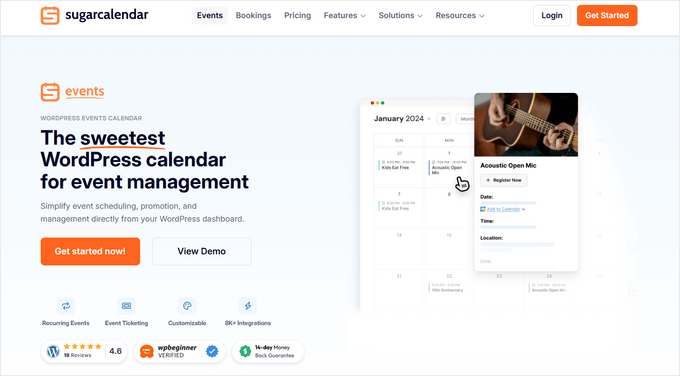
Sugar Calendar is the overall best WordPress calendar plugin on the market, and it’s perfect for creating event calendars in WordPress. The plugin is very feature-rich but still very easy to use. Plus, it’s lightweight, so it won’t impact your website’s speed and performance.
At WPBeginner, we’ve used the plugin for different projects and really liked the features it provides. For more details, see our complete Sugar Calendar review.
There’s even a built-in ticketing system, so you can sell tickets to your events through WooCommerce or Stripe.
All of your events are easy to create and manage from the backend of your site through an easy-to-use dashboard and editor.
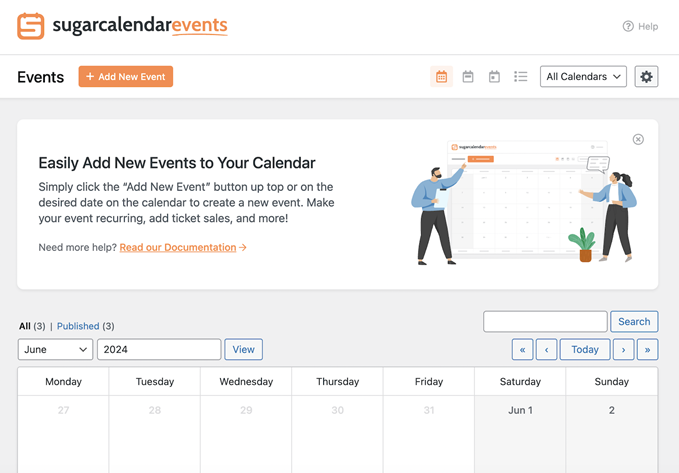
It includes all of the event management features you need, like recurring events, start and end times, single and multi-day events, event categories, and more.
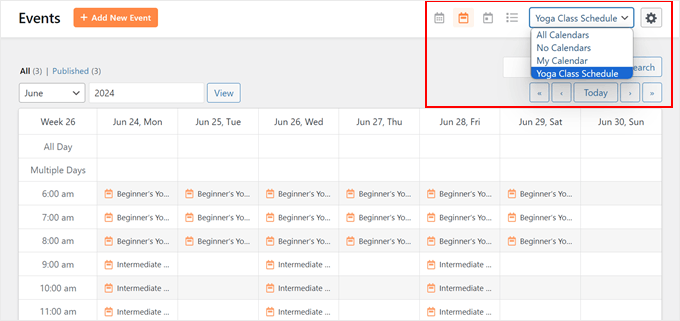
Another feature we liked about the plugin was that you can also create separate calendars for each type of event that you offer. You can then easily switch between calendars, select your preferred calendar view, and search for specific events.
Sugar Calendar also offers an RSVP addon that makes managing attendees simple. With it, you can collect RSVPs directly on your site, allow guests to add plus-ones, limit event capacity, and more. This is a great way to streamline planning for both virtual and in-person events.
It comes with two Sugar Calendar blocks so that you can easily display your calendars in any post or page in WordPress. The event calendars you display on the front end integrate with your existing WordPress theme.
Plus, you can seamlessly integrate your events calendar with Google Calendar, Outlook, Apple Calendar, WPForms, Google Maps, and more.
To learn more, see our guide on how to create a simple event calendar with Sugar Calendar.
✅ Pros of Sugar Calendar:
- Very easy to use, and you can manage your calendar directly in WordPress.
- It supports recurring, one-off, multi-day, all-day, and specific-duration events.
- You can sell tickets to your events through WooCommerce or Stripe.
❌ Cons of Sugar Calendar:
- Could use more documentation to support users.
Why we recommend using Sugar Calendar: It lets you manage and promote all kinds of events from your WordPress dashboard. You can create custom URLs and let users sign up for your events on your site.
2. WPForms
WPForms is the best form builder for WordPress, and it’s a great option for creating event planning forms, event vendor forms, RSVP forms, and more.
At WPBeginner and our other brands, we use WPForms for creating different forms on our websites, including the contact form, registration form, and job application form. If you want to learn more about its features, please see our detailed WPForms review.
We also like that WPForms includes an AI form builder that can create an event form for you in seconds. You can describe what you need (like RSVP, ticket sales, or a volunteer signup), and WPForms will suggest the right fields and layout, so you don’t have to start from scratch.
Plus, WPForms includes a template library of over 2,000+ premade templates to quickly build the forms for your event, and all of these templates can be customized with the drag-and-drop builder. You have full control over the form fields, so you can collect all of the information you need from your attendees.
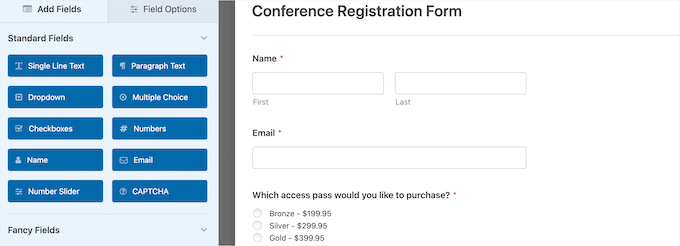
We were also impressed with WPForms for offering an event registration form template that you can use to sell tickets, and you can accept payments with Stripe or PayPal.
WPForms also integrates with top email marketing providers like Constant Contact, Brevo, Drip, and more. This makes it easy to send emails to people who have RSVP’d or registered for an event.
For more details, see our guide on how to create an event registration page in WordPress.
✅ Pros of WPForms:
- There are a lot of event templates to choose from.
- The drag-and-drop editor is easy to use.
- The wide range of third-party integrations means that you can send follow-up emails about events or collect payments.
❌ Cons of WPForms:
- The native Google Calendar integration is not available in the free version.
Why We Recommend WPForms: WPForms is our recommended form builder for user registration. It offers plenty of customization options to ensure your forms stay on brand. You’ll also be able to view all event registrants and their stats as they complete the form.
3. Formidable Forms
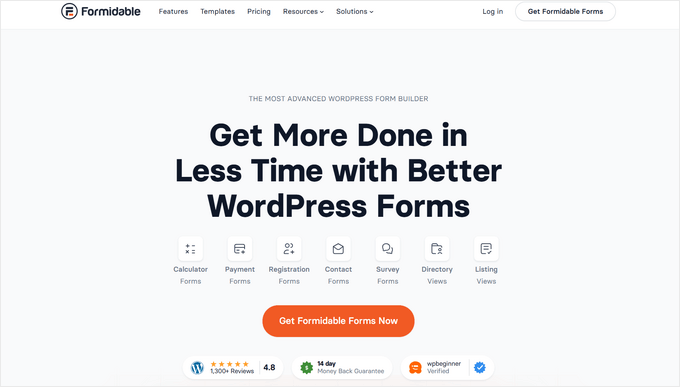
Formidable Forms is the most advanced WordPress event form builder on the market. It stands out for us because it allows you to create complex event signup and registration forms.
To learn more about its features, you may want to go through our Formidable Forms review.
That said, we found that the plugin has a unique feature called Views, which lets you take any form data you’ve collected or entered yourself and display it visually.
This makes it easy to create your own events in your WordPress dashboard. You can also automatically create everything you need on the front end of your site, including event information and event calendars.
Another thing we liked about the plugin is that it has a library of over 175+ templates you can use to quickly create event registration forms. These include online registration forms, RSVP forms, event planner forms, and more.

You also have complete access to your data within the plugin dashboard, so it’s very easy to manage all of your attendees.
✅ Pros of Formidable Forms:
- It has tons of pre-built form templates for event signups, planning, and RSVP.
- It has anti-spam protection features.
- You have access to active and responsive support to get your questions answered.
❌ Cons of Formidable Forms:
- It can be pricey to get calendar views since you’ll need at least the Plus plan.
- The learning curve can be harder for complex form setups.
Why We Recommend Formidable Forms: We like that Formidable Forms has plenty of advanced features to create an event page. There’s even a calendar view, so users can see all the upcoming events they can attend.
4. The Events Calendar
The Events Calendar is a feature-rich event management system that can help you manage nearly every aspect of your events. While testing the plugin, we found that it is a complete event management solution for WordPress.
To learn more, see our The Events Calendar review.
The beginner-friendly interface makes it easy to add all your event details, including a separate page for venues and organizers.
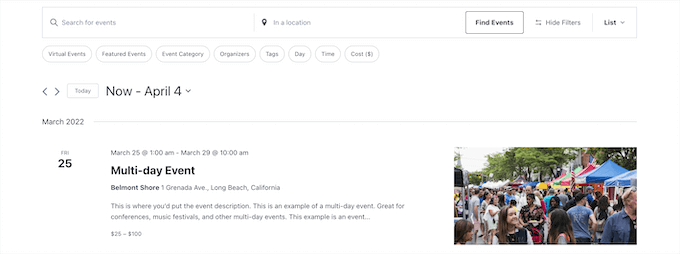
You can display your event calendar on the front end in multiple views, including day, week, or month. Another interesting feature we found was that you can spotlight events to increase engagement on the ones you want the most attention.
Plus, you can add filtering so your users can find the exact events they’re looking for.
You can quickly import data from other calendars to speed up the event creation process. Your users can also subscribe to updates in iCal or Google Calendar.
The Events Calendar has many advanced features, but the pricing adds up quickly since you’ll need to pay more for every addon and website you use it on.
✅ Pros of The Events Calendar:
- It allows you to import events from Google Calendar, Meetup, iCalendar, and other sources.
- The software is updated regularly.
- You can set up recurring events so attendees are always reminded of an upcoming event.
❌ Cons of The Events Calendar:
- Premium support is only available for the Pro plan.
Why We Recommend The Events Calendar: The Events Calendar is a simple yet easy-to-use plugin for driving engagement and increasing attendance. The calendar is highly customizable, and users can filter the event type to find what they’re looking for.
5. Smash Balloon Facebook Feed Pro
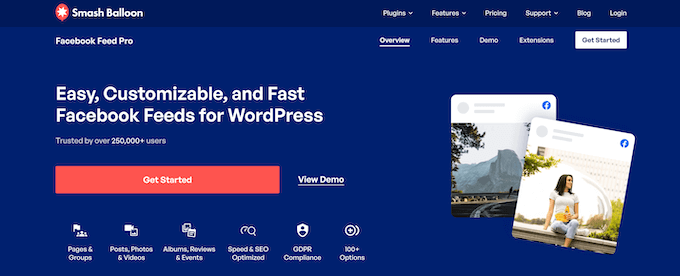
Smash Balloon Facebook Feed Pro is one of the best Facebook plugins for WordPress and a great option for marketing social media events. If you have a large Facebook community and regularly promote and organize events, then this plugin will help you integrate them with your site.
It makes it easy to connect your WordPress site to Facebook with the click of a button. Plus, there are lots of features you can use to showcase your Facebook posts on your website. Please see our Smash Balloon review to learn more.
What impressed us the most is the workflow. Instead of manually creating events in WordPress, you can simply create a Facebook event, and the plugin automatically syncs and displays it on your website.

Beyond the event automation and management features, you can use the plugin to display your Facebook feed, posts, and more on your WordPress website. You have full control over how it looks and what information you want to display.
For more details, see our guide on how to display Facebook events on your WordPress site.
✅ Pros of Smash Balloon:
- Ability to connect your calendar with Facebook
- You can also display all other assets from Facebook, such as pages, groups, posts, and testimonials, which helps to boost social proof.
- You can customize what to display and how the calendar looks on your site.
❌ Cons of Smash Balloon:
- It won’t be helpful if you don’t use Facebook to display events.
Why We Recommend Smash Balloon Facebook Feed Pro: We like Smash Balloon Facebook Feed Pro because it bridges the gap between your social media and your website. If you have an active community that RSVPs on Facebook, this is the easiest way to keep your website visitors updated without doing double the work.
6. Event Organiser
Event Organiser is a simple and free WordPress event plugin that makes it easy to create and manage events. This plugin uses custom post types, so creating a new event is as simple as writing a blog post. You can also create recurring events, assign events to different venues, and more.
While testing, we found that you can view your events within your WordPress dashboard in a list view or calendar format.
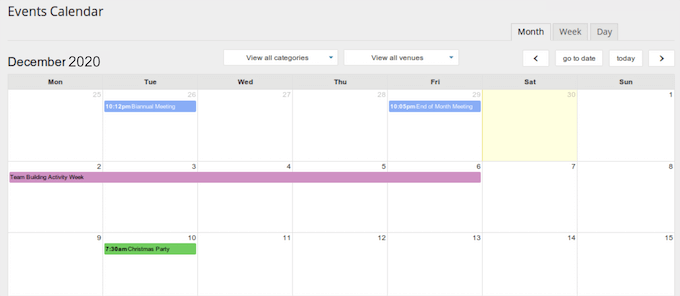
It also includes a few widgets to display a calendar of events, event agendas, or the standard WordPress calendar with events added.
✅ Pros of Event Organiser:
- The plugin is free.
- It’s very easy to use.
- You can set up one-time and recurring events.
❌ Cons of Event Organiser:
- It doesn’t come with advanced features.
Why We Recommend Event Organiser: If you’re looking for a free and simple events plugin, the Event Organiser is a good alternative to the other options. While it lacks advanced features, you can still display your calendar and showcase events on your WordPress site.
Best WordPress Event Plugins (Video)
If you’re mostly using your website to run events, then you may want to check out our picks of the best WordPress themes for events and conferences.
We hope this article helped you learn about some of the best WordPress event plugins you can use with your WordPress site. You may also want to see our guide on how to run members-only events in WordPress and the best WordPress event ticketing plugins.
If you liked this article, then please subscribe to our YouTube Channel for WordPress video tutorials. You can also find us on Twitter and Facebook.


April Hoff
Sadly, Event Organizer hasn’t been tested with the latest version of WordPress nor has it been updated in the last six months, so even though my client is accustomed to this plugin, I’ll be trying Sugar Calendar on their rebuild. Thanks for the recommend!
WPBeginner Support
You’re welcome!
Admin
Dennis Muthomi
Now I have been working on a client site very closely and we switched from The Events Calendar to Sugar Calendar for her small business website and I personally vouch for how easy and lightweight Sugar Calendar is.
And since we’re using Sugar Calendar, I integrated it with a form plugin like WPForms which was already installed to create custom registration forms for our events. This has been a game changer for us with event management.
Sally G.
I have been using & liking Events Manager on a few sites.
WPBeginner Support
Thanks for sharing what worked for you
Admin