


Seeing your hard work go unnoticed is one of the most frustrating parts of building a website. You publish great content, but without the right keywords, it often gets lost in search results.
At WPBeginner, we learned early on that relying on guesswork doesn’t build traffic. We tested dozens of tools to find the ones that actually uncover what our readers are searching for.
This data-driven approach helped us grow our audience to millions of readers. Now, I want to share the exact toolkit that powers our strategy.
Here are the best keyword research tools to help you get the traffic you deserve.
If you are in a hurry, this handy table will show you my top picks:
| Tool | Best For | Free Plan | Starting Price |
|---|---|---|---|
| Semrush | All-in-one SEO platform | Limited (10 req/day) | $139/mo |
| LowFruits | Low-competition keywords | Limited (3 searches/week) | $20.75/mo |
| Ahrefs | Backlink analysis + keywords | No free plan | $129/mo |
| AnswerThePublic | Question-based keywords | Limited (3 searches/day) | $13.33/mo |
| TopicRanker | Content gap analysis | No free plan | $99/mo |
| WPBeginner Keyword Generator | Free brainstorming tool | Free (unlimited) | Free |
| Google Keyword Planner | Google Ads keyword data | Free (Google Ads account required) | Free |
| SEOBoost | Keyword-driven content optimization | 14-day free trial | $22.50/mo |
Our top pick is Semrush for its all-in-one capabilities. If you want a free tool to start with today, try the WPBeginner Keyword Generator (no account needed). Read on for my full comparison.
These tools fall into a few main categories: all-in-one platforms (Semrush, Ahrefs, SEOBoost), low-competition specialists (LowFruits, TopicRanker), Google-native tools (Google Keyword Planner), and free starter tools (WPBeginner Keyword Generator, AnswerThePublic). Knowing which category fits your situation makes it easier to pick the right tool.
While those are my quick recommendations, the best tool often comes down to your specific needs and budget. Below, I provide a detailed breakdown of each tool to help you find the perfect match for your website.
What Is a Keyword Research Tool?
A keyword research tool helps you discover the exact words and phrases people type into search engines like Google. These tools show you search volume, competition levels, and the search intent behind the keyword, which means you’ll know if people are looking to buy a product or just learn something new.
This allows you to find content ideas that your customers are actively seeking. You can then build your content strategy around these topics for your blog posts and landing pages.
These tools also show you where your competitors are ranking. You can then improve your content to target those same keywords and attract that traffic to your site.
Editor’s Note: I recommend using the All in One SEO plugin for WordPress along with one of the keyword research tools below for maximum ranking improvements.
How We Use AIOSEO: At WPBeginner, we rely on All in One SEO for all our foundational SEO. It automatically handles our sitemaps, meta tags, and schema markup. This is why we recommend using it alongside a powerful keyword tool. You can read the full story on why we switched from Yoast to AIOSEO.
How I Test and Review Keyword Research Tools
Through extensive testing of keyword research tools, I’ve pinpointed the features users need to find valuable keywords and improve their online visibility.
This practical experience allows me to thoroughly evaluate each tool and provide reliable recommendations. Here’s my testing process:
- Keyword Suggestion Quality: I assess the relevance and variety of suggestions. I look for tools that help identify search intent, meaning, they don’t just show how many people search for a term, but why they are searching (to buy, to learn, etc.).
- Ease of Use for All Skill Levels: I examine how user-friendly the tool is. Beginners should be able to grasp the basics quickly, while experienced users should find advanced features easy to use.
- Analytical Depth and Features: I look at the depth of analysis and range of features offered. This includes competitor analysis, SERP analysis, and tools for keyword grouping and content planning.
- Value and Cost: I check if the tool is worth the money. For paid tools, I ask if the price is justified. For free tools, I confirm if they are truly useful.
Why Trust WPBeginner?
Since 2009, WPBeginner has been dedicated to SEO best practices and helping website owners succeed online. Our team actively uses keyword research tools daily to grow our online presence and guide our readers.
Our editorial team tracks keyword positions using AIOSEO’s built-in Search Statistics dashboard directly inside WordPress. For keyword discovery and competitive research, we rely on Semrush, using each tool for what it does best.
Based on our hands-on testing, we recommend Semrush and LowFruits as top choices. We regularly test and reassess other solutions to make sure our recommendations remain accurate, unbiased, and helpful. To learn more, see our complete editorial process.
Now, let’s look at the best keyword research tools for SEO that you can use.
How AI Search Is Changing Keyword Research
AI search has changed how people find information online. Tools like Google’s AI Overviews now answer many queries directly on the results page, which means fewer people click through to the articles below.
This is a shift that matters for your keyword research strategy. Because users are reading the AI-generated answers at the top of Google instead of clicking links, a keyword that drives strong impressions today may deliver far fewer clicks than it used to, even if your ranking hasn’t moved.
What Is AEO (Answer Engine Optimization)?
Answer Engine Optimization, or AEO, is the practice of structuring your content so that AI systems can extract and cite it in generated answers. This means writing clear definitions, using structured FAQ sections, adding schema markup, and covering topics with enough depth that AI tools can pull direct answers from your pages.
AEO works alongside traditional SEO rather than replacing it. You still need strong rankings.
The difference is that you also need to format content in a way that makes it easy for AI to surface and attribute to your site.
Using AI Tools as a Research Input
You can use ChatGPT, Gemini, or Perplexity to brainstorm keyword ideas, explore topic angles, and find questions your audience is asking. These tools are good at generating broad lists of ideas quickly.
The caveat is that AI chatbots cannot give you accurate search volume or keyword difficulty data because they don’t have access to live Google data. If you ask an AI for search volumes, it will often confidently invent fake numbers.
Use them to generate starting points, then validate any keyword in a dedicated tool like Semrush or LowFruits before building a content strategy around it.
Tracking AI Visibility
Semrush recently launched its AI Visibility Toolkit, which tracks how often your content appears in AI-generated answers across ChatGPT, Perplexity, and Gemini. It’s the first major SEO platform to offer this kind of cross-platform AI visibility tracking.
Appearing in AI-generated answers is now a separate goal from ranking in traditional search results. Knowing where you stand in both places helps you decide where to focus your effort.
With those foundations in place, here are the tools that will help you build a smarter keyword strategy.
1. Semrush
Best for: marketing teams and serious website owners who need an all-in-one SEO platform.

Semrush is a complete SEO tool suite to help you perform keyword research and improve your rankings. It’s rated 4.5/5 on G2 based on 3,434 reviews and 4.6/5 on Capterra from 2,299 reviews, making it one of the highest-rated SEO tools available.
The Keyword Overview tool gives you a complete picture for any keyword you enter. This includes search volume, trends, and much more.
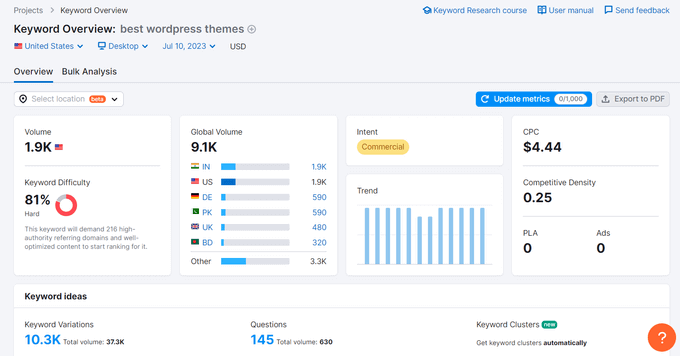
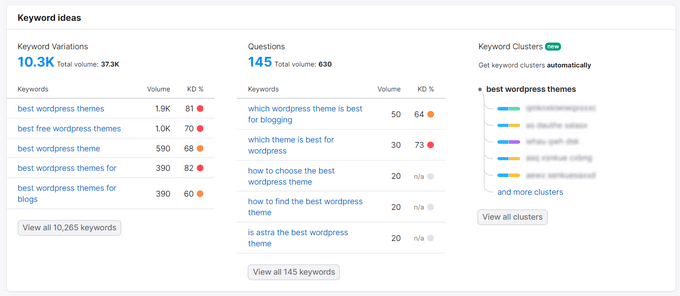
As you scroll down, you can see a list of similar keywords, organic search results, and even Google Ads that target that term.
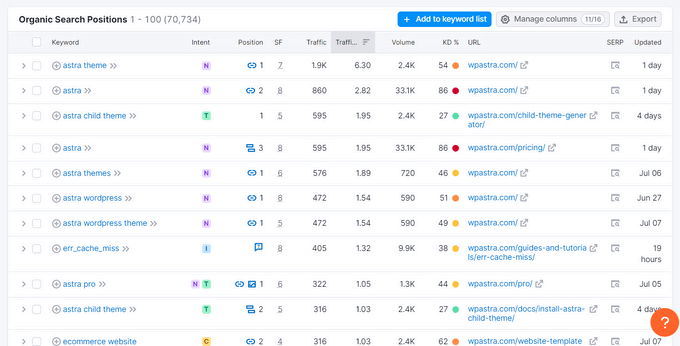
You can also enter a competitor’s website in the Domain Overview to see their organic keywords, traffic metrics, and other important data.
The Organic Research tab shows you relevant keywords, search engine ranking positions (SERPs), traffic value, and more for any competitor.
Semrush also integrates with the All in One SEO plugin. This helps you find related keywords directly inside the WordPress post editor as you write, so you don’t have to switch tabs.
How We Use Semrush: The Semrush integration with All in One SEO is a key part of our workflow. It allows our writing team to find and add relevant keywords directly inside the WordPress editor, making our content process much more efficient.
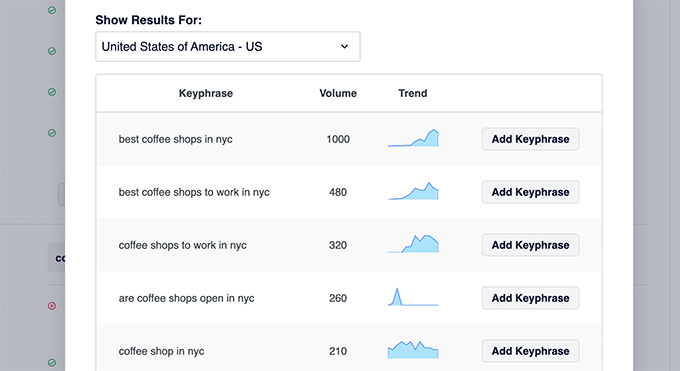
The integration shows you search volumes and trends right in the editor. You can then add the keywords to your content with a single click.
Semrush also launched its AI Visibility Toolkit, which tracks how often your content appears in answers generated by ChatGPT, Perplexity, and Gemini. It’s the first major SEO platform to offer cross-platform AI visibility tracking, making it the right tool if you want to measure your presence in both traditional search and AI-generated results.
Leading marketers worldwide rate Semrush as the #1 keyword research tool. Its full suite of tools also helps with content marketing, social media, and more.
What I Like About Semrush:
- It’s a complete toolkit with features for competitor analysis, site audits, and rank tracking.
- Provides extensive keyword data, including search volume, difficulty, and related ideas.
- Excellent for researching competitor keywords, strategies, and backlinks.
- Includes the AI Visibility Toolkit to track your content’s presence in ChatGPT, Perplexity, and Gemini results.
- Rated 4.5/5 on G2 (3,434 reviews) and 4.6/5 on Capterra (2,299 reviews).
What I Don’t Like About Semrush:
- One of the more expensive keyword research tools on the market.
- Keyword data is still an estimate and not always perfectly accurate.
Why I Recommend Semrush: I recommend Semrush for serious website owners and marketing professionals who need an all-in-one SEO and competitive intelligence platform.
2. LowFruits
Best for: bloggers and niche site owners chasing low-competition, easy-to-rank keywords.
LowFruits is a keyword research tool that helps you find low-competition, high-potential keywords that you can actually rank for. One user reported ranking for 146+ keywords and driving 35,000+ clicks in just 12 months using LowFruits’ low-competition keyword approach.
What makes LowFruits unique is its focus on finding brand-new ‘low-hanging fruit.’
Many people get stuck trying to compete with giant sites. LowFruits helps you avoid this by finding ‘weak spots’ in the search results. These are keywords where forums (like Reddit or Quora) or low-authority blogs are currently ranking, meaning you have a high chance of beating them.
Its Keyword Finder analyzes Google’s autocomplete data to generate targeted long-tail keyword suggestions. Simply enter a keyword to uncover untapped ranking opportunities.
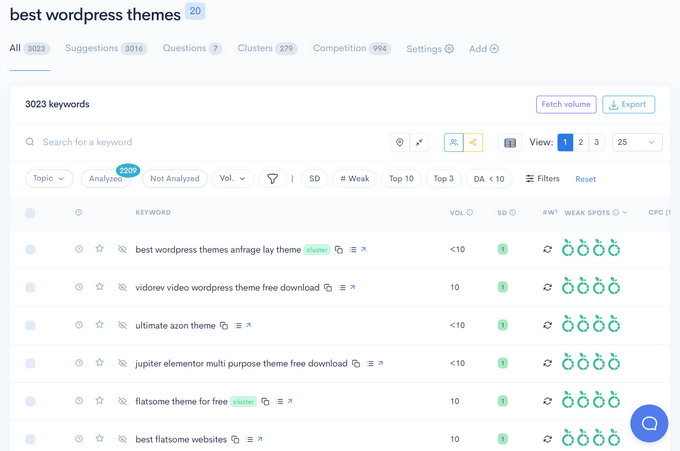
Beyond standard metrics like search volume, LowFruits also identifies weak spots in the SERPs.
The SERP Analyzer feature examines the top 10 Google results and highlights low-authority websites. This makes it easier for you to spot opportunities to outrank competitors.
LowFruits also helps you build niche authority with its Keyword Clustering feature. This process groups similar keywords, allowing you to target related terms on a single page to boost its visibility.
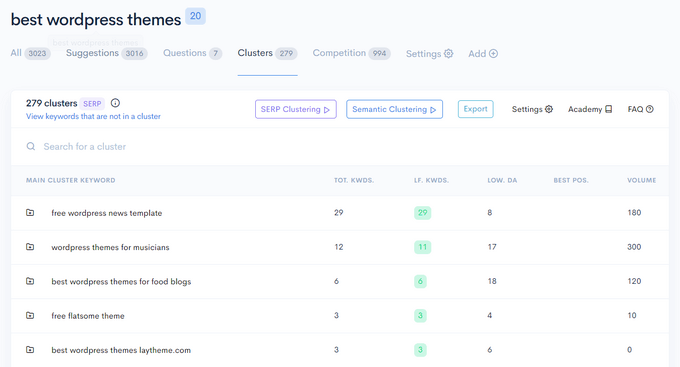
You can view clusters by search intent or semantic structure. Additionally, LowFruits offers other helpful tools, including a Rank Tracker and Domain Explorer.
What I Like About LowFruits:
- Designed to find long-tail keywords with low SEO difficulty, making it easier to rank.
- Analyzes search results to identify weak spots and ranking opportunities.
- Offers an affordable pricing structure, especially for smaller websites and bloggers.
- Features a simple and intuitive interface that is accessible for beginners.
- Offers a limited free plan (3 searches per week) so you can test the tool before upgrading.
What I Don’t Like About LowFruits:
- Doesn’t offer the same depth of keyword data as comprehensive tools like Semrush.
- Primarily geared towards long-tail keyword research, it is less suitable for broad, high-volume keyword strategies.
Why I Recommend LowFruits: I recommend LowFruits for bloggers, small business owners, and niche website creators who are focused on finding easy-to-rank, long-tail keywords.
3. Ahrefs
Best for: SEO professionals and agencies who rely on backlink analysis alongside keyword research.

Ahrefs is another popular tool that offers similar features to Semrush.
Its keyword explorer provides keyword ideas when you type a term into the search box.
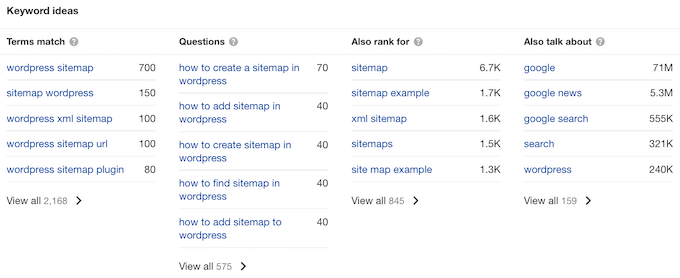
You can also use Ahrefs to see the keywords your competitors rank for but you don’t.
This helps you create new content targeting those topics.
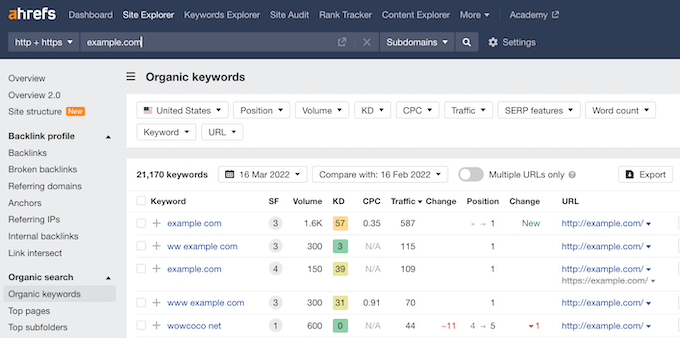
Ahrefs and Semrush both offer many other useful tools. These include reports to find broken links on your site, PPC keyword analysis, and much more.
In my experience, choosing between Ahrefs and Semrush often comes down to your budget and how you use data.
It is important to note that Ahrefs uses a usage-based credit system. This means you are charged credits for every report you open or keyword you analyze, which can get expensive if you are not careful.
On the other hand, while Semrush is also expensive, they offer a freemium account that allows for 10 requests per day. This includes searches and clicking on reports, which is often plenty for a very small hobby blog.
Ahrefs no longer has a free tier for research, though their Webmaster Tools is excellent for auditing your own site.
What I Like About Ahrefs:
- Offers exceptional backlink analysis capabilities, which is its primary strength.
- Provides a wide suite of SEO tools, including keyword research, site audit, and rank tracking.
- Has a very large and frequently updated index of web pages and backlinks.
- Considered to have a highly reliable keyword difficulty score.
What I Don’t Like About Ahrefs:
- One of the most expensive SEO and keyword research tools.
- The sheer amount of data can be overwhelming for beginners.
Why I Recommend Ahrefs: I recommend Ahrefs for SEO professionals, agencies, and large businesses that require comprehensive SEO data and best-in-class backlink analysis.
4. AnswerThePublic
Best for: content creators who want to find question-based and long-tail keyword ideas.

AnswerThePublic works a bit differently from other tools. It presents keywords in an engaging visual format, though you can also view them in a standard list.
If you’re just getting started with SEO, this is a great tool to try. You don’t even need an account. Just type in your keyword and explore the results.
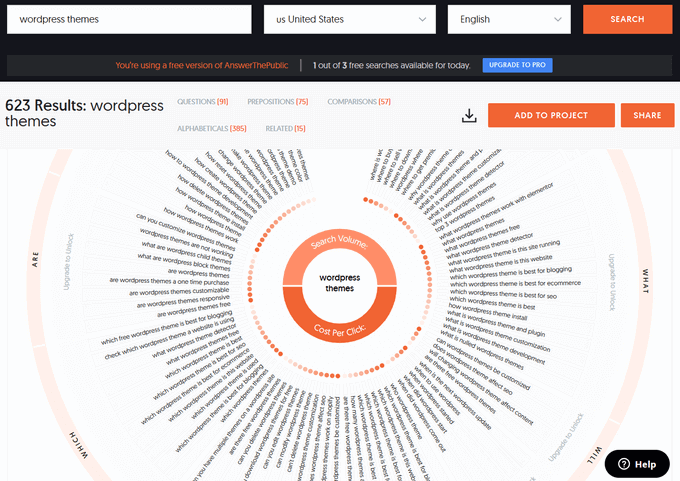
The results are based on Google and Bing’s auto-suggest features. You can click any keyword to search for it on Google, which will show you what content currently ranks.
The free version is a great resource for bloggers. If you perform searches regularly, you will need their pro plan for unlimited access.
What I Like About AnswerThePublic:
- Focuses on questions people ask, uncovering valuable long-tail and question-based keywords.
- Presents keyword ideas in visually appealing formats, making it easy to explore topics.
- Offers a free version that limits you to 3 searches per day, perfect for trying it out.
- Excellent for generating content ideas that address user questions and pain points.
What I Don’t Like About AnswerThePublic:
- The free version doesn’t provide search volume data for keywords.
- It’s mainly focused on question-based keywords and should be supplemented with other tools for broader research.
Why I Recommend AnswerThePublic: I recommend this tool for content creators who want to understand their audience’s questions. It’s useful for finding long-tail keywords and crafting content that directly answers user queries.
5. TopicRanker
Best for: content strategists who want to optimize existing posts and build topical authority.
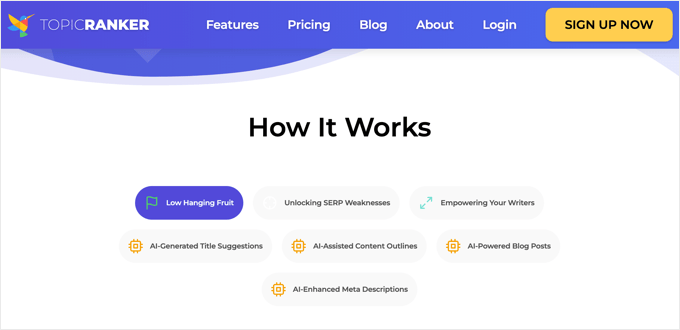
While many tools focus on individual keywords, TopicRanker takes a different approach.
Think of TopicRanker as an audit tool for your published posts. While other tools help you find new keyword ideas, TopicRanker analyzes your existing content to find gaps preventing you from ranking higher.
I’ve seen sites leapfrog to the top of Google simply because they added a specific subtopic or answered a question that TopicRanker identified as a weak spot in the current top 10 results.
To achieve this, TopicRanker analyzes the top-ranking content for your target keyword. It then identifies the subtopics, questions, and related terms that help that content succeed, revealing the strategy behind it.
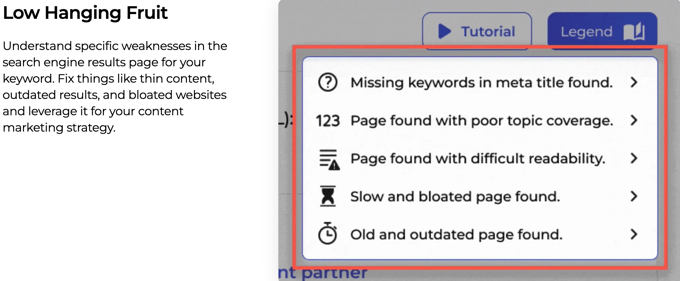
TopicRanker doesn’t just show you keywords to use. It gives you insights into how to structure your content, what subtopics to cover, and which related terms to include to build topical authority.
This makes it a great tool to complement your main keyword research. You can use it to refine your content strategy and gain a competitive edge.
What I Like About TopicRanker:
- Uses AI to identify and cluster related keywords and topics for your content strategy.
- Can generate content briefs based on keyword clusters, aiding in content planning.
- Analyzes top-ranking content to provide insights into effective content structure.
What I Don’t Like About TopicRanker:
- As a newer tool, it may have less historical data than more established platforms.
- Primarily focused on content strategy and topic clustering, it needs to be supplemented for broad keyword research.
Why I Recommend TopicRanker: I recommend TopicRanker for content marketers and strategists looking for an AI-powered tool to help with content planning and building topical authority.
6. WPBeginner Keyword Generator
Best for: WordPress beginners who want a completely free, no-signup keyword brainstorming tool.
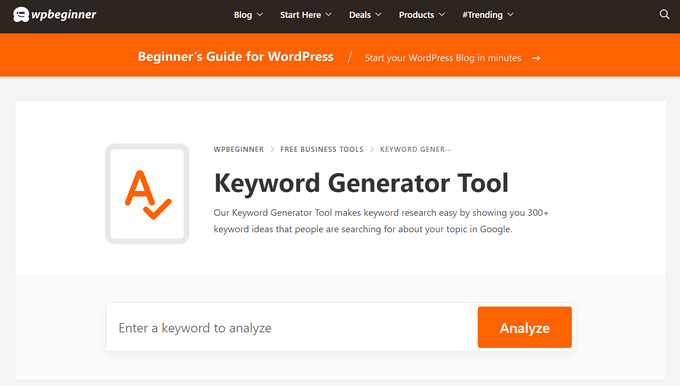
The WPBeginner Keyword Generator is a completely free tool that helps you discover new keyword ideas for your WordPress blog or website.
Simply enter a topic and click ‘Analyze.’ The tool will instantly generate over 300 keyword ideas from Google that you can browse or download as a CSV file.
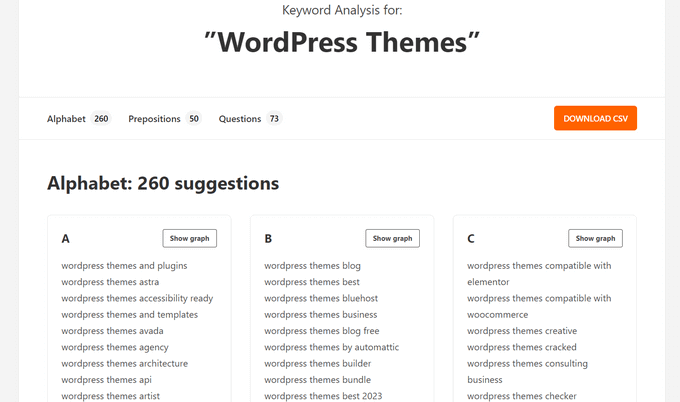
The ideas are neatly organized into three sections: Alphabetical, Prepositions, and Questions.
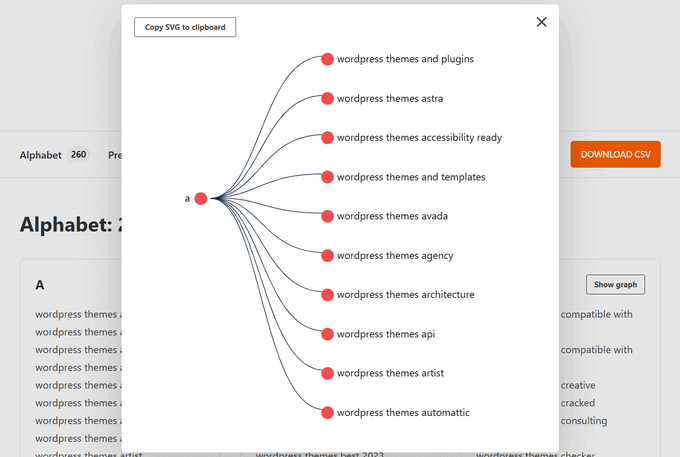
You can also click the ‘Show graph’ button to see the ideas visualized as an SEO topical graph.
The best part about the WPBeginner tools is that you don’t have to create an account to use them, and there are no daily limits.
What I Like About WPBeginner Keyword Generator:
- Completely free, making it accessible to everyone.
- Very simple and easy to use, perfect for WordPress beginners.
- Generates hundreds of keyword ideas from a single seed keyword.
- Useful for quickly generating initial keyword ideas and variations.
What I Don’t Like About WPBeginner Keyword Generator:
- Provides basic keyword suggestions but lacks in-depth data like search volume or difficulty.
- More suitable for initial brainstorming than deep, strategic keyword research.
Why I Recommend WPBeginner Keyword Generator: I recommend this tool as a free and easy starting point for keyword research. It’s great for quickly brainstorming ideas, especially for WordPress beginners.
7. Google Keyword Planner
Best for: anyone running Google Ads campaigns or looking for keyword data straight from Google.
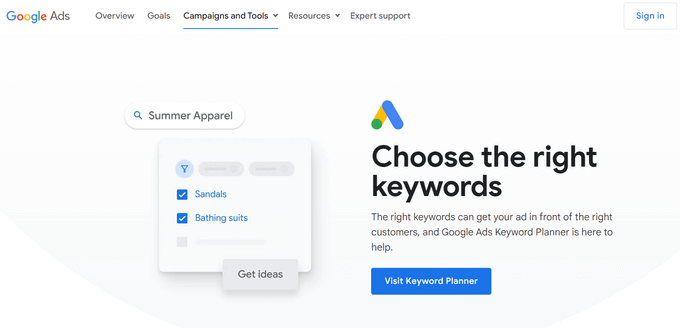
Google’s Keyword Planner is designed for advertisers, but it’s also a useful and free tool for SEO. To access it, you will need a Google Ads account.
If you don’t have an account, you will need to create one and enter payment details. You don’t have to run an active campaign or pay for anything to use the planner.
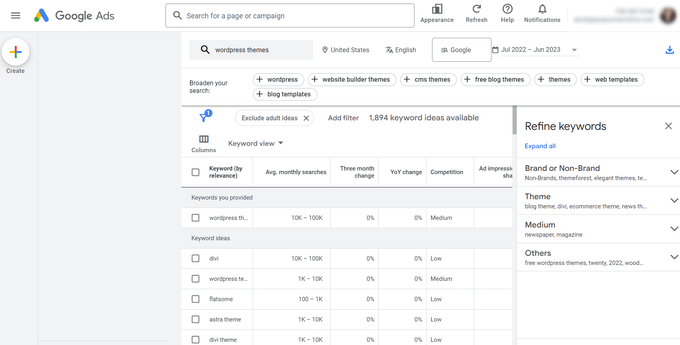
💡 Google may ask you to set up a campaign. You can usually skip this by looking for a link that says ‘Switch to Expert Mode’ or ‘Create an account without a campaign.’
Once inside, you can type in any keyword to view its approximate monthly search volume.
Note: Unless you are paying for active ad campaigns, Google will only show you broad search volume ranges (like 1K – 10K) rather than exact numbers. However, you’ll also see a long list of related keyword ideas that you can scroll through or download.
What I Like About Google Keyword Planner:
- Provides keyword data directly from Google.
- Free to use for anyone with a Google Ads account.
- Offers search volume ranges, competition levels, and keyword suggestions.
What I Don’t Like About Google Keyword Planner:
- Data is primarily geared towards paid advertising, so organic SEO metrics are less detailed.
- Keyword suggestions can sometimes be very broad and less specific for long-tail research.
- Lacks the deep competitor analysis features found in dedicated SEO tools.
Why I Recommend Google Keyword Planner: I recommend this as an essential free tool, especially for beginners and anyone running Google Ads campaigns. It’s the official source for Google’s own keyword data.
8. SEOBoost
Best for: WordPress publishers who want to go from keyword research to optimized content without switching tools.
SEOBoost is an all-in-one content optimization platform built by the AIOSEO team. It covers the full content workflow, from keyword research and briefs through to live optimization and content audits, all in one subscription.
The Topic Reports feature analyzes the top 30 ranking competitors for your target keyword, extracting 24 distinct content metrics per page. This gives you a data-driven picture of exactly what’s needed to rank before you write a single word.
The AI-powered Content Brief builder takes that research and turns it into a structured guide for your writers, covering recommended word count, heading structure, and keyword targets. You can share briefs externally with a single link.
The real-time Content Optimization editor scores your content as you write, flagging missing keywords and thin sections based on competitor analysis. If you use AIOSEO, that score appears directly inside the WordPress block editor.
How We Use SEOBoost: SEOBoost is built by the same team behind AIOSEO, and the two tools integrate natively. Writers on our team can see their content score directly inside the WordPress editor without switching to a separate tab.
What I Like About SEOBoost:
- All-in-one workflow: research, briefs, optimization, and auditing in a single tool.
- Topic Reports analyze 24 content metrics across the top 30 ranking pages, which is deeper than most competitors.
- Starts at $22.50/mo, which is 4x cheaper than Clearscope at $129/mo for a comparable feature set.
- Includes a 14-day free trial with no credit card required.
What I Don’t Like About SEOBoost:
- The native WordPress integration requires AIOSEO. Users on other SEO plugins work from the standalone web app instead.
- The platform is feature-rich, which means there’s a learning curve when you first get started.
Why I Recommend SEOBoost: I recommend SEOBoost for WordPress users who want to bridge the gap between keyword research and content execution. Its native AIOSEO integration means you can apply keyword insights without leaving the WordPress editor.
Bonus: Serpstat
Best for: budget-conscious website owners who want an all-in-one SEO platform without the Semrush price tag.
Serpstat is an all-in-one SEO platform that covers keyword research, competitor analysis, rank tracking, and site audits.
You can use it to find new keyword ideas with data on search volume, CPC, interest over time, and more.
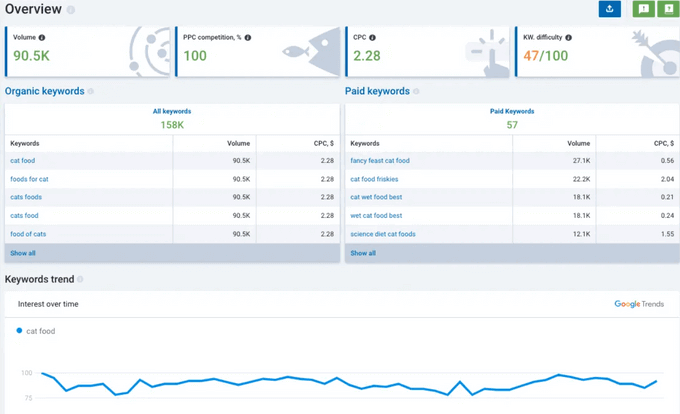
With Serpstat, you can easily view the top Google results for your keyword, including the site that appears in the featured snippet, if any.
The competitor analysis feature lets you see the organic keywords driving traffic to any domain. This is useful for spotting gaps in your content strategy and finding topics your rivals rank for but you don’t.
What I Like About Serpstat:
- Covers keyword research, competitor analysis, rank tracking, and site audits in one platform.
- More affordable entry price than Semrush or Ahrefs, making it a strong option for smaller budgets.
What I Don’t Like About Serpstat:
- Keyword data is less comprehensive than Semrush for competitive niches.
- The interface has a steeper learning curve compared to more beginner-friendly tools.
Why I Recommend Serpstat: I recommend Serpstat as a strong all-in-one SEO platform that offers a good balance of features, data, and affordability. It’s a great alternative to more expensive tools like Semrush and Ahrefs.
Bonus: SpyFu
Best for: marketers focused on reverse-engineering competitor keyword and PPC strategies.
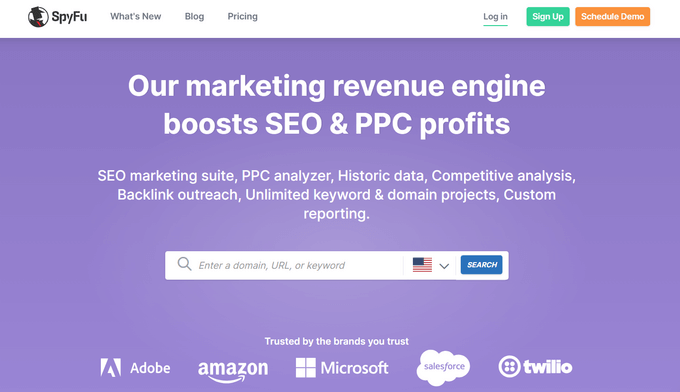
SpyFu is designed to let you learn from your competitors by exploring their most profitable keywords and ads. You can try it for free without even logging in.
Just type a competitor’s URL into the search bar to see their top organic keywords, estimated monthly clicks, and the Google Ads they’re running. This makes it one of the fastest tools for competitive research.
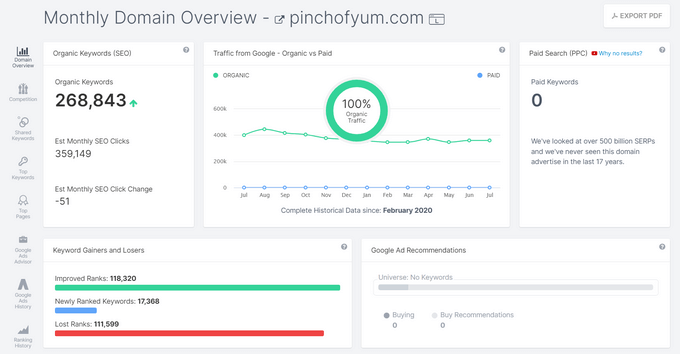
SpyFu collects historical data, so you can see how your site or a competitor’s site has risen or fallen in the rankings for specific keywords over time. This is particularly useful for understanding seasonal trends and long-term competitor strategies.
You can also compare your site against others in your industry and track which keywords drive the most PPC spend for any domain.
What I Like About SpyFu:
- Excellent for competitor research — shows organic keywords, PPC ads, and historical ranking data for any domain.
- Free to try without an account, which makes it easy to get started.
What I Don’t Like About SpyFu:
- Primarily focused on competitive intelligence, so it’s less useful as a standalone keyword discovery tool.
- Data accuracy for smaller or newer sites can be limited.
Why I Recommend SpyFu: I recommend SpyFu for users who are focused on competitor keyword research and want to gain a deep understanding of their competitors’ SEO and PPC strategies.
Bonus: Ubersuggest
Best for: beginners looking for a simple, affordable introduction to keyword research.
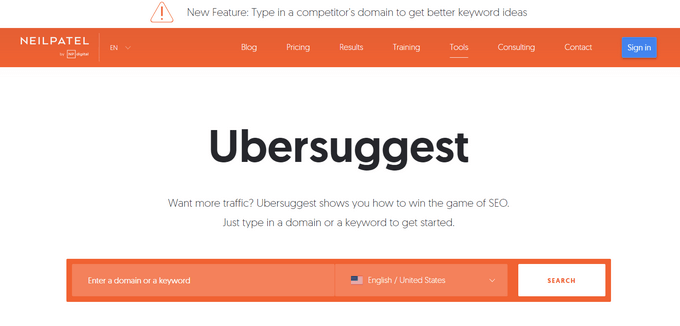
Ubersuggest is a tool from Neil Patel that offers search volume data, keyword suggestions, and keyword difficulty scores.
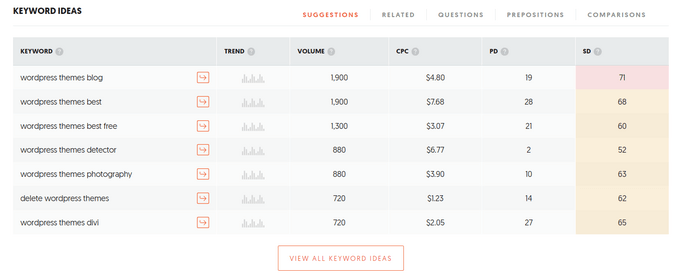
You can view many related keyword suggestions with data like trend, volume, cost per click (CPC), and SEO difficulty.
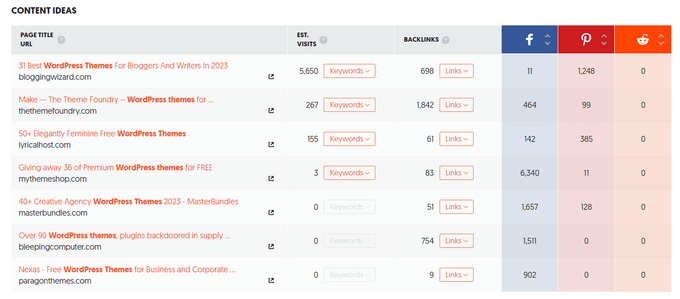
Under Content Ideas, it also shows content related to your keyword.
This includes estimated visits, backlinks, and social shares.
If you sign in with a Google account, you can get more keyword suggestions and daily rank tracking. Ubersuggest also offers a Chrome extension to improve your workflow.
What I Like About Ubersuggest:
- Simple and easy to navigate, making it accessible for beginners.
- Offers affordable pricing plans compared to premium tools like Semrush and Ahrefs.
- Provides keyword overview data, content ideas, and competitor analysis features.
What I Don’t Like About Ubersuggest:
- Some users have questioned the accuracy of its keyword data compared to more established tools.
- The free plan is very limited in terms of daily searches and data access.
Why I Recommend Ubersuggest: I recommend Ubersuggest as a good all-around keyword research tool, especially for users who are looking for an affordable and user-friendly option.
Other Free Tools Worth Knowing
Beyond the tools listed above, there are a few free options worth having in your research toolkit. They’re not full keyword research platforms, but each one fills a specific gap.
Google Trends
Google Trends shows you how interest in a keyword has changed over time. It’s useful for spotting seasonal peaks, identifying rising topics before they become competitive, and comparing the relative popularity of two keywords side by side. You don’t need an account, and it’s completely free.
Google Search Console
Google Search Console shows you the actual keywords your site already ranks for, along with clicks, impressions, and average position. It’s the best tool for finding near-win keywords, the ones on page two that a focused content update could push to page one.
If you haven’t connected your site yet, see our guide on how to add your site to Google Search Console.
KWFinder (by Mangools)
KWFinder is a focused keyword research tool known for its clean interface and accurate keyword difficulty scores. It’s a strong alternative if you want one dedicated keyword tool without paying for a full suite like Semrush or Ahrefs. Mangools offers a free trial, and paid plans start at a lower price point than the major platforms.
Which Is the Best Keyword Research Tool? (Expert Pick)
After trying out all the popular keyword research tools, I believe that Semrush is the best keyword research tool and the #1 SEO toolkit on the market.
I also highly recommend LowFruits. It’s the perfect tool for finding low-competition keywords that you can rank for.
If you’re looking for a free keyword research tool, then try our WPBeginner Keyword Generator or AnswerThePublic.
Not sure which tool fits your situation? Here’s a quick guide:
- Budget is your priority → LowFruits
- You need an all-in-one SEO platform → Semrush
- You want to track AI search visibility (ChatGPT, Perplexity, Gemini) → Semrush AI Visibility Toolkit
- You want to optimize content after finding your keywords → SEOBoost
- You’re a blogger just getting started → WPBeginner Keyword Generator (free) or LowFruits
- You focus on competitor research and PPC → SpyFu
- You want question-based and “People Also Ask” keywords → AnswerThePublic
- You need best-in-class backlink data alongside keywords → Ahrefs
For any keyword strategy to be effective, it’s essential to set up Google Analytics and connect Google Search Console to your website.
These tools help you see how your website is performing for specific keywords and show you the average click-through rate (CTR) for your content. You can then tweak your titles to improve CTR and boost your rankings.
Best Keyword Research Tool for Bloggers
If you run a blog, LowFruits is my top pick. It’s built specifically for finding low-competition keywords that smaller sites can realistically rank for, which is exactly what you need when you’re building authority from scratch.
If you want to start without spending anything, the WPBeginner Keyword Generator is the best free option. It generates hundreds of keyword ideas instantly, with no account or signup required.
Frequently Asked Questions About Keyword Research Tools
Having helped thousands of users choose the right SEO tools, we’ve answered our fair share of questions. Here are the answers to some of the most common ones.
Which is the best keyword research tool for beginners?
For beginners, I highly recommend starting with free tools like our WPBeginner Keyword Generator or AnswerThePublic. They are very easy to use and help you find great topic ideas without feeling overwhelmed.
LowFruits is also an excellent paid option designed specifically to find low-competition keywords, which is perfect when you’re starting out.
Can I do keyword research for free?
Absolutely. Tools like Google Keyword Planner, our own keyword generator, and the free version of AnswerThePublic provide plenty of ideas to get you started.
While they lack the deep competitive data of paid tools, they are powerful enough for building a solid content strategy.
Why should I pay for a keyword research tool?
Paid tools like Semrush and Ahrefs offer a significant advantage with more detailed data. They provide competitive insights, keyword difficulty scores, and rank tracking.
These features are essential for growing your site in a competitive space and making smarter marketing decisions.
What is a good keyword difficulty score?
A good keyword difficulty score is relative to your website’s authority. For new websites, it’s best to target keywords with a very low difficulty score, often under 20 on most tools.
As your site builds more authority with quality content and backlinks, you can begin to target more competitive keywords with higher scores.
Additional Resources & Next Steps
Now that you’ve seen the best keyword research tools available, you can use these guides to put your findings into action and improve your rankings.
- How to Do Keyword Research for Your WordPress Blog – Follow our step-by-step process for finding and analyzing the right keywords for your content strategy.
- How to Optimize Your Blog Posts for SEO – Learn our proven method for optimizing posts to rank higher in search results.
- Ultimate WordPress SEO Guide for Beginners – Our complete guide covers all the essential aspects of WordPress SEO to help you get more traffic.
If you liked this article, then please subscribe to our YouTube Channel for WordPress video tutorials. You can also find us on Twitter and Facebook.


Jiří Vaněk
Keyword research is important to me, but I first had to learn a lot about it from courses and articles like the ones here. I used Semrush, but I’m limited by the free account. Now that I’ve seen AIO SEO integrate Low Fruits, it gives me hope that this process will be easier for AIO SEO users, and I’ll be able to use integrated tools directly in my WordPress. Thanks, in any case, for showing other tools besides Semrush that can be used as alternatives.
Moinuddin Waheed
keyword research makes an important component of blogging journey specially to have organic traffic.
I have used many tools. Semrush is infact best among them but is paid and it becomes very difficult for any blogger just starting out to afford that tool.
Most of the people have reservations about the free tools.
are they accurate enough to rely on?
do they provide other options as well to scale?
WPBeginner Support
The free tools can still work for sites and some of the sites that offer a free version have a paid version that offers more insight.
Admin
Ahmed Omar
Although I am writing my content for long time
It is my first time to know about Google Keyword Planner, also I did not know about WPBeginner Keyword Generator
the post is very valuable and helpful
Thank you
WPBeginner Support
You’re welcome
Admin
Maria
Thank you for this article. I am a newbie trying to create my own website, and this was very helpful. I know more about SEO tools and the tools offered. Now that I am more knowledgeable, thanks to you, and can start my keyword searches for better content.
Thank you again.
WPBeginner Support
Glad you found our list helpful
Admin
Jennifer Duffy
Thank you so much for providing all of this excellent information in a very easy-to-understand format!
WPBeginner Support
You’re welcome
Admin