


Ever tried running a business using just your personal cell phone? I learned the hard way that it’s a recipe for disaster, especially as you start to grow.
When I first started out, my mobile device was my command center. But soon, important client messages were buried under family texts, I had no work-life balance, and there was no way to bring on team members professionally.
I knew I needed a real business phone system, but the sheer number of options was overwhelming. After weeks of intense research and testing 12 different services, I’ve narrowed it down to the top 3 that are truly worth your time.
I’ve put everything I learned into this guide to help you make the right choice, minus the weeks of research. Let’s find the perfect phone service for your small business
Quick Pick – My Top 3 Business Phone Services
In a hurry? No worries! Here are my top 3 picks so you can quickly choose the right phone service for your business.
 |  |  | |
|---|---|---|---|
| Best For | Small businesses | Large teams & integrations | Teams using Zoom |
| Free Trial | ✅ Available on some plans | ✅ 14-day trial | ❌ No free trial (Free version available) |
| Video Meetings | ✅ | ✅ | ✅ |
| Unlimited SMS | ✅ | ✅ | ✅ (US/CA only) |
| Unlimited Domestic Calls | ✅ US, CA, PR | ✅ | ✅ (With upgraded plan) |
| Unlimited International Calls | ❌ | ✅ (on higher-tier plans) | ❌ |
| Pricing /user/mo | From $15 | From $20 | From $10 |
| My Rating | ⭐⭐⭐⭐⭐ (4.9/5) | ⭐⭐⭐⭐⭐ (4.9/5) | ⭐⭐⭐⭐⭐ (4.8/5) |
| Get Nextiva | Get RingCentral | Zoom Phone |
TL;DR – Quick Summary
The best business phone service for most small businesses is Nextiva, which offers an excellent balance of advanced features and affordable pricing. For larger teams needing more power, RingCentral provides superior integrations. Meanwhile, Zoom Phone is the ideal choice for teams already using Zoom for video meetings.
Why and When You Need a Business Phone Service
Unfortunately, using your personal phone number for business calls isn’t sustainable in the long run. You’ll have to deal with interruptions to your personal life, and you will struggle to manage team communication as your company grows.
On the other hand, adding a proper business phone service allows you to do the following:
- Easily track call duration, hold times, wait times, and overall usage.
- Most services come with call forwarding, caller ID, call waiting, inbound call routing, call recording, and more.
- Share one business phone number among several of your team members simultaneously. The auto attendant feature allows you to route a call to the first available representative.
- Receive and make calls using a desk phone system, cordless phones, mobile cell phones, or a computer.
- Easily add new employees without calling in an IT technician.
- Most modern business phone systems use VoIP (Voice over Internet Protocol), which sends calls over the internet. This means you can take your local or toll-free number with you anywhere in the world! All you need is a stable, high-speed internet connection.
If you’re running an online store or a small business, then adding a professional business phone service can also help you grow your business. You can use it to build a better customer experience with professional sales and support provided over the phone.
Here at WPBeginner, we use Nextiva for our phone system and also use LiveChat software to create a complete customer support solution.
Need a Better Way to Get Customer Info?
WPForms is the easiest way to add contact forms, quote request forms, and surveys to your website. Instead of just relying on phone calls, you can let customers reach out on their own schedule.
You can create any type of form in minutes to capture leads and gather feedback, helping you grow your business even when you can’t answer the phone.
My Process: How I Test and Review Business Phone Services
To find the very best phone services for small businesses like yours, my team and I did a lot of in-depth research and personally tested many of these services in real-world scenarios.
Here’s what I looked at:
- Real-World Experience: I’m not just recommending these services based on spec sheets. My own company currently uses Nextiva for our daily operations, and we’ve used and tested several other business phone systems over the years. This gives me firsthand knowledge of how they perform in a busy environment.
- Ease of Use: How easy is it to get started and use the service every day? I personally tried setting each service up. I also checked how simple it is to add and manage contacts, set up call forwarding, and use voicemail, even if you’re not a tech expert.
- Key Features & Integrations: I looked closely at the must-have features each service offers, like voicemail-to-email, call recording, and conference calling. I also tested how well they connect with other popular business tools you might use, such as Slack, Google Drive, and CRM software.
- Call Quality and Reliability: I made lots of phone calls (both local and international) to see how clear the calls sounded. I also paid attention to dropped calls or any delay in the conversation. I checked to make sure the service worked well, even during busy times, power outages, or weak internet connections.
- Pricing: I carefully examined the cost of each service to find the best overall value for small and medium-sized businesses. This included looking at what features you get at each price point, how flexible the plans are, and whether the service can scale as your business grows. Importantly, I also looked out for any sneaky hidden fees or extra charges.
- Real User Reviews: Beyond my own hands-on testing, I also dug into reviews and feedback from other real business users. This helped me spot any common issues or highlights that we might have missed in our internal tests.
Why Trust My Recommendations?
My name is Syed Balkhi, and I’m the founder of WPBeginner and the CEO of Awesome Motive. Together, my companies create software that powers more than 25 million websites.
Here’s why you can trust my recommendations:
- Real Life Experience: My company actually uses Nextiva for business operations. I’ve also tested out a few other business phone services over the years.
- Detailed Testing: My team and I thoroughly test each phone service for call quality, ease of use, and advanced features like call routing.
- Community Feedback: I’ve gathered feedback from users in the WPBeginner community to make sure that my recommendations meet real-world needs.
- Transparency: I only recommend phone services that I would be comfortable using myself. If it’s not good enough for me, it’s not good enough for WPBeginner readers.
Now, let’s take a look at the top business phone services for your small business. For more details, see our editorial process.
1. Nextiva – Overall Best Business Phone Service for Small Businesses
Nextiva is an all-in-one platform for business phone calls, video, and messaging. It is my top choice for business phone services because it brings everything together into one user-friendly platform, and it’s the service I personally chose for my own business.
Setting up Nextiva is surprisingly straightforward, even for people who are not tech-savvy. Plus, the call quality has been consistently fantastic, whether we’re using desk phones in the office or the mobile app when we’re out and about. Calls are always crisp and clear, which means reliable communication for my team.
I really love Nextiva’s smart call routing. It uses advanced logic (powered by AI) to quickly figure out who an incoming call is for and sends it to the right person or department right away. Setting up and sharing business phone numbers is also a breeze, helping my team look professional without ever having to give out personal phone numbers.
 |
| Pricing: Starts at $15/user/month |
| Free Trial: Available for some plans |
| Standout Features: |
| 🔹 Unlimited free domestic calls and texts 🔹 AI-powered, advanced call routing 🔹 Voicemail-to-email transcription 🔹 Interactive voice response system 🔹 Toll-free & local business numbers 🔹 Call analytics & reporting |
| WPBeginner Rating: A++ (Review) |
| Best For: Small businesses 🏆 |
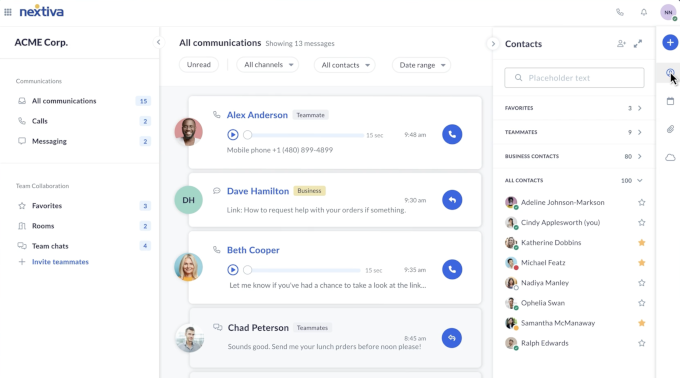
Nextiva also comes with helpful call analytics. These provide detailed reports on call volumes, call duration, and team member performance.
Plus, it connects smoothly with popular CRM (Customer Relationship Management) software. This means when a customer calls, their contact info and history can pop up on your screen automatically, so your team is always prepared.
Now, there are a couple of things to be aware of. Some users have found that the desktop app can sometimes use a lot of your computer’s power (be ‘resource-intensive’), which I’ve occasionally seen, too.
This is a trade-off for the high-quality performance Nextiva provides. Because the app handles high-definition voice and video calls simultaneously, it requires a bit more of your computer’s power. Usually, just closing other apps you’re not using fixes this, so it’s not a huge deal for the quality you get in return.
Also, it’s good to know that Nextiva’s unlimited calling only covers the US, Canada, and Puerto Rico.
| What I Like About Nextiva | What I Don’t Like About Nextiva |
|---|---|
| Crystal-clear call quality, whether you’re using a desk phone or their mobile app. | The desktop app can use a lot of resources and can slow down older computers. |
| Flexible call routing. | The mobile app can be tricky to use and find all available settings. |
| Easy setup and management of local and toll-free business numbers. | There are occasional long wait times for customer support. |
| Comprehensive call analytics with detailed reports on call metrics. | The Caller ID sometimes shows only the number but not the name. |
| Great integrations with CRM systems. |
My Recommendation: In my opinion, Nextiva is the best overall business phone service for small businesses. It offers powerful, enterprise-level features at affordable prices. It’s user-friendly, provides excellent call quality, and connects easily with essential customer service tools. In my own business, Nextiva has helped us streamline communication, enhance our customer service, and gain useful insights from our call data. For an even deeper dive, check out my full Nextiva review.
Nextiva pricing: Pricing for Nextiva’s service starts from $15 per user every month for the Core plan, which is paid yearly when you use my Nextiva coupon.
Bonus: WPBeginner users can use my Nextiva coupon code to get up to 50% off.
2. RingCentral – Best Business Phone Service for Larger Teams & Integrations
RingCentral is an all-in-one cloud communication platform that combines phone, video meetings, and messaging. It is my top pick for larger teams that need extensive integrations and scalability because it’s designed to grow with your business.
I put RingCentral to the test to see what it can do. Setting it up was straightforward, and the call routing system was impressive. You can set rules based on departments, business hours, and caller ID to help direct calls where they need to go.
The call analytics and integrations with CRMs and help desk software were also powerful yet easy to set up.
Everyday tasks, like adding new users, setting up phone numbers, and managing basic features, were quite easy. Once the initial setup was done, managing professional numbers, like getting local or toll-free numbers, was also simple.
One small hurdle I found was that setting up SMS (text messaging) was a little trickier compared to some other services.
 |
| Pricing: Starts at $20/month/user |
| Free Trial: 14-day free trial |
| Standout Features: |
| 🔹 Combined phone, video, messaging platform 🔹 Great call routing and management 🔹 Strong analytics and tool integrations 🔹 Scalable solutions for business growth 🔹 Screen sharing and toll-free minutes |
| WPBeginner Rating: A++ (Review) |
| Best For: Medium to large businesses 🏆 |
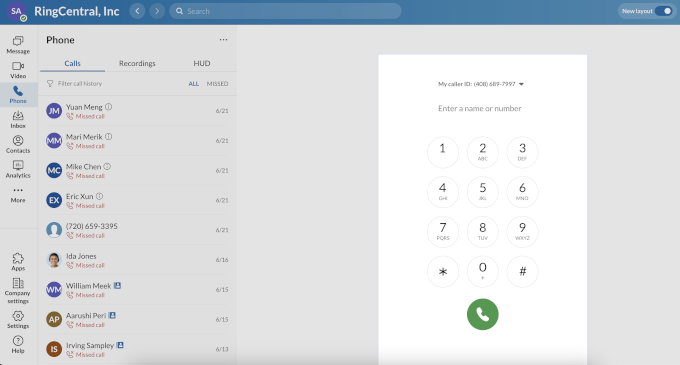
RingCentral includes extra features like video meetings with screen sharing, team messaging, and integrations with tools like Google Workspace and Microsoft 365.
However, because it offers so many features, some new users might find it a bit overwhelming to learn everything at first. Also, while their support team is generally knowledgeable, I’ve noticed that wait times can sometimes be longer.
| What I Like About RingCentral | What I Don’t Like About RingCentral |
|---|---|
| The service is packed with features for phone calls, video calls, and messages. | There can be a bit of a learning curve at first because it has so many features, but once you get the hang of it, it’s quite powerful. |
| Connects smoothly to CRMs and other tools. | Customer support can be slow at times compared to other RingCentral alternatives. |
| Extra perks like automatic transcriptions and sales insights. | Setting up SMS through RingCentral is often challenging and time-consuming. |
| Handles multiple business numbers with ease. | |
| Reliable service and call quality. |
RingCentral is compatible with a wide variety of popular desk phones from brands like Poly, Yealink, Cisco, and Mitel. This makes it a great choice for offices that already have existing hardware. Of course, you can also use their full-featured mobile and desktop apps instead of a physical phone.
My Recommendation: In my opinion, RingCentral is a fantastic business VoIP solution, particularly if you have a medium-to-large-sized business or expect significant growth. It really shines with its extensive features, ability to scale, and wide range of integrations. For a more detailed look, check out my full RingCentral review.
RingCentral pricing: Their Core plan starts at $20 per month for each user (billed annually). Other plans come at different pricing and advanced features like auto call recording, internet fax, unlimited video, whiteboards, messaging, and more. You can use my RingCentral coupon code to get up to 33% off.
You can also pay extra to get a vanity phone number for your business, which allows you to have a catchy and memorable business phone number (like 1-800-YOURBIZ).
3. Zoom Phone – Best for Video Call Integrations
Zoom Phone is a cloud-based VoIP phone system integrated directly into the Zoom video conferencing platform, offering voice, video, and chat in a single application. I was curious to see if it could offer the same simplicity and reliability as a business phone system.
One of its biggest draws is that it’s often more affordable than some other top choices, especially for basic needs. Its cloud VoIP phone system still packs in all the essential call features you’d expect. And the best part? You can manage everything right from the Zoom app you might already be using.
Essentially, you get a VoIP phone service, video meetings, and team chat all together. I like that with a simple click, you can turn a phone call into a video conference with Zoom Meetings or transfer a call to a Zoom Room.
While I didn’t choose it for my company’s daily operations, I tested it thoroughly and found the calls were loud and clear. That being said, call quality isn’t as high as what you’d get with Nextiva or RingCentral.
Zoom Phone also provides a solid set of call-routing features. You can set up auto-attendants (a virtual receptionist to greet callers), call queues (to manage calls during busy times), and routing rules based on factors like time of day, specific department, or even the incoming caller ID.
 |
| Pricing: Starts at $10/user/month |
| Free Trial: No free trial but a free version is available with limited features. |
| Standout Features: |
| 🔹 Single interface for phone, video, and chat 🔹 Seamless one-click switch between voice and video calls 🔹 Auto-attendant and smart call routing 🔹 Voicemail-to-email transcription 🔹 Google and Microsoft 365 calendar integrations 🔹 CRM and team chat integrations 🔹 Mobile and desktop apps |
| WPBeginner Rating: A+ |
| Best For: Video conferencing |
| What I Like About Zoom Phone | What I Don’t Like About Zoom Phone |
|---|---|
| Clear and reliable voice calls. | The metered international calling fees are a bit expensive for small businesses. |
| Very budget-friendly for small businesses. | I noticed some occasional issues with connectivity and lag during video conferencing. |
| It covers everything from phone calls to video conferences and meetings. | It has limited call analytics. |
| Routes calls to the right people. | |
| The calling interface is clean and super beginner-friendly, just like the regular Zoom app. | |
| Connects to your CRM and more. |
You get a wide array of useful features with Zoom Phone. These include call forwarding, call recording, voicemail transcription (voice messages converted to text), auto-attendant, SMS text messaging, user-friendly desktop and mobile apps, and even support for traditional desk phones.
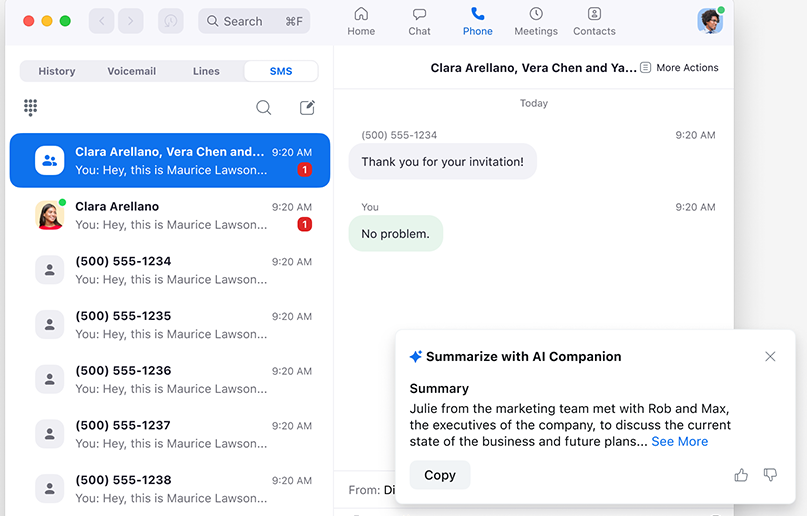
It also integrates with other business tools like Salesforce and HubSpot, among others.
However, it’s not the best option if detailed call analytics are a top priority for your business.
My Recommendation: After testing Zoom Phone, I can recommend it as a solid and user-friendly business phone system, especially if you’re already invested in the Zoom ecosystem. It delivers pretty good call quality, great video conferencing, and integrates nicely with other tools. It’s the best choice for teams that already spend their days in Zoom meetings and want to add phone capabilities to the same app.
Zoom Phone pricing: Their phone plans start at $10 per month per user for the pay-as-you-go plans. However, to access unlimited outbound calls, you need to upgrade your plan, starting at $20 per month per user.
4. Grasshopper – Best Business Phone Service for Solo Users & Basic Needs
Grasshopper is a virtual business phone service that forwards calls to an entrepreneur’s existing personal phone lines. I was really interested in checking it out because it’s designed squarely for solo entrepreneurs and very small businesses that need a professional number without new hardware.
Grasshopper really shines when it comes to simplicity and affordability. It’s a fantastic option if you don’t have a physical office, because it works smoothly using your existing cell phones and other devices.
It gives you a professional business phone number (a ‘virtual phone number’) that cleverly forwards incoming calls to any phone or mobile device you already own. To make outbound calls showing your Grasshopper business number, you’ll use their app. During my tests, the call quality was generally good – clear and reliable enough for everyday business conversations.
Its call routing features are straightforward but effective, letting you easily forward calls to different phone numbers or send them to voicemail. Grasshopper is also handy if you’re working solo but want to appear bigger, as you can add extensions (like ‘Press 1 for Sales, Press 2 for Support’) that can all route to you.
 |
| Pricing: Starts at $14/month |
| Free Trial: ✅ 7-day free trial |
| Standout Features: |
| 🔹 Easy setup with no additional hardware 🔹 Auto-attendant for a professional phone system 🔹 Call forwarding & voicemail-to-email 🔹 Mobile & desktop apps for easy management 🔹 Unlimited minutes on all plans 🔹 Vanity phone number options |
| WPBeginner Rating: A+ |
| Best For: Solo entrepreneurs & small business owners 🥉 |
| What I Like About Grasshopper | What I Don’t Like About Grasshopper |
|---|---|
| It offers US, Canada, and UK-based local and toll-free numbers. | Grasshopper lacks advanced features like video conferencing and team messaging. |
| Very beginner-friendly, and you can get started quickly. | It has limited call analytics. |
| It’s more affordable than many other business phone services. | Doesn’t integrate deeply with other software. |
| No new hardware needed. It works with your existing cell phone or landline. | Making international calls often requires a significant upfront deposit, and per-minute rates apply on top of that. |
One thing to note: if you make a lot of international calls, Grasshopper might not be the cheapest option, as those usually come with extra costs. It does offer convenient voicemail and basic business texting, but you won’t find advanced team messaging features or deep CRM integrations here.
Overall, Grasshopper is an excellent choice if you’re not a tech whiz but want a reliable, no-fuss business phone number that just works. If you’re looking for a simple and straightforward solution to give your small business a professional touch, Grasshopper could be exactly what you need.
My Recommendation: Grasshopper is an ideal choice for freelancers, solopreneurs, and anyone needing a simple, budget-friendly way to get a professional business phone number. It doesn’t overwhelm you with advanced features you might not need, but it reliably delivers a professional phone presence without headaches or high startup costs.
Grasshopper pricing: Their plans start at just $14 per month for the ‘Solo’ package, which includes one local or toll-free number and one extension. If you need more numbers or extensions, their higher-tier plans offer those options.
5. Ooma – Best for Hybrid Phone Setups
Ooma Office is a VoIP business phone service that supports both physical desk phones and software-based virtual phone calls through mobile and desktop apps. This “hybrid setup” makes it a solid choice for businesses with both a physical office and remote team members who need to stay connected.
One of the first things I noticed is that Ooma Office is significantly cheaper than sticking with old-school traditional phone lines. That’s a big win, particularly for startups and small businesses keeping a close eye on their budget.
During my tests, I found the call quality to be consistently clear and reliable, whether I was using their desktop app or the mobile app on my phone.
Ooma Office is also packed with all the powerful features you’d expect from a modern service. These include a virtual receptionist (to greet callers and direct calls), extension dialing, music-on-hold, user-friendly mobile apps for calling on the go, and detailed call logs.
It’s also easy to add a toll-free number (like an 800 number) to any Ooma Office plan. They will pre-select one for you to get started quickly, but you also have the option to choose a new one that fits your business.
And one of the best parts? The setup process is super easy. Most users can get it up and running in just a few minutes, which is a huge plus for busy small business owners.
On the downside, I found the Ooma app’s design to be a bit dated compared to some competitors. It also doesn’t offer super in-depth call analytics, and its CRM integration options are somewhat limited. While Ooma is great for many small businesses, if you’re anticipating very rapid, large-scale growth, it’s not quite as scalable as Nextiva.
 |
| Pricing: Starts at $19.95/user/month |
| Free Trial: No free trial available |
| Standout Features: |
|
🔹 Works with both virtual & desk phones 🔹 Free toll-free number included 🔹 Caller Info Match (pulls data from LinkedIn & Google) 🔹 Unlimited calling in the US, Canada, Mexico, and Puerto Rico 🔹 Custom hold music for a professional experience 🔹 Chrome extension for easy call management |
| WPBeginner Rating: A (Review) |
| Best For: Businesses needing a hybrid phone setup |
Related: Wondering how Ooma compares to other top providers? See my detailed Nextiva vs. RingCentral vs. Ooma comparison.
| What I Like About Ooma | What I Don’t Like About Ooma |
|---|---|
| The control panel is very beginner-friendly, making it simple to manage calls, add new users, change settings, and more without any fuss. | Some plans or setups require you to purchase Ooma-specific hardware, which can be an added upfront cost. |
| It’s a budget-friendly option. | The Ooma app is a bit outdated and clunky. |
| Ooma does not require long-term contracts, giving businesses the freedom to change plans or providers. | While Ooma can scale, if your business is likely to grow a lot, then you will be better off with Nextiva or RingCentral. |
| Ooma offers good call quality and reliability. |
Ooma supports various IP phones from brands like Yealink and their own Ooma-branded devices. The main benefit is the flexibility to use their mobile and desktop apps, which means you don’t need to purchase any physical phones unless you want to.
My Recommendation: I believe Ooma is great for both traditional office settings with desk phones and remote teams who are looking to increase productivity and collaboration. For more information, read my full Ooma review.
Ooma pricing: Their pricing starts at $19.95 per month per user with no contracts, and it comes with a free toll-free number and 50+ business phone features.
They also have an Ooma Office Pro, which costs $24.95 per month and includes additional features such as video conferencing, voicemail transcription, enhanced call blocking, call recording, a desktop app, and more.
The Office Pro Plus plan, which costs $29.95 per month, offers more advanced features, including unlimited call queues, Salesforce integration, meeting recording, hot desking, and more.
6. Phone.com – Best Business Phone Service for International Calling
Phone.com is a cloud-based VoIP phone provider that offers flexible call routing and affordable international calling rates. Its approach is impressive because, unlike other providers that charge premium rates, it includes several European countries and Canada as local calls.
I found their web and app-based admin panel (where you manage settings) to be super straightforward and easy to use. What really stood out was their smart call routing system. You can set up custom rules based on the time of day, day of the week, or even the caller’s ID to ensure calls get to the right person or department. Setting up an auto-attendant (virtual receptionist) and ring groups (where multiple phones ring at once) is also very simple.
Phone.com makes it easy to set up local, toll-free, and even memorable vanity numbers. In my tests, while the call quality might not be quite as crystal-clear as top-tier services like Nextiva or RingCentral, it’s perfectly acceptable for most daily business communications.
You also get all the essential features you’d expect, like call forwarding, conference calling, and basic video conferencing included in their plans.
 |
| Pricing: Starts at $12.74/month |
| Free Trial: No free trial available |
| Standout Features: |
| 🔹 Local rates for calls to Canada, France, Germany, the UK, and more 🔹 AI-powered Answer Bot for call screening 🔹 HIPAA-compliant phone service 🔹 Smart call routing system 🔹 Secure video conferencing (up to 100 users) 🔹 Mobile & web apps included in all plans |
| WPBeginner Rating: B+ |
| Best For: Businesses making frequent international calls |
| What I Like About Phone.com | What I Don’t Like About Phone.com |
|---|---|
| Phone.com is a very budget-friendly option. | The design of their website and apps feels less modern compared to some competitors. |
| Their affordable calling to North America and many European countries makes it a good option if you have clients or team members there. | Customer support is limited compared to other companies. |
| The calling interface is simple and easy to learn. | |
| Offers integrations with some popular CRM software to help manage customer calls. |
So, the bottom line is that if affordable international calling and flexible call routing are high on your list, Phone.com is definitely worth considering. Just be aware that their customer support response times can sometimes be a bit slow.
My Recommendation: Overall, I found Phone.com to be a solid and budget-friendly VoIP phone system, especially if international calling costs are a concern. While its user interface could use a bit more polish, it delivers decent call quality for everyday needs and offers good, flexible call routing options.
Phone.com pricing: Their plans start at $12.74 per month, offering 500 calling minutes, one account phone number, video conferencing, and more.
7. GoToConnect (Formerly Jive) – Best All-in-One for Collaboration
GoToConnect is a unified communication platform that combines a full-featured VoIP business phone system with the high-quality video conferencing technology of its sister product, GoToMeeting. I spent some time checking it out since it’s a complete business communications solution.
Since GoToConnect is part of the larger GoTo software family, it seamlessly integrates with its other meeting and webinar software, like GoToMeeting, GoToWebinar, GoToTraining, and more. Plus, it has particularly good video conferencing quality.
It offers a wide range of smart call routing options, including auto-attendants (virtual receptionists), call queues to manage high call volumes smoothly, and customizable rules to forward calls to specific individuals or departments. Getting local and toll-free numbers is easy, and assigning them to your employees or teams is straightforward.
It also offers dozens of CRM integrations and other marketing integrations with popular services like Salesforce, Zoho, Microsoft Outlook, Google Workspace, Zendesk, and Slack.
While GoToConnect has a lot to offer, its many advanced features can be tricky to learn at first. It might not be the best pick if you’re completely new to VoIP systems.
 |
| Pricing: $26/month |
| Free Trial: A free demo is available |
| Standout Features: |
| 🔹 Crystal-clear HD video meetings 🔹 Smart call routing based on time of day 🔹 Custom backgrounds and meeting controls 🔹 Real-time meeting stats and attendance 🔹 All-in-one mobile app for calls and video 🔹 Multi-level virtual receptionist |
| WPBeginner Rating: B+ |
| Best For: Video conferences |
| What I Like About GoToConnect | What I Don’t Like About GoToConnect |
|---|---|
| Clear and reliable phone calls. | The prices get a bit high for small businesses as you add more users and features. |
| Phone, video, and messaging together. | Getting fully set up and learning all the features (onboarding) can be more time-consuming compared to other providers. |
| HD video conferencing features. | |
| A wide range of CRM integrations. | |
| Great for call routing and forwarding. |
You can use GoToConnect with a variety of hardware, including popular desk phones from brands like Cisco, Polycom, and Yealink. They also support conference phones and cordless devices. However, you don’t need any special hardware, as their desktop and mobile apps provide full functionality.
My Recommendation: I think GoTo Connect is definitely worth checking out if you want a single platform for your business phone, video meetings, and team messaging.
GoToConnect pricing: Their pricing starts at $26 per month for the basic service. Their premium plan includes advanced features designed for larger call centers. I found it to be a bit pricier than some other solutions I tested, which is why I think it is more suitable for mid-size companies.
8. Freshcaller – Best Business Phone Service for Sales & Support Teams
Freshcaller is a cloud-based phone system specifically designed for customer support and sales teams. What impressed me most is how it packs powerful call center features into a system that’s surprisingly easy to get started with and use daily.
Its international reach is a big plus – you can get phone numbers from over 90 countries, which is fantastic if you have a global customer base or support team. The setup process is quite straightforward, even if you don’t consider yourself tech-savvy. Plus, its pricing is generally very budget-friendly.
The platform comes with all the essential call center tools you need: call queues, intelligent routing, shared numbers, and comprehensive call monitoring. I especially liked its analytics features, which give you detailed insights into your team’s performance and call patterns.
Overall, it’s an excellent choice for businesses that want powerful customer support features without the complexity of traditional call center systems.
 |
| Pricing: Pay-per-minute or $15/user/mo |
| Free Trial: ✅ Free plan available |
| Standout Features: |
| 🔹 Pay-as-you-go pricing with no long-term commitment 🔹 Call monitoring for remote team coaching 🔹 Intelligent call routing & automation 🔹 Ability to use your own carrier 🔹 Purchase phone numbers from 90+ countries |
| WPBeginner Rating: B |
| Best For: Sales and support teams |
| What I Like About Freshcaller | What I Don’t Like About Freshcaller |
|---|---|
| Good, reliable call quality. | While starting prices are low, costs can climb as you add more agents or need more advanced features from higher-tier plans. |
| Simple to set up and manage. | The platform can be slow at times. |
| Routes calls to the right people easily. | Limited customization options for the user interface. |
| Excellent for global reach. You can bring your own existing carrier or purchase local phone numbers in over 90 countries. | Limited AI features. |
| Great if you use other Freshworks products, such as Freshdesk and Freshsales, to streamline workflows and centralize data. | |
| Freshcaller offers competitive pricing for small businesses. |
My Recommendation: After taking a close look, I believe Freshcaller is an excellent choice for businesses with dedicated sales or customer support teams handling a significant volume of customer calls. Its features are specifically designed to make those interactions smoother and more efficient.
Freshcaller pricing: They offer a pay-per-minute plan to help you get started. Or you can upgrade to the Growth plan, which includes up to 2,000 free incoming minutes, starting at $15 per month per agent.
9. Dialpad – Best AI-Powered Business Phone Service
Dialpad is an AI-powered cloud communication platform that combines voice calls, video conferencing, and team messaging into a single, user-friendly interface.
I was impressed by its AI-powered features for automating tasks and boosting communication efficiency. For example, you get automatic voicemail transcription, live speech-to-text during calls, real-time call sentiment analysis (understanding caller mood), and insightful post-call summaries.
I also liked Dialpad’s AI live coaching. This provides real-time suggestions and recommendations to your agents during live calls! It’s fantastic for training new team members more quickly and can even help your experienced agents close more sales or resolve issues more effectively.
Plus, Dialpad combines voice, video conferencing, and team messaging into a single platform. This makes communication simple and easy for businesses to manage.
Dialpad seamlessly integrates with 70+ popular tools and apps, including Google Workspace, Slack, Salesforce, Microsoft Teams, and Zendesk.
However, Dialpad’s customer support is only offered through a chatbot system on lower-tier plans. This can be frustrating when trying to fix complex issues.
 |
| Pricing: $15/month/user |
| Free Trial: ✅ 14-day free trial |
| Standout Features: |
| 🔹 Real-time AI call transcription 🔹 Smart noise cancellation 🔹 Voice sentiment analysis 🔹 Natural language routing system 🔹 Unlimited video meetings |
| WPBeginner Rating: B |
| Best For: AI features |
| What I Like About Dialpad | What I Don’t Like About Dialpad |
|---|---|
| Super clear and reliable calls. | To get all the AI features, you may need a pricier plan. |
| Voice, video, and messaging together. | Customer service is a chatbot system on lower-tier plans, which can be frustrating for more complex issues. |
| It runs on the Google Cloud Platform and their worldwide data centers, with a 100% uptime guarantee for Enterprise users. | The call routing system can be confusing. |
| It has powerful AI features, with great voice transcription. | |
| Connects to your CRM. | |
| It offers local phone numbers in many countries. |
Dialpad supports a range of desk phones from Polycom and Yealink, and you can even purchase pre-configured phones directly from them. Like other top services, you can also forgo hardware and use their computer and smartphone apps instead.
My Recommendation: Dialpad is a great phone service for businesses that want powerful voice intelligence features. It’s also a good fit if you already use cloud-based tools because it integrates with many popular services.
Dialpad pricing: Dialpad pricing starts at $15 per month per user. You can also purchase addons separately, such as conference room lines, virtual faxes, and additional local, international, or toll-free numbers.
10. Vonage – Best Business Phone Service for Call Centers
Vonage Business Communications (VBC) is a VoIP communication platform well-suited for call centers and larger businesses. As a well-established name in the VoIP world, it offers a powerful platform with more complex features, and I was keen to see how its current phone service performs.
It offers a wide range of features, from basic phone service to video conferencing and team messaging, all designed to help businesses stay connected.
I appreciate that you can add local, toll-free, and international company phone numbers right from the admin dashboard. This makes it super easy to manage your numbers all in one place.
Vonage is a strong contender for call centers, offering features like CRM integrations, auto-dialers, automatic call logging, call recording, and intelligent call routing options (including AI-powered routing). It’s also compatible with a wide range of VoIP desk phones, so you can use traditional office hardware alongside their desktop and mobile apps.
It’s also packed with advanced features like a virtual receptionist, call screening, and click-to-dial functionality from your computer. Some plans even offer AI-powered tools like an AI virtual assistant to handle routine interactions, plus much more.
But keep in mind that it has long contract periods and the addons can quickly add to the price.
 |
| Pricing: Starts at $13.99/mo/per line |
| Free Trial: Available with credits |
| Standout Features: |
| 🔹 Advanced call routing by department 🔹 Local numbers in multiple countries 🔹 Group paging and intercom features 🔹 Call monitoring for team training 🔹 Admin portal for call management 🔹 Usage reports and call analytics |
| WPBeginner Rating: B- |
| Best For: Call centers |
| What I Like About Vonage | What I Don’t Like About Vonage |
|---|---|
| It has high call quality and reliable connectivity. | Contract periods are quite long. |
| Can grow with your business. | Long waits for customer support. |
| Connects with CRMs and other tools. | |
| Excellent features for call centers, including detailed call logs, call recording, options for AI-powered routing, and in-depth call analytics. | |
| The call interface is very modern and easy to use. |
My Recommendation: I think Vonage shines with its advanced features specifically for call centers. It offers reliable call quality, flexible call routing, and integrations with plenty of business tools.
Vonage pricing: Starting from $13.99 per user per line.
11. 8×8 – Best for Global Communication
8×8 is a global cloud-based communication platform that provides voice, HD video conferencing, SMS, team chat, and contact center services for international businesses.
I like 8×8’s advanced contact center features, which include call queues, skills-based routing, and a virtual receptionist. These are particularly helpful for businesses with high call volumes or specific customer service needs.
With 8×8, you can easily get local phone numbers, toll-free numbers, and even international numbers from a wide range of countries if your business needs a global presence. Setting up new numbers is generally quick, and you can assign them to different users or teams within your organization without much hassle.
Plus, 8×8 is easy to scale as your business grows. You can start with the basic plan, which includes unlimited calling to 14 countries, and easily upgrade to access more advanced features and unlimited calling to a higher number of countries.
Keep in mind that the user interface may feel somewhat outdated compared to newer platforms. And it doesn’t offer the best call reporting and analytics, which is a drawback at this price point.
 |
| Pricing: Contact for pricing |
| Free Trial: Yes |
| Standout Features: |
| 🔹 Enterprise-level HD voice and video calling 🔹 Device switching mid-call 🔹 Intelligent call routing with custom rules 🔹 Interactive virtual receptionist system 🔹 Available in 48+ countries |
| WPBeginner Rating: C+ |
| Best For: Global communication |
| What I Like About 8×8 | What I Don’t Like About 8×8 |
|---|---|
| It offers a 99.999% uptime SLA and has 35+ public and private data centers. | 8×8 is more expensive than many other phone services. |
| 8×8 combines voice, video conferencing, team messaging, and contact center features in a single system. | They don’t have the most responsive customer support. |
| It’s designed specifically for international businesses. | Limited custom reports. |
| Routes calls to the right people. | The design is not as modern as some others. |
| It integrates with multiple CRM, productivity, and business applications. |
My Recommendation: I believe 8×8 X Series is a strong candidate for global businesses, mid-sized companies, and enterprises. It offers a reliable, feature-rich communication platform designed for international businesses and call centers.
8×8 pricing: 8×8 does not publicly advertise its pricing, so you’ll need to contact the sales team to get a quote for its services.
12. Verizon – Best for Reliable Service & Integrated Solutions
Verizon offers several business communication solutions, including its Business Unlimited mobile plans and dedicated VoIP services like One Talk. While it’s already a household name for network coverage, its mobile solutions are best for teams where on-the-go reliability is the top priority.
Overall, I recommend Verizon if unbeatable network reliability on the go is your absolute top priority.
What truly sets Verizon apart is its network reliability and extensive coverage. For many businesses, especially those that rely on consistent connectivity, Verizon has a good reputation for being dependable.
It has an extensive and reliable network that provides strong call quality and fewer service interruptions. This is essential for businesses that need dependable communication.
When using Verizon’s Business Unlimited mobile plans, call management features are typically handled at the device level. For more advanced call routing options, such as auto-attendants or sophisticated call groups, you can opt for Verizon’s dedicated One Talk, which is separate from their standard mobile plans.
With Verizon’s Business Unlimited mobile plans, each line comes with its own dedicated phone number. You can manage these lines through your Verizon business account. If you need toll-free numbers or specific local numbers separate from mobile lines, then Verizon offers them through their other business services, like One Talk or as add-ons.
Their Business Unlimited mobile plans, as the name suggests, typically offer unlimited talk, text, and data. These plans often come with perks like mobile hotspot data, call filtering capabilities, and some mobile security features.
Plus, Verizon offers bundled packages that combine phone service with internet, mobile, and other business solutions. This can simplify billing and reduce costs for businesses that use these services.
 |
| Pricing: $30/month/line |
| Free Trial: 30-day free trial |
| Standout Features: |
| 🔹 Answer work calls on your Verizon mobile device anywhere with network coverage 🔹 Professional greeting system 🔹 Manage customer waiting times 🔹 Keeps working during outages 🔹 Detailed call tracking and reports |
| WPBeginner Rating: C+ |
| Best For: Reliable service |
| What I Like About Verizon | What I Don’t Like About Verizon |
|---|---|
| Dependable call quality and service. | Their standard mobile plans lack many of the advanced business phone system features (like auto-attendant, complex routing) found in dedicated VoIP services. |
| Verizon is a well-known and reputable company. | Doesn’t connect well with many other apps. |
| Strong network for consistent service. | Data reports are not very detailed. |
| Easy for basic phone needs. | More expensive than many other options. |
| Unlimited talk, text, and data on Business Unlimited plans. | Their plans can be complex and difficult to navigate, with many options, add-ons, and potential hidden fees. |
| Bundled packages can help businesses save on phone, internet, and more. | Long wait times for customer support. |
Verizon primarily supports popular mobile devices like iPhones and Android phones for their business plans. For their VoIP services like One Talk, they also support compatible desk phones, giving you some flexibility if you need an office setup.
My Recommendation: If your business depends on mobile phones and you want a reliable network, Verizon’s Business Unlimited plans are a solid option. They offer great call quality for people on the move. Overall, Verizon is a good fit if your main priority is strong mobile service from a trusted provider.
Verizon pricing: Verizon is one of the more expensive business phone services I’ve reviewed. The Business Unlimited plans start at $30 per month per line.
Which Is the Best Business Phone Service for You?
After carefully researching all the top providers, here are my top picks for the best business phone service.
1. Nextiva – Best for Small Businesses & teams
My #1 pick for a business phone service is Nextiva for its overall balanced services. It is affordable, offers a comprehensive set of features, with easy setup, and reasonable rates. It offers a wide range of integrations, making it perfect for sales, support, marketing, and day-to-day use at work. I use it for my own business and have found it incredible value for money.
2. RingCentral – Best for Larger Teams & Integrations
RingCentral is my top pick for larger businesses and growing teams. It combines phone, video, and messaging in one platform, with excellent call routing, analytics, and CRM integrations. While it has a slight learning curve, once set up, it becomes a powerful tool for collaboration and communication.
3. Zoom Phone – Best for Teams Already Using Zoom
Zoom Phone is a great choice if your team already uses Zoom for meetings. It integrates directly with Zoom’s platform, making it simple to switch between phone calls and video conferences. It’s affordable, easy to use, and works well for small teams who live inside the Zoom ecosystem.
For all the reasons above, I decided to use Nextiva for my own business and rate it as the #1 best business phone system. In my research, RingCentral came in a very close second. Their VoIP phone system offers many of the same features as Nextiva, and in the end, it came down to price and customer service.
You can’t go wrong with either of these top two VoIP providers, and Zoom is a great third option if your business already lives in their ecosystem.
I also looked into many other business phone service providers not listed in this article, such as Skype, Viasat, Avaya, and others. I decided it wasn’t best to list them all in this article because I don’t want to cause choice paralysis.
Quick Comparison of All Business Phone Service Providers I Tested
Here is a quick recap of all the business phone service providers I tested for this article with pricing and when they may be best suited for your business.
| # | Phone Service | Best For | Pricing /mo |
|---|---|---|---|
| 1 | Nextiva | Best value for small businesses | $15 |
| 2 | RingCentral | Large teams & integrations | $20 |
| 3 | Zoom Phone | Video call integrations | $10 |
| 4 | Grasshopper | Solo entrepreneurs | $14 |
| 5 | Ooma | Hybrid phone setups | $19.95 |
| 6 | Phone.com | International calls | $12.74 |
| 7 | GoToConnect | Video conferencing & collaboration | $26 |
| 8 | Freshcaller | Sales & support teams | $15 |
| 9 | Dialpad | AI-powered features | $15 |
| 10 | Vonage | Call centers | $13.99 |
| 11 | 8×8 | Global communication | Custom |
| 12 | Verizon | Reliable service & integrated solutions | $30 |
Business Phone System FAQs
While helping thousands of business owners find the best business phone line providers for their needs, I have answered quite a lot of questions.
Below are some of the answers to the most frequently asked questions about VoIP business phone systems and service providers.
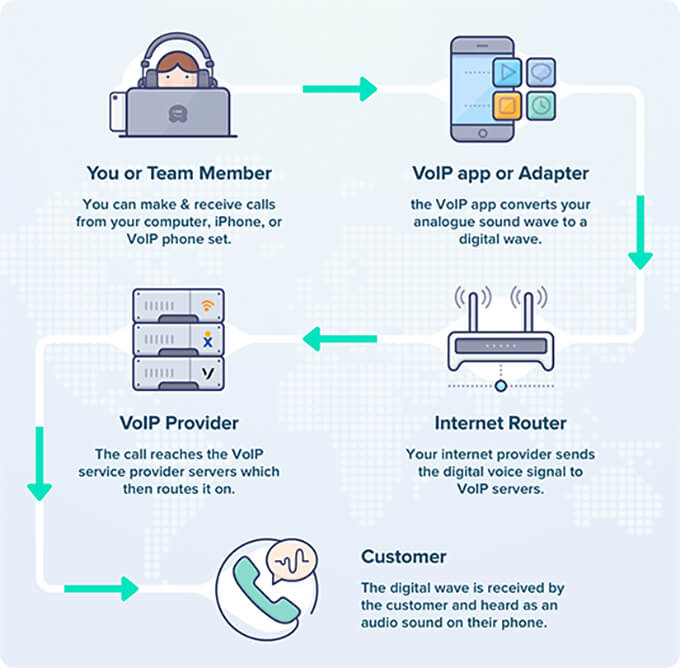
What is VoIP, and how does it work?
VoIP (Voice Over Internet Protocol) is a phone technology that allows you to make and receive phone calls using the internet instead of traditional phone lines.
We wrote a detailed guide on what VoIP is and how it works.
Here’s a quick visual VoIP infographic:
Is business VoIP phone service cheaper than a landline phone?
Yes, VoIP business phone systems are cheaper than on-premise landlines because they use your existing internet connection rather than requiring a separate system or hardware. A VoIP business phone service also lowers internal IT and support burdens by simplifying the overall workflow.
Typical landline phone providers charge extra for advanced call features like call queuing, call transfer / automatic call forwarding, music on hold, extension dialing, conference bridge, etc.
With business VoIP, all the advanced features are included in a flat monthly fee, and top providers like Nextiva allow you to save up to 90% on internal calling costs.
Another huge benefit is that you get international calling at far more affordable rates.
Can I switch from a landline phone to a business VoIP service?
Yes, you can easily convert your landline business phone system to a business VoIP solution. All the top business phone system companies, like Nextiva and RingCentral, make it easy for you to keep the same business phone number when switching from landline to VoIP.
How much does a business phone service cost?
The cost of your virtual business phone service will depend on the provider you choose, but typically, a VoIP service would cost around $20 per month.
Can I use my cordless phone with business VoIP?
Yes, you can use your existing cordless phones, softphones, and desk phones with most business VoIP providers. All the top providers that we mentioned in our list also come with a mobile phone app that you can install on your personal cell phone as well.
If you’re currently using analog phones or have a PBX setup, then you can use a VoIP adapter to keep the same business phone system.
What are the disadvantages of VoIP business phone systems?
VoIP business phone services make phone calls over the internet. The biggest disadvantage is that if you do not have a reliable internet connection, then your customer call quality will not be as good.
Also, if your business experiences a power outage, then it likely means that your internet router will also lose power. This can lead to call dropping. We always recommend using a battery backup with your internet router to avoid call quality issues.
I’ve also noticed many people forget a crucial safety step: emergency services. Unlike traditional landlines, VoIP doesn’t always automatically know your physical location. That said, you’ll need to manually update your address in your VoIP dashboard to ensure 911 dispatchers can find you during an emergency.
These disadvantages can be easily mitigated, and the advantages of VoIP business phone systems simply outweigh any cons.
You get all the advanced call features like call routing, music on hold, conference calls, auto-attendant, interactive voice response (IVR), call queuing, extension dialing, voicemail forwarding, video calling, and a lot of flexibility without the high costs of landline phones.
Which is the best business phone system, in your expert opinion?
Our top 3 choices for the best business phone services are:
No, this last question is not a joke. I seriously get this question even after referring people to this guide.
That’s why my team even made a video comparison of the top business phone services:
Related Reading for Business Phone Services
I hope this article helped you find the best business phone service for your small business. You may also want to see some other articles related to business phone systems:
- Best virtual business phone number apps
- Best call center software
- Best conference call services
- Best business cell phone plans
- Best business voicemail transcription service
- Best cheap VoIP phone services
If you liked this article, then please subscribe to our YouTube Channel for WordPress video tutorials. You can also find us on Twitter and Facebook.





coriander
Great breakdown! I really appreciate how you compared real-world usability instead of just features on paper. The pros and cons for each service made it much easier to understand which options actually deliver value in 2025. This kind of honest testing saves businesses a lot of trial and error.
WPBeginner Support
Glad our list was helpful!
Admin
Hanna Rodriguez
Do you have more detailed Price information
WPBeginner Support
As prices can change over time or due to seasonal sales, we recommend checking the sites for the individual products for more details on a specific product’s pricing.
Admin
Dayo Olobayo
Finding the right business phone service can definitely feel overwhelming. This article does a good job of breaking down the key features to consider. One thing I would add to the mix is security. Especially for businesses that handle sensitive information, it’s important to make sure your phone service provider has robust security measures in place.
Mrteesurez
Incredible article.
I have been looking for a way not to use my own number for my business, I then dedicated one of my numbers for Business but I can see in this article how to have a virtual numbers for businesses, thanks for this list.
But you didn’t include any free one there that I can just try out.
I admire that Nextiva because btheyvalsi have an app for both iPhone (iOS) and Google (Android) smartphones, but I don’t know if they have a free plan to start with.
WPBeginner Support
Due to the nature of these businesses they will not have a free version for now.
Admin
Fajri
I haven’t use any of phone service listed above yet.
But as anyone who grow their business and brands on internet, we are gonna need it.
I hope someday I can grow my website more, and one of the thing is to open the call support.
I’m saving this useful information right now.
Moinuddin Waheed
Having a good phone service is important for any business to grow.
Customer grievances redressal is of utmost importance when it comes to gain the customer confidence.
it is good to see that WordPress has this much option to add for a good business phone to the wordpress websites.
thank for the detailed list.
Adrienne
Need to review OpenPhone. it’s the best digital phone around.
WPBeginner Support
When we next update the article we will look into it
Admin
Konrad
It’s not just about looking professional, but also about optimizing customer interactions. The convenience of features like call forwarding and call recording can greatly boost efficiency. Thanks for the recommendations.
WPBeginner Support
You’re welcome, glad our recommendations were helpful!
Admin
Sharon
Nice read! It’s always interesting to explore new options, right? While VoIP services can be handy for businesses, it’s essential to weigh the pros and cons. In my case, running a solo freelancing business I’ve found that focusing on email works well for my clients, and it keeps things simple and cost-effective. I already fight the relentless spam calls on my cell phone (fortunately, there’s an app for that)! I’d hate to see how many spammers would take advantage of the VoIP services. Maybe in the future, I will get brave and add this service. Thanks for the information! As always, the information is welcomed and quite informative!
WPBeginner Support
Glad to hear our guide was helpful and email is most certainly a good way to go to get started
Admin
John
Thanks for sharing .
WPBeginner Support
You’re welcome
Admin
Sumaira anum
One of the best website and amazing content i like it. thanks for sharing such a nice content………………….
Vighnesh Prabhu
Informative article, thanks for sharing !
WPBeginner Support
You’re welcome
Admin
Rao Shakil Amad
Thanks for sharing this, very informative
WPBeginner Support
Glad you found it helpful
Admin
Anna K
The 8×8 price start at $12 per user per month with unlimited calling in US and Canada.
WPBeginner Support
Thank you for the notification about their lower-tier plan
Admin
Oseni Rofiat
Thanks for the input.
WPBeginner Support
You’re welcome
Admin
telpree
helooo
WPBeginner Support
Hello
Admin
James Robert
I use Nextiva, and love their service. Unbelievable product, and their customer service is amazing!
Braden Martin
Informative article, thanks for sharing! I agree, every business should employ business phone services, as they offer better call quality at minimal costs and easy accessibility and mobility to users as well as flexibility and enhanced overall performance of the business.
Dave Meyers
What about Google Voice & G-Suite’s Hangout’s integration? How does that stack up?
Susan Marshall VA
I would like to mention an even more affordable option for those on a tighter budget. I personally use Skype with a local phone number. I pay about $30 a year for my local number and $2.99 a month for outgoing calls including long distance. I don’t have heavy phone usage and this has worked well for me for several years.
Anthony
Thanks for the input, a great alternative.