


I still remember when the secret to SEO seemed to be stuffing your focus keyword into every possible sentence. It was a messy strategy that often made content unreadable and ultimately didn’t help anyone.
Thankfully, search engines have gotten much smarter, and so have we. After helping millions of users and optimizing our own sites for over a decade, our team has learned that getting SEO right isn’t about repetition, but about relevance and strategic placement.
In this guide, I’m going to walk you through the exact process we use at WPBeginner to handle focus keyphrases. You’ll learn how to use them effectively to please both your readers and search engines, without sacrificing quality.
Let’s start by clarifying what a focus keyphrase actually is and why it’s so important for your site’s success.

What Is a Focus Keyphrase in WordPress?
A focus keyphrase (also known as a focus keyword) is the main search term or phrase you want your WordPress post or page to rank for in Google and other search engines. Think of it as the core topic of your content that helps search engines understand what your page is about.
In our experience running multiple successful WordPress sites, we’ve found that choosing the right focus keyphrase is important for getting your content in front of the right audience. It’s one of the fundamental building blocks of effective WordPress SEO.
Let’s look at a practical example: If you’re writing an article about coffee shops in New York City, your focus keyphrase might be ‘best coffee shops in New York City’. You might also target variations like ‘coffee shops in NYC’ or ‘top NYC coffee shops’.
The key is to choose a focus keyphrase that matches your content’s main topic, uses language your audience actually searches for, and has reasonable search volume and competition.
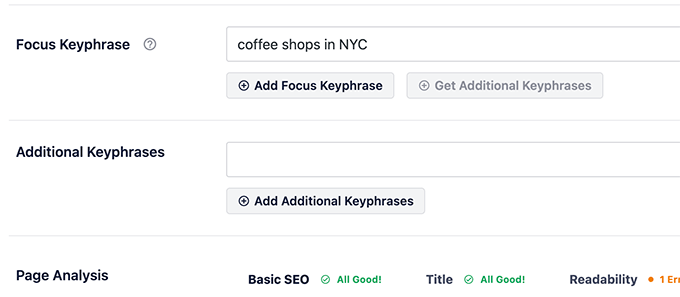
Modern WordPress SEO plugins make it easy to implement and optimize your focus keyphrases. For example, All in One SEO (AIOSEO) provides a dedicated focus keyphrase field and shows you a TruSEO score with actionable optimization tips.
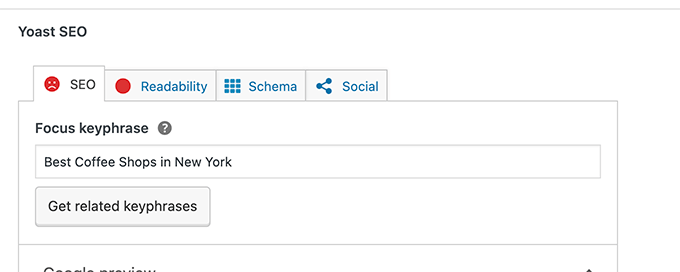
Similarly, Yoast SEO offers focus keyphrase analysis with specific recommendations to improve your content.
Once you’ve set your focus keyphrase, these tools will guide you in optimizing your content effectively without falling into the trap of keyword stuffing. They’ll help ensure your content reads naturally while still maintaining good SEO practices.
This approach reflects the latest SEO best practices we’ve tested across our sites, helping us achieve better rankings while maintaining high-quality, reader-friendly content.
How to Properly Use Focus Keyphrase in WordPress
For this tutorial, we’ll be using All in One SEO for WordPress which is the best WordPress SEO plugin on the market. It’s used by over 3 million websites, and this is the plugin we use here on WPBeginner.
With that said, the basic concept is the same, and the tutorial would work for any other SEO plugin that supports the focus keyphrase feature.
One of the advantages of using All in One SEO for WordPress is that it supports multiple focus keyphrases.
Plus, you also get a free Semrush integration that helps you unlock additional keyword ideas to make your content more comprehensive.
First, you need to install and activate the All in One SEO for WordPress plugin. For more details, see our step-by-step guide on how to install a WordPress plugin.
Note: There’s also a free version of AIOSEO plugin available that you can use as well, but for the sake of our screenshots, we’re using the Pro version.
Upon activation, the plugin will launch the setup wizard that will help you set up the plugin.

If you need help, see our tutorial on how to properly install and setup All in One SEO for WordPress.
Setting Focus Keyphrase in WordPress
After the setup, you can add a new blog post or page, or edit an existing one.
On the post edit screen, scroll down to the AIOSEO Settings section. From here, you’ll find the option to set a focus keyphrase for that particular post or page.
Simply enter your focus keyphrase and click on the Add Focus Keyphrase button.
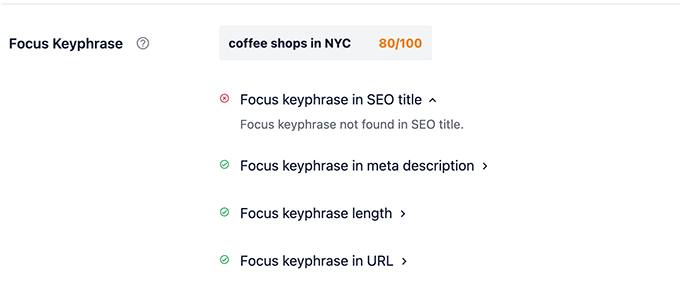
As soon as you set a focus keyphrase, All in One SEO will analyze your content for that particular keyphrase and will show you a score.
Improving Your Content for Focus Keyphrase
All in One SEO shows a score after you set your focus keyword with practical tips to improve your content for that particular keyphrase.
For instance, in the above screenshot, the plugin is telling us to include the focus keyphrase in the SEO title.
Following all the recommendations will help you improve your score. While a perfect score is a fantastic goal for your on-page SEO, remember that it’s a guide, not a guarantee for a #1 ranking.
Many other factors, like backlinks and site authority, also play an important role in search rankings.
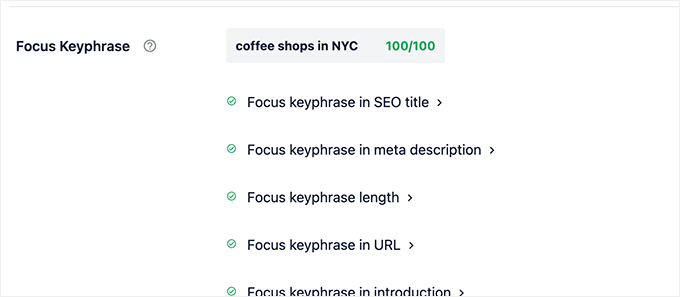
Let’s break down these recommendations so that you have them in mind when writing your content.
1. Focus Keyphrase in SEO Title
The plugin recommends adding your primary focus keyphrase in the SEO title.
By default, All in One SEO uses your post title in the SEO title. That means that if you used a focus keyword in the post title, then the SEO title will automatically include that.
You can also choose to have a custom SEO title and manually edit it in the AIOSEO settings for that particular post.

2. Focus Keyphrase in Meta Description
Meta description is the short SEO description for that particular content. By default, the plugin will pick it up from the post excerpt.
However, we recommend manually writing a meta description of no more than 160 characters for best results. This way you can creatively use your focus keyphrase in the meta description.
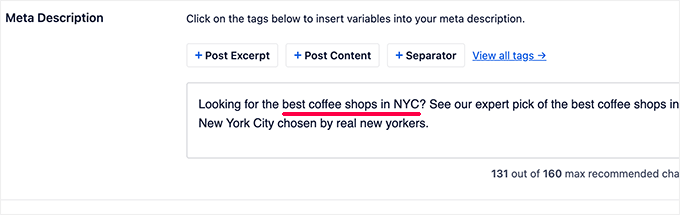
For more information, take a look at our guide on SEO title, meta description and keywords.
3. Focus Keyphrase Length
AIOSEO suggests keeping your focus keyphrase to around four words to help you stay focused on a specific topic. This is a helpful guideline, but don’t be afraid to use a longer keyphrase if it accurately reflects what your audience is searching for (this is often called a ‘long-tail keyword’).
4. Focus Keyphrase in URL
WordPress supports SEO friendly URL structures, which allow you to use meaningful URLs for your posts and pages.
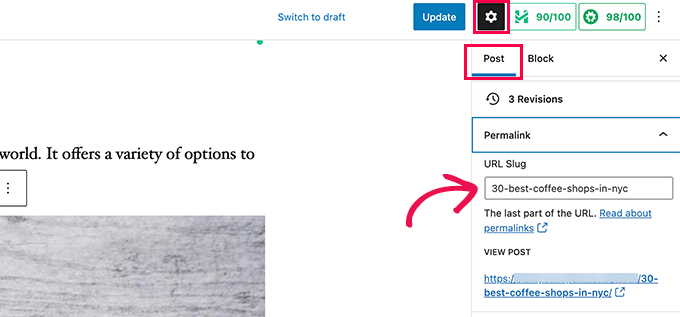
This URL is usually automatically generated from your post title. If you have used your focus keyphrase in your post title, then it will also be included in the URL.
However, you can also manually edit the URL under the Permalink section in the Post settings column.
5. Focus Keyphrase in Introduction
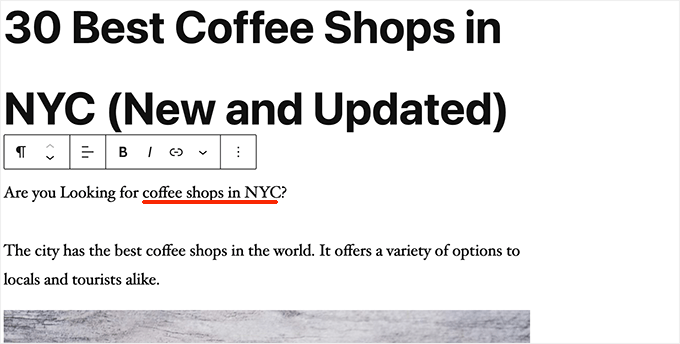
Adding your focus keyword in the introduction section of your article is highly recommended for SEO purposes.
The intro section is the first sentence or paragraph of your article. If possible, try to use the focus keyword as early as possible.
6. Focus Keyphrase in Subheadings
Subheadings are essential in making your content more readable. That’s why search engines consider them important.
Using your focus keyphrase in a subheading adds more weight to it.

7. Focus Keyphrase in Image Alt Attributes
Image SEO can help your content rank higher in search engines since images play an important role in improving user experience as well as SEO.
Alt text (also called the alt attribute) is a short, written description of an image. It’s super important because it’s read aloud by screen readers for visually impaired users and helps search engines understand what your image is about.
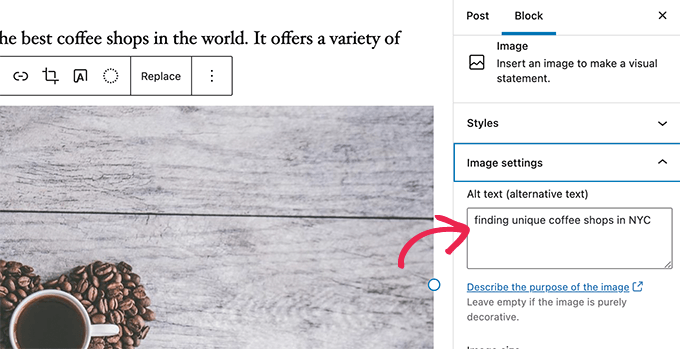
Your alt text should accurately describe what’s in the image. If your focus keyphrase fits naturally into that description, that’s great for SEO.
For example, for an image of the AIOSEO score, a good alt text would be ‘Perfect focus keyphrase score in AIOSEO’. However, you should never force a keyphrase where it doesn’t belong or add it to an image that it doesn’t describe.
Using all the above-mentioned tips for your primary focus keyword will give you a perfect focus keyphrase score.
Using Multiple Focus Keyphrases in WordPress
Search engines usually will look for more complete sources to show in search results, to make sure searchers get the information they’re searching for. That’s why longer blog posts often tend to rank better.
You can make your content more complete by trying to cover all the necessary information and keyphrase variations that a user may be looking for.
For instance, users looking for the best coffee shops in NYC may also be looking for famous coffee shops in Brooklyn.
All in One SEO for WordPress allows you to optimize your content for multiple focus keyphrases.
After you have optimized your content for the primary keyphrase, you can add more keywords under ‘Additional Keyphrases’.

All in One SEO for WordPress will show a score for each additional keyphrase that you add.
It will also show more recommendations for each keyphrase.
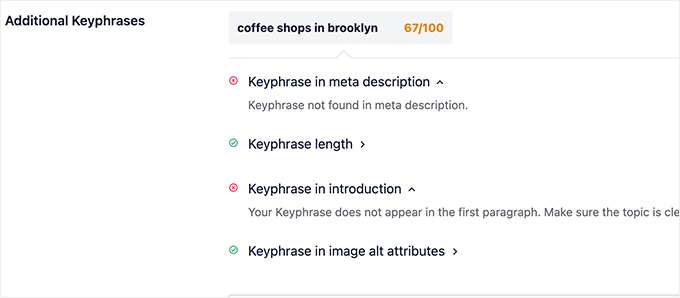
Now, it is important to understand that sometimes you may not be able to include a secondary keyphrase in the meta description, intro, or post title.
The most important rule is to always prioritize your human readers over search engines.
For example, let’s say your main keyphrase is ‘best coffee shops in NYC’. If you try to force a secondary keyphrase like ‘Brooklyn artisan espresso’ into your introduction where it sounds unnatural, you’ll just confuse your reader. It’s always better to write for humans first.
Find More Focus Keyphrase Ideas
Now when it comes to keyword ideas, most beginners often rely on their own instincts to guess what users may be looking for.
However, it is not necessary to use guesswork when you can get actual data.
All in One SEO for WordPress comes with built-in integration with Semrush to provide you with additional keyword ideas right inside the post editor. Semrush is the most comprehensive SEO tool on the market that helps you find smart insights with actual data.
Simply click on the Get Additional Keyphrases button under AIOSEO settings when writing a post.
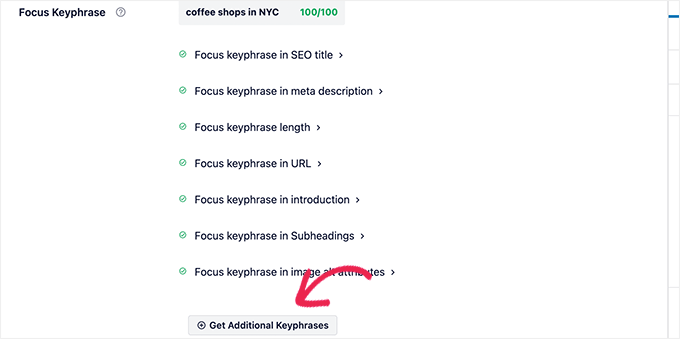
This will launch a popup wizard where you can either log in to your Semrush account or sign up for a new free Semrush account.
Note: If you want to try the pro version, you can use our exclusive Semrush coupon code to get a free 30-day trial.
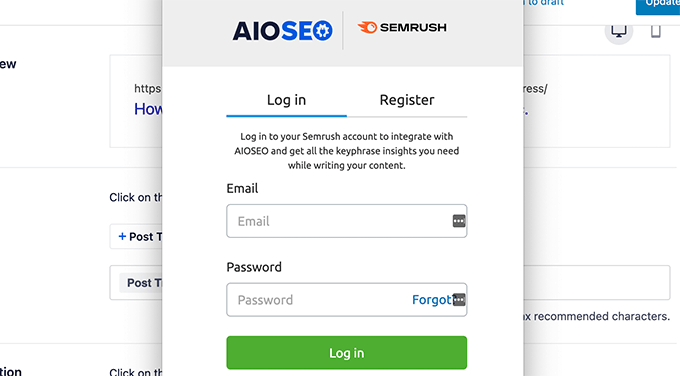
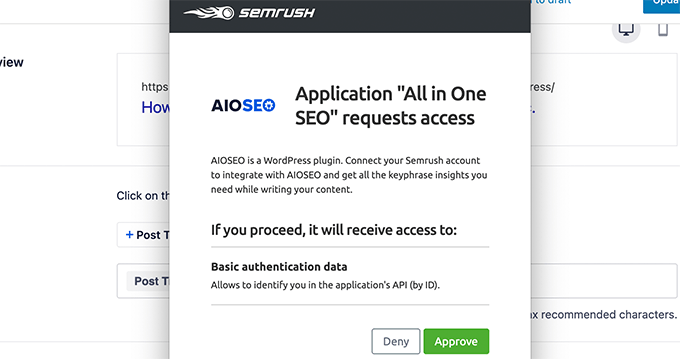
After that, you’ll be asked to give AIOSEO permission to connect to your Semrush account.
Click on the ‘Approve’ button to continue.
That’s it!
Once your site is connected to your Semrush account, the plugin will close the popup and fetch the additional keyword ideas.
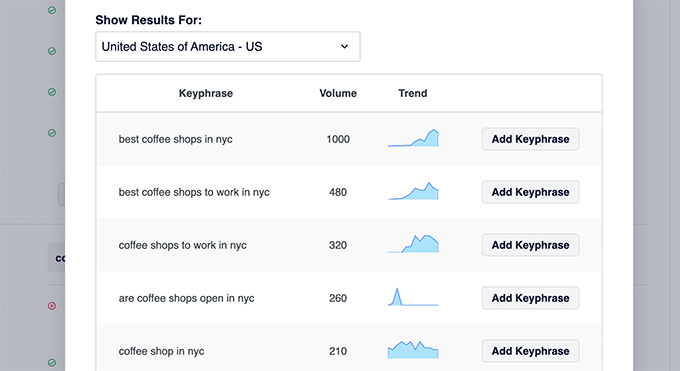
You’ll see a list of keyphrases with their search volume (how many people search for it each month) and a trend graph (showing if it’s becoming more or less popular).
Simply click on the ‘Add Keyphrase’ button to select a keyphrase and All in One SEO will show a keyphrase score right away.
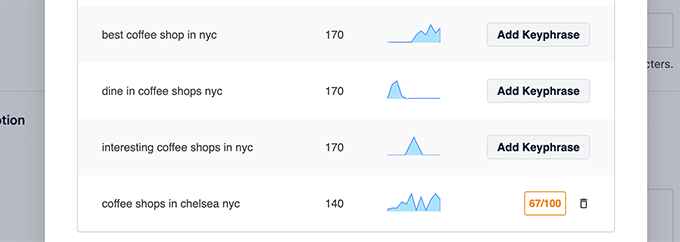
Tip: It is important that you need to write for humans first. Avoid changing your content unnecessarily just to stuff additional keyphrases.
Alternative: If you’re looking for an alternative to Semrush, you can use the free WPBeginner Keyword Generator. It will instantly generate 300+ keyword ideas from Google that you can use in your content.
Bonus: Track Your Keyword Performance with AIOSEO Search Statistics
Adding focus keyphrases is a great start, but how do you know if they’re actually working? That’s where AIOSEO’s Search Statistics feature comes in. It lets you easily see how your keywords are ranking in search results directly from the WordPress dashboard.
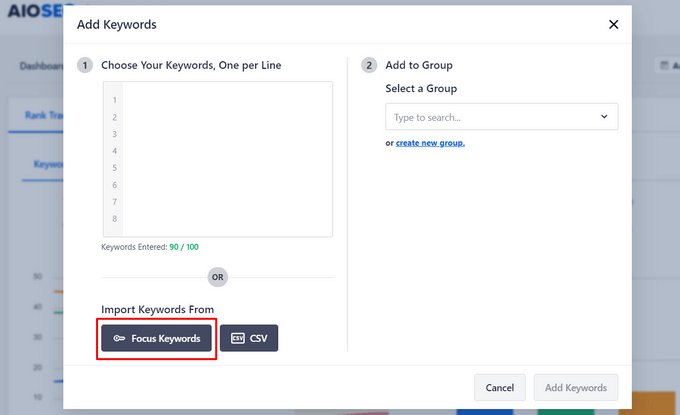
To get started, you can quickly import the keywords you want to track from the focus keywords in your posts.
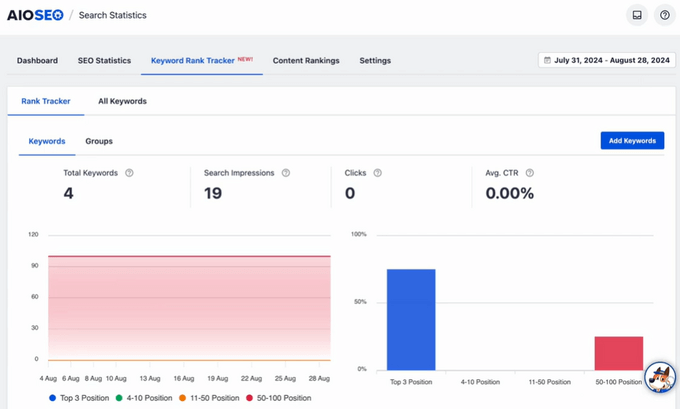
After that, the plugin will give you an overview of your keyword ranking positions in an easy-to-read report.
To see more details and how each specific keyphrase is ranking, you can scroll down the page.
This area includes important metrics like position, position history, search impressions, clicks, and average click-through rate.
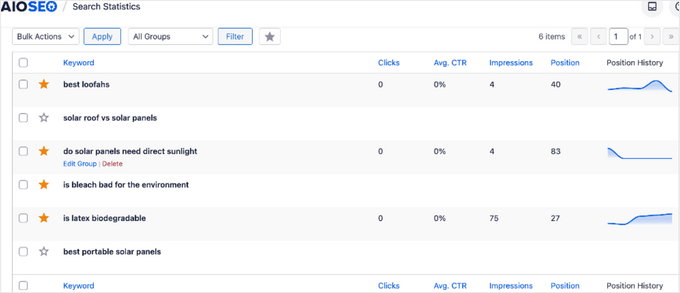
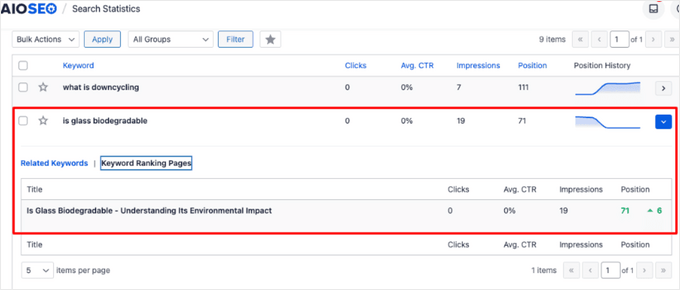
You can also see the exact pages that are ranking for a particular keyword.
To do this, simply click on any keyword to expand the section, and then click on ‘Keyword Ranking Pages.’
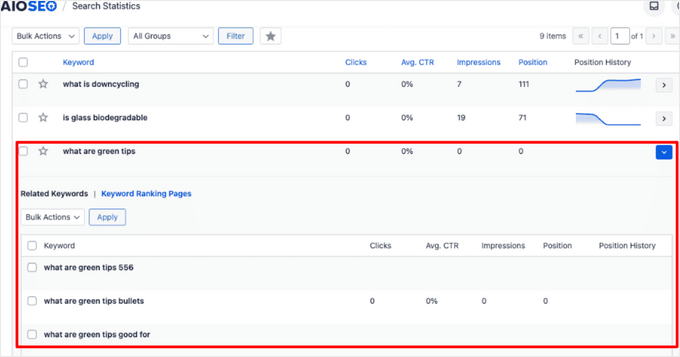
You can even discover more keywords related to the ones you’re already tracking by clicking on ‘Related Keywords.’
By regularly checking your AIOSEO Search Statistics, you can find out what keyphrases are driving results and adjust your strategy for maximum traffic.
For more details, see our guide on how to check if your blog posts are ranking for the right keywords.
Video Tutorial
Frequently Asked Questions About Focus Keyphrases
Over the years, we’ve received thousands of questions about SEO best practices. Here are answers to some of the most common questions we get about using focus keyphrases in WordPress.
1. What is the difference between a focus keyphrase, categories, and tags?
Think of them as having different jobs. A focus keyphrase is the specific search term you want a single page to rank for in search engines.
Categories are for broadly grouping your posts for users, and tags describe specific details within a post to help users find related content on your site.
2. How many focus keyphrases should I use per post?
You should always have one main focus keyphrase. For more comprehensive articles, you can add 2-4 additional keyphrases that are closely related variations or synonyms. The goal is to create in-depth content, not to stuff keywords where they don’t belong.
3. Does a perfect AIOSEO score guarantee a #1 ranking?
No, a perfect on-page SEO score doesn’t guarantee a top ranking. While it means your content is well-optimized, search engine rankings are also influenced by many other factors like your website’s authority, backlinks, site speed, and the overall competition for that keyphrase.
4. Should I use the same focus keyphrase on multiple posts?
It’s best to avoid this. Using the same focus keyphrase on multiple posts can cause keyword cannibalization, where your own pages compete against each other in search results. Every post and page should target a unique keyphrase.
5. Can I change my focus keyphrase after publishing an article?
Yes, you can. If you find a better keyphrase or your post isn’t ranking for the current one, you can update it. When you do, make sure to also update your SEO title, meta description, and content to reflect the new keyphrase for the best results.
Next Steps to Improve Your WordPress SEO
We hope this article helped you learn how to properly use focus keyphrases in WordPress. Now that you’ve mastered this skill, here are a few other guides that will help you get even more traffic from search engines.
- How to Improve Your Organic Click-Through Rate (CTR) – Learn our proven tips to make your search engine listings more compelling so more people click on your links.
- Best SEO Rank Tracker Tools – Discover the top tools to monitor your keyword rankings and see how your SEO strategy is performing over time.
- How to Properly Set Up All in One SEO – Our ultimate guide walks through every feature in AIOSEO to ensure your website’s technical SEO is perfectly configured.
If you liked this article, then please subscribe to our YouTube Channel for WordPress video tutorials. You can also find us on Twitter and Facebook.




Dennis Muthomi
The section about tracking multiple keyphrases has been particularly valuable across my client websites.
For me, I create a spreadsheet to track primary and secondary keyphrases across different posts – it’s incredibly helpful when managing multiple sites and identifying content gaps or optimization opportunities.
Helen Vorrath
In the article it says:
“One of the advantages of using All in One SEO for WordPress is that it supports multiple focus keyphrases.
Plus, you also get a free Semrush integration that helps you unlock additional keyword ideas to make your content more comprehensive.
First, you need to install and activate the All in One SEO for WordPress plugin. For more details, see our step-by-step guide on how to install a WordPress plugin.
Note: There’s also a free version of AIOSEO plugin available that you can use as well, but for the sake of our screenshots, we’re using the Pro version.”
It would be helpful if you noted that you can only use the free Semrush integration if you have the Pro version of AIOSEO.
WPBeginner Support
Unless we hear otherwise, you should be able to use it with the free plugin, you would want to ensure you have one keyword set if the button is not clickable for you.
Admin
Mrteesurez
Thanks for bringing up the topic of using focus keyphrases in WordPress with AIOSEO. it’s crucial for effective SEO. I remember when I first started optimizing my posts, I was overwhelmed by the technicalities of SEO, especially with focus keyphrases. But once I began using AIOSEO, it became much more manageable. For example, when I worked on a blog post about starting a business, I learned the importance of not just stuffing the keyphrase but strategically placing it in the title, meta description, and throughout the content. AIOSEO’s on-page analysis guided me to tweak my keyphrase usage, which significantly improved my rankings. By following its suggestions, I saw a jump in organic traffic, proving that even small adjustments can make a big difference. So, for beginners, understanding and correctly implementing focus keyphrases with tools like AIOSEO can be a game-changer for your site’s visibility.
Dayo Olobayo
I use aioseo plugin and have always implemented the focus keyphrase in my articles but never properly understood the impact of the additional focus keyphrase. Please what should be the minimum Truseo score if I’m using an additional keyphrase?
WPBeginner Support
Other than improving the score when able, there is no specific score we would recommend as a minimum at the moment. The higher the number is normally better as long as you are still writing for your audience first.
Admin
Dayo Olobayo
Thanks for the heads up. I’ll always focus on writing for my audience while aiming for higher scores.
Moinuddin Waheed
giving attention to focus key phrases is as important to include in the content as focus keywords.
I have seen and have realised my self as well that whenever we make a search, we give key phrases to the Google search and that is what Google algorithms crawls for in its pages.
Having said this, is focus key phrases same as that of long tail keywords concept?
or they are different concepts?
WPBeginner Support
A keyphrase is normally the general concept and long tail keywords would be the very specific keyword but they can be used the same way if you knew the long tail keyword you wanted to target.
Admin
Moinuddin Waheed
Thanks wpbeginner for the reply and clarification of both the terms.
I have confused both the terms for a long and didn’t know much about its difference or the similarities.
in a way both serve the same purpose of targetting s specific keyword phrase which we specifically call as long tail keyword as we want to target pointedly that phrase.
Denise
I cannot get past the first screen in the wizard, it just sits there and the dot at the bottom flashes. Been over 30 min since I hit save.
WPBeginner Support
It sounds like your site many be running into an error, if you reach out to the plugin’s support they should be able to help diagnose and assist.
Admin