


We test hundreds of WordPress plugins on our own websites every year. It is a familiar sight to see a long list of deactivated tools gathering digital dust in the dashboard.
You might worry that these unused files will hurt your page speed or cause security issues. We hear this valid concern from our readers all the time.
Thankfully, you do not need to panic about a sluggish website. We have thoroughly checked how these inactive plugins actually affect performance.
In this guide, we will explain exactly what happens to your site. We will also show you the safest way to handle them.
What Are Deactivated or Inactive Plugins in WordPress?
The best thing about WordPress is that you can extend it using WordPress plugins. When you install a WordPress plugin, WordPress downloads the plugin file to your web hosting server.
In order to start using a plugin, you will need to activate it.
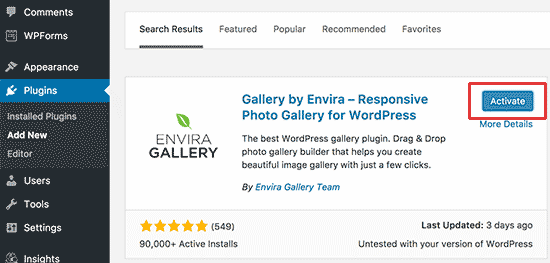
You can install plugins and activate them later.
You can also deactivate a plugin that you tried but didn’t find useful. You can see all your installed plugins (both active and inactive) on the Plugins page in the WordPress admin area.
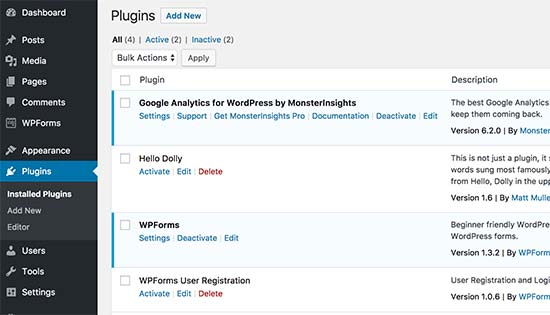
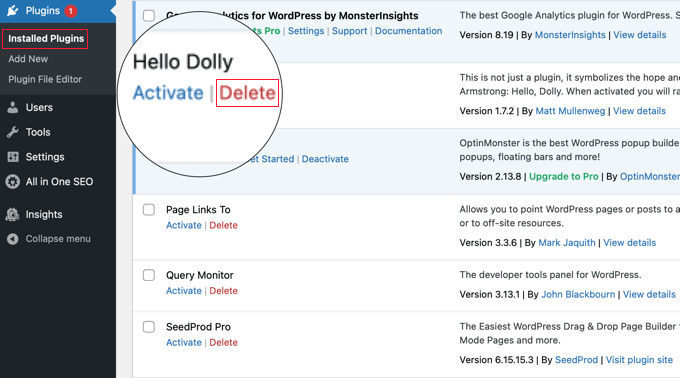
Active plugins are highlighted in blue, and inactive plugins show a ‘Delete’ link below them.
Do Inactive Plugins Slow Down WordPress?
No, inactive or deactivated plugins do not slow down WordPress. To understand that, let’s see how WordPress works behind the scenes.
Each time a user requests a page from your WordPress site, WordPress starts a loading process. During this process, it only loads active plugins installed on your website. All inactive plugins are totally ignored and are not loaded or even looked at.
Even if you have dozens of inactive plugins installed on your WordPress website, they won’t affect the performance of your site or make it slow.
The only time WordPress looks for inactive plugins on your site is when it loads the ‘Installed Plugins’ page in your WordPress admin area. Even then, it just quickly reads the plugin’s header file (a small text file with basic info like the name and version number) to create the list you see.
If your WordPress site is slow, then inactive plugins are definitely not the reason. See our guide on the common issues that make WordPress slow and how to fix them.
You may also want to check out our step-by-step guide to speed up WordPress and boost performance.
Should I Delete Inactive Plugins in WordPress?
WordPress lets you deactivate plugins, so you can temporarily turn them off without losing them.
If you plan to use that plugin soon, and you fear that deleting the plugin will delete its settings, then you should keep it.
Otherwise, there is really no point in keeping the inactive plugins installed on your website. In fact, they can be quite problematic at times.
For example, whether or not you are using that plugin, WordPress will still show you updates for those plugins. This can be a bit annoying, particularly if you have many regularly updated plugins installed on your site.
While inactive plugins are harmless on their own, it’s important to remember they are still pieces of software code on your website.
Think of an inactive plugin like an unused, locked door in your house. While the door is locked, it’s generally fine. But if that door is old and has a weak lock (like an outdated plugin with a known vulnerability), it becomes a potential entry point for hackers to break into your website from the outside.
In the unlikely event of a security breach, these outdated plugin files could potentially be used by hackers to hide malware or cause other damage.
Before you delete anything, we highly recommend creating a complete backup of your website using a plugin like Duplicator.
Then, as a WordPress security precaution, you should delete any inactive plugins that you do not intend to use. You can learn how to do this in our beginner’s guide on how to properly uninstall a WordPress plugin.
What Actually Makes Your WordPress Site Fast?
Keeping your plugin list tidy is a great habit for site security and organization. But for a truly fast website, you need a tool that actively optimizes performance.
At WPBeginner, we rely on WP Rocket to handle our site caching and speed optimization. It makes a significant difference by taking care of complex technical details, like saving static versions of your pages (caching) and making your website files smaller (minifying code), which goes far beyond simple plugin management.
While deleting inactive plugins is smart housekeeping, a premium performance plugin like WP Rocket is what will make your site feel lightning-fast for your visitors.
Frequently Asked Questions About Inactive Plugins
We often get questions from our readers about managing plugins. Here are the answers to some of the most common ones we receive.
1. Do inactive plugins slow down WordPress?
No. Think of inactive plugins as being ‘asleep.’ When a visitor comes to your site, WordPress only ‘wakes up’ your active plugins to build the page. The inactive ones are left alone, so they have zero impact on your site’s loading speed. 😊
2. Is it safe to delete inactive plugins?
Yes, it is not only safe but also recommended to delete inactive plugins that you don’t plan to use again. While harmless when dormant, they are still files on your server and could become a security risk if not updated.
3. Will deleting a plugin also delete its settings?
This is a great question, and it really depends on the plugin’s developer. Many well-coded plugins will clean up after themselves and remove their settings, while others intentionally leave data in your database.
Developers often do this so that if you ever decide to reinstall the plugin later, you won’t have to configure your settings from scratch.
Pro Tip: Before deleting a complex plugin, check its settings page for a ‘delete data on uninstall’ option. If you think you might use it again and don’t want to reconfigure it, just leave it deactivated.
4. Can inactive plugins pose a security risk?
Yes, they can. Even though they aren’t active, inactive plugins are still executable files on your server. If a hacker gains access to your site, they could use a vulnerability in an old, outdated, and inactive plugin to inject malware.
Expert Guides on WordPress Plugins
If you found this article helpful, you might want to check out these other guides on best practices for managing WordPress plugins:
- What Are WordPress Plugins? And How Do They Work?
- Which WordPress Plugins Are Slowing Down Your Site?
- Beginner’s Guide: How to Choose the Best WordPress Plugin
- When Is It Worth It to Buy Premium WordPress Plugins? (Explained)
- How Many WordPress Plugins Should You Install? What’s too many?
- How to Properly Update WordPress Plugins (Step by Step)
- Should I Update WordPress or Plugins First? (Proper Update Order)
- Is It Safe to Use Outdated WordPress Plugins? (Explained)
- Should You Install Plugins Not Tested With Your WordPress Version?
- WordPress Plugin vs Functions.php file (Which Is Better?)
If you liked this article, then please subscribe to our YouTube Channel for WordPress video tutorials. You can also find us on Twitter and Facebook.


Mrteesurez
Another thing is that inactive plugins when they are more can take of space on your server and also all folders therein are counting to your hosting Inode limit. It’s better to disactivate and removed or deleted away. thanks.
Dennis Muthomi
Speed and performance is not a reason for me to remove them.
But, I have made it a habit not to keep unused plugins installed for security reasons. Even inactive plugins can potentially pose vulnerabilities if they become outdated or infected.
Totally agree with the recommendation to fully uninstall plugins you are not using rather than just deactivating.
Mrteesurez
I appreciate your contribution on this topic, it’s crucial for a secure WordPress site. You are right that speed and performance aren’t the only reasons for plugin management. From my experience, inactive plugins can pose risks and even take up server space, Inode (this is what happened to me). I now fully uninstall unused plugins or download them for later use. This practice helps avoid security vulnerabilities and keeps my sites running smoothly. Thanks for highlighting this important point!
Jiří Vaněk
I completely agree Dennis, but I would just add—and many people don’t do this—that the same situation applies to themes. It’s good to have one active and one backup theme, but then delete all the others, just like with inactive plugins. Every theme, besides the graphics (images), is essentially a set of PHP code, and if an inactive theme is still on the website, it can pose the same risk as an inactive plugin. A good practice is to treat all inactive WordPress elements, which don’t necessarily need to be there, in the same way.
Jiří Vaněk
Thanks for confirming my theory that inactive plugins are ignored by WordPress. In my practice, I don’t keep unused plugins on WordPress. Not because of speed, but precisely because of the potential risk of vulnerability. Basically, thanks to this article, you have confirmed that I am doing it right. Thank you for the information.
Dayo Olobayo
Thanks for clearing this up… I always thought inactive plugins might be slowing things down, but it’s good to know that’s not the case. However, I will be more mindful of keeping my plugin list clean to avoid any security vulnerabilities.
WPBeginner Support
Glad we could clear up that common misconception
Admin
Mrteesurez
For me, the reason why I keep inactive is for a fear of if plugin will be available for download again. It has happened to me twice, I got to the plugin directly to download the plugin but no find it again (has been removed or stopped).
Although, this day I don’t usually keep them much as I would have downloaded the plugin files on my system in case I later need it or it’s elements.
thanks.
WPBeginner Support
You’re welcome and there’s nothing wrong with downloading the file off your site instead of keeping the plugin inactive on your site
Admin
Moinuddin Waheed
This is infact I have done several times that to keep the plugin files, I keep an offline backup.
Wig every new release of the plugin I keep updating the offline folder with the new plugin.
Just keeping the plugin inactive in the dashboard just for this reason doesn’t seem wise as it may cause security loopholes.
Chris
HI,
I have deactivated a few plugins but have not deleted them in case I want to use them later.
But the Updates to these Plugins show up on my Dashboard under the Updates and Plugin tabs.
Is there a way to turn off the notifications for updates to Deactivated Plugins?
Thanks.
WPBeginner Support
We would not recommend removing the update notification and you should keep the deactivated plugins up to date to keep your site safe.
Admin
Chris
Thanks for the reply to my question and confirming that deactivated plugins should be kept up to date.
Harwinder Karwal
Do I lose the database on deactivating a plugin?
Do I get the database after reactivating a plugin?
Any other benefit of the deactivation/activation process of the plugin (s)?
WPBeginner Support
It would depend on the plugin but you should keep the plugin data when you deactivate a plugin and don’t completely remove it so it would have all of your information when reactivating your plugin.
You would normally only have deactivated plugins on your site if you are troubleshooting a problem or have a very specific need for a plugin for a limited time.
Admin
Mark
Is there any performance benefit (or problem) in deactivating a plugin that is used to develop your site so for example Elementor or Contact Form 7. It could then be activated if you need to edit later.
WPBeginner Support
Deactivating a plugin would remove its functionality until the plugin is reactivated. If you’re not using the plugin then deactivating it could help a small amount with your site’s performance.
Admin
rakesh kumar
I do understand that inactive plugins do not slow-down you website if they are not in a very large number as they have very small footprint in your database, Since the information of the plugin is stored in the database and every time WordPress generate a new page, looks in the database, So according to me if you are not using any plugin then all the traces of that plugin must not appear on your system. If they are there then it should slow-down the website.
Max
Ok,
but plugin is a piece of code and has weight anyway. Theoreticaly it must slow down the site does it?
WPBeginner Support
No, it does not. It takes space on your hosting storage but it is not executed. It does not consume any memory to slow down WordPress.
Admin
Luis Daniel Carbia
Hey, I had this doubt and this article resolved it the correct way: concise and detailed. Thanks!
Jason
If working on a client’s site, i always like to remove any inactive plugins I do not think we will need to use. That way, your client does not intentionally or inadvertently active any plugin(s) they are not familiar with. Removing inactive plugins also lessens any hacker’s targets.