


Getting an email from your web host about a “PHP update” can feel a little nerve-wracking. After all, PHP is the engine that powers your entire WordPress site, and technical jargon can be confusing.
The last thing you want is for a server update to cause conflicts or take your website offline. I’ve managed hundreds of WordPress sites, so I have navigated this process many times.
In this guide, I’ll walk you through exactly what this update means. I’ll also share the simple steps you can take to ensure everything goes smoothly.
What is PHP and Why Does WordPress Need It?
WordPress is developed using PHP, which is an open-source programming language. It runs directly on your web hosting server to build your WordPress pages and serve them to your visitors.
Think of it as the core engine of your website. Without PHP, WordPress simply wouldn’t work.
WordPress and PHP Updates
Like WordPress itself, PHP is constantly evolving with newer versions that offer better performance and security.
At the time of writing, WordPress requires at least PHP version 7.4. However, the official recommendation from WordPress.org is to use version 8.1 or greater.
I have noticed that most shared hosting providers offer stable, well-tested versions of PHP. You can typically update or even downgrade it from your hosting control panel.
You can see which PHP version your website is using by going to the Tools » Site Health page and switching to the ‘Info’ tab.
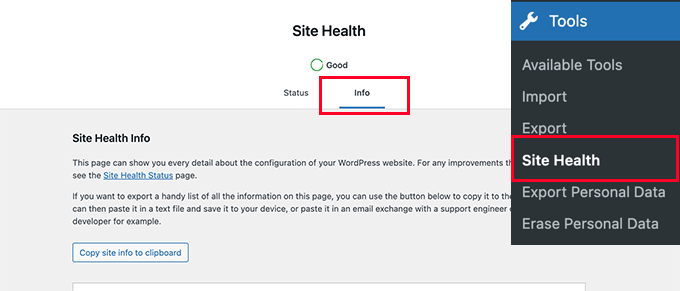
Next, you need to scroll down a little and click to expand the ‘Server’ tab.
This section shows server information, including the PHP version your server uses.
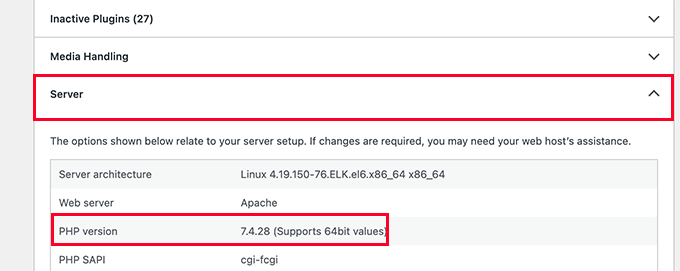
Note: If this section shows anything below PHP 7.4, then you need to update your PHP version as soon as possible.
Why Don’t Hosting Providers Use the Latest Version of PHP by Default?
I have seen many web hosting companies prioritize stability over using a cutting-edge PHP version. A brand new version could cause apps that run on PHP, like WordPress, to misbehave or stop working if plugins and themes aren’t fully compatible yet.
However, they also don’t want to stay far behind. A PHP update initiated by your web host is supposed to go smoothly, but it can also go wrong. It often depends on your web host and how they configure their servers.
This is why I always recommend choosing top-tier WordPress hosting, as it ensures that highly skilled engineers maintain those servers.
Bluehost, Hostinger, and SiteGround are popular, reliable web hosting services. They all support modern PHP versions that meet WordPress requirements.
Choosing an unreliable web host for your WordPress site can cause unexpected downtime during or after the update. In those cases, there is little you can do except switch to a better host.
Things You Need to Do When Your Host Updates PHP
Your web host is probably already hosting thousands of WordPress sites. They take precautions to ensure everything goes smoothly for their customers.
The notice you received is to inform you about the update so you can verify that your site is working correctly afterward. While it’s unlikely that this update will break things, it is always good to be prepared.
Here are a few things you can do to prepare for the update.
1. Make a Complete WordPress Backup
First, I always recommend that my readers regularly back up their WordPress sites. If you don’t have an automatic backup solution, see my list of the best WordPress backup plugins to choose one.
I personally recommend Duplicator. At Awesome Motive, we use it to back up and migrate many of our own websites. It allows you to create scheduled backups and safely store them in cloud services such as Dropbox and Google Drive.
You can also use the free version of Duplicator to get started. It lets you create on-demand WordPress backups easily.
To learn more, see our full Duplicator review.
Alternatively, you can manually back up the WordPress database and download all your website files using FTP.
2. Install WordPress Updates
After creating a backup, you need to make sure you are running the latest version of WordPress. You should also take a moment to update your plugins and themes.
To do so, simply go to the Updates screen and install any available updates.
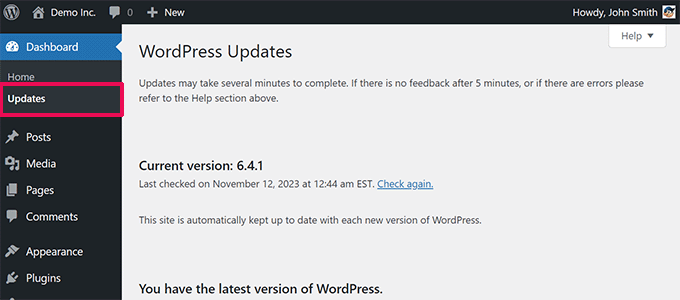
PHP updates are generally safe for the WordPress core software and most popular plugins. However, a poorly coded or outdated plugin may stop working.
If a plugin on your site has stopped working after a PHP update, you need to contact the plugin author for support or find an alternative.
What to Do if a PHP Update Breaks Your WordPress Site
There is a very small chance that a PHP update will break your WordPress site. However, with the abundance of free and paid plugins, a single line of poor code can result in any of the common WordPress errors.
If your site has a problem after the update, here are the steps to follow:
- Isolate the Problem: The first thing you need to do is see if the error is caused by a plugin or theme. To do that, you can deactivate all your WordPress plugins and switch to a default theme like Twenty Twenty-Four. If this fixes the issue, you can reactivate them one by one to find the culprit.
- Contact Your Host: If deactivating plugins doesn’t solve the issue, I suggest contacting your web host’s support team. They are likely aware of the update and can provide the necessary assistance.
- Restore From a Backup: If your web host is unable to help you, the next step is to restore your WordPress site from the backup you created earlier. This will get your site back online quickly while you investigate further.
- Switch Hosting Providers: If your hosting provider cannot solve the issue or these problems happen often, it may be time to change your WordPress hosting. A reliable host is the foundation of a healthy website.
Frequently Asked Questions About PHP
Will updating PHP make my WordPress site faster?
Yes, in most cases it will. Each new version of PHP brings performance improvements, making it more efficient at processing code. This can lead to faster page load times and a better experience for your visitors.
What is the safest PHP version for WordPress?
The safest version is the one recommended by WordPress.org, which is currently PHP 8.3 or greater. This ensures you get the best balance of modern performance, strong security, and wide compatibility with themes and plugins.
Is PHP 8.4 Compatible with WordPress?
Yes, PHP 8.4 is fully compatible with WordPress 6.9 and greater.
Additional Resources
I hope this guide helped you understand how your web host’s updates impact your WordPress site.
You may also want to see these other helpful articles:
- Tips to Improve Your WordPress Site Health Check Score
- Beginner’s Guide: How to Safely Update WordPress (Infographic)
- The Ultimate Guide to Boost WordPress Speed & Performance
- How to Backup Your WordPress Site (Ultimate Guide)
If you liked this article, then please subscribe to our YouTube Channel for WordPress video tutorials. You can also find us on Twitter and Facebook.



Moinuddin Waheed
updating to the latest version of php may cause to break the website and cause several other problems.
I have faced this issue and asked my hosting provider to update it for me. This solved the issue .
Thanks wpbeginner for bringing this to our attention. This is really a very serious cause of concern for many who gets in trouble by updating php version without taking backup or other considerations.
Rosemary Lafferty
Excellent explanation, thank you
WPBeginner Support
You’re welcome, glad our guide was helpful!
Admin
Rafal
I don’t understand. I have notice on dashboard “PHP Update required”. You wrote above “This is why we recommend our users to choose the best WordPress hosting, so they know that there are top-notch engineers who are looking after those servers.”. I have bluehost, top one recommended by you. And what next?
WPBeginner Support
If you reach out to their support they can update your PHP for you. Hosts will set you up with the up to date versions of PHP but they don’t always update the PHP without you reaching out to ensure nothing is broken on your site should you still need to use an older version of PHP.
Admin
Miley Cyrus
Interesting article….
WPBeginner Support
Thank you
Admin
Rozina
Thanks for such useful articles by your excellent editorial staff.
I would really appreciate if you could let us know as to which PHP handler is being used on this website – Really impressive that WPB loads fast even with such high traffic.
As per info available on this topic DSO is supposed to be faster than suPHP, but it is really unclear as to how fast DSO is in comparison to suPHP (secure, stable and works well with wordpress).
Wolfgang
This is an important criterion for a beginner with a limited budget who has so many starting expenses. But it should not be the main guiding force. In the long run, cheap may not necessarily be the most economical. If the level of services is good then a little investment will pay for itself through better performance. Look for web hosting plans offered by affordable companies which provide quality with reasonable rates for web hosting.
Roger
Perfect timing; I just got that same email a couple weeks ago. BTW, I’ve started referring my clients to your website for tutorials. Fantastic content .
Thank you.
Helen
Do you have a current article on good hosting? Your archived article from 2009 is outdated and recommends host gator!
WPBeginner Support
Yes we still recommend HostGator.
Admin
Carole Rains
The PHP update by Bluehost broke the checkout page on my Wordpress site. Items added to the cart did show up in the cart page at checkout, but the cart icon in my header said the cart was empty. In addition, when the button for “enter credit card info” is clicked, it triggers an error message that says invalid shipping method. Bluehost agreed to switch me back to PHP 5.2 temporarily, but said at some (undetermined) point in the near future they will switch to the new version regardless.
Any suggestions on how I can fix this?
Marilyn Lesniak
When I updated my pho to the newest versuon, I only got 1 problem. When I open posts and click on tags I receive this message.:
How do I fix this? Thx!
Jan Reilink
(as sent via Twitter)
It’s not PHP updates that break WordPress websites or plugins. It’s not updating WordPress (or plugins) that breaks when PHP is updated… BTW, the WordPress core and most plugins I use run perfect with PHP 5.5.
Most hosting providers will keep an older PHP version available for customers to temporarily switch back to when something goes wrong. Where I work, 5.4.* is the default and both 5.5* and 5.3* are available. Version 5.3 until PHP drops the support for security updates.
So, always check with your hosting provider first if that is possible before getting angry with your hosting provider…
For as far as I know, a lot of hosting companies configured PHP in a way that lets you set up custom configuration settings through .user.ini files: http://www.php.net/manual/en/configuration.file.per-user.php. When all error reporting and/or displaying is disabled, you can easily enable the logging and/or displaying of errors:
log_errors = On
error_log = “/path/to/your/logfile.txt”
display_errors = On
This will ease the fixing of older, poorly maintained plugins.
Conrad
Another item to watch out of is that plugins and other applications that have been protected with older versions of Ioncube might stop working when the PHP version is changed. The developer of the plugin or application needs to update their Ioncube protection first.
Once you make the change, you need to make a list of all the plugins & applications you are using and go through then one by one to check for functionality with the new php.
That said, I am running bleeding edge PHP with the latest WP and apart from applications that were protected with old Ioncube versions, everything is running smoothly.
Zimbrul
I’ve noticed my host allow me to choose what version of PHP I want to use for each site hosted on a shared account. After reading this I will use that option with caution.