


Have you ever found a helpful code snippet online but felt nervous about adding it to your WordPress site? You’re not alone.
While copying and pasting code in WordPress theme files might seem easy for experienced users, it can be intimidating for beginners.
At WPBeginner, we publish a lot of WordPress tutorials that instruct readers to add code snippets to their sites. Because of this, we get frequent questions from users who are understandably worried about messing things up.
That’s why we’ve put together this guide. In this article, we’ll show you how to copy and paste code snippets from the web into WordPress without breaking your site.

💡Quick Answer: How to Add Code Snippets in WordPress
In a hurry? Here are the 3 ways to add code snippets to your website:
Method 1: Add Code the Easy Way with WPCode. You can use this free plugin to add and manage snippets right from your dashboard, and it checks your code for errors before it goes live. We recommend it for most people, especially beginners who want the safest option.
Method 2: Store Code in a Site-Specific Plugin. This is a simple custom plugin you create to hold all your snippets, so they keep working even if you switch themes or update WordPress. It is a good choice if you are comfortable with code but want to keep it separate from your theme.
Method 3: Add Code Directly to functions.php or Theme Files. You can paste snippets straight into your theme’s files, but they will disappear if you change themes. We only recommend this as a last resort, and always back up first.
Why Add Code Snippets to Your WordPress Site?
WordPress is the best website builder in the world due to the flexibility it offers. It’s super easy to add new features and functionality to your site and can help build nearly any type of website.
We share all kinds of tips and tricks you can use to make your website better. Some of these tips will ask you to add code to WordPress.
While adding custom code snippets to your website is optional, and you can often find plugins to do the same task, sometimes a simple snippet is more efficient.
Often, adding code snippets can be an easy way to fix many common WordPress errors, improve your WordPress security, and add new features to your website.
With that said, let’s take a look at how to add code snippets to your WordPress website safely.
What are the Best Ways to Add Code Snippets in WordPress?
It’s important to mention that before you start adding code snippets to your WordPress website, you should install and use a WordPress backup plugin.
This keeps your WordPress site safe, and you can always restore it from a backup in case anything goes wrong.
When adding snippets to WordPress, you may find instructions to add them to WordPress theme template files, like index.php, single.php, and more.
These snippets are only useful for those specific theme files, so you will have to add them directly or create a WordPress child theme.
However, most code snippets will be added to your WordPress theme’s functions.php file. Some tutorials might recommend adding it directly to the file, but there are much better alternatives that allow you to future-proof your changes.
This way if you ever change a theme, your custom functionality will not be removed.
There are different ways to edit WordPress files depending on which method you choose to add custom code snippets to your WordPress blog or website.
With that said, let’s take a look at some of the most beginner-friendly ways to add custom code snippets in WordPress.
Method 1: Adding Custom Code with the WPCode Plugin (Easy)
Using a code snippets plugin is the safest and most beginner-friendly way to add code to WordPress.
The WPCode plugin lets you add and manage custom code snippets on your website easily, without having to edit your theme files.
It comes with smart code snippet validation to help you prevent common code errors. This protects you from breaking your website when adding code snippets.
WPCode also has a built-in code library that makes it easy to find all of the most popular WordPress code snippets. You can add these expert-written code snippets in just a few clicks.
The best part is that it lets you manage all code snippets from one central screen, and you can even organize them using tags.
The free version of WPCode comes with everything you need to add custom code in WordPress. WPCode Pro offers advanced features like a private cloud snippet library, conversion pixels, scheduled snippets, and more.
Note: The WPCode method is useful for snippets that need to be added to the functions.php file. If you are asked to add a code snippet in other theme files, then this method will not work.
How to Edit and Add Code to WordPress with WPCode
If you’re going to use the WPCode plugin to add code to WordPress, then you’ll be adding code directly in your WordPress admin dashboard.
First, you need to install and activate the free WPCode plugin. For more details, see our beginner’s guide on how to install a WordPress plugin.
Upon activation, simply go to Code Snippets » + Add Snippet in your WordPress admin dashboard. Then, click the ‘Add New’ button.
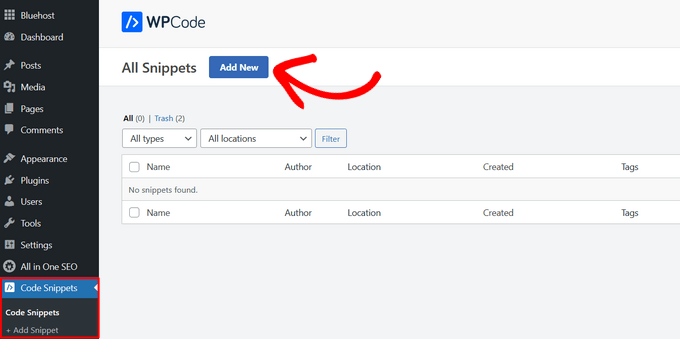
This brings you to a screen where you can choose a snippet from the pre-made library or add your custom code.
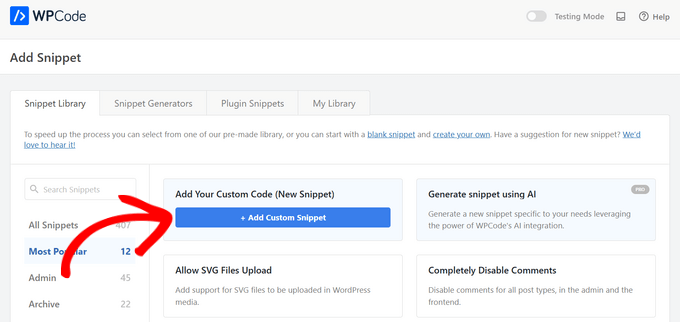
To add custom code, click on the ‘+ Add Custom Snippet’ button under the ‘Add Your Custom Code (New Snippet)’ option.
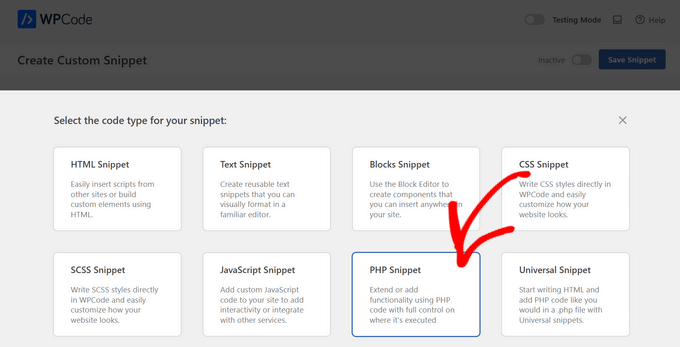
Then, select the code type you want from the options that appear on the screen.
For this tutorial, we’ll choose the ‘PHP Snippet’ option.
On the next screen, start by giving your snippet a name to help you remember it.
Then, paste your code into the ‘Code Preview’ box.
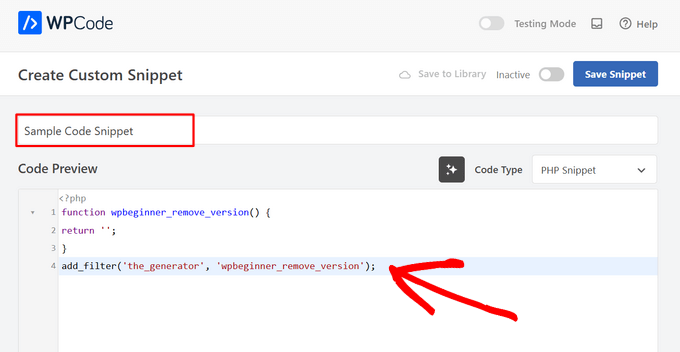
Next, scroll down to the ‘Insertion’ section.
Here, you can choose to use the code snippet as a shortcode that you can manually copy and paste anywhere on your site.
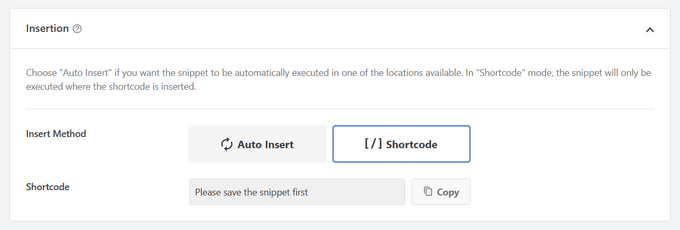
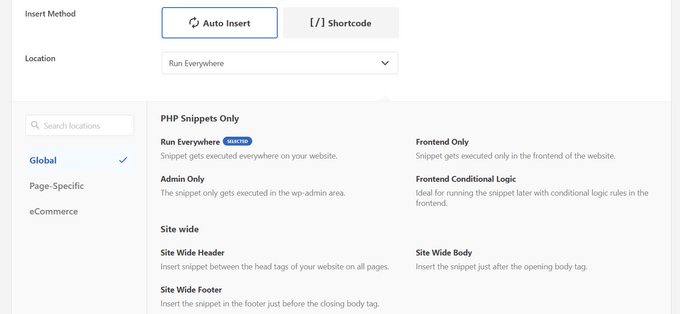
Or, you can select the ‘Auto Insert’ method to choose a location (WordPress function) where the code snippet will be automatically inserted.
You can choose from locations such as Run Everywhere, Frontend Only, Admin Only, Site Wide Header, After Post, Between Posts, Before Paragraph, and more.
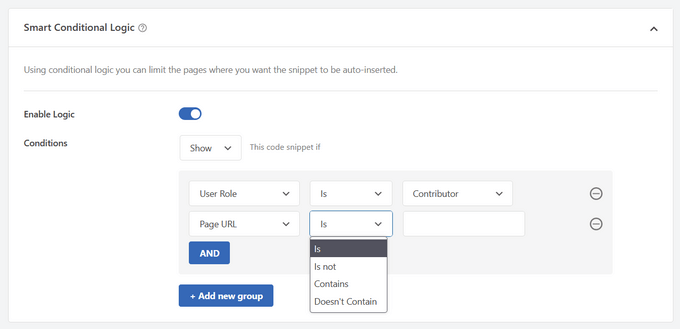
The best part about WPCode is that aside from the various Auto Insert options, it also comes with beginner-friendly conditional logic options.
This lets you select when your code should load.
Once you’re done adding the code, toggle the switch from ‘Inactive’ to ‘Active’ in the top right corner.
Then, click the ‘Save Snippet’ button.
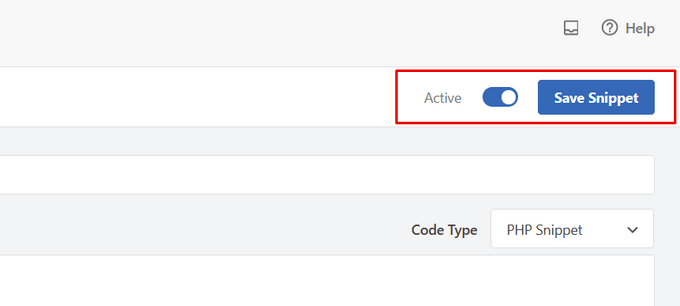
Once the snippet is active, it will be added automatically or displayed as shortcode, depending on the insertion method you chose.
For detailed instructions, see our guide on how to easily add custom code snippets in WordPress.
How to Add Code to the WordPress Header and Footer
Sometimes you may only need to add code to your theme’s header.php or footer.php files. The WPCode plugin can also help you do this easily.
This comes in handy when you need to add a tracking code for Google Analytics, Google AdSense, Facebook Pixel, TikTok Pixel, and more to your website.
Plus, it lets you manage all of your header and footer codes in one place, prevents any manual errors, and lets you upgrade or change your theme without worries.
Note: This method works best for tracking scripts, custom CSS, and JavaScript code.
Go to Code Snippets » Header & Footer and then enter your code snippet into the header, body, or footer, section of your website.
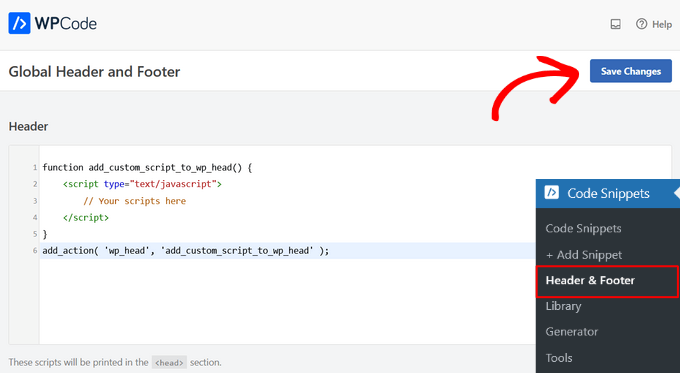
Make sure you click the ‘Save Changes’ button, and your code snippets will be live on your website.
For more details, see our guide on how to add header and footer code in WordPress.
Method 2: Adding Custom Code in Site-Specific WordPress Plugin
Another flexible option is to use a site-specific WordPress plugin. This is a custom plugin that you can create for your own website and use to save all your custom code.
The advantage of this method is that your code is not dependent on your theme, and it will remain active even when you change themes. It is also not affected by any WordPress updates on your website.
Note: This method is only applicable for code snippets that need to be added to the functions.php file.
If you’re using a site-specific plugin, then you can use the built-in WordPress plugin editor to add your custom code.
First, you’ll need to go to Plugins » Plugin File Editor and then select your plugin from the drop-down menu labeled ‘Select plugin to edit:’.
The editor will load your site-specific plugin. Then, you can simply add code to the page.
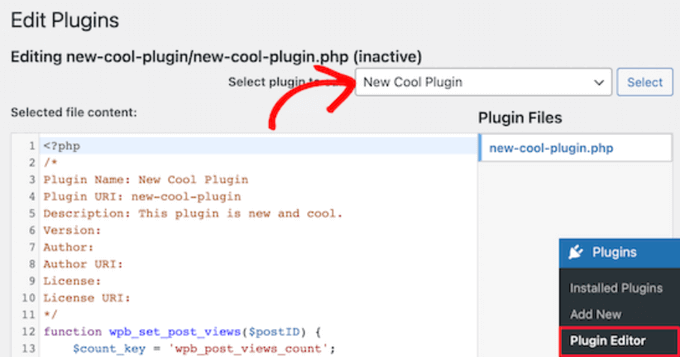
Once you’re finished, make sure to click on the ‘Update File’ button to save your changes.
If something is missing in your code or can break your website, then the plugin editor will automatically undo your changes.
Another way you can add custom code to a site-specific plugin is by using FTP. For more details, see our beginner’s guide on how to use FTP to upload files to WordPress.
Simply open up your website using your preferred FTP client, and then right-click on the plugin file and select the ‘View/Edit’ option.
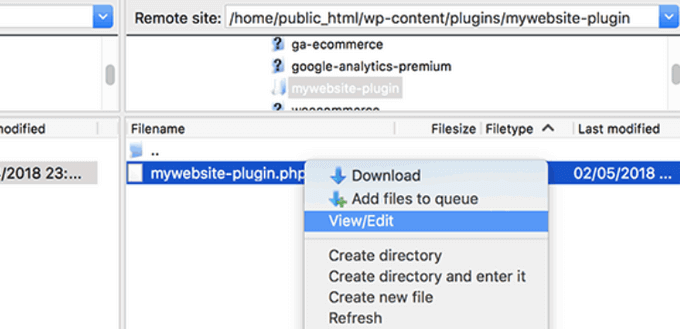
This will open up the file so that you can add your code snippets. When you save and upload the file again, then changes will automatically show up.
For more details, see our guide on how to create a site-specific plugin for your website.
Method 3: Adding Custom Code to Functions.php or Other Theme Templates
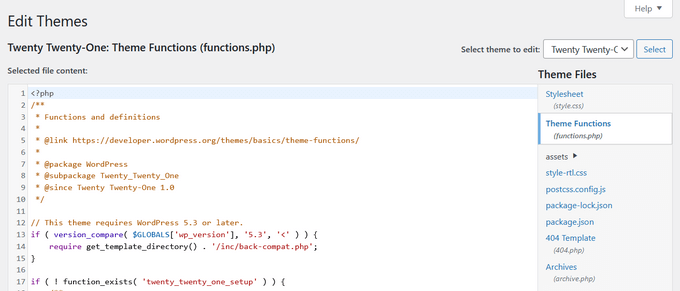
Finally, it is okay to add code snippets directly to your theme’s functions.php file. However, we recommend using the other options above, since there are some downsides.
First, if you update your WordPress theme, then all of your changes will be gone.
Next, the code you added will only work if you are using that particular theme.
That being said, let’s take a look at how to properly copy and paste code snippets and avoid breaking your website.
If you are adding code snippets directly to your theme’s functions.php file or any other page template, then you can add the code by navigating to Appearance » Theme File Editor in your WordPress admin panel.
Then, you can select the file from the right-hand column, and it will open up in the editor.
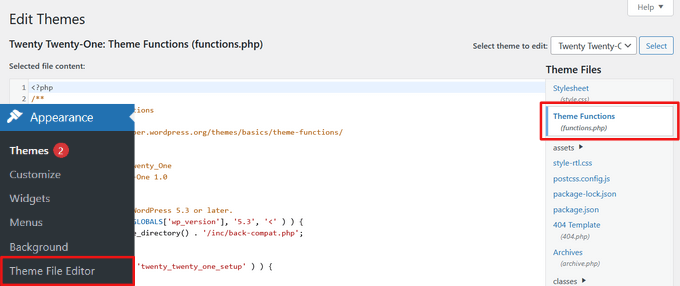
The tutorial you’re following will tell you where you can add the code snippet, but if not, then you need to add the code at the bottom of the file beneath all the code that’s present.
Another alternative is to use the FTP or file manager of your WordPress hosting file manager to add custom code to your theme files.
Simply connect your FTP client to your website and then go to wp-content » themes » your-theme-folder and right-click on the file that needs editing.
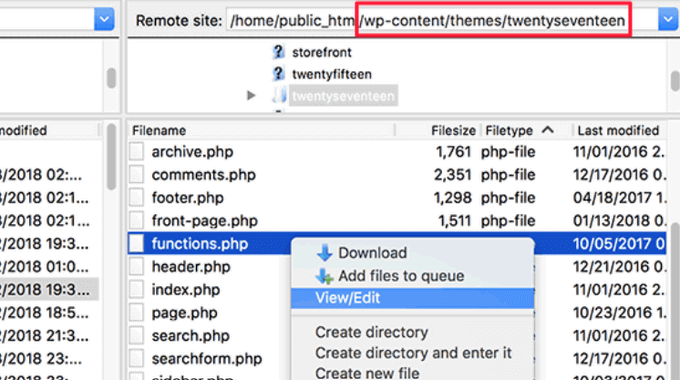
Then, click the ‘View/Edit’ option to open the file in the text editor and add your code snippet.
Troubleshooting PHP Errors when Adding Custom Code
There are some common mistakes that beginners make when adding custom code snippets to their WordPress websites. Luckily, most of these errors can be avoided and fixed easily.
Let’s take a look at these errors and the best ways you can fix them.
1. Incorrect Usage of PHP Begin and End Tags
WordPress is written mainly in the PHP programming language which has a specific syntax that tells your server that the following code needs to be processed by PHP. Here is what a typical PHP code snippet looks like:
// PHP Begin Tag
<?php

// Rest of the code goes here

// PHP End Tag
?>
All your PHP code needs to be inside the <?php and ?> tags.
The PHP end tag is very important in files that switch back and forth between PHP and HTML. This includes most WordPress theme files that use PHP tags alongside HTML.
You need to make sure that if you are pasting your code at a location where the PHP start tag is not closed, then you need to add your code without the starting PHP tag.
<?php
// Some pre-existing code

// your custom code

?>
If you are pasting your custom code outside or after the PHP end tag, then you need to add the PHP begin tag as well.
<?php
// Some pre-existing code
?>

// Your custom code snippet
<?php

?>
Almost 90% of all errors are caused by the incorrect placement of PHP start or end tags. Looking at your code will help you understand whether or not you need to add the PHP start or end tags in your custom code snippet.
However, many WordPress theme files like functions.php may not have a PHP end tag at all. This means that you can add your code at the bottom of the file without the start or end tags.
Here’s an example of what that looks like.
<?php
// Lots of code in your theme's functions.php file
//
//
// Your custom code
function custom_loginlogo() {
echo '<style type="text/css">
h1 a {background-image: url('.get_bloginfo('template_directory').'/images/login_logo.png) !important; }
</style>';
}
add_action('login_head', 'custom_loginlogo');
Remember that some tutorials may assume that you already know how to use PHP start and end tags. So, they may simply show you a code snippet without those tags in place.
function custom_loginlogo() {
echo '<style type="text/css">
h1 a {background-image: url('.get_bloginfo('template_directory').'/images/login_logo.png) !important; }
</style>';
}
add_action('login_head', 'custom_loginlogo');
Sometimes when code snippets are given they can be added to multiple locations, so the PHP end and start tags won’t be included.
When you are adding such a code snippet in your theme files, you need to make sure that it is inside the PHP tags.
2. Incorrect Nesting Errors
PHP has a particular syntax for functions, conditional logic, and loops. This syntax depends on curly brackets which indicate when a function begins and when it ends.
For example, here is a simple PHP function:
<?php
function wpbeginner_tutorial() {
echo "Hello World!";
}
?>
Now, if you want to add a custom code snippet that has nothing to do with this function, then you will need to put it outside this function like this:
// Pre-existing code in your theme file
<?php
function wpbeginner_tutorial() {
echo "Hello World!";
}
// Your custom code
function custom_loginlogo() {
echo '<style type="text/css">
h1 a {background-image: url('.get_bloginfo('template_directory').'/images/login_logo.png) !important; }
</style>';
}
?>
If you miss the starting or ending curly brackets, then this will break the code, and you will end up with an error page.
Understanding PHP Errors in WordPress
Errors that are caused by adding custom code to WordPress will often result in a detailed error message. Most of them are syntax errors, parse errors, or fatal errors due to unexpected characters.
The good news is that these errors will tell you which line in your code caused the error.
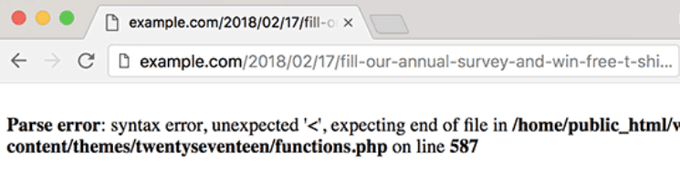
Then, you can then go to the exact line to review the code and figure out what you missed.
For this, we recommend using a proper text editor for code editing because they have line numbers and syntax highlighting which can help you fix the issue easily.
If you’re using the WPCode plugin, it also comes with precise error reporting that will show you the exact line where an error occurred.
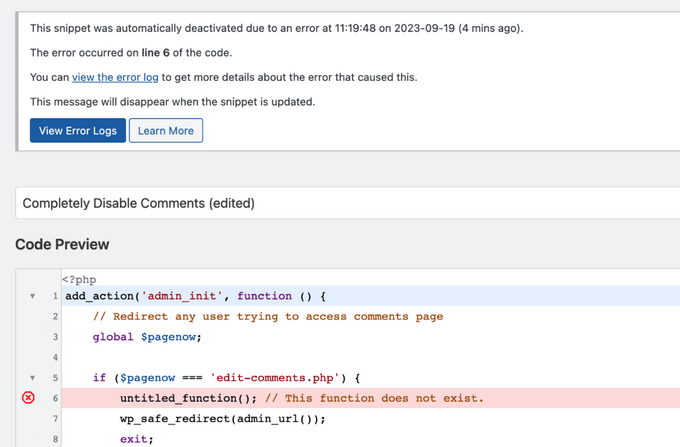
When WPCode finds an error that could prevent you from accessing your website admin area, it will automatically disable snippets so that you can safely fix the issue.
What To Do When Your WordPress Site is Inaccessible?
First of all, take a deep breath and don’t panic. All of your website’s files are still there and you can access them.
Simply connect to your website using an FTP client or the file manager app in cPanel in your WordPress hosting account.
For more details, see our beginner’s guide on how to use FTP to upload files to WordPress.
Next, locate the file where you added the code that caused the error and open it to edit it.
Then, you can try and fix the issues with the code snippet. If you are unable to fix those issues, then simply remove the code snippet you added and save your changes.
Now, your site should be back to normal again. If it is still showing some error, then download a fresh copy of your WordPress theme and extract the zip file to your computer.
After that, locate the file where you made the changes earlier, and upload it to your server while overwriting the old file.
For more ways to solve these issues, see our guide on the most common WordPress errors and how to fix them. If that doesn’t help, then follow our WordPress troubleshooting guide to perform a step by step diagnosis.
We hope this article helped you learn how to paste code snippets from the web into WordPress. You may also want to see our guide on how to easily display code on your WordPress site and our picks of the best WordPress development tools.
If you liked this article, then please subscribe to our YouTube Channel for WordPress video tutorials. You can also find us on Twitter and Facebook.





Dennis Muthomi
Most of my clients are beginners,and they’re always been hesitant to modify their site’s code directly.
So they always reach out to me when they need any code addition and I always use WPCode. I can easily find any custom code I added to clients site faster.
And I recommend creating a staging site to test new snippets before implementing them on your live site. This extra step has given me more confidence when experimenting with custom code.
Suman Sourabh
In my case, I had to add a php snippet for adding “Last updated date” on the single.php file. It actually worked seamlessly. I just selected my activated theme and chose single.php file.
Jiří Vaněk
In my opinion, the WP Code plugin is a must-have for anyone who wants to better customize their website. This plugin has helped me numerous times when other plugins weren’t performing as expected, but a solution in the form of a snippet existed online. The extensive snippet database is also excellent, offering a wide variety. Thanks to WP Code, my website’s language versions and mobile menu finally started working correctly, all thanks to the embedded codes from GitHub.
Dayo Olobayo
I was always afraid of adding codes to my themes so as not to damage my website. But I’ve read many articles on this forum and I usually see the recommendation of the wpcode plugin. I don’t have an idea about code but this plugin has made it easy for me to style my website using code snippets, and even more confidently too.
Dayo Olobayo
I do have a question though. Does wpcode allows the styling of themes that is done under the “additional css” option of wordpress themes?
WPBeginner Comments
If you are asking about adding CSS via WPCode, then yes. WPCode can help add CSS code as well.
That said, depending on your needs the additional CSS section may be better for adding theme CSS.
prabhat kumar biswal
why image uploading option was not mention
Max
Thanks for the article but it’s really thrown my understanding of the functions.php file. Is a closing tag really required on every theme’ s Functions file. For example, looking at a clean, untouched installation of the popular Divi theme, there is no closing php tag: ?>
Divi works perfectly without this closing tag so I am assuming that some themes’ Functions.php files don’t require it?
Another point – many people giving out snippets (yourself included) include line numbers as part of the code. When the code snippets are pasted into the functions.php file you then need to go through each line deleting the line numbers, and only the line numbers. If you don’t do this the code breaks and won’t work. I expect this is a very common mistake too. So it would be preferable to avoid these potential problems by posting the code in your tutorials without the line numbers so we don’t have to tediously edit the line numbers out after pasting and risk corrupting the code.
WPBeginner Support
Hey Max,
Good questions. You are right, it is not necessary to add the closing php tag at the end of the functions file.
As for line numbers in code snippets, you will notice a tiny menu when you take your mouse over to a code snippet on WPBeginner. This menu contains a view source or copy button. Clicking on it will open a popup window where you can copy the raw code without line numbers.
Hope this helps.
Admin
Mayaprakash Pant
I read this article and it is really nice. Just to know one thing, what are the sentences written in green in above tutorial? Are they comments or something else? Help me with this.
WPBeginner Support
Hey Mayaprakash,
Yes those are comments to help users understand whats happening in the code.
Admin
Charlesdeeds
Thank you my dear for your support. you have saved a brother from loosing he’s job appointment… Thanks and Best regards
Waqar Ahmed
A very easy to understand article and explained a great topic.
Dylan Cornelius
You’ve done a wonderful job describing a somewhat technical topic in an easy-to-understand, straightforward way. Your examples are simple and really help. Kudos!
WPBeginner Support
Thanks Dylan
Admin
Md. Mohiuddin Faisal Bhuiyan
Very common mistake also for me. We always have to aware of this.
Asanka Ranjeewa
It is really help full, even i am knowing a little codding. it is really help full and now i know it even better. thanks.
WPBeginner Support
Hey Asanka,
Glad you find it helpful You may also want to subscribe to our YouTube Channel for WordPress video tutorials.
Admin
Anna
I’m laughing out loud because it’s as if you’d written the article based on the mistakes I just made! Thank you so much for spelling out the little details as I was quickly back up and running thanks to this article.
wonntann
Thanks for this easy to follow article!
Aashi
Whenever i comment and uncomment the codes it creates an error sometimes of “;” or sometimes of “/”.
I again uploaded the file in which there were no changes but still the same error occurs.
Stuck badly.. What to do next.
Keli
Help! I just made one of the mistakes mentioned above and my site is broken. I saw your reply to Amy but can’t figure out how to change my function php. Please help!
Keli
I have a child theme installed and activated, and I added google analytics code to ‘Appearance> Editor> Theme Functions (functions.php) which was empty and now my site is broken? its a huge issue as there si currently facebook promo running driving people to a broken site.
Amy
Syed can you please help me!!
WPBeginner Support
Hi Amy,
You will need access to cPanel dashboard for your web hosting account or FTP credentials. Once you have those, you can connect to your WordPress site using FTP or you can use File Manager from your hosting account dashboard. Locate your theme’s functions.php file and edit it. You will need to go to line 14 to remove the unexpected code or remove the code that you entered earlier causing the issue.
Admin
isi
hi i tried to paste a font on php, im newbie on this below is the code can anyone see which is my mistake….
<html >
<link rel="Shortcut Icon" href="/images/favicon.ico ” type=”image/x-icon” />
<link rel="pingback" href="” />
<?php
wp_head();
Jessica
So using the example above, please could you advise which tags would be stripped from your code snippet below, if you were to paste the code into an existing functions.php file that already had an opening and closing tag?
// Paste your Google Analytics code from Step 4 here
Jeffrey
I pasted the code to update the date and time of when a post was updated rather than it displaying the “original” date of the post. I posted right after the Google authorship in my Genesis Child Theme. It’s displaying the updated date but it doesn’t say “Updated. . . “, it just shows the original date and underneath shows the updated date. The file starts with in the file, so my thinking is I have too many “php” in the code. I’m sure it is not placed inside another function. Any help would be greatly appreciated. Here is the code:
add_action(‘genesis_before_post_content’, ‘add_last_modified_date’);
function add_last_modified_date() {
if (is_single()) { ?>
<time datetime="”>
<?php }
}
This is the code BEFORE where I placed the above code:
960, ‘height’ => 80 ) ); ** commented out by payam 09-06-11 to add my own logo and header bg
/** Add support for 3-column footer widgets **/
add_theme_support( ‘genesis-footer-widgets’, 3 );
/* ACF Options page */
if(function_exists(‘acf_add_options_page’)) {
acf_add_options_page( ‘Site Options’ );
// acf_add_options_sub_page(‘Header’);
// acf_add_options_sub_page(‘Footer’);
}
/* payam add google publisher authorship info to home page only */
add_action(‘genesis_meta’, ‘child_google_publisher_authorship’);
function child_google_publisher_authorship() {
if ( is_front_page() ) {
$ED_google_publisher_authorship_link = ” ;
}
echo $ED_google_publisher_authorship_link;
}
James
Thanks so much!! Saved me from pulling my hair out!
Sinan İŞLER
Haha noob friendly article nice
Barbara
Am I the only one wondering if my google analitics information can be pasted into my Wordpress.com site??? In the past I’ve come across things suggested to be added to Wordpress only to find out it does not work for my .com. So tell me. Did I go through all of the analitics set up for nothing? I hope not. Where could you paste the information in Wordpress.com? There no place to be found.
WPBeginner Support
Barbara, this guide is for self hosted WordPress.org sites. As for WordPress.com blogs, you can not add Google Analytics code or try to pass any unauthorized code into a free WordPress.com blog. Please see our guide on WordPress.com vs WordPress.org
Admin
Louis Sahagun
I was informed that I have to add script to the beggining of: /google_analytics_auto.js’/script/head> in order to change this from relative url to absolute url. This will fix many broken links since I recently changed the IDX to my site. After reading the above instructions, it sounds like I need to use a FTP client like Filezilla to perform this. Is this correct?
Anthony
Hello,
I found your tutorial unfortunately after I broke my site. I am getting this error:
Parse error: syntax error, unexpected T_IF in /home/content/45/7334345/html/wp-content/themes/Magazine110613/functions.php on line 31
But I cannot access the admin panel to fix the code. Any suggestions?
Thanks!
WPBeginner Support
You can fix this by accessing your site using an FTP client like Filezilla. Download a fresh copy of your theme and extract it on your computer, then you need to upload the new functions.php file from your computer to to your theme directory using the FTP client.
Admin
Dwight B
Hi I was referred to your article from this link:
http://cyberchimps.com/guide/make-responsive-unresponsive/
I have a question, since I have my child theme installed and activated, is adding the PHP code as simple as going to ‘Appearance> Editor> Theme Functions (functions.php) [which is empty]’ and pasting it?
Or are there other files that need to be edited?
Thanks, hope you can help.
Editorial Staff
It is that simple, but you have to be very careful with the proper syntax that we have highlighted in the article above. If you paste the code incorrectly, then you can potentially lock yourself out of your WordPress admin. This is why we highly recommend that you know how to use FTP before modifying code through WordPress admin.
Admin
Sean
Wow, this is the 1st ever article I have seen on the web which acknowledges the fact that newbies who want to get things done with adding code do not necessarily know the assumptions that tutorial writers often have.
This is a very thoughtful and great gesture on your part. Thank You.
I do not blame the experts since they are writing form another level, but seriously, it wouldn’t hurt them or take any extra time to just add the 1 or 2 lines to make sure their code is understood by everyone.
Right now I am looking around for the explanation of another basic thing that must be obvious to all the PHP pros but is totally lost on me, which is, what do they mean when they say “Paste the code below within the single.php within the loop” . . .
What’s “within the loop” here and where should I paste the code snippet in my single.php file ?
Any ideas please ?
WPBeginner Support
Sean, in WordPress terminology, the loop refers to the WordPress Loop. It is the code that runs a loop, generating HTML for posts fetched by the SQL query run by WordPress. It starts like this:
<?php if ( have_posts() ) : while ( have_posts() ) : the_post(); ?>and ends like this:
<?php endwhile; else: ?><p><?php _e('Sorry, no posts matched your criteria.'); ?></p>
<?php endif; ?>
When you are asked to paste a snippet inside the loop you need to paste it between the start and end of the loop.
Admin
Michael
Nice, thoughtful article. There are many little things a beginner must know, like these simple errors, that are quickly taken for granted once we learn them. It’s these little things that often cause people to just give up. But that keeps some of us in business :-).
Greg
Thanks for this – the one questions that I have is that often I have seen that there are ‘code snippets’ that are offered, but I have NO idea which file they are to be pasted into!
Others, like the one that talks about Displaying Custom Fields here:
http://codex.wordpress.org/Using_Custom_Fields#Displaying_Custom_Fields
The links to “The Loop” quickly get very unclear when they make statements like:
The Loop should be placed in index.php
and
……..in any other Templates used to display post information.<=== they must be kidding, right?
This is where I get very frustrated. How am I supposed to know what "Any of the OTHER Templates used to display post information" is supposed to mean.
Any guidance you could give on this would be greatly appreciated.
Editorial Staff
Hey Greg,
It is definitely a tough question as to where to paste the code because the answer varies based on the situation. If it is a theme based function, then you would use functions.php file (or another theme file). If it is a site based function, then you probably want to use a site-specific plugin.
The Loop is used by WordPress to display posts. Using The Loop, WordPress processes each post to be displayed on the current page, and formats it according to how it matches specified criteria within The Loop tags. Any HTML or PHP code contained in the Loop will be processed on each post. You read more about it here: http://codex.wordpress.org/The_Loop
As for template files, you can get a better overview here: http://codex.wordpress.org/Template_Hierarchy#Visual_Overview
Not all themes have all these template files. The most basic theme only needs style.css file and an index.php file. But the more customization you want, the more options you have available for you. The visual overview in the link above should explain that.
“The loop should be placed in index.php” is the very bare bone example. Some themes have separate loop files altogether (i.e loop.php or loop-content.php, loop-quote.php etc). Then the theme author would call those loop files into other template files like single.php where they can say get_template_part( ‘loop’, ‘single’ ); which will include the loop-single.php file. Theme authors have different practices to make things work. It also depends on whether you are using a parent theme or a child theme. Because in child themes, you are mainly just working with the functions.php file and hooks available in the theme framework. Yes it gets pretty tricky when it comes to the child themes.
Admin
Felipe
In your very first example:
//This is the opening tag of a PHP Code
<?php
the comment *before* the opening tag of a PHP Code won't run very well Not a big deal as few people will paste that anywhere but as the whole guide is about learning how to mix PHP code correctly with HTML and other PHP code …
Editorial Staff
Just using that for explanation purposes.
Admin
scottwyden
I used to make these mistakes and there was never an article like this to help me learn. Thanks for writing this up for newbies!