


“How do I know if this order is legitimate?” is a question we often hear from WooCommerce store owners.
After handling our own share of fraudulent orders and helping other businesses do the same, we’ve learned that fraud prevention is always easier than cleanup.
The good news is that protecting your store from fraud doesn’t require any advanced technical skills. Based on our experience managing multiple online stores, we’ve narrowed down the most effective ways to detect and stop fake orders before they cause real damage.
In this guide, we’ll walk you through how to secure your WooCommerce store against fraud and keep your business safe.
💡In a hurry? Here are the key ways to prevent fraud in WooCommerce:
- Use a dedicated WooCommerce anti-fraud plugin to score and block orders.
- Leverage powerful tools like Stripe Radar and 3D Secure.
- Require customers to create an account and verify their email address.
- Filter malicious traffic with a Web Application Firewall (WAF).
Why Do You Need to Prevent Fraud and Fake Orders in WooCommerce?
Fraudulent and fake orders can cause serious financial losses to a business. This is why you need to monitor your online store and prevent these orders.
Last year, online stores lost more than $20 billion in revenue due to fraudulent payments, chargebacks, and fake orders. For some eCommerce stores, the total fraudulent order costs were higher than 4% of total revenue.
The good news is that many fake orders are spam and can be easily prevented. However, some malicious orders are placed just to annoy or harass an online business.
To know what you’re up against, eCommerce fraud comes in many forms:
- Payment fraud: This occurs when scammers use stolen credit card details to make purchases. They may have obtained the card information through phishing or data breaches. The best WooCommerce payment gateways are PCI-compliant and help keep customer details secure.
- Chargeback and refund fraud: This happens when customers buy an item, then dispute the charge with their credit card provider to get a refund while keeping the product.
- Account takeover: This is when hackers gain unauthorized access to customer accounts. They can then make purchases, steal personal information, or change passwords.
With that in mind, let’s look at how to prevent fraud and fake orders in WooCommerce.
Here is a quick overview of all the tips we will cover in this guide:
- Use a WooCommerce Fraud Prevention Plugin
- Use Stripe Radar and 3D Secure to Automatically Block Fraud
- Using the Cash on Delivery Payment Option Carefully
- Sell in Specific Countries
- Require Users to Create an Account
- Use a Web Application Firewall and Custom Rules
- Require Customers to Verify Their Email Addresses
- Frequently Asked Questions About WooCommerce Fraud
Ready? Let’s get started.
1. Use a WooCommerce Fraud Prevention Plugin
The easiest way to prevent fraudulent and fake orders in WooCommerce is by using an anti-fraud plugin.
The WooCommerce Anti-Fraud plugin is a tool that automatically assigns a risk score to incoming orders based on a set of customizable rules, helping you flag or block suspicious transactions
First, you need to install and activate the WooCommerce Anti-Fraud plugin. For more details, see our step-by-step guide on how to install a WordPress plugin.
Upon activation, you need to visit the WooCommerce » Settings page and switch to the ‘Anti-Fraud’ tab.
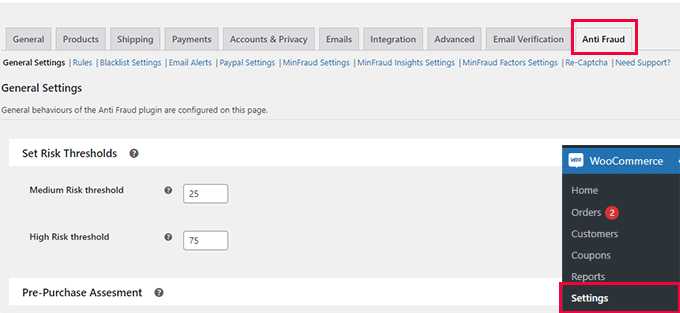
From here, you can set a minimum and high-risk threshold score.
Below that, you can change the order status based on the risk score. For instance, you can set the score when an order will be automatically canceled, and set a score to put an order on hold.
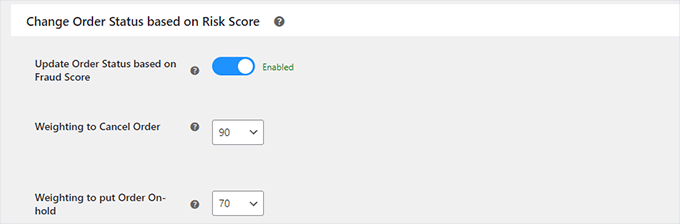
Don’t forget to click on the ‘Save Changes’ button to store your settings.
Next, you need to switch to the ‘Rules’ tab. From here, you can configure the rules and assign them a risk score.
For instance, you can set a 5-point score for a customer who is placing their first order.
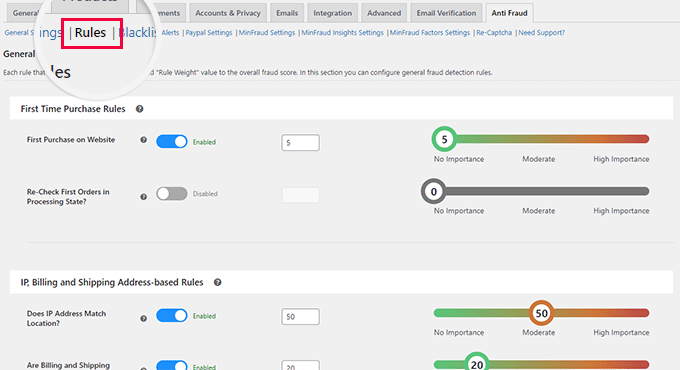
You can set scores for suspicious IP addresses, emails, unsafe countries, matching IP addresses to geographic locations, and more.
You’ll want to carefully review the rules and their assigned scores and make changes if necessary. If you are unsure, then the default settings would work for most eCommerce websites.
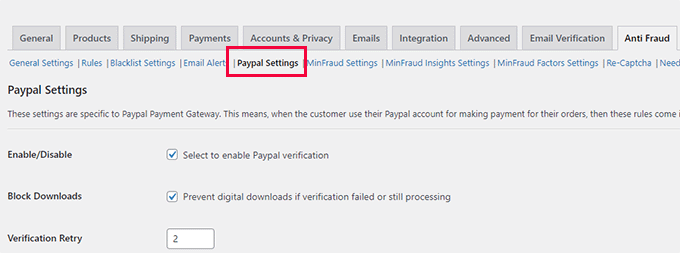
If you are using PayPal as a payment option on your store, then you can switch to the PayPal tab. From here, you can require users to verify their PayPal email addresses.
The plugin also allows you to connect with the third-party fraud detection service MaxMind.
This paid service uses a global database to collect data about suspicious payment details, emails, IP addresses, and more.
You can then add this score to your plugin risk score and decide what to do when it is higher.
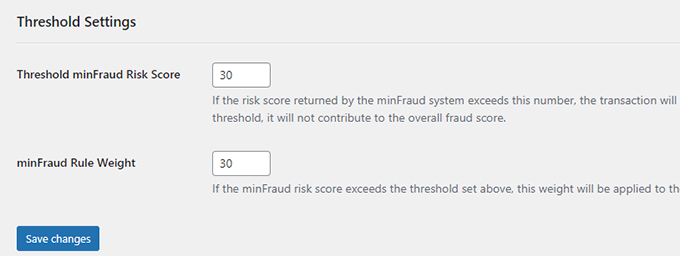
Once you are satisfied with your settings, don’t forget to click on the ‘Save Changes’ button to store them.
Viewing Fraud Detection Activity
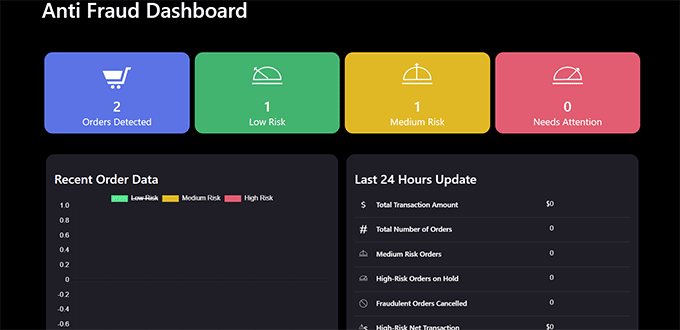
The plugin comes with an easier dashboard where you can see plugin activity in an easy-to-understand format.
Simply click on the Anti-Fraud menu item in your WordPress admin sidebar. From here, you can see statistics about all your orders.
The anti-fraud plugin will help you catch most of the fake and fraudulent orders on your WooCommerce store.
However, if you need stricter measures, then continue reading for additional WooCommerce fraud prevention tips.
2. Use Stripe Radar and 3D Secure to Automatically Block Fraud
Stripe is one of the most popular online payment solutions in the world. While several plugins connect WooCommerce to Stripe, we recommend the WooCommerce Stripe gateway by FunnelKit because it simplifies the setup process.
It makes it easy to add modern payment methods like Apple Pay and Google Pay, while still including essential security features like Strong Customer Authentication (SCA) and 3D Secure payments.
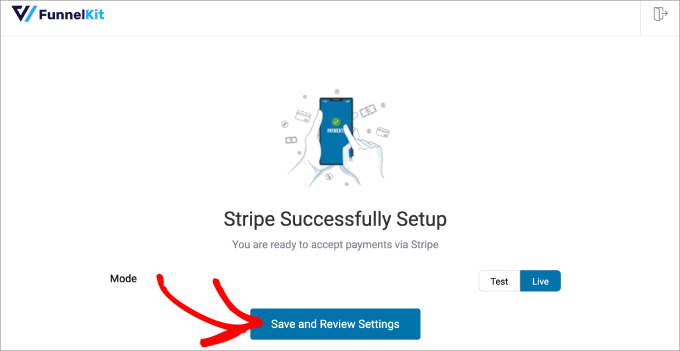
This method requires you to use Stripe as your main payment gateway. Once you install the plugin, it will guide you through configuring your settings.
Beyond the basics, Stripe offers a powerful feature called Stripe Radar to help fight fraud. It uses a sophisticated set of algorithms to reduce chargeback risks for your business.
Stripe uses machine learning that is trained on data from millions of companies worldwide. This helps it identify and block potentially fraudulent orders automatically.
For example, the system can spot suspicious patterns, like a credit card being used in two different countries within a few minutes, or an order coming from an IP address known for fraudulent activity.
We use Stripe Radar on our own eCommerce websites to help reduce fake and fraudulent orders. In our experience, its machine learning is particularly effective at identifying and blocking payments from high-risk IP addresses without any manual configuration.
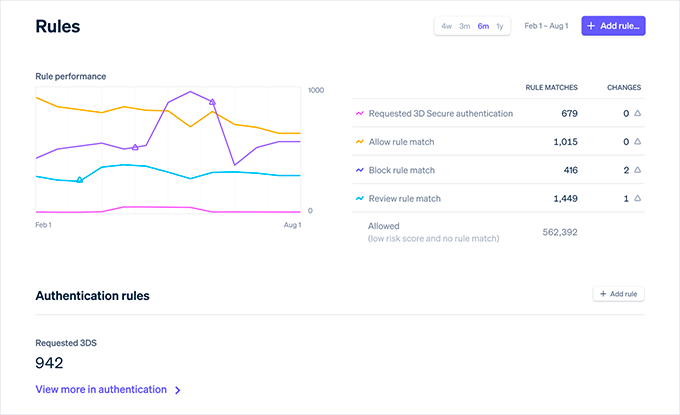
In addition to its machine learning, you can set custom rules with allow and block lists for extra control. Unfortunately, not all WooCommerce payment gateways have these powerful features.
If you’re looking to switch to Stripe, we recommend talking with the FunnelKit team. They are WooCommerce experts who can help.
3. Disable or Restrict Cash on Delivery (COD)
Whenever possible, we recommend disabling the ‘Cash on Delivery’ (COD) payment option. While popular in some regions, it is a common source of fake and fraudulent orders.
With COD, users can easily place an order with a fake address, refuse to accept the delivery, or cancel after the item has already shipped. This leaves you vulnerable to significant losses.
When a COD order fails, you are still responsible for paying out of pocket for both the initial shipping and the cost of returning the package. These costs can add up quickly.
By removing this option, you can lower the number of fake orders you receive. Instead, you can offer a variety of secure, prepaid payment options for your customers.
However, we understand that COD is an essential payment method in some countries. If you must offer it, consider adding extra security steps like requiring phone number verification or limiting the COD option to repeat customers with a good order history.
4. Sell in Specific Countries
WooCommerce allows you to easily restrict orders from specific countries. This is a valuable strategy because fraudulent attempts are often concentrated in high-risk regions where you may not have a legitimate customer base.
By limiting sales to the countries you actually serve, you can block a significant source of fake orders before they ever happen.
To do this, go to the WooCommerce » Settings page and select the countries you want to sell or ship to under the ‘General’ tab.
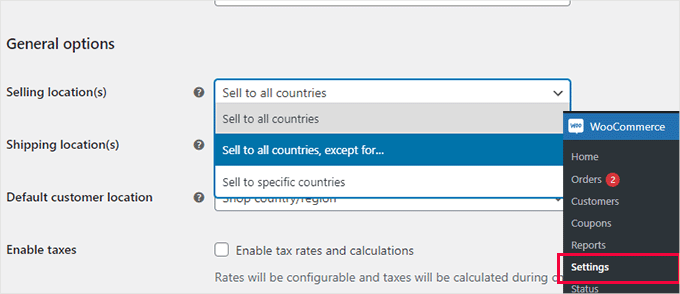
You can also restrict certain WooCommerce products to specific countries in WooCommerce as well.
Note: While geographical restrictions are very effective, determined users can sometimes use a VPN to change their location. However, it remains a strong deterrent against most automated and low-effort fraud attempts.
5. Require Users to Create an Account
Another useful trick to slow down and prevent fake orders is requiring users to create an account before they can check out.
Simply go to the WooCommerce » Settings page and switch to the ‘Account and Privacy’ tab. From here, you’ll need to uncheck the box next to the ‘Allow customers to place orders without an account’ option.
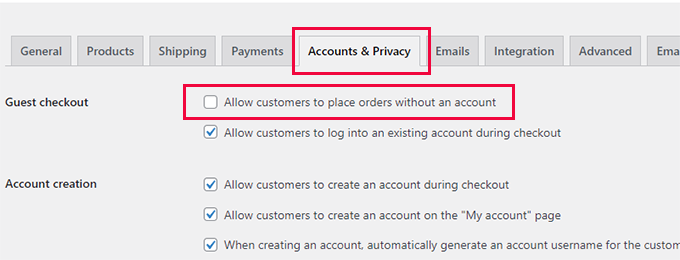
Below that, you can check options that allow users to create an account during checkout or from the ‘My Account’ page.
This simple change creates a necessary friction point that helps reduce low-effort automated attacks and spambots that rely on guest checkouts.
More importantly, it provides you with a user profile that includes an order history and email address. This data makes it much easier to monitor for suspicious activity and allows you to block any customer who places a fraudulent order.
6. Use a Web Application Firewall and Custom Rules
A Web Application Firewall, or WAF, acts as a protective filter between your website and all incoming internet traffic.
It automatically blocks known malicious bots and disposable email addresses before they can ever reach your WooCommerce store.
This is crucial because many scammers use automated tools, fake IP addresses, and dummy data to place spam orders. A WAF helps block these attempts before they even load your site.
We recommend using Cloudflare, as it’s one of the best WordPress firewall plugins on the market. It comes with powerful security features, CDN servers, and a malware removal service.
At WPBeginner, we have been using it to protect our website and have had an excellent experience.
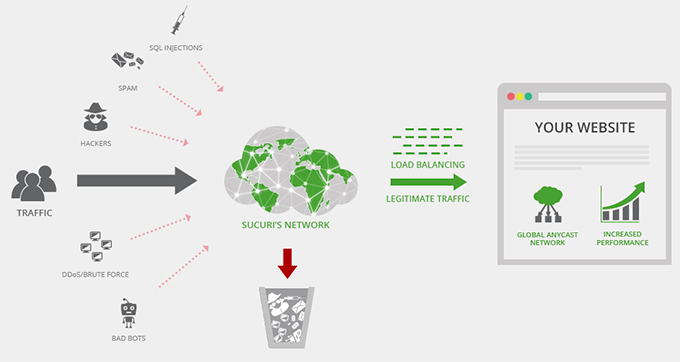
In Cloudflare, you can also set up custom page rules to trigger CAPTCHA or even automatically block users with suspicious activity.
At WPBeginner, we use Cloudflare Enterprise in our larger eCommerce stores, which includes bot anomaly detection and threat response.
If you’re running a large eCommerce store, then it’s worthwhile exploring Cloudflare Enterprise tools.
7. Require Customers to Verify Their Email Addresses
Requiring new customers to verify their email address is another powerful layer of security.
This step confirms the customer is using a real, accessible email account, which helps block fraudsters and bots that rely on fake or disposable addresses to place spam orders.
To do this, you can simply install and activate the Email Verification for WooCommerce plugin. For more details, please see our step-by-step guide on how to install a WordPress plugin.
Upon activation, you need to visit the WooCommerce » Settings page and switch to the ‘Email Verification’ tab.
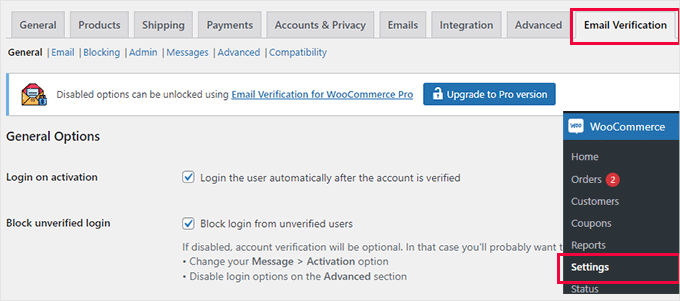
From here, you can configure the plugin settings to your own requirements.
For instance, you can switch to the ‘Email’ tab and delay the default WooCommerce new user email until the user verifies their account.
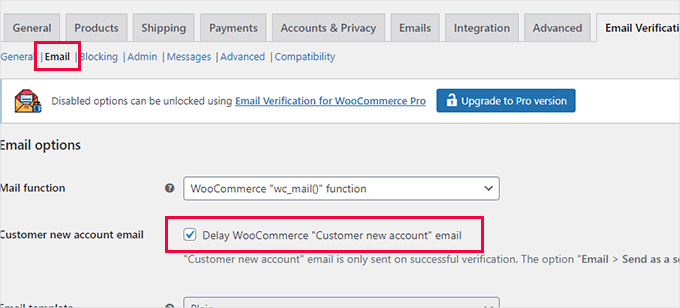
Don’t forget to click on the ‘Save Changes’ button to store your settings.
Now, the plugin will automatically send a verification link to all new customers.
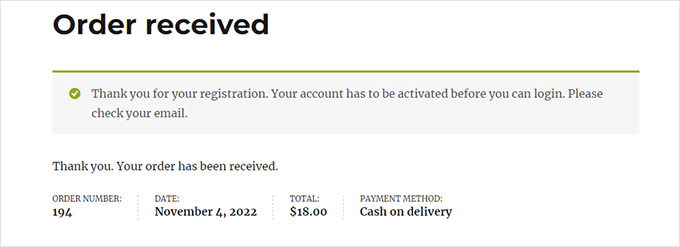
It’s crucial to ensure your store has reliable email delivery. Otherwise, legitimate customers might get locked out.
We recommend using WP Mail SMTP along with SendLayer to improve your WooCommerce email delivery rates. Over 3 million websites use the WP Mail SMTP plugin, and it even has a free version if you are on a budget.
To get started, see our tutorial on how to fix WooCommerce not sending order emails.
Frequently Asked Questions About WooCommerce Fraud
Here are some questions that our readers frequently ask about WooCommerce fraud:
What are the common signs of a fake WooCommerce order?
You should look for red flags like a shipping address that doesn’t match the billing address, especially if it’s in a different country. Other common signs include unusually large first-time orders and suspicious email addresses with random letters or numbers.
Does WooCommerce have built-in fraud prevention?
WooCommerce itself has very basic security features. It mainly relies on payment gateways like Stripe and PayPal to handle primary fraud detection.
This is why we strongly recommend using dedicated anti-fraud plugins and a web application firewall for more complete protection.
What should I do if I’ve already shipped a fraudulent order?
If the order is still in transit, you should contact your shipping carrier immediately to request a package intercept. If it has been delivered, you will need to gather all the order information and file a chargeback dispute with your payment processor.
We hope this article helped you prevent fraud and fake orders in WooCommerce. You may also want to see our guide on eCommerce security tips to protect your online store, or take a look at our expert pick of the best WooCommerce plugins to grow your store.
If you liked this article, then please subscribe to our YouTube Channel for WordPress video tutorials. You can also find us on Twitter and Facebook.





Jiří Vaněk
Thank you for the very valuable advice. As a newcomer still learning WooCommerce, I consider the security of the store to be a top priority. When I create an e-shop for someone, I also care about protecting it against fraudulent orders that might be maliciously created, for example, by competitors. This list is exhaustive, and I will certainly implement some of the points into my current solution to safeguard the store against these practices, just as I do against spam. Thank you for making the internet safer with your guides.
WPBeginner Support
You’re welcome, glad our guide was helpful
Admin
Mrteesurez
Fantastic!
I didn’t know there were plugins to protect WooCommerce stores from fraud. Thanks for introducing them to us. I like using cash on delivery, but your idea has taught me to avoid it as much as possible to prevent fake orders and other fraud attempts. All eCommerce stores need to check out these plugins; they will definitely help protect the store. Thanks for sharing this article.
Jiří Vaněk
Cash on delivery is a very popular way to send goods in my country. Therefore, I also know that people often reconsider whether they want the goods or not and in the end, they don’t pay for the cash on delivery and don’t pick up the goods. I would probably only use it for verified customers who have some purchase history, otherwise, as you mentioned, it’s really good to avoid it because it can cost you a lot in postage and shipping with the risk of zero profit.
Moinuddin Waheed
I have seen many friends of mine who left the idea of ecommerce store merely because of this reason after running an online store for a while.
Having a robust mechanism for prevention of fraud and fake orders is a must for any online store.
This becomes more prudent for one who is just starting out.
Thanks for the detailed guide of preventive measures of fake orders and fraud.
WPBeginner Support
You’re welcome
Admin