


If you have an online store, then keeping track of stock levels, ensuring timely restocks, and automating tasks can simplify your order management. This can improve the customer experience in your store and boost conversions as a result.
The good news is that there are several inventory management plugins designed specifically for WordPress that can help you streamline your workflow.
However, your needs may differ depending on the type of online store you have. That’s why I tested a variety of inventory management plugins to identify the best ones based on ease of use, features, and integration capabilities.
In this article, I’ll share my list of the best inventory management plugins for WordPress websites.
My Verdict: Best Inventory Management Plugins for WordPress
In a hurry? Here’s a quick overview of the best inventory management plugins for WordPress:
| # | Plugins | Best For | Pricing |
|---|---|---|---|
| 🥇 | ATUM WooCommerce Inventory Management | Managing WooCommerce store inventory | Free + Premium addons |
| 🥈 | Easy Digital Downloads | Organizing inventory for digital downloads | Free + $199.50/yr |
| 🥉 | Wholesale Suite | B2B store inventory management | Free + $148.50/yr |
| 4 | WP Simple Pay | Setting inventory restrictions for subscriptions | Free + $49.50/yr |
| 5 | Smart Manager | Bulk editing your store’s inventory | Free |
| 6 | WP Inventory Manager | Managing inventory for small online stores | Free |
Why Use Inventory Management Plugins in WordPress?
Inventory management plugins help you keep stock accurate, prevent overselling, and save time by automating how products are tracked and updated in your online store.
Here’s why they’re worth using:
- Prevent overselling and stockouts by automatically tracking inventory levels in real time
- Set reorder points and get low-stock alerts so you can restock before products run out
- Maintain healthier inventory levels with stock movement tracking and demand forecasts
- Streamline operations with built-in tools for invoices, shipments, and returns
- Free up time to grow your business instead of managing spreadsheets or manual updates
This makes inventory plugins especially useful for busy store owners who want fewer errors, smoother workflows, and more consistent sales without extra effort.
How I Test And Review WordPress Inventory Management Plugins
To give our readers some great recommendations, I tested the most popular inventory management plugins on real websites.
When doing that, I focused on the following criteria:
- Ease of Use: I have prioritized beginner-friendly plugins with an easy setup process.
- Features: An ideal inventory management plugin should have features like real-time tracking, low stock alerts, barcode scanning, order management, and more.
- Performance: I analyzed how the plugins affect site speed, database queries, and overall loading times to ensure they won’t slow down an online store.
- Compatibility: I tested the plugins with different WordPress themes, WooCommerce extensions, and other popular tools to see if there were any conflicts or issues.
- Support and Updates: I checked documentation, support forums, and response times from developers. I also looked at how frequently the plugin is updated to ensure long-term compatibility.
- Reliability: I have only recommended dependable tools that I have tested ourselves in real time.
Why Trust WPBeginner?
At WPBeginner, our team of experts has experience in WordPress, SEO, web hosting, online marketing, and more. When it comes to inventory management plugins, we take our testing seriously to ensure we recommend only the best solutions for your online store.
We conduct real-world testing by simulating product sales, stock updates, and order processing to see how well the plugin performs in day-to-day operations.
By following this process, we ensure our recommendations are based on real data and practical usability. For more details, see our editorial process.
In this article, I’ve included plugins that cover these different needs, so you can find the right solution for your website.
1. ATUM WooCommerce Inventory Management
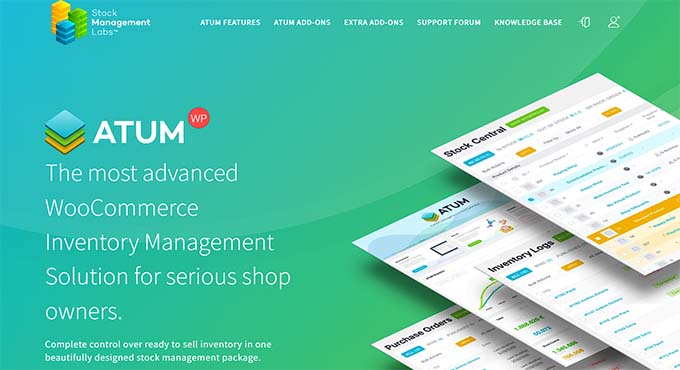
ATUM WooCommerce Inventory Management is the best WordPress inventory management plugin on the market.
During evaluation, I discovered that it has a user-friendly interface and an intuitive stock central dashboard.
Here, you can see the overall stock levels, stock value, and metrics like best-selling products and low-stock items.
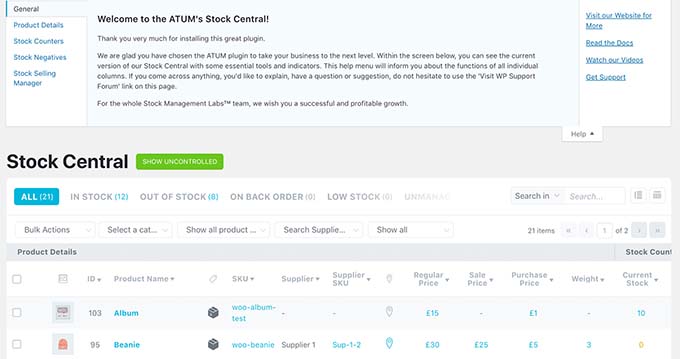
The plugin can seamlessly integrate with WooCommerce and automatically update availability and stock levels on product pages.
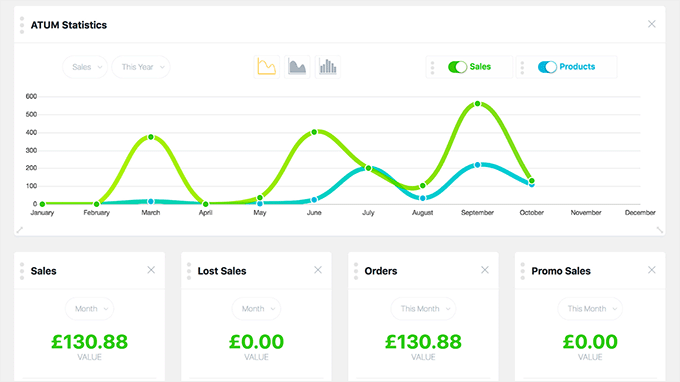
Plus, ATUM provides detailed statistics and reports on sales performance and inventory levels, enabling informed decision-making.
It also comes with a premium multi-inventory addon that creates multiple inventory records per product, manages stock across various locations, and sets priorities for inventory usage.
Other than that, the plugin allows data editing, user role management, batch, and serial number tracking, and so much more.
✅Pros of ATUM WooCommerce Inventory Management:
- Purchase order management, advanced filters, and product search
- Clear visual stock indicators (in stock, low stock, out of stock)
- Inventory movement tracking with graphs and charts
- Barcode scanning and data export options
- Built-in supplier management for easier restocking
❌Cons of ATUM WooCommerce Inventory Management:
- Some advanced features require paid addons, even though a free version is available
Why I recommend ATUM WooCommerce Inventory Management: I recommend using it comes with a powerhouse of features that make it super easy to manage your online store. If you have a WooCommerce store, then this is the perfect choice for you.
2. Easy Digital Downloads

Easy Digital Downloads (EDD) is an all-in-one eCommerce plugin for selling digital products, and it includes features to help you control inventory.
Several of our partner brands use it to sell their plugins and manage their inventories. To learn more about our experience with it, you can see our detailed Easy Digital Downloads review.
The plugin comes with a Purchase Limit extension that lets you control the number of times a product can be downloaded before its status changes to ‘Out of Stock.’
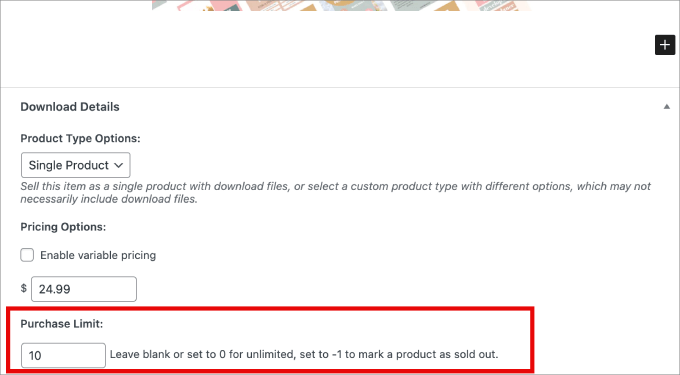
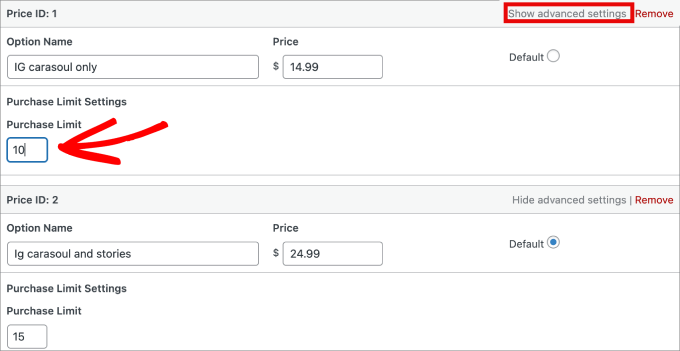
It allows you to set different purchase limits for various pricing plans and even lets you set a default purchase limit for all the products in your online store.
EDD even provides comprehensive reporting tools to monitor sales and customer behavior.
You can filter reports by specific dates and products, track refunds, and export store data to CSV files. These insights help in making informed decisions about product availability and inventory needs.
✅Pros of Easy Digital Downloads:
- Manage multiple versions of digital products and deliver updates to customers
- Built-in tools for product comparison, customer history, and automated download emails
- Includes campaign tracking and strong fraud protection
- Keeps detailed records of customer data and purchase history
❌Cons of Easy Digital Downloads:
- Not suitable for managing inventory for physical products
- Purchase restriction features are not included in the free plan
Why I recommend Easy Digital Downloads: It’s the ideal inventory management plugin if you sell digital products. EDD lets you set purchase limits, access advanced analytics and reports, offer and manage different product versions, and so much more.
3. Wholesale Suite

If you have a B2B online store, then Wholesale Suite is the best inventory management plugin.
I have thoroughly tested it and found it to be super beginner-friendly. To learn more, see our complete Wholesale Suite review.
The plugin offers real-time stock updates and sends you notifications if the product has low stock or if you run out of stock.
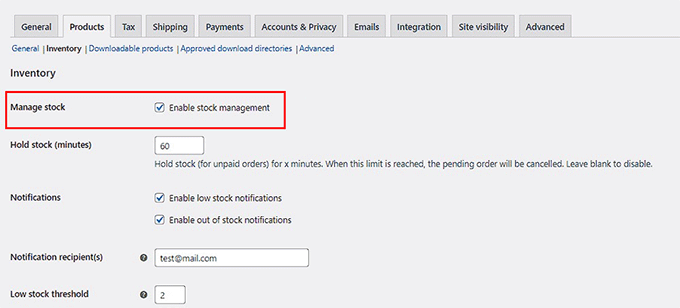
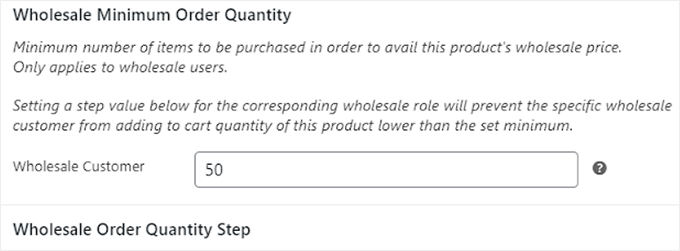
Plus, you can set a minimum quantity for specific products, allow wholesalers to reserve products beforehand, and track transfers.
Other than that, the suite comes with different plugins that enable you to add a wholesale order form, set custom prices for WooCommerce products, and build registration or login forms.
✅Pros of Wholesale Suite:
- Seamless WooCommerce integration with role-based wholesale accounts
- Role-based control over wholesale product visibility
- Separate product visibility for wholesale vs retail customers
- Wholesale inventory tools like bulk pricing, pack sizes, and minimum order quantities
- Reports for wholesale sales, customer behavior, and stock movement
❌Cons of Wholesale Suite:
- Slight learning curve for beginners
- Most advanced features require the pro version despite a free plan
Why I recommend Wholesale Suite: If you have a B2B WooCommerce store, then Wholesale Suite is a great choice. It comes with real-time stock updates, lets you set a minimum order quantity, and tracks transfers.
4. WP Simple Pay

WP Simple Pay is the best WordPress Stripe plugin on the market. While it’s not a full inventory system, it has a handy Purchase Restriction addon. This tool lets you limit the number of times a product or service can be sold through its payment forms, which helps prevent overselling.
If you are curious about more of its features and performance, you can take a look at our complete WP Simple Pay review.
It also lets you accept online payments without needing to set up a shopping cart on your website.
All you have to do is create a payment form and check the ‘Hide the payment form after a set number of payments’ option.
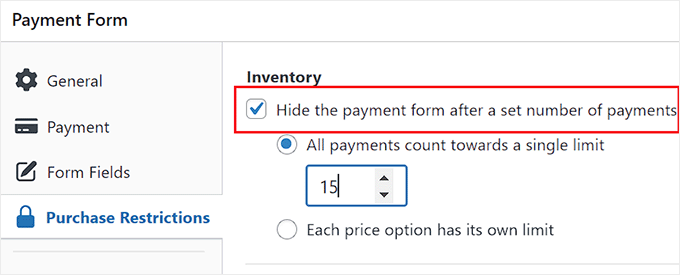
Once you do that, add the value after which your payment form will no longer be active on your site.
When reading the documentation, I found that you can also control product availability by setting specific start and end dates for when items can be purchased.
✅Pros of WP Simple Pay:
- Easy-to-use form builder with premade templates
- Manual stock tracking with automatic product availability updates
- Purchase restrictions based on pricing plans
- Supports multiple payment methods, including SEPA, Affirm, Klarna, and AliPay
- Role-based payment restrictions
- Flexible recurring subscriptions (daily, weekly, monthly, or yearly)
❌Cons of WP Simple Pay:
- Purchase Restriction addon is only available in the pro plan
- No advanced inventory tracking or stock adjustment features
Why I recommend WP Simple Pay: I recommend WP Simple Pay for anyone who needs to sell services, event tickets, or simple products with a quantity limit, but doesn’t need a full eCommerce shopping cart.
It’s a great way to accept payments and control sales without the complexity of a larger inventory system.
5. Smart Manager

Smart Manager is an amazing inventory management plugin that lets you manage the stock levels for digital and physical products.
The plugin sets a minimum stock level value, sends low-stock alerts, and allows you to bulk edit multiple products, orders, posts, and pages.
Other than that, I appreciate that it offers inline editing, product duplication, stock history for each product, and more.
Smart Manager can easily integrate with WooCommerce, EDD, and WPForms and is a great choice for online stores of all sizes.
✅Pros of Smart Manager:
- Centralized order management with status updates and notes
- Advanced search with CSV import/export and custom fields
- Multisite support
- Task scheduling for repetitive actions like stock updates and exports
❌Cons of Smart Manager:
- Steep learning curve
- Limited customer support reported by some users
- Can impact site speed and performance
Why I recommend using Smart Manager: If you have an online store that sells physical and digital products, then Smart Manager is a great choice because it comes with inventory management features for all kinds of items. It can also integrate with WooCommerce and EDD at the same time.
6. WP Inventory Manager
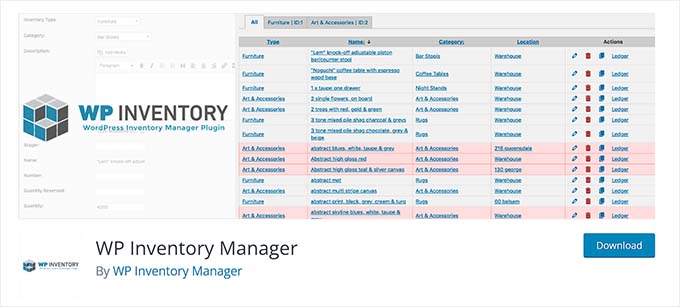
WP Inventory Manager is a free WordPress plugin that enables the creation, tracking, and categorization of inventory items.For example, a business renting out equipment, a library tracking books, or a museum cataloging its items could use this plugin to manage their collection online.
It comes with a search feature and allows you to display your whole inventory as a spreadsheet on the front end of your WordPress site.
During testing, I found that WP Inventory Manager lets you organize your inventory items into various categories for easy navigation and management.
Additionally, you can use it to edit product details, descriptions, prices, or images, and can add custom fields to collect more data.
✅Pros of WP Inventory Manager:
- Uses separate database tables for better performance and faster data access
- Supports multiple product images and attachment of documents like PDFs
- User-based inventory permissions and built-in barcode generation
- Customizable inventory layouts with built-in templates
❌Cons of WP Inventory Manager:
- Can integrate with WooCommerce but doesn’t function as a full eCommerce solution
- Possible compatibility issues with some WordPress plugins
Why I recommend WP Inventory Manager: If you have just started your online store and are on a tight budget, then WP Inventory Manager can be a great solution for you because it’s free.
Which is the Best Inventory Management Plugin for WordPress?
In my opinion, ATUM Inventory Management is the best WordPress inventory management plugin for WooCommerce stores.
It offers an intuitive stock central dashboard, allows real-time inventory tracking, and helps you understand inventory movement with graphs and charts.
However, if you have a membership site with a simple payment form, then you can use WP Simple Pay to set up purchase restrictions.
Similarly, if you have a B2B store, then Wholesale Suite is the better choice because most of its features are specifically designed for wholesalers.
But if you sell digital products, then Easy Digital Downloads is the best solution for you.
Frequently Asked Questions About Inventory Management in WordPress
Here is a list of some questions frequently asked by our readers:
Can WordPress be used for inventory management?
By default, WordPress itself does not come with inventory management features. However, you can use an inventory management plugin to add this functionality to your website.
What is the difference between Shopify and WooCommerce inventory management?
Both Shopify and WooCommerce have built-in features for basic inventory management, like tracking stock counts and sending low-stock alerts.
However, for more advanced tools like bulk editing, purchase limits, or barcode scanning, both platforms rely on plugins or apps. The main difference is that with WooCommerce, you have a wider variety of plugins to choose from to add the exact features you need.
For more details about this, you can see our comparison of Shopify vs WooCommerce.
Which inventory management plugin is best for a small online store?
The free plan of the ATUM WooCommerce Inventory plugin can work wonderfully for a small online store that doesn’t have a large inventory.
However, if your store sells digital products, then you can use Smart Manager. Its free version is good for basic tasks, but you will need the premium version to unlock its most powerful features.
Related Guides for Inventory Management
If you’re looking for additional information on inventory management or eCommerce, you may want to check out these articles, too:
- Dropshipping Made Simple: A Step by Step Guide for WordPress
- Best WooCommerce Point of Sale Plugins (Easy POS Setup)
- How to Create a Product Catalog in WordPress (Step by Step)
- How to Import & Export WooCommerce Products with Images
- Most Popular Digital Products You Can Sell Online
- How to Limit Purchase Quantity in WordPress
- Best WooCommerce Alternatives for Specific Needs
- WordPress eCommerce Setup Guide for Beginners
If you liked this article, then please subscribe to our YouTube Channel for WordPress video tutorials. You can also find us on Twitter and Facebook.


Prajwal Shewatkar
I use WP Inventory Manager on my store. It is a good option for stock-taking. You can also make little tweaks here and there to get alerts when the stocks reach the re-order level. I’ve used custom code to 1. get alerts when to order new inventory (re-order level); 2. to Stop selling products when the stock level reaches the danger level ( I keep some stock with me to replace if I deliver defective items). It is a useful plugin for stock audits also. Real-time inventory knowledge can help you determine economic order quantity and it helps scale up business faster.
WPBeginner Support
Thanks for sharing which of these you use for your site!
Admin