


Have you ever clicked ‘Publish’ on a WordPress blog post and then realized that you used the same title as another post?
It’s an easy mistake to make, especially if you’ve been blogging for a while or manage a large site. But duplicate post titles can confuse your readers and make it harder for your content to perform well in search results.
Thankfully, you don’t have to keep track of every title manually.
After a lot of research, we’ve found a great tool to automatically flag duplicate titles before you hit publish. In this guide, we’ll show you how to prevent duplicate post titles in WordPress, so your site stays reader-friendly and SEO-ready. 🙌
Why Prevent Duplicate Post Titles in WordPress?
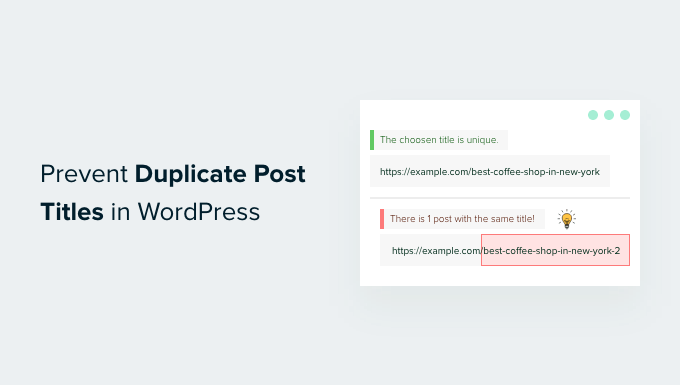
Avoiding duplicate post titles helps keep your content clear and organized, which can also improve your search engine visibility.
Both your blog post title and its URL (or slug) play an important role in SEO.
By default, WordPress uses your title to create the post slug. If you create a post with the same title as an existing one, WordPress will automatically add a number to the end of the slug, such as your-title-2, to keep it unique.
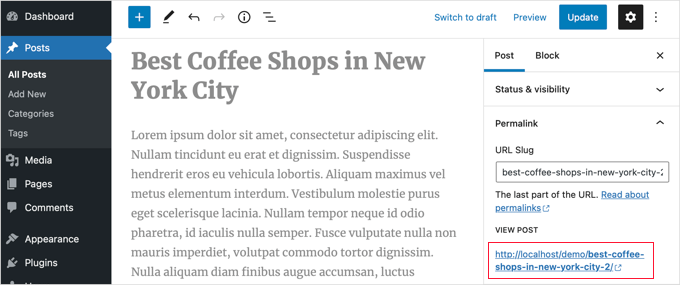
While that number prevents a broken URL, it doesn’t solve the bigger SEO issue. The content of the two posts may still be too similar in the eyes of search engines.
Having multiple posts with similar titles can lead to a problem called “keyword cannibalization.” Simply put, this confuses search engines like Google because they don’t know which of your posts is the correct one to show in search results.
Consequently, both posts might rank lower than they should.
With that in mind, we’ll show you how to prevent duplicate post titles in WordPress so your site stays clear, organized, and optimized for search.
Here’s a quick overview of all the things we’ll cover in this article:
Let’s get started.
How to Prevent Duplicate Post Titles in WordPress
If you discover a duplicate title on a single-author website, then you can simply change one of the titles and remove the number from WordPress URLs.
That said, this can be a lot harder to keep track of when you’re running a multi-author WordPress site with lots of content and writers.
But don’t worry. The solution we’ll cover will help you prevent duplicate post titles and automatically advise your authors to change them.
The first thing you’ll need to do is install and activate the Unique Title Checker plugin.
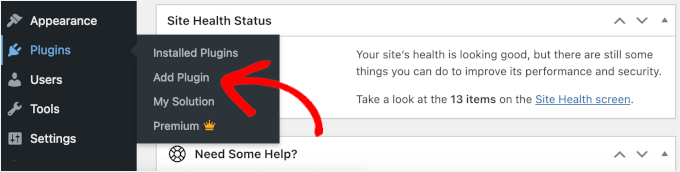
From your WordPress admin area, go to Plugins » Add Plugin.
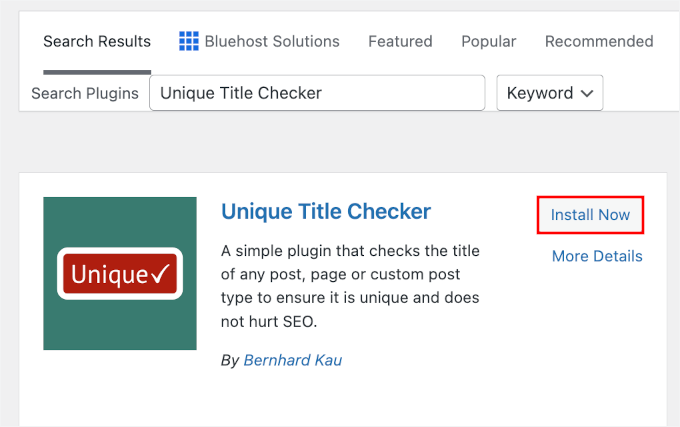
Next, you can use the search bar to quickly find the plugin.
When you see it in the search results, click ‘Install Now’ and then ‘Activate.’
If you need help, you can see our step-by-step guide on how to install a WordPress plugin.
The plugin works out of the box, and there are no settings for you to configure.
Simply go to Posts » Add New and type in a title for your post. The plugin will automatically check the title against your database to see if it already exists.
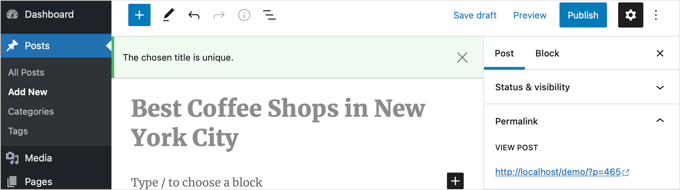
You can now try again by creating a new blog post. This time, use a title that you have already used for another post.
If a duplicate is found, the plugin will display a red warning notice on the right side of the screen (or at the top of the editor) notifying you that the title is already in use.
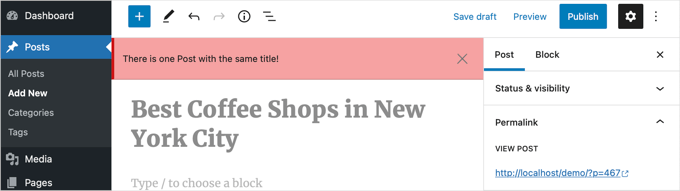
It will not technically stop you from editing the post, saving it, or even publishing it.
However, the visual warning is usually enough to let you and other authors or users on your website know that they should tweak the headline to make it original.
🧑💻 Pro Tip: If the plugin says you have a duplicate title but you can’t find the post, check your Trash folder. WordPress considers posts in the Trash as “existing,” so you must permanently delete the old post to reuse the title.
Bonus Tip: How We Manage Post Titles at WPBeginner
The Unique Title Checker plugin is an excellent tool, especially if you want a simple solution. However, as WPBeginner grew, we needed a more powerful system to manage our content workflow.
At WPBeginner, our team uses the All in One SEO (AIOSEO) plugin. It is our complete toolkit for everything related to on-page search optimization.
AIOSEO includes a built-in tool that helps you optimize your SEO Title (the title that appears in Google search results). It ensures your SEO title is unique across your site so you don’t compete with your own content.
It also comes with a Headline Analyzer that scores our titles for SEO and readability right inside the WordPress editor.

This tool analyzes word balance, sentiment, and character count. It helps our writers craft the best possible headlines before they publish a post, and it’s a key part of our editorial process to maintain high content standards.
For more information about the plugin, you can check out our detailed AIOSEO review.
FAQs for How to Prevent Duplicate Post Titles in WordPress
In this section, we’ll answer some common questions about managing post titles and duplicate content in WordPress.
How do I prevent duplicate post titles in WordPress?
To prevent duplicate post titles, you can use a plugin specifically designed for this purpose. Plugins such as Unique Title Checker will tell you if a new post title duplicates an existing one, allowing you to change it before publishing.
How do I fix duplicate title tags in WordPress?
To fix duplicate title tags in WordPress, you can use an SEO plugin like AIOSEO.
You can start by running the SEO Analysis or Site Audit to find pages with duplicate titles. Then, open each affected post or page in the WordPress editor and update the SEO title in the AIOSEO settings to make it unique.
How do I stop WordPress from duplicating content?
To stop WordPress from duplicating content, you should regularly audit your posts to check for duplicates. You can also use plugins like Delete Duplicate Post to scan your site and minimize repeated content.
Before using any plugin to bulk delete posts, though, make sure you create a complete WordPress backup. This gives you a safety net to restore your data if something goes wrong.
Additional Resources for WordPress Page and Post Management
We hope this tutorial helped you learn how to prevent duplicate post titles in WordPress and keep your content organized for both readers and search engines.
If you found this helpful, you may also want to learn:
- How to Quickly Generate 100+ Blog Post Ideas
- How to Write a Great Blog Post (Structure + Examples)
- How to Create a Custom Home Page in WordPress
- How to Exclude Pages from WordPress Search Results
- Advanced Landing Page Tips to Skyrocket WordPress Conversions
If you liked this article, then please subscribe to our YouTube Channel for WordPress video tutorials. You can also find us on Twitter and Facebook.


Jiří Vaněk
Is it possible to use this solution for pages, or does it only work on posts? I have a knowledge base, or rather a glossary of terms, set up using pages, and it happens that I occasionally use duplicate titles since it contains nearly 700 pages for different terms. So, is it possible to check pages in this way as well?
WPBeginner Support
Yes, the plugin also works for pages.
Admin
Dennis Muthomi
Thank you for this. As someone who manages a multi-author blog, I’ve encountered this issue before and can attest to its importance for SEO and user experience.
Thanks for recommending the Unique Title Checker plugin. It’s a simple yet effective solution that doesn’t interfere with the writing process but still alerts authors to potential duplicates.
kzain
I can’t tell you how many times I’ve accidentally created posts with duplicate titles, causing confusion and a bit of chaos on my site.
The tips provided here are not only practical but also easy to implement. WPBeginner has once again addressed a common issue with a straightforward solution. It’s a relief to know I can now maintain a more organized and professional-looking site. Thanks for making WordPress management so much simpler for all of us!
WPBeginner Support
You’re welcome, glad our guide was helpful!
Admin
Anurodh Keshari
Hey Author,
Thanks for providing this information but this plugin is outdated and it’s not working do you have any other suggestion or any other plugin for this problem. I really need this…
WPBeginner Support
We do not have a recommendation at the moment but we will certainly take a look at the plugin and if there are any replacements we would recommend we will update our article.
Admin
Fredrik Hed
Any good suggestions for a plugin to check for duplicate content and/or duplicate posts on a WP website?
Thanks
Dodecha
But there are also problems where duplicate contents are developed from category and tags pages what to do about that ?
Comturkey
What about Real Estate website, most of propeeties are same
Gaz
last comment is over a year old, but WPB have relisted this in a post dated december 2016.
is this plugin still worthy of a mention when it is untested with the latest release of WP?
Gaz
sorry, thought the last comment was the last post at the bottom,
Still curious to weather this plugin is being updated to be compatible with the new release of WP
Asween
I know about duplicate keyword but I don’t know about duplicate title, it is very useful tips
Webperts
In one of my website, I was not using SEO plugin but I was facing duplicate title, I just customized wp_title() function in header and its done.
kozmikcharlie
for my wordpress 4.0 installation doesn’t go… when I write the duplicated title I need to save it to get the message (as in last pic). It seems to ignore it…
Hasan Movahed
thanks for share this post . im developer this plugin .
WPBeginner Staff
Thanks for writing this useful plugin
Hieu Luong
Thanks Hasan! your tool is very useful!
KonaGirl
This is good to know. I had created a duplicate-2 page on purpose not realizing the detriment it would cause. I changed it and installed the plugin so that I don’t do it again unwittingly. Thanks for the info.