


Building an online store should be exciting, not stressful. Yet many business owners find themselves stuck between two popular choices: Magento and WooCommerce.
Both platforms can power successful eCommerce businesses, but they take very different approaches to getting you there.
The secret isn’t finding the “best” platform—it’s finding the one that matches your specific needs and comfort level. Some businesses thrive with Magento’s powerful enterprise features, while others prefer WooCommerce’s user-friendly approach.
Having guided numerous business owners through this decision at WPBeginner, we know that the right choice depends entirely on your unique situation.
We’ll break down the key differences between these platforms in plain terms, helping you see which one fits your business vision.
By the end, you’ll know exactly which platform will support your success without the confusion or second-guessing.
Quick Comparison of Magento vs. WooCommerce
In a hurry? Here is a quick comparison of Magento vs. WooCommerce to help you choose the right tool for your needs:
| Feature | Magento (Adobe Commerce) | WooCommerce |
|---|---|---|
| Cost | High (Expensive hosting + dev fees) | Low (Free core plugin + affordable hosting) |
| Ease of Use | Steep learning curve (Developer-centric) | Beginner-friendly (Easy setup) |
| Hosting | Requires VPS or Cloud Hosting | Works on Shared Hosting |
| Maintenance | Manual security patches & updates | One-click updates & managed options |
| Support | Official support (Paid plans only) | Huge community, documentation & hosts |
| Best For | Large Enterprise Businesses | Small to Medium Businesses |
Overview: Magento vs WooCommerce
Before we get into details, let’s take a quick look at both popular eCommerce platforms and what makes them stand out.
What is Magento?
Magento is a powerful open-source eCommerce platform.
After being acquired by Adobe, it is now offered in two main versions: Magento Open Source, a free version you can download and host yourself, and Adobe Commerce, a premium, feature-rich solution for enterprise-level businesses.
What is WooCommerce?
WooCommerce is an open-source eCommerce platform built on top of WordPress, which is the world’s most popular website builder.
It allows you to easily create an online store, accept payments, manage inventory, and more. It runs on top of WordPress, which gives you access to thousands of WordPress plugins and themes to grow your eCommerce business.
Both platforms are open-source software and can be extended with extensions and utilize templates for design. However, they both have different pros and cons, which make them unique.
What to Look for in Your eCommerce Platform?
If you are just starting out, then you will want to keep a few things in mind when choosing a platform. These basic factors are crucial when deciding which eCommerce solution will be better for your business.
- Budget – Cost of starting your store and recurring expenses that would affect your business.
- Ease of Use – How easy is it to use for beginners
- Payment Methods – It should support multiple payment gateways. If you require certain payment methods, then you need to make sure that it supports them.
- Scalability – Your eCommerce platform should be able to scale with your growing business needs
These are just some of the basic things you need to look at. Depending on your business, you may also want to consider how the platform does other things like inventory, taxes, invoices, and more.
That said, let’s compare Magento vs WooCommerce. You can click the links below to jump ahead to any section:
- Cost: Magento vs WooCommerce
- Ease of Use: Magento vs WooCommerce
- Payment Methods: Magento vs WooCommerce
- Extensions and Integrations: Magento vs WooCommerce
- Scaling Your Business: Magento vs WooCommerce
- Magento vs WooCommerce: Which One is a Better eCommerce Platform for You?
- Frequently Asked Questions About Magento vs WooCommerce
Cost: Magento vs WooCommerce
For most startups, the cost is one of the most significant factors in decision-making.
When starting your eCommerce website, you need to evaluate the cost. You must also factor in how those costs will grow as you need more resources, addons, and other services.
Cost of Magento eCommerce Platform
Magento is available in two primary versions. The first is Magento Open Source.
This is the free, self-hosted version that you can download and install on your own web hosting.
You can download and install this yourself on any hosting provider. However, it does not include all features, and it does not come with any support.
Second, you have Adobe Commerce, which includes 2 paid plans.
The Commerce Pro plan includes the Adobe application, support, deployment tools, and CDN. It also includes 50GB of testing, DDoS protection, WAF, and more.
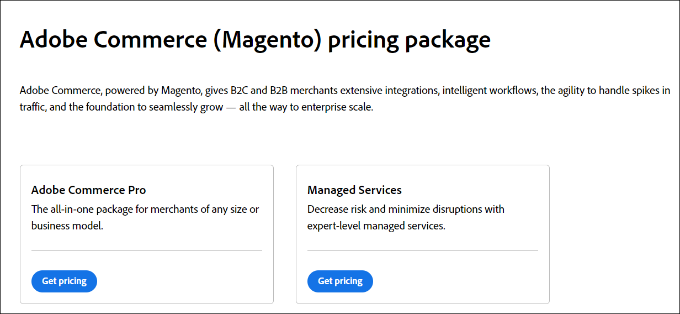
On the other hand, there is a Managed Services plan. This offers additional features like designated cloud infrastructure, custom site monitoring, and personalized run books.
It also includes go-live process coaching, dedicated escalation management, and more.
To find out the prices for each of these plans, you’ll need to get in touch with the sales team and request a quote.
That said, even the Magento community version is not cheap. The core software is free, but you will need at least a VPS hosting plan or a cloud host like Amazon Web Services to run it.
This means even though you will be using the free version, your hosting bill will still be quite high.
If you purchase paid extensions or hire a developer to work on your Magento store, then your costs will increase significantly.
Cost of WooCommerce
WooCommerce is available as a free software that anyone can download and install. It runs on top of WordPress, which means you can install it on any WordPress website.
WooCommerce itself is free. However, you will need to register a domain name, ensure you have an SSL certificate, and purchase WordPress hosting to start your WooCommerce store.
Normally, a domain name costs $14.99 per year, and an SSL certificate costs $69.99 per year. Web hosting typically costs around $11.99 to $14.99 per month.
While these standard costs can add up for a startup, there are more affordable ways to get started. Many hosting companies now specialize in WooCommerce.
These platforms offer discounted hosting plans that reduce your starting cost significantly.
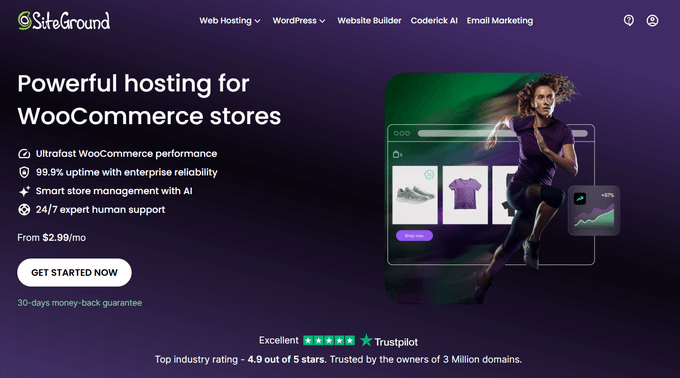
SiteGround, an officially recommended WooCommerce and WordPress hosting provider, has agreed to offer WPBeginner users a great deal.
They are offering a free domain name, a free SSL certificate, and a huge discount on hosting. This offer will help you start your online store for as low as $2.99 per month.
The cost of starting a WooCommerce store is a lot lower than the Magento community edition. There are also far more choices available for WooCommerce hosting plans.
Apart from hosting, using paid extensions and themes for WooCommerce will also affect your costs.
However, WooCommerce gives you access to more than 60,000 free WordPress extensions and thousands of free WordPress themes.
You can easily find free WooCommerce plugins as alternatives to paid extensions. There are also tons of free WooCommerce themes that you can use to further reduce your costs.
With affordable hosting plans and an abundance of low-cost free extensions and themes, WooCommerce is clearly less costly than Magento.
Winner: WooCommerce
Ease of Use: Magento vs WooCommerce
Most folks starting an eCommerce business are not programmers or web developers.
They need a platform that they can use easily. They do not want to pay someone a fortune to help them do basic things.
Even experienced users prefer an easy-to-use platform. This helps them focus on growing their business instead of struggling with software.
Let’s take a look at Magento and WooCommerce to see which one is easier to use.
Magento – Ease of Use
Magento is a powerful eCommerce-specific platform. It packs tons of built-in features that work out of the box. However, it comes with an advanced setup process that can be complicated for new users.
It is not easy to install. Most hosting companies do not offer pre-configured installers for Magento. The installer language is very developer-centric. This may leave beginners a bit clueless about several important settings.
Beyond installation, maintenance is also a challenge. You must manually install security patches and updates, which often requires hiring a professional developer.
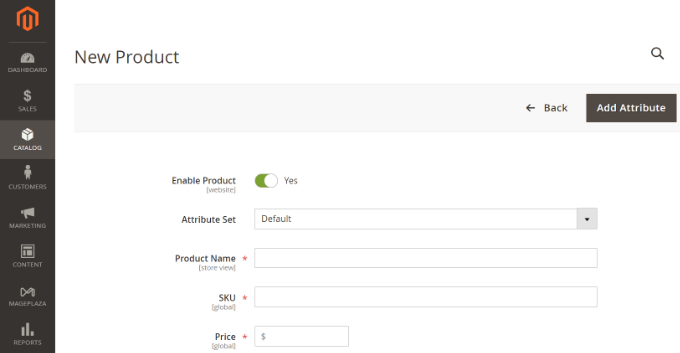
After the setup, you will have to spend some time learning the basics. Installing extensions or customizing themes is not always easy. You may need to seek help to set them up.
You can find tutorials and documentation online. But most often, they are written for developers and not for DIY users.
Overall, Magento is extremely powerful and comes packed with a ton of features. But it is not the easiest-to-use eCommerce platform.
WooCommerce – Ease of Use
Compared to Magento, WooCommerce is significantly easier to use. This is especially true for beginners and users who are not developers.
The installation is simple. Many WooCommerce hosting providers will automatically install it for you along with WordPress.
Since WooCommerce is a WordPress plugin, you will need to install WordPress first.
Even if your host doesn’t automatically install WordPress, there is likely an auto-installer. This lets you do it with just a few clicks.
WooCommerce comes with a setup wizard that will walk you through the initial setup. This includes creating pages, setting up payments, choosing the currency, and setting shipping and tax options.
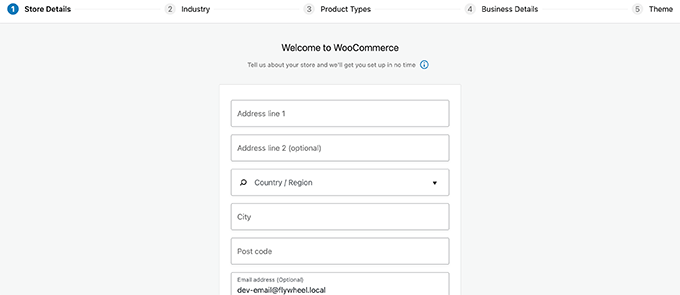
Once you are up and running, you will find plenty of help to do almost anything. WooCommerce themes and plugins are easy to install and come with their own settings.
WooCommerce still has a bit of a learning curve, but overall it is far easier to use than Magento.
Winner WooCommerce
Payment Methods: Magento vs WooCommerce
As an eCommerce store, you will need to accept online payments on your website.
There are many payment gateway companies. These allow you to take credit cards and use other services, like PayPal or AliPay.
Some payment gateways may not be available in all regions. You need options that are available for both you and your users.
Let’s see what payment options are available for Magento and WooCommerce stores.
Magento – Payment Options
Magento comes with PayPal, Authorize.net, cash on delivery, bank transfer, and purchase order payment methods by default.
It also has extensions available for many popular payment gateways. This includes Stripe, 2Checkout, Braintree, WePay, Google Pay, Apple Pay, Skrill, and more.
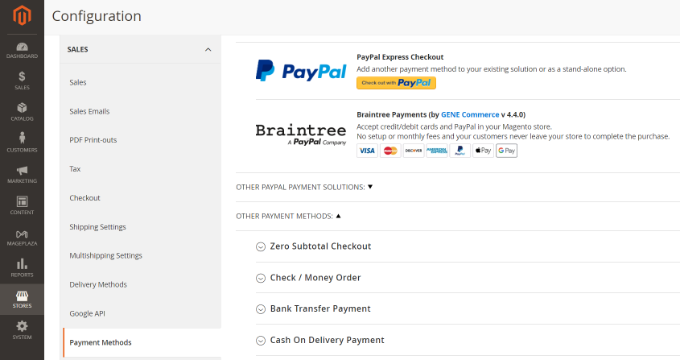
Magento’s APIs allow developers to easily integrate payment gateways.
If the payment gateway you are looking for is not yet available, you can hire someone to create a custom extension for it.
WooCommerce – Payment Options
WooCommerce offers PayPal and Stripe payments by default. It also supports all major payment gateways through extensions and addons.
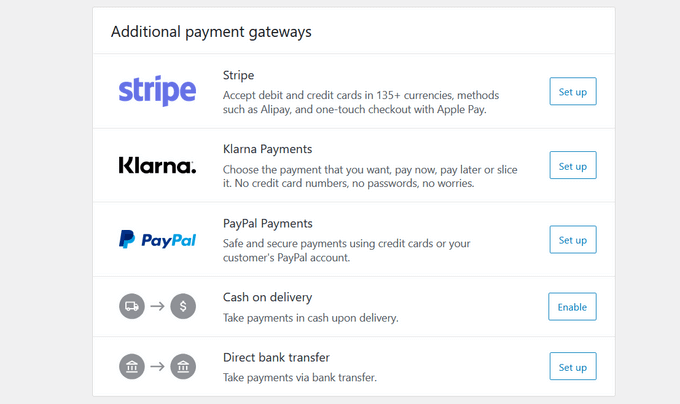
WooCommerce even supports many regional and lesser-known payment companies. Since it is so easy to extend, any payment company can create an add-on for WooCommerce support.
We feel that both Magento and WooCommerce do a great job with payment support. Both platforms have options for multiple payment choices.
However, WooCommerce is often the better choice if you need a specific local payment gateway. Its open ecosystem makes it easier for smaller regional providers to build integrations.
Winner: Tie
Extensions and Integrations: Magento vs WooCommerce
There is a limit to the features your eCommerce platform can add to the core software.
This leaves room for third-party extensions, tools, and integrations to extend the platform by offering additional features.
Both Magento and WooCommerce have extensions, themes, and support offered by third-party integration providers.
Magento Extensions
Magento has an active community of developers, agencies, and freelancers. There are plenty of free and paid third-party extensions available for Magento that you can use.
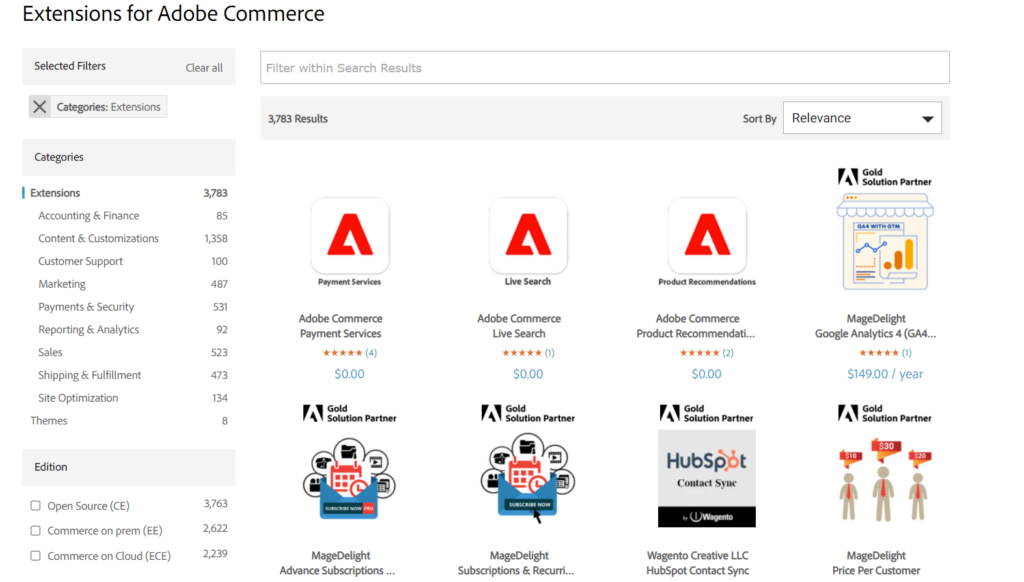
These extensions allow you to easily add new features and integrate other tools and services into your online store.
The official Adobe Commerce Marketplace currently lists thousands of extensions, with over a thousand of them available for free.
That’s a decent number of extensions, considering that Magento has a lot of functionality in the core software.
WooCommerce Extensions and Addons
Since WooCommerce runs on top of WordPress, you get access to the entire WordPress ecosystem.
This includes over 60,000 free plugins and thousands of paid ones. These tools allow you to add any feature imaginable to your site.
For example, you can create contact forms with WPForms or handle SEO optimization with All in One SEO.
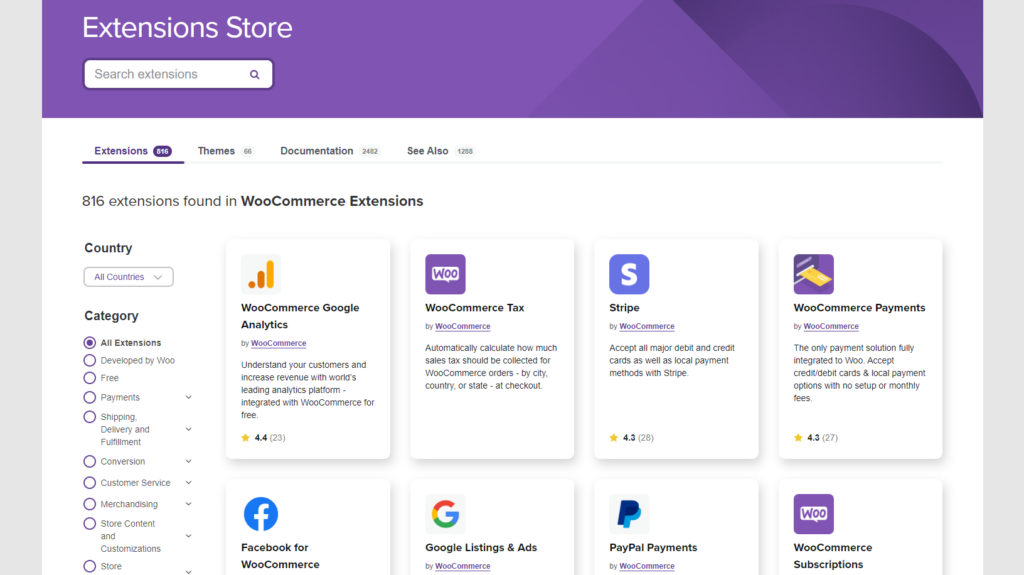
On top of that, there are thousands of extensions built specifically to add features to WooCommerce.
A large number of extensions means you can connect your WooCommerce store to any third-party service. This includes your email marketing company, payment gateways, CRM software, and more.
Winner: WooCommerce
Scaling Your Business: Magento vs WooCommerce
Growing your eCommerce business comes with its own challenges.
As your website traffic and sales grow, you will need more server resources. This is necessary to keep up with your business goals and growth trajectory.
Both Magento and WooCommerce can handle large eCommerce stores with huge spikes in traffic.
However, they are two different platforms. This affects their scalability and infrastructure requirements. Let’s take a look at how Magento and WooCommerce handle scalability on large eCommerce websites.
Scaling Magento
Magento is designed from the ground up to be a powerful eCommerce platform. However, when it comes to scaling, your costs and technical challenges will skyrocket.
If you are using the community edition of Magento, then you will have to do it on your own.
Magento is resource-intensive software. If you are on VPS hosting, you will eventually have to upgrade to a dedicated server or a cloud hosting service like Amazon Web Services.
You will also need to optimize your store for caching and manage backups. You must also protect against DDoS attacks by using a website firewall.
If you don’t have experience in managing large websites, then you will need to hire Magento specialists.
If your business can afford the growing costs, then the easier option would be to switch to Adobe Commerce plans.
Scaling WooCommerce
WooCommerce stores will face the same technical challenges as Magento. However, you have a lot more options to continue growing while keeping your costs low.
The scaling path for WooCommerce is also much smoother. You typically start with a shared hosting plan.
As you grow, you can use easy caching options to improve performance. You can do this with plugins like WP Rocket.
When you outgrow shared hosting, you can move to a managed WooCommerce hosting provider like SiteGround.
These providers handle the technical optimization for you. This lets you scale your website easily to meet your growing business needs.
Finally, for enterprise-level stores, you can move to specialized high-performance hosting like WordPress VIP.
Finding WordPress specialists to help scale your online store is not as costly as Magento. Even at the enterprise level, your eCommerce store would be able to perform well at much lower costs.
Winner: WooCommerce
Magento vs WooCommerce: Which One is a Better eCommerce Platform for You?
Magento and WooCommerce are both full-featured eCommerce platforms that you can use to build any kind of online store. However, it comes down to costs and your personal skills to choose between them.
WooCommerce obviously has the advantage of a large user base and market share. It runs on WordPress, which is already the world’s most popular website builder. WordPress users would feel at home when working on WooCommerce.
It also beats Magento in terms of ease of use and cost of building and running an eCommerce store at scale.
If you want an easy-to-use, cost-effective, and easy-to-scale eCommerce platform, then WooCommerce is the perfect fit for you.
Magento, on the other hand, is more suitable for enterprise-level businesses with their own development teams or businesses that can spend money on hiring someone.
To put it simply:
- WooCommerce is the best choice for… small to medium-sized businesses, startups, and anyone who wants an easy-to-use, highly customizable, and budget-friendly platform. If you already use or plan to use WordPress, it’s the natural and most powerful choice.
- Magento is the best choice for… large, enterprise-level businesses with complex technical requirements, high sales volume, and access to a dedicated team of developers. It’s a powerful but complex system that requires significant investment in both time and money.
Frequently Asked Questions About Magento vs WooCommerce
Here are some questions that our readers have frequently asked us when comparing Magento and WooCommerce:
Is Magento better than WordPress?
No, for most users, WordPress (via WooCommerce) is the better choice because it is easier to use and more affordable.
Magento is typically only “better” for large enterprise-level businesses that require complex, custom infrastructure and have a dedicated development team to manage it.
What are the disadvantages of WooCommerce?
The main disadvantage is that you are responsible for maintaining your own website, including backups and security updates. However, you can easily avoid this technical work by using a managed WooCommerce hosting provider like SiteGround, which handles the maintenance for you.
Which eCommerce platform is best for SEO?
WooCommerce is generally best for SEO because it runs on WordPress, the most SEO-friendly platform in the world. It gives you full control over your site’s structure and integrates seamlessly with powerful tools like All in One SEO to help you rank higher.
Does WooCommerce charge a monthly fee?
No, the core WooCommerce plugin is 100% free to download and use. However, running an online store does have other costs, such as domain registration and web hosting fees, which are required to keep your website live.
Is Magento difficult to learn?
Yes, Magento has a steep learning curve and is difficult for beginners. It is designed for developers and technical professionals, so you will likely need coding knowledge or a hired specialist to set up and manage your store effectively.
Is Magento SEO friendly?
Yes, Magento is SEO-friendly and includes strong built-in features for search optimization. However, configuring these settings correctly often requires technical expertise, whereas WooCommerce makes SEO settings accessible to everyone through beginner-friendly plugins.
We hope this article helped you compare the pros and cons of Magento vs WooCommerce. You may also want to see our side-by-side comparison of Shopify vs WooCommerce and how to create a WooCommerce popup to increase sales.
If you liked this article, then please subscribe to our YouTube Channel for WordPress video tutorials. You can also find us on Twitter and Facebook.



Moinuddin Waheed
I think woo commerce is the best choice when it comes to making an online Store.
It is powered by wordpress which has a huge community of users, when in trouble we would be getting an instant how to guide.
it is also cost effective and has tons of easy to use integrations.
Woo commerce by far the best option to choose for starting online business.
Ralph
I think WooCommerce is the best, but I’m looking for alternatives for my new shop. It is better to have a bigger perspective. Do you guys have a comparison between woocommerce and shopify?
WPBeginner Support
We have a comparison article that you can find below:
https://www.wpbeginner.com/opinion/shopify-vs-woocommerce-which-is-the-better-platform-comparison/
Admin
Jiří Vaněk
When we last tested Magento on the server and examined its resource requirements, it showed significantly higher load and demands on the server compared to WordPress and WooCommerce. Therefore, it’s advisable to opt for quality hosting and always communicate with the provider to ensure this system runs smoothly.
Adrian
Thank you for the post, very informative.
Is BigCommerce any Good Compared to WooCommerce
WPBeginner Support
We have a comparison article already that you can find below!
https://www.wpbeginner.com/opinion/bigcommerce-vs-woocommerce-which-one-is-better-comparison/
Admin
Theresa Wise
Thanks for sharing this awesome article with us. It’s been two years now that I have been using magento for my online store. However, the picture is clear to me and now I am surely gonna switch for woocomerce website. But, I only have one concern. If, migrating my website will hurt my SEO efforts or not.
As, the SEO performance of my website was badly hurt when I shifted the hosting of my website from godaddy hosting to magento managed cloud hosting which is powered by Cloudways.
WPBeginner Support
Unless something strange happens, transferring your site should not have a major effect on your SEO
Admin
Anil
I spend lot of time to know the comparison of Magento vs WooCommerce. This article is logically the best and i stopped to spend more time for the subject. Why should i keep one lakh rupees in my pocket for buying only thousand rupees product, for this logic I will go with WooCommerce now .Thanks lot for clear my mind..
WPBeginner Support
Thank you, glad you feel our content is the best
Admin
T
@CHRIS magento 2.3.0 is slow in my opinion out of the box with less than 20 store products. I’ve seen a lot of low resource wordpress installations. How much computer power is reserved and available on your installation? Are you on shared hosting? To me, my private server wordpress installation is just as fast as my private server magento installation.
WPBeginner Support
Thanks for your feedback on this
Admin
Miley Cyrus
Thanks for sharing this information.
WPBeginner Support
Thanks for reading our article
Admin
Atif ali
Hi,
It was a good article. It clears everything regarding Magento and woo. Can you please also write an article which will compare the woocommerce with the open cart?
Thanks,
chris
good article!
though WooCommerce is the winner after all.
but i think you might need to compare speed also.
speed is also very important aspect for a e-commerce site.
I don’t know too much about Magento, but I really think WooCommerce/WP system is slow to load or responsive because of it’s database structure and so on.