


DreamHost has been selling web hosting since 1997, and it is one of the few hosts that WordPress.org officially recommends. A long track record is reassuring, but it does not tell you how fast a host is today.
In July 2026, I tested DreamHost the same way I tested 14 other WordPress hosting companies, with an identical WordPress site on a custom domain, the same tools, and the same checklist.
This DreamHost review shows you the real numbers from my hosting speed test, plus the pricing details that most reviews gloss over.
Quick Answer – Is DreamHost Worth It?
Yes, DreamHost is worth it if you want the lowest long-term hosting bill of any host we recommend. It scored 64 out of 100 on our WPBeginner Score, which places it 7th out of our 7 recommended hosts.
In our hosting speed test, the DreamHost site loaded its main content in under a second. That is fast enough for a typical blog or small business site, and every plan includes daily backups that most budget hosts skip.
The trade-off to know is that it was not as quick as our other budget picks, and the headline price requires a 4-year commitment.
DreamHost at a Glance
| DreamHost Test Summary (July 2026) | |
|---|---|
| WPBeginner Score | 64 / 100 |
| Speed (LCP) | 986 ms |
| Global response time | 658 ms average across 6 regions |
| Uptime | 100% over a 30-day monitoring window |
| Pricing | From $1.99/mo with our link on a 4-year term, renews at $7.99/mo |
| Support | 24/7 live chat and email from DreamHost’s in-house team (no standard phone line) |
| Best for | Beginners who want the lowest long-term hosting cost |
You can see how DreamHost ranks against all the hosts I tested in our best WordPress hosting comparison, which uses the same data as this review.
About DreamHost
DreamHost was founded in 1997 by four college friends in California, and it remains one of the last independently owned hosting companies. Today it powers over 1.5 million websites, including more than 750,000 WordPress installs.

DreamHost is also a certified carbon-neutral host, which is a nice bonus if sustainability matters to you. And while WordPress.org’s recommendation matters, I did not let it influence this review.
The verdict below comes from what my hosting speed tests actually measured.
Pros and Cons of DreamHost
Pros
- The lowest renewal price of any host we recommend, printed right on the plan card
- Daily backups on every plan, where Bluehost backs up weekly at a higher price
- 25 websites, 25 GB NVMe storage, and unmetered bandwidth on the entry plan
- Free domain for the first year with free domain privacy included – many hosts charge extra for privacy
- Zero downtime during our 30-day monitoring window
- Independently owned since 1997, with month-to-month billing available on every plan
Cons
- Slower page loads than the other budget hosts we tested
- Not the host for traffic-spike businesses (see the stress test below)
- The headline price requires a 4-year commitment paid upfront
- Email becomes a paid add-on after a 3-month free trial
- No phone line – support is live chat and email, with paid callbacks
How I Tested DreamHost (Methodology)
I used the same testing protocol for every hosting company in our comparison. I set up an identical WordPress site with a default theme and test content, including images, on a custom domain.
Then I ran the same four tests – GTmetrix for speed and LCP, k6 for stress with 50 virtual users at the same time, a response-time test from 6 global regions, and 30 days of UptimeRobot monitoring.
Those four tests make up the performance side of the WPBeginner Score, which counts for 80% of the total. Each test carries a set weight, so no single lucky number can carry a host.
The other 20% of the score comes from value. For that part I look at what the plan really costs and gives you in return – the intro price, the renewal price, how many sites and how much storage you get, the plan limits, and the quality of support.
The full methodology, the exact weights, and every host’s raw numbers are in our best WordPress hosting guide.
DreamHost Performance Test Results
Below you can find my full DreamHost speed test results.
Speed Test – 986 ms LCP
Largest Contentful Paint (LCP) measures how quickly the main content of a page appears. It is the speed number that Google’s Core Web Vitals care about most.
My DreamHost test site showed its main content in just under one second, and the full page finished loading in 1.5 seconds.
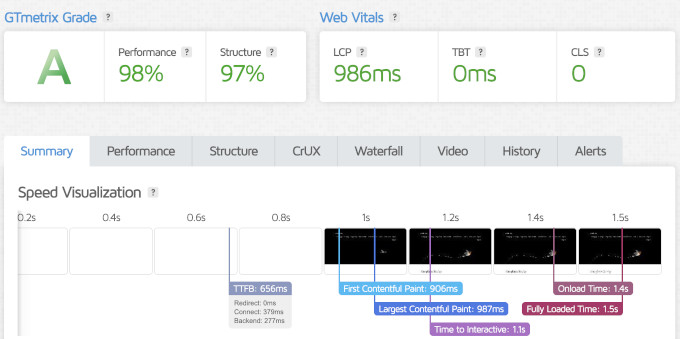
I will be honest about this number. A load time around one second is fine for a starter site with no optimization.
However, when I tested other popular hosts, the median LCP was 659 ms. Among the budget hosts, Hostinger was the quickest at a similar price.
So DreamHost does not win on raw speed in our data. It competes on price and limits instead, which the pricing section below covers.
Server Response Time – 658 ms Global Average
Speed test tools load the whole page with images included, but that is only one part of the performance. To see raw server speed, I also measured time to first byte (TTFB) from data centers in 6 regions around the world.
The heading above shows DreamHost’s average across all 6 regions.
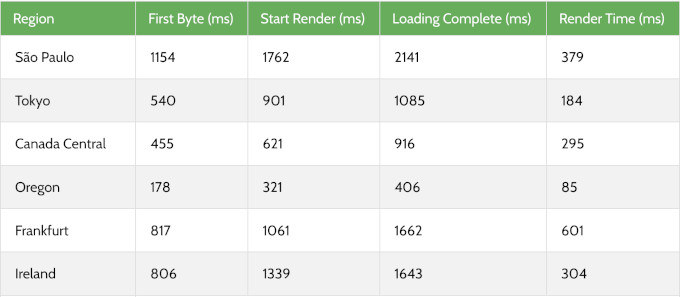
Response times were good in the US and Canada, and slower in the other regions. Our test site ran in DreamHost’s default US location, so this pattern makes sense.
If your audience is mostly in North America, DreamHost’s response speed will serve you fine. If your audience is global, DreamHost does not include a CDN on these plans, so I recommend adding Cloudflare’s free CDN to serve content from locations closer to your visitors.
Stress Test – 245 ms P95 Response
To see how a host behaves under a traffic spike, I send 50 virtual users to the test site with K6 by Grafana Labs and record the P95 response time. P95 means 95% of all requests finished faster than that number.
DreamHost held a 245 ms P95 response, and not a single request failed. The site stayed up through the whole run.
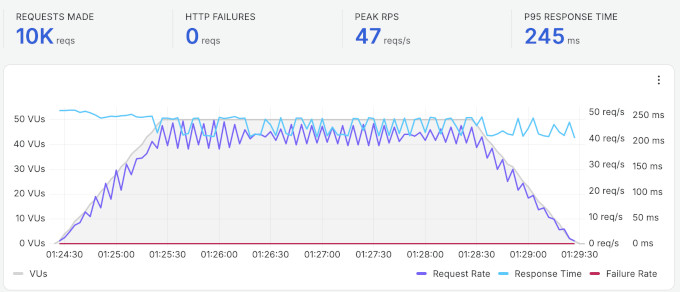
Still, that number is the weakest under-load result of the hosts we recommend.
In practice, a quarter of a second under 50 simultaneous visitors is still fast for a typical blog, portfolio, or small business site. Most new websites never see 50 visitors in the same moment.
You should care about this result if your business depends on traffic spikes. If you are planning a store with sale-day rushes or content that attracts press mentions, then a managed host like Levamo is built for exactly that load.
Uptime – Zero Downtime Over 30 Days
I monitored the DreamHost test site with UptimeRobot, checking every 5 minutes. Over the 30-day window, it recorded 100% uptime with no incidents.
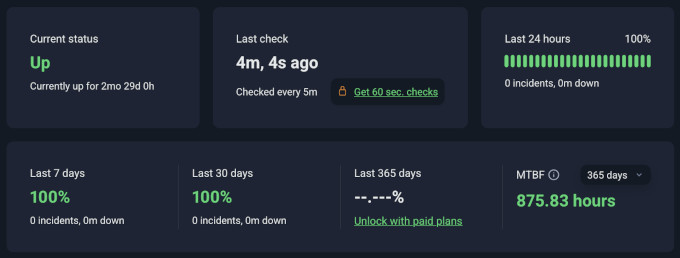
DreamHost goes further than most hosts here, and its uptime guarantee promises zero downtime where most budget hosts only promise 99.9%. It backs that promise with multiple data center locations, redundant cooling, emergency generators, and constant monitoring.
In our monitoring window, DreamHost lived up to its own promise.
How DreamHost Compares to Other Hosts We Tested
The speed test numbers on their own do not give you the full picture. Here is how DreamHost performed compared to other similarly priced hosts from our comparison, all tested with the identical setup.
| Host | LCP | Global response | Uptime | Intro / renewal | WPBeginner Score |
|---|---|---|---|---|---|
| DreamHost | 986 ms | 658 ms | 100% | $1.99 / $7.99 | 64 / 100 |
| Hostinger | 659 ms | 227 ms | 100% | $2.69 / $10.99 | 88 / 100 |
| Bluehost | 933 ms | 599 ms | 100% | $2.99 / $9.99 | 69 / 100 |
| SiteGround | 608 ms | 369 ms | 100% | $2.99 / $17.99 | 75 / 100 |
The WPBeginner Score weighs performance at 80% and value at 20%. DreamHost’s 64 reflects exactly what you see above – it trails the group on speed, while its value is the strongest of the four.
DreamHost has the lowest renewal price of the group, so it costs the least over the long run. It is also the only one of these four that includes daily backups at the entry price, where Bluehost backs up weekly.
To see the full rankings, and the raw data for every host we tested, check out our best WordPress hosting guide.
DreamHost’s Infrastructure and Technology
Most other DreamHost reviews skip what runs under the hood, and I believe it is worth highlighting.
Storage – every plan runs on NVMe SSD storage, which is the faster generation of SSD. DreamHost says NVMe delivers up to 10 times faster load times than older SATA drives.
Control panel – DreamHost built its own control panel instead of licensing cPanel. You manage domains, databases, email, SSL, and backups from one place, and advanced users still get a full Unix shell.
Data centers – DreamHost serves shared and WordPress hosting from its US data centers in Ashburn, Virginia and Hillsboro, Oregon. Its newer Amsterdam and Singapore locations mainly serve its cloud and VPS products, so plan on a CDN if your audience is global.
Security and backups – every plan includes unlimited free SSL certificates from Let’s Encrypt, daily automated backups, and on-demand performance scans. Domain privacy comes free with the free domain, which many hosts sell as a paid extra.
Developer tools – you get SSH access, crontab, raw log files, MySQL databases, PHP 8, and support for Rails, Python, and Perl. That is more backend freedom than most budget hosts allow.
DreamHost Hosting Plans and Pricing
DreamHost offers shared web hosting, managed WordPress hosting, VPS, cloud, and dedicated servers. For most readers of this review, the three shared Web Hosting plans are the relevant ones.
| Plan | Web Hosting Launch | Web Hosting Growth | Web Hosting Scale |
|---|---|---|---|
| Intro price (4-year term) | $1.99/mo | $3.49/mo | $7.99/mo |
| Renews at | $7.99/mo | $8.99/mo | $19.99/mo |
| Websites | 25 | 50 | 100 |
| Monthly visits | ~40,000 | ~200,000 | ~400,000 |
| Storage | 25 GB NVMe | 50 GB NVMe | 100 GB NVMe |
| 20 mailboxes (3 months free) | 40 mailboxes (3 months free) | 60 mailboxes (3 months free) |
The honest catch is the term. The intro prices above come with our link on a 4-year term, and you pay the full term at checkout.
On DreamHost’s public pricing page, the same Launch plan on a 1-year term costs $2.89 per month and renews at $10.99 per month. If you would rather not commit at all, every plan also offers monthly billing at a higher rate.
I like that DreamHost prints the renewal rate right on the plan card instead of hiding it in fine print. Whatever term you pick, you know what year two costs before you pay.
All plans include daily backups, unmetered bandwidth, unlimited free SSL, a free starter website, and a free domain for the first year on any 1-year or longer term. All plans also come with a 30-day money-back guarantee.
DreamHost also sells DreamPress, its managed WordPress line, from $14.99 per month with built-in caching, a CDN, staging, and unlimited email. Most readers should start on the Web Hosting Launch plan and upgrade only when their traffic demands it.
Free and Paid Hosting Addons
DreamHost’s headline price is honest, but a few extras start free and later cost money. Knowing these up front will save you surprise charges.
- Free domain – free for the first year on 1-year and multi-year terms, and it includes free domain privacy protection, which many hosts sell separately. After year one, the domain renews at the standard registration rate. This is fairly standard practice across shared hosts that offer a free domain.
- Professional Email – a 3-month free trial on every Web Hosting plan. After the trial, mailboxes start at $19.99 per mailbox per year, so budget for it if you need email at your own domain.
- Remixer AI website builder – free for the first 30 days on Web Hosting plans. Treat it as a trial rather than a permanent freebie.
- Refund rules – every plan comes with a 30-day money-back guarantee on the hosting itself. DreamHost issues refunds to credit card payments, so pay by card if you think you might use the guarantee.
DreamHost for WordPress Beginners
DreamHost skips cPanel entirely and gives you its own custom control panel. Websites, domains, email, databases, and backups all sit in one clean dashboard.
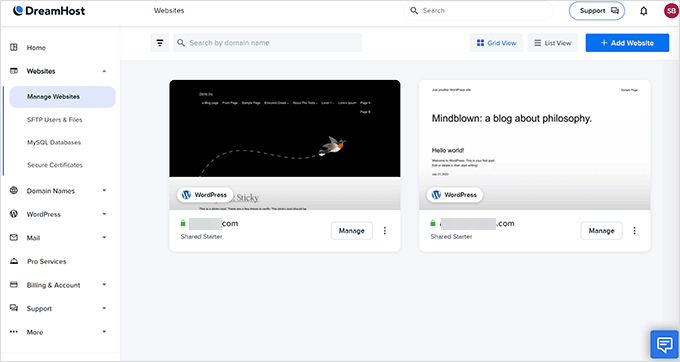
If you have used cPanel for years, expect a short adjustment period. If this is your first host, there is nothing to unlearn, and the panel covers the essentials without the clutter.
Getting WordPress running is easy. You can have DreamHost pre-install WordPress at signup, or use its WordPress install assistant from the panel in about a minute.
Two extras stand out for first-timers. DreamHost’s team builds you a free 4-page starter website, and its Liftoff AI builder can launch a personalized WordPress site in under 60 seconds.
If you already have a site somewhere else, DreamHost includes a free automatic migration plugin that moves your WordPress site over for you.
DreamHost Customer Support
DreamHost runs its support fully in-house, with no outsourcing. You can reach the team 24/7 through live chat or email tickets from the control panel.
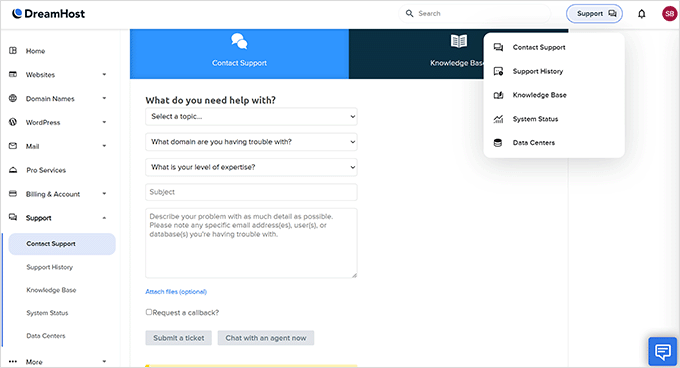
There is no phone line to call. DreamHost offers callbacks instead, but they cost extra and are not part of every plan.
To be fair, phone support is rare at budget hosting prices, and most hosts at this level stick to chat.
DreamHost’s support team has won Gold Stevie and Globee awards for customer service, and it includes people who contribute to WordPress core. That matters when your question is about WordPress itself rather than the server.
Who Should Use DreamHost and Who Should Look Elsewhere
Choose DreamHost if you are building your first website on the smallest possible budget and want the bill to stay low at renewal. You get daily backups, generous site and storage limits, and a free domain with privacy included, all from a host that has been around since 1997.
Its zero-downtime record in our monitoring backs the reliability claim.
Look elsewhere if raw speed is your priority, since Hostinger and SiteGround both beat DreamHost in our tests. The same goes if you want cPanel, need phone support on an entry plan (SiteGround), or run a high-traffic store that needs proven performance under load, where Levamo is the stronger pick (see our full hosting comparison).
Final Verdict – Is DreamHost the Right Choice for You?
DreamHost is perfect for beginners who want the lowest long-term hosting bill without giving up daily backups or generous limits. It has earned trust since 1997 by keeping its pricing plain – the renewal rate sits right on the plan card, and every plan offers monthly billing.
My verdict – if budget decides your hosting choice, visit DreamHost and start on the Web Hosting Launch plan. If speed is your deciding factor, our best WordPress hosting comparison shows which host won each category on the same tests.
FAQs About DreamHost
1. What are the disadvantages of DreamHost?
Based on our tests, the main ones are page loads that trail our other budget picks and softer results under sustained traffic. On the billing side, the headline price needs a 4-year commitment, email becomes a paid add-on after a 3-month trial, and there is no standard phone support.
2. Is DreamHost good for WordPress?
Yes. DreamHost is one of the few hosts WordPress.org officially recommends, and its support team includes WordPress core contributors.
You get a WordPress install assistant, a free automatic migration plugin, and daily backups on every plan.
For heavier WordPress sites, its DreamPress line adds managed features like staging and a built-in CDN.
3. Is DreamHost good for beginners?
Yes. The custom control panel is clean, DreamHost’s team builds you a free starter website, and 24/7 chat is there when you get stuck.
The main adjustment is that there is no cPanel, but most beginners adapt to the dashboard quickly.
4. Does DreamHost use cPanel?
No. DreamHost built its own control panel instead.
You can still manage MySQL databases, change PHP versions, install WordPress in one click, and control SSH and FTP access, so you lose the familiar layout rather than the features.
5. Can DreamHost handle high traffic?
DreamHost rates its shared plans for 40,000 to 400,000 monthly visits, and bandwidth is unmetered, so a busy month never triggers overage fees. In our stress test, the site stayed up with zero failed requests at 50 concurrent users.
For a business built on traffic spikes, such as a store with big sale days, a managed host like Levamo is the safer pick.
6. Which is better, Bluehost or DreamHost?
On our identical tests, the speed difference was small – Bluehost loaded at 933 ms, just 53 ms ahead of DreamHost. DreamHost costs less over the long run and includes daily backups, where Bluehost backs up weekly.
Bluehost counters with the simplest setup we have seen and phone support on its higher plans. Pick DreamHost for the budget, and Bluehost for the most hand-held start.
7. Which is better, DreamHost or SiteGround?
SiteGround was faster in our tests, loading at 608 ms, and it includes phone support on every plan. However, it renews at $17.99 per month, more than double DreamHost’s renewal rate.
Choose SiteGround if speed and support matter more than cost. Choose DreamHost if the long-term bill decides.
8. Where are DreamHost’s servers located?
DreamHost’s main data centers are in Ashburn, Virginia and Hillsboro, Oregon, with headquarters in Brea, California. Its newer Amsterdam and Singapore locations mainly serve its cloud and VPS products.
Our test site ran in the default US location, which is why North American response times were strong while other regions lagged. A CDN closes most of that gap for global audiences.
9. Can I install WooCommerce on DreamHost?
Yes, you can install WooCommerce on DreamHost’s web hosting and VPS plans. A new store with modest traffic will run fine on the shared plans.
As your store grows, plan to move to managed hosting, because stores are harder on a server than blogs.
WPBeginner users get an exclusive discount on web hosting and a free domain with our DreamHost coupon.
Changelog
- July 2026 – Rebuilt the review around our July 2026 test data (speed, stress, and response time tested July 23, plus a 30-day uptime monitoring window). Added the WPBeginner Score, the comparison table against similarly priced hosts, the infrastructure section, and the pricing fine print, and updated all plans, prices, and refund terms to DreamHost’s current offer.
We hope this DreamHost review helped you with your WordPress hosting research and helps you choose the right WordPress host for your needs. You may also want to see our pick of must-have WordPress plugins for business websites.
If you have any questions or feedback about my DreamHost review, please send me a message. I love hearing from our readers, and you can scroll below to read real DreamHost user reviews from other business owners from around the world.
Andrei Marinescu
It’s okay. (okay for me is like awesome for everybody else. Awesome for me doesn’t come easily)
Jon Herrmann
I am relatively savvy but not a techie. Dreamhost has been a great resource, especially their live chat customer service available pretty much any time. And the structure of their Wordpress set up is great and easy.
Benny
awesome service. used to be with GoDaddy, and about 4 years ago switch to dreamhost. no comparison. Their support has always been top notch, and thats the key to everything.
Howard Cruse
So far I’ve found Dreamhost’s customer service to be very available and helpful, with actual humans ready to give me a hand.
Chris D.
I recently switched hosting from GoDaddy to Dreamhost and the service has been on-point in helping with a few issues I had getting things set up along the way. I would recommend Dreamhost.
Zoran Jankovic
Been with Dreamhost for 8 years now and during this time they never let me down. Their support service is excellent, promptly responding to silliest of my queries and resolving issues in no time. Well done Dreamhost team, I wholeheartedly recommend your services!
Chris
Support is a joke, I cancelled my service after 5mins and went with GoDaddy where I was able to pick up the phone and get support for FREE, what a concept! DreamHost is garage.
Fernando Andrade
These dudes have always been nothing but helpful and available, when I have needed their help. Thanks, Dreamhost!
Elaine Johns
My son switched me to dreamhost so I would be able to do a lot more with my website than what I could with my former host, and not come to him with every change i want. We’re both happy we made the switch.
Patrick
Dreamhost support is very good. In addition, they’ve made major improvements in capacity and speed of their systems in the last few years.
Stability is a lingering issue, especially on their mail clusters. It’s not unusually for these to be out of service for hours at a time.
Their basic plan used to be sufficient for most things, but increasingly you have to pay significantly extra for additional services. Their Wordpress hosting is a good example. There is no reliable, simple firewall available in the basic plan, only Cloudflare which is not very good.
In general I’m positive about Dreamhost, but also always considering alternatives.
Francesco Emmanuel
I had a problem registering a domain and the support group was quick and efficient in getting in touch with me. I would definitely use Dream Host again.
mike hayward
Same old messages which say that you have exceeded memory allocation – but no analysis as to why.
The majority of the VPS CPU is very low [2% average] – but the moment there is a modicum of traffic the RAM overloads.
It is clear that the server settings are not optimised correctly to have such a wild swing – but the support staff do not get this.
its getting a bit tired sadly
Dorian Pula
I have used DreamHost for more than 5 years, and overall I’ve been very happy. Their support staff is pretty awesome, once even helping find a bug with my webapp that I wrote. I was able to grow with them, until my specific needs outgrew their offerings. The VPS solution is pretty good, assuming you don’t need a specific OS or version of software or are very particular with your setup. The shared hosting is great too if you are using standard PHP-based apps and sites. Unfortunately DreamHost is not an awesome choice if you are trying to deploy custom Python webapps or anything Docker related.
Lauren
I’ve been using Dreamhost for… I don’t even know… over 10 years? I’ve never had an issue, and their awesome staff is always willing to help me through my n00b mistakes and/or cluelessness. I’ve even had times when my question had nothing to do with their service, but they answered my questions faster than the other company did. Love the live chat support.
Tex Brooklyn
Dreamhost is awesome. Everything has worked correctly from the beginning. Any difficulties I’ve encountered, I have caused, and they have helped resolve them without any attitude. It wasn’t always instantaneous, however it was resolved fairly quickly. Always within a few hours.
Excellent value on hosting, and domain registration. We are very happy with DH.
Ben Davies
Must say great service. I found out that there was an error on my theme after a recent wordpress update and at 4am I spoke to someone online and they sorted everything out for me within about 10 minutes. Can’t speak highly enough of them!
Steve Birtwistle
Having to jump through this many hoops simply to get mail working is completely unacceptable. The amount of trouble shooting, wasted time and frustration this has caused is ridiculous. No hosting service should be this temperamental and its is absurd to need to contact the provider to whitelist IP addresses due to their poor services. In my 20 years of IT and technology I have never had a worse experience with a hosting service.
Their web based tools for administration are crude and restrictive, the limitations of their email account settings are not acceptable, the webmail interface is years out of date and essentially unusable, the entire system is fragmented with multiple interfaces for various tasks, they have poor documentation and all of this is on top of the absolute shit reliability and performance.
The inconsistencies continue on our side with issues with sending and receiving but also occurring with attempting to move or delete emails with obscure error messages and seeming permissions errors.
Irene MacBain
Dreamhost have done above and beyond to give me time to sort out the website and some of the stuff that was on there just taking up space. With a huge number of roles I have to deal with in a short space of time, it has not been possible to be up to date with things recently. Dreamhost were timely in their correspondence and have been more than patient in providing extra time for me to sort things out. We’ve been with others but Dreamhost always wins for us in every aspect of web hosting.
Md Sajjadul Farooque Robin
I was using dreamhost shared hosting for last 4 years and 1 year with VPS. Shared hosting was good with lot of goodies, gmail integration, ssh, git availability. VPS experience, to be honest, is not that compared to digitalocean. It’s pretty slow. Other than, I will recommend dreamhost.
Terry Cabeen
I’ve been with Dreamhost for over 8 years now (over 10 years if you count leeching off a friend’s account before I got my own), and have been nothing but thrilled (with occasional hiccups). The most recent was some issue preventing me from installing WordPress or creating subdomains. Mere moments after requesting support, it was resolved.
My only disappointment is that “some issue with [my] account” was never really explained, so I didn’t learn anything from the experience. If it’s preventable, I have no idea how.
J. Johnston
I have a real problem with this hosting service. I have three (3) websites under active hosting with them, and one (1) Wordpress blog. The WP blog actually performs reasonably well, but the websites, which consist of plain-vanilla xhtml/css have had substantial load time issues. Two of the sites are generally pretty good performers, but one loads so slowly, it can take anywhere from 2 minutes to infinity (timeout) for the index page to load.
I double checked this problem by using several external page load checkers, including Google PageSpeed Insights. I found that page load times from these services were very problematic. I prepared screenshots and detailed information and contacted tech support. I also checked the IP addresses of the shared hosts, and noted that the problem site was on a different shared host than the others. ALL of this information was communicated to Dreamhost.
To put it mildly, Dreamhost tech support SUCKS. Three (3) contact attempts, and the first two people completely blew me off. In fact, that didn’t even ACKNOWLEDGE the information I sent them. One of these geniuses actually told me to CLEAR MY BROWSER CACHE. Yeah, dummy, my browser cache is going to affect how external speed checkers load my site, uh huh.
I’m a systems administrator and I work with many users at my regular place of employment. These people at Dreamhost:
1. Do not know what they are doing
2. Will feed you lines of bullshit to get you to go away
3. Are arrogant, and blatantly ignore even detailed information when provided.
As an admin myself, I really appreciate it when a user provides me with detailed information. It streamlines the troubleshooting process and helps me get to a solution faster. These guys, DON’T EVEN CARE.
Spend your money elsewhere.
Bill
I recently contacted Dreamhost about making some necessary DNS changes for my new email vendor. I very promptly received back the directions necessary to make all of the changes that I needed to make, with everything being taken care of in less than an hour! Awesome – actually totally awesome, thanks Dreamhost!
Pat Seguin
Excellent support and service. I’m recommending Dreamhost to all my colleagues. No extra bs sales pitches and fast and friendly response to my only support issue needed.
Giorgos Agopian
I create & consult on websites so I have accounts with a few US hosting providers.
Dreamhost was my first and through the years I have but one thing to say:
Dreamhost is the only hosting company that KEEPS GETTING BETTER!
I have seen substancial improvements server-wise (speed, stability etc) even on shared hosting and they keep adding services taking in mind user feedback.
Opinions may vary according to experience (we’re talking big companies here with many clients) but in the long run I find Dreamhost to be the best and have been always of great support.
I’m glad it was my first choice!
Tiago Pais
Great service. One of our users just deleted our media folder and they restored it in a matter of hours.
Dustin Barrett
I have been using Dreamhost for the last 6 months or so for about 10 websites. I just upgraded to a private server with them because I have been nothing but happy with their service so far. I have had hostgator as well as arvixe…two hosting companies that are supposed to be top notch. Hostgator I had billing issues that I had to call and have them fix EVERY MONTH plus it took FOREVER to get support. Arvixe was just SLOW with all of my sites. Dreamhost has been perfect. I have contacted support multiple times and they have been nothing but friendly and knowledgeable. I highly recommend their service.
Mark
Technical support was fast and thorough (as usual). I’m sticking with Dreamhost!
Duncan
After many months of always being impressed by Dreamhost online-chat support, this time I was left severely underwhelmed.
The first response to my query was “Wow”, which was not very helpful. Then a couple of phrases meant very little. Then silence. Then, after a query from me asking him to explain what he had just said, and then one more asking if he was still there, more silence. At this point I gave up.
Lucas
They are a little on the expensive side and their servers a very slow at running WordPress. Customer support can be slow at times and generally that supply you with links to help you solve your problems. Their referral plan is a little sketchy and I have lost some referrals because of their small print. My clients have then gone to having hosting fees that are too expensive. I’m switching to DigitalOcean and I wouldn’t recommend.
B Frey
I’ve used Dreamhost for 9 years, for 3 web sites. I first used PHP and then converted the sites to WordPress, so they could be maintained more easily. I’ve generally been happy with the service and support. Once every year or two email at the hosted domains runs into a problem that eventually gets fixed.
Robert Solly
I have used Dreamhost for many years with good support for all of my questions. The last time I had an issue, I asked two questions in the same email. I had the same results as one of the reviewers here, the second question was ignored or missed. It was answered in a second email.
I will number my questions from now on, but your tech support people should read more carefully.
Robert
Overall it was a bad experience.
1) Performance was very bad when loading pages. No matter what theme I used, it took from 2 seconds at the fastest front page load to as much as 10 seconds to load the first page. It never timed out completely, but was not something I could stay with. I had the $30 per month account.
I have a few other sites on Bulkregister and although they’re far cheaper at only $60 per year, they are giving me load pages of less than a second most of the time for the standard Twenty fourteen theme. I’ve had them for years and thought that I needed a dedicated site like Dreamhost, but it was a waste of time.
mike hayward
Support is generally excellent – during weekdays.
Weekend support is generally below average – to really infuriating.
The latest experience was awful since the Support could not be bothered to tackle this advanced issue.
The weekend support can often be nearly as bad as Godaddy [which is terrible]. They show bad habits of cutting off chats; being obtuse; pretending to not see what you are seeing and a host of other “…..if I do this enough….this person will give up….”
and you know I do – give up.
The servers need to be better optimised for caching.
Lucy Glorius
I needed help and even though it was because I had forgotten my password, and they were nice and helpful and never made me feel bad about it.
Gabe
I’m here, for a second time, after DreamHost asked me to rate their support. Unfortunately, after years of excellent service I’ve had two unacceptable support threads in a row.
The first was a simple email issue where their servers were blocking a confirmation email. A month later the issue resolved itself. Support didn’t even know the issue was resolved so they certainly can’t claim they fixed it.
At the end of the email issue I was contacted by someone higher up the hierarchy. They apologized, said they looked into it and found the response unacceptable. Then asked for my comments on how things could be improved. I gave them my comments, said I appreciated their time but I was still going to move my domains – dozens of them – to another provided. They asked me how they could make me a happy DreamHost customer again.
This directly led the to second issue. They asked what they could do and I explained that the apology had gone a long way to mending fences. All I needed at this point was a small token. I was looking into Pagely and MediaTemple’s managed WordPress options and suggested they make me a deal on their managed WordPress option as a token. Their response was to say, sure you can sign up for DreamPress right here it is only $25/mo (the normal, undiscounted, non-promo full price). They were running a promo on DreamPress for $20/mo at the time. I had the page open in my browser reading their sales page when the support ticket came in telling me I could sign up for $25/mo.
From what I can tell there are 2 major issues. First, their ticketing system seems to be redirecting my tickets to the wrong place. Second, the ticket thread isn’t being fully read. The 2 problems combine to create a very frustrating support experience for anything that can’t be immediately answered. If I ask 2 questions in a response it has become way too often that only 1 gets acknowledged let alone answered. Additionally, with both issues support responses suggested to me that they weren’t reading the entire support thread prior to responding to me. As a result, many of supports answers just made no sense in the context of the entire issue thread.
To top it all off I’m trying to move my domains as they come up on their expiration date and can’t. My first attempt was automatically blocked by DreamHost’s systems. I then contacted DreamHost support who told me everything was ready to go on their end. Now 1&1 is telling me DreamHost has to re-initiate the transfer…
For background, I have been a DreamHost customer for about 8 years now. I run my own dedicated servers through a different, cheaper, hosting company. I also code in PHP and Python. I’ve transferred domains a few times before without issue – typically 1&1 to DreamHost in the past. While the issue could be on 1&1’s side I’m inclined to blame DreamHost at this point until proven otherwise.
Laura
Dreamhost was super helpful. I’m teaching a wordpress class so tech support showed me how to set up twelve sub-domains at no extra cost! Then I did a one-step install of WP in each sub-domain and now each of my students is happily learning wordpress by practicing on their own site. Thanks dreamhost!
Josh
Had Dreamhost for 6 years. I finally didn’t have a use for it and let it expire for about a month. I now have a need for it and went to renew it. I contacted support to see if they would offer any type of discount to keep me as a customer. I was told it would need to be forwarded to a manager in which a email states I will have a response within 24 hours. No response after 2 days of waiting, I then contacted support again which I was again told it would be forwarded to a manager and they are very good at getting back to customer. Still no response.
Decided to go with another hositng service which offers way more for way less.. Thank you Dreamhost for not giving me the time or day and allowing me to choose a competitor at a much cheaper price that when I call / chat with them their responses are immediate.. instead of, “we have forwarded this issue to a manager” without a response.
Josh
Colm Branigan
Excellent, easy to use service, especially the one click install option for Wordpress. Support is also excellent- I use the online chat option. Would definety recommend.
Joao Costa
successfully moved our site to DREAMHOST; team was fully supportive during the process. Looking forward to a excellent service from now on.
Mary A.
Great Customer Service is so important, and Dreamhost provides it! No matter your level of expertise, you want an ISP you can rely on, and one that can guide you when you need it. Dreamhost is quick, friendly and is as hands on or off as you require. They have been a Godsend when I have gotten in over my head, but in addition provide fast, reliable web hosting that let’s me get on with creating my websites. I highly recommend them to anyone who wants top quality and friendly sevice!
Nasser Ahmed
One of the best support teams I have ever worked with. Very professional and always fix our issues in a timely manner. Thank you Dreamhost support team.
Dave Morgan
The Dreamhost techie squared me away in mere seconds. Had me doing stuff I never knew I could do. Did what he showed me. Went back to work. Whole transaction took maybe 30 seconds. My kind of whiplash!!!
Jacky Lopez
I need to have my sites backedup in DreamObjects, when I asked how to do that I received this message – “find it here”
http://wiki.dreamhost.com/DreamObjects_Overview_and_FAQs
Are you kidding me, create a real helpful page, not a vague splash of jargon.
I’m about to drop my account because I can’t use it
Paul
I’ve been with Dreamhost since 2002. After a recent service issue with Media Wiki upgrading and Dreamhost support basically neglecting my request I am starting the process to migrate my 15 domains and hosting services to other providers. Over the years my only complaints were associated with Dreamhost server response time and bandwidth. The currect Dreamhost lack of support for their One Click auto-upgrade features doesn’t support my low maintenance policy for using a hosting provider. I write scripts at work to automate functionality. Dreamhost has made a decision to force manual upgrades to their many many users instead of writing a custom script to perform all the work. Bad decision to put more work on users and not enough on yourself. I will cease recommending Dreamhost after this last issue.
Nicole Wrage
I hadn’t updated something right and wasn’t able to follow the first step to create a WordPress admin account for my new domain. The DreamHost rep provided a fast, easy reply and I was able to follow the instructions and fixed the problem. Not being super savvy with this yet, I really appreciate the support! Thanks!!
Diego Sinning
I have been client of dreamhost for more than eight years now and the other quality of their service and products has made me stay with them and even when I moved overseas. They are always offering more for your money, besides they are always nice and give quick to respond to your inquiries. I will definitely recommend and rate DREAMHOST as the best hosting provider ever….
Toby Allen
I was looking to move a photo site with 35GB of data to dreamhost from a personal hosted site. My account says unlimited storage but I thought I’d check that they were ok with me transfering up 35GB of data before I started.
Not a problem, so I’m in the process of unloading now.
Karen
I can’t give an honest review of the support since I never chatted with them.
It was Sunday and I opened a chat window. The time until they could respond was 22 minutes. As the clock ticked down I decided to go about finding the answer differently. I found it before they responded.
The question was simple. I was trying to find it while logged on as a customer what it cost to host. They don’t provide it online while logged in. You have to go to the basic website to get the information. I registered via DreamHost because Weebly uses them for registration. It wasn’t a conscious choice.
It’s okay. I don’t like that they can’t be called, only emailed or chatted with. I registered another site with them simply because I want to keep everything in one place.
Sarah Coleman
Dreamhost are always there when I need them, their Live Chat is better than a phone call in that it is 24 hour, I can write down/copy problems, issues and error messages and keep a log of the conversation. I went from 123-reg to DH many years ago and have never looked back.
I can’t fault any aspect of their service! Always so friendly and *human* too…so much better than talking to a machine!
charles Uibel
Fast, Fun, and Friendly, been with Dreamhost for a few years.
They made a mistake, refunded me, sent me some canned messages unless I needed a real human, and there he was.
I escaped the horror of Godaddy and here I am, thanks