


Hostinger is one of the fastest-growing web hosting companies in the world, serving more than 4 million customers in over 150 countries. But if you’re like most smart people, you don’t pick a web host based on popularity, and you want to see real speed test results first.
In July 2026, I tested Hostinger the same way I tested 14 other WordPress hosting companies, with an identical WordPress site on a custom domain, the same tools, and the same checklist. This Hostinger review shows the real numbers from my rigorous hosting speed test using industry-standard benchmarking tools.
Quick Answer – Is Hostinger Worth It?
Yes, Hostinger is worth it for most people who want to start a WordPress website, and it is our best overall WordPress hosting pick. It scored 88 out of 100 on our WPBeginner Score, tied for the highest score we gave any host we tested.
In our hosting speed test, the Hostinger site loaded with a 659 ms LCP (Largest Contentful Paint), and it delivered the fastest average global response time in our entire test group. I have also hosted my own personal sites on Hostinger for more than 5 years, so this review draws on real long-term use.
Their entry plan costs $2.69 per month with our link and includes 3 websites and a free domain for the first year. However, if you have a high-traffic eCommerce website, then you may want to look at a more managed WordPress hosting provider like Levamo.
Hostinger at a Glance
| Hostinger Test Summary (July 2026) | |
|---|---|
| WPBeginner Score | 88 / 100 |
| Speed (LCP) | 659 ms |
| Global response time | 227 ms average across 6 regions |
| Uptime | 100% over a 30-day monitoring window |
| Pricing | From $2.69/mo with our link (48-month term), renews at $10.99/mo |
| Support | 24/7 live chat and email (priority support starts on the Business plan; no phone) |
| Best for | Most people starting a WordPress website |
You can see how Hostinger ranks against all the hosts I tested in our best WordPress hosting comparison, which uses the same data as this review.
About Hostinger
Hostinger started in 2011, and its origin story goes back to 2004, when the team launched their first web hosting brand in Kaunas, Lithuania. Today it serves more than 4 million customers in over 150 countries.
I have been using Hostinger for more than 5 years to host small personal projects, hobby blogs, and family websites. That experience informs this review, but the verdict below comes from what my hosting speed test actually measured.
Pros and Cons of Hostinger
Pros
- 659 ms LCP and a 1.1 second full page load in our speed test
- 227 ms average global response time – the best of all the hosts we tested
- Held a 21 ms P95 response in our 50-user stress test with no failed requests
- One-click WordPress install and hPanel, one of the clearest dashboards I have used
- Free domain for the first year and 2 free email mailboxes per site for the first year
- 100% uptime during our 30-day monitoring window
Cons
- 3 websites and 20 GB storage on the entry plan, where Bluehost gives 10 websites at a similar price
- The $2.69 headline price requires a 48-month term paid upfront
- Renews at $10.99 per month after the first term
- No phone support on any plan
- The entry plan skips the CDN, AI tools, and priority support – those start on the Business plan, where Bluehost includes a CDN at a similar price
How I Tested Hostinger (Methodology)
I used the same testing protocol for every hosting company in our comparison. I set up an identical WordPress site with a default theme and test content, including images, on a custom domain with no caching plugins.
Then I ran the same four tests – GTmetrix for speed and LCP, k6 for stress with 50 virtual users at the same time, a response-time test from 6 global regions, and 30 days of UptimeRobot monitoring.
Those four tests make up the performance side of the WPBeginner Score, which counts for 80% of the total. Each test carries a set weight, so no single lucky number can carry a host.
The other 20% of the score comes from value. For that part I look at what the plan really costs and gives you in return – the intro price, the renewal price, how many sites and how much storage you get, the plan limits, and the quality of support.
The full methodology, the exact weights, and every host’s raw numbers are in our best WordPress hosting guide.
Hostinger Performance Test Results
Below you can find my full Hostinger speed test results.
Speed Test – 659 ms LCP
Largest Contentful Paint (LCP) measures how quickly the main content of a page appears. It is the speed number Google’s Core Web Vitals care about most.
My Hostinger test site showed an LCP of 659 ms, and the full page finished loading in 1.1 seconds.
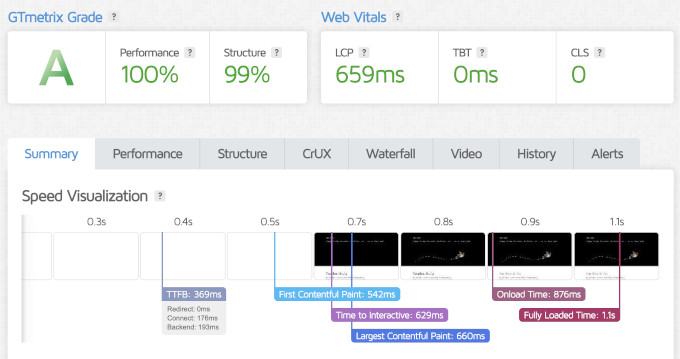
That result beats similarly priced hosts like Bluehost (933 ms) and DreamHost (986 ms) on the same test. The fastest host in our comparison, Levamo, loaded in 358 ms, but it costs about ten times more per month.
For a $2.69 shared hosting plan with no caching plugins installed, this is a strong speed result.
Server Response Time – 227 ms Global Average
Speed test tools load the whole page with images included, but that’s only one part of the performance. To see raw server speed, I also measured time to first byte (TTFB) from data centers in 6 regions around the world.
Hostinger averaged 227 ms across the 6 regions. That was the best average response time of all the hosts we tested.
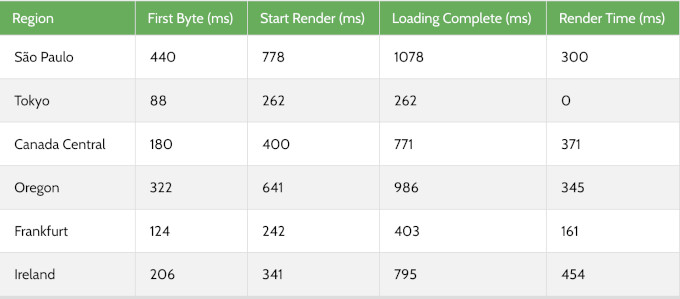
Response times stayed strong across North America, Europe, and Asia. South America was the slowest region at a 440 ms TTFB, which is still quicker than the global averages of several hosts in our comparison.
If your audience is spread around the world, a CDN will serve your content from locations closer to your visitors. Hostinger includes its CDN on the Business plan and higher, so factor that into your plan choice.
Stress Test – 21 ms P95 Under Load
To see how a host behaves under a traffic spike, I sent 50 virtual users to the test site with k6 by Grafana Labs and recorded the P95 response time.
Hostinger held a 21 ms P95 response time with no failed requests. Its LiteSpeed cache kicked in immediately and kept response times flat as the traffic climbed.
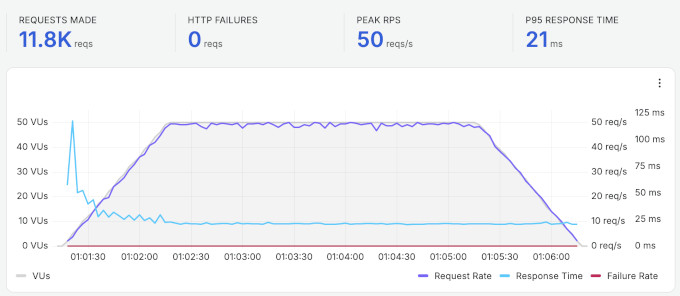
This was one of the strongest under-load results in our comparison. It means a growing blog or a small online store on Hostinger can absorb a sudden traffic spike without slowing down.
Uptime – 100% Over 30 Days
I monitored the Hostinger test site with UptimeRobot, checking every 5 minutes. Over the 30-day window, it recorded 100% uptime with no incidents.
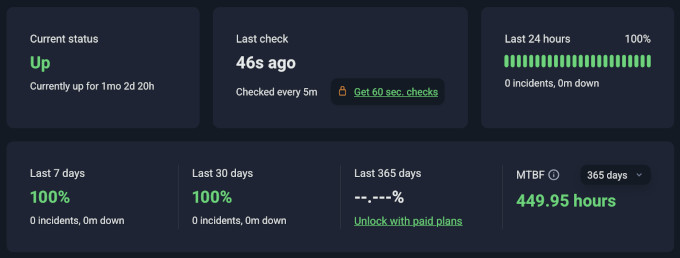
Hostinger backs its hosting with a 99.9% uptime guarantee, and in our monitoring window, it stayed above its own promise. That result matches my long-term experience with my own sites there, which have never faced downtime that needed my attention.
How Hostinger Compares to Other Hosts We Tested
The speed test numbers on their own do not give you the full picture. Here is how Hostinger performed compared to other similarly priced hosts from our comparison, all tested with the identical setup.
| Host | LCP | Global response | Uptime | Intro / renewal | WPBeginner Score |
|---|---|---|---|---|---|
| Hostinger | 659 ms | 227 ms | 100% | $2.69 / $10.99 | 88 / 100 |
| Bluehost | 933 ms | 599 ms | 100% | $2.99 / $9.99 | 69 / 100 |
| SiteGround | 608 ms | 369 ms | 99.96% | $2.99 / $17.99 | 75 / 100 |
| DreamHost | 986 ms | 658 ms | 100% | $1.99 / $7.99 | 64 / 100 |
The WPBeginner Score weighs performance at 80% and value at 20%. Hostinger’s 88 reflects exactly what you see above. It leads this group on response time, beats most of it on speed, and packs more tools into its entry plan than most hosts at this price.
To see the full rankings, and the raw data for every host we tested, check out our best WordPress hosting guide.
Hostinger’s Infrastructure and Technology
Most other Hostinger reviews skip what’s under the hood on their shared hosting platform, but I believe it’s worth highlighting.
Caching and speed – Hostinger’s shared plans run LiteSpeed caching, which is the layer that kept our stress test at a 21 ms response. Hostinger also lists one-click object caching among its WordPress optimization features.
Control panel – instead of cPanel, Hostinger built its own control panel called hPanel. It covers the same jobs, including WordPress installs, email, databases, a PHP version manager, and a drag-and-drop file manager.
Data centers – Hostinger runs servers in the USA, Europe (France, Germany, the Netherlands, Lithuania, and the United Kingdom), Asia (Indonesia and Singapore), and South America (Brazil).
CDN and security – every plan gets a free SSL certificate, DDoS protection, and Cloudflare-protected nameservers, and the CDN comes with the Business plan and higher. Developers also get Git access on shared plans.
File limits – hosting providers often cap the number of files your account can hold, and that cap is usually the first thing a growing site hits. Hostinger allows 400,000 files on the Premium plan and up to 2 million on its entry cloud plan, so a media-heavy site can stay on a cheap plan for years.
Hostinger Hosting Plans and Pricing
Hostinger offers shared, cloud, VPS, and eCommerce hosting, plus a website builder. For most readers of this review, the shared WordPress plans are the relevant ones.
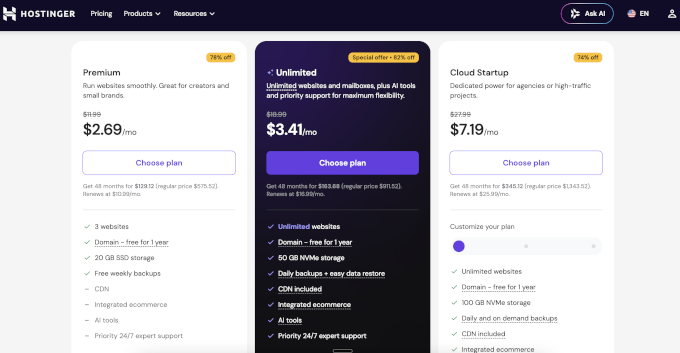
- Premium – 3 websites, 20 GB SSD storage, weekly backups, a free domain for the first year, and 2 free email mailboxes per site for the first year. $2.69 per month with our link on a 48-month term, renews at $10.99 per month. The CDN, AI tools, and priority support are not included at this level – they start on the Business plan.
- Business – unlimited websites and mailboxes, 50 GB NVMe storage, daily backups with easy restore, the CDN, integrated eCommerce tools, AI tools, and priority support. $3.41 per month with our link on a 48-month term, renews at $16.99 per month.
- Cloud Startup – built for bigger sites and agencies, with 100 GB NVMe storage and daily and on-demand backups. $7.19 per month on a 48-month term, renews at $25.99 per month.
All plans include hPanel, a free SSL certificate, 1-click WordPress installation, free website migration, and a 30-day money-back guarantee.
Hostinger does not recommend the Premium plan for eCommerce stores with more than ten products. In my experience, a new blog or small business site will not outgrow Premium for a long time.
You can move to the Business plan when you need the CDN, the AI tools, daily backups, or more than 3 websites. Look at Cloud Startup when your store or your traffic starts to grow.
Free and Paid Hosting Addons
Hostinger’s headline price is honest, but a few extras follow first-year rules. Knowing these up front will save you surprise charges.
- Free domain – free for the first year on the shared plans, then it renews at the regular domain price. If you cancel within the 30-day guarantee window, the refund does not include domain registration fees, but you get to keep your domain. This is fairly standard practice across shared hosts that offer a free domain.
- Email mailboxes – each website gets 2 free mailboxes for the first year. After year one, keeping them becomes a paid add-on, which is also common across budget hosts.
- Backups – Premium includes weekly backups, and daily backups start on the Business plan. I recommend you set up your own backup solution regardless of your hosting provider’s backup policy.
- Refund rules – the money-back guarantee covers your hosting fees and runs for the first 30 days after signup. Add-ons like domain registration are excluded.
Hostinger for WordPress Beginners
Hostinger makes starting out easy. The 1-click WordPress installer sets up your site in minutes, and hPanel keeps your websites, domains, email, and security in one clean place.
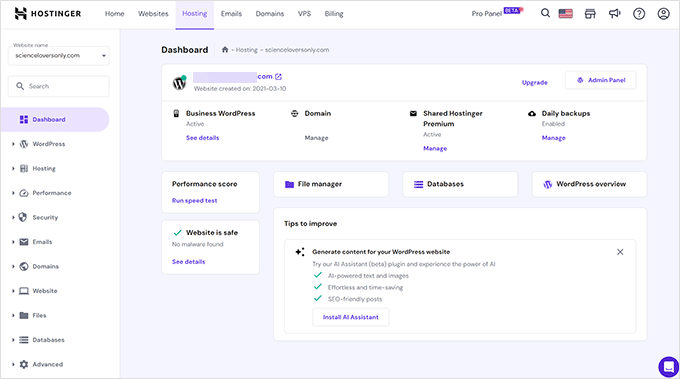
The AI toolkit goes further than what most budget hosts offer, though the site-building AI tools start on the Business plan. Every customer gets Kodee, an AI assistant that can troubleshoot common WordPress issues.
I was not expecting much from Kodee at first. But a few times when I ran into minor hosting issues, it solved my problem without me needing to wait for a human agent.
I would treat the AI tools as a convenience rather than a reason to choose a host. For a first-timer, though, they remove real friction.
Hostinger Customer Support
Hostinger offers 24/7 support over live chat and email, plus a large knowledge base with step-by-step tutorials. Priority response comes with the Business plan and higher, and there is no phone support on any plan.
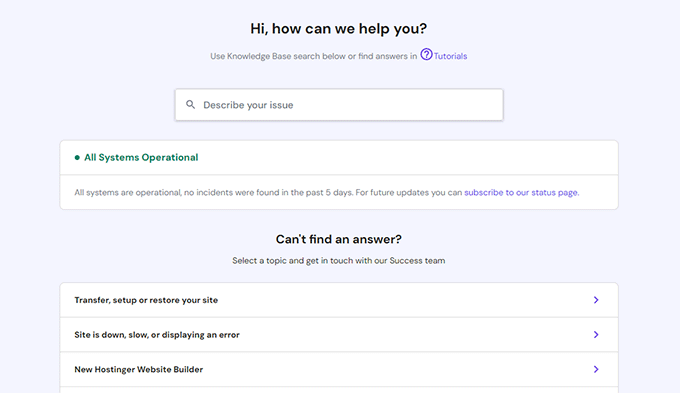
Kodee, the AI assistant, is your first touch point, and it handles most common questions instantly. You can ask for a human agent at any time, and in my experience the team responds quickly.
If you purchased your hosting through one of Hostinger’s local websites, such as hostinger.in, you can also get support in that local language.
To be fair, phone support is rare at budget hosting prices, and most hosts at this level stick to chat. Bluehost adds phone on its Business plan or higher, and of all the budget hosts that we tested, SiteGround was one of the few that included phone support on every plan.
Who Should Use Hostinger and Who Should Look Elsewhere
Choose Hostinger if you want the best overall mix of speed, tools, and price for a new WordPress website. Its 88 WPBeginner Score and its strong showing across all four of our tests make it the pick I recommend to most people.
Its 100% uptime in our monitoring backs the reliability claim.
Look elsewhere if you need phone support, since SiteGround includes it on every plan. The same goes if you want to run many websites on one cheap plan (Bluehost includes 10 on its entry plan), or you run a high-traffic eCommerce site that needs managed hosting under load, where Levamo is our pick (see our full hosting comparison).
Final Verdict – Is Hostinger the Right Choice for You?
Hostinger is the best overall WordPress host I tested this year. It pairs strong speed test results with more included tools than most similarly priced plans, and my own sites have run on it without trouble for more than 5 years.
My verdict – if you are starting a WordPress website and want the best overall value, visit Hostinger and start on the Premium plan. If you need phone support or run a high-traffic store, our best WordPress hosting comparison shows which host won each category on the same tests.
FAQs About Hostinger
1. What are the disadvantages of Hostinger?
Based on our tests and plan research, the main ones are the entry plan limits (3 websites and 20 GB storage, where some hosts give you more), the 48-month term required for the $2.69 price, the $10.99 per month renewal, and no phone support. Performance was not one of them, since Hostinger posted some of the strongest numbers in our comparison.
2. Is Hostinger good for beginners?
Yes. Hostinger installs WordPress in one click, hPanel is one of the clearest control panels I have used, and the Kodee AI assistant answers common questions instantly.
The AI website builder and 24/7 chat support round it out. It is our best overall pick for someone starting a new WordPress site.
3. Can Hostinger handle high traffic?
In our stress test, Hostinger held a 21 ms P95 response with 50 concurrent users and no failed requests, thanks to its LiteSpeed cache. That was one of the strongest under-load results we recorded.
For consistently high-traffic or eCommerce sites, a managed host like Levamo is still the safer long-term pick. Hostinger’s own cloud and VPS plans are also an easy upgrade path.
4. Is Hostinger better than Bluehost?
On our identical tests, Hostinger was faster. It loaded with a 659 ms LCP against Bluehost’s 933 ms, and its 227 ms global response beat Bluehost’s 599 ms.
Bluehost counters with 10 websites on its entry plan, where Hostinger includes 3, and the simplest setup for a first site. Our Hostinger vs Bluehost comparison goes deeper.
5. Why is Hostinger so cheap?
Hostinger keeps prices low by limiting server resources on each plan and by asking for a longer term upfront for the best rate. Once your website grows and hits a resource limit, you can upgrade to their cloud or VPS plans.
6. Where are Hostinger’s servers located?
Hostinger’s headquarters are in Kaunas, Lithuania. Its servers run in the USA, Europe (France, Germany, the Netherlands, Lithuania, and the United Kingdom), Asia (Indonesia and Singapore), and South America (Brazil).
That global spread showed in our response time test, where Hostinger averaged 227 ms across 6 regions.
7. Does Hostinger offer a free domain name?
Yes, Hostinger includes a free domain name for the first year with its shared hosting plans. After the first year, the domain renews at the regular registration price, which is standard across hosting companies.
8. Which Hostinger plan should I get?
We recommend starting with their Premium plan. It covers 3 websites and includes a free domain, which is more than a new site needs.
Upgrading later takes a few clicks, so there is no reason to overbuy on day one.
WPBeginner users get up to 79% off Hostinger, and the discount applies automatically when you sign up through our link.
Changelog
- August 2026 – Rebuilt the review around our July 2026 test data (speed tested July 21, response time and stress tested July 24, 30-day uptime window). Added the WPBeginner Score, the comparison table against similarly priced hosts, the infrastructure section, and updated the plans, pricing, and renewal details.
We hope this review helped you with your WordPress hosting research and helps you decide if Hostinger is the right host for your needs. You may also want to see our pick of must-have WordPress plugins for business websites.
If you have any questions or feedback about my Hostinger review, please send me a message. I love hearing from our readers.
You can also scroll below to read real Hostinger user reviews from other business owners from around the world.
Pete
We have just discovered that Claude AI is not allowed to visit our site, I have been on to support for about 4 hours now, without any sign of success. When Claude visits our site, they just get a 403 Forbidden.
Claude cannot access any pages on the site. Which means that we are excluded when anyone asks Claude about products that we supply. This is not good…
Team Hostinger
Hello Pete,
Thank you for taking the time to share this. We’d love to take a closer look and see what’s blocking Claude from accessing your site. This type of problem usually requires a closer review of the website’s configuration, including any bot protection rules that might be blocking access.
Please reach out to us via Live Chat from your Hostinger account or email support@hostinger.com, and our team will investigate this further.
Sincerely,
Benefi from Hostinger
juli
I would warn anyone about using Hostinger. I bought a hosting package. Was booted out of my account (I was deleting cache as advised by them!) and they could not send a verification code when I was trying to get back in. I have been emailing support for over 4 hours now. They have now given up and created a support ticket. Of course we are at the end of the day! So I presume that they will not answer today. I was pointing my old domain to new Host website. My emails are now unreliable, I can’t see what is going on as I CAN’T logon. It is a shambles. I should have stayed with Siteground who has support 24/7. As the say, “buy cheap, and cry”. So BEWARE!
Team Hostinger
Hi Juli,
Thanks for letting us know what happened — that experience definitely isn’t what we want for you. The good news is your account recovery request has already been approved, so you should have access again. We sometimes need a bit more time to verify ownership for security, but everything is resolved now.
If you still have any concerns or run into issues, please reach out to us anytime at support@hostinger.com
Warm regards,
Benefi from Hostinger
Testy
Oh Hostinger. Before you I had just a mild frustration at the bottle neck of support called web chat. YOU though absolutely took it to another level of time wasting. Absolutely abysmal support, if you have something critical DONT GO HERE! They will not be there when something goes wrong. All I needed was to unlink my google account….I need to disable 2fa to do that. Wouldn’t critical account detail changes require additional authentication…..maybe its just me. Either you get a great price with no support or great support with a crazy prize.
Team Hostinger
Hello,
We’d like to help you. For security reasons, if you’re unable to access your account, it’s necessary to go through account recovery and provide the required verification documents. This helps ensure that access is only given to the rightful account owner and keeps your account secure.
To review your situation, please email us at support@hostinger.com. We’ll be happy to assist you once we hear from you.
Warm regards,
Benefi from Hostinger
Helen
I bought extra email storage from Hostinger, and during the transfer they lost half of our business correspondence. Unbelievable. Their support just said “sorry” and didn’t even try to fix it. Worst provider experience I’ve ever had.
Team Hostinger
Hello Helen,
We’d like to help get this sorted. Since we couldn’t locate your account from the details shared, please reach out to quality@hostinger.com so we can take a closer look and help resolve it.
Sincerely,
Benefi from Hostinger
Asif
Simply awesome.
I love it.
Srikant Deogharia
Its user-friendly and has AI enabled Kodee in case you are stuck somewhere. Will highly recommend Hostinger.
Akin Fadeyi
l have enjoyed using “Hostinger platform” and their service support.
They do care about their customers.
l highly recommend them to anyone that may be looking for hosting company to host their website.
Nicholas Getzinger
I feel like this web builder is among one of the best web builder sites I have ever used. I am not an experienced web builder, but Hostinger has made it pretty darn easy. I am all the time recommending this site.
I only which it was easier to add additional administrators with controls on what they would be allowed to edit, it would make it a lot easier for me.
Team Hostinger
Hi Nicholas,
We’re glad to hear you’re enjoying our AI Website Builder!
If you’d like someone else to be able to edit your website, you can do so by sharing account access. You can find a step-by-step guide here: hostinger.com/support/1583777-how-to-share-access-to-your-account-at-hostinger/
Hope this helps! Feel free to contact us if you need any further support.
Sincerely,
Benefi from Hostinger
sayed
It works. very well. I have a good experience with it.thank you
Vorgath Callaghan
I really like Hostinger because it’s so easy to understand when it comes to connecting domains to services like Firebase and others. The domain pricing is also very relevant for users on a budget, and the service can be upgraded. Thank you.
Ron Bartlett
Very happy with the service so far.
Neil Stevenson
The chatbot (assuming it is a bot!) is awesome. It’s the best I’ve used online. EVER. It told me exactly what to do, and it worked, on every occasion I’ve had to use it.
Steve Brown
Firstline support for websites is provided by an AI named Kodee (or perhaps something else sometimes) that is surprisingly good and very fast. Although the responses are somewhat generic, they are usually relevant and better than firstline human tech support at many IT-oriented services in “understanding” my issue. I can’t tell if or when a human tech enters the convo.
Milos
Hostinger is great in many aspects, fast, reliable, affordable (tho renewal prices are a lot higher). They offer a lot of features and very good customer support that’s willing to help with any issues you might have (as well as Kodee – ai chat bot).
I use them for hosting all my sites and my client sites, very much recommended.
Raymond Kilfoil
I am really enjoying the ease at which Hostinger resources and support are made available. The problem at the moment is me having too many ideas and too much to implement. The partnerships they have are unbelievably good and I would recommend Hostinger to anyone interested in getting an online presence.
I am looking forward to the day I go love with my products with much anticipation.
Thank you for assisting me on this interesting journey.
KAUSTUV
I really like the hosting service, really fast and good under pressure, I even recommended it to some of my friends. Good Work.
Marco
Great tool, had a problem 500 and Hostinger solved it. I just entered in the paltform and followed the procedure, without the need to call and pay my IT Agency.
Pawan kumar
I am using Hostinger since past 3 years and I am happy because the process is very easy to make work.
Pham Hong Phuoc
Experience with Hostinger is good. Host is smooth and fast. Customer care and support is good, fast and efficient. There are good promotions.
Corbin Smith
I switched to Hostinger about a year ago for a website that I took on after someone else managed it for 30 years, and once I learned my way around, I’ve found it easy to use, responsive, reliable, and efficient. I sometimes have to wait a bit for my file manager to load and am not sure if that’s sluggishness on my end or the server being slow. It’s no big deal.
Geismar Peña Torres
I’m pleased with my website through Hostinger, I’ve been having for year and it’s been working great. It wasn’t complicated at all creating my website due the tools that Hostinger offers to build a website business.
William P Parker
Love Hostinger. You guys moved my website and got it back going very quickly. It runs well and seems to be very secure.
Said Dellache
super Platform !
Phillip Ha
The new Kodee AI agent for WordPress is very helpful for my website maintenant process. It can provide a high accuracy step-by-step instruction to follow. It’s smart to understand the questions in the prompts.
Gustavo
Excellent service.
Until today I have not had any problems and the times I had issues, the support via chat or email solved them for me.
Luis Valdez
Because you reminded me of the renewal date, I can see you are NOT involved with shady practices. Therefore, I will highly recommend Hostinger to anyone that asks and most likely reuse your services again in the near future.
Carlos Roberto Ferreira
Hostinger is an excellent VPS for both beginners and advanced users.
Marijke Ali
Works good for me, an absolute beginner of Wordpress.
They are reactive to questions and support,
AI is also a great help and works well.
Thanks for being by my sides!
Marijke
Jennifer
I am very pleased with Hostinger so far, 8 months into choosing them! I did extensive research to find the best fit, and Hostinger does not disappoint.
The 5-year term was very affordable (will likely increase a lot at renewal, but even that will probably be a fair price.
I had a somewhat custom migration (my files bypassed the /files/ folder and they worked with me to get it right. I had a couple of additional interactions with support, and they were always helpful and easy to communicate with. Their dashboard is also very interactive and intuitive.
Just recently, I interacted with their AI feature, Kodee, and it solved my issue in a matter of minutes. Out of the blue, all subpages stopped working on my site. After suggesting 2-3 solutions, it had me just press “save” on my permalink settings, and voila, I was back up and running.
Again, really satisfied with my choice to go with Hostinger and look forward to many more years!
Mohsin
I’ve used a couple of hosting services in the past, but hostinger’s been very user friendly and economical.
LH
Hostinger is very easy to use. Poor importantly, their chat support is superb. You get Instant accurate answers to any questions. I have websites and other hosts and anything you need done is an absolute nightmare, whereas with a Hostinger everything is easy. Setting up emails is very easy and painless as compared to their competitors where it’s always a nightmare.
I just wish they had a service where they would handle the transfer of my other websites to theirs, because I am not technically capable, and would be happy to pay for that type of service.
Alberto Maclang
I’ve had a really great experience with Hostinger so far! The platform is user-friendly, reliable, and makes website management so smooth—even for someone without a technical background. I really appreciate how fast the hosting is and how responsive the customer support team has been whenever I had a question. It feels like everything I need is in one place—affordable plans, great features, and excellent support. Highly recommend to anyone looking for reliable hosting!
Ando Harris
Hostinger is a well priced and comprehensive hosting solution I use for not only my Wordpress website but also my n8n automations. Highly recommended.
Manu
I love Hostinger for their fast and helpful support, as well as their simple and minimal UI and functional interface. The product cost is also just right, albeit it could do with retaining existing customers more cheaply, according to our usage patterns.
Stephen
I have been running a personal www site on Hostinger for years now and there has never been any issues at all with either the service or provision. It just simply ticks away in the background and does what I ask of it as such—just be there and up and running.
Christo Skelton
I chose Hostinger because it is not American. Everything has been smooth so far.
Jon Lachapelle
Service is great and the ability to directly upload my html files makes my life way easier than dealing with a quirky FTP client
Vicente Salgueiro Filho
I have a few domains hosted with Hostinger and I’m very satisfied with the support they offer. Koodee helps me whenever I need it. Congratulations to the entire team, a big hug!
Hilton Chesterfield
We have had no problems with Hostinger. Everything has been super easy. We migrated three websites, and it was seamless, easy peasy.
Thanks for making things so easy for us!
Mirza Ubaidullah Javed
Easy to set up, cost-effective, and … overall good. Recommended!
Shelley Rush
Hostinger has very competitive pricing. The hPanel is easy to navigate with a streamlined onboarding process. Hostinger’s support team are very helpful and responsive. Thank you Hostinger!
Agnius Vasiliauskas
Hostinger services are worth each penny.
Nassurdine
⭐️⭐️⭐️⭐️⭐️
“I’m very happy with Hostinger! The platform is fast, easy to use, and perfect for building my website. Their support team is always helpful, and the prices are very affordable. Highly recommended!”
Elaine Mello
I’m having a great experience using Hostinger, since few months ago.
Services are so useful and easy to use. Keep up the good job, Hostinger team!
Nathan Minderhoud
Transparent web hosting with a transparent price scheme – moreover they work with inodes so it’s clear how much you have used. On almost every topic the website has a guide. And they have major bonuses like free automatic backups and a cheap business email addon (which is very important for giving a professional look to your company/webshop/organization. And Hostinger’s navigation is not only well-structured, it’s fast. You don’t have to wait for some outdated interface to load all the options. You can even change advanced settings for email like SPF, DKIM, DMARC relatively easily and uncomplicatedly compared to other hosting company’s.
Peter Bloecker
The Hostinger website has been improved a lot over the years, easy to handle and just check the hosted blogs step by step. Affordable and optimizing is easy.
Highly recommended.
Andrew James
Using Hostinger has been great. So easy.
Lindomar
I am using Hostinger from last few months and til now there is no problem as a WP Begginer
Andullah Alzmami
Very good platform for hosting and email services.
Some technical issues to set up the link
Anup
Great going team!You never give me a reason to complain Keep up your good work!