


Uploading videos directly to WordPress might seem convenient, but it often slows your site, eats up storage, and can hurt your SEO, leaving you frustrated and your visitors waiting. You don’t have to compromise performance to share video content.
The smarter approach is simple: host your videos on platforms like YouTube and embed them in your posts. This keeps your website fast, saves storage, and expands your reach.
In this article, we’ll explain why direct uploads can harm your site and explore the smarter alternatives that ensure your videos reach your audience without compromising performance.
Upload vs. Embed: What’s the Difference?
Let’s start with the basics. Many WordPress users don’t realize there’s an important difference between uploading videos to WordPress and embedding them. Understanding this difference can save you from costly mistakes that we’ve seen slow down websites.
Uploading videos to WordPress means the files live on your server, just like images in your media library. Every time someone watches, it eats into your storage and bandwidth. Over time, this can really slow things down, something I learned the hard way.
Embedding videos works differently. You upload the video to YouTube, Vimeo, or Wistia, then paste the embed code into your WordPress post.
Your visitors watch the video on your site, but the heavy lifting happens on the platform’s servers, not yours. It’s a simple switch that made a huge difference for me.
After years of running WordPress sites and helping others optimize theirs, I can confidently say: embedding is almost always the better choice. In my experience, it keeps sites faster, saves storage, and gives your visitors a smoother experience. Here’s what I found works best.
1. Easy Sharing
When I started embedding videos in WordPress, I realized it was much easier than uploading them. Just paste the URL from YouTube or another platform into your post, and you’re done. No bulky files, no fuss.
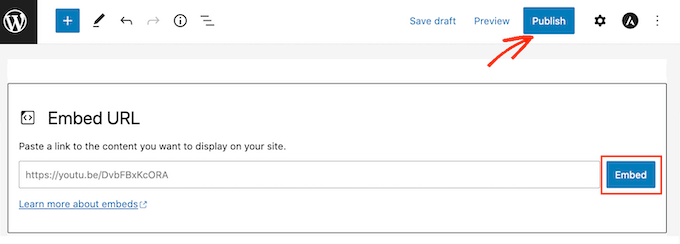
It’s also easier to manage a channel on YouTube. On the other hand, it’s not so simple in WordPress to create a video section separately from your images and other uploads. When you upload a video to WordPress, it will be mixed in with all your other media library content.
Another benefit I noticed: sharing is simpler. Viewers can easily share your videos, and sometimes your content even gains traction on social media without you lifting a finger.
2. Save on Bandwidth
Uploading videos directly eats into your bandwidth. And the higher the quality, the more it adds up. I quickly ran into limits on my shared hosting plan.
I learned the hard way that if others embed your videos, bandwidth usage multiplies fast. You might also need extra plugins to manage video display, and each one can slow your site further.
Some plugins aren’t optimized, which adds server load. On shared hosting, I’ve seen sites temporarily taken offline because the bandwidth or server load got too high.
Optimizing your WordPress site speed is more important than ever since it affects your SEO rankings and website traffic, too.
3. Visibility and Traffic
YouTube is the world’s second-largest search engine and the most visited site online. That alone convinced me to put my videos there instead of hosting them on WordPress.
Uploading a video on YouTube can bring more viewers than uploading it on your own website. The social networking features of YouTube and other video-sharing websites can trigger the viral popularity of your videos.
For example, on the WPBeginner YouTube channel, we have over 296,000 subscribers and get tens of thousands of new views each week.

4. Video Quality Optimization
Platforms like YouTube and Vimeo process videos for better playback. Viewers can pick HD or lower resolutions depending on their connection. I noticed this makes a big difference in how smoothly my videos play.
They also detect a viewer’s connection and device, automatically adjusting the quality. My audience gets a smoother experience without me doing anything.
When I hosted videos on WordPress, I missed out on these optimizations. The videos played as-is, used more bandwidth, and sometimes frustrated visitors with buffering or poor playback.
Bonus Features
Many video hosting platforms also offer more features that you are missing out on if you just upload to WordPress.
For example, you can use these tools to:
- Add auto-captions for accessibility
- Monetize videos through ads
- Track views and engagement with analytics
- Create custom thumbnails for a polished look
And there’s even more, depending on the platform you choose. These extras make hosting externally worth it in my experience.
What Video Hosting Service Should You Use?
After testing a few platforms, I found that video hosting services solve more than just speed and bandwidth problems.
They automatically adjust video quality for each viewer’s internet connection, and some even expose your content to a wider audience. It’s like giving your videos a built-in boost.
For us at WPBeginner, we stick with YouTube. With its massive audience—second only to Google in search volume—it’s a reliable way to attract new followers consistently.
They also have a Partners Program to help you make money online with your videos.
After uploading your videos to YouTube, you can use a plugin like YouTube Feed Pro or Envira Gallery to display YouTube video galleries on your WordPress site. For more details, check out our list of the best YouTube video gallery plugins.
If YouTube doesn’t fit your needs, there are plenty of alternatives. I’ve tested several, and you can see a full list in our guide to the best video hosting sites for bloggers, marketers, and businesses.
Frequently Asked Questions
Sharing videos on your WordPress site doesn’t have to be a headache. Here are some common questions we hear from site owners like you, along with straightforward answers to keep your site fast and your videos visible.
1. Why shouldn’t I just upload videos to WordPress?
Uploading videos directly uses your server’s storage and bandwidth. This can slow your site, frustrate visitors, and even hurt your SEO. High-quality videos make this problem worse, especially if you’re on shared hosting.
2. What’s the difference between uploading and embedding?
Uploading stores the video on your server. Embedding streams it from platforms like YouTube or Vimeo. Embedding keeps your site fast, reduces bandwidth use, and often gives viewers a better quality experience.
3. Will embedding help my SEO and traffic?
Yes. YouTube is the world’s second-largest search engine. Posting your videos there can bring more viewers, increase shares, and help your content reach a wider audience.
4. Are there extra benefits to using a video hosting platform?
Definitely. Platforms like YouTube, Vimeo, and Wistia offer HD optimization, auto-captions, analytics, custom thumbnails, and even monetization options, all features WordPress alone doesn’t provide.
5. Which video hosting service is best?
YouTube is a great starting point because it’s easy to use, widely recognized, and can help you grow your audience. Vimeo or Wistia are excellent alternatives if you want more customization and professional tools.
6. Can I showcase multiple videos on my site after embedding?
Absolutely. Plugins like YouTube Feed Pro or Envira Gallery let you display video galleries and organize content without slowing down your site.
Additional Resources on WordPress Performance
We hope this tutorial helped you learn why you should never upload a video to WordPress. You may also want to see some other guides related to improving WordPress performance:
- How to Easily Lazy Load Images in WordPress
- How to Optimize Images for Web Performance Without Losing Quality
- Why Do You Need a CDN for Your WordPress Blog? [Infographic]
- Best WordPress Slider Plugins – Performance + Quality (Compared)
- How to Free Disk Space and Reduce Inode Usage in WordPress
- How to Avoid Enormous Network Payloads in WordPress (8 Expert Tips)
- How We Boost Page Load Speed on WPBeginner
- How to Offload WordPress Media to Improve Website Speed
- How to Properly Run a Website Speed Test (Best Tools)
- The Ultimate Guide to Boost WordPress Speed & Performance
If you liked this article, then please subscribe to our YouTube Channel for WordPress video tutorials. You can also find us on Twitter and Facebook.





esmail
thanks … it was a nice article
one question :
if we want display a featured video ( very special video that not exists in other sites) in our site ,
what do you suggest ?
note : our goal is more traffic in ourself site .
Goverdhan
Hi, Now am planning to host one e-Learning website for students and IT professionals with high quality video and audio lessons with fee, if I host my all video in YouTube with Embedded YouTube or Vemio, here my question is complete video content is safe? All these videos can view public and downloadable? How I can restrict to view all public…
Please help me…
Ramon
Keep in mind that this post is for your average blogger or similar. What you intend to do is a big project similar to linda.com or teamtreehouse.com. I wouldn’t take the information in the post to heart as your plan would require you to host your own content for the security reasons you mentioned.
Jona Adams
I don’t agree with using Youtube or Vimeo, the content on your website is what counts, plus the ads on YT are ridiculously long. I prefer to have my content, my video’s on my site, why give Google “free content” so they can make more money?
The SEO value is that the video is “only on your site” that provides exclusivity and that provides rank, for good quality. Make the videos short, people only have seconds to watch a video. As far as copyright content, Don’t copy, end of story.
It is now June 2015, most themes now expect web designers to self-host HTML5 which is far better quality. If your hosting company is close to your market, you’ll have good speed. A well made 30 second video, can have powerful impact if done properly and with HD 1080 or better.
Don’t always take the easy way out.
Alex
What would be useful is users upload to wordpress, then from there the video would be uploaded to youtube, vimedo, dailymotionn etc
Drew
Does anyone know how to upload a video to your homepage without getting ads from youtube. The ad I’m getting is because i used a copyright song.. Is there another way of uploading a video onto my website without getting ads or youtube banners…
Dhanush
You can download the Youtube file(if possible from Youtube only or form other sites) onto your system and then Upload it to your homepage. i guess this will help you out.
Tracy
What if I want to embed a video on YouTube or Vimeo — but I dont want it to be publicly available there? If I set privacy restrictions on the YouTube/Vimeo video, can it still be embedded in WordPress?
sneha
If you are using Vimeo then yes..
In vimeo,
No will see video, and you can still embed video…
Regards,
George
To upload video or movie files to word press, there are three steps involved.
First, upload you file , for example mymovie.mp4 to your web hosting server, Second, create a HTML file called movie.htm with two lines as follow:
This is my movie.
http://mywebserver.com/mymovie.mp4.
This is the URL to your file after you upload your file to your server.
Third, go to word press upload your file movie.htm, Select a name such as MovieShow. To run your MovieShow by clicking on the link on your blog post. Upon the execution of the post, click on the URL. Your movie mymovie.mp4 will play. In this approach, the file size you want to upload is only limited by your server’s maximum file allowed.
Karlosb
the problem is you get the Youtube overlay and that doesn’t match the design of many corporate websites
Dan Guerra
Is there software (not freeware) that allows you to upload to youtube, multiple files at once?
David
I want user to have the privilege to upload videos from my site to youtube, vimeo or any other video site and the video can be viewed and played on my site. Wanted to know if there is any plugin for that.
WPBeginner Staff
Instead of pasting the embed code, try pasting just the video URL. See how to embed videos in WordPress.
If that doesn’t work, then contact your web host.
Theo
Thank you for the advice. Sorry I’m late in responding.
Theo
Hi,all
I hope you can help. I have a wordpress website with Green Geeks and when I embed a you tube video it spans my entire webpage no matter what parameters I pick with the you tube embed code. Any ideas?
Bob
I have copied the URL into my post, but whenever it is posted and you try to play the video you get the following response: “The video contains content from SME. It is restricted from playback on certain sites. Watch on YouTube.”
What do I need to do to get it to play on my blog?
Tamara
Basically i took a really long time to edit a video (the video length is just under 2hrs) from a korean show. the video got blocked as soon as i put it up on youtube, but a lot of people are interested in watching it. i also plan to start a blog too and im thinking wordpress.com Could you suggest a way for me to avoid the copyright so that my youtube video is viewable, and then i can eventually put it on my blog?? sorry for the long question but pls help. THankS A L0T!
Drew
Did you find a way to upload a video without ads?
Prahphet
I’m all about serious beautiful quality. I spend most of my time perfecting the little things and detail overall for a better viewing experience. Vimeo, YT etc all transcode and downgrade the quality of uploads no matter what, completely taking away all of my hard work and rendering hours. Self hosting will hopefully allow me to share my work and advertise at the quality I want, and most of my files are small so the transcoding on Vimeo & YT’s side is so unnecessary for me. Great article.
RW
Great post and I highly agree with your points. I wrote a post on the same topic a few years back. Thanks for your thoughts!
Jo Patrick
We have a problem in that our sites are mainly for educational institutions and streaming video from the sites such as Vimeo & YouTube etc are blocked by the majority of internal firewalls.
The institutions can request for specific sites to be unblocked but on the whole the IT departments are fearful of allowing access and this solution does not work for the casual visitor.
Does anyone know a way that if the streaming site is blocked, the browser will instead display an alternate self hosted video?
Pura Verona
I share the same sentiment here. Embedding is fine, given the points in this useful article. But yeah, I need a way to still play an embedded video in wordpress when usual video hosting sites such as youtube or vimeo are blocked in a network. Thank you!
Marek Andreansky
I disagree – I would upload videos directly to my website so that I don’t loose control over content, not to mention the loss SEO benefit a properly embedded video would bring (higher rank).
Social sharing an be achieved by adding the social sharing buttons to the page with a single plugin.
The only problem is availability but that can also be solved by using an external CDN.
I write this with the belief that a video should drive traffic to your site. You can then directly convert that traffic into revenue.
Earl Henson
” not to mention the loss SEO benefit a properly embedded video would bring”
================
But the article says embedded is good, ‘uploaded’ video is bad.
Denis Sandmann
Where is your Website?
Fernando
Good article. The problem that I have is that the videos that I uploaded on Wordpress.com don’t work on iPhones and iPads. They work fine on laptops but when played on other devices, I get a strikethrough triangle (a broken play button).
siddhrth
Hello
is it possible that a wordpress user will upload a video from wordpress panel and this video will store on youtube.
i follow the youtube API. but i need solution on wordpress.
is there any plugin to solve this one. Kindly inform.
Thanks
angus carter
Hi, I see this post is about a year old, so I am not sure if it is still checked but if so I’m having a slight problem, I hope someone will have advice on. So I embedded my youtube videos and they worked great last night. Now though i am only getting a black screen and audio. At the end of the video though, if I click on a related video (those links do appear after the black plays all the way through) that video will play with audio and visuals. So what gives? Is this a strange fluke? The videos play fine on youtube, just not embedded. I’m very confused as to why it worked and then quit working, I even tried new pages and embedding new videos and still nothing. Any advice would be great, though hopefully I’ll have it resolved before anyone checks this post. Thanks!
-angus
P.S. I am using suffusion theme if that makes any difference, I don’t see why it would but obviously don’t know what would cause this.
WPBeginner Support
Did you try switching themes, and disabling plugins? Are you pasting the embed code in your posts or just the YouTube video URL? You only need to paste the youtube video URL in WordPress and it automatically embeds it for you.
Admin
angus carter
Hi, thanks for the quick reply. I honestly did not expect anyone to get back with me this fast. Found out what the problem is and I think it is on youtube’s end. Basically what happened is all my embeds got switched to 3d mode, despite the fact that I disabled 3d viewing on the videos and they weren’t shot in 3d to begin with. I tested it with some other random videos that weren’t mine and sure enough they got converted to 3d mode in the embed too. I guess with that, since I don’t have my browser or site set to view 3d I just got a black screen. Trying to remedy it and get my embeds off 3d, I came across a couple forums that mentioned that this has happened before, usually when youtube does stuff to their backend and that it gets fixed within a day or so. So I guess I just have to wait and see if it corrects itself. Thanks for the advice though and keep up the great work with this site, it’s really a great resource!
-angus
Luke B
This is a good article; however, it did not address what to do if for some reason I insist on having videos hosted on my WordPress site.
For example, I want the videos on my site to only be available on my site, and not able to be embedded or used elsewhere. The reason I want this is for exclusive content. Once it’s on YouTube, it’s no longer exclusive and anyone can embed it for their own purposes.
What would be the best plugin to use if I do want to host my own videos?
In fact, I want users to be able to upload their own videos (like they do to YouTube), but on my site. Essentially, it will be like a mini-YouTube site but for a specific niche.
If users are on YouTube, then they are not on my website, and they are much more likely to get distracted and start looking up random videos. What I want is for them to view the videos on my site, see that we know our stuff and then have an option to join/buy/subscribe (or whatever the case may be.
I current use shared hosting with Host Monster. I’m on an unlimited plan, but I do understand that they have a fair use policy and may decide to stop the activity if it throttles the server for some reason.
Having said that, I can always upgrade to a virtual server of my own and continue the process.
What plugin do you recommend with that in mind? Obviously, it needs to be able to dynamically convert file types, etc. and have the ability to optimise like YouTube does.
Is WordPress the best platform to use? If not, what would I be better off looking at?
I need your help. I’ve searched long and wide, and I still can’t find a solution :S
Cyrus
Very good comment. I have the same questions!
Please help!
Roger
Very useful article. I was actually just discussing this with a friend the other day. We will be doing online classes on our website, and we face a lot of the similar problems: ads, privacy, bandwidth, etc. After reading this, it sounds like Vimeo is the way to go. We’ll also be using a plugin from Woothemese called Sensei to restrict the content. So, between Vimeo and Sensei, we should be able to embed the videos on our site while restricting access to only those that pay, correct? Thoughts? (We’ll have a few free videos, too).
Thanks again, great blog!
Roger
Michael Stursberg
Another advantage to embedding(iframe) videos via Youtube or VIMEO is that you automatically get HTML5 support for mobile devices..!!
Michael
Hello,
Good article.
My question is:
I’m setting up a squeeze page with the optin offer of a video tutorial.
What would be the best of doing this?
I want it it to be a downloadable course.
Regards,
Michael
WPBeginner Support
If you want you can hide the video behind the optin in a post that first checks user’s subscription confirmation. However, we would still advice you to embed the video through a service like vimeo or YouTube. But if you must upload the video you can do so by uploading it in webm or mp4 format.
Admin
Jon
The other issue with embedding is both YouTube and Vitmeo add commercials to videos or show links to other companies. I don’t want a video to play on my business website and then end with a page full of videos from my competition like YouTube does.
WPBeginner Support
Actually you can turn off ads on your video in YouTube video manager. You can also turn off related videos that appear after the video playback.
Admin
Brad Griffin
@Jon. I have a TON of churches that I work with, and almost universally that is their big question about YouTube. They don’t want anything “questionable” showing up after their video is done, yet the ability to turn off the ‘suggested videos’ is somewhat overlooked AND easily fixable!
Run over to YouTube real quick. Pick a video. Now click “SHARE”. Then click “EMBED”. Now, see that little line that says, “Show suggested videos when the video finishes”? Make sure that box is UN-checked.
Ta-dum! You’re good-to-go!
Roger
Hey I am currently creating a music site were musicians can send there media such as pics videos and audio. Embedding sounds great for the videos what would you suggest for the audio and the video. We want to be able to live vj the videos on podcast would that work with embedding.
WPBeginner Support
Yes it should work.
Admin
leigh
What if video content is private and we don want on youtube or other services …
As in site content is private …
I like fact we dont smash our bandwidth by embedding – cool – yet issue is privacy
any help there
WPBeginner Support
There are solutions for that too. For example, in Vimeo, you can set the privacy of your video to password protected, set a password for the video and set it to be embedded anywhere. On your protected content area you can enter the password and users can enter that password to view the embedded video.
Admin
April
I agree with embedding, but currently it’s really hard because we have member only videos and we cannot seem to find any plugin that will protect the video. When they click on the play button from Youtube, it will play for them anyway =/
shula
Thank you – its really clear, but how do I stop all the links from youtube.?
We made a film, so I have the original cd but when we upload it then a whole load of links
appears that I dont want my site to sponsor.
Is there any way to stop all the links working?
Im told VIMEO doesnt do this but we cant get it to work on iphone
Thank you so much – best wishes Shula
Editorial Staff
Are you talking about the suggested videos that Youtube shows at the end? If so, then Youtube has the ability to stop that in your embeds. Essentially you’ll add ?rel=0 at the end of your embed URL.
Admin
Shula
Hullo and thank you for quick and
clear reply
we tried you’d suggestion and if worked
Many thanks
Shula Rich
Andrea Wheeler
Thank you for this one as it has been a problem for us for the longest time!!
Steve
Thanks for a brilliant post. I have a question. When i embed a video from youtube, it is massive (as in size of the video not the amount of disk space it consumes) , even after i change the size. Why does this happen and how do i address it. Thanks
Lisa Marie
I love this article. I think it is great. I do have a question for you that would be the opposite as to what you are thinking. I have a member only website and only want members to see the video and not be able to share it. They are paying for the high quality information as my clients and I do not want this “out there”. Using Youtube etc allows for sharing links and urls. Some have passwords and links you send, but I simply want my videos on the private website ready to go, but no sharing. Seems no one I ask has the answer! Do you?
Thanks so much.
Lisa
Editorial Staff
Vimeo offers this functionality for their Vimeo Plus users which is like $59/yr.
Admin
Christine
Very good article clarifying the difference between embed and upload. I definitely recommend embed to my clients.
One glitch I have run into on WordPress is that an embed code does not seem to work (video doesn’t display at all) when the code is inserted into a widget instead of embedding in a blog post.
Michelle
Great post, but my school blocks any YouTube videos. What other platform do you suggest to post my student videos?
Editorial Staff
Vimeo or VideoPress
Admin
Cindy
I have a .mov file purchased from istockphoto that is more like an animated .gif than a video. How do you suggest I put it on my site? Before finding this article, I did upload it to the Media Gallery but I can’t get it to run. Thank you.
Editorial Staff
You can either use VideoPress, or upload it to Youtube.
Admin
Ranvir Singh
Greetings,
If I am embedding video from YouTube onto my Wordpress site how can I decrease the time it takes to load the video in a page?
R
Editorial Staff
Youtube is generally very fast. There is no way to speed it up any further.
Admin
Zimbrul
After reading the article one question pops up in my mind: what is the best way to host videos and stream them on your WordPress site if you don’t want to upload them first to Youtube or Vimeo?
Editorial Staff
You can try VideoPress
Admin
doug_eike
A couple of years ago, I started uploading audios to my WordPress blog, and the traffic increased markedly. After uploading over 150 audios, however, my backups began to take an unreasonably long time. To solve the problem, I’ve begun to embed YouTube videos on my blog to replace the audios. Thanks for the insights!
Jeannette Paladino
Excellent advice. I always use YouTube videos but I will know for the future the pitfalls of actually downloading a video to my site. It is so easy to embed the code. I always go to YouTube for the code to embed in my posts. You can also download them from the WP dashboard, which I’ve never done. Does it make a difference? Thanks for the tip.
Editorial Staff
Embedding using oEmbed helps if other plugins want to tweak things. It also allows you to adjust content width universally if you change the theme.
https://www.wpbeginner.com/wp-themes/how-to-dynamically-change-the-oembed-width-and-height-in-wordpress/
Admin
Dolores
that’s great advice. I’ve been wondering which video host to consider and if it’s worth embedding or not. Thanks!
Shannon
What does embedding do to the load time for a Wordpress site? I am creating posts with several videos and and embedded PDFs from scribd and the load time is really bad, like 20 seconds. I thought because I was embedding that it would be faster, but it is really slow. I don’t have any pictures- just embedded video, embedded PDF, text, and links. I would think that would be a quick load time.
Editorial Staff
Embedding does slow down your site, but uploading the video would do the same along with increasing your bandwidth. The more external queries you make (i.e embedding), the slower your page would be.
Admin
PolarStar
Hi, How is this different from uploading an MP3 file as you commented in one of your previous articles? https://www.wpbeginner.com/plugins/add-mp3-audio-files-wordpress/
Shouldnt MP3 files also be hosted outside of WP?
Thanks, PS
Editorial Staff
The article you linked merely shows how to upload mp3 files. If you can upload your audio files elsewhere, then that is recommended as well.
Admin
Edwin
I disagree with this post. There are many copyright issues with YouTube and Vimeo to say the least. In one case, I have a situation where I’m working on a cross-cultural university website which needs to be viewed by people in Australia and China. The Chinese don’t have access to Vimeo or YouTube due to government control. The other issue is copyright. Videos uploaded to YouTube and Vimeo (and other online services) are often subjected to weird copyright caveats – published at the whim of those companies. Wordpress is technically no different to any other website when it come s to showing copyrighted (Intellectual property) video and providing you have the bandwidth, you can use plugins such as JW_player etc. There are heaps of other reasons why clients may not want their videos on public display, but DO need to be able to tweak them in Wordpress. Paid for content is another reason. If nearly half the world can’t even access YouTube / Vimeo, then that’s surely a big enough point in and of itself.
Editorial Staff
Edwin, you do make great points. Granted that you have the server resources, then you should definitely go ahead and upload the videos on your site. However, most beginners think that “unlimited” space and bandwidth on their shared servers really means unlimited. Uploading the videos on those shared hosts will crash. If you have a lot of traffic, then even dedicated servers will crash. Video streaming takes up a lot of resources.
Paid for content, can be done with Vimeo. You can make videos private on Vimeo network and restrict embedding on a specific domain. Then password protect that content (i.e membership sites). An example of this would be WPBeginner videos (http://videos.wpbeginner.com)
Admin
Edwin
Thanks for your reply. I guess, even though I’ve been building websites since 1994, I will always consider myself a “beginner” – and so visit yours site for tips
But you also make a good point. It’s not good to host vids on a shared server with limited space / bandwidth.
I’m actually uploading video (right now) to a very expensive purpose-built server ($850 per quarter for only 2TB!!) on A2Hosting. So yes – I see your point. I would never be able to do this on one of my run-of-the-mill $225pa shared servers. YouTube or Vimeo would be the go then.
Rob
Edwin, drop the ego he wasn’t calling you a beginner
ajit
What if you like to use Youtube or Vimeo, but do not like user to know it source link. so that video is view able on site, and user share web site link, not Youtube or Vimeo link ?
i know about restrict embedding to a particular URL, but is there WP Video Plugin which can hide Default Video Player and source link.
Editorial Staff
Not sure if there is a plugin like that.
Admin
naveen
What about hosting a video in videopress, a premium service from wordpress?
Will that work better? Because, videopress provides the option to upload movies/videos of higher sizes.
Editorial Staff
Yes VideoPress work.
Admin
Reid Peterson
Smart post! I’ve been completely surprised by how many people still have VERY slow Internet speeds! My company has an online learning platform that hosts a dozen video courses and I get WAY too many calls about the videos not playing on their computer. 9.5 times out of 10, the learner has buffering issues, mostly because they are using an Internet connection of super slow speed.
It’s frustrating. However using the 3rd party service greatly reduces the chances of the learner experience such buffering issues.
Connie
yes, upload your video to a video service and get rid of all the rights and control.
You do the video and at the end you loose your video, because you give over the rights according to their terms of service
but I think intellectual property is worth less than earning money from other people’s property in the USA
we europeans have another opinion on that.
Editorial Staff
If your video doesn’t violate any copyrights, then you shouldn’t have to worry about having it removed. Also please avoid making political attacks.
Admin
Pete
I agree with the above, with a caveat… Only use a popular, well established upload provider. If the site you upload to goes broke there goes your video.
Gautam Doddamani
i agree with pete, if our site goes broke so does the video…i have always embedded videos on my site and not even once uploaded a file bigger than 5mb lol..thanks for the list of pros and cons of uploading videos..really helps!
Cheers,
Gautam
Devin Walker
Great article on a topic often not discussed. I always recommend using Youtube or Vimeo depending on the client. Something, maybe sometimes, will uploading be justified.
Editorial Staff
Sometimes it is justified maybe if it is a intro video of your product, and you want a customized player. But folks use CDN for those type of videos.
Admin
Ahmed
Embedding, that’s for sure. CDN + Embedding = more awesome.