


Have you ever published a post and then seen a different title for it in Google’s search results? This is a common and confusing experience. The good news is you probably didn’t do anything wrong!
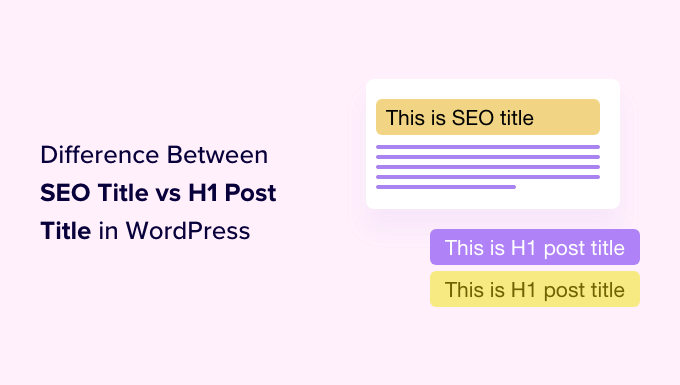
The truth is, your WordPress site uses two different titles: the H1 post title your visitors see on the page, and the SEO title that search engines see. Understanding how each one works is key to improving your rankings and getting more clicks.
After optimizing thousands of articles here at WPBeginner, we’ve mastered the art of crafting both types of titles for maximum impact. We’ll show you the same techniques we use every day.
In this guide, you will learn the difference between the two, how to set them up correctly, and when you should make them different. Let’s get your titles working for you.
Here’s what we will cover in this tutorial:
- What’s the Difference Between SEO Titles and Post Titles?
- How to Add H1 Post Titles in WordPress
- How to Add SEO Titles in WordPress
- How to Customize the Default SEO Title in WordPress
- Tips for Creating the Best Post Titles in WordPress
- When Should You Use a Different SEO Title?
- Frequently Asked Questions About SEO Titles vs Post Titles
- Expert Guides on WordPress Titles
1. What’s the Difference Between SEO Titles and Post Titles?
Every post and page on your WordPress website will have two titles, one that visitors will see at the top of the post and one that search engines use when indexing your site. While these are two completely different use cases, the two titles will most often be the same.
The title that is displayed at the top of every WordPress post is called the H1 post title because WordPress will surround it with <h1> HTML tags to show that it is the most important heading in the post.
This title should let your visitors know what the post is about and attract their attention so they click on the post and read it.
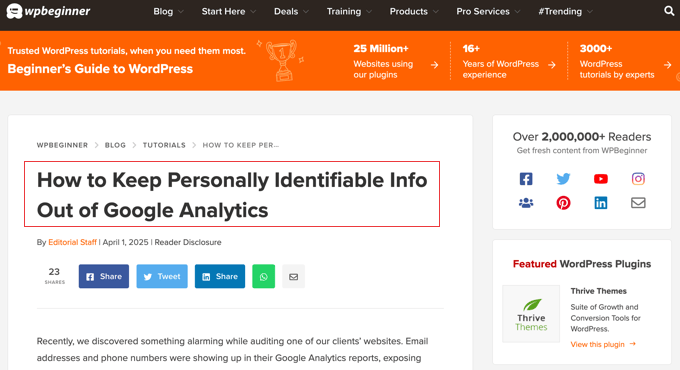
Search engines like Google pay close attention to your <h1> header tags, but they also look for a different title, one enclosed in HTML <title> tags. This is your post’s SEO title and is also known as the meta title.
The SEO title is used when search engines rank your page and display it in search results.
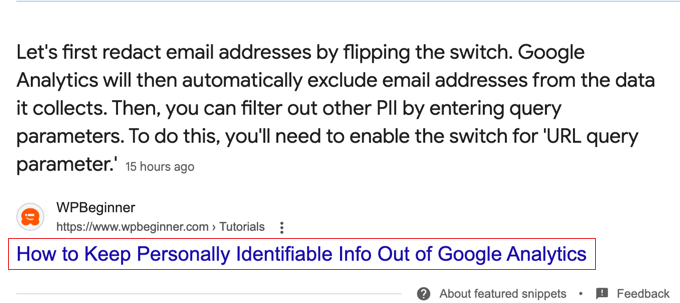
Your visitors won’t see the SEO title anywhere on your website. However, it will be used as the page title in the browser tab, and other websites may use it when linking to your post.
By default, the SEO title will follow a simple template: ‘Post Title — Site Title’. This means WordPress automatically uses your H1 post title as the main part of your SEO title, which is great for consistency.
This default setting works well for most blog posts. However, to customize the SEO title, you will need to use a WordPress SEO plugin.
With that being said, let’s take a look at how to add H1 post titles and SEO titles in WordPress.
2. How to Add H1 Post Titles in WordPress
Adding a title to your post is simple. When you add a new post in WordPress, the block editor will ask you to add a post title and then allow you to create blocks where you can add the content of the post.

If you are new to the block editor, then you can learn how to use it step-by-step in our guide on how to use the WordPress block editor.
You can add a post title by simply typing it on the first ‘Add title’ line of the post.
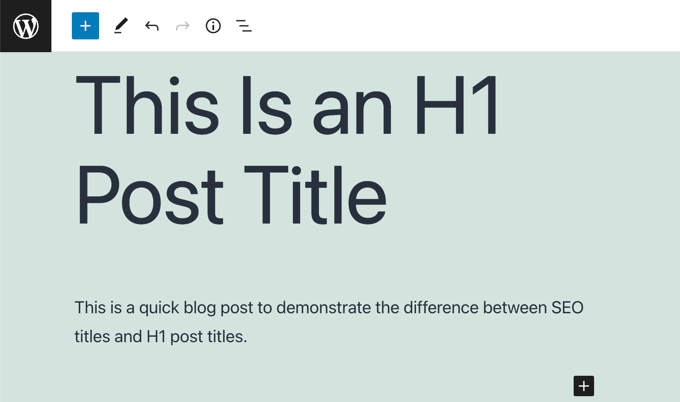
Your website visitors will see this title displayed at the top of the post on your blog, and it will also be used in the post list on your blog’s home page.
When you view the HTML source of the post, you will notice that WordPress has wrapped the title in <h1> tags to identify it as the post title.
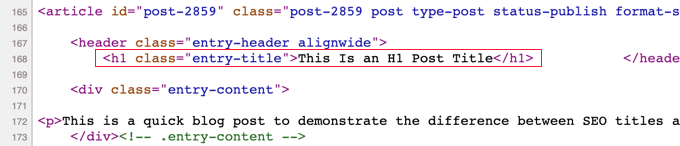
The <h1> tag is the most important heading tag and should be used only for the post’s title. If you use subheadings in your post, then you should use less important heading tags, such as <h2>, <h3>, and <h4>.
3. How to Add SEO Titles in WordPress
The easiest way to add and customize SEO titles is with the All in One SEO (AIOSEO) plugin. AIOSEO is the original WordPress SEO plugin that’s used on over 3 million websites, including our own.
In this tutorial, we will use the free version of All in One SEO because it allows you to customize the SEO title. However, AIOSEO Pro offers even more features to help you rank better in search engine results pages.
The first thing you need to do is install the free All in One SEO Lite plugin. For more details, see our step-by-step guide on how to install a WordPress plugin.
Upon activation, you will need to configure the plugin using the AIOSEO setup wizard. For detailed instructions, see our guide on how to set up All in One SEO for WordPress correctly.
Now, when you are adding or editing a post or page, there will be an ‘AIOSEO Settings’ section below the post content. Here, you will find a section labeled ‘Post Title’ where you can customize the SEO title.
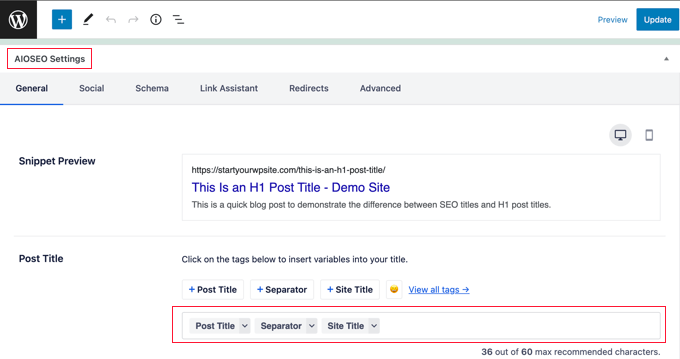
Notice that the default SEO title is the H1 post title, followed by a separator and the site title.
You will also see a preview of how the title will look in a Google search and the number of characters you used. This will help you create a title that is not too long. The recommended length of an SEO title is 60 characters, so it isn’t cut off on search engine results pages.
You can leave the default SEO title as it is, customize it by typing directly into the field, or use smart tags (which are placeholders for information like your post title or site name). For example, you can type a completely new SEO title like this:
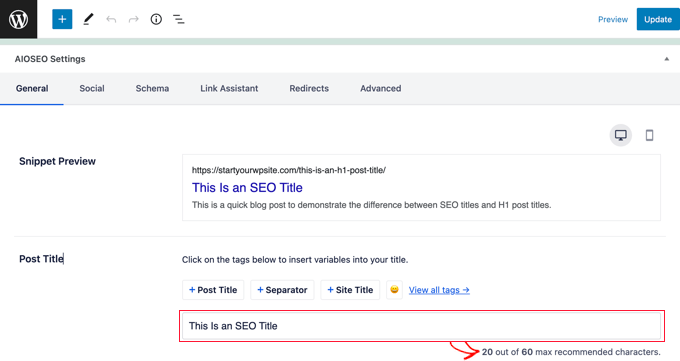
When you view the HTML source of the post, you will notice that WordPress has used <title> tags to identify it as the SEO title.
Here is an example.

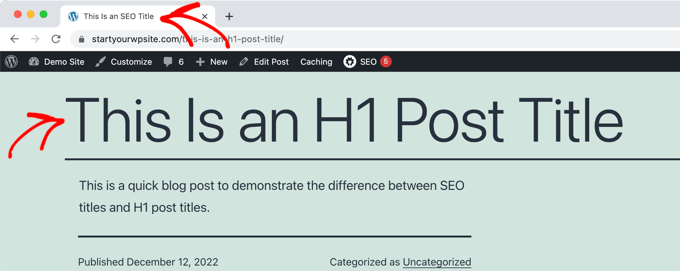
Visitors to your website will see the H1 post title at the top of the post.
They will see the SEO title in their browser tab and on search engine results pages.
4. How to Customize the Default SEO Title in WordPress
You can customize the default SEO title used for posts and pages using the All in One SEO plugin.
First, you need to navigate to the All in One SEO » Search Appearance page and then click the ‘Content Types’ tab.
Near the top of that page, you will see the ‘Posts’ section. Make sure you’re on the ‘Title & Description’ tab, and you will see the default SEO title used for posts next to ‘Post Title’.
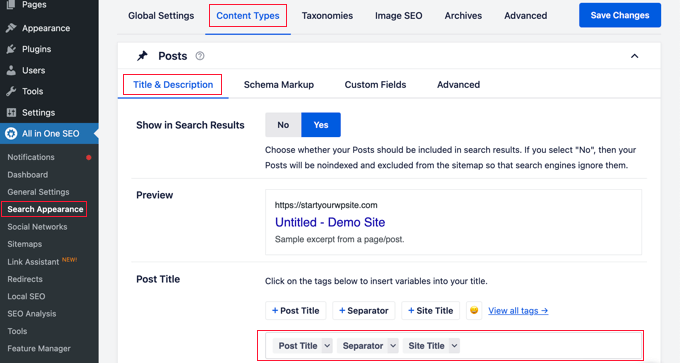
By default, you will see smart tags for the post title, a separator, and the site title. You can customize the default SEO title by adding or removing smart tags.
For example, to make the SEO title just the post title without the site name at the end, simply delete the ‘Separator’ and ‘Site Title’ smart tags. You can do this with the backspace key on your keyboard or by clicking on a smart tag and then clicking the trash icon on the popup.
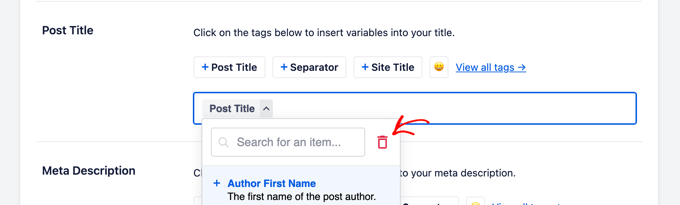
You can also easily add smart tags to the default SEO title.
You can do this by clicking the buttons for commonly used tags found above the Post Title field or clicking the ‘View all tags’ link to see a list of all smart tags.
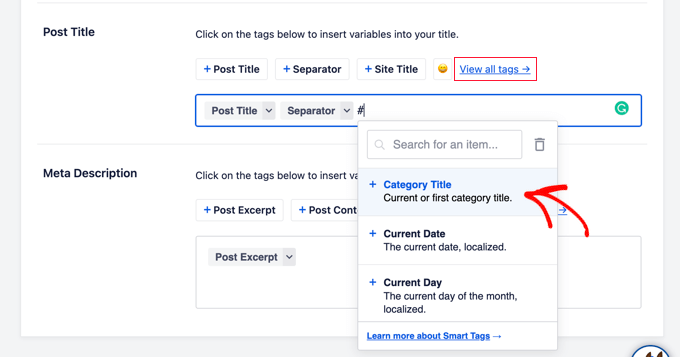
Simply click on a smart tag to add it to the SEO title. When finished, make sure you click the ‘Save Changes’ button at the top of the screen to save the new default post title.
You can customize the default page title in a similar way by scrolling down to the ‘Pages’ section below.
5. Tips for Creating the Best Post Titles in WordPress
Choosing the right title for your blog post can help it rank higher in search results. It can also motivate users to click on your article when they see it in the search results, thus boosting your CTR (aka click-through rate).
Here are some tips on how to write more effective post titles.
Write Your Posts Titles for Users, Not Search Engines
When you think of a title to use for your post, keep your users in mind, not just search engines.
When you write a title for users, you are likely to come up with something that’s more engaging, and it will lead to more clicks.
You want to make sure that your title is readable, understandable, memorable, and clearly describes the content of the post.
Make Sure the Title Is Not Too Long
The length of your SEO title is important. If it’s too long, it will get cut off in search results. For this reason, we recommend keeping your SEO titles under 60 characters. This helps ensure the full title is visible to people on Google.
You can check the length of the SEO title and see a preview of how it will look in a Google search when you customize it using All in One SEO.
Include the Focus Keyword in the Title
You can make your blog post title more SEO-friendly by using your focus keyword in the title. We also recommend making it catchy and click-worthy. That’s because your organic click-through rate (CTR) plays an important role in SEO.
The best way to improve your titles is with the AIOSEO headline analyzer tool. This will evaluate your headline, give it a score, and offer tips to make your headline even better.
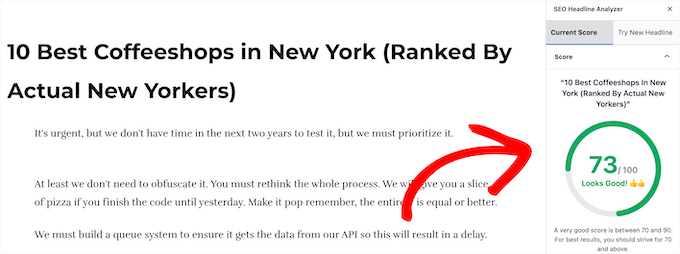
For more details, see our guide on how to use a headline analyzer in WordPress to improve SEO titles.
Include Your Focus Keyword in the Meta Description
Now that you’ve crafted an effective title, don’t forget the meta description.
This is the short summary that appears under your title in search results. Including your focus keyword in the meta description can help search engines understand your content and encourage users to click.
You can learn how to do this step-by-step in our guide on how to add keywords and meta descriptions in WordPress.

AIOSEO Pro also comes with an AI-powered Title / Description Generator.
This powerful tool uses ChatGPT to automatically generate high-quality SEO titles and meta descriptions based on your content, which can save you a ton of time.
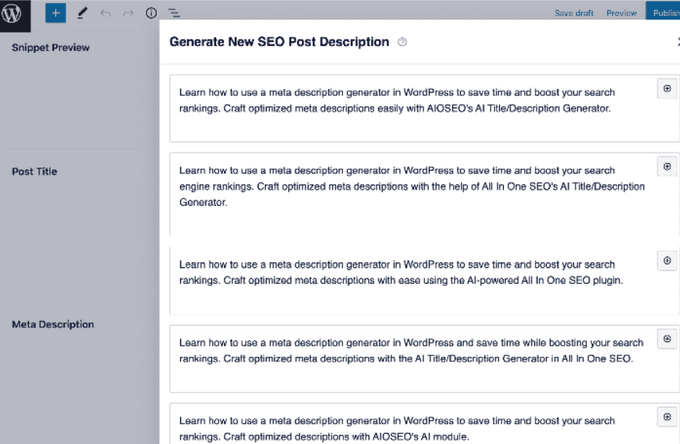
You can add your preferred description suggestion in 1-click and tweak it according to your needs.
For more details, see this tutorial on how to use a meta description generator in WordPress.
6. When Should You Use a Different SEO Title?
In most cases, your H1 post title and SEO title will be the same. However, there are times when you may want to customize the SEO title so that it is different from the H1 post title.
A More Engaging SEO Title
For example, you may want to tweak the SEO version of the title so it is more engaging to potential visitors and more likely they will click on it in a Google search. You could then display a more detailed and descriptive H1 title on your website.
A Shorter SEO Title
Another reason to change the SEO title is if you have created the perfect H1 title for your post, but it is longer than 600 pixels. In that case, Google will not have room to display the full title in the search results, and you should create a shorter SEO title.
A Longer SEO Title
On the other hand, if your H1 title is very short, then you can take the opportunity to make your SEO title longer by adding relevant keywords that will improve your page ranking.
A Quick Note: Google May Change Your SEO Title
It’s also important to know that Google sometimes rewrites SEO titles to better match them with a user’s search. In fact, one study found that Google modifies a high percentage of titles to try and improve search quality.
This can be frustrating if you have worked hard on crafting the perfect SEO title.
What we have found is that your title is more likely to be changed when your SEO title is different from the H1 title. When these two titles match, the study found that Google rewrites the title only 20% of the time. This is a good reason to use the same title in both places if you can.
Frequently Asked Questions About SEO Titles vs Post Titles
Here are answers to some of the most common questions we get about the difference between SEO titles and H1 post titles in WordPress.
1. Should my SEO title and H1 post title be the same?
In most cases, keeping your SEO title and H1 post title the same is a good idea. It provides consistency and may reduce the chance of Google rewriting your title in search results.
However, you might create a different SEO title if your H1 is too long for Google or if you want to add a keyword to target search users more directly.
2. Why did Google rewrite my SEO title?
Google often rewrites titles to better match what a user searched for, improve clarity, or make them more mobile-friendly. It’s a very common practice designed to improve the search experience.
While you can’t stop it completely, creating a clear, descriptive title that accurately reflects your content can make it less likely to be changed.
3. What is the ideal length for an SEO title?
The recommended length for an SEO title is under 60 characters. This helps ensure your full title appears on search engine result pages without getting cut off.
4. Is a meta title the same as an SEO title?
Yes, the terms ‘meta title’ and ‘SEO title’ mean the same thing. They both refer to the title found in the HTML <title> tag of your page, which is what search engines use.
5. How do I change my SEO title in WordPress?
The easiest way to change your SEO title is by using a WordPress SEO plugin like All in One SEO. In the post editor, you can scroll down to the AIOSEO settings and customize the ‘Post Title’ field.
Expert Guides on WordPress Titles
We hope this tutorial helped you learn the difference between SEO titles and H1 post titles in WordPress. You may like to see some other articles related to WordPress headlines and titles:
- How to Properly Use Heading Tags in WordPress (H1-H6 Explained)
- How to Write Powerful Headlines Using AI (Explained)
- How to Use Headline Analyzer in WordPress to Improve SEO Titles
- How to Create a List of Forbidden Words for WordPress Titles
- How to Automatically Truncate Blog Post Titles in WordPress
- How to Hide the Title for Selective WordPress Posts and Pages
- How to Add Subtitle for Posts and Pages in WordPress (Step by Step)
If you liked this article, then please subscribe to our YouTube Channel for WordPress video tutorials. You can also find us on Twitter and Facebook.




Jiří Vaněk
Great explanation of the difference between the SEO title and the H1 heading. I usually use the same description for both in AIO SEO and have never actually used anything different for the SEO title. However, I learned from this article what the difference is. Furthermore, I also didn’t distinguish between heading sizes and had everything as H1. I found out that I was completely wrong only on this website, and I had to go back and adjust about 70 blog posts. I just want to ask, does it make sense to have a different SEO title and heading in terms of SEO, or is it better to keep them the same? I assume that at least in both cases I should use keywords, but I’m not sure if I’ll benefit from using a different phrasing for the title and the heading. Can someone please explain this to me?
Dennis Muthomi
Great article on the difference between SEO titles and H1 post titles! The section on customizing default SEO titles with All in One SEO was super helpful. As a blogger I use that plugin and can vouch for it. One other thing I do is to regularly review and update older post titles, both H1 and SEO, to keep them fresh and relevant. That’s helped my site’s SEO over time.
David Lim
I’m not sure, it may be included in the article, but I haven’t seen it. Formally, is there any well-proven practice on how to write the SEO title?
WPBeginner Support
We would recommend taking a look at our article below!
https://www.wpbeginner.com/plugins/how-to-use-headline-analyzer-in-wordpress-to-improve-seo-titles/
Admin
David Lim
I checked that, appreciate the help
Jessica Cramer
I’m confused by this article because you’ve use the exact same words for the H1 post title, “How to Start a Wordpress Blog in 2022- Beginner’s Guide” outlined in red in the second image, AND for the Seo Title, “How to Start a Wordpress Blog in 2022- Beginner’s Guide”, outlined in red in the third image. The exact same words are used in both titles, so this is extremely confusing to me. Can you please clarify?
WPBeginner Support
We will try to make it clearer in the future but section 1 explains the differences. The H1 is for your visitors to see while the SEO Title is for search engines to see and show as a result on search engine pages.
Admin
Moinuddin Waheed
While teaching html to students,I have always emphasized on the importance of having only one h1 heading in a post, as it signifies that it is the most important heading of this post.
Subsequent topics will be followed by having heading h2.
This not only ensures good visual experience but also helps for search engine optimisation purposes as well.
Thanks for keeping us updated with technical aspects of seo as well.
WPBeginner Support
You’re welcome
Admin
Ahmed Omar
thank you for this post.
it is important to notice the difference between both post title, to improve the ranking and to keep good SEO
specially that most SEO asking to put key words in the H1, so it became a little confusing
but I have a question regarding H1 post title, should it be only H1 or it can be H2, H3
WPBeginner Support
For now it is best to have the post title only an H1 and only one per post/page
Admin
Peter Iriogbe
In line with Google’s guidelines for heading tags in blog posts, it’s essential to structure them based on the hierarchical levels of subcategories and sub-subcategories. It’s not solely dependent on the H1 tag. For instance, use an H2 tag for a subtitle like ‘5 Ways to Make Money with Blogging,’ and under this subtitle (H2 tag), employ H3 tags for minor titles listing the five ways, such as ‘1. Google’ and ‘2. Affiliate Marketing.’ Google values heading tags when they effectively serve the SEO purpose of your post.
Seppo Partanen
How to add an SEO title when using a traditional editor?
WPBeginner Support
If you mean the classic editor, then you should see the SEO options beneath the post content area.
Admin
Seppo Partanen
Thanks for the answer. Your instructions tell you how to make an SEO title with the block editor. However, there is no instruction on how to do it with the Calssic editor. I can do H1 H2 etc. titles, but how to make a SEO title? There are the sections Snipet Preview, Article Title and Meta Description, etc. at the bottom, but how to use them to create an SEO title?
WPBeginner Support
Beneath the post content there should be an area specifically for AIOSEO where you can set the post title and that is your SEO title. The AIOSEO section should look the same as it does in our article above that uses the block editor.
Chinecherem Somto
thanks for this wonderful piece
please I want to know if it is advisable to add my site name after my SEO title, or should I use only my SEO title
WPBeginner Support
Keeping the site name should work for most blogs but you would need to test if removing the site name works well for your site.
Admin
Peter Iriogbe
I don’t think it is recommended to add your site name after each page title. The best thing you need to do is to keep your SEO title straightforward and catchy. Google often adds your site name to the search result, so you don’t need to repeat it in the SEO title. Just make the SEO title snappy to attract clicks.
James O'Sullivan
I am still confused. So the SEO title is separate from H1 correct? That means the proper format is SEO title > into paragraphs > H1 title…rest of blog
WPBeginner Support
The SEO title is something you would set in your SEO plugin, you wouldn’t need to add it to the article itself
Admin
Peter Iriogbe
By default, the title tag is included as part of the HTML files of your website. So you don’t have to manually set it (Unless otherwise is not correctly set by the developers).
On the other hand, the H1 tag is part of the HTML heading tags (It ranges from H1 to H6) It is used in hierarchical order in a blog post. H1 is the biggest while H6 is the smallest