


You have found the perfect WordPress plugin or theme, but there is a catch: it is only available on GitHub. Unlike the official WordPress repository, there is no magic “Install” button, which can feel intimidating for beginners.
The good news is that downloading and installing software from GitHub is actually quite simple. At WPBeginner, we frequently use GitHub to access custom tools and plugin beta versions, so we have mastered the process.
In this guide, we will show you how to install WordPress plugins and themes from GitHub step by step.
Quick Summary: To install a plugin from GitHub, download the ZIP file from the repository (check for a “Release” first), go to Plugins » Add New in WordPress, select ‘Upload Plugin’, choose the ZIP file, and click ‘Install Now’.
- What Is GitHub?
- Why Are Some WordPress Plugins and Themes Only on GitHub?
- Pros and Cons of Installing Plugins from GitHub
- How to Install WordPress Plugins and Themes From GitHub
- How to Get Updates for WordPress Plugins Installed From GitHub
- Bonus: How to Automatically Deploy WordPress Theme Changes Using GitHub
- Frequently Asked Questions About GitHub Plugins
- Additional WordPress Plugin and Theme Development Resources
What Is GitHub?
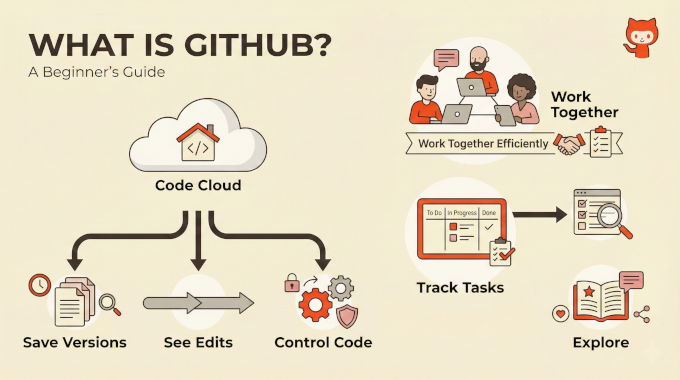
GitHub is a cloud-based hosting service for software development and version control using Git. It allows developers to track changes, save history, and manage code versions across projects.
Beyond hosting, GitHub offers practical tools for collaboration and project tracking. Users can work together efficiently, follow developments, and engage with repositories.
At WPBeginner and across our partner companies, we use GitHub for development. We have seen firsthand how it helps remote teams like ours and boosts productivity, while ensuring all code is hosted securely.
Why Are Some WordPress Plugins and Themes Only on GitHub?
Most beginners install plugins from the WordPress.org directory or a developer’s website. However, you will sometimes find that the specific tool you need is only available on GitHub.
There are several reasons why a developer might choose to host their work exclusively on this platform:
- Strict Directory Guidelines: The official WordPress plugin directory has strict rules. Some developers prefer to skip the review process and host their code under their own control.
- Beta Testing: Developers often use GitHub to share “beta” (unfinished) versions of their software. This allows advanced users to test new features before they are available to the general public.
- Non-Commercial Projects: Sometimes, a developer creates a simple tool for their own use and shares it for free. They may not have the time or interest to maintain a marketing page or official support forum.
While this open environment is great for innovation, it also means these plugins don’t always have the same safety checks as the ones you’ll find on WordPress.org.
Pros and Cons of Installing Plugins from GitHub
Downloading plugins from GitHub can give you access to powerful tools, but it is not for everyone. You should weigh the benefits against the potential risks before installing them on a live website.
Here are the main advantages and disadvantages.
👍 Pros of Using GitHub Plugins
- Access to the Latest Features: You can often try out new features and updates
- Direct Developer Contact: You can report bugs or suggest features directly to the developer using the “Issues” tab on GitHub.
❌ Cons of Using GitHub Plugins
- No Security Review: The official WordPress plugin directory reviews code for safety. GitHub does not, so you must trust the developer completely.
- Potential Instability: Code on GitHub is often a work in progress. It may contain bugs or errors that could break your site.
Because of these risks, we always recommend making a complete backup of your site before installing a GitHub plugin. You can use a plugin like Duplicator to create a safe restore point.
Now, let’s explore the steps for installing WordPress plugins and themes from GitHub.
How to Install WordPress Plugins and Themes From GitHub
Installing plugins from GitHub is similar to installing a WordPress plugin manually. However, since these tools are not reviewed by the WordPress team, you should ensure you trust the developer before installing them.
- First, go to the plugin or theme’s repository on GitHub.
- Look for a ‘Releases’ section in the right sidebar. It is best to download a stable release if one is available.
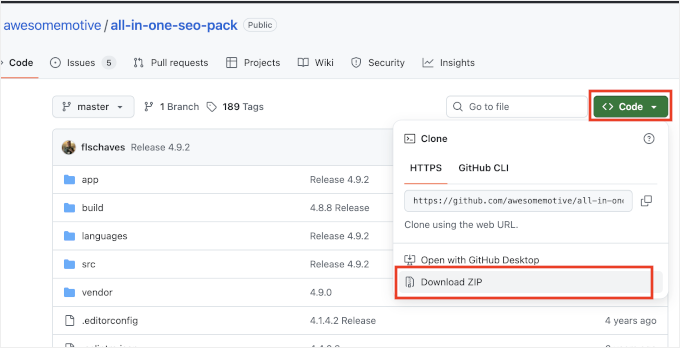
- If there are no releases, click the ‘Code’ button and select ‘Download ZIP’. Note: This downloads the development files, which may be unstable.
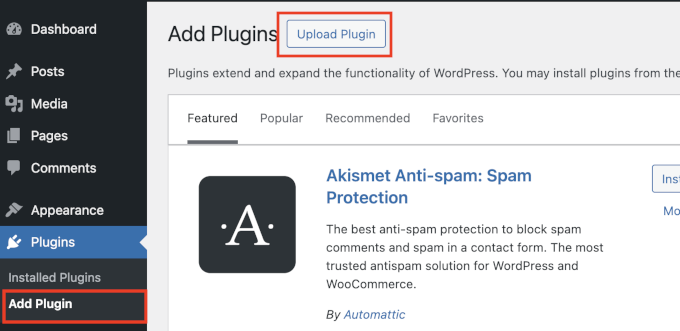
- Go to your WordPress admin area and navigate to the Plugins » Add Plugin page.
- Click on the ‘Upload Plugin’ button at the top of the screen.
- Click the ‘Choose file’ button and select the ZIP file from your computer.
- Click ‘Install Now’. WordPress will upload and unzip the file. Note: GitHub often adds a suffix like
-mainor-masterto the folder name (e.g.,plugin-name-main). This is normal and won’t affect how the plugin works. - Once you see the success message, click ‘Activate’ to start using the plugin on your WordPress website.
Warning: If the plugin displays a fatal error upon activation, it may require a “build” step (using tools like Composer or NPM). This is common with advanced GitHub projects and is generally not beginner-friendly. Check the repository’s README file for instructions.
How to Get Updates for WordPress Plugins Installed From GitHub
By default, WordPress does not show automatic updates for plugins downloaded from GitHub. To receive updates, the developer must enable them specifically.
There are two common ways this works:
- Built-in Updates: Some plugins already include code that enables automatic updates directly from GitHub. You don’t need to do anything extra.
- Git Updater Plugin: The developer may ask you to install the Git Updater plugin (formerly GitHub Updater). This plugin connects your site to GitHub to check for new versions.
We recommend contacting the developer on GitHub to ask about their update policy.
Bonus: How to Automatically Deploy WordPress Theme Changes Using GitHub
If you are a developer working on a custom theme, you can also automatically deploy your changes to GitHub.
This saves time and ensures that you have different versions of your theme saved in case you need to roll back changes in the future.
For details, see our guide on how to automatically deploy WordPress theme changes using GitHub and Deploy.
Frequently Asked Questions About GitHub Plugins
Is it safe to install plugins from GitHub?
It depends on the developer. Unlike the WordPress plugin directory, GitHub does not review code for security. You should only install plugins from developers you trust or reputable companies.
Why isn’t the plugin in the WordPress directory?
Developers often use GitHub for beta testing or for plugins that don’t meet the specific guidelines of the official repository. It doesn’t necessarily mean the plugin is bad, just that it is distributed differently.
Additional WordPress Plugin and Theme Development Resources
You may find the following resources helpful for choosing WordPress themes and plugins or for starting your own development journey:
- Is It Safe to Use Outdated WordPress Plugins? (Explained)
- Beginner’s Guide: How to Choose the Best WordPress Plugin
- Free vs Premium WordPress Themes (Pros and Cons for Site Owners)
- How to Add Dummy Content for Theme Development in WordPress
We hope this guide helped you install WordPress plugins or themes from GitHub. You may also want to see our guide on how to code a website and our expert picks for the best code snippets for WordPress.
If you liked this article, then please subscribe to our YouTube Channel for WordPress video tutorials. You can also find us on Twitter and Facebook.




Dennis Muthomi
For me, I always set up a staging environment when testing GitHub plugins. It’s saved me so many headaches! I can check everything works properly before going live. This is especially important with lesser-known GitHub repos.
Your tips about checking updates are spot-on – it’s exactly how I handle my clients’ sites. I’m definitely sharing this with my junior devs who are just getting started with GitHub WordPress stuff.
Jiří Vaněk
GitHub is still a big unknown for me, but I’m slowly trying to delve into its mysteries and commands. I’m mainly interested in it because of the versioning possibilities and also because there are occasionally very interesting projects here. And yes, as a beginner, I still don’t understand it. Tutorials like this are very valuable to me because this is not the first article about GitHub that I’m reading here. The more I learn about it, the more I start to enjoy it, because even in WordPress, one can step out of the box, so to speak. That means going a bit beyond the official WordPress repositories. And because of this, I get access to interesting projects again. Thanks for these guides.
Moinuddin Waheed
This is very good news that the vast community of wordpress non code background can also use GitHub for downloading themes and plugins.
i thought that git and GitHub are only developers per se. But we can use wordpress themes and plugins downloaded from here.
Thanks wpbeginner for this helpful tutorial.
At times we don’t get plugin in wordpress repository and Google shows it in GitHub, so we can easily access and test them on our local machines.
Jiří Vaněk
That’s right. What I’ve also discovered is that you can find solutions to many problems on GitHub. Several times while working with WordPress, I encountered an issue on a foreign website and in my effort to help, I ended up on GitHub. And there, I found the solution. However, sometimes it was a bit more complicated for me to implement it. That’s why these articles are very meaningful and have great potential for me, because I feel that you can find really interesting things on GitHub that aren’t usually in the repository.
Ethan
Hi, are the plugins and themes from github safe to download without malware and other malicious code?
WPBeginner Support
It would depend on who’s code you are downloading
Admin
Ismail
Hello admin,
Thank you so much for this article and I learn a lot from this site. Today, I want to download Facebook Instant Articles fro Github, and this article help me to do that. But I have a question, if possible please guide me since I am newbie.
For FBIA plugin from WP Directory, do I have to uninstall it and install the plugin from Github afterwards? I hope you can help me on this. Thank you for your help to all people.
WPBeginner Support
If you are replacing the plugin with a version from GitHub it would normally be best to remove the old files and then replace them with the plugin from GitHub
Admin
yh
wordpress is saying I need a business plan to add plug ins. is there any way around this? or is there any way for me to retrieve a scheduled post and post it manually? I cant find the post anywhere
WPBeginner Support
Please see our guide on the difference between self hosted WordPress.org vs free WordPress.com blog.
Admin
Andy Fragen
Thanks for mentioning GitHub Updater. It works with plugins or themes hosted on GitHub, Bitbucket or GitLab.
As a bonus you can use GitHub Updater to perform a one click install of any GitHub, BitBucket, or GitLab (public or private repos) plugins or themes using only the repository URI vastly simplifying the instructions in the article.
adolf witzeling
GitHub is great-for learning too. I’ve gained so much knowledge just by looking at code from github. Thanks for this nice post!
Gautam Doddamani
GitHub and StackOverflow are some of my favourite sites for checking out useful scripts that i can use on my blog. I am using one plugin from GtiHub myself…but didn’t know about the GitHub updater…thanks guys!
Morgan
Here is a real tip:
Right click “Download ZIP” > Copy Link Address
Plugins > Add New > Upload > Choose File
When the window pops-up for you to find your zip file, just paste the URL and it will fetch the link. No need to clutter your computer with files you don’t need.
Andy Fragen
You can actually do a one click install using the Remote Install feature of GitHub Updater. Added benefit is the plugin/theme directory is correctly renamed.
Tracy
Are the plugins found on Github any more “unsafe” than the plugins that are in the repository?
WPBeginner Support
Tracy, yes there is a chance of that. In the WordPress plugin repository, plugins go through a basic review process and since it is a larger community an unsafe plugin would get caught much quicker than on GitHub.
Admin
Aaron
Awesome article, I heard your interview on Mixergy. Really love how you use FAQ’s to drive content. I had no idea your traffic was so huge- very cool to see your growth through value creation. Congrats! –Aaron
Alfred Degens
Thanks for this article!
Can you tell me where to find Wordpress plugins on GitHub?
Is there a way to search for those open source plugins on Github?
I tried on Google search but didn’t find any plugin on Github.
Regards,
Alfred
WPBeginner Support
Try searching WordPress Plugin site:github.com
Admin