


When we first started building websites, we’d often see competitors snagging that prime spot in Google’s answer boxes. It felt like they knew a secret we didn’t, capturing tons of clicks before users even had a chance to scroll.
After years of hands-on testing across our own WordPress sites, we discovered a surprising truth. Winning that valuable ‘position zero’ often has less to do with complex technical tricks and more to do with simple content formatting.
You absolutely don’t need to be an SEO expert to make it happen. We’ve developed a straightforward process that has helped us and thousands of our readers land these valuable featured snippets.
In this guide, we’ll share our proven method for structuring your content to win Google answer boxes.
What Is a Google Answer Box?
Google’s answer box is a box that appears at the top of search results and answers users’ questions by showing a snippet of information.
It is part of Google’s knowledge graph and is just like a featured snippet.
While some answer boxes are simple facts provided directly by Google, many are pulled from helpful articles. Those are the ones this guide will help you win.
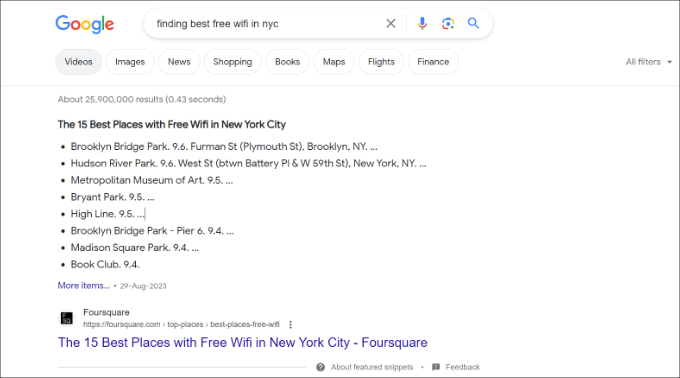
Google uses carousels, side boxes, lists, tables, and answer boxes to display the most relevant information at the top. This information is gathered from various sources, and the algorithm decides which results should be displayed inside an answer box.
According to industry research, earning a spot in an answer box can secure a significantly higher click-through rate (CTR) than traditional search results.
How Google Displays Information in the Answer Box
The purpose of answer boxes is to offer instant information to users. This works particularly well when people are looking for factual data like public figures, distances, conversion rates, scores, and similar information.
If users get the exact information they need, then they can move on and search for something else. For many queries, Google can just display a sidebox from the web’s most reliable knowledge sources, like Wikipedia.
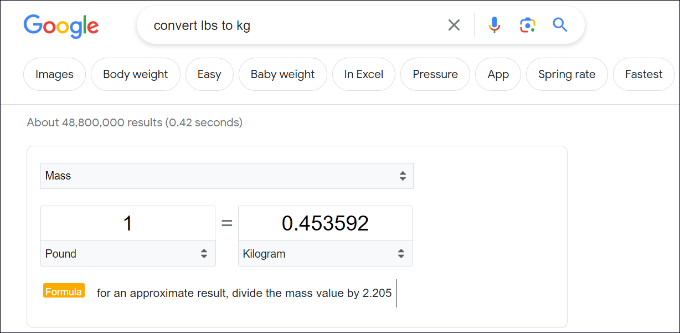
For simple facts like the currency conversion shown above, Google often provides the answer itself from its own data. This is one type of answer box. But for more complex questions that require deeper explanations, Google looks for the best answer from websites like yours.
In a way, it might sound like Google is trying to keep all the traffic for itself. However, not all users are looking for information that Google’s knowledge graph can answer with accuracy.
If a user’s keywords require an opinionated, well-thought-out, or research-based answer, then Google relies on other web sources.
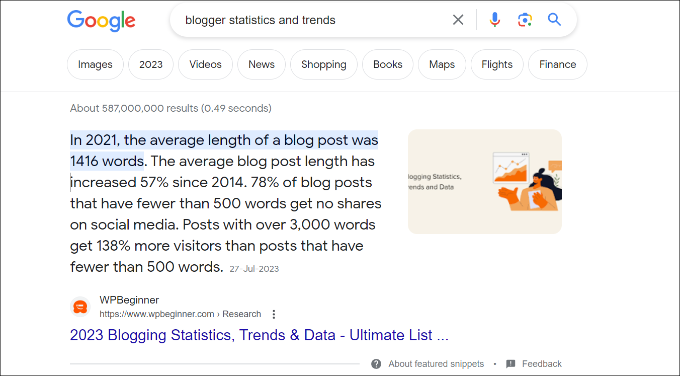
If you are among the top 10 results for a keyword, then you are already closer to appearing in a Google answer box.
Google answer box results change quite often, and you can easily appear as the best answer by simply improving your WordPress website content.
Let’s explore a number of content optimization steps that you can take to appear in the answer box. You can click the links below to jump to our different tips:
- Add Short and Helpful Answers in Your Content
- Include Keywords in the Form of Questions
- Use Lists, Tables, and Table of Contents
- Optimize Content With Data-Driven Decisions
- Answer the Question Immediately on the Page
- Follow SEO Best Practices
- Are Google Answer Boxes Worth the Effort?
- Frequently Asked Questions About Google Answer Boxes
- Additional Resources to Boost Your SEO
1. Add Short and Helpful Answers in Your Content
The purpose of Google answer boxes is to provide quick answers to users.
To help grab an answer box, you will want to make sure that your article answers a specific question as early in the article as possible. You also need to make your answer short, concise, and easy to understand.
You can also add a frequently asked questions (FAQ) section to your blog post and pages. This will allow you to answer as many questions as possible for a particular topic and increase your chances of getting featured in an answer box.
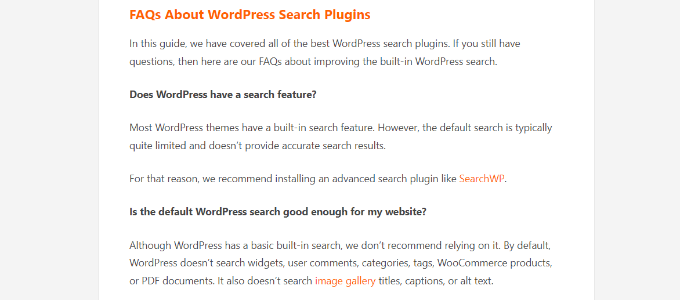
If you are using All in One SEO for WordPress (AIOSEO), then it is super easy to add a FAQ section to your content. AIOSEO is the best SEO plugin for WordPress, and it automatically optimizes your site for featured snippets.
Another advantage of using AIOSEO is that it lets you easily add FAQ schema in WordPress. FAQ schema is a smart markup code that allows Google to identify a FAQ section in your content.
As a result, Google may reward you by listing your site in answer boxes, people also ask sections, and other rich results.
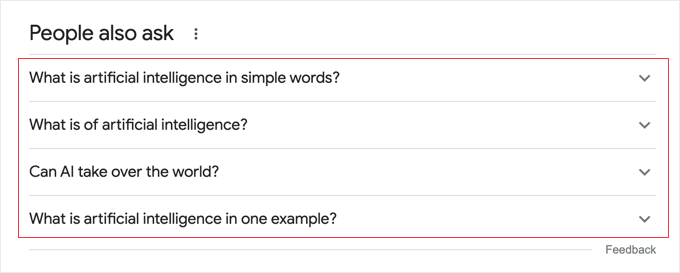
2. Include Keywords in the Form of Questions
It also helps to include your keywords in the form of a question followed by a short answer. After that, feel free to add as much detail to your answer as you want.
Adding more information will allow you to use the keyword throughout the article. You can even use the article to answer other questions your users may have about the same topic.
To find keywords that are in the form of a question, you can use any keyword research tool.
For instance, we recommend Semrush as it shows a lot of information about a search term. This includes questions about the topic, which you can include while writing the article.
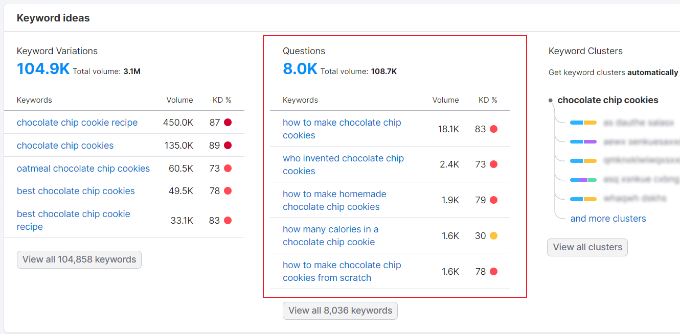
Expert Tip: Looking for a free way to do keyword research? Our WPBeginner Keyword Generator tool can help you find hundreds of keyword ideas in just seconds.
To learn more, please follow our guide on how to do keyword research for your WordPress blog.
3. Use Lists, Tables, and Table of Contents
Users love properly formatted content because it helps them quickly get the information they need. You can publish informative content in a viral listicle format that is easier for visitors to consume and share.
For example, here’s how Google picked numbered bullets from OptinMonster’s exit-intent popup hacks article and showed it as an answer box / featured snippet in the search results.
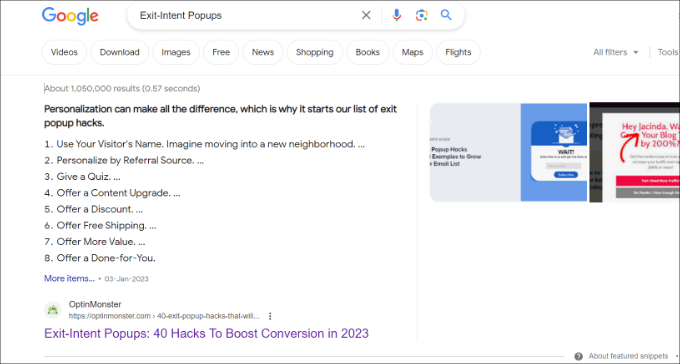
Google understands that list and table formatting makes content easier to read and tends to highlight the websites that use this formatting.
This includes:
- Pages that use tables to list items
- How to articles that use step-by-step instructions
- Top lists that simply list items
- Lengthy articles that use a table of contents
- And more
This does not mean that you must always use one of these formats to write your articles. However, if using formatting can help your users get to the information quickly, then it’s a good idea to use it.
In other cases, Google will use descriptions from your list post and show them in answer boxes.
For example, Google picks small details from our article about WordPress form plugins and displays them in the search results.

4. Optimize Content With Data-Driven Decisions
Data is the most important thing you need if you want to create an effective content strategy. Without knowing information about your visitors, you won’t be able to write content that they want to read.
This is where Google Analytics comes in. Its detailed data helps you understand your audience and plan accordingly.
You will need MonsterInsights to properly track user engagement in WordPress. It is the best Google Analytics plugin on the market, and it will help you learn where your users are coming from and what they do while they are on your site.
These stats provide you with a clear picture of what’s already working on your website. You can then expand on it and make informed decisions for better SEO.
5. Answer the Question Immediately on the Page
Google pulls the text for its answer boxes directly from the visible content on your page. To increase your chances, you should answer the user’s question as clearly and concisely as possible near the top of your article.
A great strategy is to include the question in a subheading (like an H2 tag) and then provide the answer in the first paragraph or list right below it. This makes it easy for Google to find and feature your answer.
6. Follow SEO Best Practices
Apart from answering user questions, you also need to make sure that Google can find your content and understand it easily.
This means you still need to optimize your posts for SEO just like you would normally do:
- Include your keywords in the SEO title, description, and keywords.
- Add your focus keyword in the content and sub-headings in your article.
- Properly use categories and tags.
- Make sure there is enough content to cover the topic.
- Make internal linking a habit and link to your other posts and pages.
- Add title and alt tags to your images.
For more details, you can see our complete guide on how to optimize your WordPress blog posts for SEO.
Are Google Answer Boxes Worth the Effort?
Yes, absolutely. As we mentioned earlier, the click-through rate for results in the answer box is way higher than for other content. Depending on the topic and your content, the traffic gains can be huge.
However, we do not recommend you overthink it. The purpose of answer boxes is to help users find information quickly. If you focus on answering questions through helpful and informative content, then search results will start picking up your content.
Google’s search features are always changing. There are no shortcuts that will help you win forever. But building your website as an authority/reliable source of useful information will help you win in the long run.
Frequently Asked Questions About Google Answer Boxes
Here are answers to some of the most common questions we receive about getting your content featured in Google’s answer boxes.
1. What’s the difference between a Google Answer Box and a Featured Snippet?
A Google Answer Box is the general term for any informational box at the top of the search results. A featured snippet is a specific type of answer box that pulls its information from a webpage and links to it.
The tips in this article will help you appear in answer boxes, and you can learn even more in our detailed guide to getting a Google featured snippet.
1. What is a Google Answer Box?
A Google Answer Box, also called a featured snippet, is a special block that appears at the top of the search results. It pulls a concise answer directly from a webpage to quickly answer a user’s question.
2. What is the main benefit of appearing in an answer box?
The biggest benefit is a much higher click-through rate (CTR). Research shows that these featured snippets can get over 32% of all clicks for a search query, which means more traffic for your site.
3. How can I increase my chances of getting a featured snippet?
You can improve your chances by clearly answering questions in your content using lists, tables, and question-based headings. Using an SEO plugin like All in One SEO to add schema markup also helps Google understand your content’s structure.
4. Do I need to be the #1 search result to get into an answer box?
No, you do not need to be in the top organic position. Any webpage that ranks on the first page of Google search results has an opportunity to be chosen for the answer box.
5. Does using an SEO plugin guarantee a featured snippet?
While an SEO plugin like AIOSEO significantly helps with the technical optimization needed, it does not guarantee a spot. Google’s algorithm makes the final decision based on the overall quality and relevance of your content.
Additional Resources to Boost Your SEO
Now that you know how to optimize for Google’s answer boxes, you can take your site’s SEO even further. Here are some of our essential guides that will help you continue to improve your search rankings:
- Ultimate WordPress SEO Guide for Beginners – Our comprehensive guide covering all the essential aspects of WordPress SEO.
- Best Keyword Research Tools for SEO – A detailed comparison of the best tools to find what your audience is searching for.
- Internal Linking for SEO: The Ultimate Guide of Best Practices – Learn how to properly link your own content to improve SEO and user experience.
- Beginner’s Guide to Image SEO – Properly optimized images can help you rank in image search and improve page speed.
We hope this article helped you learn how to appear in Google answer boxes. You may also want to see our list of the best WordPress SEO plugins and our guide on how to use Google Trends to improve SEO and grow your business.
If you liked this article, then please subscribe to our YouTube Channel for WordPress video tutorials. You can also find us on Twitter and Facebook.





Olaf
Google answer boxes are great for targeted data searches. I love that I don’t have to sift through individual websites to find specific and relevant information; Google serves it up for me. If you appear in these boxes, I believe it’s an even bigger win than being in the top position on the SERP. From my personal experience, I’ve found that having a table of contents and a FAQ section works really well. So if your content allows for these two elements, you can significantly increase your chances of being featured in an answer box.
Dennis Muthomi
braavo! this is well explained article.
does directly mirroring the keyword query in your answer help with grabbing those Answer Boxes? For example, if the keyword is “What is the best WordPress SEO plugin in 2024?”, would structuring the answer like “The best WordPress SEO plugin in 2024 is XYZ because…” improve the chances of appearing in the Answer Box? I’d love to hear your thoughts on this
WPBeginner Support
That could help but is not a requirement to have your content appear. We would recommend looking into our guide below on keywords:
https://www.wpbeginner.com/glossary/keywords/
Admin
Mrteesurez
Yes, welldone, I have been looking for this post since. I think if one is able to follow this and implement the it properly, there is high probability of showing on answer box.
Using FAQs and formating is not only useful for search engine but helpful for users to enhance the understanding of the topic matter.
WPBeginner Support
Glad you found our post helpful
Admin
Ahmed Omar
This is a great post.
It happened 2 times for me that google put my site as answer, and I did not know that time how I did it or why google chosen my site.
Now it is obvious from your post, and I will work on it specially adding question to the post.
Thank you
WPBeginner Support
You’re welcome, glad we could help remove confusion regarding this
Admin
Jiří Vaněk
Personally, I have to say that I started appearing in these boxes when I incorporated FAQs into my articles. So now, I quite enjoy the practice of adding, wherever possible, a summary of content in the form of quick FAQs at the end of any article that allows it. This method of summarizing has paid off for me. Additionally, in the Google Search Console, I see indexed articles with FAQs, and it significantly helps to boost SEO and the discoverability of the content.
WPBeginner Support
Thank you for sharing what worked for you
Admin
Moinuddin Waheed
Seeing content in the Google box is something that will make a brand value in the visitors mind.
I have thought of this and was of the opinion that it might be some Google’s own logic to put content there. But thanks for the description , now it’s clear that we can have our content in the Google box with seo improvements and some other techniques that you have mentioned like creating content in question answer format, including frequently asked questions and others
WPBeginner Support
Glad we could share this information on the answer box
Admin
Ralph
I have 2 articles that appear as a google answer but never knew, why it happened. It just used my H2 and H3 as a bullet point list.
WPBeginner Support
Glad we could share why you were included in the answer box
Admin
Andri Marza Akhda
I am from Indonesia. Nice article..Thanks for sharing
WPBeginner Support
Glad you liked our article!
Admin
Saud Razzak
Nice article! Thanks for sharing
Shafi Khan
Google answer boxes are the new #1 and it’s definitely worth it if you can rank in their.
Article formatting and content quality are two important factors to consider if you want to rank your site in position 0.
Thanks for sharing.
Saif U Rehman
Sir, I am from Pakistan. I am a student of Computer Sciences. I just want to learn SEO with proper guideline so please guide me from where I can learn SEO with free resources. I am awaiting your precious guideline for a beginner.
WPBeginner Support
Hi Saif U Rehman,
Our website is mainly about beginner WordPress users and we often write about SEO when explaining it for WordPress beginners. You can take a look at our ultimate step by step WordPress SEO guide for beginners.
However, SEO is complicated subject and continuously evolving. We will recommend you to check out Google’s own resources, Google Search blog, and webmaster guidelines. You will also find plenty of useful free resources by simply searching for SEO basics.
Hope this helps
Admin
Saif U Rehman
Thanks for Sharing.