


I built my first WordPress website almost 20 years ago, and I still remember assuming it would be free. After all, WordPress itself doesn’t cost anything, so why would running a site?
I quickly found out the hard way that hosting fees, premium themes, and plugin costs added up faster than I expected. What I thought was a free website ended up costing real money.
I’ve seen the same thing happen to many business owners and friends. Most people underestimate how much a WordPress website actually costs.
That’s why I created this complete breakdown of WordPress website costs. I’ll walk you through everything from the bare minimum budget to a full professional setup, so you can plan ahead and avoid costly surprises.
Quick Estimate of the Cost of Building a WordPress Website
I have broken down the typical costs into four common WordPress website types.
Here is a quick summary of what you can expect to spend every year for each:
| Website Type | Estimated Annual Cost |
|---|---|
| Low Budget Website | $46 – $100 |
| Small Business Website | $300 – $1,000 |
| eCommerce Store | $1,000 – $3,000+ |
| Custom Website | $5,000 – $15,000+ |
Now, let’s explore what is included in each of these budget levels and how you can manage your spending.
I’m going to cover a lot of important information in this article. You can use the quick links below to jump straight to the topic you want to learn about:
- What Do You Need to Build a WordPress Website?
- What's the Cost of a WordPress Website (Low Budget)?
- What's the Cost of a Small Business Website with WordPress?
- What's the Cost of a WordPress eCommerce Website?
- What's the Cost of a Custom WordPress Site?
- How to Avoid Overpaying on Your WordPress Website?
- Frequently Asked Questions About WordPress Website Costs
What Do You Need to Build a WordPress Website?
The WordPress software itself is free and open-source, meaning anyone can download and use it. But to create a live website that people can visit, you will need a few essential services.
The total cost of a WordPress website can be broken down into four main parts:
| Component | Purpose | Average Cost Range |
|---|---|---|
| WordPress Hosting | This is where your website’s files are stored online, making your site accessible on the internet. | $35 – $150 / year |
| Domain Name | This is your website’s unique address that users type into their browser, like wpbeginner.com. | $0 – $20 / year (often free for the first year with hosting) |
| Design (Theme) | A theme controls the visual appearance, layout, and style of your website. | $0 – $100+ (one-time or annual fee) |
| Plugins & Extensions | These are apps you install to add new features, such as contact forms or online stores. | $0 – $200+ / year (varies widely based on needs) |
While WordPress offers thousands of free themes and plugins to get you started, hosting and a domain name are the initial required costs. As your website grows, you can choose to invest in premium themes or plugins for more features.
Feeling lost? Don’t worry – let me walk you through the real cost of building a WordPress site.
What’s the Cost of a WordPress Website (Low Budget)?

You can launch a fully functional WordPress website for a very low cost, typically between $46 and $100 for the entire first year.
This is completely achievable by taking advantage of special hosting deals and using the vast library of free WordPress themes and plugins.
First, you will need a domain name and web hosting. A domain name typically costs around $14.99 per year, and web hosting starts at about $7.99 per month.
Thankfully, Bluehost, an official WordPress-recommended hosting provider, has agreed to offer our users a free domain name and a significant discount on web hosting.
📝 For more hosting recommendations, check out our guide on how to choose the best WordPress hosting.
Next, you will need to install WordPress on your hosting account. You can follow our complete step-by-step guide on how to start a WordPress blog.
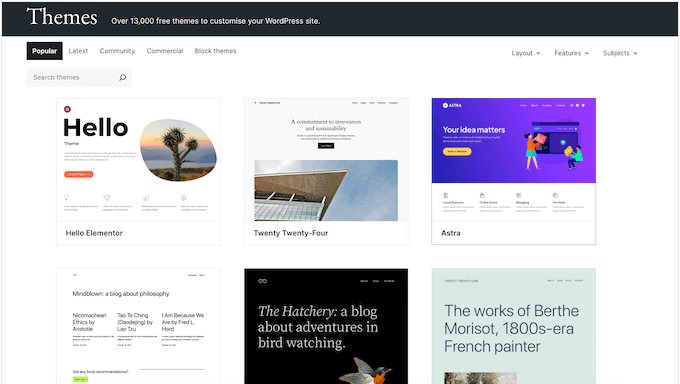
Once WordPress is installed, you can choose a design using a free template. These templates are called WordPress themes, and they control your website’s appearance.
There are thousands of professionally designed free themes available. For inspiration, see our expert pick of beautiful free WordPress blog themes.
After choosing a theme, you can follow the instructions in our guide on how to install a WordPress theme.
Next, you may want to add features like a contact form, photo gallery, or slider. There are more than 59,000 free WordPress plugins that can help you do that without costing a cent.
Not sure where to start? We’ve put together a list of essential free plugins that we recommend for almost every website:
Features
- WPForms Lite – Add contact forms to your site and even accept online payments with Stripe.
- SeedProd Lite – Easily build custom landing pages for your website without writing any code.
Website Optimization
- All in One SEO – Improve your WordPress SEO and get more traffic from search engines like Google.
- MonsterInsights (Free) – Track your visitors using Google Analytics to see where people are coming from and what they’re interested in.
- WP Super Cache – Improves your website’s speed by adding cache, which helps your site load much faster for visitors.
Website Security
- Duplicator or UpdraftPlus – These WordPress backup plugins ensure you always have a copy to restore if disaster strikes.
- Sucuri or MalCare – Scan your site for malware to keep your visitors safe.
There are many more free plugins that can add all kinds of features to your site. You can explore more in our roundup of the must-have WordPress plugins for all websites.
What’s the Cost of a Small Business Website with WordPress?
For a small business, building a professional WordPress website typically costs between $300 and $1000 per year. This budget allows for quality hosting, a premium theme, and essential plugins to help you generate leads and grow your business.
This estimate does not cover a full eCommerce store, which I will go into more detail about in the next section.
For a standard business site, you can start with an affordable hosting plan to keep initial costs down.
I recommend SiteGround’s GrowBig plan. They are known for their excellent support, which is a lifesaver for busy owners who don’t have a technical background.

Next, you should choose a premium theme for your design. This ensures you have access to support and updates. You can find excellent options in our list of the best WordPress themes for business websites.
To add the right functionality to your website, you will need a combination of free and premium plugins. Here are the premium tools I believe are essential for a small business website to succeed.
Features
- WPForms Pro – The premium version has all the features you need to generate leads, including payment fields, conversational forms, and powerful integrations.
- SeedProd Pro – A drag-and-drop page builder that lets you easily customize every part of your business website.
- WP Mail SMTP – This is essential for making sure your business emails are delivered reliably and don’t end up in the spam folder.
- Uncanny Automator – An automation plugin that connects your website with 200+ popular business tools.
Marketing
- Constant Contact – One of the best email marketing services for small businesses.
- OptinMonster – Helps you convert website visitors into leads and customers with popups, banners, and other campaigns.
- MonsterInsights Pro – This Google Analytics plugin helps you make data-driven decisions to grow your business.
- All in One SEO Pro – Improves your website’s SEO rankings so more customers can find you on search engines.
Security
- Duplicator Pro – Comes with automatic scheduled backups, remote cloud storage, and easy site migration tools.
- Sucuri Firewall or MalCare – A website firewall and malware protection are non-negotiable for a business site.
For more details on getting set up, see our step-by-step guide on how to make a small business website.
What’s the Cost of a WordPress eCommerce Website?

Building an online store with WordPress requires a more significant investment than a standard website. Based on my experience, the cost of a WordPress eCommerce site typically ranges from $1,000 to $3,000 per year, but this can increase based on the paid addons and services you need.
This budget allows for more powerful hosting, an essential SSL certificate for security, and the premium plugins required to manage products, payments, and marketing effectively.
In addition to hosting and a domain, your eCommerce site will need an SSL certificate to securely accept payments. I recommend using one of our recommended WooCommerce hosting providers because many of their plans include a free domain and a free SSL certificate.
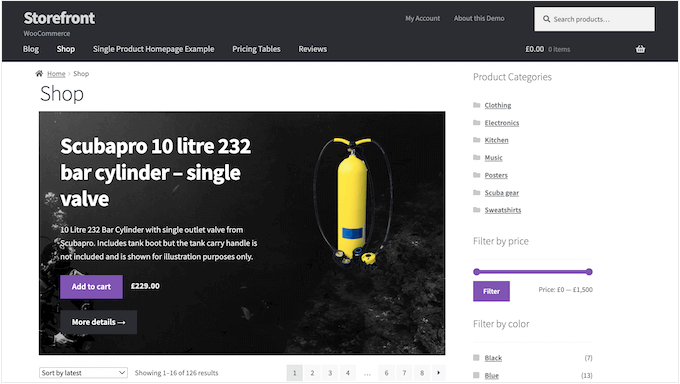
Next, you will need to choose an eCommerce plugin. While there are several options, I recommend WooCommerce. It is the most popular eCommerce platform in the world, powering millions of successful online stores.
⭐ For more information, please see our detailed WooCommerce review.
You can get started by following our step-by-step guide on how to start an online store. After that, you will need to pick a theme with full WooCommerce support from our list of the best WooCommerce themes.
While WooCommerce itself is free, you will need paid extensions and services for advanced functionality. Here are some of the paid services I recommend for any serious eCommerce website.
Features
- WPForms – To add customer inquiry forms, surveys, and feedback forms.
- SeedProd Pro – Lets you create custom product grids and customize the WooCommerce checkout page.
- WP Mail SMTP – This is critical for ensuring your order confirmations and customer emails are delivered reliably.
- Uncanny Automator – Connects your online store with 200+ popular tools to automate key business tasks.
- FunnelKit – Boost your revenue with high-converting sales funnels, one-click upsells, order bumps, and more.
Marketing
- OptinMonster – Convert abandoning visitors into customers with targeted popups and offers.
- Constant Contact – A powerful email marketing service to engage your customers.
- MonsterInsights – Provides real-time eCommerce tracking in Google Analytics so that you can see what your customers are buying.
- All in One SEO Pro – Improve your WooCommerce SEO to drive more qualified buyers to your online store.
- HubSpot – An all-in-one CRM, live chat, and marketing automation platform.
Security
- Duplicator or BlogVault – Regular backups of your store, customer data, and order details are non-negotiable.
- Sucuri – A website firewall is crucial for protecting customer payment information and preventing attacks.
Remember, the best approach is to start with the essentials and then add more tools as your online store grows and generates revenue.
What’s the Cost of a Custom WordPress Site?

A custom WordPress site means hiring a developer to build a unique design and specialized features just for you. The cost varies widely, but you can generally expect a custom theme to cost between $2,000 and $5,000, while a complete custom website often ranges from $6,000 to $15,000 or even higher.
For a site of this scale, it’s also wise to use a managed WordPress hosting provider. This setup offers a high-performance environment with premium support and developer-friendly tools.
⭐ Since several of you asked for more details on this section, we have created a comprehensive guide on how much a custom WordPress theme costs, plus tips on how you can save money.
One of the most effective ways to reduce custom site costs is by using the SeedProd plugin to create your own designs.
SeedProd is a powerful drag-and-drop website builder that lets you create custom themes and page layouts without editing any code.
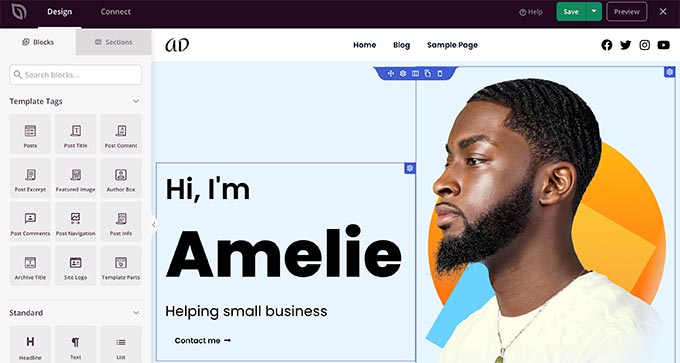
In fact, you can use SeedProd to reduce your custom WordPress site costs by as much as 90%. For more details, see our tutorial on how to easily create a custom WordPress theme with SeedProd.
We’ve used SeedProd to design multiple websites for our partner brands, including the WP Charitable, WPForms, and Duplicator sites.
💡 You can learn more about this popular page builder plugin by checking out our complete SeedProd review.
How to Avoid Overpaying on Your WordPress Website?
My advice is always to start small and then scale your WordPress site as it grows. In many cases, you don’t need all the premium features you see on well-established websites in your industry.
Remember, those websites had a head start. It likely took them time to figure out how to manage costs and invest in the right tools for growth.
You can start with a budget-friendly website using free plugins and templates. Once you start getting visitors, you can consider adding premium features like a professional theme, email marketing, or a paid backup plugin.
The same principle applies to an eCommerce website. Just start with the bare minimum needed to make sales, then add more tools as you figure out what will best help you and your customers.
Another top tip is to look for the best WordPress deals and coupons to get discounts.
And remember, you don’t always need to hire a developer.
We have dozens of step-by-step tutorials to guide you through creating many different types of WordPress websites, such as:
- How to create a business directory
- How to create a review website
- How to build an auction website
- How to build a coupons website
- How to create a multilingual website
- How to create a job board
- How to create a Q&A website
- How to create a portfolio website
- How to create a knowledge base
- How to create an online marketplace
Video Tutorial
If you’d prefer a visual overview of how much it costs to build a WordPress site, you can check out our video tutorial:
Frequently Asked Questions About WordPress Website Costs
Can I build a WordPress website completely for free?
While the WordPress software itself is free, you still need to pay for a domain name and web hosting to make your site live on the internet. However, by using a free theme, free plugins, and an affordable host, you can get started for under $100 for the first year.
How much does monthly maintenance for a WordPress site cost?
You can perform basic maintenance like updates and backups yourself for free. If you hire a professional service, then WordPress maintenance plans typically cost between $50 and $200 per month, depending on your site’s size and complexity.
Is WordPress cheaper than other website builders?
WordPress can often be cheaper, especially for growing websites. While builders like Wix have simple monthly fees, they often charge more for advanced features like eCommerce. With WordPress, you have more control over your spending and can find competitive pricing for hosting, plugins, and themes.
I hope this article answers your questions about how much a website costs to build. You may also want to see our list of legit ways to make money online with WordPress, and our AI-powered business name generator tool to come up with company name ideas.
If you liked this article, then please subscribe to our YouTube Channel for WordPress video tutorials. You can also find us on Twitter and Facebook.




Kanon
I found this incredibly interesting and really enjoyed reading it. Thank you so much.
The presentation of the content is also beautiful—it’s clean, well-organized, and very easy to read, making the whole experience completely stress-free.
If you don’t mind me asking, would you be willing to share which service or platform you used to create this content?
WPBeginner Support
Glad our article was helpful, we cover what we use for our site on our blueprint page below!
https://www.wpbeginner.com/blueprint/
Admin
Olaf
I really like this article. I think I’ll save it and occasionally send it to customers who don’t believe that a website can cost anywhere from a few dollars a month to tens or even hundreds of dollars a month. Sometimes it’s very difficult to set a price just for the work on a website. When you consider the final result, the website, domain, plugins, and developer’s work—you can easily end up with a completely customized website costing between 1,500 and 2,000 euros. However, it’s great that you’ve covered everything from the cheapest options to the more expensive ones, so beginners don’t get discouraged thinking building a website is too costly. If someone builds a website themselves, uses the lite versions of plugins, and finds that sufficient, they can easily end up spending only 30 euros a year. And that’s an excellent price. But it does require personal effort, enthusiasm, and a willingness to learn new things.
Mrteesurez
What a comprehensive analytics !
You have explained everything in details and is well understood.
Except for hosting and domain, WordPress is totally free and the use of hosting like Bluehost shared hosting has cut the costs down below $100 with their offer, making it affordable for starters to start blogs.
uzoma ichetaonye
When setting up a WordPress website in terms of the cost. i love the fact that WordPress allows for free website themes. When i was setting up mine some years ago, i utilize the opportunity of installing a free theme of which later i upgraded to the premium version of my website theme.
So, i will say that it is 100% beginner-friendly for new users as you only need to pay for web hosting and a domain name ONLY.
Thanks WPBeginner for this article.
Dennis Muthomi
Hosting is a major factor for me because I want my website to load quickly. Slow loading speeds lead to poor user experience, which REALLY hurts conversions.
I think it’s worth investing in good hosting like SiteGround’s GoGeek hosting plan for more hosting power and performance that can handle more traffic as your website grows.
Hajjalah
Hosting and a domain name for a website are so vital and in most cases not free because one has to pay for them but I am somehow optimistic about about the use of free or paid plugins and themes. Because most starting websites have a low traffic, does the use of free plugins and themes affect website performance ?
WPBeginner Support
No, using the free options available from plugins does not affect your website performance differently than if you were using the paid versions.
Admin
Jiří Vaněk
The difference between the paid and unpaid versions lies in the features. The core of the plugin is exactly the same. However, the paid version offers certain additional features, usually those that are highly requested. So, in the end, the plugin is completely the same, but obtaining a paid license simply unlocks features that were previously unavailable.
Dayo Olobayo
This is a valuable guide for anyone starting a WordPress website. The section on custom development costs is insightful. For those considering hiring a freelancer or agency, are there any recommendations on how to find reputable providers and ensure they understand one’s specific needs?
WPBeginner Support
For a starting point we would recommend taking a look at our article below!
https://www.wpbeginner.com/showcase/best-places-to-hire-wordpress-developers/
Admin
Vincent Nyagaka
Thank you for breaking down the costs of building a WordPress website in such a comprehensive way! Understanding the expenses involved, from domain registration to hosting and themes, is crucial for anyone willing to create a website. Your detailed guide provides clarity on budgeting considerations, allowing beginners to plan effectively and make informed decisions. With your insights, navigating the financial aspects of website development becomes much more manageable.
However the costs differ like country generic domains in specific countries.
WPBeginner Support
That is true, different currencies and regional domains may have different pricing.
Admin
Moinuddin Waheed
Geography plays important role in the costing for making a website.
In our country India, making a wordpress website for small blogs and institutions, they want to pay a maximum of 500$.
in most of the cases it would be less than this.
This is because the competition is too high here and it becomes difficult to make a good bargain.
Some local servers are very cheap but we never buy from them as I think it is always better to have good hosting servers and domain providers.
Thanks for making the cost calculation of WordPress websites easier.
Abubakar Zubair
I wanted to make a similar comment and found it here already.
yes, as you said, a large role is played by demographics. I recently started enjoying being a developer when I started getting clients from the U.S.