


WordPress can automatically update your site in the background, including its core software, plugins, and themes.
While these automatic updates play an important role in keeping your website secure, they don’t always go smoothly in every setup, and we’ve run into this problem ourselves.
In some cases, an automatic update can introduce compatibility issues or override changes you’ve made, especially on more complex sites.
That’s why some site owners prefer to turn off automatic updates and handle them manually, so they can test changes before applying them.
In this guide, we’ll show you how to disable automatic updates in WordPress, along with when it makes sense to do so.
Why Disable Automatic WordPress Updates?
Automatic updates protect most sites from security vulnerabilities without requiring any action. WordPress updates its core files automatically, and when a popular plugin or theme has a critical security flaw, it may receive an automatic update too.
However, there are situations where automatic updates can cause problems, particularly on sites with custom configurations or multiple plugins.
For example:
- A plugin update may conflict with your theme or another plugin, causing errors or downtime.
- A theme update could overwrite custom code if changes were made directly to theme files.
- On business websites or online stores, even brief downtime can impact revenue, so updates need to be tested before going live.
We still don’t recommend disabling automatic updates for most sites — they’re one of the easiest ways to stay protected. But if any of the issues above apply to you, then you can disable automatic updates in WordPress.
Just make sure you have a routine for checking and installing updates manually, and a reliable backup solution in place before you start.
That said, we’ll show you two easy methods to safely disable automatic WordPress updates, one using code and the other with a plugin. Simply use the quick links below to jump straight to the method you prefer:
Method 1. Disabling Automatic WordPress Updates Using Code (Recommended)
If you want the simplest and safest way to disable automatic WordPress updates without touching your theme or core files, the free WPCode plugin is your best option. It has over 3 million active installations and a 4.9/5 rating on WordPress.org.
Typically, to disable automatic updates using code, you’d need to edit your theme’s functions.php file and the wp-config.php file, both of which can be risky if you’re not careful.
However, WPCode lets you add code snippets directly from your WordPress dashboard, so there’s no need to edit any files manually.
It also validates each snippet for PHP errors before going live. If there’s a problem, the snippet is automatically deactivated rather than taking your site down.
Plus, it comes with a built-in code library where you can find popular code snippets like disabling automatic WordPress updates, disabling REST API, allowing SVG file uploads, disabling comments, and more. This eliminates the need to install a bunch of single-use plugins.
Note: The free WPCode plugin has everything you need to add custom code in WordPress. If you want advanced features like a private cloud snippet library, conversion pixels, scheduled snippets, code revisions, and more, you can upgrade to WPCode Pro.
To get started, you need to install and activate the free WPCode plugin. If you need help, see our guide on how to install a WordPress plugin.
Once the plugin is activated, head to Code Snippets » Library from your WordPress admin dashboard.
Then, search for the ‘Disable Automatic Updates’ snippet and click on the ‘Use snippet’ button.
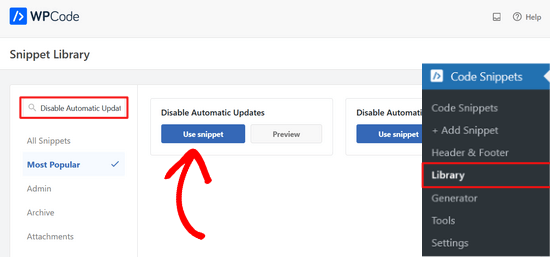
WPCode will then automatically add the code snippet and select the proper insertion method.
The code snippet has three filters to disable WordPress core updates, plugin updates, and theme updates.
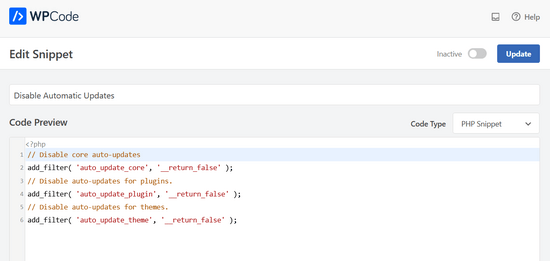
If you don’t want to use one of these filters, simply edit the code to add an //at the beginning of the filter line.
For example, adding an // to the core auto-updates filter line will prevent it from executing. So, you’ll still get automatic updates for the core, but not for plugins and themes.
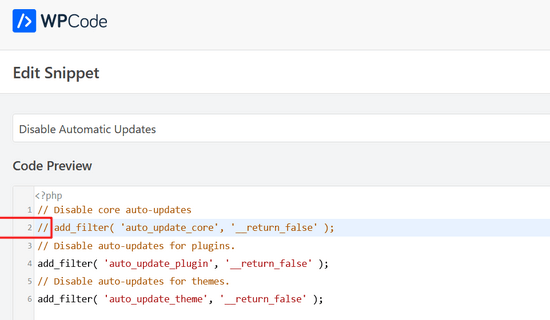
After that, all you need to do is toggle the switch from ‘Inactive’ to ‘Active.’
Then, click on the ‘Update’ button.

That’s it. You’ve now disabled automatic updates in WordPress.
Alternative: If you’re comfortable working with WordPress files, you can disable automatic updates by adding this line of code in your wp-config.php file:
define( 'WP_AUTO_UPDATE_CORE', false );
This will disable all automatic WordPress updates.
Important: Make sure you read our article on how to safely edit the wp-config.php file in WordPress for step-by-step instructions.
If you want to receive minor core updates, but disable theme and plugin updates, you can do so by adding the following filters in your theme’s functions.php file:
Disable automatic WordPress plugin updates:
add_filter( 'auto_update_plugin', '__return_false' );
Disable automatic WordPress theme updates:
add_filter( 'auto_update_theme', '__return_false' );
Method 2. Configuring and Disabling Automatic WordPress Updates With a Plugin
Another way to disable automatic WordPress updates is by installing and activating the Easy Updates Manager plugin. If you’re not sure how to do that, take a look at our step-by-step guide on how to install a WordPress plugin.
Once the plugin is activated, go to Dashboard » Updates Options to configure your settings.
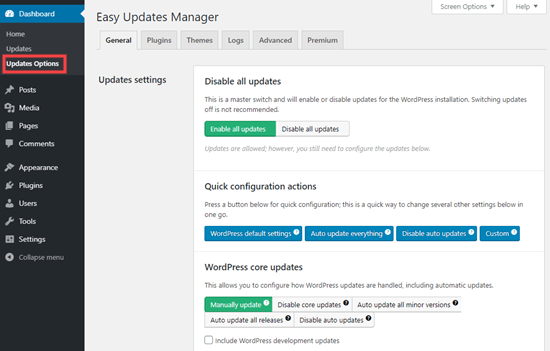
You can choose to ‘Disable all updates’, but we don’t recommend this option. Primarily because it’ll prevent all update notifications from appearing.
Instead, you should pick the settings you want. You could disable plugin and theme auto-updates, but leave the standard core WordPress auto-updates enabled.
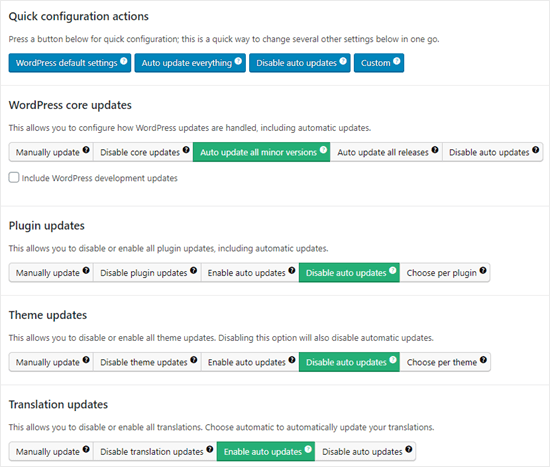
Note: If you choose ‘Disable plugin updates’ and ‘Disable theme updates’ instead of ‘Disable auto updates’, then you won’t even see the update notifications in your plugins and themes lists.
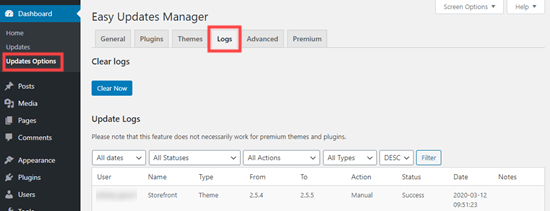
Easy Updates Manager keeps a log of what’s updated, so if anything does break on your site, you can rollback to a previous working version. To view this, go to Dashboard » Updates Options and then click the ‘Logs’ tab.
There’s also a premium version of Easy Updates Manager, which offers a lot of extra options.
For instance, it integrates with UpdraftPlus, one of the most popular WordPress backup plugins, so that you can automatically run a backup of your site before updates are applied.
Pros and Cons of Automatic WordPress Updates
Now you know how to disable automatic updates, but should you disable them? There’s no right answer, and this depends on you and your website.
On our sites, we’ve disabled automatic plugin and theme updates, while keeping the minor core updates enabled.
Let’s take a look at the advantages and disadvantages of automatic updates. That way, you can decide whether to disable auto-updates on your site.
Advantages of Automatic Updates in WordPress
Automatic updates are great for WordPress security. Many users forget to update their plugins or their core WordPress installation.
With automatic WordPress updates enabled, you don’t have to worry about updating your site whenever a minor update to WordPress is released. These are pushed out for maintenance and security purposes.
In the past, automatic updates were something you only got by paying for managed WordPress hosting. Now, they’re available for everyone (at least for minor releases).
You also know that if there’s a crucial security issue with WordPress or a popular plugin, then WordPress will automatically update. Even if you’re busy or away from home, your site will stay secure.
If you have a lot of sites, then automatic updates can save you quite a bit of time. And even if you only have one site, you might prefer the peace of mind of knowing that WordPress is taking care of things.
Disadvantages of Automatic Updates in WordPress
The core WordPress team responsible for releasing updates makes sure that it goes through without a hiccup.
However, there is a slight chance that automatic updates can break your site. In our experience, the minor releases haven’t broken any of our sites yet.
That’s because we are following the best practices and not modifying any core files. If you modify WordPress core files, then these automatic updates can override them.
If WordPress ever felt it necessary to push out a security update for a theme you are using, there is a chance that it will break your website. This particularly applies if you have modified your theme files.
Automatic plugin updates can potentially break your site as well. There are just too many variables, such as different server environments and plugin combinations.
Now, it’s important to know that these updates will not break the vast majority of websites. Even so, you may feel you don’t want to take the risk.
Another drawback is that you won’t always automatically get a notification when your site is updated.
Should I Disable Automatic WordPress Updates?
Basically, it’s up to you to make this decision.
For most beginners and the vast majority of WordPress websites, automatic updates are harmless, and you should not disable them.
However, if you run an online store or don’t want to lose business due to a broken site, then you can safely turn off automatic updates.
Still, make sure that you manually install those updates in a timely manner to ensure your website’s security.
Video Tutorial
If you learn better by watching, then check out our video tutorial on how to disable automatic updates in WordPress:
Bonus Resources Related to WordPress Updates
We hope this article helped you learn how to disable automatic updates in WordPress. Now, you may want to check out our other guides about WordPress updates:
- How to Check and Update to the Latest WordPress Version
- How to Fix WordPress Website Not Updating Right Away
- How to Properly Update WordPress Plugins (Step by Step)
- How to Disable Plugin Updates in WordPress and Why You Shouldn’t
- How to Enable Automatic Updates in WordPress for Major Versions
Whether you’re using automatic or manual updates, it’s crucial to make sure you have regular backups of your site. You may also want to take a look at our guide on how to make a backup of your WordPress site, or see our comparison of the best WordPress security plugins.
If you liked this article, then please subscribe to our YouTube Channel for WordPress video tutorials. You can also find us on Twitter and Facebook.




Jake
You don’t need a plugin or code to prevent core updates of major versions. On the Updates page, there’s a link “Switch to automatic updates for maintenance and security releases only.” (Maybe that wasn’t available when the article was originally written.)
WPBeginner Support
That was not available when we created this article but thank you for sharing this method as well
Admin
Jiří Vaněk
Thank you for the article. It saved me from constantly updating WordPress at the moment a new version was released. After reverting to the old version from a backup, WordPress immediately tried to update automatically. This was a significant help.
WPBeginner Support
Glad our guide was helpful
Admin
Jakub
Thank you very much for your help
WPBeginner Support
You’re welcome!
Admin
praddep
I have found function.php file using my file manager in Cpanel but when I open function.php to edit there are a lot of coding and I am not understanding where to paste this code { add_filter( ‘auto_update_plugin’, ‘__return_false’ ); }
WPBeginner Support
You would normally want to add it to the bottom for ease of removal in the future as well as avoiding adding it somewhere where it would have an issue
Admin
Jes
Every time WP autoupdates it screws up my sites. It’s been an absolute nightmare and now I’m dealing with how to fix a site yet again that it messed up the theme and I do not customize. It’s the Divi theme. Craziness, I miss the old ways of web design, this is a constant nightmare.
Yan Cruz
I been having trouble with the hestia theme although I’m using a child theme. It keeps changing the footer to the default although I coded to make sure it changed to what I want.
Which of these forms would benefit me the most to accomplish what I seek?
My knowledge of php is alright, so I can try coding if it is the better choice.
WPBeginner Support
Hi Yan,
We would suggest that you contact theme author to figure out the most effective way to modify the footer. If you are using easy updates manager plugin, then you can disable all theme updates.
Admin
vijayaragavan
Great Articles are Here , I learned more and more, Great, Thank you
ABN WEBTECH
This exact that I am looking for.
Thanks wpbeginner Team
Editorial Staff
You’re very welcome. Glad you found it helpful.
Admin
Marco Diversi
This is going to be a very important article! I have disabled all the updates, I hate Gutenberg!
Serene
Thank you for this easy tutorial.
David
Hello.
I have just installed this plugin. Can someone please confirm to me that even though I have disabled all updates (plugins, themes, WP updates, etc), I will still receive notification that an update is available by simply logging into my WP Admin?
If this is the case, when I do a manual update, will I have to disable this plugin to complete the action?
Thanks all,
David.
Steven
David, I appears that this question was asked about eight months ago, so I will go ahead and answer for all future viewers asking themselves the same question. I assume you have already found the answer…
When you disable automatic updates with a plugin or using the PHP constant variables, the WP-Admin will still show that there are updates available. At this point, you will have to manually update the core, themes, or plugins within the Wp-Admin interface or a remote manager.
I hope this was helpful.
Chaudhary Sushil
Thank you for the guideline how to stop auto update of WordPress version.
My story is – the first time I face version auto update problem on 4.8.3 that is working good for front page but I stuck to open my dashboard. It shows fatal error. My mind is going black what I do for this how to recover. But the jetpack plugin saves the site by going on wordpress.com and disabling installed plugins one by one and at last, I found the plugging that was not updated from last 2 years and that was causing a problem.
I spend 6 months on the site and there is too much information that way I scared to follow manual process to go in code via hosting or ftp and change or rename folders one by one and check the reflection.
Because on this process one big problem is to fully break site on that case the backup is the way to go back on the previous stage but I also still not try how to recover from a backup and this is one of the most dangerous for right now.
I am sharing this story with you all because what I fell in that situation was too bad and I don’t what any to put them self in this situation, So it’s best to practice for all these types of a problem at starting face though demos. It’s best to stop our self-entering in the red zone.
Stefano
As in the official wordpress site:
Only:
define( ‘AUTOMATIC_UPDATER_DISABLED’, true );
will disable all automatic updates.
define( ‘WP_AUTO_UPDATE_CORE’, false );
will disable only wp core auto updates as the definition says.
Renato Frota
The recommendation to use “add_filter” on wp-config.php is noobish and tend to cause problems – along to break wp-cli (wp-cli.org) to work with your WordPress install.
Use instead:
define( ‘AUTOMATIC_UPDATER_DISABLED’, true );
And ALWAYS put it BEFORE the line that says “That’s it, stop editing!”
WPBeginner Support
Hi Renato,
You probably didn’t notice that the add_filter method clearly says that the code needs to go into functions.php file or a site-specific plugin.
Admin
George Applebee
My horror story was about falling for the concept that backing up my website would protect me from a WP major upgrade.
After manually upgrading my site with a major upgrade, the site broke, so i went to my favorite save my *ss backup software Updraft plus, only to find that the WP upgrade changed the database structure and file names. The backup was worthless because the database couldn’t be overwritten.
Arghh! I had to find an older version of WP and start from scratch with a new DB and WP install. I could then use my backup software to get my client’s website back by installing the plugin. Be aware, WP upgrades can totally change the database structure!
pabster
After months of having auto updates totally disabled with the ‘WP_AUTO_UPDATE_CORE’ false tweak, my WP has managed to auto update on its own!! I was in 3.9 and now all of a sudden I’m in 4.2.2. How’s that possible? Do those folks still have some secret, hidden ace under the sleeve for forcing auto update on people like me?
WPBeginner Support
Sometimes web hosts auto update out-dated software on their servers. Contact your hosting provider.
Admin
pabster
I’ve contacted them. They didn’t update it.
Eoin
My website also auto updated even though I have the snippet in the code to prevent it.???
The hosting company didn’t do it either.
Any ideas?
Una
I hate automatic Wordpress updates. The last one broke my theme.
So thank you so much for the way to diable this.
J Man
I wonder who had this rather crazy idea in the first place…
pabster
It’s a totally commercial thing. Nothing really much to do with “security” and that kind of mantra. We’re in a capitalistic world, and everything is ruled by money. Even “free” software is.
nathi
Updating automatically is a no go for me, alot of customization is in place and needs to be measured against new wordpress versions before proceeding to update-definitely will use this Code. Thanx
Gadi
Is the automatic update can make any crash with the template version ?
grisales
Of course it can happen!
When you download a theme you should check which WP Version is it compatible with.
Always keep on mind that you shouldn’t update the core although there is an update release available unless your plug-ins, and customizations have been tested to be compatible with the version you want to update to by you or the authors of such extensions.
Jan Fikar
For me, I hate when something si updated (rewrited) with no control or whatsoever. The might be not compatble plugin having all webpage killed.
Patrick Mercer
Just experienced an automatic update and even though it worked fine, I found this tip and turned off the auto updates as fast as I could. I hate it when something suddenly starts working different and I have to spend time trying to figure out why. I live my life at my pace, not yours.
ElDerecho
Automatic updates are a phenomenally bad idea for web applications. If they screw up the update (like MS has done with Windows updates a number of times), they will be potentially hosing millions of public sites that businesses rely on. Or worse, if the system is exploited, they’d be giving access to millions of servers to hackers, spammers, and who knows who else.
No to mention, its just plain dangerous to allow executable files (PHP in this case) to be writable by the web server.
Anyways, thanks for the post.
Agarwalls
Thanks very helpful for me.
gabriel
Thank you, this was really a pain
RobS
I agree this is a bad policy and they should create an on/off option in the General Settings. I want to update in a timely manner, but I have run into many situations where a plug-in doesn’t work with the latest WP upgrade. I usually have to wait until the plug-in dev fixes their plug-ins.
If WP could guarantee all plugins are upgraded to work with new updates before they deploy, then sure, it makes sense. But that will never happen in an open source world.
Rachel Ramey
For what it’s worth, my sites all DID auto-update through a major release. (3.7x to 3.8x and 3.8x to 3.9x)
Nicole Kavanagh
I totally agree with the Wordpress Automatic Updates.
As a business owner and selling wordpress extensions, our business model arrived just in time.
Long gone are the days when developers can sell extensions with a lifetime of Updates and Support, who in any business offers a service which is not payed for? It is just not viable or sustainable for any business.
The up keep for maintaining WordPress and e-commerce extensions to be compatible with newer versions is very demanding on any team.
This will really add a new dimension for the developers selling extensions that are not maintained. Usually the cheaper extensions, eventually you may find that these developers will not continue to sell their product.
We started out selling all of our products at a cost of $** offering 1 year of Updates and Support included in this price, any subsequent years thereafter require a new Licence key at a discounted price to continue to receive: Activation, Updates and Support.
The Wordpress automatic updates make sense to us, this is our business and maintaining all of our extensions is what we do.
It does take a lot of time and testing, and then of course the product information, product descriptions, product screen casts, product documentation all needs to be updated as well.
There may be some clients that never updated their Wordpress, e-commerce extensions, and eventually something will break.
But then there are also the clients that update their extensions the minute there is a notification there is an Update.
If all developers are in the same boat with maintaining their code to suit any new versions, it is a level playing field l agree with.
Nicole from Extension Works.
Mac Gyver
Nicole, you are so wrong that I don’t know where to begin.
First, I did not authorize Yoast to change my update settings, and I’m mad as H__L.
Second, the rule is NEVER EVER UPDATE BEFORE DOING A WEBSITE BACKUP. When websites do auto update that safety feature is precluded.
Third, the clumsy auto loading of the WP updates has somehow knocked one of my non-wordpress sites off the internet – Google says:
“If you are the owner of this web site you have not uploaded (or incorrectly uploaded) your web site. For information on uploading your web site using FTP client software or web design software, click here for FTP Upload Information.”
That is my oldest website, not wordpress, and the “update hack” that Yoast installed without my permission caused this and more. I have not changed any configuration on the affected website; the auto WP updates to a subdomain of that primary domain caused this.
Now I have to waste time I had already scheduled to get GoDaddy techs to get my servers straight.
Believe me, when I finish that task I’ll get Yoast’s attention on social media.
Edit: There were not one but TWO of my 6 websites knocked offline by the ill-conceived “hack” by Yoast. If you listen closely you can hear me sizzle.
Orangorangan
Thanks for the snippet! i just tought my web has been updated by someone else, freak me out! haha
Mohsin Alam
I want to disable only themes update, not full core update. How to do that? Thanks
WPBeginner Support
Mohsin, a better strategy is to create a child theme and make all your changes in the child theme. But if you must stop your theme update, then you can do that by editing the theme header in the style.css file.
Admin
anon
Ha! i thought the client had updated the site so i disabled ftp just to find out it’s Wordpress default. LOL!
Never have I heard such a stupid idea in all my time as a developer! How did that get passed – is there an online thread discussing this stupid idea?
CoolStory
You should probably stop using blogging software to build a client’s website then
Dan
If you think WordPress can only be used for blogs you haven’t been paying attention.
Christina
Well, I had a site update to 3.8.2 automatically yesterday and when I went to work this morning, the site’s homepage was broken.
I use genesis framework and a child theme, so I have not edited the core. The site was almost ready to go live, and now I can only hope genesis can help me fix it.
I have a backup, but reallllllly don’t need the hassle of that, especially as it was taken a few days ago.
I will definitely be turning off automatic updates and think they are a terrible idea. Too many variables between plugins and theme conflicts to trust something without taking an immediate backup prior to updating. :O(
Javier
Ok, but what if a hacker takes control over the wordpress server for updates and then push a malicious update?? Half of the websites of the world down, the biggest DoS ever or every server infected with malware. IM FREAKING OUT!!
WPBeginner Support
No automatic updates are quite safe.
Admin
Joanna Benson
The automatic updates are a bad idea. What about plug-in compatibility issues?! I like to be sure that the principal plug-ins that I use on my website are compatible with the latest version of Wordpress BEFORE Wordpress is updated. Finding out AFTER when a plug-in breaks my site because it isn’t yet compatible with the latest version of Wordpress is a headache that I don’t need. The fact that Wordpress wouldn’t have thought about this before implementing the automatic updates is quite surprising!
Christian
I agree! Qtranslate, for example, is a pain as it is coded with the latest wp version number written into the code …
Mark
I am very wary of installing plugins unless I absolutely need them.
Plus I always check with the theme developer about conflicting plugins… I’ve had some bad experiences.
I recommend only using premium plugins because of support and updates
Nicole
I would disable automatic updates because sometimes Wordpress updates because a lot of the time it breaks functionality or messes up the layout on the site. This happens when I’m using a theme that doesn’t work with the new version of Wordpress, or if my site is integrated with the Yii Framework (PHP MVC architecture). It’s better if i’m able to test out the update on a test site instead of the live site automatically updating.
Thanks for the information on how to disable!
Todd Nagel
Thank you for this, I manage quite a few wordpress sites, not everyone has the budget to be where they would like to be at all times, not all the sites have the ‘best’ of code, some are way old so are using older plugins, lots of things can go wrong in an update..
Wordpress adding this in without ‘warning’ really is kind of wrong in my opinion.
and my manual update to 3.8 the other day broke a website because the contact form 7 extra plugin for ‘uplicate confirm email’ is outdated..
as long as you stay within a few updates, your going to be pretty secure, and we always do it on a ‘dev’ folder first..
T
Mel Brady
The last update ruined my good working product. It took a couple days to repair. Is this going to happen on all wordpress updates. I’ve got more to do then fixing my site.
Sharon J
i don’t like automatic updates because I would rather wait in case there are bugs. Also, if there is a problem I have 80-100 customers. What if there is a problem on ALL those sites? I am going to disable automatic updates on my site and on future sites for sure.
Jocelyn Wing
I’m with you Sharon. It’s a disaster waiting to happen. That’s why I am here because I have a client who noticed and complained about why his website look keeps changing.
Thanks to WordPress community for making the software more secure.
Thanks for the advice here.
Arend
I think I have enough off those peoples who think any non technical computer-user is a moron
I think that the sheer arrogance of the Wordpress developers is something I don’t want
to deal with any longer, so after 6 years of happy using it’s goodbye to Wordpress….
and on the look-out for a new Cms sytem without developers trying to make my decisions
Eni
Agree.
Something pretty strange is going on over the Internet. From G, FB,WP…hosting companies…, “security” softwares….., open source browsers and other software we need to use the Internet….seems like everyone is hurrying over each other to make our life “easier” and “safer” by full beg of automatic updates and other “services” running “on our behalf”, with little or no control on our side what’s going on and what’s being done.
Automation like that very likely may destroy peoples long-years efforts results in a second,
without anyone being responsible for such effect.
Coz’ things are complicated and not synchronized to the point that in most cases you would need to spend months if not years to locate where problem(s) arouse from .I doubt anyone of us could deal with such situation. Anyone using WP knows that you need at list 10-20 plugins to make it work per your essential needs. And just coping with plugins and WP updates none of them synchronized with each other, costs you too much time, nerves and energy. Seems like we should be occupied only by doing that.
Makes no sense.
Not good.
JOhnne
Of course it makes sense, it is totally necessary automatic browser updates or we would be stucked in the old ie 6/7 until now with all kind of old css support. You can be angry, but all developpers are thankfull for browser updates, it’s the way microsoft should have done long time ago and we wouldn’t have this crap ie 6 / 7 / 8 versions running until now. We have a major delay in web creativity and innovation today becouse of this, and we are slowing getting of this cenario!
Umm No
Brought a site down today with the 3.8.1, didn’t even know this would happen. turned it off on all other sites. Won’t allow that to happen again. Update on a friday so I can spend my weekend cleaning up the mess they make. and then delete all threads started on wp support about broken sites. Seems like they don’t want people to know they break sites and leave it for you to clean up the mass
Barbara
My two cents: Automatic updates seem to always happen to me at the most inconvenient time. That’s reason enough to turn them off. Thanks for the article!
Glen
I have been a WordPress user since 2007, and since added 3 more websites using WP. I have always updated my own sites when new versions of WP became available. When learning about updates back in 2007 I recall that specific and important instructions were given that all plugins must be disabled before updating to a new version of WP. Therefore, I’ve always done that. Now, with the automatic update for minor versions, my sites are being automatically updated. Does that mean they disable the plugins? If not, what has changed that plugins no longer need to be disabled? I’m a little nervous about this.
WPBeginner Support
Glen, there is no need to worry about that. During the update, WordPress puts your site in maintenance mood which is just like disabling plugins. It then updates your site and then turns off maintenance mood.
Admin
Glen
Thanks a whole bunch, support. I probably should have known that. You’ve certainly put me at ease over this. My previous concerns have gone out the window. Again, thank you.
where to add the code?
you say what file to add it to. where to we add it in that file? my config file has lots of stuff in it that I dont want to mess up. where do I paste the code in that file? need more info please.
Brian
I have two websites that were totally broken last time the updates took place. I have changed core files on http://pizzaspotz.com and http://gotinterviews.com. I am very inexperienced at making child themes. I just don’t seem to be able to do it. Just call me ignorant. But I wonder if I create child themes one day, I could then go ahead and enable automatic updates on these two sites and the auto updates will no longer break the sites.
WPBeginner Support
Brian yes this is why child themes are recommended.
Admin
Brian Humek
Just had to visit your site again today to double check how to disable these updates. I saw WP had updated some of my sites and I guess I’m forgetting a lot these days. I double checked and found my two sites which were messed up in the last update were indeed disabled.
Again, kudos to your easy tutorial.
Nathan
Will adding this line of code into my configuration file help multi-site installations? I need clarification / verification before running that.
WPBeginner Support
Yes
Admin
Paul G.
Hey guys,
I thought I’d let you know of an addition we’ve made to our plugin which lets you completely customize most of the WordPress Automatic Updates for your sites.
You’ll find it under the “Auto Updates” section of the WordPress Simple Firewall ( http://wordpress.org/plugins/wp-simple-firewall/ )
Hope you like!
Paul.
Barbarella a.k.a. The Mad Cat Lady
Not happy with being “forced” to have automatic updates without the option of turning them off. Even though I know how to put this code into wp-config.php, other people might not have a clue, and I think we should at least be given an on/off switch in the dashboard where we could have the choice to disable automatic updates if we wanted to.
Thanks for this snippet of code though. I will apply it to all my sites now (and I have a LOT of WP sites!).
Rachel Ramey
I absolutely agree. The Wordpress user documents themselves specify to ALWAYS BACK UP before updating, and now we don’t have that option because our sites update themselves without asking our permission. And you have to hack the code to turn it off. That’s ridiculous and utterly FOOLISH!
If they’re going to make this a default, then I’m with you – there needs to be an “off” switch or checkbox in the settings.
Patty Ayers
Syed, I’m wondering why the code you provide here seems to be strongly discouraged by Andrew Nacin in this post: http://make.wordpress.org/core/2013/10/25/the-definitive-guide-to-disabling-auto-updates-in-wordpress-3-7/
“The constant AUTOMATIC_UPDATER_DISABLED can be used to disable the automatic updater entirely. It’s like DISALLOW_FILE_MODS — no changes allowed at all — but it’s specific to the auto updater.
Don’t use this to block only core updates! You’ll also be blocking a lot of other functionality. You won’t get translation updates (language packs) for core, themes, and plugins. You won’t receive update notifications sent via email to alert you of new WordPress releases. It also disables all opportunity for fine-grained control.”
Or am I (likely) misunderstanding something?
WPBeginner Support
Thanks Patty for pointing this out. We have updated the article.
Admin
Erni
Are you sure that the code with “true” is right, or is this a mistake and you’ve to add “false” to the code to disable the updates?
For my self I want to update wordpress alone, without any background updates. It would be cool if you’ve an option to decide yourself to deactivate automatic updates.
WPBeginner Support
This is what we are trying to do in this article.
Admin
Erni
Thank you. Sorry my fault I read something different.
Jenny
Thank for this tip, I always prefer to test the compatibility of a new version with plugins installed before using it in production