


Widgets are such an integral part of WordPress themes that it is hard to imagine a WordPress theme without widgets. Widgets are executable scripts that you can simply drag and drop in your sidebars or any other widget ready area in your theme. Many of our readers utilize widgets to add custom elements to their sidebar. However this article is for those curious users who want to learn how to add dynamic widget ready sidebars or widget ready areas in WordPress themes.
Registering Sidebars or Widget Ready Areas in WordPress
First thing you need to do is to register your sidebar or widget ready area for your theme. You can register multiple sidebars and widget ready areas. Copy and paste this code in your theme’s functions.php file
function wpb_widgets_init() {

	register_sidebar( array(
		'name' => __( 'Main Sidebar', 'wpb' ),
		'id' => 'sidebar-1',
		'description' => __( 'The main sidebar appears on the right on each page except the front page template', 'wpb' ),
		'before_widget' => '<aside id="%1$s" class="widget %2$s">',
		'after_widget' => '</aside>',
		'before_title' => '<h3 class="widget-title">',
		'after_title' => '</h3>',
	) );

	register_sidebar( array(
		'name' =>__( 'Front page sidebar', 'wpb'),
		'id' => 'sidebar-2',
		'description' => __( 'Appears on the static front page template', 'wpb' ),
		'before_widget' => '<aside id="%1$s" class="widget %2$s">',
		'after_widget' => '</aside>',
		'before_title' => '<h3 class="widget-title">',
		'after_title' => '</h3>',
	) );
	}

add_action( 'widgets_init', 'wpb_widgets_init' );
In this code, we have registered two sidebars. We have given them names and descriptions to identify them on Widgets screen. The description parameter can be used to tell users where this sidebar appears in the theme. The wpb is the name of the theme we are working on, it is used here to make these strings translatable. You should replace it with your theme name.
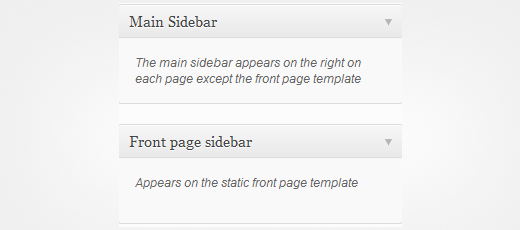
Adding Dynamic Widget Ready Sidebars in WordPress Theme Files
So far we have only registered Dynamic Sidebars. Users can drag and drop widgets into these sidebars from Appearance » Widgets screen. However, these sidebars will not appear on your site until they are called in a template like sidebar.php or anywhere else you want to display them. To add these widget areas, edit the template file where you want to display them and paste this code:
<?php if ( is_active_sidebar( 'sidebar-1' ) ) : ?>
	<div id="secondary" class="widget-area" role="complementary">
	<?php dynamic_sidebar( 'sidebar-1' ); ?>
	</div>
<?php endif; ?>
In this example code, we have used sidebar id to call the sidebar we want to display here. Change the sidebar id to display another sidebar. For example, you can register three sidebars for footer area and then call them one by one in your theme’s footer.php template.
Widgets can be very powerful. You can add widgets to your posts and page content, make your text widgets colorful, or extend the power of default WordPress widgets. Rightly placed widget ready sidebars allow users to add custom elements to their websites using simple drag and drop interface.
We hope that this article helped you learn how to add dynamic widget ready sidebars in WordPress. We would recommend that you study the code in theme frameworks such as Genesis to learn how professionals are using them in their products. For questions and feedback please leave a comment below.




nabil
hi i need two column in side bar ! how can i do that whit css
Jason
Where can i extend the functionality of my wordpress widgets
Milada
Hallo team again,
sorry to trouble you, but I would like to specify, that I would need one widget above the themes current Primary Sidebar widget on the right and the other widget on the left side from the article in the middle.
How should I proceed?
Thank you,
Milada
Milada
Hallo team again,
how do I add a field in the widget and which and where do I paste a field code to have there affiliate links?
Thank you,
Milada
Tanmay Bala
i want to learn how to use DB Plugin in wordpress and redux framework.
Marc
This tutorial was a great help.
Been trying to accomplish this for about a week now.
Nice and to-the-point.
Thank you!
Laura
I just wondered, before I actually paste the code, does this work on a theme that originally doesn’t come with a sidebar? I’m using Book Lite which only has footers.
WPBeginner Support
Yes, it does.
Admin
Laura
Thanks so far – I tried to register the sidebar but whenever I hit “save” I get the white screen of death – which I never had before. Any suggestions what could be wrong?
Lohith
Thanks Alot
Its really wonderful and simple method to explain….
Bakopu
Thank you very very much sir. Where are you sir , we want to take your blessings by touching your feet.
akhilesh
thanks sir these post have vry helpful for me
Marcos Nakamine
Worked perfectly
Thanks
gWorldz
I am having trouble getting the widget to display o.O
The widget is registering and displaying in the back-end properly with no issues, however, it will only show my widget content if I include content in the previous widget.
I’m using a 2011 child theme and registering an additional footer area.
functions.php snippet:
https://gist.github.com/gWorldz/76273b5901e1b5c4759b#file-functions-php
sidebar-footer.php
https://gist.github.com/gWorldz/b6177ccc9734718dd636#file-sidebar-footer-php
style.css
https://gist.github.com/gWorldz/0f24a9350da164ee2f29#file-style-css
Do you have any idea what I’m doing wrong or what is causing this issue?
Tiger
Did you ever get any help on this? I am having the same issue.
MJ
Just wanted to say thanks for this. I Googled to find out how to register a sidebar in WordPress, and hit a few other sites before this one, and yours had the best, clearest, most understandable directions. Well done.
arvind
your post is helpful to me,
thanks !!!!!!
Dharmendra Prajapati
Finally i got my dynamic widget ready sidebar after 23 days… I was googled all the sites.. and finally i redirected @ your site.
Thanks
Kevin
In the second snippet, where you are inserting the widget code into the template, where you have
div id=”secondary”
Should that id change with each widget area.
Ex:
First, Secondary, Third, fourth, etc
WPBeginner Support
Kevin yes you should, and it should be named after the widget area or the sidebar it is representing.
Admin
SS
Works for registering the sidebars but when I go to the Appearance » Widgets screen I see all my widgets but nothing to drag them into.
WPBeginner Support
SS, when you have successfully registered a dynamic widget ready sidebar it will appear on Widgets screen. This means that registering sidebars probably didn’t work.
Admin
Steve Smart
Hi –
This is a very helpful post. Thankyou!
I’ve been successful using one dynamic widget area, now I’m trying to implement more than one. Everything seems to work as expected, except an odd problem in the dashboard. If I drag a text widget to my second dynamic widget area I can add content as you would expect, and save it, and it produces output on my pages as expected, however if I now revisit the dashboard widgets page, the second widget area does not appear to contain any widgets.
I am using a twentytwelve-child theme, and Wordpress 3.7.1.
Any thoughts?
Jackson
Hearty thanks….You have done such a wonderful work…thanks thanks thanks…
JP
thanks, found this useful. right to the point.
Praveen Prasad
Can you tell me where is the Call Function Started ?
Ed Du
You can also use Headway with a additional block and it will take care of all of this. Or pagelines for that matter.