


Do you want to display different sidebars for certain posts and pages on your WordPress site?
A lot of the time, you will want to show the same sidebar across your entire website or blog. However, sometimes you may need to show different sidebar content on some of your posts and pages.
In this article, we will show you how to create and display different sidebars for each post and page in WordPress.
When Would You Need Different Sidebars in WordPress?
Many WordPress themes have a default sidebar location where you can add useful widgets and content. For example, many sites add a search bar to the sidebar or show a list of recent posts.
If your WordPress theme has a sidebar, then by default, it will look the same on all your posts, pages, categories, and archive pages.
However, you may want to display different sidebar widgets on certain WordPress posts and pages.
For example, you might show different content in the sidebar of your most popular posts or display ads that are more relevant to a particular page.
You could even use different contact forms depending on the page’s content.
Having said that, let’s see how to create and display a different sidebar for each post and page in WordPress. Simply use the quick links below to jump straight to the method you want to use:
Method 1: Displaying Different Sidebars for Each Post and Page in WordPress (Easy)
If your theme supports sidebar widgets, then you can easily create multiple sidebars using Lightweight Sidebar Manager. This custom sidebar plugin lets you build as many sidebars as you want and then assign them to different posts and pages.
You can also add them to custom post types or assign a sidebar to all the different pages or posts that have a specific category.
The first thing you need to do is install and activate the Lightweight Sidebar Manager plugin. For more details, see our step-by-step guide on how to install a WordPress plugin.
Upon activation, you need to go to Appearance » Sidebars. To create the first sidebar, click on the ‘Add New’ button.
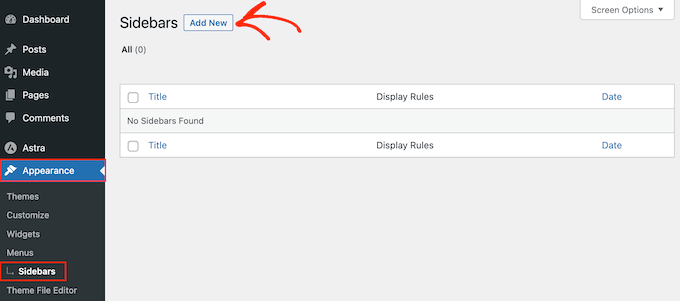
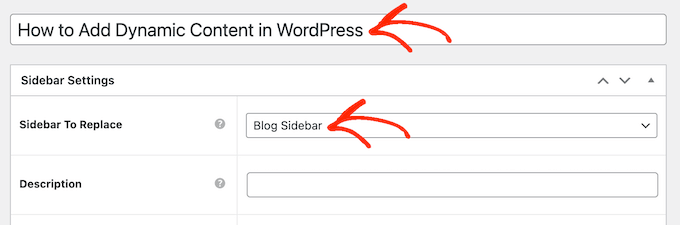
You can now type in a title for the new WordPress sidebar. This is just for your reference, so you can use anything you want.
With that done, open the ‘Sidebar To Replace’ dropdown menu and choose the location where you want to show the sidebar. The options you see may vary depending on your WordPress theme.
Now, you can control where the sidebar appears by creating inclusion or exclusion rules.
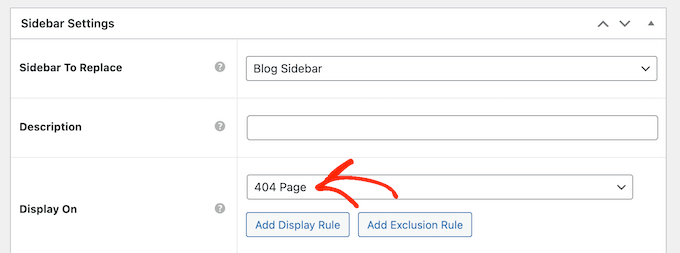
To create an inclusion rule, just open the ‘Display On’ dropdown and choose the pages, posts, custom post types, or categories where you want to use the sidebar.
For example, you might add the sidebar to a specific page, such as your 404 error page, the author archive, or blog page.
Another option is using the sidebar for a particular page, post, or category by selecting ‘Specific Pages/Posts/Taxonomies.’
This adds a box where you can type in the page, post, or category.
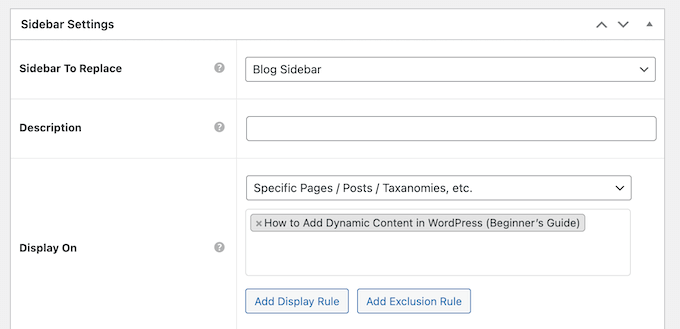
To create more inclusion rules, simply click on the ‘Add Display’ Rule button.
This adds a section where you can create the new inclusion rule.

If you prefer, then you can create exclusion rules instead. For example, you may want to show the sidebar on every page except the homepage.
You can also combine inclusion and exclusion rules to control exactly where the sidebar appears on your WordPress website.
To create an exclusion rule for the sidebar location, just click on the ‘Add Exclusion Rule’ button.
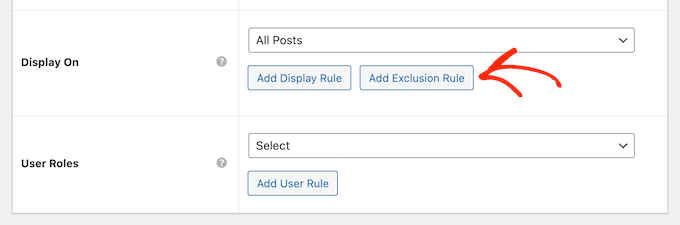
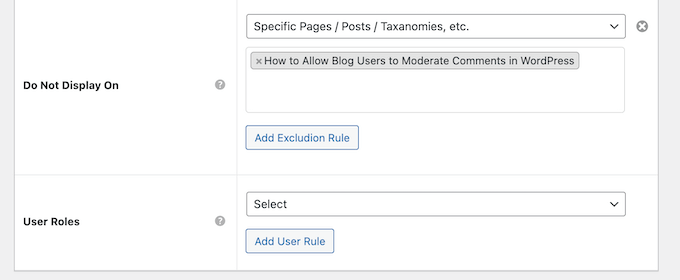
In the new ‘Do Not Display On’ section, open the dropdown menu and select the page or post that shouldn’t use this sidebar.
You can also exclude the sidebar from WordPress pages that have a specific category by following the same process described above.
After deciding where the sidebar will appear on your WordPress blog, you may want to show different content to different users.
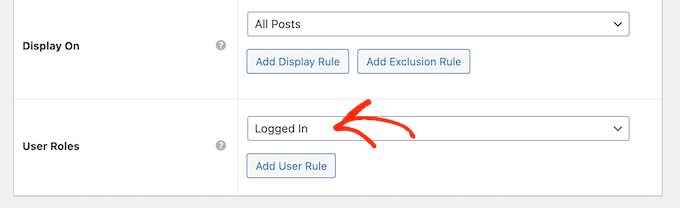
For example, if you have a membership site, then you might use a different sidebar for visitors compared to logged-in members.
To do this, open the ‘User’ dropdown and choose a role from the dropdown menu. Now, only people with this specific user role will see the sidebar.
Finally, you may want to type in an optional description. This will only appear in the WordPress dashboard, so it’s a good way to share information with other admins or users on a multi-author WordPress blog.
If you are going to create lots of sidebars, then you can also use this field to leave yourself notes and helpful reminders.
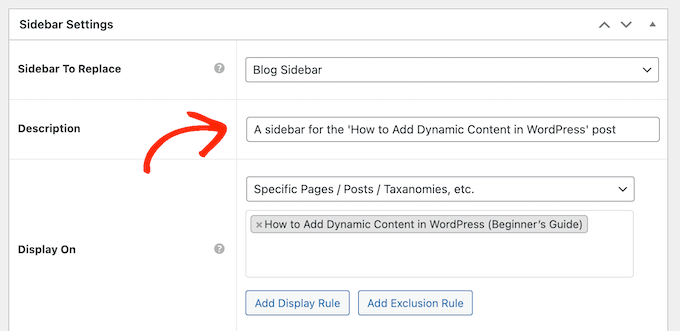
When you are happy with the information you have entered, simply click on ‘Publish.’
With that done, go to Appearance » Widgets. You will now see all the widget areas that your theme supports by default, plus the new sidebar you created in the previous step.
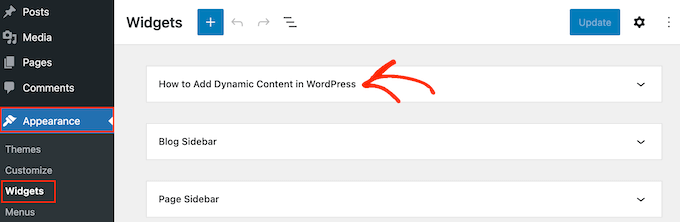
You can now go ahead and add widgets to the sidebar, just like any other widget section.
For step-by-step instructions, please see our guide on how to add and use WordPress widgets.
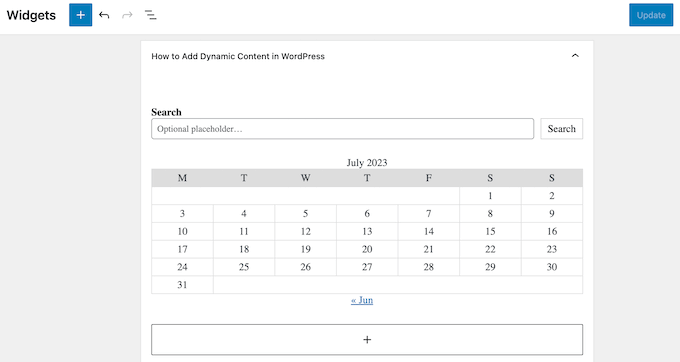
When you are happy with how the sidebar is set up, click on ‘Update.’
Now, if you visit your WordPress blog, you will see the new sidebar live.
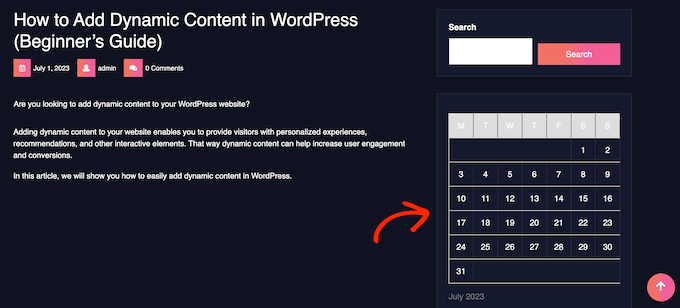
To create more theme sidebars, simply keep repeating these steps.
Method 2: Creating a Different Sidebar With a Page Builder Plugin (Works With Any WordPress Theme)
If your theme doesn’t have a sidebar function, then you can still create different sidebars using a drag-and-drop page builder plugin.
SeedProd is the best and most beginner-friendly landing page builder plugin for WordPress. With this plugin, you can create any type of custom page without writing any code.
It also has dozens of professional site kits and templates that you can easily edit and fine-tune using the drag-and-drop builder.
When designing a custom page, you can choose a layout that has a sidebar.
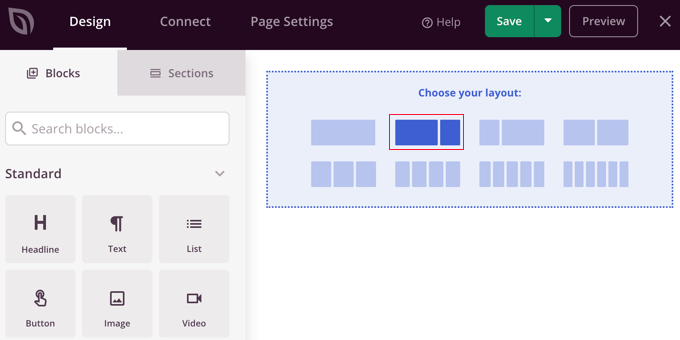
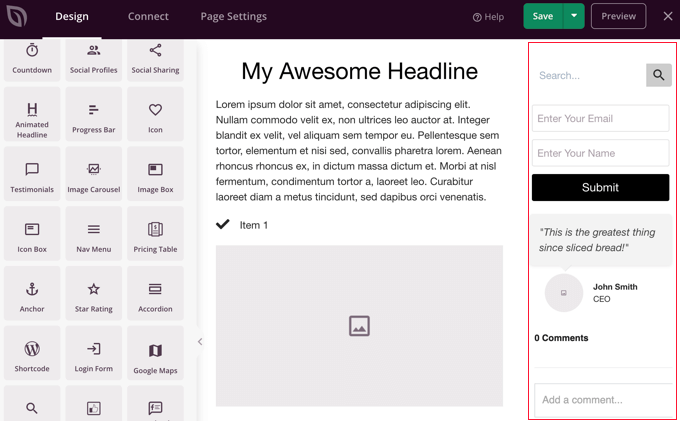
You then simply find the blocks you want to show in that sidebar and add them using drag and drop.
SeedProd has all the blocks and features you’d expect from a powerful page builder, such as opt-in forms, social profiles, countdown timers, contact forms, buttons, various content blocks, and more. This makes it easy to create powerful and unique sidebars for your WordPress blog.
To learn how to use the SeedProd page builder plugin on your website, you can see our guide on how to create custom sidebars, headers, or footers for each WordPress category and how to create a custom page in WordPress.
Learn More Ways to Customize Your WordPress Sidebar
Want to improve your WordPress sidebar further and make it more useful for your users? Check out these WordPress tutorials:
- How to Add Social Media Icons in Your WordPress Sidebar
- How to Create a Sticky Floating Sidebar Widget in WordPress
- How to Add Featured Posts in the WordPress Sidebar
- How to Use Shortcodes in your WordPress Sidebar Widgets
- How to Create a Collapsible Sidebar Menu in WordPress (The Easy Way)
- How to Add a Login Form in Your WordPress Sidebar
- How to Display Instagram Photos in WordPress Sidebar Widget
We hope this article helped you learn how to add different sidebars to each post or page in WordPress. You may also want to learn how to create a custom Instagram feed in WordPress or see our expert picks for the best block themes for full site editing.
If you liked this article, then please subscribe to our YouTube Channel for WordPress video tutorials. You can also find us on Twitter and Facebook.





Syed Balkhi says
Hey WPBeginner readers,
Did you know you can win exciting prizes by commenting on WPBeginner?
Every month, our top blog commenters will win HUGE rewards, including premium WordPress plugin licenses and cash prizes.
You can get more details about the contest from here.
Start sharing your thoughts below to stand a chance to win!
Jiří Vaněk says
I have a technical section on my blog, which is the majority, and I write technical articles on various topics. The minority part is private, where I write my own opinions on anything (politics, personal life, sports). In elementor, I created a different header and a different footer for both sections so that it was graphically separated. I just needed to finish another menu. I will try your instructions so that both the technical and personal sections have a completely different structure. Thank you very much for the instructions.
Ralph says
Wow! I never knew i could have different sidebars!
This is great feature for different categories for my use. Thank you for this guide i will definitely put it to good use!
WPBeginner Support says
You’re welcome, glad we could share how to set this up
Admin
poonam says
thank you so much
WPBeginner Support says
You’re welcome
Admin
Rashmi says
Thanks for sharing such an interesting article
WPBeginner Support says
You’re welcome!
Admin
Rajat says
thankyou for sharing this information
WPBeginner Support says
You’re welcome!
Admin
Folake Taylor says
Unfortunately, this plug-in did not work with my version of WP.
WPBeginner Support says
Thank you for letting us know. For the not tested message, we would recommend taking a look at our guide below for understanding why it is not always something you should be concerned about:
https://www.wpbeginner.com/opinion/should-you-install-plugins-not-tested-with-your-wordpress-version/
Admin
Finn G says
can you use this to add sidebar images to both sides of the page and have different images on different pages?
thanks
WPBeginner Support says
You can use this to have a different image on different pages but for the sidebars of your site normally, it would depend on the specific theme you are using for if they have a second sidebar for the other site or if one would need to be added with a page builder or custom code.
Admin
Muhammadd Farhan says
Wow, you just saved my day! looking for this solution and I got exactly what I need. Thank you for the post.
WPBeginner Support says
Glad our guide was helpful
Admin
Jim Joshua Oba says
Hello! My Sidebar has disappeared. It was displaying before it got missing. However, i din’t change the theme.
The message reads “Your theme has 1 widgets area but this particular page doesn’t display it”.
WPBeginner Support says
You would need to reach out to your theme’s support for displaying the widgets properly on that page.
Admin
Ken Mbesa says
This is exaaaaactly what I needed for my portfolio website.
Thanks WP Beginner. You guys are the best, always!
I have been a huge user of your resources for over three years now, and your website is one of my most opened bookmarks in all my browsers (in fact, it’s usually just open even when am not using it looking for WP info ;-)).
WPBeginner Support says
Glad our guides are helpful and continue to be helpful
Admin
Polly says
Mine is a very basic website but this worked like a charm. Thank you
WPBeginner Support says
You’re welcome, glad our article was helpful
Admin
M.IFTIKHAR says
Hi ! I have a problem in my wordpress website that the sidebar on shop page is not showing up but when i custimize the shop page it still show but not showing on default shop page .Please tell me why this is happening ?
WPBeginner Support says
You would want to start by reaching out to your theme’s support to see if this is a known issue with your theme and they should be able to assist.
Admin
Peter P. says
We tried this plugin but it wasn’t really usable for many sidebars. We had a hundred posts where the sidebar should contain more information about each product. Already after 10 sidebars the system became slower and slower, until it finally became unbearable with 20 or 30 sidebars.
We then used a different, differently designed solution that didn’t require a sidebar.
WPBeginner Support says
Thank you for sharing your feedback about the plugin
Admin
Poorya says
What happens to the posts/pages which have multiple categories selected?! or with several tags?
For example, I want a custom category for the news section and another for tourism, but what happens when a post appears on both of these categories?
WPBeginner Support says
You would need to check with the plugin for what would happen when a conflict like that happens. If you have multiple posts in different categories then you may want to take a look at how you have your categories themselves set up
Admin
Marco Diversi says
hello, I am trying to find a solution to add embed code to the sidebar of a post.
what i would like to have is a plugin that allow you to add a html or txt widget to the side of one single post, I have spent some time trying to find this but can not find! I have a website where every post is a different location and it needs a different map each post.
WPBeginner Support says
You may need to look for another solution as your needs grow but for now you may want to take a look at: https://www.wpbeginner.com/plugins/how-to-show-or-hide-widgets-on-specific-wordpress-pages/
Admin
Shivaja says
This is what I was looking for! Thanks for the video tutorial wpbeginner…
WPBeginner Support says
Glad you liked our guide and it was helpful
Admin
BRENDAN says
This one seems dead Syed, plugin not updated in 2 years so likely missing a lot of integration since WordPress has undergone some major core upgrades over the last 12 months. Is there a more recent solution for sidebars?
WPBeginner Support says
Thank you for letting us know, we’ll certainly take a look at this article and possible alternatives
Admin
Rushikesh says
Is it possible without any plugin, on Genesis framework? because I have purchased NEWS PRO Genesis Theme.
Nick says
Great article ! THanks
Katy says
Thank you so much! I have been driving myself mad trying to fix the sidebar then I found your video! Thankyoooou!!
aba charles says
Really nice and detailed tutorial you have here. But i don’t know why after following it my sidebars are still not appearing
Greg Svishchov says
Hi, great video! What about creating a separate sidebar for the HOME PAGE? Is that possible?
WPBeginner Support says
Yes you can create a separate sidebar for the homepage if you are using the static front page.
Admin
Soumik Sadman Anwar says
Is there any way to show no sidebar on a certain page at all?
Remember, the other pages will have to show the sidebar.
becka says
Is there a way to change the sidebar on certain pages and have it removed entirely on others? Before I download and activate I would like to know if removing the sidebar completely and making the page width 100% as easy as making different sidebars for different pages
Linda says
Hello – I have a sidebar on my weekly blog page but when I click on read more, it takes me to the full page width and doesn’t show the sidebar. I have looked everywhere to try and do this. Can anyone help please?
Dr Jill SM says
I tried to use the easy side bar and it does not work! I want to put a side bar only on specific pages and this put it on ALL of them.
I had learned how to use the original appearance > widgets and had right side bar on certain pages. I just added a new page to my web site and got the side bar that I did NOT want. I tried to add a left side bar to ONLY my new page and could not do it. So I looked at this video and got the plug-in easy side bars and it does not add a left side bar to ONLY the new page nor does it help me remove the right side bar [done through appearance > widgets] from the new page. Not real helpful.
K.Mr says
Hi, I need small help that you could do. I’m planning to buy managed wordpress on godaddy. I write posts in two languages. 1 is supported by adsense and one is not. I would like to place ads on posts using this on supported only language posts. Can I do this ? Can i use this to place ads? Please could you tell me?
Kati K. says
Hi! Can I add more sidebars with this plugin? Do I have to replace my existing sidebars with these new sidebars? For example, I have now 3 optional sidebars and I would like to have more than that. Is that possible somehow? Thanks!
Jennifer L says
I installed this plugin and now my site doesn’t work at all!! How do I fix this, it is really important! Please advise.
Jennifer
WPBeginner Support says
Hi Jennifer,
You can manually delete the plugin using FTP. Connect to your website using FTP client and go to /wp-content/plugins/ folder inside it you will find easy-custom-sidebars folder. Delete it and then login to your WordPress site. You can reinstall the plugin again if you want to give it another try.
Admin
Jahbless says
Sir my sidebars are appearing at the bottom of my blog and not the side why?
WPBeginner Support says
Hi Jahblees,
Please check plugin settings and make sure that you set your sidebar to replace the appropriate sidebar.
Admin
Ale Goedrich says
Hello – I have the same problem. The only choices I get is to replace the Footer Widgets 1 – 4. There are no other choices. Any ideas? I’d like to add a sidebar to my products thats different from my blog sidebar. I am using Divi.
Thank you, Alex
Jason A. says
I needed a super quick fix, and this did the trick nicely. Thanks!
Claire C says
Useful! I definitely want the ability to change my sidebar at times – my theme provides up to 8 choices, including full width (ie. none) for my pages but only ‘on’ or ‘off’ for all posts. So my question is, specifically for each individual post, could I chose 1. to add a sidebar of my choosing or 2. to have no sidebar at all (ie. full width)? Thanks
WPBeginner Support says
Hi Claire,
Yes, you can do that.
Admin
Iboro says
Thanks a lot. Your articles has been really helpful especially for me a major novice
Dave DeWitt says
Wow! This feature is something I’ve been wanting to do for a while. As usual, wpbeginner, makes it easy and fun! Thank you!!