


Remember the last time you needed to grab an image URL from WordPress, but couldn’t figure out where to find it? As a team that manages multiple WordPress sites, we know how frustrating this seemingly simple task can be.
Over the years, we’ve discovered several ways to quickly access image URLs in WordPress. Whether you need them for embedding in emails, sharing on social media, or using in custom code, knowing how to find these URLs is an essential skill.
In this guide, we’ll walk you through the easiest methods to get your image URLs in WordPress. These are the same techniques we use daily, and they’ll save you tons of time once you know them.
If you prefer written instructions, just keep reading. We have several topics covered in this article, and you can use the quick links below to navigate through them:
How to Find the URL of an Image in WordPress (Step by Step)
When you upload images, WordPress automatically creates a unique URL for them using the default WordPress media uploader.
Usually, a WordPress image URL includes your domain name followed by /wp-content/uploads/, the date of the image upload, and the image file name.
For example, an image named ‘travelaccessories.jpg’ uploaded to example.com in January 2023 will have a URL like this:
www.example.com/wp-content/uploads/2023/01/travelaccessories.jpg
Now, let’s take a look at how to get the URL of images uploaded to your WordPress website.
First, you need to log in to your WordPress admin area and go to Media » Library. Once done, it will open your media library, where all your images and other media files are stored.
Next, you can use the search feature to enter the image name that you want to find the link for.
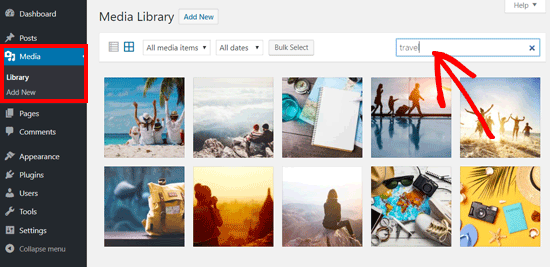
Once you click on the image, it will open a popup window with the image attachment details. You will see the image details in the right column and an image preview on the left.
The right column displays all image details, including the file name, file type, upload date, file size, dimensions, and image metadata like image alt text, title, caption, description, image uploaded by, and more.
You will also see the image URL at the end. You can find it in the link in the ‘Copy Link’ box.
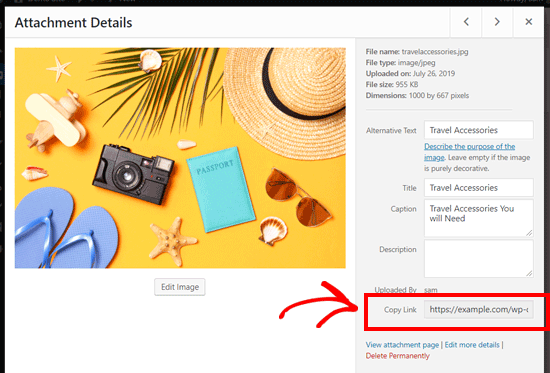
You can simply copy the link and use it anywhere you like.
If you open the image URL in your browser, then you can see the full-size original version of the image uploaded.
How to Find Your WordPress Image URL From the Front End
The method shown above lets you get the URL of any image uploaded to your WordPress blog, whether it is published live or not.
If you want to get the URL of images already published on your site, then you can get it from the front end itself. It is much easier!
Just open a page or post where the image is published and find the image. After that, right-click on the image and select the ‘Open image in new tab’ option.
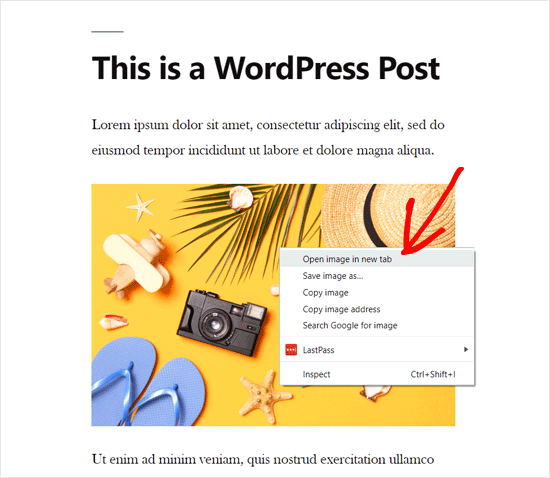
💡 Note that you can also find this URL by clicking on ‘Copy image address’ instead.
Once the image opens in a new tab, look at the URL in the address bar. That is your WordPress image URL.
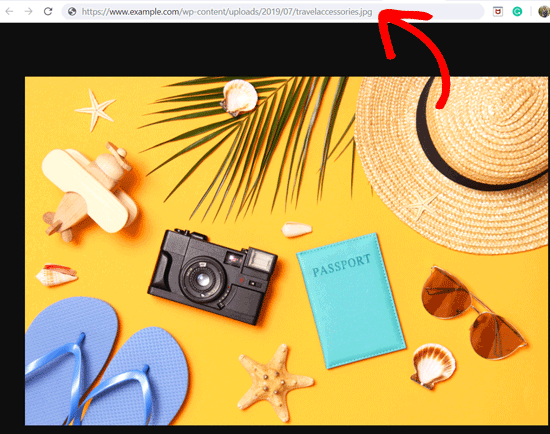
Now, you can copy the image address and use it anywhere you want.
How to Find Multiple WordPress Image URLs
If you want to find the image URLs for multiple images, then there is a quick and easy way to do this. Rather than manually searching for each image, you can view the page source.
Simply visit the WordPress post or page on the front end. Then, right-click on the page itself and select ‘View page source’.
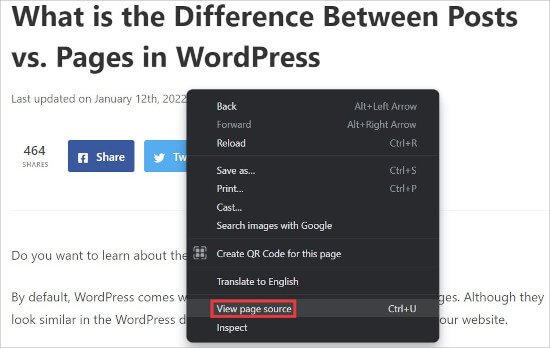
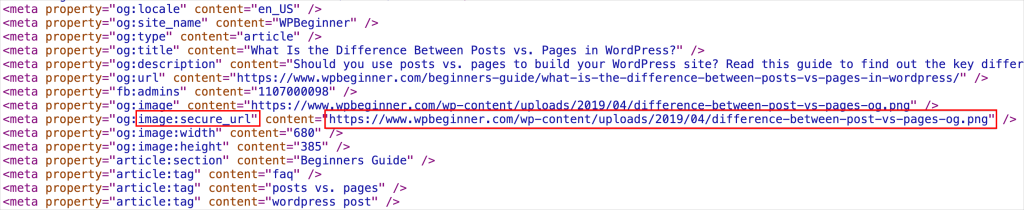
This will open a new tab in your browser where you will see the source code for the page.
Here, you can manually look for and copy each image URL on the page.
How to Get the URL of GIFs, Videos, and PDFs in WordPress
As we mentioned earlier, other media files like GIFs, videos, and documents like PDFs are also saved in the WordPress media library.
You can easily find the URL of these files by following the same steps as shown above.
Go to Media » Library from your dashboard, and then click on a GIF, video, or document whose file URL you want to see. After that, the Attachment Details popup window will appear.
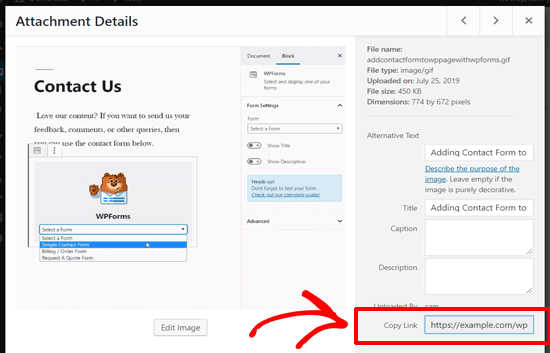
You can get the attachment URL next to the ‘Copy Link’ option in the right column.
Explore More: Essential Guides for Mastering WordPress Image and File Management
We hope this article helped you learn how to get the URL of images you upload in WordPress. For more tips and tricks to organize your images and files in WordPress, check out these guides below:
- How to Allow Users to Upload Images on a WordPress Site
- How to Organize WordPress Files in Media Library Folders
- How to Add Categories and Tags to WordPress Media Library
- How to Bulk Upload WordPress Media Files Using FTP
- How to Easily Organize Media Uploads by Users in WordPress
- How to Do Basic Image Editing in WordPress (Crop, Rotate, Scale, Flip)
- 6 Best File Upload Plugins for WordPress (Free & Paid)
Video Tutorial
If you prefer a more visual approach to learning, here’s a quick video tutorial that walks you through the steps with ease.
If you liked this article, then please subscribe to our YouTube Channel for WordPress video tutorials. You can also find us on Twitter and Facebook.


GARY MCKENZIE
How do you change the image url from example.com/wp-content/uploads/2023/01/image.jpg to example.com/image.jpg
WPBeginner Support
You would need to disable images being uploaded to folders under Settings>Media as that would be why your images are being included in the different dated folders.
Admin
Jiří Vaněk
You can also directly copy the address of the image using the right mouse button. Is it more practical or better to open it in a new tab as you show in the instructions?
WPBeginner Support
We recommend opening in a new tab to ensure the image loads properly but you could manually copy the image url like that and check the URL in a new tab.
Admin
Jiří Vaněk
Ok, thanks for the reply. I just didn’t know if it had any benefits or not.
yligman
Hallo Mr Wpbeginner
Please i need information for url post wp. Localhost host and live hosting. Is there anyway for fix url for all url link domain?
Regards
Yligman
WPBeginner Support
If you mean you’re trying to move the site from local to a hosting provider, you would want to take a look at our article below:
https://www.wpbeginner.com/wp-tutorials/how-to-move-wordpress-from-local-server-to-live-site/
Admin
Rahul
Hello,
I there any way to bulk export the image url ? I am using the website for eCommerce where multiple images of product are required so,
WPBeginner Support
We do not have a recommended method for what it sounds like you’re wanting at the moment.
Admin
Jordan
Does google analytics track this part of your website? So I’m linking ” ” on another website. When I test going to the link im not seeing the traffic in google analytics.
Marco Panichi
And the next question is: where I can find all the versions created after the upload?
I mean, the large, medium, thumb sized version of the image.
Rosa
Thank you so much! This worked perfectly.
Alice
Thanks, that was very helpful and clear!
Waqas Ali
Alternatively one can ‘right click’ on the image and copy URL.
Editorial Staff
Not if that image is not inserted into a post.
Admin
Nizam Khan
Nice post! This will be helpful for newbies. Thanks for sharing