


Beautiful typography is one of the easiest ways to make your website look professional and trustworthy.
Google Fonts are incredibly popular for this reason – they’re free, easy to use, and there are hundreds of gorgeous options to choose from.
The challenge is that Google Fonts creates an unexpected privacy issue. Every time someone visits your site, their information gets sent to Google’s servers automatically.
This can cause problems with privacy regulations, especially if you have visitors from Europe where data protection rules are strict.
Through our experience helping website owners navigate these challenges, we’ve discovered two simple solutions that give you the best of both worlds.
You can keep your beautiful fonts while ensuring your visitors’ privacy is fully protected, and both methods are surprisingly easy to implement.
💡Quick Answer: How to Make Google Fonts Privacy Friendly
In a hurry? Here are the 2 easiest ways to make Google Fonts privacy friendly:
- Host Google Fonts locally using the OMGF plugin – The Optimize My Google Fonts (OMGF) plugin hosts fonts in your server, keeping your site GDPR-compliant.
- Disable Google Fonts using the Disable and Remove Google Fonts plugin – This plugin turns off all Google Fonts and uses system fonts like Arial or Helvetica, improving load times and avoiding privacy issues.
Why Make Google Fonts Privacy-Friendly?
You should make Google Fonts privacy-friendly to protect your visitors and keep your WordPress site compliant with privacy laws.
By default, loading Google Fonts sends your visitors’ IP addresses, which is considered personal data under GDPR to Google. Without proper legal consent, this practice makes your site non-compliant.
Using privacy-friendly methods lets you maintain your site’s professional look while sidestepping potential legal risks. Even if your site looks great, ignoring the privacy implications can create serious problems.
This is especially important if you have visitors from the European Union, where non-compliance can carry heavy fines—up to €20 million or 4% of global annual turnover for serious violations.
Making Google Fonts privacy-friendly ensures you’re delivering a safe, compliant experience for all your visitors.
Which Method Should You Choose?
In this tutorial, we will be showing you 2 easy ways to make your Google Fonts privacy friendly.
To help you decide which method is best for you, here’s a quick comparison of hosting Google Fonts locally versus disabling them entirely:
| Feature | Method 1: Host Locally | Method 2: Disable & Use System Fonts |
|---|---|---|
| Privacy Compliance | Fully GDPR compliant (no IP sent to Google) | Fully GDPR compliant (no IP sent to Google) |
| Font Appearance | Retains specific Google Fonts design | Uses default system fonts (e.g., Arial, Helvetica) |
| Performance Impact | Minimal initial load from your server; reduces external requests | Fastest possible load times; no font files to download |
| Implementation | Requires a plugin (e.g., OMGF) or manual setup | Requires a plugin (e.g., Disable and Remove Google Fonts) |
| Ideal For | Websites needing specific Google Fonts for branding | Websites prioritizing maximum speed and simplicity |
Ultimately, the best method depends on your priorities. If maintaining your website’s specific aesthetic with Google Fonts is crucial for your brand, then hosting them locally is the ideal solution.
However, if maximizing site speed and ensuring the simplest path to privacy compliance are your main goals, then disabling Google Fonts and using system fonts is highly recommended.
You can use the links below to jump to the method of your choice:
Method 1: Host Google Fonts Locally in WordPress
One way to make Google Fonts privacy-friendly is to host them locally in WordPress. This means the font files are stored on your own WordPress hosting server.
When a visitor comes to your site, their browser will load the fonts directly from your server instead of connecting to Google. This prevents the visitor’s IP address from being sent to Google, which solves the privacy issue.
The first thing you need to do is install and activate the OMGF (Optimize My Google Fonts) plugin. For more details, see our step-by-step guide on how to install a WordPress plugin.
Upon activation, you need to visit Settings » Optimize Google Fonts to configure the plugin. On this page, you’ll find the settings for local fonts.
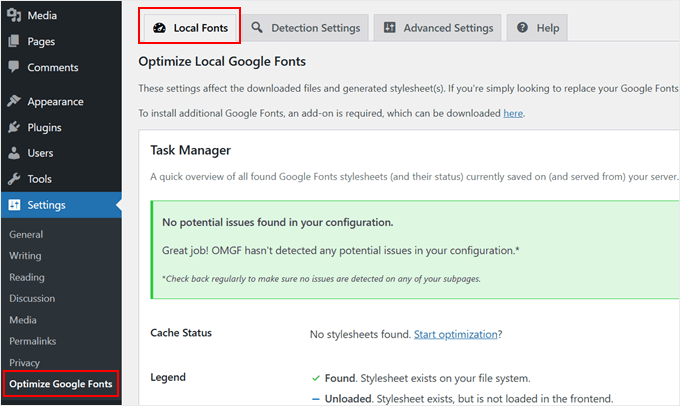
You will see a statement that the default settings will automatically replace your Google Fonts with locally hosted copies.
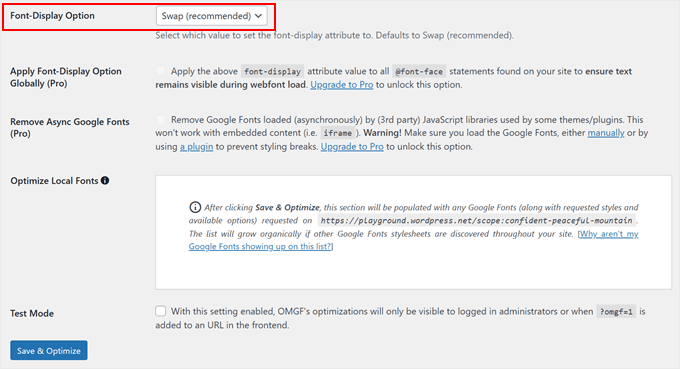
All you need to do is scroll down the page and make sure that the ‘Font-Display Option’ has the default setting of ‘Swap (recommended)’ selected.
After that, simply click the ‘Save & Optimize’ button at the bottom of the page.
You’ll see a message at the top of the screen that says, ‘Optimization completed successfully.’ Your Google Fonts are now hosted locally.
To learn more, see our guide on how to host local fonts in WordPress, including how to do this manually without a plugin.
Method 2: Disable Google Fonts in WordPress
Another way of avoiding the privacy issues of using Google Fonts is to disable them altogether and simply use the system fonts installed on your users’ computers.
We did this when we redesigned the WPBeginner website, and it improved our page load times. This is because your visitor’s browser doesn’t have to download font files from an external server, since system fonts are already on their computer.
Simply install and activate the Disable and Remove Google Fonts plugin. For more details, see our step-by-step guide on how to install a WordPress plugin.
Upon activation, the plugin will automatically disable all Google Fonts used by your theme and plugins. It doesn’t need to be configured.
Now, your visitor’s web browser will automatically use a fallback system font that’s already on their computer, like Arial or Helvetica, in place of any Google Fonts that were being used.
If you would like to choose different fonts, then see our guide on how to change fonts in your WordPress theme.
You can learn more in our guide on how to disable Google Fonts on your WordPress website.
Frequently Asked Questions About Making Google Fonts Privacy Friendly
Here are some questions frequently asked by our readers about Google Fonts and privacy:
Why are Google Fonts a GDPR risk?
When a visitor’s browser loads a font from Google’s servers, Google logs their IP address. Under the EU’s GDPR, an IP address is considered personal data.
Collecting this personal data without the user’s explicit consent is a violation of the regulation. This can potentially lead to significant fines for website owners.
Will hosting fonts locally slow down my site?
Hosting fonts locally means visitors download them directly from your server. While this can add to the initial load, it also reduces external requests to Google’s servers.
With proper optimization and a good caching plugin, the performance impact is usually minimal. In some cases, it can even speed up your site by keeping all requests on your own server.
What are system fonts?
System fonts are the basic fonts that are already installed on most computers and mobile devices. Examples include Arial, Helvetica, and Times New Roman.
Using system fonts is the fastest option because a visitor’s browser doesn’t need to download any font files at all. This is why we recommend this option if you are just starting out.
Expert Guides on WordPress Privacy and GDPR Compliance
We hope this tutorial helped you learn how to make Google Fonts privacy-friendly. You may also want to see some other articles related to WordPress data protection and GDPR compliance:
- The Ultimate Guide to WordPress and GDPR Compliance
- How to Add a Cookies Popup in WordPress for GDPR/CCPA
- How to Add a GDPR Comment Privacy Opt-in Checkbox in WordPress
- How to Stop Storing IP Address in WordPress Comments
- How to Create GDPR Compliant Forms in WordPress
- Best WordPress GDPR Plugins to Improve Compliance
- How to Add a Privacy Policy in WordPress
- How to Create a Do Not Sell My Info Page in WordPress
- How to Disable Google Fonts on Your WordPress Website
If you liked this article, then please subscribe to our YouTube Channel for WordPress video tutorials. You can also find us on Twitter and Facebook.





Dennis Muthomi
I’ve been using the OMGF plugin for my clients’ sites, and it’s fantastic. Recently tried it for a client(in the EU) who needed GDPR compliance – worked like a charm!
Here’s a helpful tip from my experience: Keep an eye on your themes and plugins after updates. They sometimes sneak Google Fonts back in. I’ve made this part of my regular site maintenance routine.
Really appreciate this resource – it’s helping me keep my client site both good-looking and privacy-compliant!
Jiří Vaněk
Thanks for the tutorial. I operate a website in the Czech Republic that is subject to GDPR legislation. For that reason, we also need to inform users of the fact that there is a mechanism on the website that collects data about their activity. We call it cookie banner. The user must be informed and allow or disable this collection.
I downloaded the Google font on a recommendation and use it locally on FTP. I also did it for the speed of the site. So thanks for the tutorial.
However, just asking, I assume that if I use other Google services like analytics or adsense, then the situation is the same and basically the user data goes to the third party again.
WPBeginner Support
Correct, you would need to use another plugin or tool to have that information be GDPR safe.
Admin
Jiří Vaněk
Thanks for confirming my hunch about GPDR. You have basically confirmed to me that unfortunately no third party services can be used without the Cookie Banner. So I will act accordingly.