


Our team once found the perfect domain for a new project, but a single message stopped us in our tracks: ‘Already Registered’. It’s a frustrating moment we’ve all faced when inspiration strikes.
Worse, privacy rules have made it much harder to find the actual owner. Many online tools that promise to help are often a dead end, leaving you feeling stuck.
After acquiring numerous domains for our own businesses over the years, we’ve perfected a few simple methods that actually work. These are the exact steps we follow to uncover ownership details without hitting a wall.
In this guide, we’ll walk you through three proven ways to find out who really owns a domain name. It’s important to know that due to modern privacy protections like GDPR, the owner’s personal information is often hidden.
However, the methods below will still help you find the domain’s registrar and give you the best possible ways to make contact. 👍
Why Find Out Who Owns a Domain Name?
Finding out who owns a domain name can provide valuable information about the domain name and the site using it. We’ve found this information to be quite helpful in making informed decisions about domain purchases.
Usually, this information will include an email address and other contact information so that you can get in touch to purchase the domain name from them. Having this contact info can save time and streamline the process of acquiring domains.
It also shows useful domain name information, such as the last time it was registered, the number of owners, and more. This data can offer insights into the domain’s history and reputation, which we’ve noted to be highly useful.
If multiple people have owned a specific domain name, this increases the chances of the domain being used for spam. Identifying such domains early can help you avoid potential issues down the road.
When you are creating a WordPress website, one of the biggest decisions you’ll make is choosing the perfect business name and matching domain. From our experience, securing the right domain is a key step in establishing your online presence.
If you’ve found the perfect domain, but it’s already registered, then you’ll want to reach out to the owner to see if they’re willing to sell it to you. We’ve seen this approach work for many users looking to secure their ideal domain name.
There are multiple ways you can find out who owns a domain name. We will show you the three easiest ways to quickly find out the owner of a domain name:
- Method 1: Search for a Domain With Namecheap WHOIS Lookup Tool
- Method 2: Search for a Domain With Network Solutions WHOIS & Domain Lookup
- Method 3: Search for a Domain With GoDaddy WHOIS Domain Lookup
- What to Do if the Domain Registration Information Is Hidden?
- Video Tutorial
- Frequently Asked Questions About Domain Ownership
- Bonus Resources
Method 1: Search for a Domain With Namecheap WHOIS Lookup Tool
Namecheap is one of the most popular domain name registrars. It lets you register all top-level domain name extensions (TLDs) and dozens of top country code top-level domains (ccTLDs).
They offer nearly every feature you’d expect from a top domain name registrar, including private registration, domain name management, email accounts, easy transfers, and even web hosting.
We have found their WHOIS lookup tool to be incredibly useful. It searches the public WHOIS database for information about registered domain names.
You can think of the public WHOIS database as a phonebook for domain names. This system is regulated by an organization called ICANN (The Internet Corporation for Assigned Names and Numbers). A WHOIS record can include details like the owner’s name, email, the date the domain was registered, and when it expires.
It also contains WHOIS data such as the registration date, name servers, most recent updates, and expiration date.
To use this tool, navigate to the Namecheap WHOIS Lookup and enter the domain name.
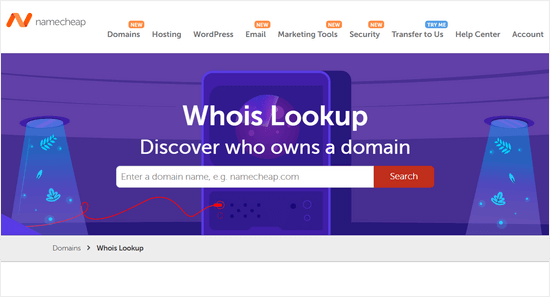
Then, the tool will display the available WHOIS directory results.
It will show you key details, such as the domain’s current registrar, who the current owner is, and any publicly available contact information.
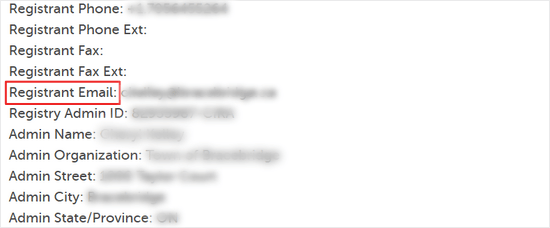
If the email address is available, then it will appear in the ‘Registrant Email’ field.
You can also try to contact the domain name owner via the domain name registrar. We discuss that more below.
Method 2: Search for a Domain With Network Solutions WHOIS & Domain Lookup
Network Solutions is one of the biggest domain name registration services in the world, with over 7 million domains registered with them. You can register a wide variety of top domain name extensions with this service.
They also offer nearly everything you need to launch your WordPress small business website, including web hosting, security tools, SEO services, and more.
You can use the Network Solutions WHOIS lookup and domain lookup tool to determine who owns a particular domain name.
Simply enter the domain you want to look up and click ‘Search.’
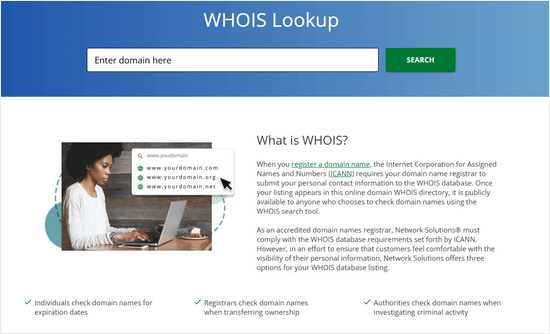
After that, the tool will display any available domain registration information.
After you search, the tool will show you all the publicly available registration information for that domain.
If the owner’s information is private, Network Solutions also offers a professional Domain Broker Service to help you acquire a domain that’s already taken.
With this service, a dedicated agent will contact the current owner and negotiate a purchase on your behalf. This is a great option if you want an expert to handle the entire process for you.
If you decide to use this service, then click the ‘Backorder’ button and put down a deposit, and their team will get to work.
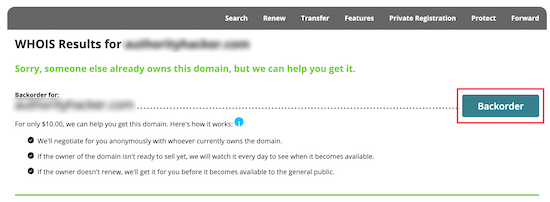
This can be a great way to purchase a domain name from an owner without doing all the work yourself.
Note: If you’re going to register a new domain name, then make sure to use our Network Solutions coupon code and the promo code NAMEBOY during checkout for up to 67% off your domain purchase.
Method 3: Search for a Domain With GoDaddy WHOIS Domain Lookup
GoDaddy is one of the longest-running and largest domain name registrars in the world, managing over 77 million domain names. It offers competitive pricing and a great selection of domain name extensions.
To determine who owns a domain name, you’ll use the GoDaddy WHOIS Database tool. It works similarly to the tools above.
Simply enter the domain name into the WHOIS database lookup, and the tool will find the relevant domain name information.
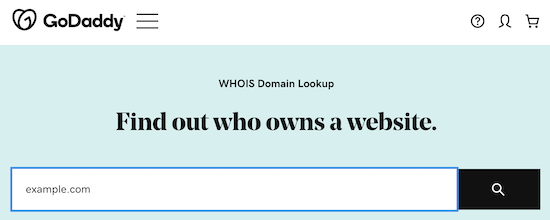
You might notice the results are similar to the previous tools.
However, it can be helpful to try the domain name search with multiple tools. If the domain is hosted at a specific registrar, then you can get more accurate information.
One helpful tip when using GoDaddy: they often recommend additional services during the search process. We suggest reviewing your cart carefully before checking out to make sure you’re only purchasing what you need.
What to Do if the Domain Registration Information Is Hidden?
Many domain name registrars today offer domain name privacy, which keeps a domain name owner’s information hidden from WHOIS searches.
This privacy protection service, along with data privacy regulations like the GDPR (a European data protection law that has become a global standard), can make it difficult to find out who owns a domain.
If you’ve used the tools above to search for a domain and couldn’t find out who owns it, then you can use the following methods to reach out to the owner.
1. Contact The Domain Registrar to Forward Your Request
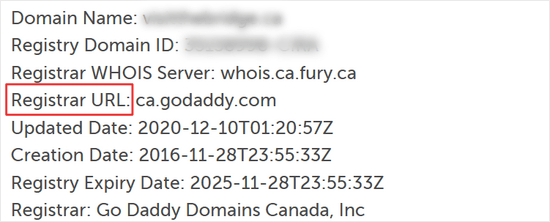
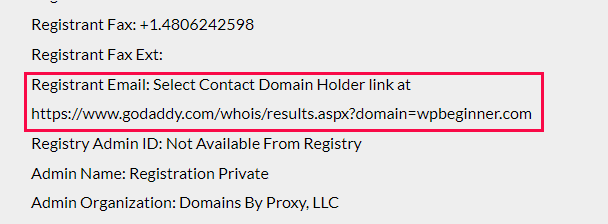
The domain owner’s information will often be hidden, but the domain name registrar will be visible.
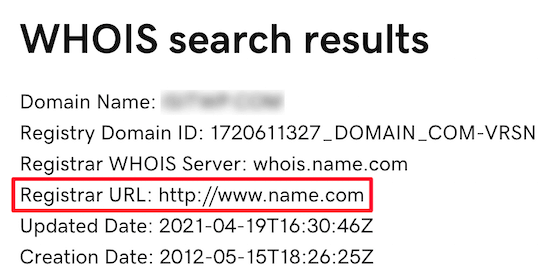
In this case, simply email the registrar and let them know you are interested in buying the domain or want to notify them about a spam domain.
You may also find a forwarding email address for the ‘Registrant Email.’ The domain privacy service provider often forwards emails received at this address to the domain owner.
2. Look up Company Information
If you know the business name using a particular domain name, then you can try to find out the current owner of the business.
You can use email finder apps like Hunter to find the right employees to contact.
An easier and quicker way to find this is by using public websites and social media platforms such as LinkedIn.com.
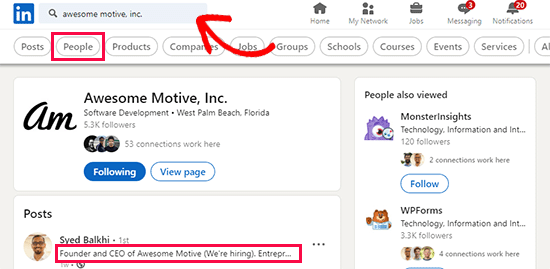
Simply enter the business name in the search field and see if you can find people who work in the company.
3. Reach Out to The Domain Owner via Their Website
Another option is to simply email the domain name owner through their website contact form if the website is currently online. From our experience, we can tell you that sometimes a direct approach may be the most effective one.
There’s a lot of other information you can find about a website’s online presence, too. For example, you can find the WordPress theme a site is using and find out who is hosting a certain website.
4. Hire a Domain Broker
If none of the strategies above work for you, you can always hire a domain broker.
A domain broker acts as a professional middleman who will negotiate with the owner on your behalf to purchase the domain. This is a premium, paid service, but it can save you a lot of time and hassle.
Many popular domain name registrars like GoDaddy offer domain brokerage services. With this service, a dedicated professional will be assigned to you, and they’ll help you negotiate a deal to transfer domain ownership.
Video Tutorial
Frequently Asked Questions About Domain Ownership
Having helped thousands of users with domain-related questions, we’ve compiled a list of the most common ones. Here are the answers to frequently asked questions about finding a domain owner.
1. What is a WHOIS lookup?
A WHOIS lookup is a way to query a public database that stores information about registered domain names. This database is regulated by ICANN (Internet Corporation for Assigned Names and Numbers) and can include the owner’s name, contact info, registration date, and expiration date.
2. Is it illegal to find out who owns a domain name?
No, it is not illegal. The information is publicly available through the WHOIS database for legitimate purposes, such as verifying ownership, contacting owners for purchase inquiries, or reporting abuse. However, using this information for spam or illegal activities is against the terms of service.
3. Why can’t I always find the owner’s information?
Many domain registrars now offer privacy protection services that hide the owner’s personal information from the public WHOIS database. Additionally, regulations like the GDPR in Europe have increased data privacy, making it more difficult to access personal contact details.
4. How much does it cost to find out who owns a domain?
Using public WHOIS lookup tools like the ones from Namecheap or GoDaddy is completely free. Costs only come into play if you decide to hire a domain broker to negotiate a purchase.
Bonus Resources
We hope this article helped you learn how to find out who actually owns a domain name. Once you find the domain owner’s information, your journey is just beginning.
These extra guides will help you with the next steps, from registering your first domain to finding the perfect alternative.
- How to Check Domain Name Availability (Easy Domain Search Tools)
- How to Buy a Domain Name That is Taken
- Best Places to Find Premium Domain Name for Sale (+ Expert Tips)
- How To Buy a Domain Name Anonymously
- What Is a Domain Backorder? (And How to Properly Place One)
If you liked this article, then please subscribe to our YouTube Channel for WordPress video tutorials. You can also find us on Twitter and Facebook.




Olaf
I feel that lately, finding information about domain owners has become increasingly difficult. Since I work in Linux, I used to use the whois command in the terminal. It works similarly to traditional WHOIS databases by sending a query and returning the data. However, recently this tool has become unusable, just like the WHOIS databases themselves. Owner information is often either hidden by WHOIS privacy or concealed due to local data protection laws such as GDPR. It’s good to know that there’s always a registrar with whom you can potentially collaborate to contact the domain owner, even if it’s often just indirectly. But it’s still better to have something than to have no information at all.
Moinuddin Waheed
Using privacy and domain protection at the time of buying the domain name should hide the information.
There are always pros and cons for both. If information is easily available one can get in touch with the owner easily and can bargain the price but it is also open to hackers.
I am not sure if having privacy and domain theft protection on hides the domain owner information?
WPBeginner Support
It would add some protections but normally there would be a way to reach the domain owner through the registrar.
Admin
Dayo Olobayo
To the best of my knowledge, privacy is the same as protection when it comes to the handling of domain names by registrars. All registrars have secured measures in place to ensure domain is secure from theft, except the owner is careless with email and 2FA setups. The essence of privacy is to hide the information of the owner so as to prevent spamming, and of course, stealing of owner’s information. But that doesn’t mean owners cannot be contacted if need be. GoDaddy for example has a brokerage service to contact any domain owner. Apart from that, there is a default email in domain privacy that inquiries can run through and vetted by registrars.
Jiří Vaněk
It used to be nice that if a person wanted to contact the owner of a domain, he could find a complete contact for the owner in the whois database, if there was no whois provacy. Now, since the time of GDPR, he can no longer find much information about the owner, so in many cases the problem is that the vast majority of data is unfortunately hidden.
WPBeginner Support
There should still be information for contacting the site owner when you use whois, it is mainly behind a secondary email to prevent spam from those who used whois maliciously.
Admin
Dennis Muthomi
That’s a solid point right there!!
The increased privacy protections like GDPR have definitely made it more challenging to directly reach out to domain owners.
I was interested in buying a domain name(which I was eyeing for), but the owner had no company or website listed, and their contact details were hidden.
I haven’t used any of the mentioned registras’ domain brokerage service yet.
I just gave up on that domain and got another one
BOTTOMLINE: Act quickly when you get your desired domain name. Buy it ASAP!!
Jiří Vaněk
For this situation, I have a piece of advice. In Whois, at the very least, the domain registrar is always visible. My usual practice, when I don’t know the domain owner’s details, is to contact the registrar, whose information is easy to find. I ask the registrar if they could contact the domain owner on my behalf and send a message, such as expressing my interest in purchasing the domain. So far, this approach has always worked for me, and the registrar’s support has forwarded the message. Of course, it’s then up to the domain owner to decide whether to respond. But there is a solution.
Zemi
I want to hide this WHOIS information, how to do?
WPBeginner Support
Your domain registrar would normally have a privacy option to hide your contact information directly but there is no way to have no information in your whois as you are required to confirm your contact information.
Admin