


I built my first website nearly 20 years ago. Back then, we did not have many WordPress hosting options to choose from. You picked one of a few names and hoped it stayed online.
Today the opposite is true. There are hundreds of hosts, and every one claims to be the fastest WordPress hosting on the market. That flood of choices makes picking a host harder.
So I tested them all. This guide shares what I found, with every result on the page. You can check my work, not just take my word for it.
Quick Pick: The Best WordPress Hosting
Short on time? Here are my seven picks from the latest round of testing. Speed is one part of the story, so scroll down to read the full review for the host that fits your needs.
| Host | Best For | Starting Price | LCP | Page Load | WPBeginner Score |
|---|---|---|---|---|---|
 | Best overall | $2.69/mo | 778 ms | 1.0 s | 77 / 100 |
 | Best for small businesses | $1.38/mo | 801 ms | 1.3 s | 79 / 100 |
 | Best managed | $29/mo | 388 ms 👑 | 522 ms | 85 / 100 |
 | Best for support | $2.99/mo | 743 ms | 1.2 s | 44 / 100 |
 | Best VPS | $14.95/mo | 687 ms | 1.0 s | 53 / 100 |
 | Best for beginners | $2.99/mo | 881 ms | 960 ms | 57 / 100 |
 | Budget alternative | $1.99/mo | 451 ms | 464 ms | 52 / 100 |
The order is my overall assessment of each host. It combines the WPBeginner Score from my performance tests with features per dollar, infrastructure, ease of use, past feedback from WPBeginner readers, and our own experience hosting with them. You can see the full scoring methodology below.
1. Hostinger – Best Overall WordPress Hosting
Read my full Hostinger review · Hostinger coupon · See full test data
I recommend Hostinger to most people who ask me where to host their website. I host my own personal and hobby sites on it, and it has stayed reliable over the years.
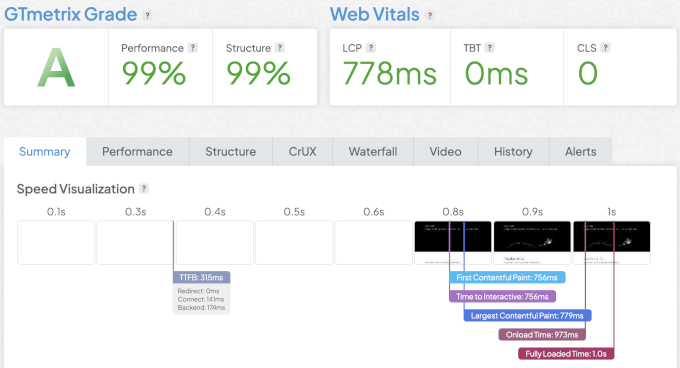
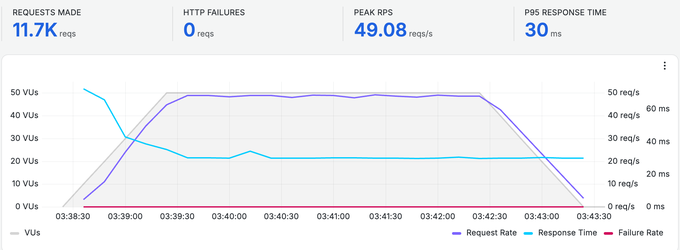
In my speed tests, the main content loaded in 778 ms, and the full page finished at 1.0 seconds. In the load test with 50 users at once, the server held a 30 ms response with no failed requests. That is strong for a plan that starts at $2.69 per month.
Their lowest plan allows for up to 3 websites, 20 GB of storage, one free domain, a free CDN, email accounts, AI tools, and 24/7 chat support. This is quite generous compared to other similarly priced options in our list. I also like that Hostinger include a lot of extra tools even on the starter plan, not locked behind an upgrade.
The trade-offs are worth knowing. The $2.69 price needs a longer plan upfront, and it renews at $10.99 per month. They also don’t offer phone support.
However, none of the above mentioned trade-offs change my pick. Considering the performance and value per dollar, Hostinger is still the strongest starting point I have tested.
Often hosting providers cap the number of files your account can hold, and that cap is usually the first thing small businesses hit, which forces them to upgrade.
Hostinger’s limits are unusually generous, with 400,000 files on the Premium plan and up to 2 million on its entry cloud plan, so a media-heavy site can stay on a cheap hosting plan for years.
They offer daily backups in the Premium tier, and one-click object caching starts only on the Business plan, which are nice to have upgrades depending on your use-case.
Pros
- Fast speed in our test – 778 ms LCP and a 30 ms response under load
- Low entry price with 3 sites, 20 GB storage, CDN, and free email
- AI tools and a drag-and-drop builder included
- 24/7 support over chat
Cons
- The lowest price needs a longer, multi-year plan
- Renews higher at $10.99 per month
- No phone support
Hostinger Performance Test Results
Performance summary: LCP 778 ms · Full page load 1.0 s · Under load 30 ms · Global 89 ms · Uptime 100%
Speed test:
My speed test for Hostinger showed a faster page load time with a 660 ms LCP.
Global response time:
Response times stayed fast in every city I tested, and the slowest was São Paulo at 136 ms.

Stress test:
Stress test result showed LiteSpeed Cache kicking in immediately with a P95 response time of 30 ms.
Uptime monitoring:
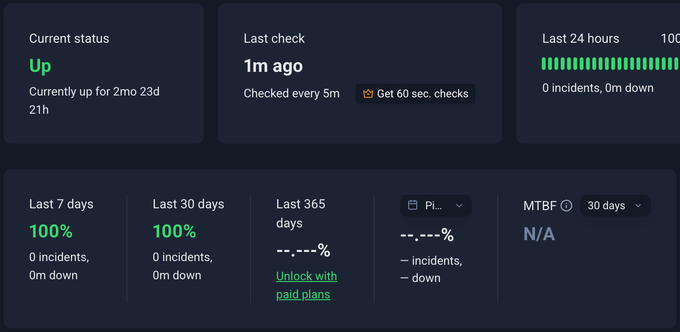
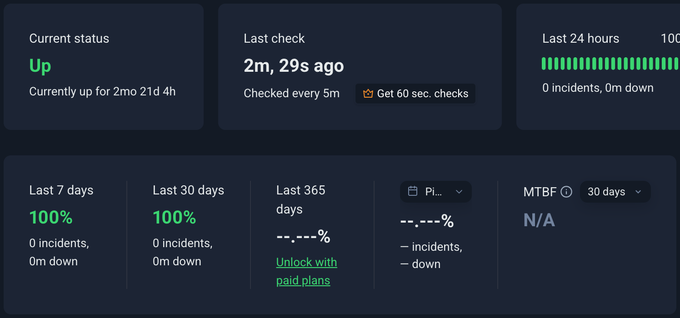
Our test site didn’t record any downtime during the monitoring period.
My verdict: Even though Hostinger is not the fastest host I tested, it offers the best combination of sites allowed, speed, and value. I have found their platform incredibly easy to use, live chat support is fast and most of the time their AI assistant quickly answers common questions. That is what makes it my #1 pick. If you want the best overall value, check out Hostinger.
2. WordPress.com – Best for Small Businesses
Read my full WordPress.com review · WordPress.com coupon · See full test data
WordPress.com is the easiest way to run a WordPress site without managing anything yourself. I think it is a great fit for small businesses, personal websites, and blogs.
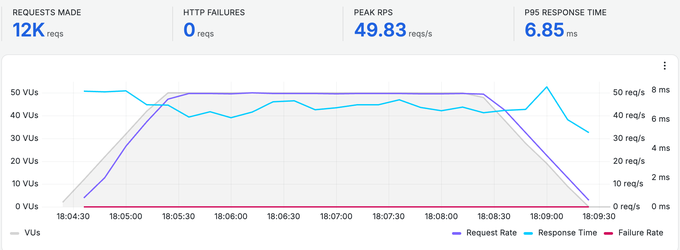
Their servers loaded the main content in 801 ms and held a 7 ms response under load. That was the best result of any host on this list for handling a traffic spike. WordPress.com ties for the top score on my list, and it earns that on performance alone.
The Personal plan starts at $1.38 per month and now includes WordPress plugins, which used to need a paid upgrade. You also get a free domain for a year.
So why is it #2 when it is cheaper and faster than Hostinger?
The price is per website. The Personal plan covers one site, while Hostinger gives you three sites and a lot more storage for a similar spend. The $1.38 rate also needs a three-year commitment, although even that total cost is less than what many hosts charge for a single year.
WordPress.com wins under heavy traffic, and Hostinger wins on value per dollar.
The biggest thing I’d look out for, though, is storage. The personal plan gives you 6 GB only, which isn’t a lot when your website starts growing.
The real advantage of WordPress.com lies in the platform infrastructure. Your site runs on WordPress.com’s own network, with a CDN across 28+ data centers, and it can burst to more than 100 PHP workers when a post suddenly takes off and you get a lot of traffic at once.
They also offer unmetered traffic on every plan, so a viral post or busy sale event does not trigger an overage fee or a forced upgrade, and every site is copied in real time to a second data center in another region. That is why it handled my stress test better than any other host on this list.
Pros
- Best result under load of any host – 7 ms response
- Cheapest entry at $1.38 per month, with a free domain
- WordPress plugins now included on the Personal plan
- Fully managed, so there is nothing to maintain
Cons
- Personal plan has 6 GB and basic support only
- Fewer tools than some similarly priced options on this list
WordPress.com Performance Test Results
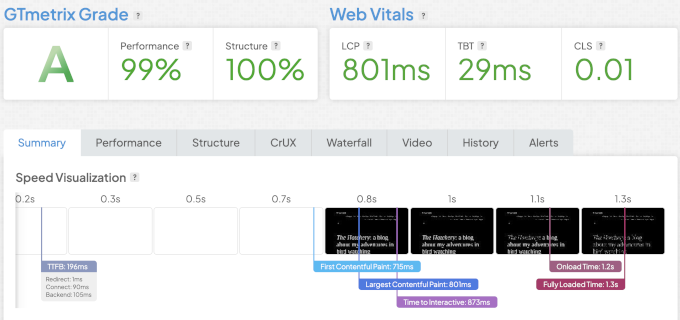
Summary: LCP 801 ms · Full page load 866 ms · Under load 7 ms · Global 68 ms · Uptime 100%
Speed test:
WordPress.com showed an LCP of 801 ms and a fully loaded time of 1.3 seconds.
Global response time:
Due to WordPress.com’s powerful globally distributed infrastructure, the response times were excellent across all locations.

Stress test:
During the stress test, I was able to see the resilient WordPress.com platform with an impressive P95 7 ms.
Uptime monitoring:
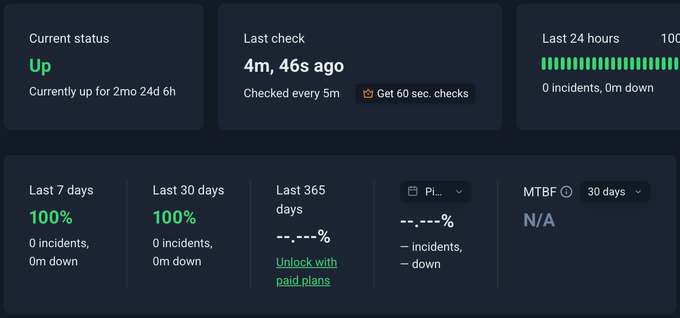
During a monitoring period of 90 days our test site showed a 100% uptime.
My verdict: WordPress.com handles traffic spikes better than any other pick and has the cheapest entry point. Its personal plan is the easiest way to start a WordPress website (and they now allow you to install plugins). However, for small businesses, I would recommend their ‘Business’ plan, which gives you more control and features. If you want to write or run your business while the platform runs everything else, give WordPress.com a try.
3. Levamo – Best Managed WordPress Hosting
Levamo is my #1 choice for eCommerce and membership websites. It is built for the kind of heavy, dynamic traffic that would slow a cheaper host down. I would put Levamo in the Enterprise WordPress hosting category.
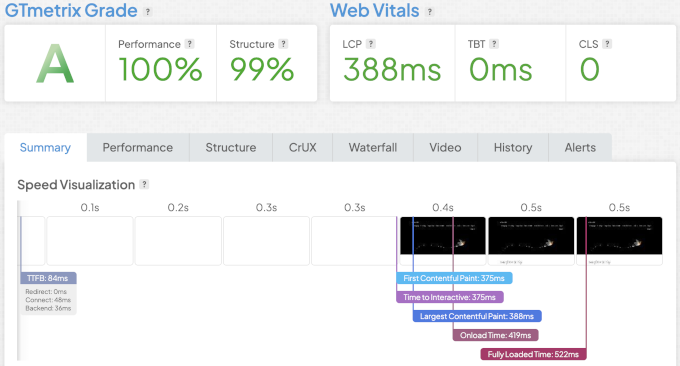
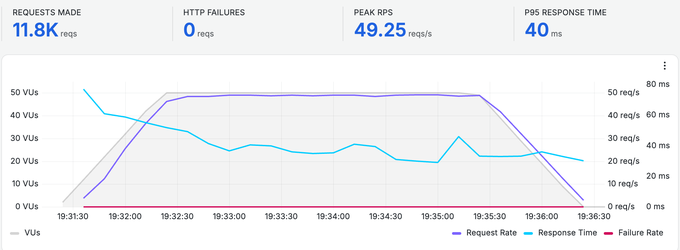
In my tests, Levamo showed its content in 388 ms and held a 40 ms response under 50 users. It was the fastest overall WordPress hosting provider of all my featured picks.
That speed comes from real infrastructure, which includes an enterprise Cloudflare CDN, Redis object caching, and built-in security.
Most of WPBeginner’s sister brands and eCommerce sites run on Levamo, so I have watched it hold up under real, heavy traffic, not only in a one-off test.
It is not cheap, but you are paying for quality, especially with Enterprise Cloudflare bundled in. Plans start at $29 per month for the entry plan when you pay yearly, and the price stays the same when you renew. Levamo can handle sites of any size.
I would not use it for a simple hobby blog, but if you have an eCommerce website or a high-traffic business website that makes money, then the speed under load is worth the price. That’s why our team at WPBeginner uses Levamo. They also includes free migration and a trial, so you can test it out first.
Before you buy, it’s important to know what the Starter plan actually covers. It includes one site and 25,000 monthly visits. Advanced features like Redis object caching and the full auto-scaling tier start on the Business plan, which is where I believe Levamo really shines.
Every plan does include a staging site, daily offsite backups, free migration, and the Enterprise Cloudflare CDN, which competitors often sell as paid add-ons. The three-day trial needs a credit card and converts to a paid plan automatically, so please set a reminder if you only want to test it.
Pros
- Fastest WordPress hosting pick to paint – 388 ms
- Elite performance under load – 40 ms response with no failed requests
- Enterprise Cloudflare CDN, Redis caching, and security built in
- Built for WooCommerce, includes auto-scaling PHP workers for traffic spikes and isolated cloud containers, so no shared resources
- Free migration and a free trial
Cons
- Premium price, starting at $29 per month
- Entry plan is one site with a 25,000-visit limit
Levamo Performance Test Results
Performance summary: LCP 388 ms · Full page load 522 ms · Under load 40 ms · Global 89 ms · Uptime 100%
Speed test:
Levamo came out as the fastest WordPress host with LCP 388 ms and a fully loaded time of 522 ms.
Global response time:
The Cloudflare Enterprise advantage became apparent in our global response time test for Levamo showing excellent response times across all regions.

Stress test:
The Levamo stress test showed a consistent response time under load with P95 response time of 40 ms.
Uptime monitoring:
My Levamo test site showed no downtime during a 90-day monitoring period.
My verdict: Levamo stood out as the fastest WordPress host in my tests, and the one we trust with our own eCommerce websites that do millions in annual revenue. It is built for hosting dynamic sites and provides enterprise grade infrastructure without the enterprise cost. If you run a WooCommerce store or membership site, I strongly recommend Levamo. Also if you’re on the Enterprise plan like our larger brands are, they offer Slack-based dedicated support, which is a game-changer.
4. SiteGround – Best for Support
Read my full SiteGround review · SiteGround coupon · See full test data
SiteGround is the host I suggest when someone tells me they get nervous handling tech on their own. The support is the best on this list, and I rely on it in the real world. WPBeginner blog itself is currently hosted on SiteGround.
It is the only pick where you can call a real person 24/7, on top of chat and tickets. It runs on Google Cloud, and in my tests it showed content in 743 ms.
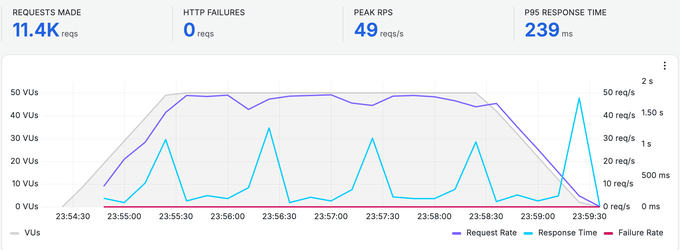
The catch is price. It starts at $2.99 per month, which you can lock in for multiple years, but the renewal price goes up to $17.99, and the entry plan covers one site only. Under heavy load it was slower than my top picks, at a 239 ms response.
So you are paying for support and platform quality, not the lowest price. For a user who wants a safety net, I believe that is a fair trade.
The fine print matters more at SiteGround than anywhere else on this list. It caps the entry StartUp plan at 200,000 files and does not include the Ultrafast PHP setup or staging, which both start on the GrowBig plan.
Backups are the bright spot on SiteGround. Every plan keeps up to 30 daily copies, the deepest retention of any host here. So my honest advice is to treat GrowBig as the real SiteGround plan for business websites.
Pros
- Best support here – 24/7 phone, chat, and tickets
- Runs on the Google Cloud platform
- Free domain and free site transfer
- Strong security and staging tools
Cons
- Steep renewal at $17.99 per month
- Entry plan is one site with visit limits
- Slower under heavy load than my top picks
SiteGround Performance Test Results
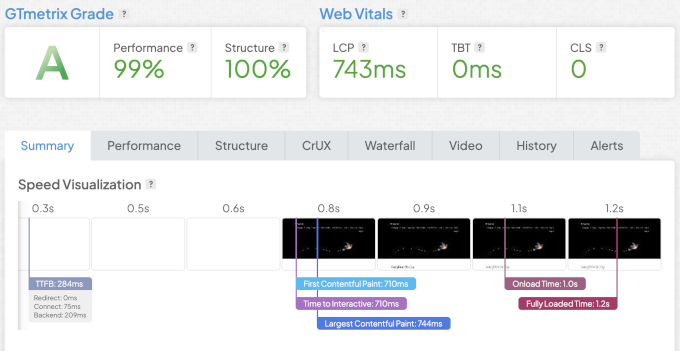
Performance summary: LCP 743 ms · Full page load 1.2 s · Under load 239 ms · Global 109 ms · Uptime 99.82%
Speed test:
SiteGround’s speed test showed an LCP of 743 ms and fully loaded time of 1.2 s. It was not the fastest but still excellent.
Global response time:
SiteGround’s response time was fast in every city I tested, and the slowest was Singapore at 220 ms.

Stress test:
SiteGround’s response time fluctuated a bit during our stress test but didn’t fail a single request and had a P95 response time of 239 ms.
Uptime monitoring:
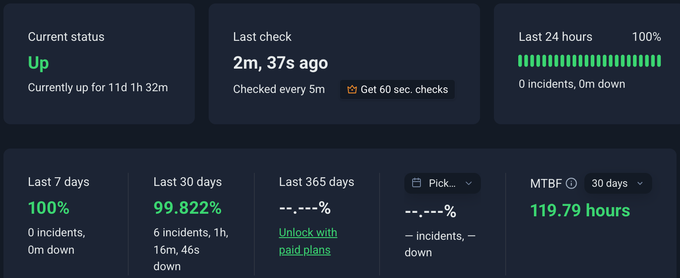
Our test site had a few short outages, and its uptime was 99.82% over 30 days.
My verdict: SiteGround may not be the cheapest host in the list, but they do have one of the best support options on this list by a clear margin. If you want a safety net of a trusted hosting provider, visit SiteGround.
5. ScalaHosting – Best VPS Hosting
Read my full ScalaHosting review · ScalaHosting coupon · See full test data
ScalaHosting is my pick once you outgrow shared hosting. It is a managed VPS hosting provider, so it sits in its own category on this list.
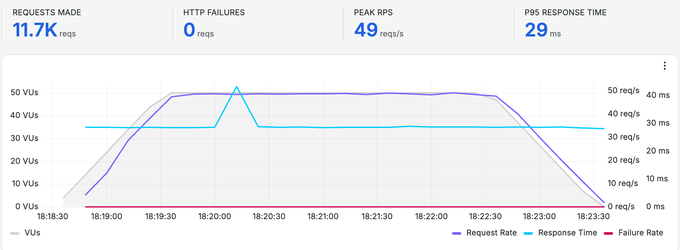
A VPS (Virtual Private Server) gives you dedicated resources instead of sharing a server with other websites, and it’s often used by developers or more technically savvy users. Scala manages the VPS for you, which is nice, and in my tests, it held a 29 ms response under load with 100% uptime.
Their hosting prices start at $14.95 per month and renew at $39.95. That is more than shared hosting, but far less than most managed VPS plans. The free SPanel control panel also saves you the usual cPanel license fee.
VPS hosting is definitely not ideal for small blogs or website. It is typically the step up for a growing site that doesn’t want the cost premium of fully managed WordPress hosting, but you still want the powerful server resources without hiring a SysAdmin.
Most other VPS providers charge extra for control panels like cPanel, which can add $15 to $48 per month on their own. SPanel is included free with unlimited accounts, and the SShield security layer (an AI-powered cybersecurity system) is bundled too.
You can add CPU or RAM from your dashboard in minutes, without migrating to a new server, and if you ever cancel, Scala refunds the unused time on your plan. For a first VPS, these details matter more than the sticker price.
Pros
- Managed VPS with dedicated resources
- Strong under load – 29 ms response, 100% uptime
- Free SPanel control panel saves the cPanel license fee
- Free migration and 24/7 expert support
Cons
- Pricier than shared hosting – $14.95, renews $39.95
- More than a simple site needs
- A VPS is a step up in complexity
ScalaHosting Performance Test Results
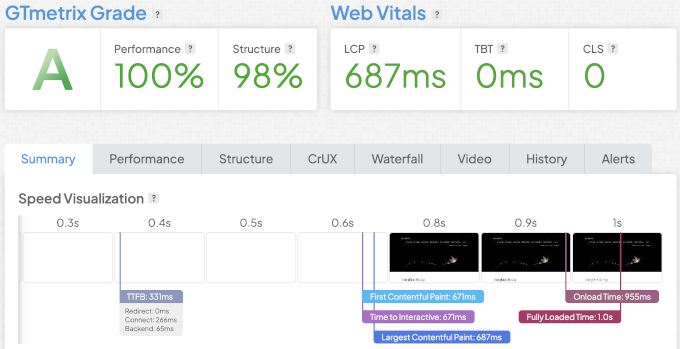
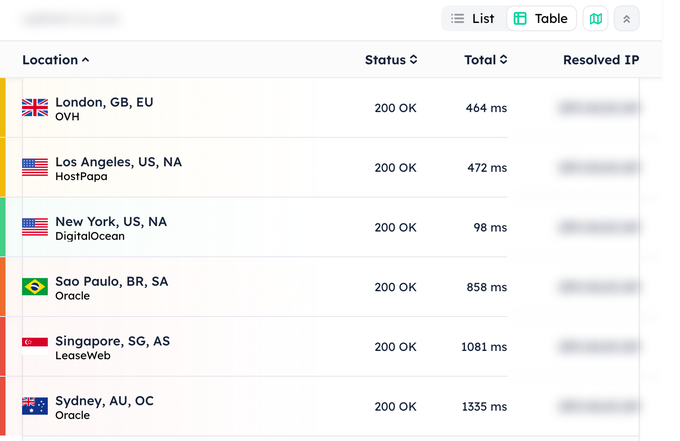
Performance summary: LCP 687 ms · Full page load 1.0 s · Under load 29 ms · Global 700 ms · Uptime 100%
Speed test:
My speed tests showed a page load time of 981 ms. However, our largest content loaded slowly.
Global response time:
The response time in North America was good but showed slower response times in other regions.
Stress test:
The stress test showed great performance with few fluctuations under stress and a P95 response time of 29 ms.
Uptime monitoring:
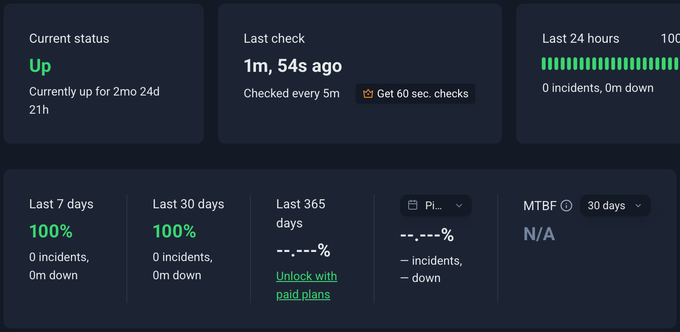
Our test site showed a 100% uptime during a testing period of 90 days.
My verdict: Considering the performance and flexibility, I found ScalaHosting to be a sensible step up when shared hosting starts holding you back. If your site has outgrown its plan, visit ScalaHosting.
6. Bluehost – Best for Beginners
Read my full Bluehost review · Bluehost coupon · See full test data
Bluehost is where I point a true first-timer. They’re an official WordPress.org recommended hosting provider, and the setup is the simplest of any host I tested.
For $2.99 per month you get room to grow: 10 websites, a CDN, and AI setup tools. It renews at $9.99, which is not the cheapest but fair for the value it offers.
I will be honest about speed. Bluehost was slowest among the featured picks, with a 881 ms LCP.
I tried to run my stress test on it, but I learned that their Cloudflare integration now blocks that kind of traffic. That is the same protection that shields real sites from attacks, so I could not push it the way I pushed the other host’s servers.
However, for a beginner who wants the simplest start and the official WordPress recommended pick, it does the job well.
Two details stand out once you read the plan pages closely. The entry plan includes 10 websites, where most hosts at this price allow one, so as a beginner, you get room to experiment without upgrading.
Secondly, the WordPress.org endorsement is not new. Bluehost has been on that list since 2005, longer than any other host.
Pros
- Officially recommended by WordPress.org
- Simplest setup for a first-time user
- 10 websites, a CDN, and AI setup tools for $2.99
- Reasonable renewal at $9.99 per month
Cons
- Slowest of my featured picks – 881 ms LCP
- No phone support on the entry plan
- Weekly backups only
Bluehost Performance Test Results
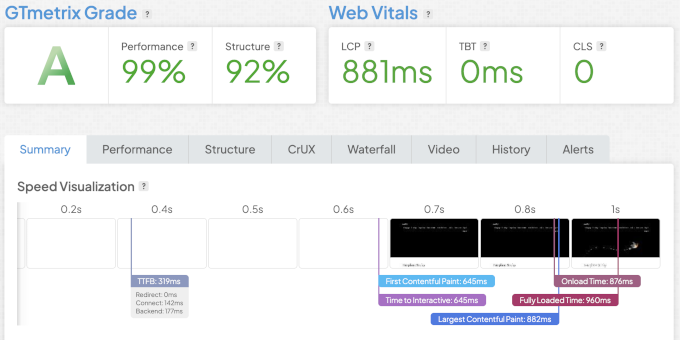
Performance summary: LCP 881 ms · Full page load 960 ms · Under load 28 ms · Global 398 ms · Uptime 99.91%
Speed test:
My speed test showed slow performance. Our largest content paint loaded in 881 ms along with rest of the page.
Global response time:
Global response time was good in North America and Europe, and slower in Asia and Australia, where Singapore took 711 ms.

Stress test:
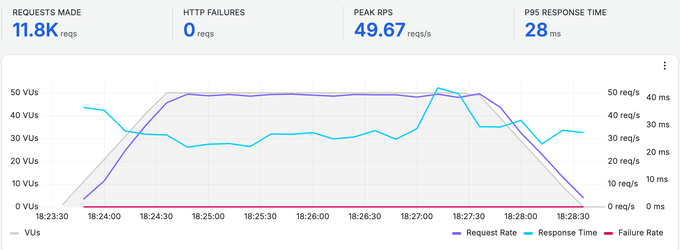
In the load test with 50 users at once, Bluehost held a 28 ms response with no failed requests.
Uptime monitoring:
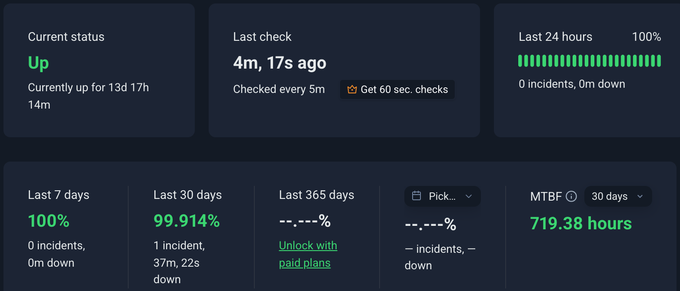
Our Bluehost test site showed 99.91% uptime over 30 days, with one outage of 37 minutes.
My verdict: Bluehost is a good choice for first-time WordPress users. It has the easiest onboarding experience, which helps new users quickly set up their first website. It is also one of the officially recommended hosting providers by WordPress.org. If you are building your first site, visit Bluehost.
7. DreamHost – Budget Alternative for Beginners
Read my full DreamHost review · DreamHost coupon · See full test data
DreamHost is my budget alternative for a first website. They’re affordable, honest about their pricing, and they’ve been around since 1997.
The value it offers is hard to argue with. Starting from $1.99/mo, it renews at $7.99 per month, the lowest of any host here, and that includes up to 25 websites, 25 GB of NVMe storage, unmetered bandwidth, and daily backups, where many budget hosts only back up weekly.
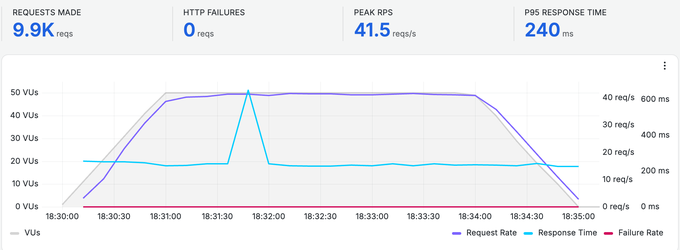
In my tests, DreamHost websites performed well with a 451 ms LCP and a 240 ms response under load. The results were reasonable rather than remarkable.
So I would not pick DreamHost for speed. However, if you want generous limits at the lowest long-term price from a host with a long track record, it is a solid choice for a first site.
Two things that I really like about DreamHost are that you can pay month to month on any plan, so you are not locked into a multi-year term to get a decent rate. And, they give free shared hosting to registered US nonprofits, which almost no other host does. This speaks volumes about their company values and that matters.
Pros
- Lowest long-term price – renews at $7.99 per month
- Generous limits – 25 sites, 25 GB NVMe, unmetered bandwidth
- Daily backups, not weekly
- Long track record since 1997
Cons
- Slower under heavy traffic – 240 ms response
- Fewer premium tools than pricier hosts
- No priority support tier
DreamHost Performance Test Results
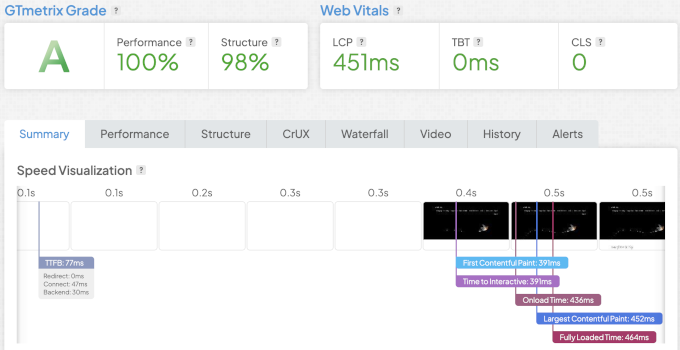
Performance summary: LCP 451 ms · Full page load 464 ms · Under load 240 ms · Global 542 ms · Uptime 100%
Speed test:
The largest contentful paint was 451 ms, and the full page loaded in 464 ms.
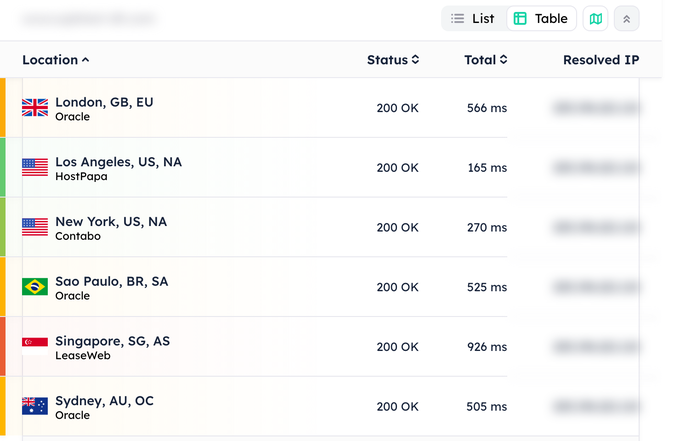
Global response time:
The response times were good in the US and Canada but slower everywhere else.
Stress test:
Our DreamHost stress test result showed a higher P95 response time (240 ms) with no failed requests.
Uptime monitoring:
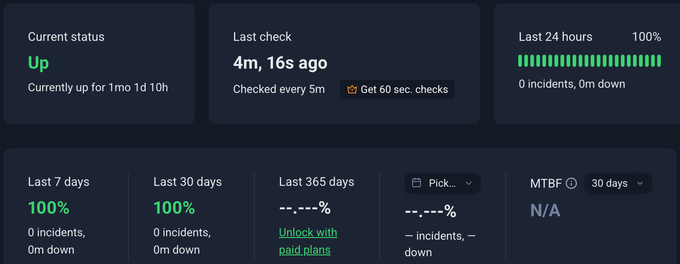
Our DreamHost test site showed a 100% uptime during the monitoring period.
My verdict: DreamHost offers a very balanced starting point for new users. It is not the fastest but makes up for it with the lowest long-term price and the most generous limits. If budget decides for you, visit DreamHost.
Why Trust WPBeginner?
We have helped millions of people build WordPress sites since 2009. I test hosts on real websites, not on their spec sheets, and we host our own sites on the companies we recommend. When a host blocks my test or slows down, I tell you. That honesty alone tells you that our research is original. These days most WordPress hosting review sites are simply sponsored listicles.
How I Test and Score Each Host
I want to share my testing process transparently with you.
I set up the same website on every host. Same theme, same content, same images. Each one ran on its own domain, with the cache warmed first.
Then I used the same tools for all of them. GTmetrix measures load speed, Grafana Cloud k6 sends 50 visitors at once for five minutes, Globalping checks response time from six cities, and UptimeRobot watches uptime around the clock.
These are independent tools that run on their own servers. I schedule the tests, but I cannot change what they measure. I run each GTmetrix test three times in a row and keep the third result. That way I measure every host with its cache already warm.
Every test site also carries the same small site icon. Without one, some hosts answered the browser’s icon request with a slow error page while others answered instantly, and that skewed the fully loaded times.
When I say a page loaded in a given time, I mean the LCP, the moment the main content becomes visible. That is the metric Google uses to measure speed and performance in their new Core Web Vitals metrics.
The fully loaded time, with every last script finished, is always longer, and you can see both on each test screenshot.
Then I turned the results into one number, the WPBeginner Score out of 100.
Performance is 80 percent of the score. It includes, how fast the page paints, how it holds up under load, how quickly it responds around the world, and its uptime.
Value is the other 20 percent. It includes: the renewal price, the starting price, what you get for the money, the support, and the plan limits. This is important for small businesses as not everyone can afford expensive hosting, and sometimes you don’t need the extra resources either depending on your use-case.
This is why a strong budget host can rank above one with a slightly higher speed score.
What Are the WordPress Hosting Requirements?
The WordPress tech stack is fairly simple and almost any good web hosting server can run WordPress. The basic requirements are:
- PHP version 8.3 or greater
- Database – MariaDB 10.11+ or MySQL 8.0+.
- HTTPS support with an SSL certificate
That is all it needs. If a host meets these, WordPress will run. I still suggest a host that keeps its servers updated and offers one-click WordPress install, automatic updates, and real support.
Which Type of Hosting Do You Need?
Speed and price matter, but the right WordPress hosting choice really depends on your business needs. Here is how I steer people, based on what they are building.
Shared hosting is for new and small sites. Your site shares a server with others, which keeps the cost low. I recommend it if you are launching your first blog, a portfolio, or a small business site with modest traffic. A local bakery, a photographer, or a small newsletter would all be perfectly fine on shared hosting. You can use providers like Hostinger, Bluehost, or DreamHost.
Managed WordPress hosting is for businesses and eCommerce websites. The host handles updates, security, backups, and speed for you. I recommend managed WordPress hosting if you run an online store, a membership site, or a business site that makes money and cannot afford downtime. You can use providers like Levamo or Rocket.net.
VPS hosting is for high-traffic sites with full-time developers. A VPS gives you dedicated resources and full control, so your site is not affected by its neighbors. I recommend it if you have outgrown shared hosting, run several busy sites, or you are a developer who needs root access. A managed VPS company like ScalaHosting handles the server upkeep, so you get the power without hiring a system admin.
The one thing I would avoid is free hosting. It often comes with ads, weak security, and the risk of a sudden shutdown. For a site that matters, it is not worth it.
Performance Comparison Charts
Page Load (LCP)
Lower is better. Orange bars are my featured picks.
Response Under Load (P95, 50 users)
Lower is better. Orange bars are my featured picks.
Global Response Time (6 regions)
Lower is better. Orange bars are my featured picks.
WordPress Hosting Complete Performance Comparison Data
My featured picks in order of my overall assessment, with each host’s WPBeginner Score alongside.
| # | Host | Best For | Price | Score |
|---|---|---|---|---|
| 1 | Hostinger | Overall | $2.69/mo | 77 |
| 2 | WordPress.com | Business | $1.38/mo | 79 |
| 3 | Levamo | Managed | $29/mo | 85 |
| 4 | SiteGround | Support | $2.99/mo | 44 |
| 5 | ScalaHosting | VPS | $14.95/mo | 53 |
| 6 | Bluehost | Beginners | $2.99/mo | 57 |
| 7 | DreamHost | Budget | $1.99/mo | 52 |
Every host I ran through the same tests, featured or not. This is the raw data for transparency. Lower is better for load, under-load response, and global response.
| Host | Load (LCP) | Under load (P95) | Global response | Uptime |
|---|---|---|---|---|
| Levamo | 388 ms | 40.46 ms | 89 ms | 100% |
| WordPress.com | 801 ms | 6.85 ms | 68 ms | 100% |
| Hostinger | 778 ms | 30.39 ms | 89 ms | 100% |
| SiteGround | 743 ms | 239 ms | 109 ms | 99.82% |
| Scala Hosting | 687 ms | 28.64 ms | 700 ms | 100% |
| Bluehost | 881 ms | 28.06 ms | 398 ms | 99.91% |
| DreamHost | 451 ms | 240 ms | 542 ms | 100% |
| Pressable | 530 ms | 6.66 ms | 194 ms | 100% |
| Kinsta | 632 ms | 51.69 ms | 148 ms | 100% |
| WP Engine | 670 ms | 57.3 ms | 176 ms | 100% |
| HostArmada | 822 ms | 131 ms | 710 ms | 100% |
| Rocket.net | 484 ms | Blocked | 125 ms | 100% |
The WPBeginner Score is out of 100. Performance is 80% of it, and value is the other 20%. Here is the full breakdown of what goes into each.
| Category | Factor | Weight |
|---|---|---|
| Performance (80%) | Page load (LCP) | 20% |
| Response under load (P95, 50 users) | 25% | |
| Global response time (6 regions) | 25% | |
| Uptime (30 days) | 10% | |
| Value (20%) | Starting price | 20% |
| Renewal price | 20% | |
| Features per dollar | 25% | |
| Support options | 15% | |
| Plan limitations | 20% |
Other Hosts We Tested
These hosts did not earn a featured spot, but I tested them too. Here is my honest one-line take on each.
- Rocket.net – It was fast on load and response, but its Cloudflare protection blocked my stress test.
- Pressable – It is a strong managed host owned by Automattic, the company behind WordPress.com. It held up well under load because it uses the same WP Cloud platform as WordPress.com.
- Hosting.com – It was formerly A2 Hosting. It is fine for a small site on a budget that wants reliable performance.
- HostGator – It is a dependable budget host and was the first host I chose when I started WPBeginner, but these days it’s quite a bit slower than my featured picks.
- HostArmada – It is an independent budget host with fast hardware, and it is worth a look for a small site.
- WP Engine – It is a well-known managed host. It is reliable, but pricier than my managed pick.
- Kinsta – It is powerful managed hosting that performed well, but the price is high and the plans cap your monthly visits.
What’s Your Primary Need?
Hostinger. It was fast in my tests (659 ms load) and gives you the most tools for the money: 3 sites, 20 GB, a CDN, email, and AI tools from $2.69 per month.
Best for: startups, small businesses, and anyone building their first serious website who wants the best value for the money.
Levamo. The fastest to paint in my tests (388 ms) and strong under load (40 ms), built on an enterprise Cloudflare CDN and Redis caching. It is made for traffic that would choke a cheaper host.
Best for: busy online stores, membership sites, and high-traffic blogs that make money and cannot afford to slow down.
WordPress.com. Fully managed and the cheapest entry at $1.38 per month. There is nothing to install, update, or maintain, so you can just write and publish.
Best for: bloggers, writers, and small businesses that want to run their business without the technical side.
SiteGround. The only pick where you can call a real person 24/7, on top of chat and tickets, all running on Google Cloud. It is the host I trust when someone needs a safety net.
Best for: beginners and non-technical owners who get nervous with tech and want a real person to call when something breaks.
Scala Hosting. A managed VPS with dedicated resources and a free SPanel control panel. It held a 29 ms response under load, and Scala runs the server so you do not have to.
Best for: growing sites and small agencies that have outgrown shared hosting but do not want to hire a server admin.
Still Not Sure? Take the Quiz
Instead of reading every comparison, let our recommendation engine do the work. Answer a few quick questions and it will point you to the right host for your situation.
My Verdict
Still deciding? Here is the short version.
For most people, I recommend Hostinger. It is fast, affordable, and gives you the most tools for the money. If you run an eCommerce store or high traffic website, Levamo handled heavy traffic better than anything else I tested. And if you are a first-timer who wants the simplest start, Bluehost is the official WordPress pick.
Whatever you choose, you have seen the data behind it. That is the point of this guide.
Changelog
I update this guide as the test data changes. Every update is logged here, newest first.
October 2026: I re-tested every host with the same test sites and the same visitor load. Global response time now comes from Globalping, which reports from six cities, instead of PageSpeedPlus. ScalaHosting raised a default request limit on our test site after we reported it, and the October stress result reflects that.
July 2026: Re-tested all hosts on their own custom domains, using the same website, then re-ranked them by the WPBeginner Score. Added the score methodology, the full comparison table, and this changelog.
WordPress Hosting FAQs
Does WordPress include hosting?
No. WordPress.org is free software you install on your own hosting account, so you still need a host to put your site online. WordPress.com is a fully managed service that includes the hosting for you.
What is the best cheap WordPress hosting?
DreamHost, Hostinger, and WordPress.com offer the best value in my tests. DreamHost has the lowest renewal price.
Which is the fastest WordPress hosting?
Levamo stood out as the fastest WordPress hosting provider in my tests, and it is our pick for the best managed WordPress hosting.
Can I move my site to a new host later?
Yes, you can move your WordPress site to a new host later. WordPress comes with a built-in export option and many WordPress hosts offer free or assisted migrations.
Do I need to buy my domain from my host?
No, you can buy your domain name from any domain name registrar and point it to your current hosting provider. Although many shared hosting companies offer free domain for a year with their WordPress hosting plans.
I hope this guide helped you find the best WordPress hosting for your needs. You may also want to see our guide on the must have WordPress plugins for business websites, and the ultimate WordPress security guide to protect your website.
If you have questions or feedback about WordPress hosting or my research, feel free to send me a message. I am always happy to help.
Margherita Pletti
I’m with Siteground, I subscribed 3 weeks ago. I found you guys while attempting to build a wp website for the first time. It’s about to be launched already, I’ve been very quick (pandemic gave me time…) but I couldn’t have if it wasn’t for you. When I found you I thought FINALLY TUTORIALS I CAN COMPLETELY UNDERSTAND!!!! You guys explained me in such a clear way WHAT IS HOSTING, WHAT IS DOMAIN NAME, WHAT IS WP, AND HOW A WEBSITE RELATES TO THESE THINGS, and you gave me most of the plugins I’m using. My website has all the functions I wanted! I was feeling very dumb before coming across you. Also, it seems to me that this website is really honest and doesn’t hide information like other blogging-tutorials clearly do. So thank you and for sure I’ll be happy to spread the word and support you.
Sumon
Personally i like siteground. Your every article is awesome. Thanks a lot.
Anita Mehra
Thank you for this amazing detailed post. It has provided me a proper guide in terms of hosting services
Nadia
This article was EXTREMELY helpful (and your site overall!), especially for someone who has felt overwhelmed with the whole process .of website building. Your guides/reviews/tutorials have helped combat the ‘overwhelm-frustration-give up’ cycle! Thank you!!
Maciel De La Cruz
I truly believe in this website not only for its ability to help those who are looking to help themselves but for its true simplicity in conveying in the information . A true DIY dream. Thank you Syed.
Editorial Staff
Glad you found the guide helpful Maciel
Admin
SANKET VIPUL DEDHIA
I have purchased Domain Name from GoDaddy and Hosting from SiteGround. The Support from the Siteground Team is absolutely swift. I got reply along with solution within 15 minutes of posting a query. I am very much satisfied with their support.
Joshua Owolabi
I have been a fan of Wpbegginer some years ago but I am not being able to start my blog because of lack of resources….but your articles are very good inspirational i want to ask if I can start with local hosting because I am from Nigeria.
Kudos to all Wpbegginer’s team
Editorial Staff
Yes, if you just want to learn WordPress, you can install WordPress on local host, but to make a website publicly available on the internet – you need to have web hosting.
Admin
Busari Dauda A
Nice article but I’m wondering why a2hosting is not on the list.
Editorial Staff
Hey Busari,
Thank you for the question, and we have answered this in our FAQ section of the post above.
There are literally thousands of WordPress hosting companies out there, and we simply can’t list them all here because that would create more confusion and cause choice paralysis for non-techy readers. Our recommendations are the top providers for those starting out
Admin
Nguyen Huy
Thank you for your information.
Lou
I love Bluehost, very user-friendly and easy to set up!
Harish
Great article. A detailed comparison for choosing the right hosting platform
Ben Joe
Thanks for this thorough analysis. Huge help to guide anyone aright. Truly appreciate your team’s efforts. Well done.
Peter Xu
Siteground has been fantastic to use!
Victoriano Truque Quesada
A good very practical article
Deborah Dakota
I’m always impressed with how non-jargony and easy to understand your writing is. Thank you for your great work!
Huzaifa Afiazuh
Nice blog post with information…..I will go with Bluehost hosting
Kamran Meyo
I think Bluehost is best for beginner to startup
Smit
Nice article! Keep up the good work
Sean
nice overview of the hosting providers!
Belinda Castle
I’m fairly new to WP Beginner but in that short time they have completely migrated my wordpress blog from .com to .org completely free and without hassle. Since then they have continuously supported me. This article has helped me with my new site enormously. Without it I just wouldn’t have known what’s what in self-hosted blogging. Thank you
Rahul
Thanks for the comprehensive list. I prefer siteground !!
Heather Jensen
Thanks for offering all this great advice to us newbies! Syed, you’re a great mentor for Wordpress!
Dilip K
The test was super perfect. I really appreciate being a new blogger. Thank you so much.
Shubham Sawarkar
Saving lots of time to find best solution for Wordpress. Thanks WPBeginner…
Rob Thijssen
Finally some info about this in plain English! Thank you!
Alex
Exactly the info I’ve been desperately looking for!
Shivangi
Great article. Loved the post. Sitegroubd is great suggestion. Thnk you so.much
Rushikesh
Thank you for the detailed info. Really helps to understand the pros and cons of different WP hosting providers
Nino Chung
I wouldn’t have known about siteground if it wasn’t for wpbeginner.
M Fahad Zahid
I was planning to start a new blog, for which I was looking for the best hosting, with most features and less price. After reading this post, I decided to go for Siteground Hosting. Hope it would work fine for me
Raymond Cubeta
This is very helpful! Thank you for sharing this wonderful resource!
Naresh Devineni
Really insightful article. Loved it! What’s your opinion on LiquidWeb hosting?
Editorial Staff
Liquid Web is a great high-end WP hosting company. We have them listed in our best managed WordPress hosting list alongside other premium hosts like WP Engine.
Honestly if you have the budget to spend more for managed WP hosting, then we highly recommend it.
For most small business users though: Bluehost or SiteGround in this list is a great place to start (without overspending).
Admin
Tanvir Hasan
Very helpful article. Thank you for this!
Wijnand
Great article, I definitely have to look into my own (European) hosting company again..
Ingrid de Bree
Totally and 100% satisfied with Siteground hosting. Awesome customer service, especially for non-techies like me!
Vishal Verma
Nicely curated list. I prefer Bluehost for hosting as they are industry leaders with a proven track record of amazing services and customer support.
Shoaib
Does woo commerce plug in work without ssl certificate?
Editorial Staff
You won’t be able to accept online payments without SSL. All hosting companies that we recommend in our guide offer free SSL certificate.
Admin
Saket Jajodia
I have been using HostDime and DO for years now but this help me understand more better, how to go about it in future.
Harsha
Awesome Post. Details are so good and learned a lot from your website. Keep up the good work. Appreciate your efforts.
Lakshya Kaushik
Nice article, covering all the parts. Tried siteground, it is good but renewal price is too much for beginners. There are no servers in india.
Vincent Nyagaka
My favorite is Hostgator but I will try SiteGround since you have moved there and I trust your recommendation.
Kyle Wilson
Siteground all the way. Because of this blog post I recently moved from A2 hosting to Sitegrounds hosting. A magical place!
Jawahar Kaushal
I was and will be a big follower of Siteground. Not only my own website and my clients testing website runs on Siteground but I also suggest my clients to move to Siteground.
Being a Developer, I am trying to make hosting world a better place. So far, I have moved 50+ clients from GoDaddy to Siteground hosting. The former is one of the worst service provider as far as hosting and support is concerned whereas the latter is a dream to work with
Vishal
Thanks for the useful information as always. Any feedback on a2hosting and namehero? My understanding is they are faster, providing staging environment, and reasonably priced…
Editorial Staff
Hey Vishal,
SiteGround, Bluehost, and others in this list also provide staging. SiteGround recently moved to Google Cloud to offer even faster hosting (this is available to all customers).
Bluehost comes with their own caching options as well to help with speed.
As for price, Bluehost offers the best value for getting started. SiteGround is premium hosting that’s why their pricing is a bit higher, but we highly recommend it if you can spend a few extra $$.
Admin
Jitendra Gursingh
Great article. Thanks for the insights
Noshad Ali
I have always loved the content of wpbeginners. It is the ultimate help for finding WordPress help and support. I highly appreciate all of the useful resources and videos.
Thank you for making WordPress easier for us.
Sarthak Agarwal
Thanks! This article is really useful
Liz McFletcher
Lots of great information!
Anuj
Love your content but personally had many bad experiences with Bluehost
Mava Kakana
Thank you for the in-depth analysis of Wordpress hosting services. I will come back to this resource for future projects.