



We’ve been using Uncanny Automator on some of our sites for a while now to connect our plugins and automate the repetitive work that used to consume our time.
If you’ve ever used it, you know how powerful it is. You can make WooCommerce talk to WPForms, trigger emails from form entries, post to Slack automatically and the list goes on.
But here’s the honest truth: that power comes with a learning curve. Building a recipe means picking the right triggers, actions, and conditions, then wiring them all together correctly. And even once you know your way around, you’re still jumping between tools to write content, pull reports, and figure out why an automation stopped working.
That’s the problem Uncanny Agent set out to solve.
Basically, if you can describe what you want to automate in plain English, you can do it by using Uncanny Automator. You can also get answers to any questions you have. It’s like having an AI assistant right inside your WordPress dashboard.
We’ve been putting it to work across our sites, and after spending real time with it, we wanted to share our experience so you can decide if it’s right for you.
Here’s our complete Uncanny Agent review.
Uncanny Agent Review: Why Use it in WordPress?
Most AI tools for WordPress have a major knowledge problem.
They understand WordPress in theory, but they have no idea about your specific WordPress set up. If you ask ChatGPT or Claude how to update a precise WooCommerce setting, you’ll likely get a list of instructions that sound plausible, but don’t match your actual WordPress version, database layout, or WordPress theme.
Uncanny Agent solves this exact problem by adding an AI assistant directly to your WordPress dashboard.
It’s available as part of Uncanny Automator’s AI + Automation plans, which means it can use all of Automator’s integrations and features.
That’s a great start, but it doesn’t stop there.
Instead of acting as a closed sandbox, Uncanny Agent can securely access and analyze your entire WordPress website. This includes identifying which plugins you’ve installed, your published content, user lists, WooCommerce orders, and system settings.
Unlike some competing AI tools, Uncanny Agent can perform real actions on your site, not just suggest them. You can use it to generate blog posts, change your system settings, pull analytics from your database, and more.
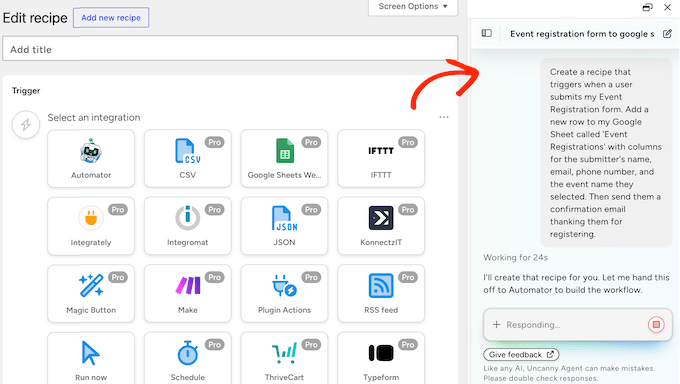
It also integrates seamlessly with Uncanny Automator’s recipe builder, so you can describe the recipes you want to build using natural language.
The result is tailored advice and automated actions that are relevant to your exact website, rather than the generic, best-guess scenarios you get from a chatbot that’s never seen your site.
If you want to test the underlying workflow engine first, you can download the free version of Uncanny Automator directly from WordPress.org. This free tier gives you access to a generous selection of core triggers and actions, so you can start building time-saving automation workflows without spending anything.
However, it’s important to note that the AI assistant isn’t included in the free plugin. You’ll need to upgrade to a paid AI + Automation plan in order to unlock the Uncanny Agent features we’ll be exploring throughout this review.
Uncanny Agent Review: Is It the Right AI Assistant for You? (My Honest Experience)
To give you a complete picture of Uncanny Agent, we spent several weeks running the AI assistant on a fully populated staging site.
Our test environment included popular plugins like WooCommerce, LearnDash, AIOSEO, MonsterInsights, and WPForms, so we could see how Uncanny Agent behaves in a realistic WordPress setup with multiple active integrations.
Throughout the testing process, we deliberately pushed the assistant beyond simple chat queries. We asked it to draft long-form content, build complex multi-plugin automations, pull live analytics straight from our database, generate functional code snippets, and update core site settings.
In this Uncanny Agent review, we’ll cover the features we returned to most often during daily work, along with a few limitations that are worth knowing about. By the end, you’ll know whether Uncanny Agent is the right AI assistant for your WordPress site.
1. Natural Conversations Inside Your WordPress Dashboard
Uncanny Agent lives entirely inside your WordPress admin dashboard. You don’t need to open a separate browser tab, authenticate with a complex third-party API, or constantly copy and paste data between different windows. The entire conversation happens right where you’re already working.
To start interacting with the assistant, click the ‘Uncanny Agent’ tab near the bottom of the admin menu. That opens an interactive chat panel.
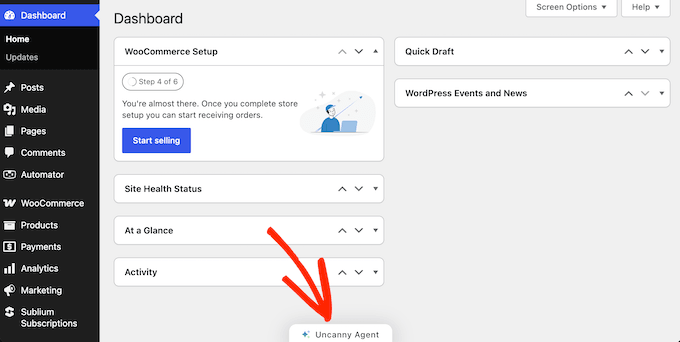
When you launch Uncanny Agent for the first time, you’re greeted with a standard onboarding message: “What can I help you with today?”
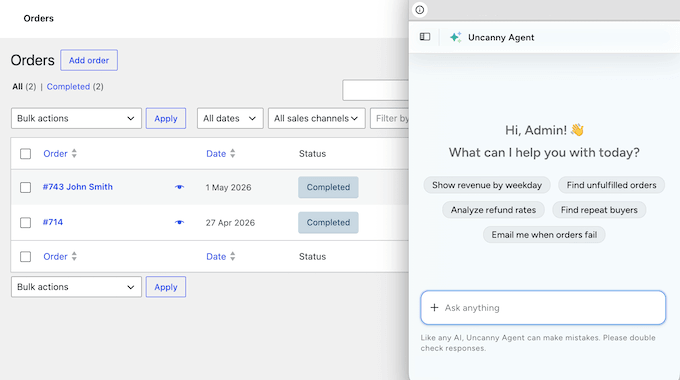
The real value emerges as you click around your WordPress dashboard. Uncanny Agent dynamically changes its behavior, automatically suggesting relevant conversation starters based on the specific page you’re viewing.
For example, on your WooCommerce orders page, Uncanny Agent understands the context and suggests prompts like “Show revenue by weekday,” “Find unfulfilled orders,” or “Analyze refund rates.”
Instead of forcing you to figure out how to write complex queries, it anticipates exactly what you might need on the fly.
How We Use It: When testing a new plugin or theme feature, we often have technical questions about how it works or how it interacts with our existing setup.
Instead of losing momentum by heading over to the plugin’s documentation or support forum, we open Uncanny Agent and ask the question directly. Because the assistant can analyze our actual site environment, the responses are significantly better than one-size-fits-all documentation.
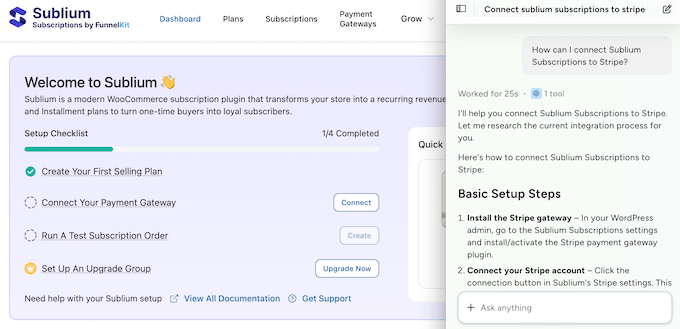
Our Honest Review: Leaving WordPress just to ask an AI for help breaks the workflow. Uncanny Agent removes that context switch and creates a unified workspace that understands your site’s setup, so you get instant, relevant help without ever having to click away.
2. Instant Answers from Your Live Site Data
One of the strongest features of Uncanny Agent is its ability to pull accurate answers directly from your live WordPress site data.
Instead of relying on a generic language model that guesses or references outdated web content, Uncanny Agent connects directly to your site’s backend database.
It can actively read, summarize, and analyze data across your entire setup. This includes WooCommerce sales logs, LearnDash course completions, user activity records, and form submissions.
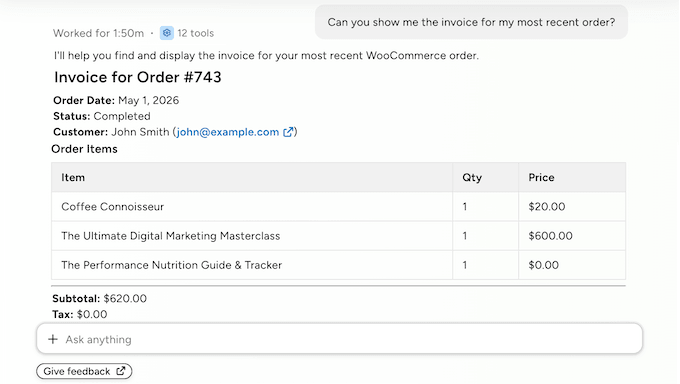
During our testing, we asked Uncanny Agent a wide range of real-world questions. How many orders came in yesterday? Which products are selling best month over month? How many students finished Course A last week?
The answers came back in seconds, with the actual numbers from our staging site. Instead of forcing us to navigate through multiple admin menus or build custom filtering rules, Uncanny Agent read our live database and displayed the exact answer inside the chat interface.
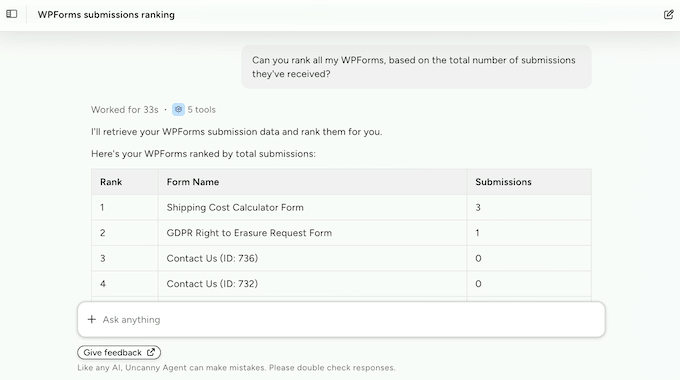
It doesn’t stop at raw numbers. Uncanny Agent can turn that data into easy-to-understand business insights covering sales trends, customer demographics, content gaps, SEO opportunities, and course completion rates.
To see how it handles practical insight requests, we tested it with a few specific prompts: “Which blog posts get the most traffic but the fewest comments?”, “What’s the average time customers take to complete Course A?”, and “Which products do customers most often buy together?”
Uncanny Agent came back with the answers straight away, using the actual numbers from our staging site rather than generic marketing recommendations.
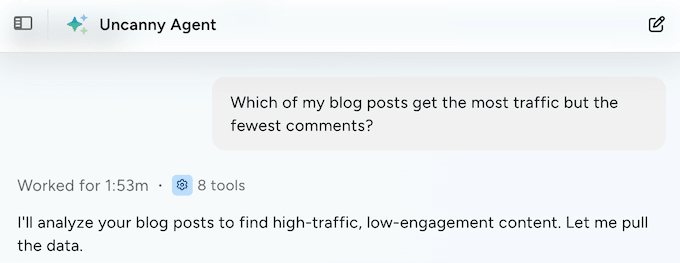
How We Use It: Pulling performance reports has traditionally meant jumping between multiple plugin dashboards, installing separate analytics solutions, or exporting messy CSVs and sorting them in Excel. With Uncanny Agent, we skip all of that.
Whenever we need a quick health check on a site’s performance, or we’re working on content planning and product strategy, we open the chat panel and ask for the data in natural language.
Our Honest Review: If we had to narrow Uncanny Agent down to the single feature that makes it worth the investment, this is it.
Being able to use plain language to get immediate, accurate analytics for your online store, membership site, or learning management system (LMS) is an enormous time-saver. Reporting shifts from a tedious administrative task into a natural, conversational interaction with a tool that understands your business data.
3. An AI That Doesn’t Just Advise — It Runs Your Site
This is the feature that separates Uncanny Agent from most other WordPress AI plugins. Most AI tools are entirely passive — they tell you how to do something, leaving you to click through endless admin screens to execute it yourself.
Uncanny Agent breaks that pattern by doing the work for you.
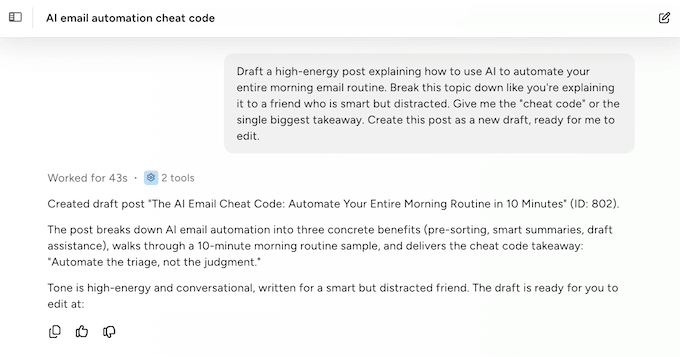
You can ask it to draft a blog post, generate a new WooCommerce product page, add a specific user to a LearnDash course, embed a contact form onto a live landing page, change permalink structures, modify navigation menus, update site settings, or adjust global theme options, all through chat.
Giving an AI direct write access to your site sounds risky, but the execution is careful. Uncanny Agent never makes silent changes under the hood.
Instead, it proposes the exact action it intends to take, displays a clear breakdown of everything that will change, and waits until you manually confirm before going ahead.
For non-technical users, this is a real productivity boost. Instead of memorizing where a specific toggle lives or hunting through complex sub-menus, you type what you want to change, and Uncanny Agent finds the right tool to get it done.
How We Use It: To test its limits, we asked Uncanny Agent to draft a holiday promotion and generate a relevant featured image. It produced a complete draft, used AI to create a unique featured image, uploaded the asset to our media library, and queued the entire post as a draft ready for review.
We still needed to edit the text to match our brand voice, but having the AI build the structure, set up the post layout, and manage the media upload saved a meaningful chunk of time.

We also asked Uncanny Agent to simultaneously update our site’s tagline, switch the global timezone, and add a new link to the primary navigation menu. It handled all three changes in a single confirmation.
Our Honest Review: Plenty of tools make big promises about automating your day-to-day work, but giving AI full control over your site is usually a recipe for disaster.
Uncanny Agent’s approach striles the right balance between automation and user control. It’s a safe, genuinely helpful addition to your daily workflow.
💡 If you use the AI to change your permalink structure, remember to set up 301 redirects with an SEO plugin like All in One SEO (AIOSEO) so you don’t lose your search rankings.
4. Keep Your Customer Data Private — No External Chatbots Required
For most generic AI tools, getting useful answers means copying and pasting your private business data into an external chat window. That raises real questions about where your customer information ends up, how long it’s stored, and whether it could quietly be used to train future AI models.
Uncanny Agent takes a different approach.
Because the assistant runs natively inside your WordPress dashboard, your data doesn’t leave your environment the way it would with a generic external AI chatbot. There’s no need to manually export spreadsheets, paste customer lists into a third-party browser tab, or hand over sensitive information to a separate service just to get an answer.
On top of that, Uncanny Agent only accesses the specific data it absolutely needs to fulfill your individual request. If you ask about a recent WooCommerce order, it won’t go scanning through unrelated form submissions or user records for no reason. This principle of minimum necessary access is a deliberate design choice, not an afterthought.
Your site data is also strictly private and is never used to train public AI models. Your customer details, sales figures, member emails, and proprietary content stay yours alone.
How We Use It: On our staging site, we deliberately tested Uncanny Agent with prompts that pulled customer purchase history, form submission data, and user activity logs. At no point did the data appear to leak into a wider external system or get stored anywhere beyond the immediate working session.
For anyone handling regulated information or sensitive customer details, that clear boundary is reassuring.
Our Honest Review: This privacy-first approach is exactly why we feel comfortable recommending Uncanny Agent to less technical users and small business owners working with real customer data.
Pasting WooCommerce orders or member emails into a generic AI chatbot has always felt risky, and Uncanny Agent removes that worry entirely. You get the power of modern AI without compromising on data control.
5. Build Automations Across 220+ Plugins Using Straightforward Language
Uncanny Automator’s recipe builder is incredibly powerful, but its visual drag-and-drop interface comes with a learning curve. Even when you’re familiar with the editor, building an advanced multi-plugin workflow takes time.
With Uncanny Agent, you can skip the manual mapping. Instead of clicking through dropdown menus to find the right triggers and actions, you describe the exact automation you want using natural language, and the AI builds the entire recipe for you.
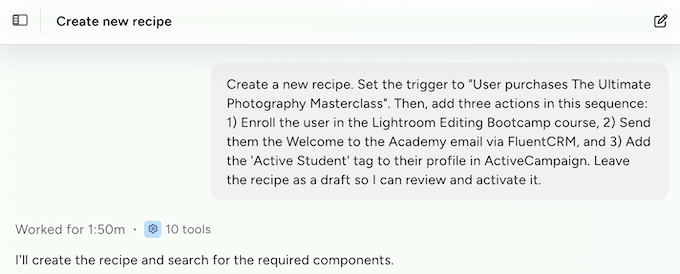
To see how it handles a real-world scenario, we asked Uncanny Agent to perform a fairly heavy-duty task: “Enroll customers in Course A when they purchase Product B, then send them a welcome email and tag them in my CRM.”
The assistant mapped out the full workflow instantly. It selected the WooCommerce purchase trigger, added three consecutive actions (enrolling the user in LearnDash, firing off the email, and passing the customer relationship management (CRM) tag), and configured the necessary background conditions.
All we had to do was review the work and activate the recipe.
Uncanny Agent also has complete access to Uncanny Automator’s library of over 220 integrations. This means it can query plugin data, execute one-off operational tasks, or configure complex multi-step recipes across an enormous range of WordPress tools.
How We Use It: We’ve used Uncanny Automator for a wide range of tasks across completely different plugins.
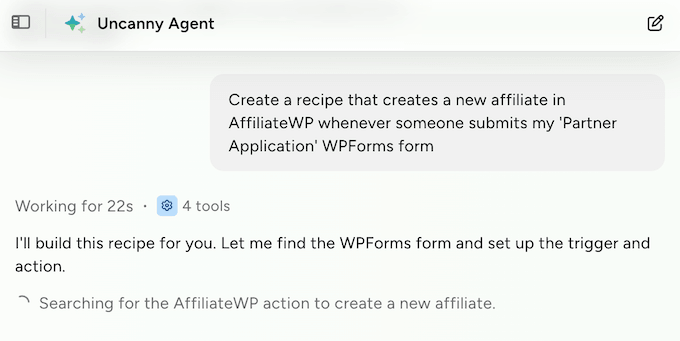
We’ve pulled sales data from Easy Digital Downloads to see which products frequently sell together, audited our AIOSEO settings to pinpoint missing meta descriptions, and built a workflow that automatically creates a new affiliate profile in AffiliateWP the moment a potential new partner completes our application form.
Our Honest Review: For complex, multi-step automations, describing what you want to achieve in one or two sentences is dramatically faster than building a recipe manually.
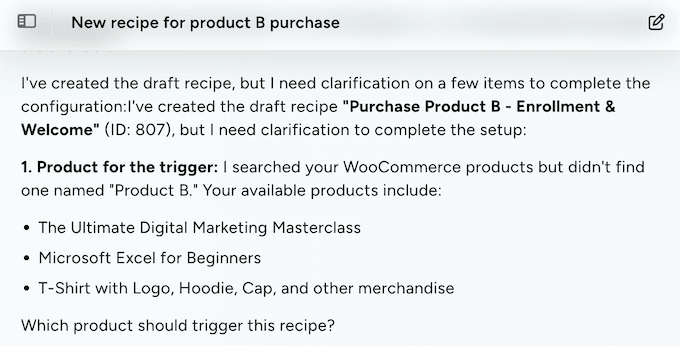
Uncanny Agent also handles ambiguity better than we expected. When our initial requests were too vague, it didn’t make risky assumptions or push blind changes through — it paused and asked smart clarifying questions before proceeding.
If you manage client sites or run a complex platform with dozens of plugins, the combination of natural-language recipe building and 220+ integrations is the strongest reason to choose Uncanny Agent.
6. Generate Content That Matches Your Site’s Voice, Not a Generic Template
Unlike some competing writing assistant software, Uncanny Agent has direct access to your WordPress content database.
Instead of writing text that sounds cold and robotic, you can ask Uncanny Agent to analyze your recent posts first to match your blog’s specific tone. You can also point it toward an existing product page you like and ask it to mirror that exact layout for a new launch.
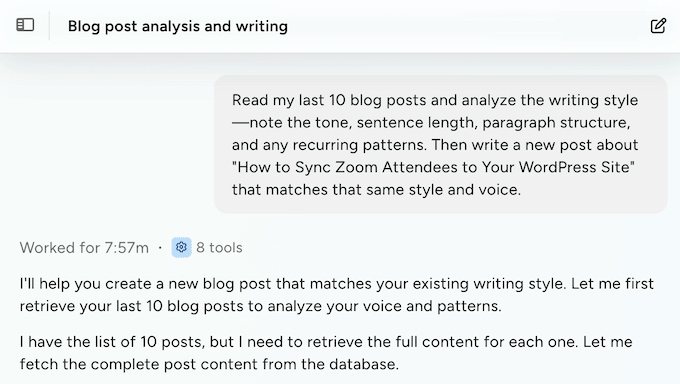
You’ll still need to edit the final text, but Uncanny Agent gives you a much stronger starting point than a generic AI writer. Instead of staring at a blank screen trying to write the perfect prompt, you can build on what’s already working — your own website’s content and brand voice.
How We Use It: We put this to the test on a sample blog containing around 30 live posts written in a very specific, conversational voice.
We told Uncanny Agent to scan the published articles for style guidelines, then asked it to draft an entirely new post on a related topic. The result sounded like it belonged on the site. Uncanny Agent accurately replicated the established sentence structure, paragraph length, and tone of our previous work.
Our Honest Review: The ability to pull directly from your live site context is what makes this stand out. Telling Uncanny Agent to study your existing content before it generates a single word changes everything.
It’s a meaningful upgrade over a standard AI writer. Just remember that you still need to manually review and edit the content before publishing.
7. Custom Code Snippets Built for Your Exact Setup
Need a custom tweak? Uncanny Agent can write HTML, CSS, JavaScript, and PHP snippets on demand.
But here’s the real magic: unlike general AI tools like ChatGPT or Claude, Uncanny Agent can see exactly which plugins are active on your site and query your live WordPress environment through specialized internal tools.
So you can ask Uncanny Agent to write snippets for highly specific tasks — adding a custom field to your LearnDash course, modifying a WooCommerce checkout step, or extending a Gravity Forms entry.
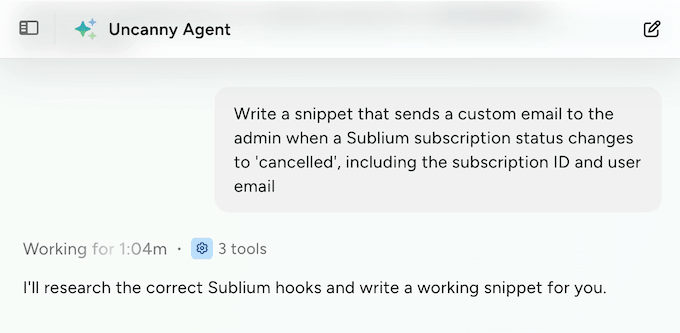
Instead of having to read through technical documentation, Uncanny Agent researches the correct hooks and generates code that fits your exact setup.
After that, you can easily paste the snippet into a tool like WPCode, or add it directly to your child theme.
Out of those options, we highly recommend using WPCode because it has built-in smart snippet validation. If the AI happens to write faulty PHP code, WPCode will automatically deactivate it so you don’t accidentally break your site.
How We Use It: When we’re experimenting with WordPress code snippets, asking Uncanny Agent is much faster than researching the technical documentation ourselves. The AI handles the boilerplate, so we can focus on reviewing and adapting the output.
Our Honest Review: If you don’t write code, this feels like a real superpower. It’s the closest thing to telling WordPress what to do using straightforward language.
Even if you’re a developer, Uncanny Agent saves a lot of time on hook lookups and database schema cross-referencing. The honest caveat is that you should still review the output before deploying anything to production, and for high-stakes changes, it’s still worth having a developer take a look first.
8. Diagnose Site Errors and Plugin Conflicts Through Conversation
Uncanny Agent reads your current site context in real time. That includes your active admin screen, pending post drafts, running Automator recipes, and core plugin metadata.
But here’s where Uncanny Automator gets smarter: it can also cross-reference your live environment with official documentation and other online resources. This means you can ask highly specific questions about your current setup (such as how LearnDash tracks course progress under the hood) and get accurate, context-aware answers back instantly.
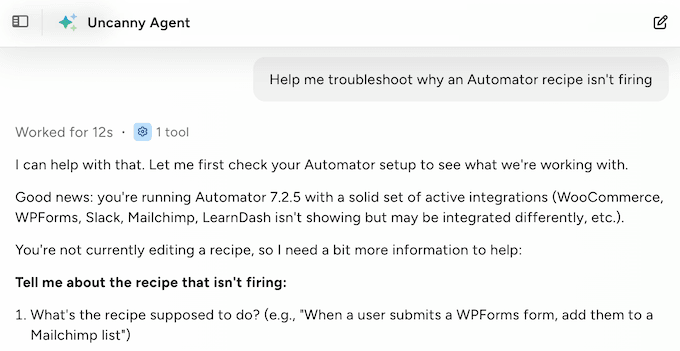
When things go wrong, this context awareness turns the assistant into a built-in debugging partner.
Instead of blindly searching Google or wading through outdated stack overflow threads, you can use Uncanny Agent to interpret confusing error messages, research known plugin conflicts, and tell you exactly where to look first.
How We Use It: When we’re troubleshooting a broken Automator recipe or tracking down an unexpected integration error, asking Uncanny Agent is much faster than digging through forums.
Instead of guessing what might be wrong, we ask Uncanny Agent to inspect the recent Automator logs. It scans the error codes, isolates the failing action, and points out exactly which token or webhook configuration is causing the bottleneck.
Our Honest Review: If you’ve ever stared at a confusing error screen and wondered where to start, this is a must-have feature. It feels like having a senior developer sitting right next to you, pointing you toward the right answer.
Keep your expectations realistic, though. For deep-seated system issues like tracing a specific payment gateway script that’s failing, you’ll typically still need to examine the source code at some point.
Uncanny Agent Review: Community and Professional Support
Getting help with Uncanny Agent is seriously easy, because the assistant lives natively in your dashboard. You can ask the AI directly about its own setup, error logs, or behavior right inside the chat window.
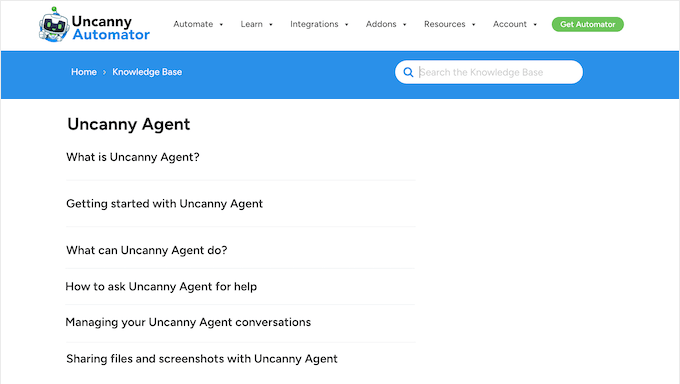
If you need a bit more technical guidance, then Uncanny Automator has a massive, searchable knowledge base packed with highly detailed documentation. They even have an entire section dedicated to Uncanny Agent, covering everything from initial setup right through to optimizing your natural-language prompts.
Meanwhile, if you want to get help directly from the experts, all premium AI + Automation plans come with professional support. According to their website, the Uncanny Automator team actively monitors incoming tickets and aims to respond to issues within a single business day.
If you do decide to submit a support ticket, it’s always a smart idea to provide as much context as possible. Writing out a clear description of what you tried, what happened, and what you expected helps the support team understand your issue, so they can respond appropriately.
For more tips, please see our guide on how to properly ask for WordPress support.
Uncanny Agent Review: Pricing and Plans
Uncanny Agent isn’t sold as a standalone plugin. It’s bundled into Uncanny Automator’s paid AI + Automation plans, which means one subscription gives you the AI assistant, the recipe builder, and the 220+ plugin integrations together as a single platform.
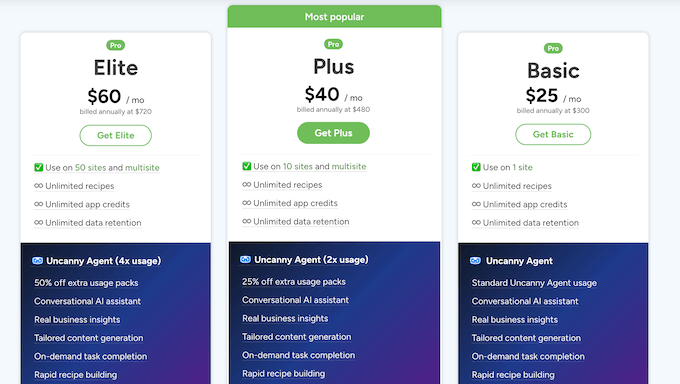
That bundling matters more than it sounds. The alternative is usually stitching together separate tools to get the same workflow. For example, you might use a generic AI chatbot for the conversations, a separate cloud automation service for the workflows, and a third tool for the WordPress connection.
Multi-tool setups like that typically run $40 to $70 per month once you add everything up, and you still have to manage credentials, webhooks, and accounts across three different platforms.
Uncanny Agent starts at $25 per month on the AI + Automation Basic plan (billed annually). That makes it one of the most affordable ways to get true AI-driven WordPress management running on your site, with everything inside a single WordPress dashboard and no separate accounts to maintain.
If you want to test the underlying workflow engine before committing to a paid plan, you can install the free Uncanny Automator plugin directly from WordPress.org.
The free tier includes a generous selection of core triggers and actions, so you can build real, time-saving automations without spending anything.
The AI assistant isn’t included in the free version (you’ll need an AI + Automation plan to unlock Uncanny Agent) but the free plugin is a solid way to see whether Uncanny Automator’s underlying engine fits how your team works.
Uncanny Agent Review: Is It the Right AI Assistant for Your WordPress Site?
To sum up this Uncanny Agent review, we’re confident it’s the most capable AI assistant available for WordPress today. Nothing else we’ve tested combines live site awareness, powerful automation, and natural-language conversations into a single tool that runs directly inside your WordPress dashboard.
What stands out most is Uncanny Agent’s ability to connect AI to your actual site. Being able to ask which affiliate partners are driving the most conversions inside AffiliateWP, or pull the exact drop-off points for your OptinMonster campaigns, is a meaningful shift in how reporting feels day-to-day.
We also appreciate that you can build recipes using natural language rather than mapping things out in Uncanny Automator’s drag-and-drop builder every time. This removes the learning curve that used to be a significant barrier to setting up advanced site workflows.
There are a few limitations to keep in mind. Uncanny Agent is a premium feature that only ships with the paid AI + Automation plans.
If you’re running a simple hobby site or starting a brand-new small business website with a limited budget, you won’t be able to access the conversational assistant using the free version of Uncanny Automator.
But if you’re looking to turn your site’s reporting, content creation, and multi-plugin workflows into a natural conversation, Uncanny Agent is an absolute must-have.
Uncanny Agent Review: Frequently Asked Questions
Adding conversational AI to your WordPress dashboard is exciting, but it also brings up valid questions about safety, cost, and how the assistant handles your data.
Here are the questions we hear most often from WordPress site owners considering Uncanny Agent.
Does Uncanny Agent change my site without asking?
No. Giving an AI tool direct write access to your website can sound scary, but Uncanny Agent uses a strict, built-in approval workflow and never makes silent changes under the hood.
The assistant proposes the exact action it intends to take, displays a clear breakdown of everything that will change, and waits until you manually confirm before going ahead. You always have complete control over what happens on your site.
Is my customer data safe when I use Uncanny Agent?
Yes. Because Uncanny Agent runs natively inside your WordPress dashboard, your data doesn’t leave your environment the way it would with a generic external AI chatbot.
The assistant only reads the specific data it absolutely needs to fulfill your prompt, and your site data is never used to train public AI models. Your customer details, sales figures, member emails, and proprietary content stay yours alone.
Do I need to know how to code to use Uncanny Agent?
No. The whole point of Uncanny Agent is that you describe what you want in natural language, and the AI handles the technical work behind the scenes.
You can draft posts, build automations, change site settings, and even generate code snippets without writing a line of code yourself. The advanced features like code snippets and theme customization are available when you want them, but you don’t need them to get value out of the assistant.
Can I choose which AI model Uncanny Agent uses?
Yes. Uncanny Agent integrates with all the leading AI providers (OpenAI, Anthropic, Google Gemini, Cohere, Mistral AI, DeepSeek, Perplexity, and xAI) so you can pick the model that fits your budget, your data preferences, and the workload you’re running.
Switching between providers doesn’t require reinstalling anything or rebuilding your existing setup.
Will Google penalize content generated by Uncanny Agent?
No, as long as the content is reviewed and edited before publishing. Google doesn’t automatically penalize AI-generated content, but it does penalize thin, low-quality, or unhelpful content.
Because Uncanny Agent can pull from your existing site voice and produce drafts that already reflect your established content style, you start with a much stronger foundation than a generic AI writer would give you. As always, treat AI output as a first draft, edit for accuracy and helpfulness, and publish content your readers will genuinely benefit from.
We hope this Uncanny Agent review helped you decide whether it’s the right AI assistant for your WordPress website. Next, you may want to check out our small business owners’ guide to AI, or see our expert pick of the best AI social media post generators.
If you liked this article, then please subscribe to our YouTube Channel for WordPress video tutorials. You can also find us on Twitter and Facebook.

Uncanny Agent User Reviews
Please share your Uncanny Agent review to help others in the community.