



If you’ve ever tried to run a subscription business on WooCommerce, you’ll know how complicated it can be.
I’ve watched countless store owners try to juggle one plugin for recurring billing, another for failed payment recovery, a third for analytics, and something extra to stop customers from canceling.
It always ends the same way: a bloated, slow site, a poor customer experience, and a massive technical headache for you.
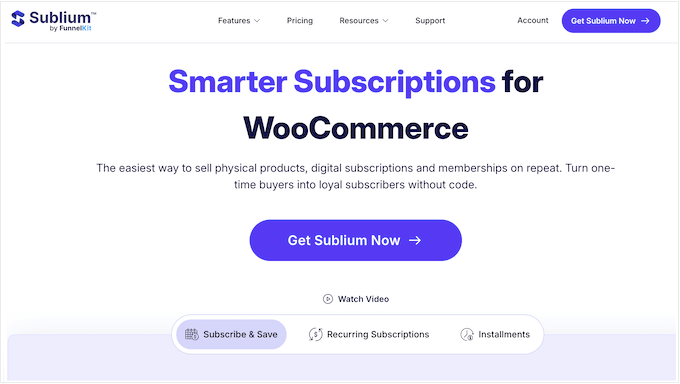
That’s why I was so curious to check out Sublium, a new all-in-one WooCommerce subscriptions plugin.
Sublium’s promise is refreshingly simple: one plugin that handles billing, recovery, retention, analytics, and customer self-service, so you don’t need a dozen separate add-ons to make everything work.
In this review, I’m sharing my real-world experience testing Sublium since its launch. I’ll walk through every major feature, share what I genuinely like (and what I didn’t), and help you decide if Sublium is the right WooCommerce subscriptions plugin for you.
Sublium Review: Why Use It in WordPress?
Typically, setting up subscriptions in WooCommerce is a real headache. You need one plugin for billing, another for handling failed payments, a separate tool or Google Analytics plugin for reporting, and another to set up a customer portal.
Straight away, this is a complicated setup to manage. Plus, it makes troubleshooting a nightmare if a renewal ever fails and you need to dig through multiple different systems to find the root cause.
Sublium aims to solve this problem by letting you manage the entire subscription lifecycle from a single, unified dashboard. This includes completing the initial checkout and onboarding process, right through to preventing churn and cancellations on your established subscriptions store.
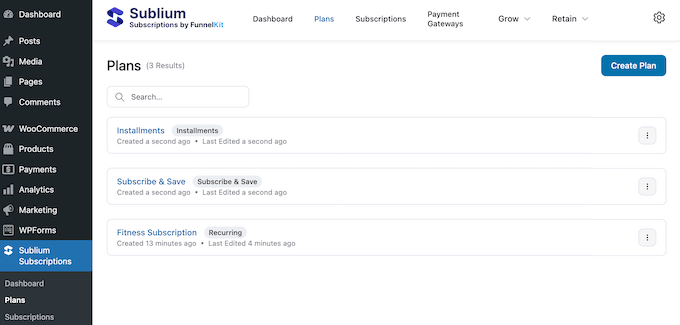
This WooCommerce plugin promises to transform any standard product into a recurring revenue machine.
Whether you want to offer traditional monthly services, Subscribe and Save plans for physical goods, or installment-based payments for high-ticket items, Sublium is designed to handle it all without requiring a dozen separate add-ons.

If you want to try the plugin without spending a cent, you can download the Lite version of Sublium from WordPress.org. It includes many essential features, allowing you to set up recurring billing and manage all your subscribers with ease.
However, the Lite version does add a 2.9% platform transaction fee on all your subscription revenue.
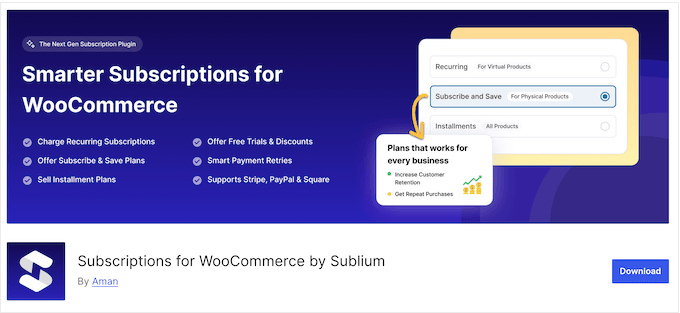
To remove this transaction fee and keep more of your profits, you’ll almost certainly need to upgrade to the premium plugin once you have an active customer base.
Beyond saving on fees, the premium version of Sublium unlocks high-impact features including advanced analytics, retention tools, and automated payment recovery to help grow your business.
Sublium Review: Is It the Right WooCommerce Subscriptions Plugin for You?
For this Sublium review, I really put the plugin to the test, by using real-world scenarios to see how it actually performs under pressure. With that in mind, in this section I’ll dive deep into Sublium’s core features and share my honest take on each one.
1. The 5-Minute ‘Zero to Selling’ Onboarding Experience
Often, one of the biggest hurdles with subscription or membership plugins is the initial configuration. It’s sometimes difficult just to know where to start.
Sublium tackles this problem head-on with a guided setup wizard that launches the moment you activate the plugin.
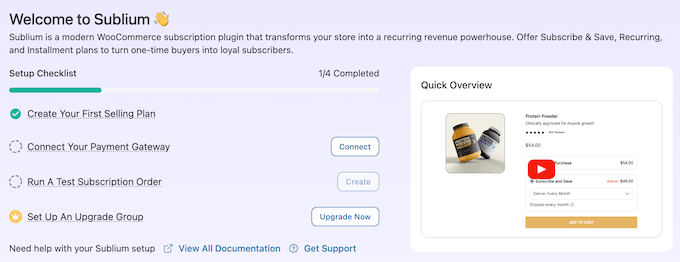
The wizard is genuinely helpful because it forces you to answer the ‘big’ configuration questions right away. You’ll decide on billing intervals, whether to offer free trials, and how to handle renewals.
In my experience, skipping these basic steps is the #1 reason why so many subscription sites fail during the second month. I love that Sublium’s wizard forces you to build a solid foundation before you go live.
How I Use It: To test this process, I ran the setup wizard on my staging site from start to finish. Within under five minutes, I’d published my first $19/month digital subscription.
My Honest Review: The Sublium setup wizard does an excellent job of covering the essentials. It gets you from ‘zero to selling’ much faster than any of the other subscription plugins I’ve reviewed.
However, this is clearly a ‘Quick Start’ tool. It doesn’t walk you through more advanced configurations like creating custom cancellation flows. You’ll still need to set those up manually within the main Sublium dashboard.
2. Deep Integration with Major Payment Gateways
When it comes to recurring revenue, your payment gateway is the most important part of the puzzle. Sublium supports Stripe, Square, and PayPal along with major credit and debit cards.
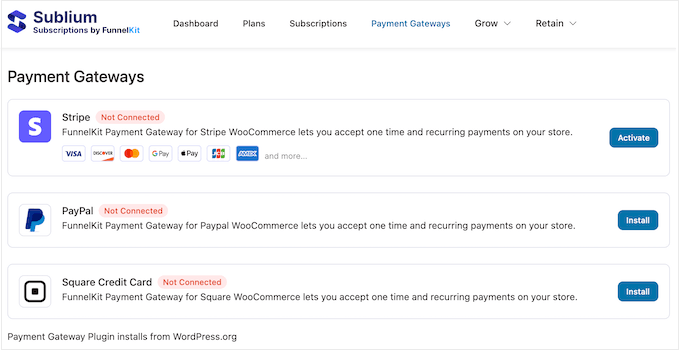
In my opinion, Stripe is the gold standard for subscription businesses because it offers the deepest support for ‘card updater’ workflows. If a customer gets a new card from their bank, then Stripe will often update the billing info automatically without the customer having to do anything.
With that in mind, I always recommend enabling Stripe for Sublium.
Pro Tip: If you’re still choosing a provider, check out our comparison of Stripe vs. PayPal or our list of the best WooCommerce payment gateways for more information.
How I Use It: On my staging site, I connected Stripe and ran a full test renewal cycle. The entire process was incredibly smooth. Sublium captured the card, stored the secure token correctly, and scheduled the next renewal charge.
I also tested the reporting, and I was pleased to see that the payment data synced perfectly with Sublium’s built-in analytics.
My Honest Review: Sublium’s Stripe integration works seamlessly straight out-of-the-box. Features like securely saving card details for future charges and failed charge recovery are deeply integrated, making Sublium a true ‘set it and forget it’ solution.
3. Recurring Revenue Engine (Sell Memberships, Downloads, and More)
Sublium is built entirely around recurring digital subscriptions, so this was the first feature I decided to explore.
With Sublium, you can quickly and easily create all kinds of recurring subscriptions and then customize the billing frequency, offer a free trial to boost conversions, add a one-time setup fee, and much more.
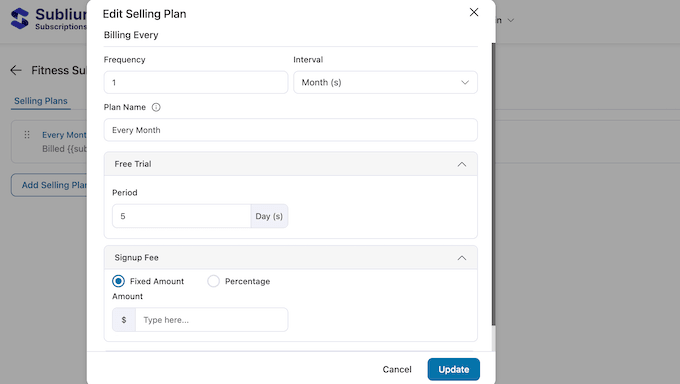
Whether you’re selling membership access, online courses, software licenses, or simple downloadable resources, Sublium promises to streamline the entire process.
Customers pay on your chosen schedule, and the plugin automatically handles everything in the background: renewal scheduling, payment capture, automated email notifications, and even revoking access if payment fails or the customer cancels their subscription.
This seamless approach turns your site into a streamlined, professional recurring revenue system, rather than a messy collection of disconnected plugins.
Plus, Sublium is incredibly easy to set up. Simply create a standard WooCommerce product, and then attach your recurring subscription model.
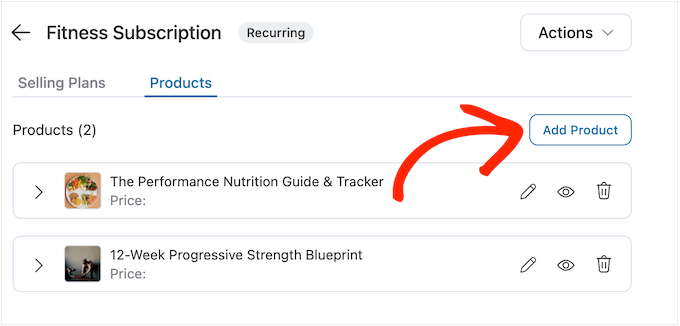
How I Use It: I tested this by creating a sample online course with a monthly billing cycle, and the automation worked perfectly. New signups could access the course instantly, without requiring any manual input from me.
My Honest Review: Sublium’s recurring engine is very reliable. If you need a ‘set it and forget it’ system for digital products, Sublium is as solid as they come.
4. Variable Subscription (Monthly, Quarterly, or Yearly)
Most subscription plugins limit you to one price and one interval per product.
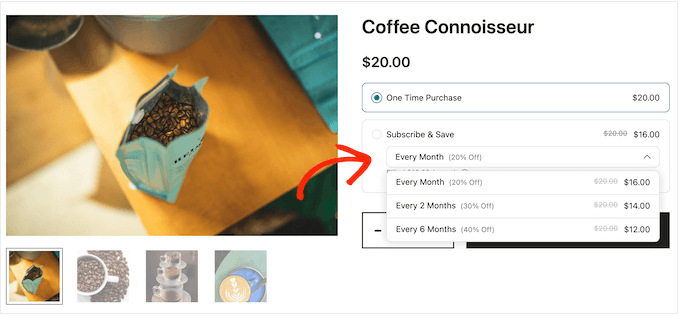
By contrast, Sublium lets you create variable subscription products. This means you can offer monthly, quarterly, and annual options on the same listing, each with its own price and configuration settings.
The flexibility doesn’t stop there.
You can also choose between fixed-term subscriptions (which end automatically after a set number of payments) or evergreen subscriptions (which continue until the customer cancels).
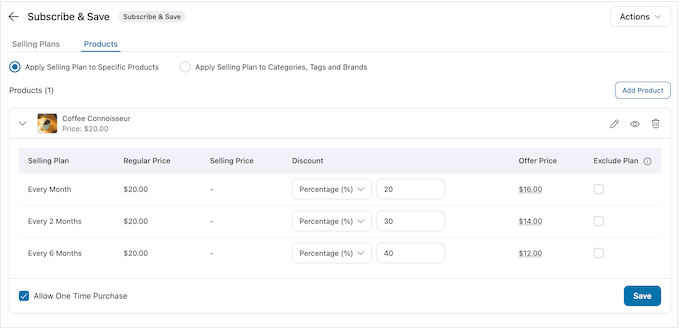
How I Use It: While exploring this feature, I created a coffee membership subscription that had three clear tiers: every month, every 2 months, and every 6 months.
Sublium displayed these as selectable options on the product page, and handled all the different billing intervals perfectly.
My Honest Review: Variable subscriptions are where many plugins fall short, so the fact that Sublium handles this so well out-of-the-box is impressive. It’s a robust feature that feels very polished.
The only thing currently missing is quantity-based tiered pricing, such as charging per user.
5. Free Trials and Signup Fees
Offering a free trial is one of the most effective ways to turn curious visitors into loyal subscribers. With Sublium, you can add a free trial to any product on your online store.
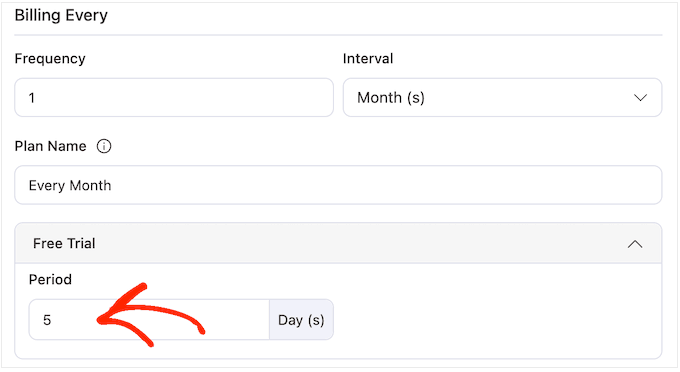
You have total control over the trial period – whether it’s a few days, weeks, or months.
Sublium also supports one-time signup fees. These are perfect for services that require upfront work, like a professional consultation, a setup fee for a membership site, or even a physical welcome kit for a subscription box service.
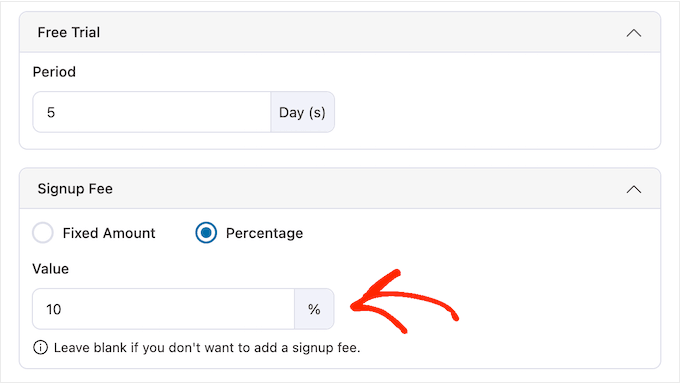
My Honest Review: I added a 14-day free trial to a membership product, and Sublium gave subscribers instant access, while scheduling the first charge for day 15.
The free trial setup is clean, intuitive, and works exactly as advertised. This is the perfect example of a feature that just works.
6. Amazon-Style Subscribe & Save
If you sell physical goods, then Sublium’s Subscribe and Save feature is a game-changer. It’s designed specifically for consumables that shoppers buy on a predictable schedule, like coffee, supplements, or skincare.
With Sublium, you can offer a recurring delivery plan right alongside a standard one-time purchase, usually while offering a small discount to reward the shopper’s commitment.
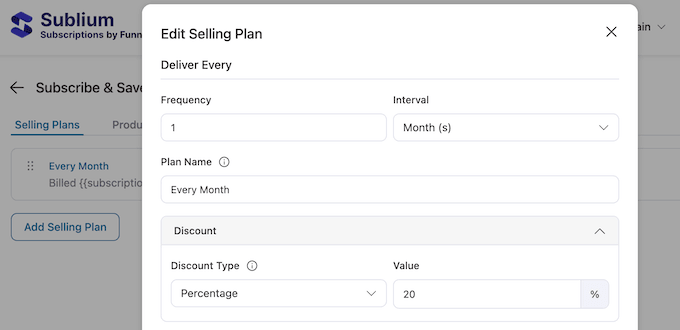
On the product page, customers see both options side by side.
They can then choose a one-time purchase at full price, or sign up for a recurring subscription with a built-in discount.
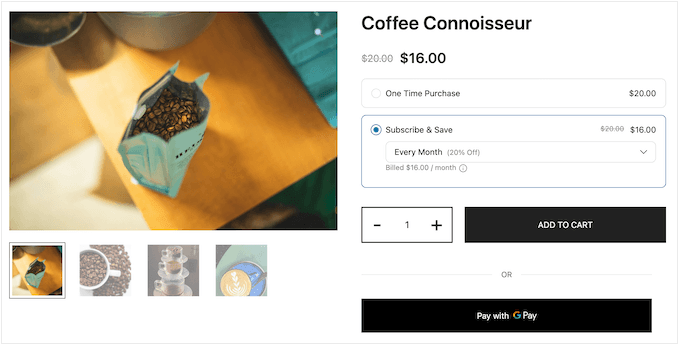
How I Use It: I set up a Subscribe and Save option on a test product priced at $20 and offered a 20% discount for monthly delivery. Sublium displayed the subscription option clearly on the product page, and it created each recurring order with the discount applied automatically.
My Honest Review: Too many WooCommerce store owners ignore the power of subscriptions. In my experience, it’s one of the easiest ways to increase your average customer lifetime value (CLV).
With Sublium, you can add a Subscribe and Save option to any product within minutes. If you sell any replenishable products or items that customers might reorder regularly, you’re essentially leaving money on the table without Subscribe and Save.
7. Interest-Free Payments Without Third-Party Apps
If you sell high-ticket items like premium online courses, coaching packages, or agency services, then Sublium’s ‘Installment Plans’ feature is a must-have. This lets customers split a large purchase into smaller, more manageable scheduled payments.
For example, a $600 course can be paid as 3 monthly installments of $200, which Sublium charges automatically based on a set schedule.

It’s important to note that this is different from Buy Now, Pay Later services like Afterpay or Klarna.
With Sublium, you’re the lender. The customer pays you directly, and your payment gateway (Stripe, PayPal, or Square) handles the recurring charges. This means no third-party credit checks and no extra fees from a lending partner.
For creators and coaches, this is a brilliant way to lower the barrier to entry without reducing your prices, all while giving customers a predictable payment schedule.
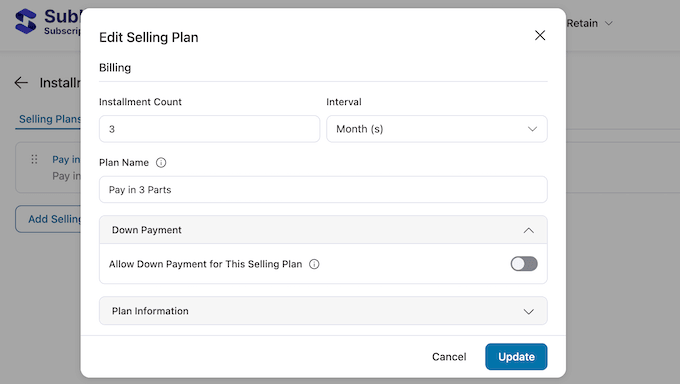
How I Use It: I set up an installment plan for a $600 test product, structured as three monthly payments of $200. Sublium gave the customer access as soon as they made their first payment.
I was also impressed by Sublium’s customer portal, which clearly displayed the upcoming payment schedule. By pairing a clear dashboard with automated reminders about remaining installments and due dates, Sublium takes the guesswork out of subscription management.
My Honest Review: Sublium’s installment feature is smartly built and incredibly easy to deploy.
However, you should be aware of the risk: if a customer’s card fails partway through the plan, you’ve already delivered the product but haven’t collected the full balance.
Because of this, I recommend mainly using installment plans for digital services or coaching, where you can easily pause their access if a payment fails.
8. Give Customers Control: Pause, Skip, and Resume
The Customer Portal is one of Sublium’s standout features. From their account page, customers can easily manage their subscriptions. They can pause, skip, reschedule, or even cancel their subscriptions without ever needing to contact you.
This kind of self-service is critical for a growing business. Subscription-related support tickets are time-consuming and frustrating for both you and your customers.
Every “please pause my subscription” email you manage to avoid, represents a real time-saving.
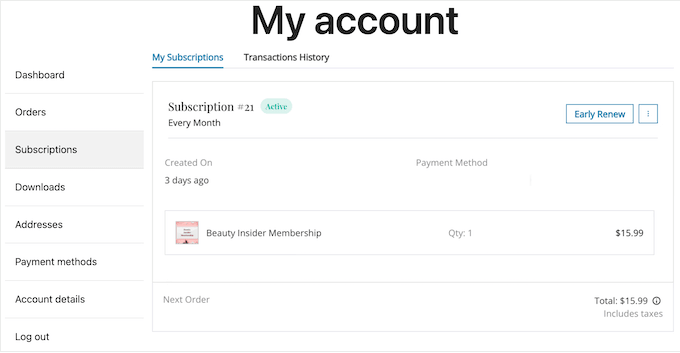
Beyond just pausing, customers can update their payment methods, change shipping details, view their subscriptions, and see their entire purchasing history at a glance.
How I Use It: I logged into a test customer account and walked through every available action: pausing, resuming, skipping a month, and updating a credit card. Everything worked seamlessly without requiring any input from the site admin.
My Honest Review: The Sublium portal is one of the most comprehensive I’ve tested. In particular, if you sell physical consumables where “pause for vacation” is a common request, then this is a must-have feature.
9. Automatic Revenue Recovery
It is incredibly frustrating when a happy customer accidentally loses their subscription because their payment fails due to an expired card, a decline, or hitting a daily limit. This scenario is known as passive churn (or involuntary churn), and it’s a major threat to your revenue.
Sublium includes a powerful payment recovery system designed to save those sales automatically.
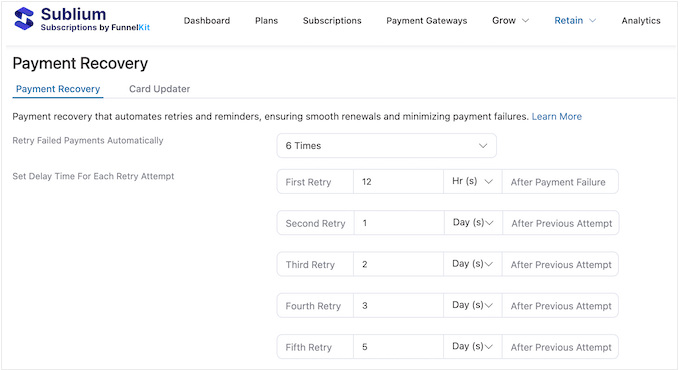
When a renewal fails, Sublium doesn’t just give up. Instead, it follows a professional recovery workflow where it:
- Automatically retries the charge on a schedule you can completely customize.
- Sends the customer an email with a secure one-click card update link.
- Escalates the issue to admin alerts if the subscription is at risk of being canceled.
The standout feature here is the one-click card updater. Customers can click the link in their email and update their payment information instantly without having to remember a password or log in.
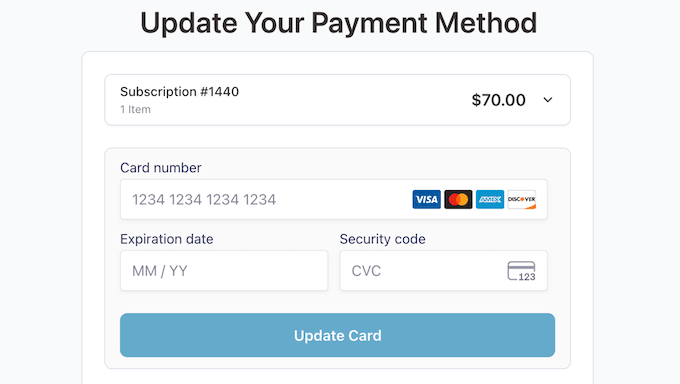
How I Use It: To see this feature in action, I simulated a failed renewal using a Stripe test card designed to decline. Sublium caught the failure straight away, scheduled a retry for three days later, and sent out the recovery email.
I tested the update link from a separate browser where I wasn’t logged in, and it worked perfectly. I updated the card, and the subscription was restored to ‘Active’ status immediately. It’s an incredibly smooth experience for the customer.
My Honest Review: This is easily my favorite feature in Sublium. If you have more than a few dozen subscribers, expired-card recovery can have a genuine, noticeable impact on your bottom line.
Honestly, the one-click card updater alone will likely pay for the cost of your Sublium subscription.
10. Frictionless Upselling: Moving Customers to Higher Tiers
Most subscription plugins treat every product as an isolated purchase. Sublium changes the game with Upgrade Groups, which allow you to define a clear hierarchy for your tiers, like Basic, Pro, and Enterprise.
This feature turns a flat catalog into a clear upgrade path. It encourages natural growth by making it easy for customers to move to higher-value plans as their needs change.
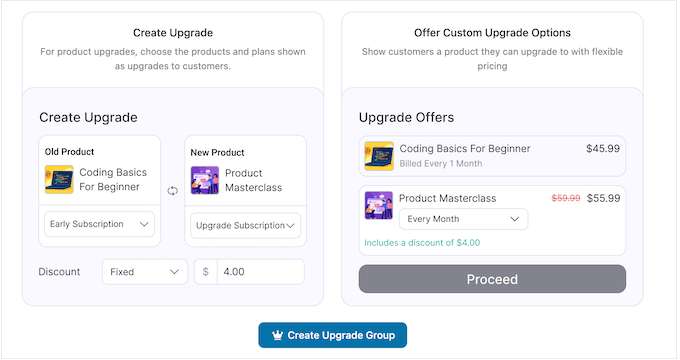
You can trigger these automated prompts so they appear at logical points in the subscriber journey, and push users towards a higher tier.
How I Use It: To test the real world experience, I upgraded a test customer right in the middle of their billing cycle.
The math was spot on. Sublium calculated the remaining days, charged the customer the exact difference, and unlocked the new tier features immediately. It’s a completely frictionless experience for the user, while also helping you avoid the stress of manual calculations.
My Honest Review: Upgrade Groups are easily one of Sublium’s most underrated features. In my experience, the fastest way to boost your revenue is to make the upgrade process completely frictionless.
While Sublium’s implementation is a bit simpler than what you’d find in enterprise billing tools like Recurly, in my opinion it’s more than enough for 99% of WooCommerce stores.
11. Smart Cancellation Flows
Let’s face it: most subscription tools make it too easy for people to quit. Sublium takes a much smarter approach with its Cancellation Flows.
Instead of letting a customer walk away, Sublium interrupts the process with a customizable sequence designed to win them back.
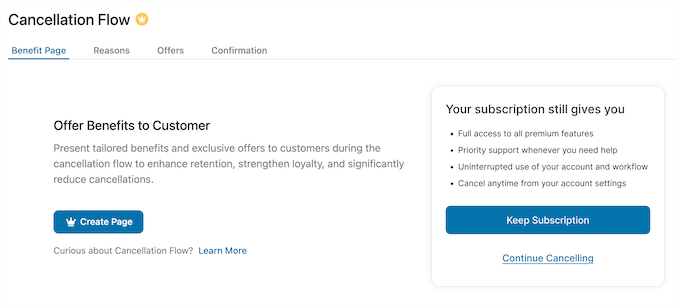
In the Sublium interface, you can visually build a step-by-step Cancellation Flow that includes:
- Benefit Reminders: Quickly recap what the customer will lose if they leave.
- Feedback Surveys: Learn exactly why this is person is leaving, through a custom survey.
- Retention Offers: Offer them a perk such as a temporary discount, a subscription pause, or downgrading to a cheaper plan.
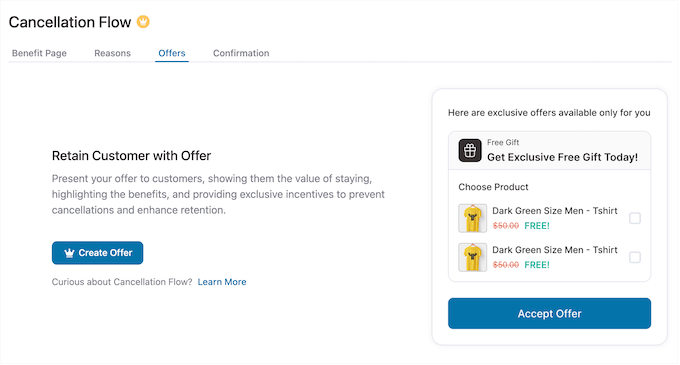
The best part? All this is conditional.
If a customer answers the survey telling you that they’re leaving because they’re going on vacation, you can offer to temporarily suspend billing and access. This is how the world’s biggest companies keep their churn rates low.
How I Use It: I built a three-step cancellation flow on my test site: a benefit reminder, a reason survey, and a final retention offer.
When I selected ‘too expensive’ as my reason for leaving, Sublium presented me with a ‘pause for 30 days instead’ option. I accepted the offer, and Sublium kept my test subscription active without requiring any manual input from a site admin.
This kind of cancellation flow is an incredibly powerful way to save sales you would otherwise have lost.
My Honest Review: Cancellation flows are a powerful tool for boosting your recurring revenue, but you have to be careful not to frustrate your users. There’s a fine line between helpful and annoying, and Sublium’s flow builder is so flexible that it’s easy to overdo it.
I’d encourage you to keep your flows short: a benefit reminder, a single retention offer, and then a ‘confirm cancellation’ button.
If you force customers through too many screens, they will get frustrated and simply ask their bank to block the charge (known as a chargeback). Too many chargebacks can result in hefty penalty fees for your store, and payment processors like Stripe may even shut down your account.
12. Analytics Dashboard: Tracking MRR, ARR, Churn & More
Standard WooCommerce reports are great for seeing how much you sold yesterday, but they don’t give you the full story.
Sublium’s analytics dashboard goes far beyond standard sales reports. It tracks the specific metrics that matter most for a recurring revenue business, such as MRR (Monthly Recurring Revenue), Annual Recurring Revenue (ARR), churn rate, and subscriber growth.
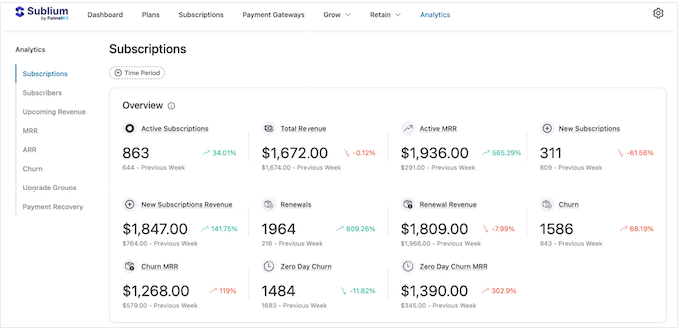
Sublium then presents all this data visually with clean charts and date-range filtering, so you can spot trends before they become problems and make data-backed decisions to grow your business.
How I Use It: On my staging site, I ran sample data through the dashboard and pulled reports across different timeframes. The MRR, ARR, and churn rates updated in real-time as I added test subscriptions.
What I found most useful was the churn breakdown. It clearly separates voluntary churn (customers who chose to leave) from involuntary churn (failed credit cards).
My Honest Review: Having this level of detail built directly into the plugin is a huge advantage. Usually, subscription site owners have to pay for expensive third-party tools like Baremetrics or Churn Buster to get this level of insight. Sublium includes them right in your WordPress dashboard.
If you want to stop guessing and start growing your subscription business based on real data, Sublium’s analytics dashboard is a must-have.
13. Customizable Transactional Emails
Subscription emails are often the only way customers interact with your brand after they’ve signed up. That said, emails are a big part of your brand experience.
Sublium includes a user-friendly email builder so you can ensure all your messages are clear, professional, and on-brand.
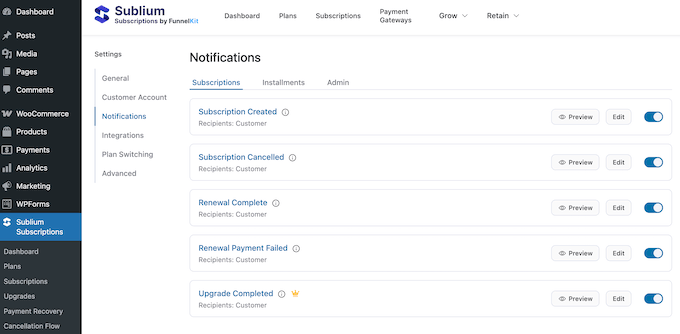
It features mobile-optimized templates to ensure your emails look great on phones, dynamic merge tags to automatically insert customer details, and full branding controls for your logos and colors.
How I Use It: I used the builder to overhaul the default welcome email. Within a few minutes, I added my brand colors, a high-quality header image, and a clean three-block layout.
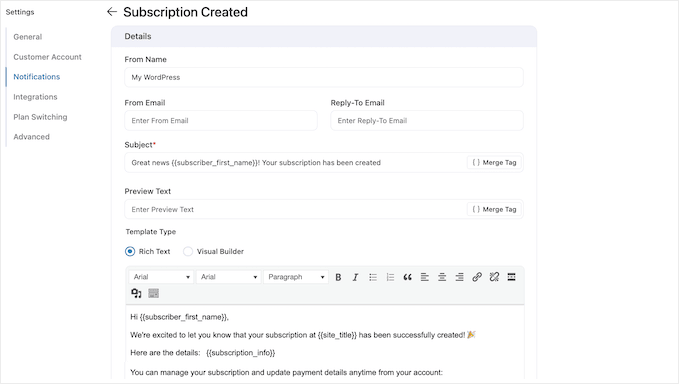
The drag-and-drop interface felt very responsive, and the mobile preview feature was a lifesaver. It caught a layout issue with my image that would have looked broken on a smartphone.
My Honest Review: For a built-in tool, Sublium’s email builder is excellent. While it isn’t as advanced as a dedicated platform like Klaviyo or ActiveCampaign, it has everything you need to create transactional subscription emails.
While I wouldn’t recommend replacing your entire email marketing service with Sublium, I’d definitely use it for every email tied directly to subscription events. It’s far better than the default WooCommerce emails and helps your business look professional from day one.
14. Detailed Activity Logs
Sublium keeps a detailed record of every single subscription event. Each entry includes a precise timestamp along with who triggered the event, such as a customer, an admin, or the Sublium system itself.
You can even export these logs to a CSV file for external auditing or record-keeping.
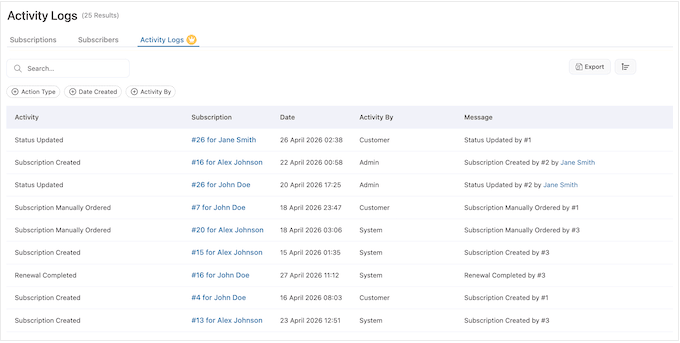
This might sound like a boring feature at first, but it’s a total lifesaver when you’re dealing with customer support.
If a subscriber claims they canceled before their last bill, you don’t have to guess what happened. The activity log gives you a clear paper trail of every renewal and cancellation attempt, so you can resolve disputes based on facts, not guesswork.
How I Use It: To see how this works under the hood, I put the tracking to the test by running a full subscription lifecycle. I signed up, paused for a week, resumed, waited for my subscription to renew, and then finally cancelled.
Sublium’s activity log captured every single step with accurate timestamps. Plus, the filtering options are a huge time-saver. You can see exactly what’s happening with one specific user without digging through a massive list of entries.
My Honest Review: Activity logs are one of those features you don’t appreciate until you desperately need them. The first time a customer disputes a charge, you’ll be glad you have this data at your fingertips.
Sublium’s CSV export is also useful if you ever need to provide evidence to a payment processor like Stripe or PayPal during a chargeback dispute.
15. Native Integrations: LearnDash, FunnelKit, & More
Sublium comes with native integrations for some of the most popular tools in the WordPress ecosystem, including FunnelKit Cart, LearnDash, TutorLMS, WooCommerce Memberships, and AffiliateWP.
These aren’t just basic connections. Instead, they’re deep, two-way integrations that handle complex workflows automatically. For example, the learning management system (LMS) integrations can automatically enrol students when they subscribe and instantly revoke access if a payment fails.
Similarly, if you’re launching an affiliate program then using AffiliateWP with Sublium is a great way to manage recurring commissions cleanly.
How I Use It: I tested the LearnDash integration from start to finish. I created a Sublium recurring subscription, linked it to a test course in LearnDash, and completed a purchase. The enrolment was instant, and the entire round trip worked perfectly without me needing to touch a single line of code.
My Honest Review: Finding this many high-quality native integrations in a relatively new plugin is impressive. These connections cover about 80% of the most common subscription business models.
Sublium Review: Pricing and Plans
Sublium follows a standard freemium model. Understanding the transaction fee structure is the most important decision you’ll make when choosing between their plans.
To start, you can download the lite version of Sublium for free from WordPress.org. This includes many essential features so you can set up recurring subscriptions, Subscribe and Save plans, and installment plans with ease.
However, the free plan does charge a 2.9% platform transaction fee on all your subscription revenue. It’s important to note that this is in addition to the standard processing fees charged by gateways like Stripe or PayPal.
To put that in perspective, if your store does $10,000/month in subscription revenue, you’ll pay $290/month in transaction fees. That’s significantly more than any of Sublium’s premium plans.
Due to this, I recommend using the free plugin to test Sublium out. Then, you can upgrade to the premium plan once you’ve established a revenue-generating business, and keep more of your profits.
The premium version of Sublium removes that 2.9% fee entirely. It also unlocks advanced features like the analytics dashboard, activity logs, smart cancellation flows, and the one-click card updater.
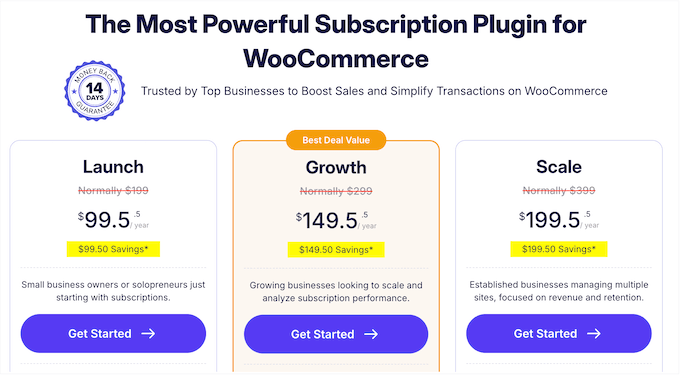
With that in mind, here’s the different premium plans:
- Launch — $99.50/year for 1 site. This is the perfect entry point for a single subscription store. It includes all the essential reports, subscription management tools, email notifications, and the payment recovery workflow. It’s a solid fit for a single brand running subscriptions on one WooCommerce store.
- Growth — $149.50/year for 2 sites. This gives you access to activity logs and detailed reports including MRR, ARR, and churn reports. You can also create upgrade campaigns to increase the average customer lifetime value.
- Scale — $199.50/year for 5 sites. This unlocks the powerful cancellation flow tools and the one-click card updater. It’s designed to help you proactively reduce churn and recover failed payments without any manual effort. This tier is generous enough for WordPress development agencies managing multiple client stores or larger brands running several subscription lines.
Sublium Review: Community and Professional Support
When choosing a WooCommerce plugin that handles your billing and checkout, understanding how you’ll get help is just as important as the features themselves.
Subscription plugins can produce tricky problems that are hard to debug on your own, like a renewal failing in the middle of the night or a gateway integration issue following an update.
That’s why I was glad to see that Sublium offers comprehensive online documentation. These docs are available 24/7, so you can often find the answers yourself without needing to open a support ticket.
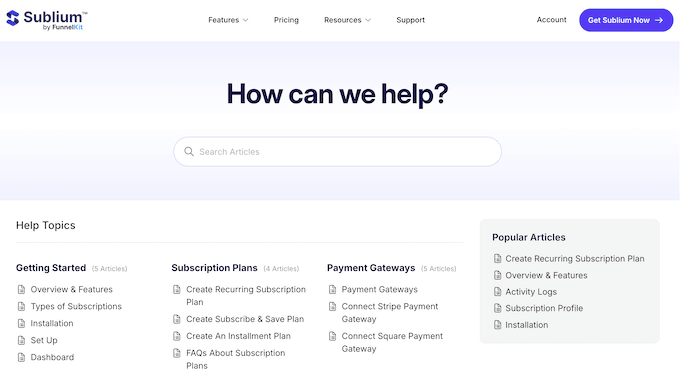
For more hands-on help, Sublium customers can submit tickets through a dedicated contact form. Their system lets you tag your query as technical, billing, or pre-sale and even attach screenshots for direct troubleshooting.
If you’re using the free plugin, then you can access community support through the WordPress.org forums. Since the plugin is still growing, the forum is relatively quiet, but that often means you’ll get a faster response from the developers themselves.
💡 No matter which channel you choose, the more detail you provide, the better. Giving the team a clear picture upfront typically means fewer follow-up questions and less unnecessary delays.
For a few tips on what to include, check out our guide on how to properly ask for WordPress support.
Sublium Review: Is It the Right WooCommerce Subscriptions Plugin for You?
To sum up this Sublium review, it’s easily the most complete WooCommerce subscription plugin I’ve tested recently.
I particularly like that Sublium is built around the full subscription lifecycle rather than just the billing engine.
Most competitors treat a subscription as a product with a recurring charge and leave it at that. By contrast, Sublium treats each subscriber as a long-term relationship. It provides the tools you need to nurture that relationship through every stage, from onboarding, right through to renewals, payment recovery, upgrade opportunities, and cancellation prevention.
However, just keep in mind that the lite version charges a 2.9% transaction fee. This means you’ll almost certainly want to invest in a premium plan, in order to keep more of your profits.
Sublium Frequently Asked Questions
Choosing the right subscription engine is a big decision for any WooCommerce store owner. To help you make the best choice for your business, here’s the most common questions I’ve heard from online store owners.
Sublium is a relatively new plugin — is it safe to trust my subscription business with it?
This is the right question to ask, because subscription billing is the engine of your recurring revenue. The short answer is yes, with a few sensible precautions.
Sublium handles the subscription logic, but the actual money movement happens on your existing payment gateway. If Sublium ever had an issue, your customers’ cards on file remain safely tokenized inside your payment gateway, not Sublium’s servers.
The plugin also maintains a detailed activity log for every subscription event, with full CSV export available. So if a customer ever disputes a charge, you have a clean, exportable paper trail to defend the transaction with your payment processor.
For most stores, that’s a much stronger position than trusting a closed-source service where the data isn’t yours to export.
Can I migrate my existing subscribers from another subscription tool to Sublium?
Yes, with some practical caveats.
If your existing subscribers’ payment tokens already live on Stripe, the migration is usually straightforward, because Stripe holds the card-on-file relationship rather than the plugin that created it. You import the subscriber records into Sublium, map them to the right products and billing intervals, and Sublium picks up the renewal cycle from where the old tool left off.
If your previous plugin stored card data in its own database rather than on Stripe, the migration is more involved.
You’ll typically need subscribers to re-enter their payment details on a Sublium-powered checkout, which usually means running a one-time migration campaign so customers aren’t surprised.
For either path, I recommend setting up a staging copy of your store first, importing a small batch of test subscribers, and running a full renewal cycle before flipping the switch on your live site.
Do I need to be a developer to use Sublium?
No. The setup wizard covers the big configuration decisions in five minutes, and every feature in this review (variable subscriptions, Subscribe and Save, installment plans, cancellation flows, the customer portal, and the analytics dashboard) is available directly in the WordPress dashboard.
The native integrations with LearnDash, FunnelKit, AffiliateWP, WooCommerce Memberships, and TutorLMS also work straight out-of-the-box, so you don’t need to wire up custom hooks to connect them.
Sublium does expose hooks and filters if a developer wants to extend the workflows, but they’re optional rather than required.
Does Sublium handle subscription taxes and VAT compliance?
Yes, for most setups. Sublium uses WooCommerce’s built-in tax calculation engine, so any tax rates you’ve already configured at the WooCommerce level (sales tax in the US, VAT in the EU and UK, GST in Australia, and so on) automatically apply to your subscription renewals.
For more complex situations, Sublium works alongside dedicated tax compliance services that integrate with WooCommerce.
What happens to my subscribers and data if I stop using Sublium?
Your subscribers and orders stay exactly where they are. Sublium stores its data inside standard WooCommerce database tables, so your subscriber list, order history, product configurations, and activity logs all remain in your site even if you deactivate the plugin.
Your customer payment tokens are also held by your payment gateway (Stripe, Square, or PayPal), not by Sublium. That means if you ever switch subscription plugins, your customers’ cards on file move with you. You’re not locked into Sublium, and can export the full activity log to CSV at any time for external auditing or migration to another tool.
If you liked this article, then please subscribe to our YouTube Channel for WordPress video tutorials. You can also find us on Twitter and Facebook.

Sublium User Reviews
Please share your Sublium review to help others in the community.