


Adding a multi-currency plugin can make your WordPress site more user-friendly by allowing customers to switch currencies and see real-time exchange rates. This improves their shopping experience and builds trust.
We sell our plugins and software to customers across the globe, so we know firsthand the challenges of dealing with multiple currencies.
That’s why, to help fellow online business owners, I have researched the top multi-currency plugins on the market, focusing on areas like ease of use, features, and pricing.
In this guide, I’ll share my top picks for the best WordPress multi-currency plugins. I’ve included different use cases so there’s something in the list for everyone.

My Verdict: Best Multi Currency WordPress Plugins
In a hurry? Then you might appreciate the following overview of all the WordPress multi-currency plugins I’ll share in this article:
| # | Plugin | Best For | Pricing |
| 🥇 | Easy Digital Downloads | Business owners selling digital products like eBooks, music, and software | Starts at $99.50 per year |
| 🥈 | YITH Multi Currency Switcher for WooCommerce | WooCommerce users seeking unlimited currency options and geolocation-based currency display | Starts at $99.99 per year |
| 🥉 | WP Simple Pay | Business owners looking to enable Stripe payments without a shopping cart | Starts at $49.50/year, with a free version available |
| 4 | CURCY – Multi Currency for WooCommerce | Business owners looking for a free, easy-to-use multi-currency plugin | Free |
| 5 | WooCommerce Multi-Currency | WooCommerce users seeking advanced currency conversion with multiple API integrations | Starts at $149 per year |
| 6 | WBW Currency Switcher for WooCommerce | WooCommerce stores that need flexible multi-currency support with real-time rates | Free |
| 7 | Currency Converter Widget | WooCommerce users wanting a dynamic currency widget with real-time conversion | $59 per year |
Why Use a Multi-Currency WordPress Plugin?
A multi-currency plugin allows you to offer multiple currencies on your WordPress website. Your customers can switch currencies from the US dollar to their local currency with a click of a button.
If you’re running an online store, then having a currency switcher plugin can come in handy.
You can reach a wider audience and target users from around the world. Customers from other countries can easily convert the product prices into their local currency without leaving your website.
It also improves the overall shopping experience for customers. The plugin removes any pricing confusion that people may have. As a result, you get to keep customers on your website and boost sales.
How I Test and Review Multi-Currency Plugins
I used a detailed process to review multi-currency plugins because I wanted to recommend the best tools. Taking time to test each plugin helped me find ones that are reliable and easy to use.
It’s not just about features. I want to make sure the plugin works well in real-world situations, such as updating exchange rates or smoothly working with payment systems.
Here are some of the key factors I considered when reviewing multi-currency plugins:
- Ease of Use: How simple the plugin is to install, set up, and use on your site.
- Multi-Currency Support: The ability to add and manage various currencies.
- Exchange Rate Control: Whether the plugin offers automatic or manual exchange rate updates.
- Geolocation: If it automatically detects the user’s location and shows local currency.
- API Integrations: Support for exchange rate APIs for real-time updates.
- Customization: Options to customize currency switchers and control pricing formats.
- Payment Methods: Compatibility with popular payment gateways.
- Additional Features: Features like reporting, shortcodes, and integration with other tools.
- Pricing: Whether the plugin is free or paid and what value it offers at different price points.
Why Trust WPBeginner?
At WPBeginner, we actively use and test the tools we recommend — including multi-currency plugins.
On several of our partner company websites, we use Easy Digital Downloads to sell digital products and software worldwide, which comes with built-in multi-currency support.
We’ve also tested a variety of other WordPress multi-currency plugins to see how they compare in real-world scenarios.
This hands-on experience allows us to confidently recommend tools that are not only feature-rich but also reliable for running a global online store.
When you read our recommendations, you’re getting advice backed by actual use — not just theory. For more information, check out our editorial process.
Now, let’s look at the best multi-currency plugins for WordPress.
1. Easy Digital Downloads
Easy Digital Downloads is hands down the best multi-currency plugin for business owners selling digital products like eBooks, music, software, and more.
It supports over 200 currencies and gives you full control over exchange rates. Whether you want to set a fixed rate or pull live rates automatically, the flexibility is there.
We’ve used Easy Digital Downloads on our partner company websites to sell premium WordPress plugins and software, so I can vouch for how reliable and powerful it is.
From seamless product management to smooth checkout experiences, it covers everything you need to run a digital store. The multi-currency functionality is just one of the many reasons it’s become my go-to solution for selling digital goods globally.
If you’d like a deeper look at how this plugin performs, be sure to check out our complete Easy Digital Downloads review.
I like the automatic option that lets the plugin auto-update the exchange rate and convert the price from USD to the customer’s local currency.
On the other hand, you can also manually set the exchange rate if this is what you prefer.
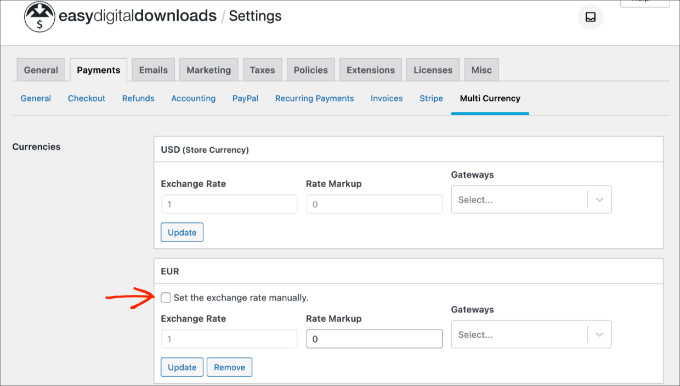
Besides that, Easy Digital Downloads lets you sell digital downloads easily. You can take advantage of its unlimited file downloads, full data reporting, a shopping cart, and more.
I also like that it easily integrates with payment gateways like Stripe and PayPal and third-party tools like AWeber, Slack, and ConvertKit.
✅Pros of Easy Digital Downloads
- Built specifically for digital product sales with proven conversion rates
- Seamless currency detection and switching
- Comprehensive tax handling across currencies
- Strong integration with payment gateways like Stripe and PayPal
- Extensive documentation and reliable support
❌Cons of Easy Digital Downloads
- Advanced features locked behind the pro version
Why I recommend Easy Digital Downloads: It’s my top choice for businesses that want to sell digital products internationally with confidence. While it costs more than simple currency switcher plugins, you’re getting a full eCommerce platform that handles everything from payments to product delivery.
Pricing: Easy Digital Downloads is a premium plugin with prices starting from $99.50 per year.
2. YITH Multi Currency Switcher for WooCommerce
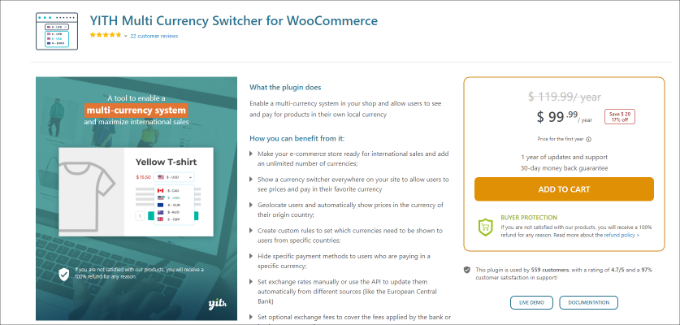
YITH Multi Currency Switcher for WooCommerce is a great choice for WooCommerce users who want unlimited currency options and automatic currency display based on customer location.
With geolocation support, the plugin can detect a visitor’s country and show prices in their local currency. You can also place a currency switcher anywhere on your site, giving customers the flexibility to switch currencies manually.
I tested this plugin on my demo website to see how well it performs. During my review process, I explored its key features and checked if it delivered on its promises – and it did.
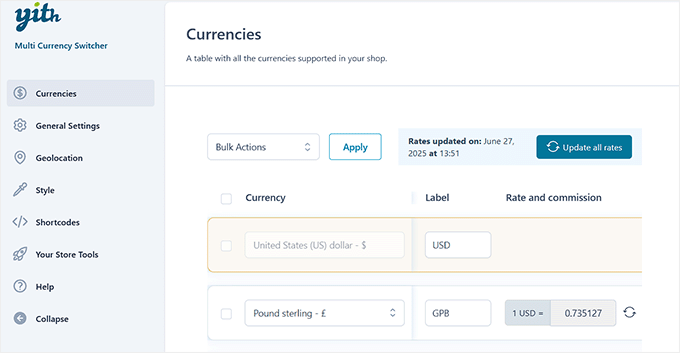
The setup was simple, and adding multiple currencies was quick and straightforward.
While testing the plugin, I found it to be super easy to use. I appreciate that it lets you add unlimited currencies to your WooCommerce store. You can show a currency switcher anywhere on your website and let customers choose their local currency.
Another great feature is that the plugin automatically detects users’ geolocation and displays prices in their native currency. It integrates with APIs of the European Central Bank, Google Finance, and other providers to automatically update exchange rates.
You can also control the frequency of exchange rate updates. For example, the plugin can check it daily, twice daily, weekly, monthly, or every 15 days.
In addition, I found that you have options to customize the currency switcher, display different payment methods for specific countries, and more.
✅Pros of YITH Multi Currency Switcher for WooCommerce
- Supports over 160 currencies with no limits on how many you can display
- Automatic geolocation-based currency detection
- Flexible pricing options with both manual and automatic conversion
- Proper currency formatting for different locales
- Payment method customization per currency
❌Cons of YITH Multi Currency Switcher for WooCommerce
- Premium pricing may be steep for smaller stores
- Requires WooCommerce, so not suitable for non-eCommerce sites
Why I recommend YITH Multi Currency Switcher for WooCommerce: It’s a reliable option for WooCommerce stores that want to support global customers with ease. The plugin offers unlimited currency support, accurate geolocation detection, and flexible display options, making it a smart choice for international sales.
Pricing: YITH Multi Currency Switcher for WooCommerce is a premium plugin that will cost you $99.99 annually.
3. WP Simple Pay
WP Simple Pay is the best Stripe plugin for WordPress if you’re looking to accept multi currency payments without setting up a full shopping cart.
It supports over 135 currencies through Stripe, allowing you to charge customers in their local currency while receiving payouts in yours.
This makes it a great fit for freelancers, service providers, and businesses that want to offer a localized checkout experience.
Our team has explored the plugin in depth, and you can find all the details in our WP Simple Pay review.
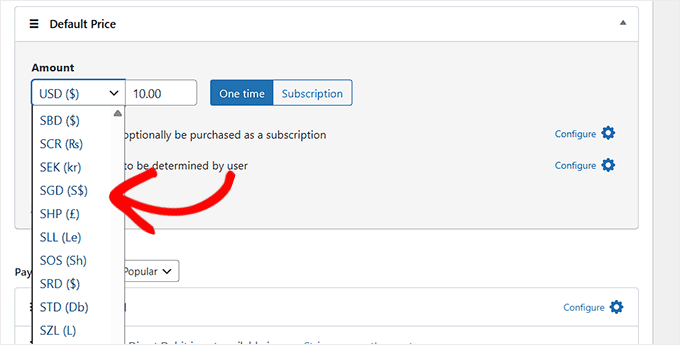
The plugin makes it easy to create payment forms, set your site’s regional currency settings, and even apply the right tax rates automatically.
It also gives you full control over how currencies are displayed. You can choose a default currency based on your region, adjust formatting, and customize tax settings to match your business needs.
I particularly like its drag-and-drop payment form builder, which offers over 10 different payment methods. This makes the whole process simpler.
For example, you can collect payments through credit and debit cards, Apple Pay, Google Pay, ACH direct debit, Klarna, Giropay, Affirm, and more.
✅Pros of WP Simple Pay
- Simple setup without needing full eCommerce functionality
- Direct Stripe integration with excellent currency support
- Perfect for services, donations, and one-time payments
- Handles recurring payments across multiple currencies
- Clean, professional payment forms that convert well
❌Cons of WP Simple Pay
- Limited to Stripe as the payment processor
- Free version has restricted functionality
Why I recommend WP Simple Pay: It’s a great solution for WordPress users who want to accept international payments without the complexity of a full eCommerce setup. With support for 135+ currencies, easy tax and currency formatting options, and easy payment form creation, it’s ideal for freelancers, service providers, and small businesses.
Pricing: WP Simple Pay prices start at $49.50 per year. You can also use the WP Simple Pay free version to get started.
Alternative: You can also accept Stripe payments in multiple currencies with the free WPForms Lite plugin. WPForms Pro supports Stripe, PayPal, Square, and Authorize.net with no additional transaction fees.
4. CURCY – Multi Currency for WooCommerce

In my opinion, CURCY is one of the best free WooCommerce multi-currency plugins. While reviewing this plugin, I discovered that it lets you accept payments in different currencies and allows customers to switch to their preferred currency.
The plugin is also easy to use and set up. It automatically detects users’ location on your WooCommerce store and displays products in the native currency.

When it comes to setting up exchange rates, you can allow the plugin to do it automatically.
That said, I also found that CURCY lets you choose different options for controlling the exchange rate.
For example, you can manually set the rate, keep the product prices fixed in other currencies, and manage the exchange rate fee.
✅Pros of CURCY
- Completely free with no hidden costs or premium upsells
- Excellent performance that doesn’t slow down your site
- Clean, professional currency switcher design
- Automatic exchange rate updates available
- Proper currency formatting for different locales
❌Cons of CURCY
- Fewer advanced features compared to premium plugins
- Limited customization options for the switcher appearance
Why I recommend CURCY: It’s a solid choice for business owners who want a free and easy way to add multi-currency support to their WooCommerce store.
Pricing: CURCY is a free WordPress plugin.
5. WooCommerce Multi-Currency
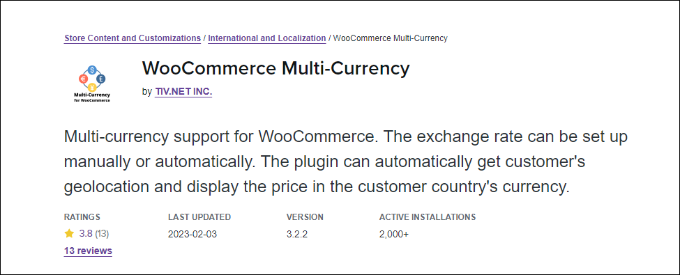
WooCommerce Multi-Currency is a premium WooCommerce extension that allows you to show product prices in the customer’s country’s currency.
Like many other plugins on my list, you can choose between automatic or manual exchange rate settings.
What’s great about the plugin is that it supports different exchange rate providers’ APIs, such as Open Exchange Rate, Abstract, Exchange Rate API, and more.
To display the currency switcher anywhere in your WooCommerce store, you can use a shortcode. Additionally, I really appreciate its sidebar widget to let customers convert prices into their local currency.
✅Pros of WooCommerce Multi-Currency
- Multiple API integrations ensure reliable exchange rates
- Advanced pricing controls with currency-specific strategies
- Detailed analytics and reporting by currency
- Handles complex tax and shipping calculations
- Enterprise-level features for large international stores
❌Cons of WooCommerce Multi-Currency
- May be overly complex for simple currency switching needs
- Requires more setup time to configure all features properly
Why I recommend WooCommerce Multi-Currency: It’s the best choice for well-established WooCommerce stores that need powerful multi-currency features. If you run a large store and want full control over how you show and manage different currencies, this plugin is a smart investment.
Pricing: WooCommerce Multi-Currency prices start from $149 per year.
6. WBW Currency Switcher For WooCommerce
WBW Currency Switcher is a free WordPress plugin that lets you display and convert prices into multiple currencies on your WooCommerce store.
It supports unlimited currencies, automatic and manual exchange rates, geo-IP detection, and even lets customers check out in their selected currency.
During testing, I found that WBW Currency Switcher works smoothly with real-time conversion powered by Cryptocompare and Free Converter.
You can also create custom currencies, upload your own flags, and choose from multiple switcher styles (simple, rotating, floating) to match your store design.
What makes this plugin especially useful is its ability to display different currencies based on a visitor’s IP address.
It can also show real-time exchange rate tables, a currency converter widget, and tooltips that preview product prices in other currencies.
✅Pros of WBW Currency Switcher for WooCommerce
- Works with automatic or manual exchange rates
- Supports an unlimited number of currencies
- Multiple display types (simple, rotating, floating)
- Geo-IP detection for automatic currency switching
- Includes optional modes: currency converter, currency rates, and tooltips
❌Cons of WBW Currency Switcher for WooCommerce
- Some advanced features (like scheduled rate updates) require the Pro version
- The interface offers many settings, which may feel overwhelming to beginners
Why I recommend WBW Currency Switcher for WooCommerce: It’s one of the most powerful free currency switcher plugins available. If your store needs multiple currencies, IP-based auto-switching, and checkouts in the customer’s selected currency, WBW gives you those features without locking the basics behind a paywall.
Pricing: Free plugin with optional Pro upgrade for advanced features.
7. Currency Converter Widget
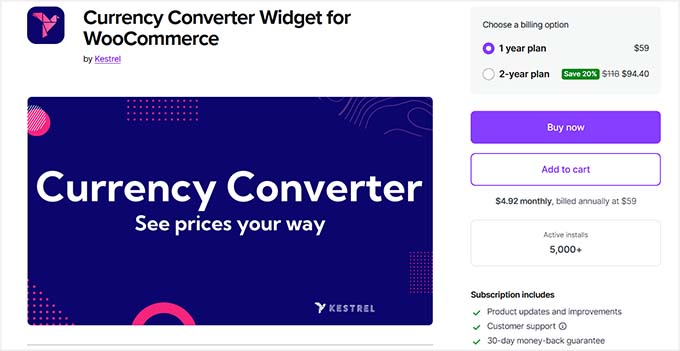
Currency Converter Widget is a popular, premium WooCommerce plugin that you can use on your store.
Our testing revealed that the multi-currency plugin offers a dynamic widget that converts product prices in real time.
It automatically grabs the latest exchange rate and applies it to the products. So, you can easily add and convert as many currencies as you want.
The best part is that the plugin saves the converted total at checkout.
This way, you can see the prices customers saw on your WooCommerce store, which I think is very useful for improving customer experience.
✅Pros of Currency Converter Widget for WooCommerce
- Real-time currency conversion with automatic rate updates
- Clean widget design that integrates well with most themes
- Transparent pricing display builds customer trust
- Flexible placement options throughout your store
- Affordable annual pricing for small to medium businesses
❌Cons of Currency Converter Widget for WooCommerce
- Focused on conversion display rather than full multi-currency checkout
- Limited customization options for widget appearance
Why I recommend Currency Converter Widget for WooCommerce: It is a smart choice for WooCommerce stores that want to show international customers price estimates without using a full multi-currency system.
Pricing: Currency Converter Widget will cost you $59 per year.
What Is the Best Multi Currency WordPress Plugin?
Based on my research, the best WordPress multi-currency plugins are Easy Digital Downloads, YITH multi currency switcher for WooCommerce, and WP Simple Pay.
That said, your choice of the best multi-currency plugin should depend on the type of website you’re running.
For instance, if you’re selling digital products, then Easy Digital Downloads is the best option. It’s super easy to use and lets you select from over 200 different currencies. You get full control over the exchange rate and can add as many currencies as you want.
On the other hand, YITH Multi Currency Switcher for WooCommerce is the best multi-currency plugin for WooCommerce stores. It automatically detects the user’s location and converts product prices. Plus, you can choose from different providers to set the exchange rate.
Lastly, you can also use WP Simple Pay to collect online payments without setting up a shopping cart. It is the best Stripe plugin and supports over 135 currencies.
FAQs About WordPress Multi-Currency Plugins
Here are some common questions people have about multi-currency WordPress plugins.
1. How do I add multi-currency to WordPress?
You will need a WordPress plugin to add multi-currency functionality to your website. WooCommerce and WordPress don’t offer a currency convertor by default. For instance, you can use Easy Digital Downloads or the YITH Multi Currency Switcher for WooCommerce plugin.
2. What is a currency convertor plugin for WordPress?
A currency converter plugin allows customers to switch product prices to their local currencies in real time. It helps boost conversions and provides a great shopping experience for users.
3. How do I add multiple prices in WooCommerce?
Using a multi-currency plugin, you can show multiple prices in WooCommerce for users from multiple locations. You can also add prices for different product variations and allow customers to choose prices in their local currency.
Bonus: More Guide on Managing Your WooCommerce Store
Looking for more information on how to effectively manage your WooCommerce store? Check out these beginner-friendly guides:
- How to Translate Your WooCommerce Store (Easy Methods)
- How to Convert WooCommerce Visitors into Customers (Expert Tips)
- Impressive eCommerce Statistics You Won’t Believe
- How to Use AI to Translate Your Website (Easy Methods)
- How to Create Multilingual Forms in WordPress
- Ecommerce Security Tips: How to Secure Your WordPress Store
- eCommerce Price Model — How to Easily Price a Product
- Best Affordable and Free eCommerce Platforms (Compared)
If you liked this article, then please subscribe to our YouTube Channel for WordPress video tutorials. You can also find us on Twitter and Facebook.




Emad
Are these plugins compatible with Multi-Vendor Plugins like WCFM Marketplace and Dokan plugins?
Thanks
WPBeginner Support
You would need to check with the support for the plugin for if there are any current connections or conflicts between the two
Admin
Mrteesurez
Having a currency switcher is important and recommend for a store that targets international audience as this will gives all user the exact price of the products in their respective local currency.
I will try and implement this feature in my store to appeal global audience.
Thanks.