


Setting up parent and child pages is a great way to organize your WordPress site, but it often results in long, clunky URLs. By default, WordPress includes the parent page slug in every child page link, which can make your web addresses look unprofessional or difficult to share.
While this hierarchical structure is standard for WordPress SEO, many site owners prefer clean, direct links for branding and marketing purposes. The good news is that you can easily take control of your URL structure without breaking your site’s navigation.
In this guide, we will show you how to clean up your child page URLs step-by-step. It is a simple process that keeps your site looking sharp and user-friendly.
What Is a Parent Page Slug in WordPress?
Your WordPress website comes with two main content types called posts and pages.
Pages are hierarchical, which means they can have child pages. These child pages are dependent on their parent pages and typically cover subtopics related to the parent.
For example, you might have a ‘Products’ parent page with ‘Pricing’, ‘Support’, and ‘Features’ child pages.
By default, the URL of a child page in WordPress will have its parent page’s slug in the URL. Here’s an example:
https://example.com/parent-page/child-page/
Using URLs like this is the best way to organize content within a hierarchical page structure on your WordPress site. These URLs are considered best practice for WordPress SEO and will make sense to your users when they read them.
It’s usually not a good idea to remove the parent page slug. It can potentially break the URL, and some experts believe it is less SEO-friendly. Sometimes, it may even cause conflicts with the WordPress permalink structure.
That said, there are specific situations where a shorter URL is desirable. For example, you might have a ‘Services’ parent page with key child pages like ‘Web Design’ and ‘SEO Audits.’ For marketing materials or branding, you may prefer the cleaner, more direct URLs like yoursite.com/web-design.
If you simply want to show a relationship between pages for visitors, the best approach is often to create standard pages (instead of child pages) and organize them with a drop-down navigation menu.
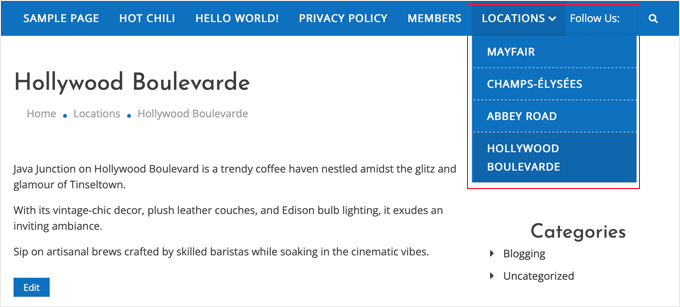
However, if you need to use a parent-child structure and still want a shorter URL, then you’re in the right place.
That being said, let’s take a look at how to easily remove the parent page slug from a child page URL in WordPress.
Removing Parent Page Slug From Child Page URL in WordPress
The first thing you need to do is install and activate the Custom Permalinks plugin. For more details, see our step-by-step guide on how to install a WordPress plugin.
Upon activation, you need to edit the child page that you want to change. Under the content area, you will see a ‘Custom Permalinks’ field where you can change the child page URL.
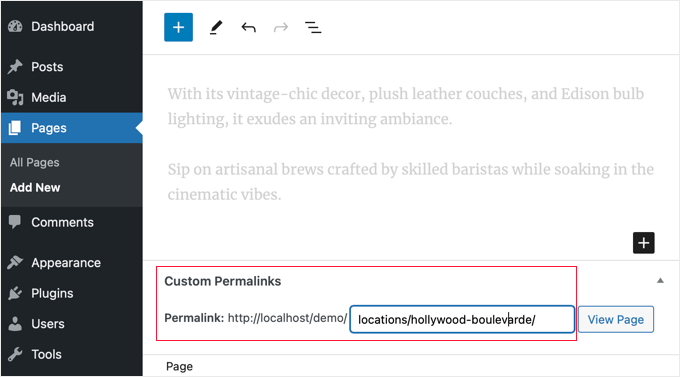
Now you can see your page’s current default URL in the permalink field. You just need to click it and enter the custom URL you want to use for your child page.
In our example, the hollywood-boulevarde page is a child page oflocations, so the default permalink is locations/hollywood-boulevarde.
We deleted the locations parent slug from the URL, as you can see in the screenshot below.
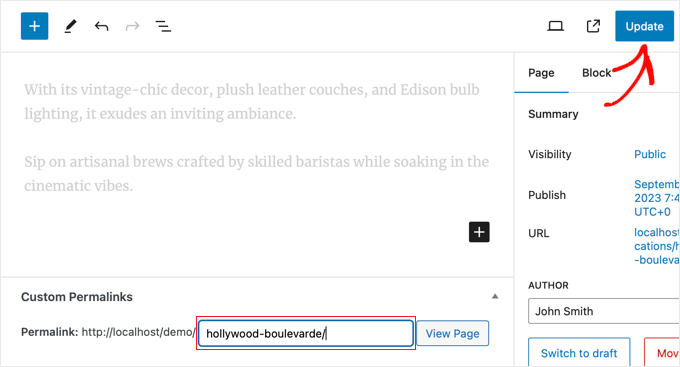
Don’t forget to click the ‘Update’ button to save your page and store your URL changes.
After saving your changes, the plugin will automatically redirect the old permalink to the new address. This means your visitors will not see a 404 error if they click a link or bookmark to the page’s old address.
When you view the child page, you will now notice that its URL does not contain the parent slug. We recommend testing the old URL in an Incognito or Private window to make sure the automatic redirect is working correctly for your visitors.
Frequently Asked Questions About Parent Page Slugs
Here are some of the most common questions our readers ask about managing their WordPress page URLs. We hope these answers provide some extra clarity.
1. Will removing the parent slug from a child page URL affect my SEO?
Changing any URL structure can have a temporary impact on SEO, but it’s generally minimal if handled correctly. The default hierarchical URL (parent/child) is logical for both users and search engines and is considered a good practice.
Using a plugin that creates proper 301 redirects, like the one we recommend, tells search engines that the page has moved permanently. This helps transfer any existing SEO value to the new URL. However, search engines generally prefer stable and predictable URL structures, so it’s best to decide on your URL format and stick with it.
2. What happens to the old URL after I remove the parent slug?
The Custom Permalinks plugin automatically redirects the old URL to the new one. This ensures your visitors don’t see a 404 error. However, if you use a dedicated redirect plugin or an SEO suite like AIOSEO, make sure there aren’t conflicting redirect rules set up for that same page.
3. Is it a good idea to remove the parent slug from the URL?
In most cases, we recommend keeping the parent slug. It creates a clear and logical site structure that helps visitors understand how your content is organized.
If you do not want a hierarchical URL, the best alternative is to create a standard, top-level page instead of a child page. You can then use your navigation menu to create a visual parent-child relationship for your users.
4. Can I remove the parent slug without using a WordPress plugin?
It is possible to remove the parent slug by adding custom code to your theme’s functions.php file or by using .htaccess rules. However, these methods are complex and not recommended for beginners. A single typo can cause a critical WordPress error, like the ‘white screen of death,’ making your entire site inaccessible.
Additional Resources to Manage Your WordPress Pages
We hope this article helped you learn how to remove the parent page slug from a child page URL. If you’re looking for more ways to organize and optimize your site’s pages, you may find these other guides helpful:
- Posts vs. Pages in WordPress – A clear explanation of when to use posts and when to use pages for your content.
- How to Add a Navigation Menu in WordPress – Learn how to organize your pages in a menu, which is a great alternative to using child pages.
- How to Create SEO-Friendly URLs in WordPress – A complete guide to setting up the best URL structure for search engine rankings.
- How to Create a Child Page in WordPress – Our step-by-step tutorial on properly setting up parent and child pages from scratch.
- How to Display a List of Child Pages for a Parent Page – Automatically show a list of sub-pages on a main parent page.
- How to Create a Landing Page with WordPress – Build a custom page for your marketing campaigns without any clutter.
If you liked this article, then please subscribe to our YouTube Channel for WordPress video tutorials. You can also find us on Twitter and Facebook.


Kristy Bernardo
I’ve searched everywhere for an answer to this question – finally found it! THANK YOU.
WPBeginner Support
Glad our guide could help
Admin
THANKGOD JONATHAN
You have said it all and I will also not recommend changing the Wordpress default permalink structure for parent slug. As it is best for both User Experience and SEO.
Ralph
I think parent page in url can be useful. I don’t have them on my own website however, when I surf the web i often don’t see a button or menu to go from post to category, so i just delete child url, and can browse parent page. I agree it is more personal than functional, but can be helpful.
WPBeginner Support
It certainly can be helpful to have them but it is more a question of personal preference for the website owner and the type of content on the site
Admin
Moinuddin Waheed
Does it really matter which slug is in the url?
I mean in terms of search engine optimisation and page visibility in the Google search bots.
many times we do find it difficult to decide which domain name to get for our blog.
is it really an search engine optimisation concern for the domain…
does it matter or we can just purchase any of the domain and start writing our blog content?
thanks for the nice article about the slug.
WPBeginner Support
It is a question of personal preference more than a requirement. Some sites want to remove the parent slug for how the content is structured.
Admin
Ahmed Omar
personally I find the parent page in the URL could be useful, as the visitor may just delete the child URL and reach to the parent page where he can find more posts or pages.
personally I am doing this when I browse sites.
Jiří Vaněk
And how will the Google Search Console react if I do this with already indexed URLs? Will it have any negative impact on SEO?
WPBeginner Support
You would want to redirect the URLs and Search Console would update to the new location over time.
Admin
Jiří Vaněk
Ok thanks for your answer. I have a lot of articles on my website and I want to make some changes to the URLs. So, these pieces of advice are very helpful.
Vinay
I have changed my page url from education to education-information. But when I click on that page.. it is showing the old page with a message page not found 404 error.. and when click on the page for 2nd time it is going to the concerned page. what should I do?
WPBeginner Support
You would want to ensure you clear any caching on your site and ensure your redirect is set up properly
Admin
Chad
What about 301 redirects? I recommend setting up these redirects if you update URLs (Google might have indexed the old version of the URL or users may have saved those links).
RK
This plugin has a conflict with a cornerstone page. Does not work with cornerstone pages.
RS_lyly2009
Awesome post.
Is there any other way to change the url without installing the plugin?
Thanks you!
Qasim Yad
Awesome! I was looking for this technique for ages. I would really love if you could share any approach other than using a plugin.
But, still i love this technique. Thanks