


Managing a busy site like WPBeginner involves dozens of image uploads every single day. We quickly realized that filenames containing spaces, capital letters, or accent characters can cause broken links and hurt our SEO rankings.
Asking every author to strictly follow file-naming rules, like avoiding spaces or special characters, is difficult to enforce manually. Fortunately, you can automate this cleanup process to save time.
This simple adjustment ensures every file is formatted correctly for search engines and web browsers, automatically fixing common formatting mistakes.
Here is how to automatically enforce clean image filenames on your WordPress site.
Here is a quick breakdown of what we will cover in this guide:
Why Enforce Clean Image Filenames in WordPress?
If you run a multi-author blog or website, then you might have different users uploading images to WordPress. It can be difficult to make sure that every image being uploaded has a clean filename.
By clean image filename, we mean a filename that uses only lowercase letters, numbers, and hyphens. It should not contain spaces, accent characters (like é or â), or special symbols.
Having a clean image filename is good for image SEO and will help your images rank in search engines so you can increase your blog traffic.
It also makes your images more searchable in your media library so you can use them again in future blog posts.
Also, filenames with special characters or spaces can often result in broken links or loading errors on some web browsers and servers. By fixing these automatically, you ensure your images load correctly for all users.
With that said, let’s show you how to enforce clean image filenames on your WordPress website, step by step.
Enforcing Clean Image Filenames in WordPress
The easiest way to enforce clean image filenames is with the free Clean Image Filenames plugin. It automatically converts special characters, accent characters, and more into a clean image filename.
The first thing you need to do is install and activate the plugin. For more details, see our beginner’s guide on how to install a WordPress plugin.
Upon activation, the plugin will automatically filter filenames for any new images you upload to your WordPress blog.
Simply go to Media » Add New and upload an image that has special characters in the filename.
For example, we uploaded an image of a blueberry, which is called Çay üzümü in Turkish, and our filename was ‘Çay üzümü.jpg’.
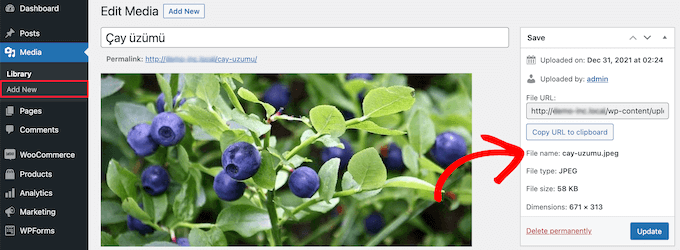
After uploading the image, the plugin filtered the image filename to ‘cay-uzumu.jpg’.
You can still use accent characters and other special characters in your image description, title, and alt tags. This will help your images rank in the search engines when people search using those special characters.
However, this plugin doesn’t convert the filename for any images you have already uploaded. If you want to convert older image files, then you’ll need to upload them again with this plugin active. Alternatively, you could use a plugin to rename the image files on your WordPress site.
If you run into any issues, then just take a look at our guide on how to fix common image issues in WordPress.
Frequently Asked Questions About Clean Image Filenames
Here are answers to some of the most common questions we get about enforcing clean image filenames in WordPress.
Does the Clean Image Filenames plugin work on existing images?
No, the plugin only works on newly uploaded images. It does not rename the files of images that are already in your WordPress media library.
To rename existing files, you would need to re-upload them while the plugin is active or use a different plugin designed to rename media files.
Why are clean image filenames important for SEO?
Clean, descriptive filenames provide search engines like Google with important context about your image. A filename like ‘puppy-playing-fetch.jpg’ is much more helpful for SEO than a generic one like ‘IMG_1234.jpg’.
Note: While this plugin handles the formatting (like making letters lowercase and removing spaces), you should still rename your files to be descriptive on your computer before uploading them.
This helps your images rank higher in image search results, which can bring more traffic to your site. It also prevents potential loading issues across different web browsers.
Can I still use special characters in my image titles or alt text?
Yes, absolutely. The plugin only sanitizes the actual filename itself. You can still use special characters and accents in your image’s title, caption, and alt text fields within WordPress.
This is a good practice, as it helps search engines and users with screen readers understand the image’s content.
Additional Resources on WordPress Images
We hope this article helped you learn how to enforce clean image filenames in WordPress. You may also want to look at these additional resources:
- Beginner’s Guide to Image SEO – Optimize Images for Search Engines
- How to Rename Images and Media Files in WordPress
- How to Fix Common Image Issues in WordPress
- Best WordPress Image Compression Plugins Compared
- How to Organize WordPress Files in Media Library Folders
If you liked this article, then please subscribe to our YouTube Channel for WordPress video tutorials. You can also find us on Twitter and Facebook.


Vitaliy Kolos
Thanks, that’s an interesting plugin, but I’m not sure I can think of cases when uncommon images may break images in browser. Could you give a few examples of that stuff happening, please?