


When I first tried Hosting.com (formerly A2 Hosting), I wanted to see if its “Turbo speed” and developer tools were truly helpful. I’ve been hosting websites for over 20 years for my own projects and for WPBeginner, so I know what to look for beyond just flashy ads.
To be honest, I didn’t expect to be blown away. But Hosting.com really did surprise me in some ways.
In this review, I’ll share everything I learned about Hosting.com. We’ll look at its speed, support, how easy it is to set up, and what it’s like to use every day.
Whether you’re thinking about starting a new blog or your current website needs to run faster, my detailed review will help you decide if Hosting.com is a good fit for you.

Here’s what I’ll walk you through in this Hosting.com review, based on my own testing and experience:
- Speed: I’ll show you how fast my test site loaded and what kind of server response times I recorded under real-world conditions.
- Performance: I ran a stress test to see how well Hosting.com handles traffic spikes without slowing down.
- Reliability: I’ll look at their uptime guarantee and whether they actually lived up to it.
- Customer Support: I talked to their 24/7 support to see how responsive and helpful they were when I needed help.
- Features: I’ll break down what tools and resources come with each plan and whether they’re enough for modern websites.
- Pricing: I’ll take a look at their pricing structure, renewal rates, and whether there are any deals worth grabbing.
This is my complete review of Hosting.com. If you’re short on time, there’s also a quick scorecard and summary below to help you decide faster.
| 📋 Hosting.com Review Quick Summary | |
|---|---|
| 💰 Starting Price | $1.99 / mo |
| 🌐 Free Domain | Yes |
| 🔒 Free SSL | ✅ |
| 💾 Disk Space | 15 GB |
| ⚙️ 1-Click WordPress | ✅ |
| 📞 Support Options | Phone / Live Chat / Email |
| ⚡ Average Load Time | 560 ms |
| 📶 Average Response Time | 121 ms |
| ⭐ WPBeginner Rating | A |
| ✅ Best for | Growing blogs, small businesses, and eCommerce stores |
| 👉 Start with Hosting.com 👈 | |
Here is a quick table of contents to easily navigate the different parts of my Hosting.com review:
- What Makes Hosting.com Unique?
- Pros and Cons of Hosting.com
- Performance Tests for Hosting.com
- Hosting.com Plans and Features
- Ease of Use: The Good and the Not-So-Good
- Help and Support
- Who Should Use Hosting.com?
- Conclusion: Is Hosting.com the Right Choice for You?
- Hosting.com Coupon 🏷️
- FAQs About Hosting.com
What Makes Hosting.com Unique?
I’ve used many hosting providers, and most promise the same things: faster speeds, great uptime, and amazing support. Hosting.com (formerly A2 Hosting) grabbed my attention because it proved its claims, especially with its performance.
Hosting.com started in 2001 in Ann Arbor, Michigan. They grew from a host for developers to a global company, now serving customers in over 200 countries.
Even with this growth, they still focus on performance. When I moved one of my test sites over, it felt much quicker right away. Their use of LiteSpeed servers and NVMe storage made a real difference.
NVMe is a newer storage technology that is much faster than even traditional solid-state drives (SSDs), which helps your site load quicker.
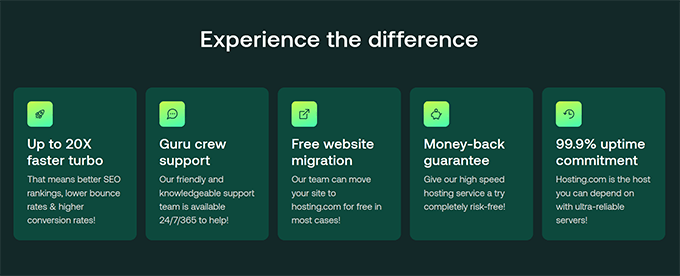
Hosting.com also offers an ‘A2 Optimized’ plugin for WordPress that handles caching, compression, and basic security setup for you. This is a huge benefit for beginners because it saves you from having to research, install, and configure several complex performance plugins yourself.
For developers, this is one of the most flexible shared hosts I’ve used. You get tools like SSH, Git, WP-CLI, and staging environments right away. Hosting.com even supports things like Node.js and Python, which is not common at this price point.
🧪 What surprised me most?
My site genuinely felt faster on the higher-tier plan. It was like flipping a switch and suddenly browsing at high speed.
If you prefer an environmentally friendly option, then you’ll be glad to know Hosting.com also promotes green hosting 🍀. They’ve invested in eco-friendly practices to offset emissions and reduce their environmental footprint.
Key Features That Stand Out:
- Faster servers with LiteSpeed and NVMe (on higher plans)
- A2 Optimized plugin handles WordPress performance optimization for you
- Developer tools like SSH, Git, WP-CLI, and staging
- Eco-friendly hosting practices
- Reliable performance without needing extra plugins
📝Note: Some of these perks are only on the more expensive plans. If you start with the cheapest option, you might not get the full Hosting.com experience. Keep this in mind before you sign up.
Pros and Cons of Hosting.com
After using Hosting.com for a while, these are the things that stood out to me — both the good and the not-so-good.
I always like to give a balanced view, so here’s a quick breakdown to help you decide if Hosting.com is the right fit for you.
✅ Pros
- Excellent speed, especially on Turbo plans
- NVMe storage for faster performance
- WordPress-optimized setup with built-in caching
- Developer-friendly (SSH, Git, WP-CLI, staging)
- 30-day money-back guarantee
- Global server locations (USA, Europe, Asia)
❌ Cons
- Introductory price is low, but renewal rates are steep
- Some performance features are only available on higher-tier plans
- No free domain included, so you’ll need to buy one separately, which adds a small extra cost to your first year.
- The dashboard can feel a bit clunky at times
Performance Tests for Hosting.com
I never just trust a hosting company’s speed claims. So, I ran my usual tests to see how Hosting.com performs in real life.
I tested a basic WordPress site with a simple theme and demo content. Here’s what I found.
Speed Test Results
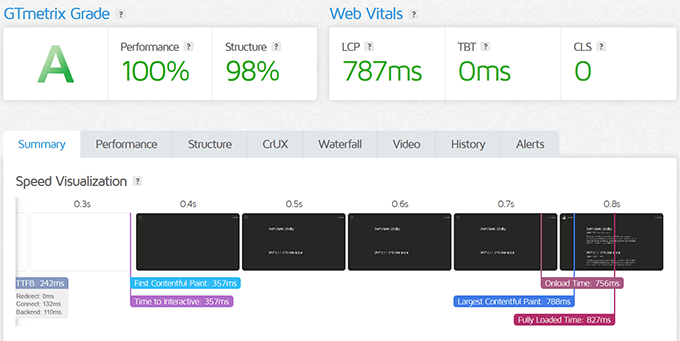
I ran a GTmetrix test on the demo site hosted with Hosting.com and got an impressive GTmetrix Grade of A. The site scored 100% in performance, and the page fully loaded in 827ms.
Stress Test Results
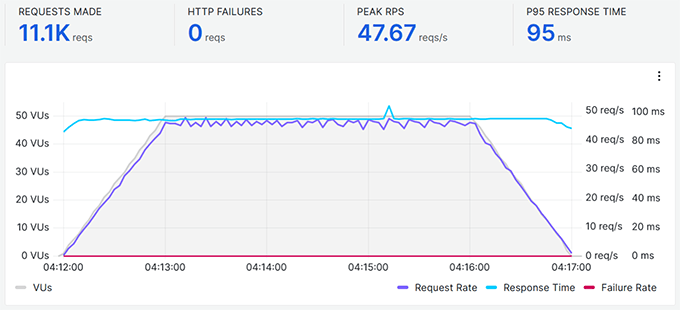
I also ran a stress test to simulate real-world traffic.
Up to 50 virtual users visited the site over 5 minutes, and the server stayed steady. It did not show any major slowdowns, and pages kept loading in under a second. This is impressive for a shared plan.
Server Response Time
I used PageSpeedPlus to check how fast the server responded from different places around the world. The results were consistently fast, with Ireland and Frankfurt offering the lowest latency.

Uptime Monitoring
I also set up an uptime monitoring test. It showed 100% uptime, which is very good for a shared hosting company.

Bottom line: Hosting.com lives up to its speed promises. This performance is excellent for its price point.
Hosting.com Plans and Features
Hosting.com has many different plans. For this review, I focused on their shared and managed WordPress hosting, as these are the most popular choices for new users, bloggers, and small businesses.
I used their Drive and Turbo Boost plans for my shared hosting website, and I signed up for the Fly plan for managed WordPress hosting.
Shared Hosting Plans
Hosting.com’s shared hosting lineup includes four plans: Startup, Drive, Turbo Boost, and Turbo Max.
Pricing starts as low as $1.99/month for the Starter plan, which is great if you just need hosting for one small business website or a personal blog. But as your site grows, you may want to upgrade to higher-tier plans for more speed and features.
| Plan | Starting Price | What’s Included |
|---|---|---|
| Starter | $1.99/mo* | 1 website, 15GB disk space, 5 email accounts, free domain, SSL, unlimited MariaDB, 30-day money-back guarantee |
| Plus | $1.99/mo* | 2 websites, 30GB disk space, 10 email accounts, free domain, SSL, unlimited MariaDB, 30-day money-back guarantee |
| Pro | $6.99/mo* | 10 websites, 50GB disk space, 20 email accounts, free domain, SSL, unlimited MariaDB, 30-day money-back guarantee |
| Max | $8.99/mo* | 100 websites, 100GB disk space, 40 email accounts, free domain, SSL, unlimited MariaDB, 30-day money-back guarantee |
Tip💡: If you are on a tight budget, then the Starter plan will be fine to get started. You can always upgrade or move your site to managed WordPress hosting as your site starts getting some traffic.
Managed WordPress Hosting
Hosting.com also has special managed WordPress hosting plans: Starter, Plus, Pro, and Max
These are a bit pricier, starting at $13.99/month, but they come pre-optimized for WordPress and include premium features like daily backups, malware scanning, and LiteSpeed server-level caching.
| Plan | Starting Price | What’s Included |
|---|---|---|
| Starter | $11.99/mo* | 15GB disk space, 5 email accounts, free domain, WordPress pre-installed, performance plugins, Turbo optimization, 30-day money-back guarantee |
| Plus | $11.99/mo* | 30GB disk space, 10 email accounts, free domain, WordPress pre-installed, performance plugins, Turbo optimization, 30-day money-back guarantee |
| Pro | $24.99/mo* | 50GB disk space, 20 email accounts, free domain, WordPress pre-installed, performance plugins, Turbo optimization, 30-day money-back guarantee |
| Max | $29.99/mo* | 100GB disk space, 40 email accounts, free domain, WordPress pre-installed, performance plugins, Turbo optimization, 30-day money-back guarantee |
These plans are great if you want a hands-off experience where everything is tuned for WordPress out of the box. That said, if you’re not running WooCommerce or a busy site, you might not need to go beyond the Jump or Fly plans.
Core Features That Stand Out
- Free white-glove site migration (even on the cheapest plan)
- 30-day money-back guarantee
- NVMe storage on Turbo plans
- Automatic backups (depends on the plan)
- LiteSpeed web server for faster performance
- Global server locations in the US, Europe, and Asia
In my opinion, the faster storage and high-performance servers made the biggest impact. The performance gains were immediately noticeable, especially once caching kicked in.
Things to Keep in Mind
- Some performance features are only available on higher-tier plans.
- No free domain included (which many hosts do offer).
- Renewal rates are significantly higher after the first term.
Ease of Use: The Good and the Not-So-Good
Starting with Hosting.com was quite simple. I signed up, chose my plan, and launched a WordPress site in just a few clicks.

They use cPanel, which is easy enough if you’ve used any web hosting before.
If you pick managed WordPress hosting, it’s even simpler. WordPress comes pre-installed, and settings like caching and backups are already set up for you.
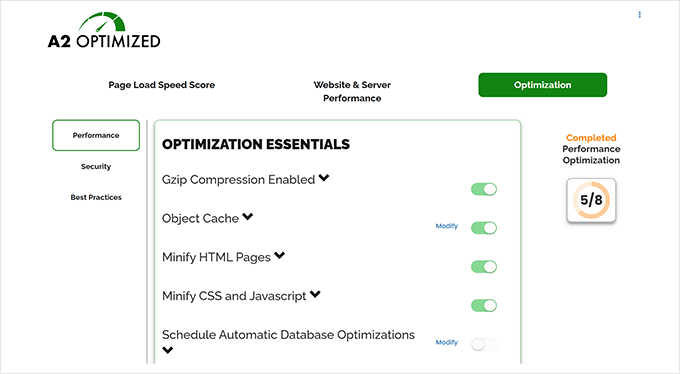
Inside the WordPress admin area, you’ll find the A2 Optimized WP plugin already installed and configured. This means less guesswork, which is great if you just want to focus on publishing content.
Another feature I liked was the TurboHub section in the hosting dashboard.
This gives you a quick way to manage your WordPress sites.
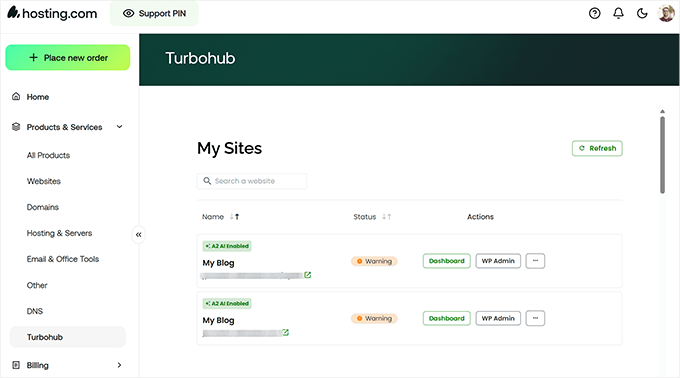
However, the interface could use a refresh. Some areas feel a bit outdated, especially when switching between billing, support, and cPanel.
It works fine, but it doesn’t look as modern as hosts like SiteGround or Hostinger.
One thing I really liked was the guided setup for new users. They ask a few questions after you sign up and then make small adjustments based on your answers. This makes getting started easier if this is your first website.
Help and Support
Whenever I test a new hosting company, I always try their support to see how fast and helpful they are. With Hosting.com, I contacted their live chat several times, both with simple and technical questions.
The good news is they are available 24/7 through live chat, support tickets, and phone.
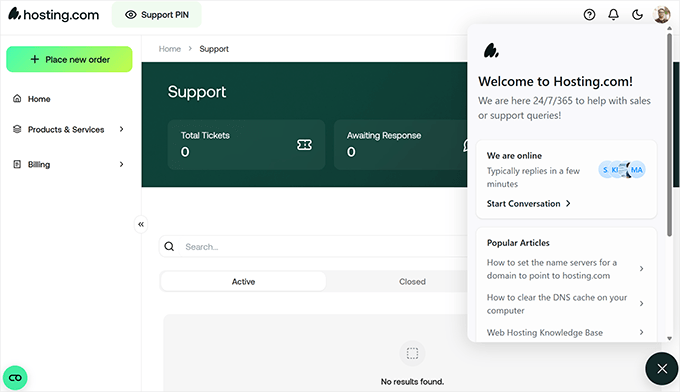
I usually get a reply from live chat within a couple of minutes. Their support team was fast and helpful for basic things, like moving my site or finding something in the dashboard.
For more technical questions, like about LiteSpeed cache settings or SSH setup, I sometimes had to send a support ticket, but they always followed up and solved the problem.
Their knowledge base is also quite good. While it’s not fancy, it has many helpful articles for new users trying to understand cPanel, backups, or WordPress installation.

It’s not just my experience. Hosting.com has thousands of positive reviews on Trustpilot with a very high overall rating. ✨ Most of this positive feedback highlights their speed and support, which matches what I found during my tests.
Who Should Use Hosting.com?
After testing Hosting.com on both shared and managed WordPress plans, here’s who I think will get the most out of it:
- You want faster load times without upgrading to VPS or cloud hosting.
- You’re running a blog, small business site, or custom project and want performance to match.
- You like having control — features like SSH, Git, WP-CLI, and staging are available even on shared plans.
- You’re okay paying a bit more for higher plans to get NVMe storage and LiteSpeed servers.
- You’ve outgrown basic hosting and want something faster, more flexible, and still affordable.
Conclusion: Is Hosting.com the Right Choice for You?
After using Hosting.com myself, I can confidently say: yes, I do recommend it. This is especially true if website speed matters to you. 👍
They offer a perfect balance of performance and features. In particular, their higher-tier and managed WordPress hosting plans are highly optimized for WordPress.
I also liked the details, like the free site migration and helpful support team. I didn’t need many extra plugins just to get good speed, and it feels like a platform that values your time and gives your website room to grow.
However, I would not suggest their cheapest plan unless you are just trying things out. You will miss what makes Hosting.com special: its speed and optimized servers.
But for serious website owners who want a faster, more flexible alternative to typical budget hosts, Hosting.com is a strong choice. It’s a host I would use again for speed-focused WordPress sites and the one I’d recommend to friends who need to upgrade from their first hosting plan.
Hosting.com Coupon 🏷️
If you’re looking to save on your hosting plan, Hosting.com offers an exclusive discount for WPBeginner readers. With my special Hosting.com coupon, you can get up to 84% off on your hosting plan.
To claim this deal, simply click here to visit the 👉 Hosting.com website, and the discount will be applied automatically during checkout.
FAQs About Hosting.com
I’ve already covered a lot in this review, but I know there are always a few questions people have when choosing a host.
Here are some of the most common ones I get asked, along with what I’ve learned from using Hosting.com myself.
1. Is Hosting.com good for WordPress?
Yes, Hosting.com is one of the better hosts I’ve used for WordPress, especially their managed WordPress plans. They come pre-configured with performance and security features, and the Turbo servers made my test site noticeably faster without any extra tuning.
2. Does Hosting.com provide a money-back guarantee?
Yes, Hosting.com offers a 30-day full refund window, and after that, they’ll still give you a prorated refund for any unused time. It’s nice to know the guarantee is there.
3. Can I migrate my website to Hosting.com for free?
Yes, Hosting.com provides free site migration services for new customers. Their migration team will handle the process to ensure your site is moved securely and with minimal downtime.
4. Does Hosting.com offer email hosting?
It does. All Hosting.com plans include email hosting, so you can create addresses like you@yourdomain.com. I’ve tested it with both webmail and a desktop client, and it worked just fine.
5. How does Hosting.com compare with competitors like Bluehost or SiteGround?
From my experience, Hosting.com wins when it comes to raw speed, especially on their Turbo plans. Bluehost is often considered easier to use for absolute beginners, and SiteGround has a sleeker dashboard and outstanding support. But for speed and developer tools, Hosting.com gave me more control and better performance.
6. Does Hosting.com include a free domain name?
No, and that’s one of the trade-offs. Unlike some other hosts, Hosting.com doesn’t bundle a free domain with your plan, so you’ll need to register a new domain name or use one that you already own.
7. Is Hosting.com suitable for eCommerce or WooCommerce?
Yes, especially their managed WordPress “Sell” plan, which is built for WooCommerce hosting. The performance and built-in tools make it a good fit for eCommerce.
If you have more questions, feel free to reach out. Hopefully, this review helped clear up the most important points for you.
Thanks for reading my review. I know choosing a hosting provider is a big decision.
For me, Hosting.com offered the speed, flexibility, and support I was looking for, especially on their Turbo and managed WordPress plans. If you’re looking for a performance-focused host that doesn’t cut corners, it’s worth checking out.
And if you’re ready to get started, you can use WPBeginner’s Hosting.com coupon, which gives you an exclusive up to 84% discount. 👉 Click here to start with Hosting.com.
RJ Roth
Wish I had moved to A2 years ago. Excellent, knowledgeable and pleasant phone support.
Kay Cosby
Support. is extremely helpful! They did not just refer me to an article and then leave me hanging. They went above and beyond what is expected to really help me out! I appreciate their excellent customer service!!!
Emily Miceli
They handled my migration so quickly that I didn’t realize it was done! They saved me a lot of grief losing my data from Bluehost and helped me figure out this DNS business. I switched to A2 because Bluehost has horrendous technical support, and I read on another site that A2 has excellent, primarily US-based support. Definitely appears to be the case. Looking forward to a long relationship with A2, if this experience is any indication.
Eric Graves
Before signing up for A2 Hosting, I had read all of the great reviews about their support team. Let me just say that all of the positive reviews are spot on. Excellent and prompt communication is what I experienced. Keep it up. It’s refreshing to experience real, friendly customer service.
Bryan George
Fast support response. Clear answers. Nice easy to configure Wordpress installation with some out of the box security enhancements.
Phil Boyd
I screwed up my website and the tech rep at A2 Hosting was extremely helpful and professional in helping to resolve my issue. Could not ask for better support.
Tom
I’ve been with A2 for years now but what really sealed the deal for me is that an incompatible WP plugin recently caused major problems with my website. A2 support did a fantastic job in getting my site back up and running. This is the first time I’ve had a website host do a restore from backups for me. It went seamlessly. A big thanks to A2 for helping me during what was already a stressful and hectic time.
Michael Mancini
I put my migration ticket in at night and it was done by early morning.
Mohamed AbdelShakour
Super fast support, Super fast and reliable server performance!
Ken jursa
Awesome service!
Nikiforos Bafas
Fastest support ever. Migration progress run in a minute.
Will Merrill
I recently signed up with A2 Hosting and am extremely pleased with the level of technical support and performance of my web sites. I would not hesitate to recommend them. I’ve used many web hosting companies since around 1997 so I have something to compare to. A2 is without a doubt the best.
Frank Cauley
Very satisfied with the support I have received.
Mark Whitbeck
Always fast, friendly, and thorough support is why I love A2 Hosting!
Robert Pease
Customer Service is always very helpful and friendly. Look no further for the best and most affordable hosting company in the world! Upgraded my server giving me more security and wordpress support for PHP. Did a great job! The migration was seamless and efficient!
Colin Fitz-gerald
I had a problem accessing my website and submitted a ticket. I figured I had to wait about 12 hours for a resolution from experience with other hosting providers. It was resolved within 30 minutes! Wow.
Andy Morris
Great support, lightening fast website. I wish I had found them years ago!
Geoffrey Matthews
A very quick and helpful response
thanks A2 hosting
FADI
Fast and easy to communicate with support
Tyler Christopherson
Support helped me get back up and running quickly on a Sunday. I am very pleased with the support.
tracy thomson
yeah . . . all that and more. Let’s be real. Speed and fast loading despite browser and internet connection is what counts …
James Beard
For a finicky email problem this was a pretty painless fix. Two quick exchanges of email and adjustments to correct the original problem. I am very pleased with the support and communications I received. J M Beard
Steve
A2 works great with WordPress. I wouldn’t use any other hosting solution.
John Wilkins
Excellent as usual, the team are first class and always a pleasure to deal with
Marie Sotos
I’ve contacted support regarding migrating to A2 hosting. Not only where they quick in their response, their feedback was concise and honest.
Jay Anderson
Every time I have an issue with any of my websites, hosting or server A2hosting support has been great.
They are my first go to support with everything.
The best support out there.
Ricardo Nardi
I’m in Brazil and I use A2Hosting. A2 Hosting is excellent. Fast servers and super fast support. Thank you.
Vijay
Friendly support that I can always relay on…
Thank you team
Vijay
Maarten Ballintijn
I’ve been using and recommending A2hosting for many years. On the odd occasion when something came up it was resolved quickly in a professional and friendly manner. Excellent service.
Frey Fares
They have a fast and effective customer service. My problem could was fixed in less than I expected and learnt how to avoid to messing up my web again.
Sally Archambault
A2 Hosting set up a breeze. Coming up to speed – a breeze. The support team – THE BEST!!! The system – reliable, stable, fast… very happy. Quick response. Went through 2 other ISP’s before landing here. (Hosting many sites via VPS)
Michael
Terrific customer support. Migrated multiple domains and they were fast and helpful.
Dom Luzi
A2 hosting is the best. Knowledgeable support staff that is always willing to help answer questions and get to the bottom of any issue.
Claire Holmes
Terrific service – always available to answer queries any time of day or night (especially down here in Australia) and fixes my problems promptly for me – a very helpful host!
Win Day
Moving multiple client sites from one host to another is always a challenge. I had a couple of particular issues around SSL certificates. A2 worked with me to resolve the issues and to help me develop a workflow so that the process runs more smoothly for me in the future. I am very pleased with their support.
Hussain R. Sawalha
Very professional.. very quick in response.. excellent service.. glad to be one of your clients.
Constance
I continue to be pleased with my selection of A2 Hosting as my hosting provider. The support gurus are amazing, response time is fast, and I am learning a lot from them. As a newbie creating an eCommerce website on Wordpress.org, I feel A2 Hosting cannot be beat for their patience and competence.
constance
Gerhard Ade
Migration completed successfully. There was a problem with the largest site not loading, but support staff fixed that quickly. They were very responsive through the process. If this first experience with A2 is any indication of future performance and service I will be a happy camper.
Nigel Baker
Excellent, Requested Migration on the 6th and completed on the 8th of May 2017
Tsafi Nelken
Excellent Service friendly and professional team
Ayman Hajar
Professional Hosting after tried ehost and inmotion and godaddy a2hosting the best
Bruce Boulineau
As an amateur that’s not very fluent in HTML I’m very happy with the service and support I get from A2!!
Ikem Stanley Emeke
I had the best and fastest response. my problem has been resolved. Thank you
Luca Murgianu
Problem resolved with 4 emails
Waqar hussain
very nice hosting very fast
Michele Smorgon
Excellent Service – Prompt Response – Beyond My Expectations
steve spinner
I’ve been with A2 for several years now. For me what is most important, and in fact is crucial, is telephone support by knowledgeable support people where english is their native language.
I have a problem 90% of the time, I call and they solve it while I’m on the phone with them.
Matt Postiff
I use A2 Hosting for two sites. One is managed by CMS Made Simple, the other by a combination including WordPress. They seem to “keep up with the Jones’s” on software upgrades and stuff. Their Swift SSD plan is noticeably faster than the entry-level package. Good uptime.
Martin Cordova
I have been a customer for about 4+ years now, a dedicated Linux VPS with Ubuntu. I don’t have complaints, tech support is very fast and helpful, minimal interruptions, about 2 in all these years, and completely justified, like upgrading their SSDs array. I have complete ROOT control of my Linux. I choose what to install or not, runs fast. I am very satisfied
Jake Barrett
I’ve been with quite a few hosting providers in the past, but none as long as I’ve been with A2 Hosting, and I don’t see that changing. Their reliability has been entirely unparalleled in my experience, and their support is more than just friendly, they’re very knowledgeable. When needed, they even work towards tailored solutions to your needs.
I’ve been quite impressed with them, and would definitely recommend them for those in need of such service.