



Si tienes un sitio de WordPress, tarde o temprano tendrás que lidiar con el spam.
Tan pronto como publiques un formulario de contacto, abras tu sección de comentarios o lances una página de registro, las sumisiones falsas y el tráfico de bots automatizados comenzarán a llegar casi de inmediato.
Durante años, he visto a los propietarios de sitios web pasar por CAPTCHAs torpes, honeypots básicos y listas interminables de bloqueo de IP. ¿El problema? Los bots han evolucionado. Gracias a la IA moderna, ahora pueden completar los desafíos antispam tradicionales casi tan rápido como los visitantes genuinos.
Es por eso que me entusiasmó probar ActiveLayer. Es un plugin antispam moderno impulsado por IA que detecta el spam en segundo plano sin obligar a los visitantes a completar un CAPTCHA.
En esta reseña de ActiveLayer, exploraré todo, desde sus funciones inteligentes de seguimiento de comportamiento, hasta sus integraciones con constructores de formularios populares, sus herramientas de filtrado en segundo plano y mucho más.
Al final de esta reseña de ActiveLayer, sabrás exactamente si es la solución antispam sin CAPTCHA adecuada para tu sitio web de WordPress.
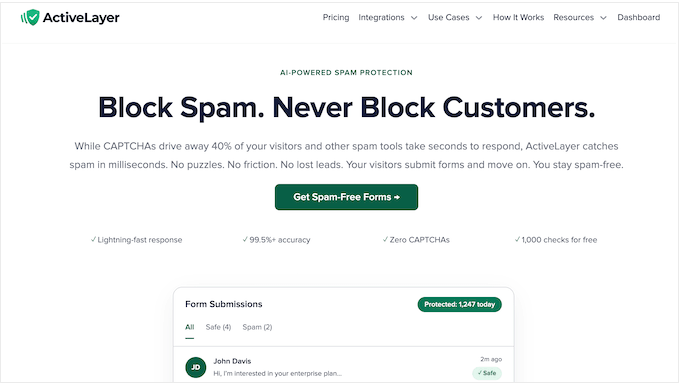
¿Reseña de ActiveLayer: Por qué usarlo en WordPress?
Si alguna vez has abierto tu panel de envíos de formularios y has encontrado 200 mensajes genéricos vendiendo relojes falsos o servicios de SEO de baja calidad, ya sabes por qué necesitas una solución antispam.
El spam en los formularios no solo satura tu bandeja de entrada. Entierra clientes potenciales de alto valor, desperdicia tu tiempo y te entrena lentamente para ignorar por completo las notificaciones de tu propio sitio web.
El problema ha crecido en los últimos años. En un estudio de caso, el equipo de WPBeginner tuvo que bloquear más de 18,000 ataques de leads de spam en un solo formulario de WordPress, lo que demuestra cuán agresivo puede ser el tráfico automatizado.
Durante años, he probado todas las soluciones habituales disponibles para sitios web de WordPress.
Pero seamos honestos: obligar a tus visitantes reales a descifrar letras onduladas o buscar semáforos es un asesino de conversiones. Cuando se enfrentan a molestos acertijos visuales, los usuarios genuinos pueden simplemente rendirse y abandonar tu sitio.
Por eso me entusiasmó tanto poner ActiveLayer a prueba.
Es un servicio anti-spam impulsado por IA, completamente libre de acertijos, diseñado para proteger formularios y comentarios de WordPress. En lugar de interrumpir a tus visitantes para exigirles prueba de que son humanos, ActiveLayer dirige las envíos de forma discreta a través de una verificación de fondo sin interrupciones.
Los mensajes reales pasan al instante, mientras que los bots y los spammers humanos son marcados antes de que lleguen a tu bandeja de entrada.
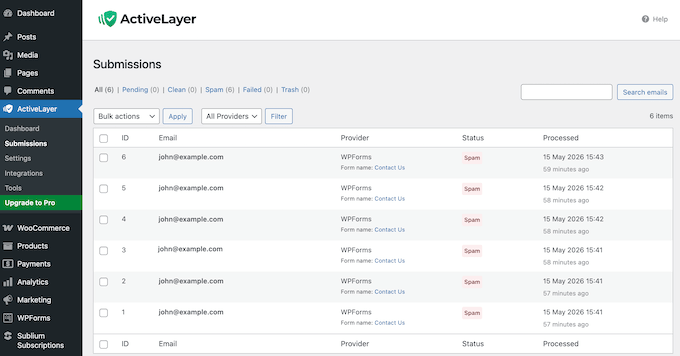
Detrás de escena, ActiveLayer combina el análisis de contenido contextual, redes de reputación de remitentes y patrones de comportamiento para decidir si cada envío individual es genuino o basura.
También revisa cuidadosamente la configuración del navegador del visitante. Esto le permite identificar el software automatizado oculto que a menudo se utiliza para raspar o enviar spam a sitios web.
Para empezar, puedes obtener el plugin de ActiveLayer directamente del repositorio oficial de WordPress y registrarte para obtener una cuenta gratuita.
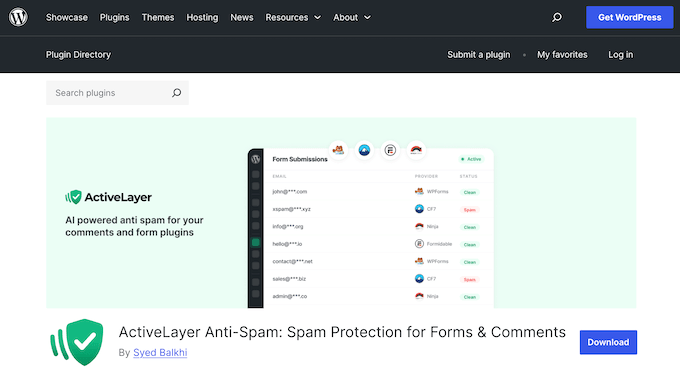
Viene con todo lo que necesitas para empezar a proteger tu sitio, incluyendo un panel de análisis completo, 10 integraciones de formularios nativas y el mismo nivel de precisión de detección que se encuentra en los planes premium de ActiveLayer.
Lo mejor de todo es que obtienes 1000 verificaciones de spam gratuitas, para que puedas probar a fondo el servicio sin gastar un solo centavo.
Reseña de ActiveLayer: ¿Es el plugin anti-spam adecuado para ti? (Mi experiencia honesta)
Para ver si ActiveLayer realmente cumple su promesa de seguridad sin fricciones, lo sometí a una serie de pruebas prácticas en mis diversos sitios de staging y demostración.
Quería evaluar la experiencia desde ambos lados: como administrador del sitio luchando contra una ola implacable de envíos de spam, y como un visitante cotidiano que solo intenta enviar un formulario.
Con todo esto en mente, profundicemos en las características principales y veamos si ActiveLayer es el plugin anti-spam adecuado para ti.
1. Configuración fácil en cinco minutos
Lo primero que probé fue el proceso de incorporación. Si una herramienta anti-spam tarda una hora en configurarse, es probable que la mayoría de las personas la abandonen por pura frustración, sin importar lo bien que funcione una vez que esté en marcha.
Con ActiveLayer, todo el proceso (desde la instalación del plugin hasta la protección de mi primer formulario) me llevó unos 5 minutos.
Me registré en ActiveLayer y luego instalé el plugin gratuito del repositorio de WordPress.org. A continuación, me dirigí al nuevo menú de ActiveLayer en la barra lateral de mi WordPress y elegí 'Configuración'.
Luego, pegué la clave API de mi cuenta de ActiveLayer y hice clic en 'Verificar clave'.
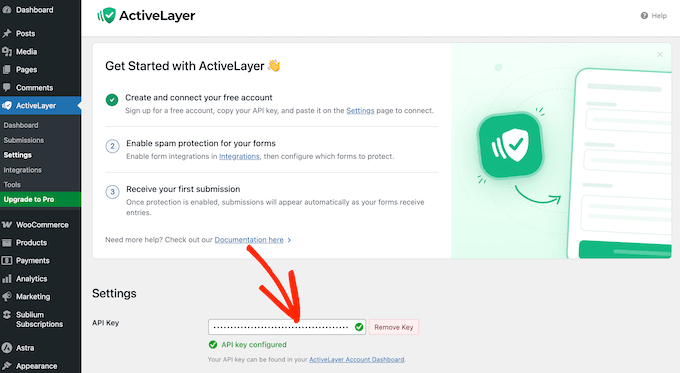
Una marca de verificación verde confirmó que mi conexión estaba activa.
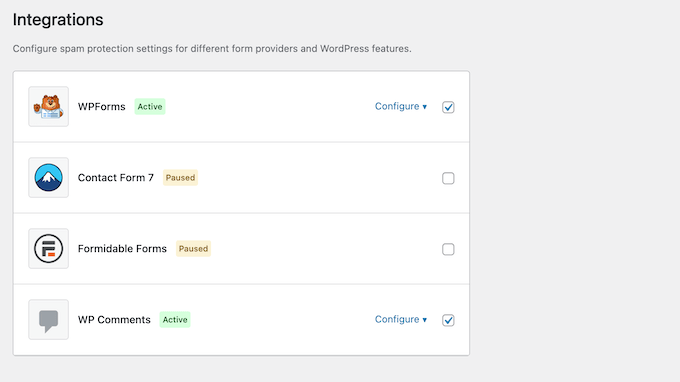
Después de eso, simplemente marqué las casillas junto a los constructores de formularios que quería proteger, como WPForms o Contact Form 7.
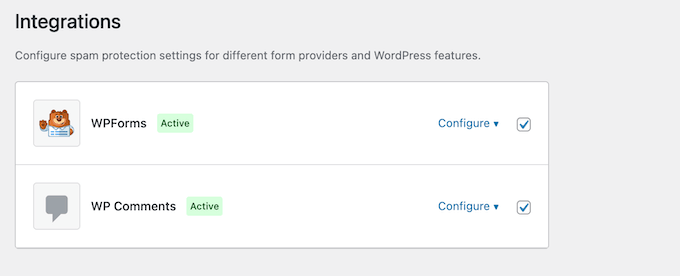
Finalmente, marqué la casilla junto a cada formulario que quería proteger.
Ese fue todo el flujo. A partir de ese momento, mi formulario ejecutó cada envío a través de la API de ActiveLayer.
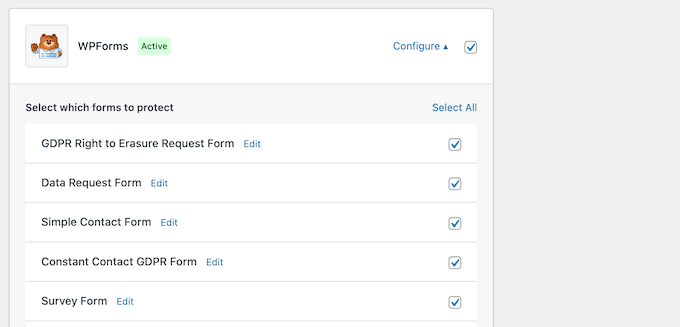
Para los comentarios de WordPress, el camino es aún más corto.
Simplemente marqué la opción ‘WP Comment’, hice clic para expandir la sección y luego configuré mis preferencias, como si quería revisar comentarios de usuarios registrados o bloquear spam de trackback.
Mi Reseña Honesta
Si una herramienta antispam es frustrante o confusa de instalar, sé por experiencia que simplemente se quedará ahí desactivada, dejando tu sitio completamente vulnerable mientras los comentarios de spam y los registros falsos se acumulan en la base de datos.
La configuración de ActiveLayer es exactamente lo contrario. Todo el proceso fue rápido y sin fricciones, guiándome a través de los pasos tan rápidamente que pasé de la instalación a la protección completa en unos cinco minutos.
2. Protección Fluida y Sin Complicaciones
Para mí, la razón principal para considerar una herramienta como ActiveLayer es que los CAPTCHAs tradicionales ya no son suficientes. Frustran a tus visitantes reales y los alejan, mientras que los bots de spam modernos se han vuelto increíblemente buenos para superar los CAPTCHAs.
Con las herramientas actuales de reconocimiento de imágenes con IA, los bots ahora pueden resolver desafíos de rompecabezas estándar con precisión casi humana de todos modos.
ActiveLayer omite por completo los rompecabezas visuales. En lugar de hacer que los usuarios demuestren que son humanos, ActiveLayer realiza una verificación silenciosa del lado del servidor en cada envío de formulario y comentario de blog antes de que toque tu base de datos de WordPress.
Tus visitantes nunca ven un desafío molesto, nunca tienen que descifrar texto borroso y nunca se quedan bloqueados por una suposición incorrecta.
Este cambio puede tener un gran impacto en tus tasas de conversión. Cuando cambias de un desafío reCAPTCHA rígido a la capa invisible de ActiveLayer, puedes evitar perder usuarios legítimos que podrían haber abandonado tu formulario por pura molestia.
Mi Reseña Honesta
¿Alguna vez has mirado las analíticas de tus formularios y notado una caída en los envíos justo después de agregar un CAPTCHA? Entonces, esta función por sí sola hace que ActiveLayer valga la pena intentarlo.
Una vez que tuve ActiveLayer funcionando en mi sitio de prueba, pude eliminar por completo todos esos molestos CAPTCHAs de la vieja escuela. Mis formularios volvieron a ser lo que deberían ser: un espacio limpio y acogedor donde las personas reales pueden contactar con solo su nombre, correo electrónico, mensaje y un botón de enviar.
Vi el mismo beneficio exacto al probar ActiveLayer en la sección de comentarios de mi blog. Los lectores podían interactuar y publicar sus ideas directamente sin tener que completar un rompecabezas primero. Durante todo el tiempo, ActiveLayer trabajó en segundo plano para aprobar automáticamente las conversaciones limpias y marcar silenciosamente los bots de spam reales para su revisión.
3. Manteniendo los Envíos de Formularios Ultrarrápidos
Los plugins antispam tradicionales hacen que cada visitante espere en la pantalla mientras la verificación de spam se ejecuta contra un servicio de validación externo. Cuando intentas enviar un formulario de contacto, un retraso de dos segundos se siente como mucho tiempo, y a menudo lleva a enviar dos veces o abandonar la página por completo.
ActiveLayer toma una ruta completamente diferente para proteger la experiencia del usuario.
Enruta las envíos a través de una cola en segundo plano impulsada por Action Scheduler, que es el mismo sistema confiable que WordPress usa para ejecutar trabajos cron en segundo plano. Esto significa que el envío del formulario ocurre al instante.
Mientras tanto, el análisis de spam real ocurre un momento después en segundo plano.
Para tus visitantes, el formulario se comporta como si no tuvieras ninguna protección contra spam instalada. Hacen clic en enviar, ven inmediatamente tu mensaje de éxito o agradecimiento y continúan con su día.
Mi Reseña Honesta
¡Ojalá hubiera tenido este tipo de servicio hace años!
Cuando probé otros servicios de spam de terceros, me encontré con la misma frustrante disyuntiva: seguridad vs. velocidad. Agregar una verificación de spam robusta siempre significó un retraso visible en el envío. En el momento en que apareció ese retraso, mis tasas de conversión cayeron.
El diseño de cola en segundo plano de ActiveLayer resuelve este problema específico de manera excelente. Es la primera característica que señalo al explicar por qué ActiveLayer se destaca. Finalmente te brinda protección de formularios de nivel empresarial sin obligar a tus usuarios reales a pagar un 'impuesto de velocidad'.
4. Detección de Spam con IA
La mayoría de las herramientas antispam tradicionales dependen de una sola señal para proteger tu sitio. Pueden cotejar la dirección IP de un visitante con una lista negra estática, o colocar un campo oculto de tipo "honeypot" para engañar a scripts simples.
El problema es que los spammers modernos se adaptan increíblemente rápido. Rotan IPs residenciales limpias, reescriben variaciones de texto usando herramientas generativas y aprenden a eludir trampas básicas.
Por el contrario, ActiveLayer analiza más de una señal. Combina análisis profundo de contenido, seguimiento de reputación de remitentes en tiempo real y patrones de comportamiento del usuario en un solo veredicto.
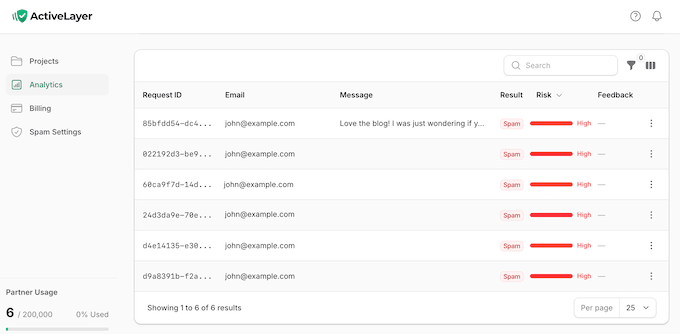
Cada solicitud de validación se devuelve con una puntuación de confianza precisa que oscila entre 0.0 y 1.0.
Empareja esto con un desglose transparente de los marcadores exactos que ha identificado. Esto significa que puedes ver exactamente por qué se marcó una entrada, mientras tienes la opción de anular manualmente cualquier veredicto directamente desde tu panel de WordPress.
Esta metodología de múltiples capas es cómo ActiveLayer logra tasas de precisión tan altas. En mis propias pruebas en diferentes formularios, detectó spam sin problemas. Las entradas legítimas pasaron sin problemas, y los raros falsos positivos fueron increíblemente fáciles de localizar y revertir.
Mi Reseña Honesta
Cuando una herramienta de seguridad afirma tener una alta tasa de precisión, generalmente soy bastante escéptico. He probado muchos servicios de spam que logran una alta precisión simplemente siendo demasiado agresivos, lo que inevitablemente lleva a bloquear a visitantes y clientes reales.
Teniendo esto en cuenta, puse a prueba ActiveLayer utilizando una combinación de scripts de bots automatizados, variaciones de texto y entradas de prueba legítimas. Me impresionó enormemente la precisión con la que ActiveLayer separó la basura automatizada de los envíos genuinos.
ActiveLayer detectó el tráfico malicioso de manera confiable, mientras que los usuarios reales pasaron por el formulario instantáneamente sin un solo bloqueo falso.
5. Detener Bots Sofisticados con Seguimiento Inteligente de Comportamiento
La cola en segundo plano y el panel central de ActiveLayer manejan la mayoría de los envíos de spam sin esfuerzo.
Pero hay un truco: los bots altamente sofisticados ahora están programados para imitar cómo los humanos escriben e interactúan con los formularios.
Ahí es donde entra el seguimiento de comportamiento de ActiveLayer. Observa silenciosamente cómo los visitantes interactúan con tus formularios en tiempo real, lo que hace increíblemente fácil detectar incluso a los bots más inteligentes.
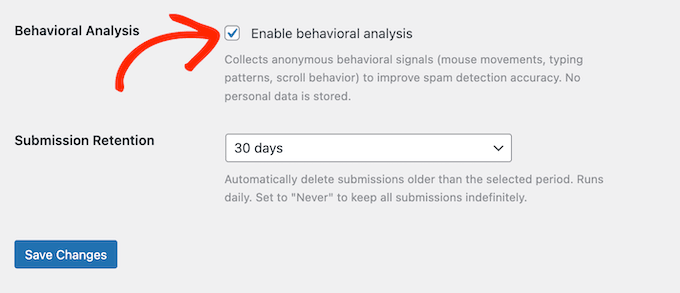
En particular, ActiveLayer monitorea los ritmos de tecleo, los movimientos del ratón y los patrones de desplazamiento naturales. Los humanos reales escriben de forma irregular, mueven sus cursores en arcos no lineales y hacen pausas para pensar entre el llenado de campos. La mayoría de los scripts automatizados simplemente no imitan estos patrones.
Después de registrar estas señales, ActiveLayer las envía a la API junto con el contenido real del envío. Al combinar estas señales de comportamiento con un escaneo profundo del envío en sí, ActiveLayer puede tomar una decisión mucho más inteligente sobre lo que es real y lo que es spam.
Si te preocupa la privacidad y no quieres rastrear las interacciones de los usuarios en absoluto, puedes desactivar fácilmente esta función en la configuración del plugin.
Mi Reseña Honesta
En mi opinión, esta función es un salvavidas si administras una sección de comentarios de un blog concurrido, o si gestionas un formulario de registro público que los bots atacan sin descanso. Los mismos riesgos se aplican si recientemente has abierto el registro de usuarios en tu sitio de WordPress, ya que los formularios de registro abierto son algunos de los objetivos de mayor prioridad para el abuso automatizado.
Estos son los entornos exactos donde los bots maliciosos se esfuerzan más por imitar el comportamiento humano, y donde los filtros de spam estándar comienzan a fallar.
Al observar cómo los usuarios interactúan realmente con tus páginas, ActiveLayer proporciona una capa adicional de defensa, justo donde más la necesitas.
6. Detección de Navegador sin Cabecera y Entorno
No todos los spambots son iguales. Algunos ni siquiera se molestan en usar un navegador web real, y en su lugar, realizan solicitudes HTTP directas al servidor de tu sitio.
Otros utilizan herramientas automatizadas e invisibles que cargan tus páginas web completamente en segundo plano sin abrir nunca una ventana real.
Ambos métodos sigilosos son formas increíblemente comunes en que los hackers inundan los formularios de WordPress con spam automatizado.
ActiveLayer detecta estas configuraciones falsas buscando pistas únicas en segundo plano que un navegador real operado por humanos siempre envía, pero que las herramientas de scripts automatizados casi siempre omiten.
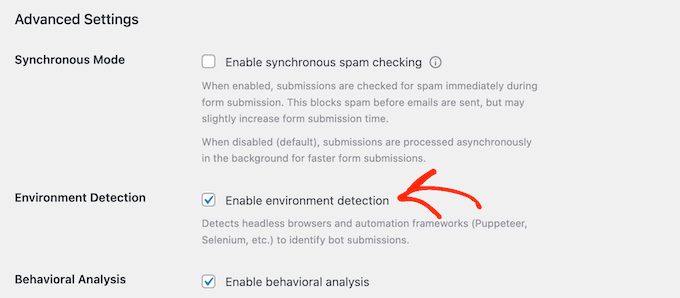
Cuando estas verificaciones de entorno funcionan correctamente, no verás que suceda nada. ActiveLayer bloquea estos bots de forma silenciosa e inmediata.
Y en el raro caso de que un script sofisticado logre pasar la verificación del entorno, el seguimiento de comportamiento de ActiveLayer está ahí para actuar como una red de seguridad.
Mi Reseña Honesta
Esta es una función que hace su trabajo de forma completamente invisible, que es exactamente lo que quiero de una herramienta de seguridad. No hay configuraciones confusas ni un registro complejo en el panel que muestre cada intento de navegador sin cabecera bloqueado.
Lo que me importa es el resultado final real: mis formularios de entrada y bases de datos no se llenan de spam automatizado.
Durante mi tiempo probando este plugin en varios entornos de staging, el volumen general de spam impulsado por bots se redujo significativamente, sin tener que administrar una sola configuración. Es una protección altamente efectiva y completamente silenciosa.
7. Integraciones incorporadas para constructores de formularios populares
WordPress tiene docenas de plugins de formularios de contacto. De hecho, algunos sitios web incluso usan múltiples constructores de formularios al mismo tiempo. Por ejemplo, un sitio podría usar WPForms para el formulario de contacto principal, Contact Form 7 para páginas antiguas y Elementor Forms dentro de páginas de destino específicas.
Típicamente, esto significa usar una solución anti-spam completamente diferente para cada constructor de formularios.
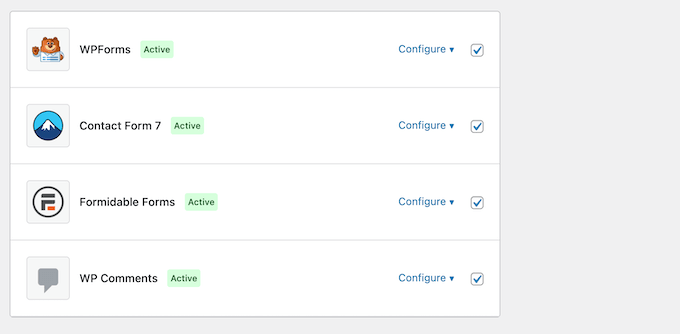
ActiveLayer resuelve este problema al venir con integraciones nativas para los constructores de formularios más comunes del mercado. Puedes administrar cada uno de ellos desde la misma página de configuración de ActiveLayer.
Actualmente, ActiveLayer soporta lo siguiente:
- WPForms
- Contact Form 7
- Gravity Forms
- Formularios de Elementor
- Formularios fluidos
- Formidable Forms
- Forminador
- Ninja Forms
- SureForms
- Comentarios nativos de WordPress
Mi Reseña Honesta
Para mí, este enfoque todo en uno cambia completamente las reglas del juego. Si mezclas y combinas diferentes constructores de formularios en tus proyectos, o administras sitios de staging con configuraciones completamente diferentes, ActiveLayer mantiene tu flujo de trabajo increíblemente simple.
También es por eso que creo que ActiveLayer es la solución perfecta para freelancers y agencias. Puedes implementar la misma solución anti-spam confiable en cada sitio de cliente que administras.
8. Control granular: Elegir qué formularios proteger
A veces, es posible que no necesites usar protección contra spam en todo tu sitio. Por ejemplo, podrías tener algunos formularios internos, como un formulario de incorporación privado protegido con contraseña que envías directamente a los clientes.
ActiveLayer maneja esto perfectamente al permitirte elegir exactamente qué formularios proteger. Dentro de la configuración, simplemente marca o desmarca una casilla junto a cada formulario, dependiendo de si necesitas protección contra spam o no. Es así de simple.
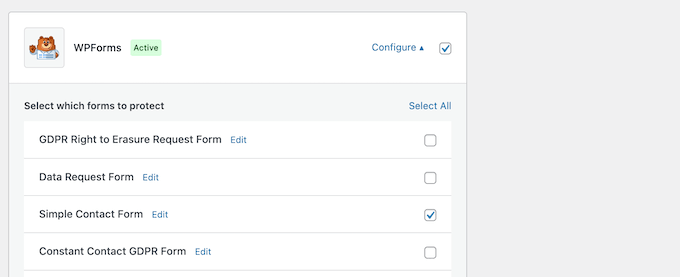
De esta manera, puedes excluir fácilmente las verificaciones de API para cosas como formularios de solicitud de RR. HH. sensibles o tableros privados. Esto es una gran victoria para la privacidad.
Mi Reseña Honesta
Con ActiveLayer, puedes elegir exactamente qué formularios activan una llamada a la API. Realmente aprecio tener esa capa de control, ya que asegura que el servicio solo se active cuando agrega valor a tu negocio, en lugar de ejecutarse silenciosamente en segundo plano.
9. Protección contra spam en comentarios de WordPress
Además, ActiveLayer protege los comentarios de tu blog con la misma velocidad y eficiencia que ofrece a los formularios de contacto.
El plugin se conecta directamente al sistema de comentarios nativo de WordPress y enruta silenciosamente cada nueva publicación a través de su API. Desde allí, se encarga de la clasificación por ti.
ActiveLayer puede aprobar automáticamente los comentarios genuinos, marcar el spam obvio y colocar los mensajes dudosos en una cola de moderación, listos para que los revises.
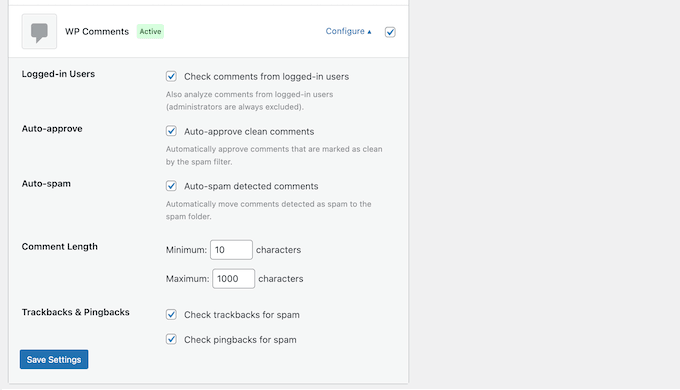
Para sitios web con comunidades activas, esta es la experiencia de usuario perfecta. Los lectores reales publican sus pensamientos y los ven aparecer de inmediato, mientras que el spam se canaliza directamente a la papelera o a la cola de moderación sin aparecer nunca en tu sitio.
Cuando combinas esto con las funciones de eliminación masiva de ActiveLayer, puedes mantener tu sección de comentarios limpia sin pasar horas revisando y eliminando manualmente comentarios de spam.
Si también deseas combinar ActiveLayer con otras herramientas, nuestro resumen de los mejores plugins para mejorar los comentarios de WordPress es un excelente punto de partida.
Mi Reseña Honesta
Mientras escribía esta reseña, utilicé ActiveLayer para aprobar automáticamente los comentarios limpios y marcar automáticamente el spam.
La configuración que más tiempo me ahorró, de lejos, fue el interruptor de detección automática de spam. Se encargó por completo de detectar y eliminar los comentarios de spam, por lo que no tuve que dedicar tiempo a clasificar manualmente cientos de mensajes.
10. Elección de la Experiencia de Usuario: Bloqueo en Línea en Tiempo Real
La configuración predeterminada de ActiveLayer verifica el spam en segundo plano, que es mi método preferido porque mantiene las envíos increíblemente rápidos. Sin embargo, también puedes evitar que los spammers envíen un formulario por completo, cambiando al Modo Sincronizado.
El Modo Sincronizado obliga al formulario a esperar el veredicto de la API antes de intentar completar el proceso de envío. Los spammers ven un mensaje de error instantáneo, mientras que los usuarios legítimos pueden enviar su mensaje con normalidad.
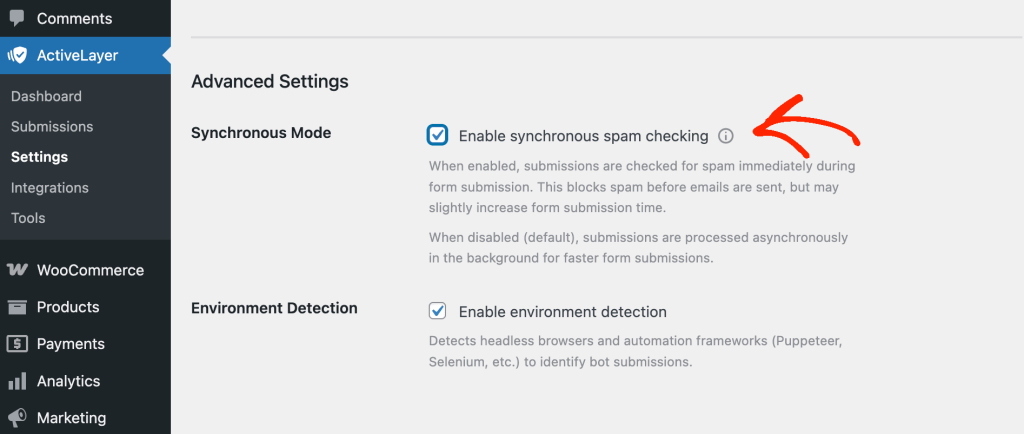
La contrapartida es un pequeño retraso en el envío del formulario, ya que la API debe responder antes de que se finalice el envío.
Mi Reseña Honesta
He utilizado otros servicios anti-spam donde el bloqueo en línea es la única opción, y el retraso obligatorio que añade es un asesino silencioso de conversiones. A los usuarios legítimos no les gusta quedarse mirando un indicador de carga.
El hecho de que ActiveLayer utilice una cola en segundo plano asíncrona por defecto, al tiempo que ofrece un Modo Sincronizado opcional, es un diseño muy sofisticado.
La mayoría de los propietarios de sitios web no necesitarán usar el Modo Sincronizado, pero tener la flexibilidad de elegir da a ActiveLayer una gran ventaja sobre las soluciones de la competencia.
11. Listas de Bloqueo Personalizadas
ActiveLayer está diseñado para manejar la mayoría del spam sin ninguna intervención manual de tu parte.
Sin embargo, la mayoría de los sitios web tienen sus propios casos límite únicos. Quizás un competidor específico sigue usando su correo electrónico de trabajo para registrarse en tus demos de productos, o una ola de bots comienza a usar una palabra clave extraña que tu audiencia nunca escribiría.
Cuando esto sucede, ActiveLayer te permite agregar tus propias reglas personalizadas manualmente.
Dentro del panel de control, encontrarás cuatro listas de bloqueo personalizadas dedicadas: dominios, palabras clave, direcciones de correo electrónico y direcciones IP.
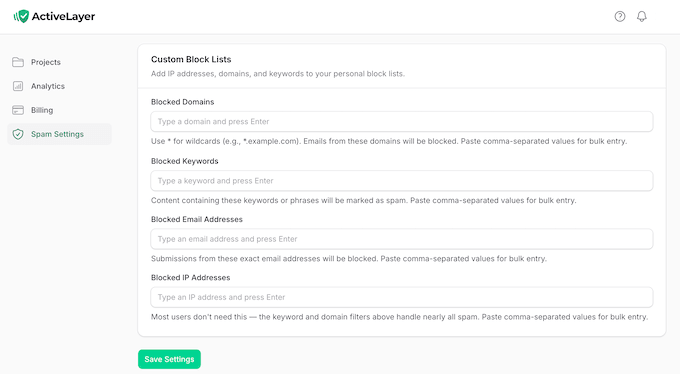
Puedes escribir cada entrada manualmente o pegar una lista separada por comas para importaciones masivas rápidas. El campo de dominios incluso admite comodines, lo que significa que puedes escribir *.example.com para bloquear completamente una red entera de subdominios a la vez.
Crucialmente, estas reglas manuales funcionan directamente junto con la IA central de ActiveLayer en lugar de reemplazarla por completo.
Cuando detecta un envío utilizando tu lista de bloques personalizada, ActiveLayer lo agrega a la misma base de datos que tus registros de spam automatizados. Esto te brinda una vista única y unificada de todo lo que ActiveLayer está bloqueando.
Mi Reseña Honesta
Durante mis propias pruebas, realmente aprecié no tener que perder horas creando y manteniendo listas negras masivas y tediosas desde cero.
Con ActiveLayer, pude usar listas personalizadas como un filtro de alta precisión en lugar de una regla amplia y restrictiva. En el momento en que noté una variación de dominio muy específica o una frase de marketing extrañamente nicho apuntando repetidamente a mis sitios, pude eliminarla por completo en segundos usando una regla de comodín.
Esto me dio el nivel exacto de control que quería, mientras dejaba que el motor de IA principal se encargara de la mayor parte del filtrado de spam diario en segundo plano.
12. Métricas de análisis y seguridad de un vistazo
Si eres como yo, no solo quieres un plugin o servicio que funcione en segundo plano, quieres *ver* que está haciendo su trabajo.
El panel integrado de ActiveLayer hace exactamente eso, brindándote una visión instantánea de tus envíos totales, el volumen exacto de spam detectado, las tasas de precisión generales, el estado de la cola y los estados actuales de tu integración.
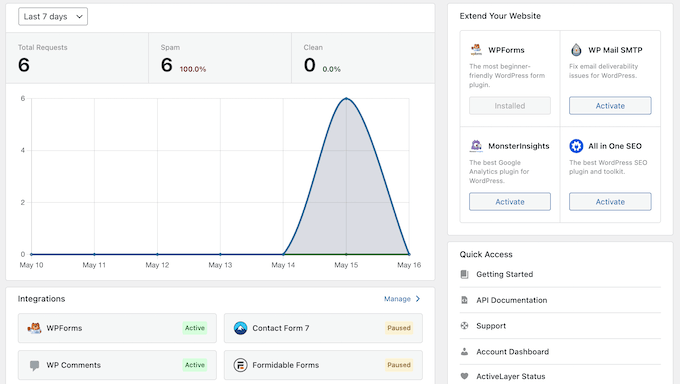
Un panel separado de estado de la cola te muestra exactamente si tus trabajos asíncronos en segundo plano se están ejecutando sin problemas. Si necesitas profundizar en los datos, puedes filtrar envíos anteriores por su estado o por el proveedor del formulario específico.
Mientras tanto, el panel de estado de integración muestra exactamente qué constructores de formularios están activos y conectados exitosamente a la red de API, y cuáles no están disponibles actualmente.
Como resultado, puedes verificar el estado de protección de todo tu sitio web sin tener que navegar por múltiples pantallas de administración o configuraciones de plugins separadas.
Mi Reseña Honesta
Si tuviera que elegir una característica favorita en ActiveLayer, son definitivamente las analíticas integradas. Combinada con una herramienta dedicada de optimización de conversiones, estos datos se vuelven aún más valiosos para detectar dónde abandonan los visitantes reales en comparación con dónde se filtran los bots.
Después de ejecutar el plugin en mi sitio de prueba durante unos días, revisé las analíticas y de inmediato me dio una vista panorámica de mis comentarios y envíos de spam recientes.
De esta manera, ActiveLayer elimina cualquier suposición o incertidumbre. En lugar de preguntarme si el sistema está haciendo su trabajo, puedo iniciar sesión y ver de inmediato que todo está funcionando perfectamente.
13. Gestión de envíos con reevaluación masiva
Cada vez que evalúa un envío, ActiveLayer lo registra en una tabla dedicada dentro de tu base de datos de WordPress. Esto te da control total sobre tus datos, para que puedas revisar entradas anteriores y anular fácilmente las decisiones de ActiveLayer en cualquier momento.
Si decides ajustar tu configuración de seguridad más adelante, no tienes que preocuparte de que tus entradas antiguas queden con etiquetas desactualizadas. ActiveLayer proporciona una práctica herramienta de acciones masivas que te permite reevaluar envíos anteriores utilizando una llamada API nueva.
También puedes anular veredictos individuales. Si un mensaje importante activa accidentalmente un falso positivo y se marca como spam, simplemente puedes marcarlo como limpio.
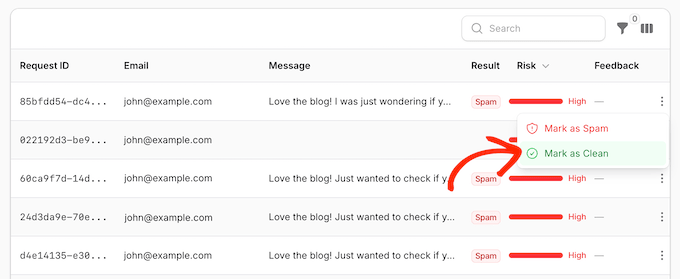
¿La mejor parte? ActiveLayer realmente aprende de estas correcciones manuales. Utiliza tus comentarios del mundo real para entrenarse, volviéndose más inteligente y preciso con el tiempo.
Mi Reseña Honesta
La reevaluación masiva es una pequeña función que resulta increíblemente útil en el uso del mundo real.
La mayoría de las herramientas antispam tradicionales tratan su veredicto inicial como final. Debido a esto, una sumisión clasificada erróneamente o mal etiquetada permanece enterrada en tu base de datos para siempre. Si el algoritmo de un plugin comete un error, normalmente necesitarás copiar y pegar manualmente esos datos del archivo de spam.
ActiveLayer cambia completamente esa dinámica al permitirte regresar y reevaluar un lote de sumisiones con tu lógica actualizada.
Esto les da a los propietarios de sitios una segunda oportunidad para que sus datos sean correctos, algo que rara vez veo en las soluciones antispam.
14. Arquitectura Fail-Open: Garantizando una Fiabilidad Fluida
En mi opinión, lo peor que puede hacer una herramienta antispam es romper tus formularios cuando su propia red se cae. Si una API de seguridad no es accesible temporalmente, un plugin mal diseñado normalmente bloqueará todas las sumisiones por precaución o se negará a cargar tus formularios por completo.
ActiveLayer está diseñado para fallar abierto (fail-open). Si su API se cae o no es accesible, el plugin recurre automáticamente al comportamiento nativo de tu proveedor de formularios. Esto significa que las sumisiones se procesan sin problemas, las notificaciones se envían como de costumbre y los comentarios del blog se guardan en su estado original de 'pendiente'.
No tienes que preocuparte por perder ni un solo cliente potencial, transacción o mensaje.
Tan pronto como se restablece la conectividad, la cola de fondo incorporada se encarga y reintenta automáticamente cualquier verificación de validación de spam pendiente.
Mi Reseña Honesta
Este tipo de marco de fallo abierto (fail-open) es absolutamente el comportamiento predeterminado correcto para un plugin de seguridad moderno.
Si ocurre una interrupción de la API, podrías ver un puñado de sumisiones de spam desprotegidas en tu bandeja de entrada durante un breve período. Sin embargo, es una compensación muy deliberada.
Preferiría lidiar con un par de molestos mensajes de spam automatizados durante una rara interrupción de servicio externo de quince minutos, que arriesgarme a que una consulta de cliente de alto valor se pierda o se bloquee.
Cuando se trata de administrar formularios de negocios, mantener una línea de comunicación abierta siempre debe ser lo primero.
15. Vigilancia de Cola y Reintentos Automáticos
Ejecutar tus verificaciones de spam completamente en una cola de fondo plantea una pregunta: ¿qué sucede si esa cola de fondo deja de procesar?
Si tu sitio de WordPress tiene un fallo o pierde brevemente la conexión con la red de spam, podrías perderte mensajes importantes.
ActiveLayer maneja esto a través de un sistema de vigilancia automatizado. Cada 15 minutos, verifica que las sumisiones de tus formularios se estén procesando sin problemas. Si los mensajes comienzan a acumularse o el sistema detecta un atasco, ActiveLayer muestra una notificación directamente en tu panel de WordPress.
Para hacer las cosas aún más confiables, ActiveLayer también utiliza reintentos automáticos. Si la API de seguridad excede el tiempo de espera o experimenta un fallo, ActiveLayer vuelve a poner en cola de forma segura esa presentación individual e intenta automáticamente de nuevo en su próximo ciclo.
Mi Reseña Honesta
Establecer el perro guardián en un intervalo de 15 minutos es el punto óptimo absoluto para un sistema como este.
Si la verificación se ejecutara con más frecuencia, simplemente desperdiciaría los recursos de la base de datos de su servidor sin ningún beneficio real. Mientras tanto, esperar más tiempo significa que un formulario atascado podría pasar desapercibido durante horas, retrasando mensajes importantes de los clientes y posibles clientes.
16. Prevención de la hinchazón de la base de datos con limpieza automatizada
Almacenar cada intento de spam para siempre no es una buena idea. Con el tiempo, su base de datos puede crecer masivamente, sus copias de seguridad de WordPress tardarán más y serán más pesadas, y terminará conservando los datos del visitante mucho más tiempo del necesario.
ActiveLayer resuelve esto con una herramienta de limpieza automática que mantiene su sitio ágil.
Puede elegir exactamente cuánto tiempo desea conservar sus registros, con opciones que van desde una ventana rápida de 30 días hasta un año completo. Una vez que elija un plazo, ActiveLayer revisará y eliminará rutinariamente cualquier entrada anterior a su fecha límite.
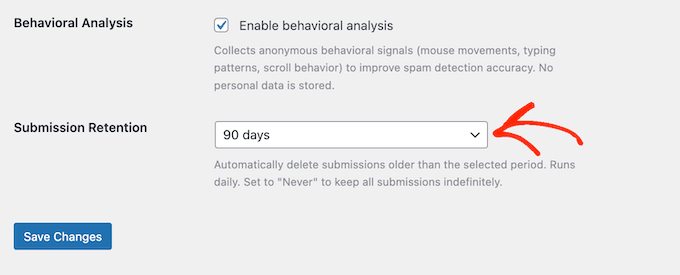
Además del horario automatizado, también hay un botón de 'Eliminar envíos antiguos'. Si tiene un sitio con mucho tráfico donde el spam ya se ha acumulado durante varios meses, esto le permite purgar instantáneamente la basura sin esperar la próxima limpieza programada.
Alternativamente, si su negocio requiere un rastro de auditoría permanente, simplemente puede seleccionar 'Nunca' para garantizar que sus registros se conserven de forma permanente.
Mi Reseña Honesta
La mayoría de los complementos antispam que he usado a lo largo de los años caen en uno de dos extremos: o acumulan sus datos de envío para siempre hasta que su servidor se queda sin espacio, o eliminan absolutamente todo basándose en un horario estricto y fijo.
Eso deja a los propietarios del sitio atrapados entre una base de datos en constante crecimiento y lenta, y no tener datos históricos para consultar al solucionar problemas. En mi opinión, la configuración de retención de ActiveLayer proporciona el punto intermedio perfecto.
17. Más allá de WordPress: Protección de aplicaciones personalizadas y sitios sin cabeza
Si bien ActiveLayer está diseñado principalmente para WordPress, está hecho para ser increíblemente flexible en su funcionamiento interno. Como resultado, ActiveLayer puede proteger formularios en plataformas que los complementos estándar de WordPress no pueden tocar, incluidas aplicaciones codificadas a medida, front-ends sin cabeza y aplicaciones móviles nativas.
La documentación oficial para desarrolladores proporciona guías de integración claras para frameworks de servidor populares como Node.js, Django y Laravel.
En segundo plano, ActiveLayer se comunica utilizando cargas útiles JSON simples, que es el formato de datos universal que utilizan casi todos los servicios web modernos. Luego, devuelve un veredicto de spam inmediato completo con su puntaje de confianza exacto y las señales de detección correspondientes.
Para equipos de desarrollo o empresas que ejecutan un ecosistema mixto de sitios WordPress y no WordPress, esto cambia completamente el juego.
En lugar de administrar herramientas de spam separadas para tu blog de WordPress, tus aplicaciones personalizadas y tus páginas de destino, puedes usar ActiveLayer en toda tu red.
Mi Reseña Honesta
Admito que entré en esta ronda específica de pruebas un poco escéptico sobre las capacidades de la API que no son de WordPress. Algunos servicios populares de protección contra spam ponen el 100% de su esfuerzo en WordPress y dejan a los desarrolladores personalizados con un sistema básico que apenas funciona.
Después de probar el endpoint REST en algunas de mis propias configuraciones de framework personalizadas, quedé genuinamente impresionado por los resultados. Está claro que esta API para desarrolladores no se agregó solo como una ocurrencia tardía de marketing: es una herramienta de seguridad completa, potente y muy capaz por derecho propio.
Reseña de ActiveLayer: Soporte Comunitario y Profesional
Antes de elegir cualquier herramienta o plugin de WordPress, es importante verificar a qué tipo de soporte tendrás acceso en caso de que algo salga mal.
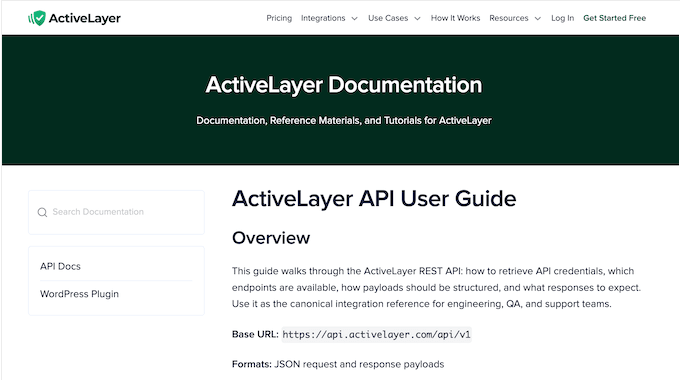
Para empezar, ActiveLayer tiene documentación en línea detallada, que incluye una guía de configuración simplificada para que puedas comenzar rápidamente. Para usuarios más avanzados, hay una referencia de API técnica y profunda que es particularmente útil si deseas implementar ActiveLayer en plataformas que no son de WordPress.
Si actualizas a Pro, obtendrás acceso a soporte por correo electrónico. Mientras tanto, los planes Enterprise vienen con un administrador de soporte dedicado y un Acuerdo de Nivel de Servicio (SLA) formal y personalizado.
Si te quedas con el nivel gratuito, puedes publicar preguntas en el foro de soporte oficial de WordPress.org del plugin.
No importa cómo te comuniques, es importante proporcionar al equipo de soporte información detallada desde el principio. Proporcionar esta información de antecedentes puede marcar la diferencia entre obtener una solución rápida y quedar atrapado en una larga cadena de correos electrónicos.
Dicho esto, asegúrate de consultar nuestra guía sobre cómo solicitar soporte de WordPress correctamente (y obtenerlo).
Reseña de ActiveLayer: Precios y Planes
ActiveLayer tiene un nivel gratuito que vale la pena probar si no estás seguro de si es la solución adecuada para ti. Puedes registrarte sin ingresar la información de tu tarjeta de crédito e obtendrás instantáneamente 1000 verificaciones de spam de un solo uso para probar el servicio.
Eso es más que suficiente para un blog pequeño o un formulario de contacto de bajo tráfico, por lo que puedes probar ActiveLayer durante unas semanas.
Cuando superes el nivel gratuito, los planes de pago comienzan en $5 al mes.

Aún mejor, puedes usar ActiveLayer en tantos sitios como desees y acceder a la API completa, sin importar qué plan compres. La principal diferencia entre los paquetes es simplemente la cantidad de verificaciones mensuales que tu cuenta puede ejecutar:
- Pro (desde $5/mes, $48/año): Este plan te ofrece verificaciones recurrentes mensuales que comienzan en 5,000 y escalan hasta 250,000. Es un plan altamente flexible y rentable, adecuado para todo, desde un formulario de contacto único hasta una sección de comentarios con mucho tráfico. También sirve como un excelente punto de partida si diriges una agencia de desarrollo más pequeña y deseas una solución única y unificada que puedas usar en sitios de varios clientes.
- Enterprise (desde $149/mes): Esto cubre más de 500,000 verificaciones mensuales junto con soporte dedicado de alta prioridad y un Acuerdo de Nivel de Servicio (SLA) formal y personalizado. También viene con capacidades de inicio de sesión único (SSO). Por lo tanto, este nivel es perfecto para usuarios empresariales y organizaciones más grandes que necesitan administrar un gran volumen de spam.
¿Es ActiveLayer Review el plugin anti-spam adecuado para ti?
Durante las pruebas, ActiveLayer ha demostrado ser una forma confiable, rápida y transparente de mantener limpios los formularios y comentarios de WordPress sin obligar a los visitantes reales a demostrar que son humanos. El diseño sin CAPTCHA, el sistema de cola en segundo plano y la detección de IA multiseñal se mantuvieron perfectamente durante mis pruebas.
En particular, vale la pena invertir en ActiveLayer solo por el panel de visibilidad. Poder ver exactamente qué envíos fueron capturados (y la razón exacta por la que lo fueron) elimina las conjeturas de la seguridad del formulario.
ActiveLayer también es una solución flexible y escalable. Ya sea que estés buscando proteger un formulario de contacto único con poco tráfico o intentando administrar las entradas de formularios entrantes en toda una cartera de sitios empresariales con mucho tráfico, ActiveLayer puede crecer con tu negocio.
Solo ten en cuenta que ActiveLayer sigue siendo una herramienta relativamente nueva en el mercado. La probé en mis propios sitios durante unas semanas antes de escribir esta reseña de ActiveLayer, y no tuve ningún problema. Sin embargo, elegirla en este momento significa que estás al principio de la curva de adopción.
Reseña de ActiveLayer: Preguntas Frecuentes
Elegir una herramienta de seguridad para tu sitio puede ser abrumador, por lo que es comprensible si todavía tienes preguntas.
Para ayudarte a decidir si ActiveLayer es adecuado para ti, aquí están las preguntas más comunes que escucho de los propietarios de sitios web de WordPress.
¿Existe una versión gratuita de ActiveLayer?
Sí. Puedes descargar el plugin ActiveLayer directamente desde WordPress.org y registrarte para obtener una cuenta gratuita. De inmediato, obtienes 1,000 verificaciones de spam gratuitas sin tener que ingresar la información de tu tarjeta de crédito.
Esto es más que suficiente para proteger un formulario de contacto con poco tráfico o un blog pequeño durante unas semanas mientras pruebas todo. Una vez que superes ese límite gratuito, los planes de pago comienzan en solo $5 al mes.
¿Funciona ActiveLayer con sitios y formularios que no son de WordPress?
Sí. Si bien el plugin dedicado facilita la implementación de ActiveLayer en WordPress, el servicio subyacente se basa en una API REST universal y altamente flexible. Esto significa que cualquier plataforma web personalizada, framework independiente o aplicación móvil nativa que pueda enviar una solicitud web estándar puede comunicarse directamente con ActiveLayer.
Además, la documentación para desarrolladores de ActiveLayer proporciona planos de integración preconstruidos para entornos backend dominantes como Node.js, Django y Laravel.
Si administras una configuración mixta, recomiendo encarecidamente usar el plugin para proteger tus sitios de WordPress, mientras conectas tus aplicaciones personalizadas directamente a la API utilizando formatos de datos web estándar.
¿Puedo usar ActiveLayer junto con reCAPTCHA u otras herramientas CAPTCHA?
Puedes, pero probablemente no deberías. El propósito de instalar ActiveLayer es eliminar por completo la fricción del usuario y las tasas de abandono que los CAPTCHA tradicionales introducen en tus formularios.
Apilar un rompecabezas visual o un desafío sobre ActiveLayer significa que tus visitantes reales todavía están resolviendo acertijos molestos, a pesar de que el motor invisible de ActiveLayer ya está protegiendo silenciosamente tu sitio por sí solo.
Mientras tanto, si has estado usando una alternativa como Cloudflare Turnstile para una experiencia de CAPTCHA invisible, normalmente puedes reemplazarla por completo con ActiveLayer.
¿Qué sucede con mis formularios si ActiveLayer se desconecta?
ActiveLayer está diseñado explícitamente para fallar de forma abierta, por lo que tus formularios permanecen en funcionamiento sin importar qué.
Incluso si la API de validación no está disponible temporalmente debido a un problema de red o una interrupción del servicio, tus visitantes no notarán nada. Aún podrán completar y enviar formularios perfectamente, y los comentarios simplemente esperarán en tu cola de 'Pendientes'.
Algunos mensajes de spam podrían aparecer en tu bandeja de entrada durante el tiempo de inactividad, pero tu negocio nunca deja de funcionar. En el momento en que el servicio se reconecta, ActiveLayer se pone al día automáticamente con todo el procesamiento en segundo plano.
Espero que esta reseña de ActiveLayer te haya ayudado a decidir si es la herramienta antispam adecuada para tu sitio web de WordPress. A continuación, es posible que desees consultar nuestra guía de seguridad definitiva, o ver nuestra selección experta de los mejores plugins de seguridad para WordPress.
Si te gustó este artículo, suscríbete a nuestro Canal de YouTube para ver tutoriales en video de WordPress. También puedes encontrarnos en Twitter y Facebook.

Reseñas de usuarios de ActiveLayer
Por favor, comparte tu reseña de ActiveLayer para ayudar a otros en la comunidad.