


Making money from ads isn’t just about having more ads; it’s about placing them smarter.
We see many WordPress site owners stick to old habits: placing ads in sidebars, headers, or footers, without realizing that readers often tune those out. Others take it a bit too far and overload their pages, which ends up pushing visitors away.
Through years of testing, we’ve discovered a simple shift that makes a big difference: placing ads inside your blog content. When added at natural pause points, these ads perform much better, and they don’t disrupt the reading experience.
In this guide, we’ll walk you through how to insert ads within your post content in WordPress. Whether you’re just starting out or looking to improve what you’ve already built, we’ve got your back! 🙌

Why Insert Ads Within Your Post Content in WordPress?
Banner and sidebar ads are a great way to make money online blogging with WordPress. However, they can be easily overlooked.
People visit your site to read your content and may not pay as much attention to your sidebar or other areas of the page. Since your post content gets the most attention from visitors, it’s the perfect place to show ads.
With that in mind, we’ll show you 3 different ways to insert ads within your post content in WordPress. If you prefer to jump straight to a particular method, then you can use the links below:
- Method 1. Inserting Ads Within Post Content Using WPCode (Automatically)
- Method 2. Inserting Ads Within Post Content Using Ad Inserter
- Method 3. Inserting Ads Within Post Content Using Code (Advanced)
- Bonus Tip: Setting Up Conversion Tracking
- FAQs: How to Insert Ads Within Your Post Content in WordPress
Ready? Let’s get started.
Method 1. Inserting Ads Within Post Content Using WPCode (Automatically)
One way to insert ads within your post content is by using the free WPCode plugin. It’s one of the best WordPress code snippets plugins on the market and doubles as one of the top WordPress ad management plugins.
We use it to manage code snippets on several of our partner brands, and it’s been working exceptionally well. You can check out our full WPCode review to learn more about the plugin.
Now, WPCode allows you to easily insert code to place ads on any of your WordPress website pages, posts, or widget areas.
You can show advertisements from third-party ad networks such as Google AdSense. Alternatively, you can display your own hosted ads, which is perfect for selling ads on your WordPress blog.
To get started, you’ll need to install and activate the WPCode plugin. If you need help, please see our guide on how to install a WordPress plugin.
💡 Note: You can follow this tutorial using the free WPCode plugin. But if you want extras like scheduling your snippets, tracking changes, or unlocking the full code library, it might be worth checking out WPCode Pro.
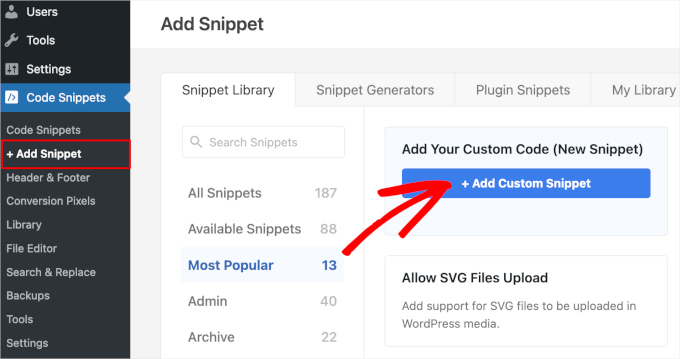
Upon activation, let’s go to Code Snippets » + Add Snippet from your WordPress dashboard.
On the next screen, simply hover over the ‘Add Your Custom Code (New Snippet)’ option and click the ‘+ Add Custom Snippet’ button.
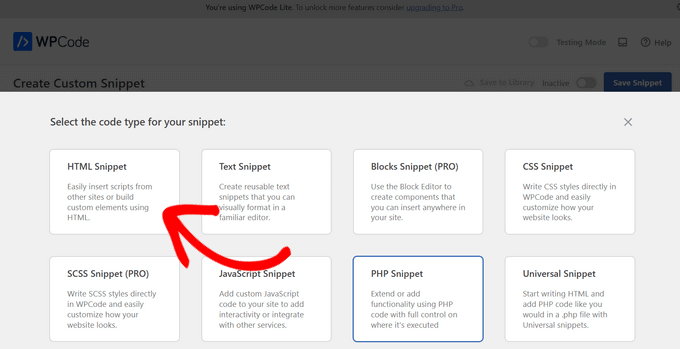
Then, you’ll need to choose the code type from the list of options that appear on the screen.
For this tutorial, go ahead and click ‘HTML Snippet.’
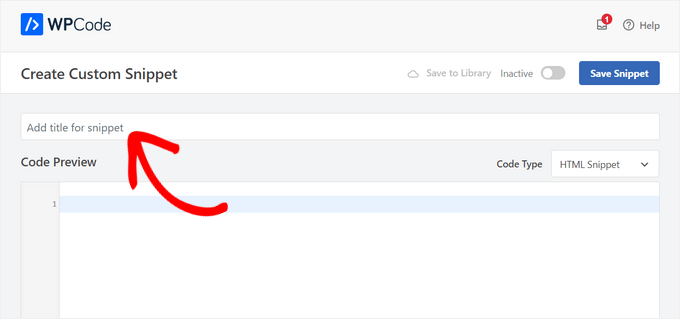
This will take you to the code editor.
From here, the first thing to do is to type in the code snippet name into the field that shows ‘Add title for snippet.’
Note that your site visitors won’t see the title since it’s only for your reference.
After that, you can choose the type of ad you want to place on your site.
One option is to use the ad code provided by a program like Google AdSense.
If you’re using Google AdSense code, then you may want to see our guide on the highest-performing Google AdSense banner sizes and formats.
We also have a complete guide on how to optimize your AdSense revenue in WordPress.
Another option is to create your own ad. If you opted for this method, then you would need to get the code from the person who is paying you to show the ad on your WordPress site or write the code yourself.
Once you have the ad code, simply copy and paste it into the ‘Code Preview’ box.
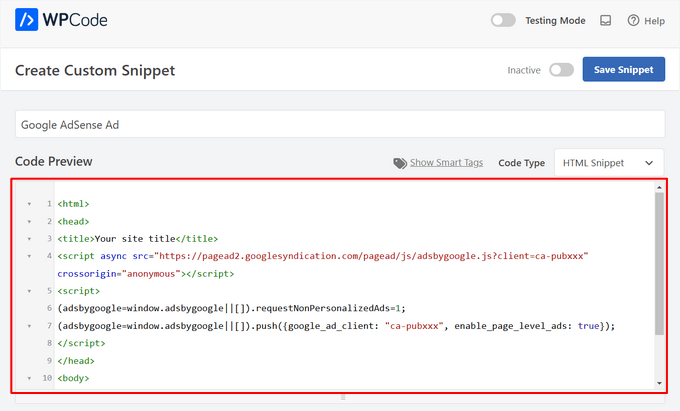
In the next step, you’ll want to scroll down to the ‘Insertion’ section. There are two main insertion options you can choose from:
- Auto-Insert – The ad code will be automatically inserted and executed on your website in your chosen location.
- Shortcode – The ad code will not be automatically inserted. You will get a shortcode that you can manually insert anywhere on your WordPress website.
You can click on the ‘Auto-Insert’ method to automatically display ads within post content.
Then, go ahead and choose the ‘Insert After Paragraph’ option from the dropdown list next to the ‘Location’ field.
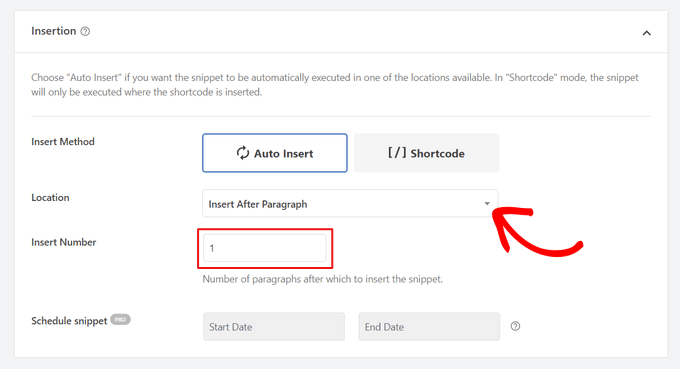
You can also modify the ‘Insert Number’ to choose the number of paragraphs after which to insert the snippet.
For example, if you want to display the ad after the second paragraph instead of the first, simply replace the 1 with a 2.
Aside from inserting ads after a paragraph, you can also automatically display ads in locations (WordPress functions) such as before or after content, between posts, before or after excerpts, and more.
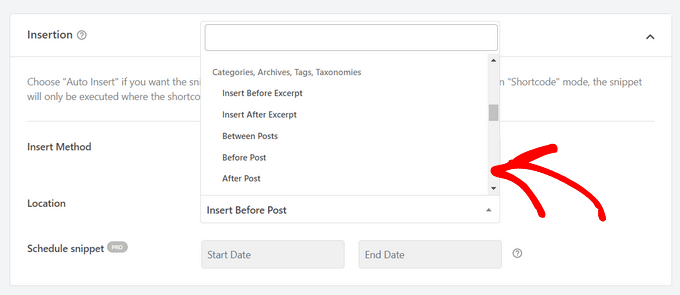
With the premium version of WPCode, you can insert ads in WooCommerce locations like before or after products, cart, and checkout page, just to name a few.
WPCode Pro also lets you schedule your ad code snippets with a start and end date. This is perfect for displaying ads around the holiday season or for other limited-time promotions.
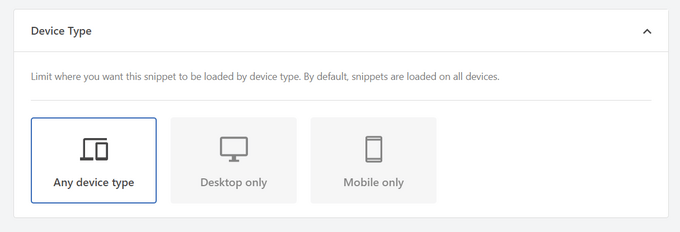
Next, you can scroll down to the ‘Device Type’ section. Here, feel free to choose whether you want to display your ad on any device type, desktop only, or mobile only.
If you want to limit the pages or posts where the ad code snippet is auto-inserted, you can scroll down to the ‘Smart Conditional Logic’ section.
For example, you can hide your ads on specific page types or page URLs.
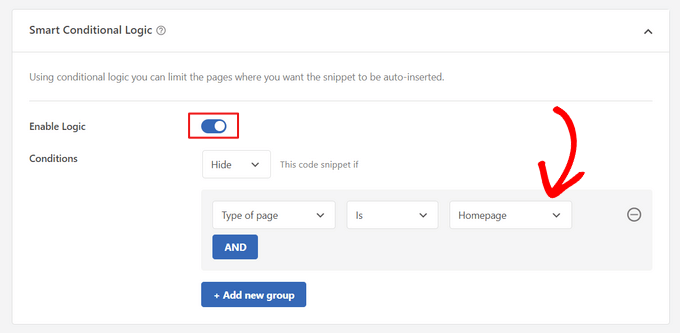
To help organize your ads, you can go to the ‘Basic info’ section.
In this area, you can add tags and notes to help you remember what your ad code snippet is for.
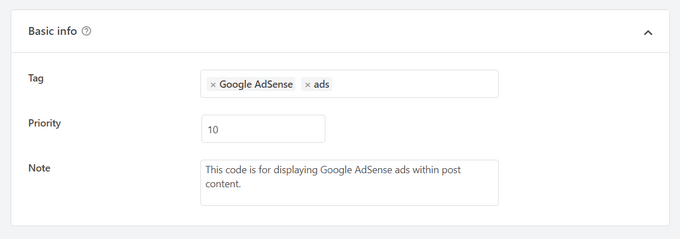
There’s also a ‘Priority’ field that allows you to control the order in which the snippets are executed when you want to display multiple snippets in the same location.
All snippets get a priority of 10 as a default. But if you want your ad code to display earlier than others, simply set the priority to a lower number.
Once you’ve finished working on your ad, it’s time to publish it.
To do that, let’s go back to the top of the page and toggle the switch from ‘Inactive’ to ‘Active.’ Then, click on the ‘Save Snippet’ button.
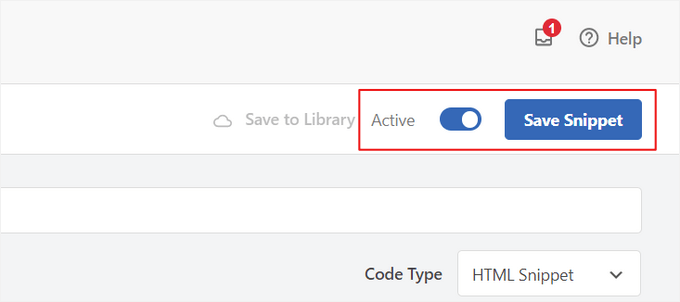
That’s it! If you selected the ‘Auto-Insert’ method shown in this tutorial, your ad will now automatically be inserted within your post content.
If you choose the ‘Shortcode’ insertion method, you can either create a new page or post or open one for editing. Then, simply find the exact place where you want to show this ad within your post content and create a new shortcode block.
You can then go ahead and paste the shortcode into this block. For step-by-step instructions, you can read our beginner’s guide on how to add a shortcode in WordPress.
Now, if you visit the page or post, you’ll see the ad within your post content.
💡 Note: If you are displaying Google AdSense ads, it may take 20-30 minutes for the ad to appear on the page.
Method 2. Inserting Ads Within Post Content Using Ad Inserter
Another option is to use Ad Inserter. This is a WordPress ad management plugin that can show both hosted ads and advertisements provided by a network.
If you’re using a network, then you can simply paste your ad code into the Ad Inserter plugin. However, if you’re creating a hosted ad, you’ll either have to write the code yourself or get it from the person who is paying to show their ad on your website.
To get started, the first thing you’ll need to do is install and activate the free Ad Inserter plugin. If you need help, then please see our guide on how to install a WordPress plugin.
Upon activation, you’ll want to go to Settings » Ad Inserter.
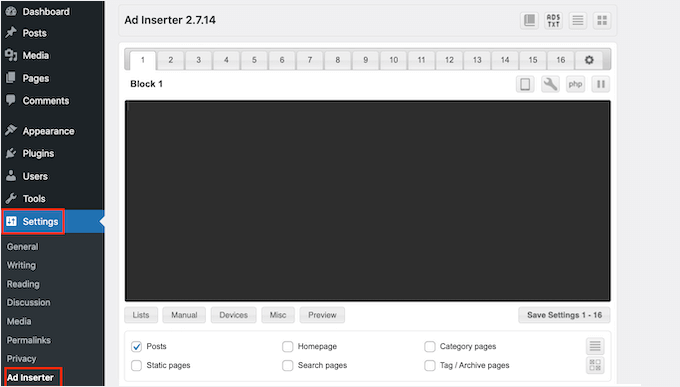
On this screen, each tab represents a different advertisement. This allows you to create multiple ads and place them on your website.
You can now either type in or copy/paste the code for the advertisement that you want to show within your post content.
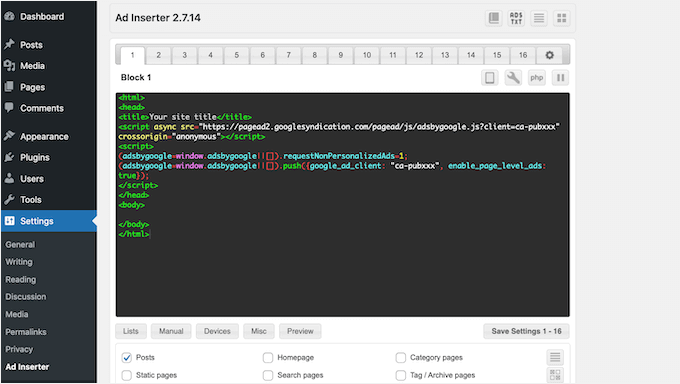
The next step is placing this ad on your website.
One option is to add the advertisement to any page, post, or widget-ready area using a shortcode. Another option is to tell Ad Inserter to automatically add this advertisement to every post and at a certain location, such as after every third paragraph.
If you want to add this advertisement to your posts automatically, then you can start by checking the ‘Post’ box.
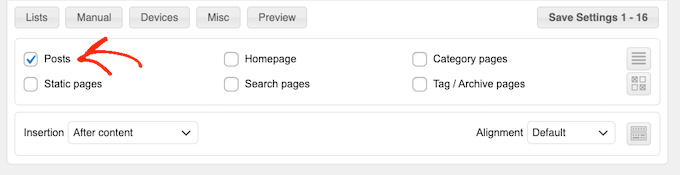
Next, you’ll need to open the ‘Insertion’ dropdown and choose where Ad Inserter should show this ad.
Since we want to insert ads within the post content, you’ll typically want to choose either ‘Before Paragraph,’ ‘After Paragraph,’ ‘Before Image,’ or ‘After Image.’
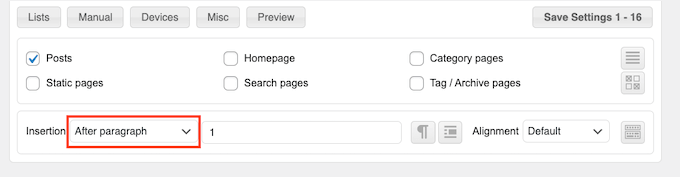
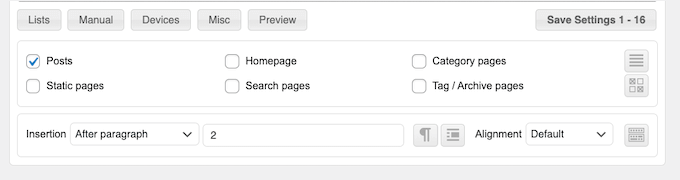
After choosing an option from the list, you can type in exactly where this ad should appear.
For example, if you wanted to show the ad after the second paragraph, then you would type in ‘2’ as you can see in the following image.
When you’re happy with your settings, click on the ‘Save Settings’ button.
Ad Inserter will now insert this ad within your post content in your chosen location.
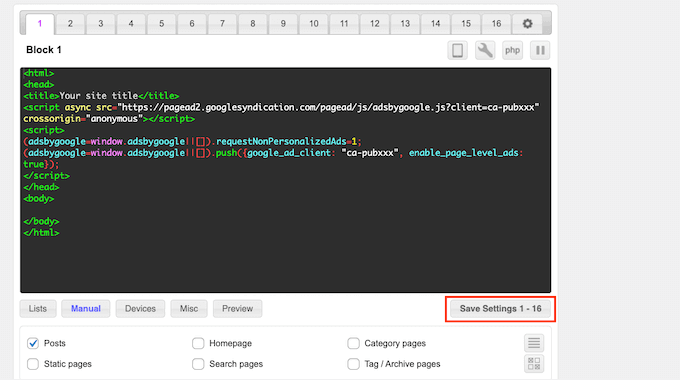
Just like we mentioned earlier, you can also place this ad on your site using a shortcode.
To do this, click on the ‘Manual’ button and then check the ‘Shortcode’ box.
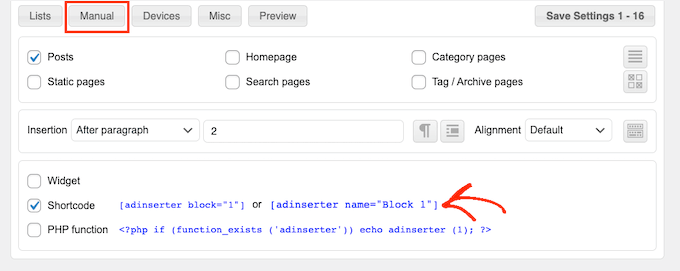
Once you’ve done that, just copy the Ad Inserter shortcode. You can then click on the ‘Save Settings’ button to save your ad.
When you’re done, you can place this shortcode on any page, post, or widget-ready area. For step-by-step instructions, you can see our guide on how to add a shortcode in WordPress.
Method 3. Inserting Ads Within Post Content Using Code (Advanced)
You can also add an advertisement to your post content in WordPress using code.
Since you’re editing your site’s code, this isn’t the most beginner-friendly method. However, it does allow you to create ads without having to install a special ad management plugin.
To insert an ad using code, either open your theme’s functions.php file or use a code snippets plugin.
Again, we recommend using the free WPCode plugin because it makes it easy to paste snippets into WordPress without editing your theme’s functions.php file.
Plus, WPCode comes with smart code snippet validation to help you prevent common code errors and prevent you from breaking your site.
You can then add the following code:
//Insert ads after second paragraph of single post content.

add_filter( 'the_content', 'prefix_insert_post_ads' );

function prefix_insert_post_ads( $content ) {

    $ad_code = '<div>Ads code goes here</div>';

    if ( is_single() && ! is_admin() ) {
        return prefix_insert_after_paragraph( $ad_code, 2, $content );
    }

    return $content;
}

// Parent Function that makes the magic happen

function prefix_insert_after_paragraph( $insertion, $paragraph_id, $content ) {
    $closing_p = '</p>';
    $paragraphs = explode( $closing_p, $content );
    foreach ($paragraphs as $index => $paragraph) {

        if ( trim( $paragraph ) ) {
            $paragraphs[$index] .= $closing_p;
        }

        if ( $paragraph_id == $index + 1 ) {
            $paragraphs[$index] .= $insertion;
        }
    }

    return implode( '', $paragraphs );
}
This code will show an advertisement after the second paragraph of a post’s content.
If you want to show your ad in some other location, then you simply need to change the following section:
    if ( is_single() && ! is_admin() ) {
        return prefix_insert_after_paragraph( $ad_code, 3, $content );
    }
In the sample code above, you can see that we’re inserting the ad after the third paragraph.
Once you’ve done that, you can go ahead and either type in or paste your ad code. This is the code that controls how your ad looks and acts.
You’ll add this code as the $ad_code value, which is where it says, ‘Add code goes here.’
$ad_code = '<div>Ads code goes here</div>';
After you’ve done that, you’re ready to publish your ad.
To do this, either activate your site-specific plugin, save the changes you’ve made to your site’s functions.php file, or activate and save your code snippet in WPCode.
Now, if you visit your website, you should see your ad live.
Bonus Tip: Setting Up Conversion Tracking
When placing ads within your content, conversion tracking can show you how well they perform.
Are users clicking on them? Are they leading to sales or signups?
Essentially, conversion tracking provides critical insights into your ad performance and overall website effectiveness. For instance, with conversion tracking, you can:
- Optimize Your Efforts: If you discover that ads from one traffic source drive more conversions, you can double down on that source for better results.
- Measure ROI: Conversion tracking shows whether your ads are delivering value. This helps you avoid wasting money on underperforming placements.
- Identify Roadblocks: Let’s say users view your content but don’t convert (for example, they abandon a form). In that case, you’ll know exactly where to make improvements, such as simplifying the form or adjusting its colors to be more accessible.
Now, the setup process might seem tricky at first, but you only need to do it once!
Many WordPress tools, like plugins or integrations, simplify the process by offering built-in support for conversion tracking.
For more information, you can check out our ultimate guide on WordPress conversion tracking.
By combining smart ad placement with conversion tracking, you can increase revenue and gain valuable insights to optimize your site’s performance.
FAQs: How to Insert Ads Within Your Post Content in WordPress
Here are some common questions you might have when adding ads to your WordPress posts:
Will inserting ads slow down my WordPress site?
It can, especially if the ad code is heavy or poorly optimized. To keep things running smoothly, use a plugin like WPCode and avoid oversized ad scripts.
Can I control which pages display ads?
Yes! Most ad management plugins let you use conditional logic to target specific posts, pages, categories, or even user roles. This way, you stay in control of where ads appear.
How can I improve the visibility of my ads?
You can try placing ads within your content instead of just in the sidebar. This is because inline ads tend to perform better. You can also run an A/B split test to display ads in different formats, sizes, or positions to see which gets the most clicks.
How can I make sure ads don’t hurt the user experience?
Remember to keep ads minimal, well-placed, and relevant so you don’t overwhelm your readers. Ads should complement your content, not interrupt it.
Are there any plugins you recommend for ad management?
Yes! WPCode is great for inserting and managing ad code with precision. Ad Inserter is another solid option if you want more layout controls and automation features.
We hope this article helped you learn how to insert ads within your post content in WordPress. You may also want to check out our guides on how to make a classified ads website or how to add Amazon ads to your site.
If you liked this article, then please subscribe to our YouTube Channel for WordPress video tutorials. You can also find us on Twitter and Facebook.




Manuel Graf
Thanks, it works for me, but I need a feature, can the magic only happen if there are more than 1500 characters in the Post? How can I do this?
Thanks a lot!
WPBeginner Support
We do not have a recommended method for only activating if there are a certain number of characters but if we do we will look to update the article
Admin
Erika
Will the Ad Sanity allow to place external ads on an individual post only not on the entire site?
WPBeginner Support
If you wanted to you can only display ads on one post!
Admin
George
Is there any way how to insert different ads after multiple paragraphs? For example AdSense ad no 1 after 2nd paragraph, AdSense no 2 ad after 6th paragraph?
WPBeginner Support
If your ad network has different ads to display then method 2 should allow for what you are wanting currently
Admin
Gideon
will this code replace the entire existing code of the theme child theme?
The <?php start is returning error
WPBeginner Support
It will not replace your entire theme’s design. For pasting the code in your functions.php you could try removing that opening PHP tag to see if that helps solve the issue.
Admin
Marvin
How can i make it to repeat (For Example. to repeat after paragraph 2.)?
WPBeginner Support
We do not have a recommended method for having the code repeat at the moment.
Admin
Deepak
Fascinating. It is so easy. Thank you guys.
WPBeginner Support
You’re welcome
Admin
Mi Monir
This is working. Thanks a lot.
WPBeginner Support
You’re welcome
Admin
Oniel
Can you please update the plugin to be able to add the code “before” the first paragraph instead of “after” the first paragraph?
WPBeginner Support
The plugin does have the option to insert before your post content instead of after a paragraph number
Admin
Shannon
This is amazing, thank you so much for this. Do you know why my ad goes to the left of the post and not in the middle?
WPBeginner Support
The most common reason would be if your theme has styling that is forcing that alignment.
Admin
Karthik
how much time take for adsense ad display on our site once we get approved after the code placed.
WPBeginner Support
That would be a question for Adsense as they may not have ads they would currently offer for your site.
Admin
Sangam
Thank you, with the help of this snippet I managed to show ad after each 300 words. I just added word count instead of paragraph.
WPBeginner Support
Glad we could give you a starting point
Admin
Chango
Hello is that Insert posts ads plug in good? or does it crash the site or slow it down? I am nervous because 7 years ago I used a adsense plug in and the maker of the plug in was adding their ads on my website.
Is this insert ads plug in good that you recommend. Does it mess with coding or slow down the site?
thanks.
WPBeginner Support
Unless you manually add problematic code, the insert post ads plugin shouldn’t harm your site’s speed.
Admin
Arkantos
Works great! But I noticed it also counts the paragraphs from an embedded tweet. Is it a way to avoid that and count only text paragraphs from the content/article?
WPBeginner Support
Sadly, not at the moment.
Admin
Von
Is there a wordpress tag to have a ‘content/block’ automatically injected into the middle of my blogs.
I’m looking for documentation (I’d seen it before). I would appreciate any help here.
Thank you.
WPBeginner Support
For what it sounds like you’re wanting, you would want to use the recommendation from the article
Admin
Willys
Hi, I have just Signed up to Google adsense but I am having a problem of how to copy my Google adsense code to my website (WordPress). How can i do it?
WPBeginner Support
For adding Adsense you would want to take a look at our article here: https://www.wpbeginner.com/beginners-guide/how-to-add-google-adsense-to-your-wordpress-site/
Admin
Sangam
I am using this code snippet in my child theme function.php to make ads appear in 3rd paragraph. But I want it to repeat after each 3 or 4 paragraph. How it can be done?
WPBeginner Support
As we state in the article, you would change the number in the code snippet to change where the ad appears.
Admin
Sangam
How to repeat? After 3rd/6th/9th/12nd etc?
WPBeginner Support
If you wanted the ad to display multiple times then inside the if statement where it has: return prefix_insert_after_paragraph
You would want a new line where you add a copy of the prefix_insert_after_paragraph with a different paragraph number
Ahsan Ali
How to insert ad after each & every 3rd paragraph in a single post?
Kindly guide!
WPBeginner Support
You would need to use the site-specific plugin method and change the 2 to a 3 on line 12
Admin
Peter
Hi
Only the code is showing on my post no images. The code is just lying there in the post, you won’t even notice it’s there
What can I do to change this
I need the banners showing in the post
WPBeginner Support
You may want to ensure you added the code with all of it’s tags correctly for your ads and didn’t skip any tags.
Admin
Ngo
Hello,
Thank you for the manual code. It seems to be working for everyone but I just can’t get it to work on my site. My site is made up of only Custom Post Types. Is this why it is not working? Please what do I need to change in the code to make them display on my custom post types?
Even ordinary widgets do not display on my site. Is there anything I can include in my functions.php to make changes display on my custom pages?
Please help, I have tried every code on the internet and none of them works.
WPBeginner Support
If you want to use the custom code on a custom post type and the method we have is not working, you could try changing is_single() to: is_singular( $post_types = ” )
and place the name of your custom post type in the single quotes
Admin
Swagatam Innovations
It worked like charm, thanks very much for this code!
WPBeginner Support
Glad our article could help
Admin
Minh Hieu
Can you help me?
How to insert ads before an ID element?
Ex: i want to insert ads before
Thanks you very much!
JOHN HOBBS
Thanks for everything you provide. It’s truly appreciated. But question. This article reads
Last updated on May 2nd, 2014
at the top. Is the information presented still valid and up-to-date?
You guys have been a tremendous help to me so I feel bad asking but I need to know.
Again, thanks for the great resources you provide!
John
WPBeginner Support
Hi John,
The plugin mentioned in the article is still available and works great.
Admin
Tell.com.ng
Please I need a clearly defined way to add more than one ad after different paragraphs.
Reply needed urgently please.
Thanks!
Atul
i am using infinite scroll featured theme and post advert plugin for ads but ads show only on first post, not next post. how can i solve it. this plugin does not repeat ads between post.
Melissa
This is by far the easiest plugin I’ve ever used! It works perfectly and looks great. Thank you so much! WPBeginner has been a huge help to me in starting my new blog!
rishabh shrivastava
It was helpful! Thanks
sandeep
thank you so much its working dude
Hoàng Trí
So I Want to insert ads by tag (Like Gym, Fitness) only two tag will show ads, and other will not. How i can do it ?
Bob
How can I place an ad before the first paragraph..underneath the single post image? When i set the number to”0″…nothing happens?
Qasim Iqbal
Hey, If I added the code using Post advert, would it be on every post? right?
If not then tell me, I want that
Bright Joe
Thank you so much for the code for the functions.php. This just lets me avoid so many unnecessary plugins.
Thanks again!
Martijn
Hi,
Thanks for the code!
How can I exclude certain posts?
Greetings,
Martijn
David
Was sincerely helpful to start off for my presentation at Kampala WordCamp 2017.
Really incredible help from you.
Segun
how can i insert HTML code in my ad space?
Adem
for more as one ad, change to this:
$ad_code = ‘Ads code goes here’;
$ad_code2 = $ad_code;
if ( is_single() && ! is_admin() ) {
$content = prefix_insert_after_paragraph( $ad_code, 2, $content );
$content = prefix_insert_after_paragraph( $ad_code2, 8, $content );
return $content;
}
return $content;
}
Thanks!
Bright Joe
Thank you so much!
Akios
Don’t know how to insert it
Sunil Kumar
Thanks! It worked.
Shehab
I want to show two ads on my post. How can I do it?
That process you showed, here I can see only one ad on every post. but I want to show two ads in every post
shuseel
I want to implement ads code other than Adsence code using JavaScript code.
The above code does not work when I have replaced JavaScript code on Ads code goes here.
Please suggest me how to implement
on the place of text.
phil
Hi,
Congratulation for this function.php code ! Works well
I ve a question :
How can i do for do not display adds on specific posts or pages ?
Many thx
Regards
Phil
Andrea
Nice code! How insert only for a certain author post?
Aditya
I am using Admiral theme and I want to display ads above the thumbnail of every post. What can I do ?
Shubhamk
I installed the plugin, I created my ads in the post but it appears at the bottom, not at the start.
Sally
Hi, I installed the plugin on my wp site and followed the instructions – post ad and edit settings to show ads on posts. But the ads don’t show on my posts. Do you know why? thanks in advance!
Gail
Have just started using the plug-in and it works great!! A question: I now want to insert a new ad. Do I have to trash the old one and then create a new one? Or can I reserve the old one for a future use? Seems like I do have to trash it to make room for the new one. Thanks.
Percival
I am wondering if it’s possible to insert a widget, rather than $ad_code = ‘Ads code goes here’;
Is this possible? I can’t seem to implement the syntax correctly, as inserting a widget seems not to respect the paragraph numbering, and randomly inserts a “1” into the text:
$ad_code .= dynamic_sidebar(‘test’);
John
Percival, did you figure out a solution? Trying to do something similar.
Morgan
Where do I get a code for an ad .?
hassan
did you mean code for ads?………
you have to visit your ads network be it google adsense or for your ads code then insert it between insert here……….
Stephen
You have to make a Google Adsense account and make an ad within that. Then, you take the code they give you for the newly created ad and insert it there.
Jagadish Prasad B
I want to put my ads in the middle of the content by using an editor. Pleas e suggest me how to add the code in the editor. Thanks for the support.
Ryan S
Creating shortcode is the best fit on your end, so first, you need to create Shortcode ads and then use that shortcode in your article/post.
Ryan S
hsabarp
thanks
this is the what i was searching for…….
Vỹ Spirit
Hello, After I add the above code to the function.php file, my article does not display ads, instead, and it’s adsbygoogle text …. How do I fix it?
hassan
i did mine some minutes ago and it work well try to remove the <?php if your functon.php already have it…….
Enrique Grobbelaar
This app seems to work for everyone, except me. I have followed all the steps, said it should display after paragraph 3. Now there is a large white block on all posts below paragraph 3, but no ad.
Does somebody perhaps know what I am doing wrong?
(Using Google Adsense)
Enrique Grobbelaar
Never mind. It is working now.
Great
Thanks you for the tutorials, I used the post ad on my site is working perfectly well but can not open in a new window. Pls how do I set the post ad banners to open in a new window?