


I remember spending hours picking the perfect featured image for an early blog post. But when I hit publish, visitors couldn’t tell the photo was from my sunrise hike in Jasper National Park.
Without a caption, a stunning cover photo loses its meaning and story. It is frustrating to discover that most WordPress themes hide featured image captions by default.
Fortunately, I have used a simple free plugin on my own blogs to fix this exact issue. It is incredibly easy to set up and works perfectly with any WordPress design.
Here is the easiest way to display captions on your featured images.

Why Add Captions to Your Featured Images?
Captions make your WordPress featured images more accessible and provide instant context for readers.
Think of a featured image as the cover of your article. It’s the first thing people see, but without a caption, it can’t tell the whole story. I’ve found that adding a simple caption is one of the easiest ways to make my content more engaging and professional.
For example, on my travel site, adding a caption like ‘Sunset view of the Logan River in Queensland, Australia’ immediately provides context and draws the reader into the adventure.
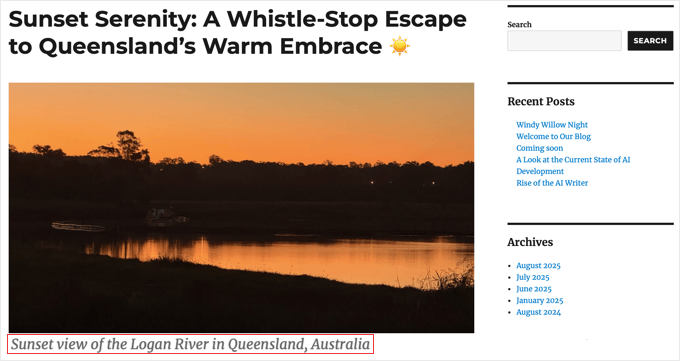
If you’re running a portfolio, you could use a caption to credit a photographer or date a ‘before-and-after’ shot, which adds a layer of professionalism.
Captions also play an important role in making your website accessible to everyone. Screen readers rely on hidden alt text to describe an image, but they also read visible captions aloud.
This lets you provide extra context for all your visitors. Just make sure your caption doesn’t perfectly match your alt text, or screen readers will read the exact same sentence twice!
This follows best practices for web accessibility and is also essential for giving proper credit if you’re using an image that isn’t your own.
Many popular publications and blogs never post an image without a credit line, and it’s a best practice I strongly recommend.
The problem is that while WordPress lets you add a caption to any image, most themes simply don’t display the caption for featured images.
This is because a theme’s code controls how featured images appear, and theme developers often leave this feature out by default. Let’s fix that.
How to Add Captions to Featured Images With a WordPress Plugin
For most people, the easiest way to display featured image captions is with a plugin. I recommend a free plugin called FSM Custom Featured Image Caption. It’s a lightweight tool designed to do one job: make your featured image captions visible.
I recommend this approach because it works with any WordPress theme. The plugin is popular and reliable, with thousands of active installations on WordPress.org. Best of all, it works right out of the box with no complicated settings.
First, you need to install and activate the FSM Custom Featured Image Caption plugin. If you need help, you can see our guide on how to install a WordPress plugin.
Once activated, this plugin gives you two easy ways to manage your featured image captions: directly in the post editor for specific posts, or in the Media Library for consistency.
First, go ahead and open any post or page for editing. In the right-hand settings panel, make sure you are on the ‘Post’ tab and look for the Featured Image section.
You will now see a new field labeled ‘Featured Image Caption’ right below your featured image thumbnail.
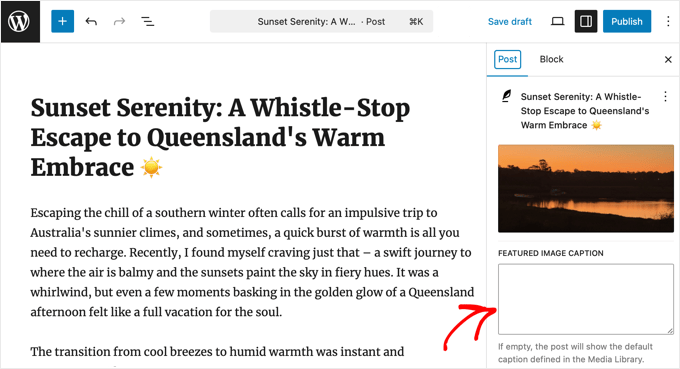
Simply type the text you want to use for your caption directly into this box. This is the primary and most straightforward method.
When you’re done, just click the ‘Update’ or ‘Publish’ button to save your changes.
That’s all there is to it. The caption you entered will now appear with your featured image on your live website.
How the Fallback Feature Works (Media Library)
The plugin is smart. Let’s say you leave the ‘Featured Image Caption’ box in the post editor empty. In that case, it will automatically check if you have a caption saved for that image in the WordPress Media Library and display that one instead.
This is super helpful if you plan to use the same image and caption across multiple posts.
To add a default caption, just navigate to Media » Library from your WordPress dashboard and click on the image you want to edit. In the ‘Attachment Details’ window that pops up, fill in the ‘Caption’ field. Any text you add here is automatically saved.
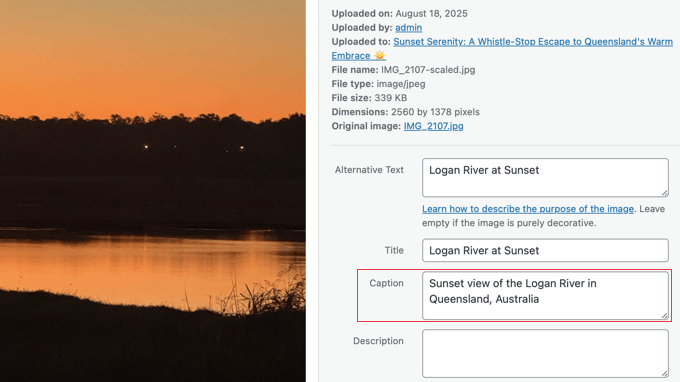
Now, as long as the ‘Featured Image Caption’ box in the post editor is blank, this Media Library caption will be used by default. This provides the perfect balance of post-specific control and site-wide consistency. 👍
Bonus: Adding a Caption to Images in WordPress
Unlike featured images, adding a caption to an image inside your posts or pages is much simpler. This is because WordPress is set up to display these captions automatically, without any extra steps.
First, upload an image to your post or page. When the media library opens, you will see fields for ‘Alt Text,’ ‘Title,’ ‘Caption,’ and ‘Description’ in the right-hand panel.
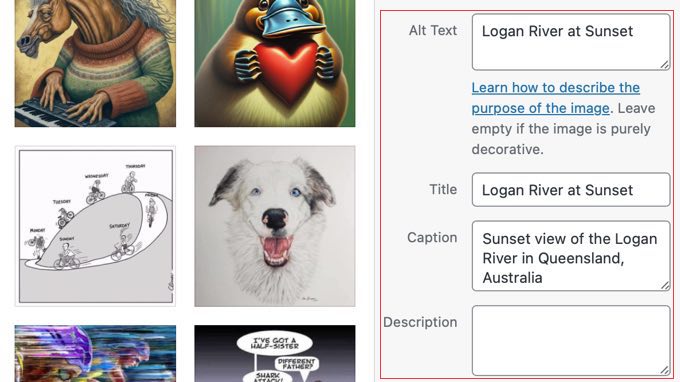
Next, simply type your text into the ‘Caption’ field.
Once you’re done, click the ‘Select’ button to insert the image into your post. The caption will automatically appear underneath it.
If you want a more in-depth guide, you can take a look at our full beginner’s tutorial on how to add captions to images in WordPress.
Frequently Asked Questions About Featured Image Captions
Here are answers to some of the most common questions we get about adding captions to featured images in WordPress.
What is the difference between an image caption and alt text?
A caption is displayed publicly on the page to give your readers more context about an image. Alt text is a hidden HTML attribute used by search engines and screen readers to understand the image, and it only displays visually if an image fails to load.
Are featured image captions good for SEO?
Yes, they can be. Captions help search engines understand your images better and improve your site’s accessibility. Both of these are positive signals for your website’s SEO.
Can I change the style of the caption text?
Absolutely. The look of your caption is controlled by your theme’s stylesheet. You can use custom CSS to change the font, color, size, or alignment to match your site’s design.
Will my captions disappear if I switch themes?
No, they won’t disappear when you change themes. The plugin saves your captions safely in your WordPress database. Just make sure to keep the plugin active, and your captions will continue to display on your new theme.
Additional Resources for WordPress Images
Now that you know how to add captions to your featured images, you may want to check out these other helpful guides related to WordPress images:
- How to Require Featured Images for Posts in WordPress – Learn how to make sure every post has a featured image before it can be published.
- Best Featured Image Plugins and Tools for WordPress – Discover our expert picks for plugins that can help you manage and optimize your featured images.
If you liked this article, then please subscribe to our YouTube Channel for WordPress video tutorials. You can also find us on Twitter and Facebook.


Dennis Muthomi
Great tips on adding captions to featured images!
one question though:- while captions provide helpful context, I’ve noticed my site getting flagged by Google PageSpeed Insights for missing alt text on images.
from an accessibility standpoint, would you recommend prioritizing adding alt text descriptions over captions??
WPBeginner Comments
You will want to use at least the alt text.
Think of the alt text as a description for the image itself. The caption helps add context to that description.
Dennis Muthomi
ok…that makes total sense now, thanks for the clarification!
Jiří Vaněk
Alternative text is important not only for SEO. By using ALT, you are telling search engines (Google, Bing, etc.) and also visually impaired users, for whom this tag is primarily intended, what is depicted in the photo or image. Google, by itself, cannot recognize what is in the image, but with the help of alt text, you can explain it to them, and they will then index the image better for the given keywords. If you do not use alt texts, you will significantly affect your image SEO. Do not underestimate this :).
Mrteesurez
It is highly recommended to be using Alt text for all images, Unless there is a text on the image, Google can’t identify what is happening in the image or picture.
Also, Alt texts are showed to users with poor Network or when the image failed to load, this text will make them understand the type of images that supposed to showed there.
Anonimus
Thanks
WPBeginner Support
You’re welcome
Admin
Zlatev
Built-in in 4.6 –
Chris
How?
Frank
no alt text????
zaib azhar
in which file?
Moyen
Hello,
I tried to get the featured image by calling the specific post ID and get_post function but everything is okay except featured image. It does not show featured image.
is there problem to call by post ID and get_post(); ?
my code?
// custome template (community)
post_title; ?>
post_content; ?>
Please any idea?
WPBeginner Support
We are sorry we can not see the code. You can put your code in http://pastebin.com/ and then share the link in the comment.
Admin
Sabir
This is very great and very helpful. Thank you so much!
Trisha
Thank you for explaining this! I just needed to add the image captions and spent a lot of time searching for a solution…..I found a lot of other answers on the WP support forum, but none of them explained how featured images are stored……such a simple thing now that I understand.
Vali_REK
Hello, great post.
Please explain if I can do that in other website.
I d like to show article or category from wordpress blog on opencart website.
Thank you
WPBeginner Support
You can fetch WordPress content into OpenCart website using RSS Feed.
Admin
Aneas Nemorosus
Where can I buy you a coffee????
Editorial Staff
You can send us a donation using the forms here:
https://www.wpbeginner.com/wpbeginner-needs-your-help/
Admin
Mike
I still don’t know what or where the “loop” is. Sorry.
Yannick
Sry, I don´t rly get it…
In which loop exactly do i have to paste the code?
Maybe it´s just me being brain-afk, sry for that.
Editorial Staff
In the loop where you want to display thumbnails with captions. This could be your single.php file, or any other files.
Admin
Dejan
Thank you for this!!!
Jhon Edison Bueno Martinez
Thanks a lot, I have been looking for this and this is the best and simple explanation of how to add the image caption for featured images.
Thanks
Editorial Staff
Use this article:
https://www.wpbeginner.com/wp-themes/how-to-display-custom-fields-outside-the-loop-in-wordpress/
Admin
tonilehtimaki87
Short neat and to the point. Only critic goes for not providing example output for the short article. For other readers: Remember to read the related posts!
Gary
How can I style the caption?
It is rendering the caption line outside of the DIV class in the source code? What am I doing wrong.
Thanks in advance,
Gary
Editorial Staff
You can wrap the echo content in a div of its own.
Admin
t.diaz
I have been banging my head against a wall for about 4 hours trying to figure out how to wrap the echo content in its own div. (PHP noob here).
Can you give me an example of how it would look to wrap the div on that echo?
Editorial Staff
Do it like this:
echo ‘open div here’ . get_post(get_post_thumbnail_id())->post_excerpt . ‘close div here’;
karen
This is great. Very helpful. Thank you so much! But it would really be helpful to show a screenshot of the result.
Bronson
This little gem comes in handy when wanting to spruce up most of the free themes out there… nice, quick and easy.