


Do you want to display today’s date in WordPress?
Many news websites, online journals, and frequently updated blogs may want to display the current date and time. This gives users an idea about the current date and how long ago the content was published.
In this article, we will show you how to easily display today’s date or current time on your WordPress website.

Why Display Today’s Date in WordPress?
Many news websites display the current date in the header section of their sites, particularly smaller news sites that publish their main stories on a daily basis.

This assures users that they are viewing the latest edition of the publication’s online edition. It is a useful stylistic decision that many news websites still use despite updating their front pages several times a day.
Similarly, online journals and bloggers also adopted this style. This assures users that they are viewing the latest entries on a blog.
There are other usage scenarios where you may just want to show the current date and time.
For instance, if your live chat works at specific hours and you want to show customers what time it is in your geographic location. Or, you are running a countdown timer campaign and want to show the current date to create a stronger FOMO effect.
That being said, let’s take a look at how to easily display today’s date, day, or current time on your WordPress website. We will cover two methods, and you can use the quick links below to jump to the one you want to use:
Method 1: Displaying Today’s Date by Adding Code to a Template File
WordPress doesn’t come with a default widget or block to display the current date or time.
However, you can still display the current date or time using some very simple code.
You can add this simple code to your WordPress theme’s template files where you want to display the time:
<?php echo date(get_option('date_format')); ?>
This code simply prints the current date using the date format set in your WordPress settings. You can change the date format by visiting the Settings » General page.
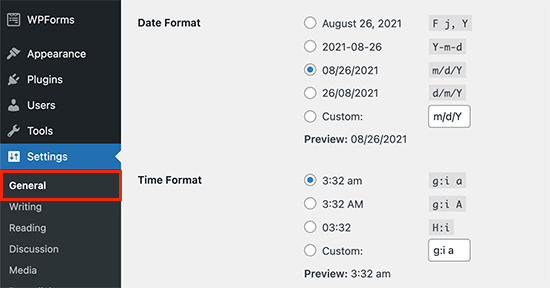
You can also use your own formatting tags to output the date in any other format. For instance, using the following code, you can print the date in month, day, and year format.
<?php echo date('F j, Y'); ?>
This is what it looked like on our demo website.
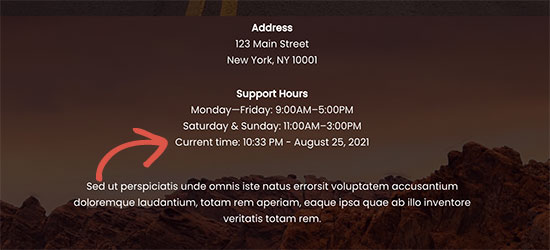
This method allows you to directly add the code to WordPress theme files, but it is not very flexible. What if you wanted to display the current date and time inside a WordPress post, page, or sidebar widget?
This next method allows you to add the date and time anywhere on your site.
Method 2: Displaying Today’s Date Anywhere Using Shortcode (Recommended)
For this method, we will create a shortcode and then use it to display the date and time anywhere on our WordPress website.
You can add the following code to your theme’s functions.php file or by using a custom code snippets plugin such as WPCode (recommended):
function wpb_date_today( $atts, $content = null ) {
	$atts = shortcode_atts( array(
		'format' => '',
	), $atts );

	$date_time = '';

	if ( $atts['format'] == '' ) {
		$date_time .= date( get_option( 'date_format' ) );
	} else {
		$date_time .= date( $atts['format'] );
	}

	return $date_time;
}

add_shortcode( 'date-today', 'wpb_date_today' );
This code simply creates a shortcode that displays the current date. You can use it by adding this shortcode anywhere on your site:
[date-today]
By default, the shortcode will display the date in the default date format in your WordPress settings.
You can also use your own date format by modifying the shortcode like this:
[date-today format='F j, Y']
Then, it should look something like this on your website.

Expert Guides on Displaying Dates in WordPress
Now that you know how to display today’s date in WordPress, you may like to see some other guides related to displaying dates in WordPress:
- How to Change Date and Time Format in WordPress
- How to Display Blog Post Meta Data in Your WordPress Themes
- How to Display Relative Dates in WordPress
- How to Display the Last Updated Date of Your Posts in WordPress
- How to Add a Dynamic Copyright Date in WordPress Footer
- How to Remove Date and Time From WordPress Comments
- How to Remove the Date From WordPress URLs
- How to Add a Google Calendar in WordPress (Step by Step)
We hope this article helped you learn how to easily display today’s date in WordPress. You may also want to see our guide on how to add a weather forecast in WordPress or our expert picks for the best quiz plugins for WordPress.
If you liked this article, then please subscribe to our YouTube Channel for WordPress video tutorials. You can also find us on Twitter and Facebook.




Syed Balkhi says
Hey WPBeginner readers,
Did you know you can win exciting prizes by commenting on WPBeginner?
Every month, our top blog commenters will win HUGE rewards, including premium WordPress plugin licenses and cash prizes.
You can get more details about the contest from here.
Start sharing your thoughts below to stand a chance to win!
Dennis Muthomi says
hi, I got a question for the time display:- what if my website has visitors from different time zones? will the date and time displayed be adjusted to their local time, or will it always show the time based on the website’s settings?
WPBeginner Comments says
These method in this guide will show the date and time for the timezone from the website.
Mrteesurez says
Thanks for sharing.
The time is not showing, only the date is showed. I want to show both date and time beside each other on the top for all visitorsb to see including the admins.
WPBeginner Support says
For that you would need to change the format in the shortcode to: format=’F j, Y h:i’
Admin
WPBeginner Comments says
The easiest option would likely be to use this plugin: https://www.wpbeginner.com/plugins/display-time-according-wordpress-blog-admin-bar/
Be sure to check out the second section for a guide on how to add the time to the site and not just the admin bar.
Please note that this is the time using the timezone for the blog, not for the site visitor.
ducmu says
how to display include time?
your code is only date
Bert Hennephof says
Code doesn’t work anymore after upgrade from PHP 7.4 to PHP 8.2
WPCode indicates error in line:
if ($atts[‘format’] == ”) {
WPBeginner Support says
From testing the snippet on our end it currently is working in php 8.2, it would depend on the specific error message you are seeing on the line.
Admin
Ihtisham Z says
Thank you for the great article.
Just wanted to note here that, if the format attribute is not provided by the user then the shortcode will fail resulting in a critical error (parsing the attribute as string) and breaking the page. So, we need to convert the string to an array.
function wpb_date_today($atts, $content = null) {
if ( ! is_array( $atts ) ) {
$atts = [];
}
// rest of the code…
}
Chris Colotti says
Thanks for the code update!!! Snippet had been working for some time then broke as you indicated..
Generosus says
Useful Tip:
Method 2 (listed above) yields a date output in UTC format. To change the output to Local Time format, replace “date” with “wp_date” (2 places).
It would be great to make a notation in your above instructions.
You’re welcome
WPBeginner Support says
Thank you for sharing that and for your feedback
Admin
Kathy says
I really wanted to use this, however, after adding it to my functions file, I get this:
Warning: Illegal string offset ‘format’ in /XXXXXXXXXX/functions.php
It showed the date, however, the warning showed up too.
WPBeginner Support says
Thank you for letting us know, we will look into this and for the time being the second shortcode with the format specified will avoid that warning.
Admin
Sunday Samuel says
Thanks for this
Saved me from installing another plugin
I am grateful
WPBeginner Support says
Glad our guide was helpful!
Admin
hugo says
Hi, thank you for the code.
It’s possible to show the month in spanish and/or in number?
greetings,
WPBeginner Support says
For adding the date as numbers if you are using the echo date method, you would change F j, Y to m/d/Y
Admin
Rebekah says
Is it possible to display a moving date? For instance, today’s date plus 7 days? I’d like to have something on my site that always displays the date one week from today.
Henry says
Adding this php code in the header file is OK but how can I control where I want to appear my date on the page?
Mark says
Use the shortcode
shiva says
very nice
anees says
thanks a lot !!
Jon says
Or with Javascript:
var dateToday = new Date(); var yearToday = dateToday.getFullYear(); document.write(yearToday);
Abiodun says
Hello
how do I change the color of this code?
it is in an arch colour and i want it in white
sameh says
How can i change the language of date format to arabic???? thanks advanced
morteza ahamadi says
i am realy beginner,
where should these codes be added?
123project says
Hi
how can I change the font and the color of this code?
WPBeginner Support says
Using CSS you can change the colors. To use css add the date template tag like this:
<span class="date"><?php echo date('l jS F Y'); ?></span>1-click Use in WordPress
Now in your theme’s style sheet you can add CSS, like this:
.date { color: blue; border: 1px solid #CCC; }1-click Use in WordPress
Admin
Clare says
I’m beginning to discover that you can do anything with WP if you just take the time out to learn how – and most of it is so simple. 2011 is the year to ditch plugins and take the weight off my site!
Editorial Staff says
Good call
Admin
Petit Nuage says
Your suggestion is incorrect, since you’ve forgotten to take the local timezone into account as defined in the Dashboard.
Editorial Staff says
We mentioned two solutions. One where you can use the server’s setting, or two where you can use WordPress setting. If you have a third solution, then please share it with us rather than saying that we are wrong because both solutions above work.
Admin
andreeib says
I used to make this using a short code function in WordPress.
Chase Adams says
Why not just use Isn’t it a lot easier as a built in function where you can change the display type in Settings > General ?
Cheap Sites says
Yeah, that was really simple! Thank you for sharing =D