


When we build WordPress sites for clients, we often add custom widgets to the dashboard. It’s a simple way to show helpful notes, links, or instructions right where the user logs in.
The default dashboard doesn’t always show the information people actually need. That’s why we like customizing it — to make the admin area feel more useful and personal.
You might want to show a welcome message, display support contact info, or include a quick tutorial. Whatever the reason, it’s easy to do once you know how.
In this guide, we’ll show you how to add a custom dashboard widget in WordPress — using code or a plugin, whichever you prefer.
What Are WordPress Admin Dashboard Widgets?
Dashboard widgets are the little boxes you see when you log in to your WordPress site. They show quick info, helpful links, and updates about your website.
By default, WordPress gives you widgets like “At a Glance,” “Activity,” “Site Health,” and “Quick Draft.” But you can add your own widgets with custom content that fits your needs.
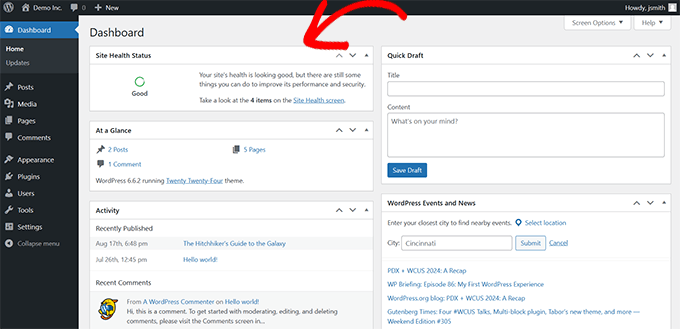
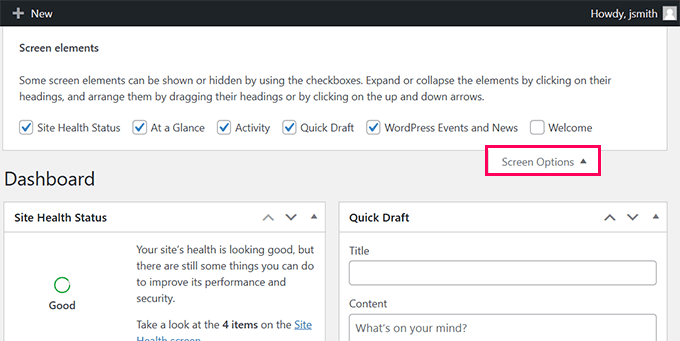
Quick Tip: Each user on your site can choose which widgets they want to see. They can show, hide, or rearrange them to match their workflow.
Why Dashboard Widgets Are Helpful:
- They show useful data the moment you log in.
- You can quickly access tools or content without digging through menus.
- Custom widgets let you personalize the dashboard for your specific needs.
Where to Find Them:
These widgets appear on the main dashboard screen inside the WordPress admin area. You can move them around by dragging and dropping, or hide them using the Screen Options tab at the top.
Why and How We Use Custom Admin Widgets in WordPress
Custom dashboard widgets are a great way to personalize the WordPress admin experience. We’ve used them on many client sites to display helpful info, link to important tools, or simplify the onboarding process.
Whether you’re running your own site or managing several for clients, custom widgets can save time and make the admin area more useful.
Real-Life Use Cases:
- Personalization: Add a welcome message, display key stats, or link to pages your team uses often.
- Developer Use: Developers often create widgets that guide clients with shortcuts to common tasks like updates or backups.
How We Use Them on Our Sites:
We rely on a set of must-have WordPress plugins, and many of them include built-in dashboard widgets.
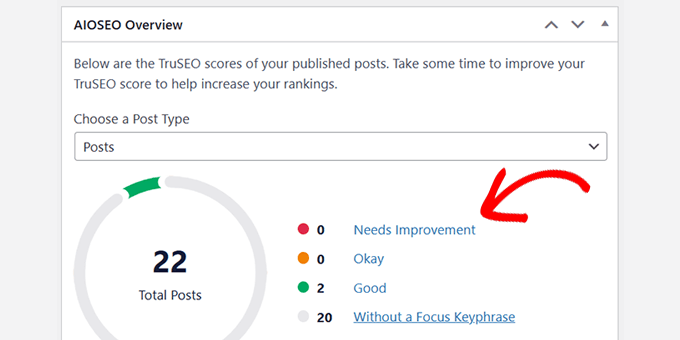
One we use often is the All in One SEO Overview widget. It shows TruSEO scores for our content and gives direct links to improve them.
We also use the MonsterInsights widget. It gives us a quick look at our website traffic and performance right from the dashboard.
It’s flexible too — we can choose which data to show depending on who’s using it.
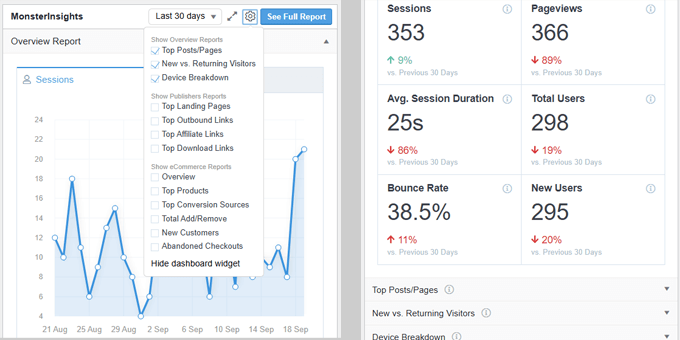
Since each team member has different needs, they can show or hide widgets and rearrange the dashboard however they like. It’s a small feature that makes a big difference in productivity.
How to Create Custom WordPress Admin Widgets
There are two main ways to create custom WordPress dashboard widgets. You can use the quick links below to jump to the method you want to use:
- Method 1: Create Dashboard Widgets Using Custom Code (More Customizable)
- Method 2: Create Custom Dashboard Widget Using Plugin (Easier)
Method 1: Create Dashboard Widgets Using Custom Code (More Customizable)
For this method, you will need to add custom code to your WordPress site to create a dashboard widget. It requires a basic understanding of WordPress programming. So, if you don’t want to write code, then you can skip to the next method.
We are showing this method first because it is more flexible and leaves room for you to add any code you want to run inside your custom widget.
We’ll show you the code you need, and then you can customize it to add your code using PHP, HTML, or JS.
When it comes to adding custom code to your WordPress site, many users think of the theme’s functions.php file. While this method works, we believe there’s a better, safer way to handle custom code snippets—using WPCode.
Editing the functions.phpfile can sometimes cause your site to crash if there’s a mistake in the code. Plus, you will lose your custom code if you switch or update the theme without backing up your changes.
WPCode, on the other hand, lets you add custom code safely without crashing your site. It also makes it easy to manage code snippets and turn them on and off as needed.
Note: A free version called WPCode Lite is also available, which you can use for this tutorial. However, we recommend upgrading to a paid plan to unlock more features.
First, you need to install and activate the WPCode plugin. For more details, see our article on installing a WordPress plugin.
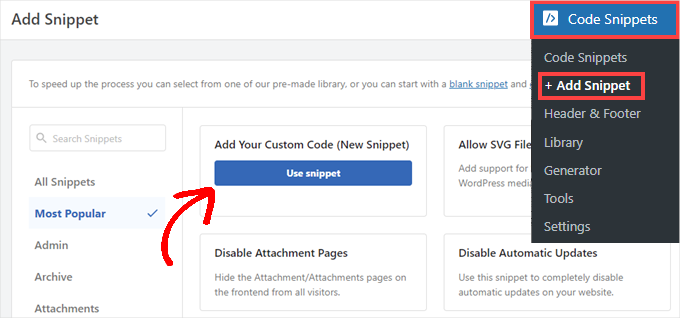
Once activated, you need to go to the Code Snippets » +Add Snippet page and select ‘Add Your Custom Code (New Snippet)’ to create a new snippet.
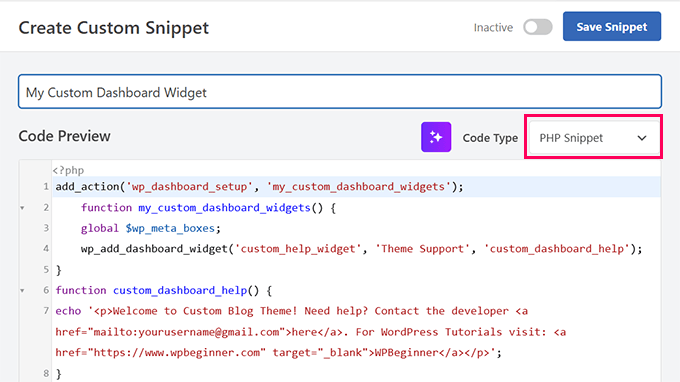
On the next screen, you need to enter a name for your custom code and choose ‘PHP Snippet’ as the ‘Code Type.’
After that, add the following code into the Code Preview box:
//hooks up your code to dashboard setup
add_action('wp_dashboard_setup', 'my_custom_dashboard_widgets');

function my_custom_dashboard_widgets() {
global $wp_meta_boxes;

// Register your custom WordPress admin dashboard widget
wp_add_dashboard_widget('custom_help_widget', 'Theme Support', 'custom_dashboard_help');
}

function custom_dashboard_help() {
// Replace this with any code you want to show in your custom admin widget
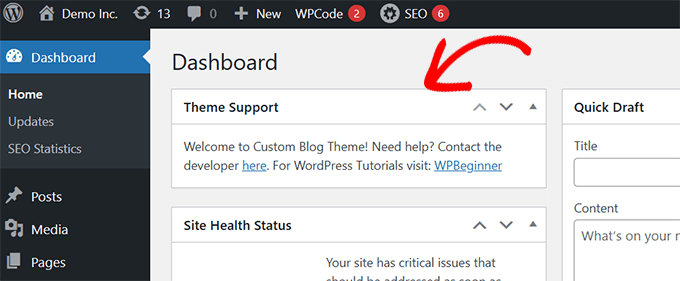
echo '<p>Welcome to Custom Blog Theme! Need help? Contact the developer <a href="mailto:yourusername@gmail.com">here</a>. For WordPress Tutorials visit: <a href="https://www.wpbeginner.com" target="_blank">WPBeginner</a></p>';
}
Here is how it should look in your WPCode interface:
Here is a little explanation of the code:
The my_custom_dashboard_widgets() function registers the custom widget using the wpb_add_dashboard_widget() function. It takes three arguments. The first one is the custom widget’s ID, the second one is the title of the widget, and the third argument is the callback function.
The custom_dashboard_help() is our callback function, and inside it, we have added the HTML code we want to show when the widget is displayed.
We have hooked up ourmy_custom_dashboard_widgetsfunction to the wp_dashboard_setuphook using add_action. This hook basically sets up the dashboard page for display.
After adding the custom code, you need to scroll down to the ‘Insertion’ section and select ‘Admin Only’ from the Location dropdown.
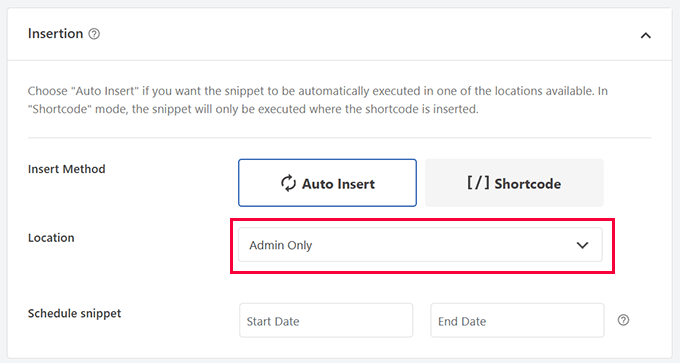
Finally, click the ‘Save Snippet’ button and toggle the status option to ‘Active’.
That’s all. You can now visit the Dashboard page to see your custom WordPress admin dashboard widget in action.
Method 2: Create Custom Dashboard Widget Using Plugin (Easier)
This method is easier, but we placed it as the second method because it is a bit less flexible than adding custom code.
For this method, we’ll use the Ultimate Dashboard plugin. It is one of the best WordPress admin dashboard plugins and helps you easily create custom admin widgets.
For more details, see our complete Ultimate Dashboard review.
First, you need to install and activate the Ultimate Dashboard plugin. For more details, see our article on installing a WordPress plugin.
Upon activation, you have to visit the Ultimate Dash…» Add New page. First, you need to provide a title for your widget and then select a Widget Type.
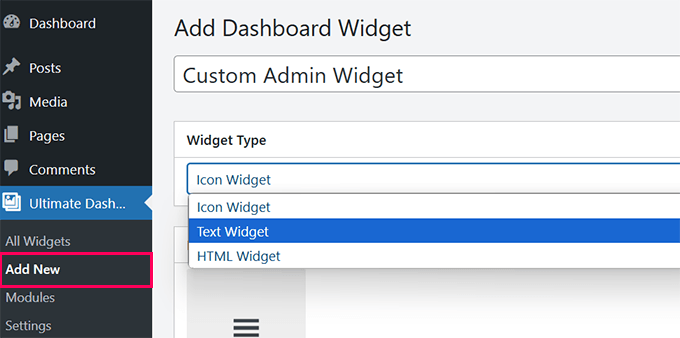
There are three types of widgets you can create:
- Icon Widget – Show a large icon and point it to any page on your site.
- Text Widget – It uses a visual editor where you can add any text you want with some basic formatting options.
- HTML Widget – Add HTML code to your custom widget.
Let’s look at each one of them.
1. Create Custom Icon Widget
Select ‘Icon Widget’ as the ‘Widget Type’ and then choose the icon you want to display. By default, it comes with a limited number of icons to choose from.
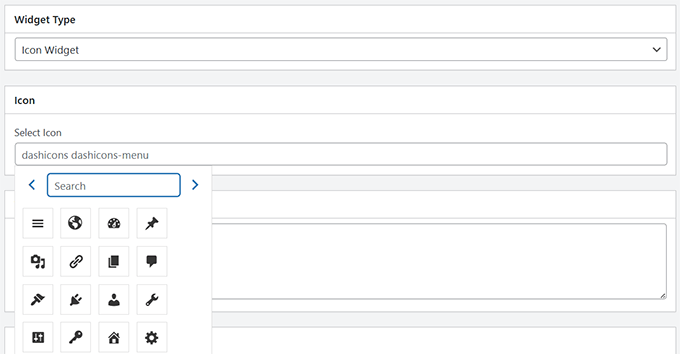
Below, you can add some text under ‘Tool Tip’ to explain to users what happens when they click on the icon. For example: ‘Takes you to WordPress settings page.’
After that, add the link where you want to send users when they click the icon.
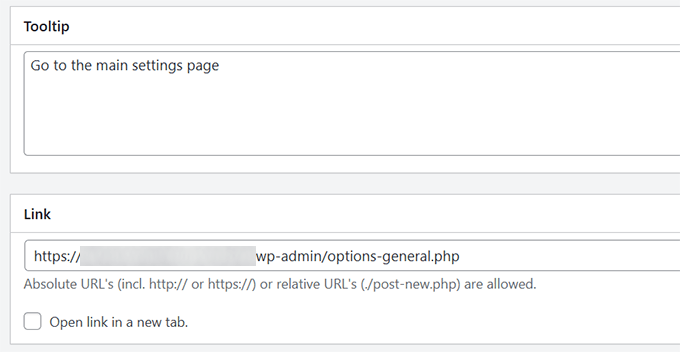
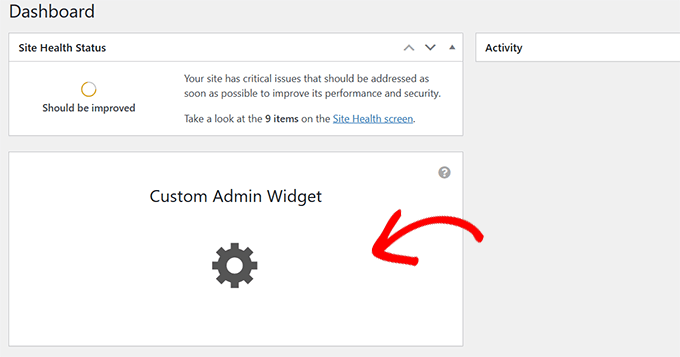
Finally, click ‘Publish’ to save your changes and visit the Dashboard to see the widget in action.
This is what it would look like.
2. Create a Custom Text Widget
If you are not already there, go to the Ultimate Dash…» Add New page. Select ‘Text Widget’ as your Widget Type.
The plugin will show you a visual text editor (the same as the old classic editor) where you can add any text you want to show with basic HTML formatting.
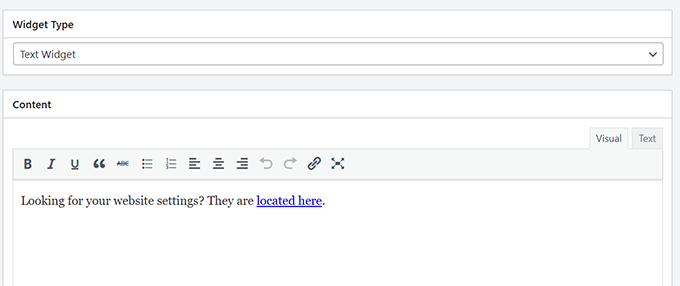
When you are finished, click ‘Publish’ to save your changes.
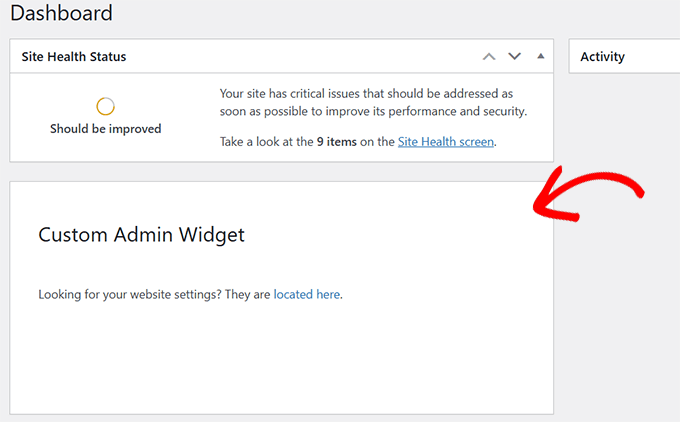
You can now visit your admin dashboard to see this custom admin widget in action.
3. Create a Custom HTML Widget
If you are not already there, you need to go to the Ultimate Dash…» Add New page. Select ‘HTML Widget’ as your Widget Type.
The plugin will show you an HTML editor where you can add any HTML code with inline CSS.
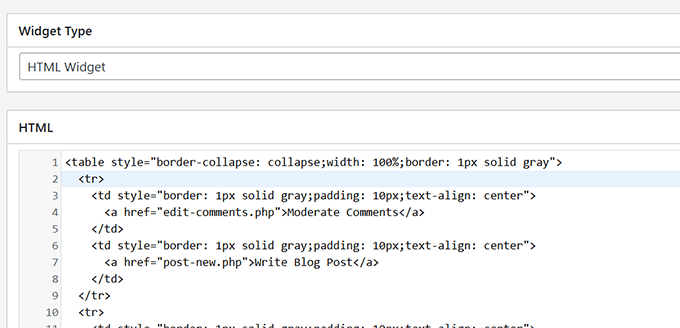
When you are finished, click ‘Publish’ to save your changes.
You can now visit your admin dashboard to see this custom admin widget in action.
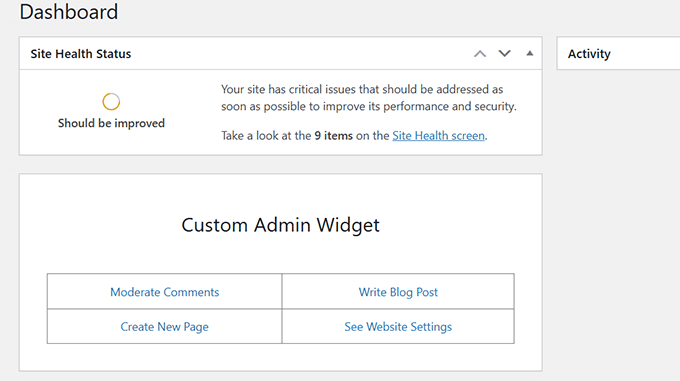
Using Ultimate Dashboard, you can create as many custom widgets as you want and mix and match different widget types to create a helpful admin dashboard experience.
Taking Your WordPress Admin Dashboard to The Next Level
The WordPress admin area is where most website owners spend a lot of time writing content, making pages, managing orders, and more.
Here are some additional resources for optimizing the WordPress admin dashboard:
- How to Customize WordPress Admin Dashboard
- How to White Label Your WordPress Admin Dashboard
- How to Create Automated Workflows in WordPress
- Plugins and Tips to Improve WordPress Admin Area
We hope this article helped you add custom dashboard widgets in the WordPress admin area. You may also want to see our WordPress security guide or take a look at this tutorial on hiding unnecessary menu items from the admin area.
If you liked this article, then please subscribe to our YouTube Channel for WordPress video tutorials. You can also find us on Twitter and Facebook.



Brandon
Very useful. Thank you.
WPBeginner Support
Glad it was useful!
Admin
Jef Vermeire
Can you add multiple widget of the same type on the wordpress dashboard. For example: can I add the custom ‘custom_help_widget’ twice on my dashboard?
WPBeginner Support
You could if you wanted to, you would want to add an additional line of the wp_add_dashboard_widget if you wanted it twice
Admin
Xavier Barbot
Very useful, thank you, I’ve tried all the plugins but none achieved adding a simple widget for my clients, very slick and easy to replicate by cresting a custom plugin, I give you 5 stars!
WPBeginner Support
Glad our recommendation was helpful
Admin
Syed Ali Ahmed
Thanks for sharing this, This is too awesome I love it.
WPBeginner Support
Glad you found our guide helpful
Admin
Mike
Is it possible to style the widget with custom attributes via HTML or CSS?
WPBeginner Support
You could but that is a bit beyond what we cover in our articles.
Admin
daan van middendorp
How can I use this for with a custom role ?
WPBeginner Support
If your custom role can see dashboard widgets, it should be able to see the custom widget.
Admin
haqem
how to put this custom widget at “Add New Post” area for writing
Ron Sierra
This was asked once but I could not find the reply or answer. How do I create multiple dashboard widgets?
Bjornen
How do I add wp_mail function to this widget?
Meaning; how do I provide the customer with a contact form in that widget?
Vishah
How can I add a button ?
Wade
Used your code and got the white screen of death. WP 4.7.2
Any ideas?
WPBeginner Support
Hey Wade,
You can remove the code using FTP. Also please see our guide on how to fix white screen of death in WordPress
Admin
gobinda das
can i change the heading Flowtown theme to something else
Javier
Hi, I’m trying to create custom widgets on a per user basis. Each user needs to have a widget with different text in it.
Is there any way to achieve this?
David Guerreiro
That is very easy ! With PHP get the current user on the function that you are using for displaying the metabox content and change the HTML depending of the user retreived. Have a look on this :
Lại Đình Cường
Hello Syed Balkhi, how can I add new admin widget with order?
shakun
How to add multiple widget on dashboard
Nishant
i tried to insert a do_shortcode() with shortcode for a contact form to give user a quick access to report any bug of provide feedback but it doesn’t work … any idea how to get CF 7 working with this ?
Thanks
Dustin
This would be great to know. I am also trying to use a shortcode in a dashboard widget.
Mike
This isn’t working for me in 3.5. Are there any updates to get this working? Thanks!
smayzes
Is it possible to do this using OOP?
e.g.:
inside a class:
wp_add_dashboard_widget(‘custom_help_widget’, ‘Help and Support’, array($this, ‘customDashboardHelp’));
function customDashboardHelp() {
echo ‘<p>Welcome to your custom CMS!’;
}
Nick Powers
I know your message is quite old, but for the sake of others who come here and have the same question. Yes, it does work with OOP, just as you have indicated.
luxsub
Is it possible to put a widget with adsense in your dashboard for a multi user site?
y3kgeek
Great idea. What if I want to create a custom dashboard widget that only people with a certain user role, say Contributing Writer, can see?
Editorial Staff
You can do this by using the conditional statement if user_can or even user roles.
Admin
DramaKing
I know it’s been three years, but if others happen to come around here looking for an answer (like me), this is how I did it. I don’t know a lot about coding so it’s probably not clean, but this is how I managed to get it to work:
add_action(‘wp_dashboard_setup’, ‘dashboard_widget_mail’);
function dashboard_widget_mail() {
global $wp_meta_boxes;
if ( current_user_can( ‘delete_users’ ) ) {
wp_add_dashboard_widget(‘custom_mail_widget’, ‘Widgetname to show up on dashboard’, ‘custom_dashboard_mail’);
} return true;
}
function custom_dashboard_mail() {
echo ‘Your custom text here.’;
}
—
You can replace ‘delete_users’ for any capability you like of course.
Martin
Thx for this! It works great.
Just a quick question:
If I want to add 2 or more custom widgets in the functions.php, do I have to change the “action” and “function” name?
Editorial Staff
Yes you would have to add two separate functions and actions…
Admin
ACS04
Sounds good, but should be better to create a simple plugin to do so, in such a way, this widget will be independant from the themes… Don’t you think ?
Editorial Staff
Well you can, but in our case it contains support information that we want our clients to know. This is mostly for custom theme designs, so it is only good to have when our theme is activated.
Admin
Frankie Jarrett
Thanks a lot for the easy example. I was able to get something up and running in just a few seconds
Stéphane
Wow! Never heard about that trick before… Very nice, thanks!
Daniel
Worked like a charm. Using this as a workaround for one of my membership site that locked all dashboard menus; this will point members to the appropriate edit posts links again.
richard
when making two widgets how do you make them side by side instead of one on top one on bottom?
Editorial Staff
Hey Richard, You can make your widget be displayed at the very top using the code in WordPress Codex Dashboard API. We don’t know how to set them side by side without manually going in and saving it for the client. Perhaps sending an email to Jake and asking him would be a good idea.
Although remember, the settings you set in functions.php does not override the normal settings if the user has previously changed the settings. This only works if the user never organized his/her dashboard before.
Admin
Ash Blue
Use display block on the outer most element and float left, make sure to set a width, but that may break it. This is very similar to a gallery layout. This is not suggested and not necessarily how WordPress designed widgets to be used (use at your own risk).
david
wpmu. I have found /wp-includes/functions.php but where should I insert the code? Thanks for your help
Editorial Staff
You actually include this in your themes functions.php file not the core file.
Admin
cho
what do u mean themes function.php?
i cannot find such a file
Editorial Staff
There is a functions.php file located in your theme’s folder.
Ash Blue
Interesting, I did all of that with the line below. Is one better, or are these both just as good?
if ( function_exists('register_sidebar') ) {

	register_sidebar(array(

		'name'=>'Contact',

	));

}
Editorial Staff
Your code is for registering Sidebar Widgets. The code we are sharing in this article is to add custom dashboard widget. When one log in to their wp-admin, they see post stats, and other information. This box will be added there.
Two completely different topics.
Admin
Vivek @ InfoEduTech
thanks for the tutorial.
please don’t take it wrong whenever you are going to post any article post it with the appropriate screen shot so that it will be easy for the newbie.
Jim
This is awesome thank you for sharing.