


If you’ve ever explored your WordPress dashboard, you’ve probably noticed a mysterious plugin called “Hello Dolly” that you never installed. It’s one of those things that makes you wonder: “Is this important? Should I activate it? Can I delete it?” 🤔
This little plugin has been quietly confusing WordPress users since 2004. Some people worry it’s essential for their site to work properly, while others assume it’s unnecessary bloatware.
The uncertainty is completely understandable. WordPress doesn’t exactly explain what it’s for or why it’s there.
In this guide, we’re going to clear up this mystery for you. You’ll learn exactly what Hello Dolly does, why WordPress includes it, and most importantly, whether your website needs it or not.

Quick Navigation: What You’ll Learn About Hello Dolly
There’s quite a bit to explore, so here’s a quick breakdown of the key points we’ll cover:
- What Is the Hello Dolly WordPress Plugin?
- History of The Hello Dolly WordPress Plugin
- What Is the Purpose of Hello Dolly in WordPress?
- Should I Delete the Hello Dolly WordPress Plugin?
- Frequently Asked Questions About Hello Dolly
- Video Tutorial
- Bonus Resources: More WordPress Tips and Tutorials to Explore
Ready? Let’s dive right in.
What Is the Hello Dolly WordPress Plugin?
Hello Dolly is a simple WordPress plugin that comes pre-installed in WordPress.
If you activate the plugin, it will display a line from the lyrics of the Hello Dolly song that Louis Armstrong most famously performed.
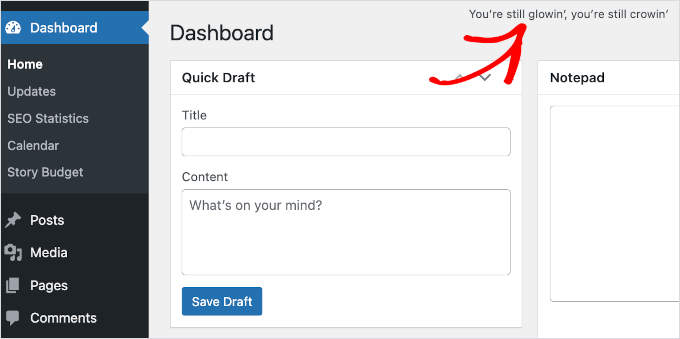
The plugin description is extremely vague and does not explain its usefulness.
This is not just a plugin, it symbolizes the hope and enthusiasm of an entire generation summed up in two words sung most famously by Louis Armstrong.
In case you were wondering, YES, this plugin is completely useless for all practical purposes.
So why is it there?
History of The Hello Dolly WordPress Plugin
Hello Dolly was one of the first WordPress plugins created. It was released in May 2004 with WordPress 1.2, which introduced the plugin architecture.
Hello Dolly is written by Matt Mullenweg, co-founder of WordPress. Apart from Hello Dolly, there were four other plugins pre-installed in the earlier version. Those plugins were:
- Search Hilite
- Markdown
- Textile1
- Textile2
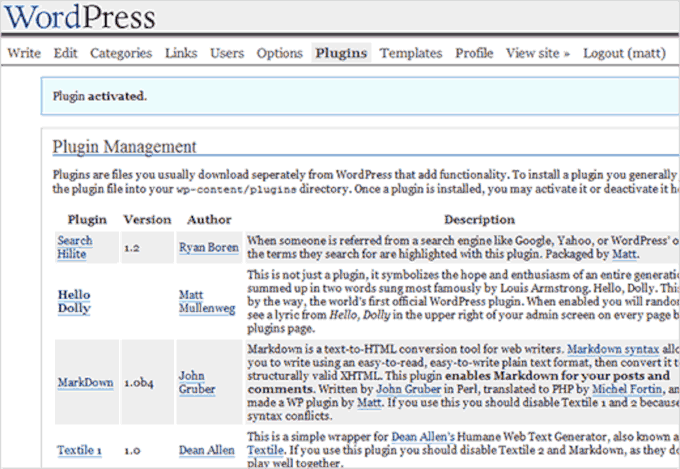
Since then, Hello Dolly has shipped with every version of WordPress.
What Is the Purpose of Hello Dolly in WordPress?
Apart from the sentimental value, Hello Dolly has no practical purpose. The community has debated its removal from the core install. However, after 11 years, it’s still part of all default installs.
The current primary reason/excuse for its inclusion is that it helps new developers start writing plugins.
However, it’s not a very good example of how to study WordPress plugin development. Better resources include the Plugin Handbook and countless other tutorials/videos.
We believe the reason for its inclusion as a default plugin is mainly tradition. For many early WordPress adopters, Hello Dolly is a reminder of the good old days and how far WordPress has come.
Should I Delete the Hello Dolly WordPress Plugin?
Yes, you can and should delete the Hello Dolly plugin. We recommend removing it from all your WordPress websites for security reasons.
While the plugin itself is not harmful, our team has cleaned countless hacked sites over the years. We often find that attackers hide malicious code in old, inactive plugins like Hello Dolly because they know most users don’t check them.
Hackers use these forgotten files to create a malicious backdoor. This allows them to regain access to your site even after you’ve found and removed the initial infection.
Because of this, it is a security best practice to delete all plugins and themes that you are not actively using on your website. This simple step helps keep your site secure.
Frequently Asked Questions About Hello Dolly
Still have questions about the Hello Dolly plugin? Here are some quick answers to common questions we hear from WordPress users.
Is the Hello Dolly plugin a virus or malware?
Nope. Hello Dolly isn’t a virus or malware. It’s a completely harmless plugin that ships with every official WordPress installation. In fact, it was created by Matt Mullenweg, one of the co-founders of WordPress.
That said, because it’s often left unused and forgotten, some hackers have been known to hide malicious code inside it after gaining access to a site. That’s why we recommend deleting any plugins you’re not using, not just Hello Dolly, as a good security habit.
Will deleting the Hello Dolly plugin speed up my website?
No, deleting Hello Dolly will not have any noticeable impact on your website’s speed or performance. The plugin is extremely lightweight and only runs a single, simple function if you activate it.
While removing unused plugins is an excellent security practice, you won’t see a performance boost from deleting this specific one.
Can I reinstall Hello Dolly after deleting it?
Yes, definitely! While Hello Dolly comes pre-installed with WordPress, it’s also available in the official WordPress plugin directory.
If you ever want it back, just go to Plugins » Add New in your WordPress dashboard, search for “Hello Dolly,” and install it like any other plugin.
Video Tutorial
Before you go, you might want to check out our video on what is the Hello Dolly plugin. Just click the ‘Play’ button below! ▶️
Bonus Resources: More WordPress Tips and Tutorials to Explore
We hope this article answers your questions about the Hello Dolly WordPress plugin. Next, you might want to check out our guides on:
- How and Why You Should Leave Reviews on WordPress
- How to Show Random Quotes in Your WordPress Sidebar
- How to Generate and Add QR Codes in WordPress
- How to Create Automated Workflows in WordPress With Uncanny Automator
- Best Fun WordPress Plugins You’re Missing Out On
- Must-Have WordPress Plugins for Business Websites
If you liked this article, then please subscribe to our YouTube Channel for WordPress video tutorials. You can also find us on Twitter and Facebook.




Dennis Muthomi
This is such an important security tip! I’ve learned the hard way that even deactivated plugins can become security risks on WordPress sites. These days, I’m super careful about keeping things clean. The first thing I do on any site is remove unused plugins – even the default ones like Hello Dolly. It’s become part of my standard cleanup routine for all my clients’ websites.
For any new WordPress site I work on, I immediately remove plugins that aren’t going to be used. Pair this with regular security scans, and you’ve got a much safer, cleaner website. It’s a simple change that makes a big difference!
Jiří Vaněk
I always automatically deleted the Hello Dolly plugin with every new WordPress installation. I never saw any benefit in it, which you confirmed in your article. However, I never really thought about its purpose in WordPress or why it’s included as a native plugin right after installation. Your article explained it perfectly. Thanks.
Ray Wyman Jr
I’ve been using WordPress since 2003, when I switched from Greymatter blog (Noah Grey). “Hello Dolly” has been running in the background of just about every WP website I’ve launched since. It is harmless. It does not increase DOM or weigh down performance. And it is a sentimental trinket – a reminder of the old days, which, in my mind, are not so old.
WPBeginner Support
Thanks for sharing your opinion on the plugin, if you want to keep it active you certainly can on your site
Admin
Alain Guillot
Thank you. I have several WordPress sites. Only recently I was helping a friend of mine installing her brand new WordPress site when challenged me about the purpose of this plugin. It was nice to show her that this plugin is useless.
shahadat khan
Oh really help full post thanks for sharing good inform keep up the good work thanks again
Joolz
Thank you – very helpful and interesting to read the low-down on this plugin’s useful/lessness. Long live “Hello Dolly!”
Lauree Sayne
Thanks for the info. I’m new to Wordpress and I was wondering about Hello Dolly. I’m happy to delete anything not needed and have a minimalist dashboard!
Thanks again,
Lauree
avinash kumar dubey
Thanks for sharing this concept. can you answer me, how to change howdy name , is this possible to edit. Thanks.
WPBeginner Support
Please our tutorial on how to change the howdy text in WordPress.
Admin
Mione C
Thanks for clearing this up! How about older default WordPress themes, though –should you delete those as well? I usually like to keep the most recent, just in case it’s helpful for troubleshooting at some point, but I’ve noticed that most people never delete any of them. What’s your take on that?
WPBeginner Support
Yes, you should delete old themes that you don’t intend to use. Keeping the latest default theme for troubleshooting and backup is a good practice. However, you can always install them for free whenever you need.
Admin
Richard Buro
Thank you for the information about the “Hello, Dolly!” Plug-in. It was informative and somewhat nostalgic. I deactivated it after realizing it really was harmless. Your article provided context and depth to my understanding about its longevity and its purpose as an initial test of the plug-in concept in the WordPress environment. As a trained historian, I can understand the desire to maintain a handle on the past. It is commendable, and – in my opinion – a touchstone for remembering the WordPress past while doing in a subtle way. Great article, great history!