


Did you know that WordPress.com and WordPress.org are actually two very different platforms?
Often beginners confuse WordPress.com and WordPress.org, which leads them to choose the wrong blogging platform for their needs. Even those who know that they are two different platforms are not aware of the differences between them.
We’re often asked by our users which is the better platform: WordPress.com vs WordPress.org. To help answer that, we have created the most comprehensive comparison of free WordPress.com vs WordPress.org (self-hosted version).
Our goal is to highlight the key differences between WordPress.com vs WordPress.org, so you can choose the right platform for your needs.
Since choosing the right platform is crucial for your online success, we have created the most detailed comparison of WordPress.com vs WordPress.org (text comparison, table-based comparison, and a full infographic). You can use the links below to jump to a specific section:
If you just want to start a blog or make a website the RIGHT way, then you can skip this article and head over to our guides here:
- How to Start a Blog with WordPress (step by step)
- How to Create a Website with WordPress (step by step)
- How to Start an Online Store with WordPress (step by step)
- How to Create and Sell Online Courses with WordPress (step by step)
Having said that, let’s take a look at the differences between self-hosted WordPress.org vs WordPress.com.
WordPress.com vs WordPress.org (Infographic)
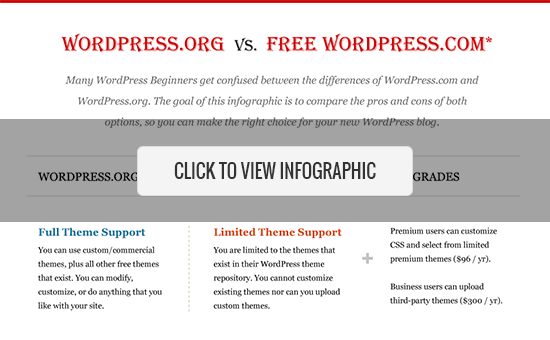
Note: This infographic and article compare the powerful self-hosted WordPress.org with the free WordPress.com website hosting service. You can unlock additional functionality in WordPress.com by upgrading to their paid service. We have highlighted those features as well.
Video Tutorial
If you’d prefer written comparisons, please keep reading.
WordPress.com vs WordPress.org Comparison
The best way to understand the difference between WordPress.com vs WordPress.org is to take a look at each platform individually.
Here’s a comparison of both versions of WordPress:
WordPress.org
WordPress.org aka “the real WordPress”, is the popular website platform that you have heard all the great things about.
It is an open-source software, and it’s 100% free for anyone to use. All you need is a domain name and web hosting. This is why it is also referred to as self-hosted WordPress.
Below are the pros and cons of using the self-hosted WordPress.org to build your website or blog.
WordPress.org Benefits
With WordPress.org, you have full control of your website. You are free to do anything you want and customize it as much as you need.
Here are some of the benefits of choosing WordPress.org to build your website, and the reason why it is our #1 pick for the best website builder.
- The WordPress software is free, open-source, and super easy to use. WordPress is used by over 43% of all websites on the internet (See why is WordPress free?).
- You own your website and all its data. Your site will NOT be turned off because someone decides that it is against their terms of service (as long as you are not doing something illegal). You are in full control.
- You can add free, paid, and custom WordPress plugins / apps to your website.
- You can customize your website design as needed. You can add any free or premium WordPress theme that you want. You can also create completely custom designs or modify anything that you want.
- You can actually make money from your WordPress site by running your own ads without sharing revenue with anyone.
- You can use powerful tools like Google Analytics for custom analytics and tracking.
- You can use self-hosted WordPress to create an online store to sell digital or physical products, accept credit card payments, and deliver / ship the goods directly from your website.
- You can also create membership sites and sell memberships for premium content, courses, forums, etc., and build an online community around your website.
WordPress.org Cons
There are very few cons of using the self-hosted WordPress.org site.
- Like all websites, you will need web hosting. This is where your website files are stored on the internet. Initially, the cost is around $3-$10 per month. However, as your website grows and gets more traffic, the web hosting plan costs will increase as expected, but then you will be making enough money to cover the costs.
- You will need to install WordPress. Luckily, most popular WordPress hosting companies offer 1-click WordPress installation options. You can also follow our comprehensive tutorial on how to properly install WordPress.
- You are responsible for updates. You can easily update your WordPress site by simply clicking on the update button (one click), so it’s not too much work.
- You are responsible for backups. Thankfully, there are tons of WordPress backup plugins that let you set up automatic backups.
The real cost of the WordPress.org website varies based on what you are trying to build (simple blog, portfolio website, eCommerce store, membership site, etc). There are also other factors like free templates vs premium templates, free plugins vs premium plugins, etc.
On a low budget, you can build your website for as little as $46 per year. See our guide on how much does it really cost to build a WordPress website for full details.
For 99% of users, our recommendation is always to use WordPress.org. See our guide on how to start a website.
Bonus: The team at Bluehost is offering our readers a 61% discount on web hosting + a free domain name. They’re an officially recommended WordPress hosting provider.
WordPress.com
WordPress.com is a hosting service created by Automattic, the company led by WordPress co-founder Matt Mullenweg. Because of the same founder, users often confuse WordPress.com with the popular WordPress.org software.
The WordPress.com hosting service has six pricing plans:
- Free – Very limited and restrictive in terms of features.
- Starter – $48 per year
- Explorer – $96 per year
- Creator – $300 per year
- Entreprenuer – $540 per year (Suitable for eCommerce sites using WooCommerce)
- VIP – starting at $25000 per year
Let’s take a look at the pros and cons of WordPress.com.
WordPress.com Benefits
The free WordPress.com platform is a good choice for hobby bloggers and those starting a blog for their family. Here are some of the benefits of using WordPress.com:
- It’s free for up to 3GB of space. After that, you will have to switch to a paid plan for more storage space. (Starter plan $48 /year, gives you 6GB, Explorer plan $96/year, gives you 13GB storage, Creator plan for $300/year comes with 50GB storage).
- You will not have to worry about updates or backups. WordPress.com will take care of that.
WordPress.com Cons
There are several limitations of free WordPress.com, which differentiate it from WordPress.org. Here are some of the disadvantages of using WordPress.com:
- They place ads on all free websites. Your users see those ads, and you don’t make money from them. If you don’t want your users to see their ads, then you can upgrade to a paid WordPress.com plan (starting from $48 per year).
- You are NOT allowed to sell ads on your website, which severely limits ways to monetize your site. If you run a high-traffic site, then you can apply for their advertising program called WordAds where you share revenue with them. Explorer and above plan users can use WordAds right away.
- You cannot upload plugins. Free plan users get built-in Jetpack features pre-activated. Creator plan users can install from a selection of compatible plugins ($300 / year). WordPress.com VIP program lets you install plugins, and it starts from $5000 per month.
- You cannot upload custom themes. Free plan users can only install from the limited free themes collection. Explorer and Creator plan users can also select premium themes and use custom CSS with those themes. There are limited customization options for the free version.
- You are restricted to their stats. You cannot add Google Analytics or install any other powerful tracking platform. Creator plan users can install Google Analytics.
- Free WordPress.com sites come with a WordPress.com subdomain (e.g. https://yourwebsite.wordpress.com). You’ll need a paid plan to get a custom domain name (e.g. https://www.yourwebsite.com).
- They can delete your site at any time if they think that it violates their terms of service.
- Your site will display a powered by WordPress.com link. It can be removed by upgrading to the Creator plan.
- WordPress.com does not offer any eCommerce features or integrated payment gateways unless you switch to the Entrepreneur plan.
- You cannot build membership websites with WordPress.com.
As you can see, the WordPress.com hosting platform is quite limited when you’re on the free, personal, or even premium plan. To unlock some of the more advanced features, you have to be on the Business plan ($300 per year) or on the VIP plan ($5000 per month).
WordPress.com vs WordPress.org (FAQs)
Since this is a popular topic, and WPBeginner is the largest free WordPress resource site for beginners, we get tons of questions regarding WordPress.com vs WordPress.org.
We have done our best to answer the most frequently asked questions below:
WordPress.com vs WordPress.org – Which is Better?
If you are a personal blogger and you don’t care about making money from your website, then go with the free WordPress.com.
If you are a business or a blogger who wants to make money from your site, then we recommend using the self-hosted WordPress.org. It gives you the freedom and flexibility to grow your website the way you want.
While you can get several advanced features with the WordPress.com Creator plan ($300 / year for each website), you can make that money go much further on a self-hosted WordPress site which costs $46 per year.
In our expert opinion, WordPress.org is hands down the better platform. That’s the platform that every professional blogger, small business owner, and even big name brands like Disney uses.
Can I Monetize Free WordPress.com Website?
WordPress.com does not allow you to run ads on free WordPress.com websites. If you run a high traffic website, then you can join their own WordAds program and share your ad revenue with WordPress.com.
You can put some affiliate links on your website, but that’s about it.
Basically, you have very limited options to monetize content on your WordPress.com website.
Whereas with WordPress.org, you have full control over content management system, so you have unlimited monetization options for your new website.
WordPress.com vs WordPress.org – Which one is better for Ecommerce?
WordPress.org offers the easiest way to build an eCommerce website. You can use WooCommerce to build your store or choose from many other WordPress eCommerce, membership, and LMS plugins.
WordPress.com also offers an eCommerce plan starting at $540 per year which is a hefty amount if you are just getting started. It is still limited in terms of features, and you’ll have to follow WordPress.com’s terms of services for your eCommerce store.
See our guide on how to start an online store without a high budget. It includes how to get your own domain for free along with all the powerful features that you need to grow online.
How do I start a WordPress.org Website?
To start a self-hosted WordPress website, you need a domain name and WordPress hosting.
A domain name is the address of your website on the internet, such as google.com, wpbeginner.com, etc. Web hosting is where your website files are stored on the internet.
We recommend using Bluehost to host your website because they are one of the largest web hosting companies in the world. They’re also an official WordPress.org recommended web host. Last but not least, they’re offering our users a free domain + free SSL + 61% off on hosting.
For step-by-step instructions, you can check out our free guide on how to make a website.
If you need help, WPBeginner team can even install WordPress and build your website for free. Learn more about how our free WordPress blog setup works.
Can I move from WordPress.com to WordPress.org?
Often new users who don’t know the difference between WordPress.com vs WordPress.org end up starting with the free WordPress.com service. Once they see the limitations of the platform, they want to switch to “the Real WordPress” aka WordPress.org.
Yes, you can definitely switch from WordPress.com to WordPress.org and fairly easily move all of your content.
We have created a step by step guide on how to move your blog from WordPress.com to WordPress.org, or you can take advantage of our free blog setup service, and we will transfer your blog for free.
WordPress.com vs. WordPress.org – Summary
The best way to think about the differences between WordPress.com vs. WordPress.org is the analogy of renting a house vs. owning a house.
WordPress.com is similar to renting a house. You have limited power and control over what you can and cannot do.
WordPress.org is like owning a house. Where you have full control, no one can kick you out, and you can do anything that you want.
Below is the summary of everything we discussed above in our self-hosted WordPress.org vs WordPress.com comparison:
| WP.org (Platform) | WP.com (Free) | WP.com (Premium) | WP.com (Business) | |
|---|---|---|---|---|
| Cost | $46 - $100 / year | Free | $96 / year | $300/ year |
| Custom Domain | Yes | No | Yes | Yes |
| Hosting Storage | Unlimited | 3 GB | 13 GB | 200 GB |
| Monetization Freedom | Yes | No | Yes (with rev/share) | Yes (with rev / share) |
| Branding Freedom | Yes | No | No | Yes |
| All SEO Features | Yes | No | No | Yes |
| Powerful Analytics | Yes | No | No | Yes |
| Full Theme Support | Yes | No | Limited | Yes |
| Full Plugin Support | Yes | No | No | Yes |
| Ecommerce Store | Yes | No | No | No |
| Membership Site | Yes | No | No | No |
| Maintenance | Yes | No | No | No |
| Full Control | Yes | No | No | No |
Final Thoughts
The confusion created by similar domains: WordPress.com vs WordPress.org is quite unfortunate for beginners. There is a lot of history behind the decisions, and you can read more about that in our article how WordPress.com and WordPress.org are related.
Our hope is that you found this article helpful in understanding the main differences between WordPress.org and WordPress.com.
We wish you all the best with your website and hope that you chose the right platform: WordPress.org.
If so, you may want to follow these useful guides:
- How to learn WordPress in 7 days or less
- 24 best WordPress plugins for your website (expert pick)
- Ultimate WordPress security guide to improve your website security
- Ultimate Guide on how to speed up WordPress (including power user tips)
- Ultimate WordPress SEO optimization guide to help improve your own website ranking (without hiring an expert)
- 27 proven tips to increase your blog traffic
If you liked this article, then please subscribe to our YouTube Channel for WordPress video tutorials. You can also find us on Twitter and Facebook.




Syed Balkhi says
Hey WPBeginner readers,
Did you know you can win exciting prizes by commenting on WPBeginner?
Every month, our top blog commenters will win HUGE rewards, including premium WordPress plugin licenses and cash prizes.
You can get more details about the contest from here.
Start sharing your thoughts below to stand a chance to win!
Briana says
It should be noted that WordPress.com now auto opts users in to have their content sold to AI companies to train their models. You can opt out, but only if you know that you need to do so. Something for anyone to consider who is thinking about signing up.
THANKGOD JONATHAN says
I didn’t know all this fhings before. Thanks to WPBeginner.
I thought it’s all the same thing but now I have the better understanding.
Thank you for this article. It really helps.
WPBeginner Support says
Glad we could clear up any confusion
Admin
Moinuddin Waheed says
This is one of the most found confusion in the beginner’s mind. they confuse WordPress.org with WordPress.com very often.
this article has clearly demonstrated the difference between the two in a clear and concise manner.
thank you wpbeginner for making the effort to clear the doubts regarding the two very confusing yet related topic.
WPBeginner Support says
Glad you found our guide helpful in clearing this confusion
Admin
Lara Carter says
This article is amazing and I love reading the comments on people experience and views on these articles, it helps give me a so much better idea the topic.
WPBeginner Support says
Glad you found the article helpful
Admin
James Demello says
Thanks, you convinced me to use WP.org.
WPBeginner Support says
Glad to hear our guide was helpful!
Admin
Alina says
Great website! I look forward to exploring your articles.
Question, please. If I use WP.org does it mean that my website will be .org or the two are unrelated?
Which one is better to have anyway? com, org, or ca (since I am in Canada)?
I want to create a website to sell microgreens locally.
WPBeginner Support says
The domain for your site does not determine if a site is a WordPress.org or a WordPress.com site. Your hosting provider determines what type of site, our guide below should help with a better understadning
https://www.wpbeginner.com/beginners-guide/whats-the-difference-between-domain-name-and-web-hosting-explained/
We prefer WordPress.org sites but depending on your uses some people find WordPress.com a better fit for them.
Admin
Oghenemase says
Thank you for the insightful exposition
WPBeginner Support says
You’re welcome!
Admin
Madu Shantel says
Thanks alot. This article was indeed helpful.
WPBeginner Support says
Glad to hear our article was helpful!
Admin
A. Boateng says
Very helpful article, thank you!
WPBeginner Support says
You’re welcome, glad our article was helpful!
Admin
Kindeng Simamora says
Thanks for the useful information.
I already have a domain and hosting and use a free WP template.
I am planning to move to wordpress.org and take Bluehost webhosting.
Can I keep my domain? Or do I have to make another one that I will get for free from Bluehost?
WPBeginner Support says
If you have your own domain and not a site.wordpress.com address you can take that to a new hosting provider like BlueHost
Admin
Christopher Pereira says
Your article is straightforward, honest, unbiased, and most important, absolutely informational. In fact, thank goodness for my positive procrastination, because sometimes, I stall a lot, if only to uncover a little more info that may save time and grief in the future, just like your article did, by clarifying the difference between WP.org and WP. com
I HAVE bookmarked you. You ARE an invaluable resource.
Thanks, guys…
WPBeginner Support says
Glad you found our content helpful!
Admin
Milzy says
Great article!! Thank you so much
WPBeginner Support says
Glad you found our comparison helpful!
Admin
Princewill Ejikeme says
Very nice clarification. When starting my blog, i actually registered with the free wordpress.com but when i saw the limitations, i decided to upgrade to personal plan. Am now a proud owner of my own domain.
WPBeginner Support says
Glad you were able to make it work for you
Admin
Pedro Araújo says
Helpful article, but what about page rank, is there any difference between wordpress.com and wordpress.org regarding potential site traffic?
Joachim says
Wow. This article was really helpful. I’m just getting to know the difference between the two domains. And it appears I’ve been stuck on the WordPress.com for a long time. I’m making the switch ASAP. Thank you for this.
LEONARD ADOLPHUS says
I’m about starting out on blogging, please do I have to input .org extension manually when searching for my domain availability. Secondly, does that mean buying a hosting from bluehost automatically makes my site a .org site?
Thanks.
Sheryl Buckner says
So glad I made the right choice to go with .org. Love Word Press. There is a lot of good content which will help me grow my platform without spending days on end trying to learn basic tips and tricks.
WPBeginner Support says
Glad to hear you’re happy using WordPress.org
Admin
Azhar says
With wordpress.org everything is possible
WPBeginner Support says
Definitely
Admin
Roman says
I prefer to choose WordPress.org, because it has tones of features and free to use and do what ever we want.
WPBeginner Support says
Thanks for sharing your preference
Admin
RON DEWALD says
I’ve used both.
I ended up using the .org one
WPBeginner Support says
Thanks for sharing which you’re using at the moment.
Admin
Kyle says
I didn’t know there were so many differences lol
WPBeginner Support says
Glad we could bring these differences to your attention
Admin
Sufian Mehmood Soomro says
Informative and detailed blog post about the difference between WordPress.org and WordPress.com I really like it and I am noted important point on my book for my information. Thanks
WPBeginner Support says
Glad our guide could help clear this up for you.
Admin
Williams says
I love wordpress.org more,
#wordpress.org
WPBeginner Support says
Glad you enjoy WordPress.org
Admin
Dy Dean says
For me wordpress.org is the best
WPBeginner Support says
Thanks for sharing your preference
Admin
Purnendu Mukherjee says
Finally the conclusion is,
WordPress.org is my own home with own responsibility.
WordPress.com is rented home.
WPBeginner Support says
Correct
Admin
Binit says
Hi how to change blog on something.wordpress.com to domain
WPBeginner Support says
That would be handled through WordPress.com and their plans. You would want to check with WordPress.com for their current method for setting a domain.
Admin
Shriya says
What will happen to my wordpress.com site and its followers after migrating o wordpress.org?
WPBeginner Support says
Your site will remain unless you decide to remove it or you can use WordPress.com’s redirect to force it to redirect to your new site and you have the option to transfer your followers using the Jetpack plugin.
Admin
Rosco says
Thanks a lot for this informative article. Can I build a social network site using wordpress.org?
WPBeginner Support says
Yes, you can. We have an article on this below:
https://www.wpbeginner.com/plugins/how-to-turn-your-wordpress-site-into-a-social-network/
Admin
Adeniye Kehinde says
Nice post am looking forward to creating a website on WordPress, one question can i creat a website for posting files, also having a store on either WordPress.com or WordPress.org
WPBeginner Support says
For what it sounds like you’re wanting, you would want to use WordPress.org.
Admin
ADENIYE KEHINDE says
Thanks , I will be starting my Website soon
Claudia says
Thank you for your detailed description about wordpress.org and wordpress.com.
I am very curious, is it possible that I buy a domain and web-hosting with another provider and then use it on wordpress.org?
WPBeginner Support says
You can, you should be able point the domain to the hosting provider for what you’re wanting. For a better understanding of domains vs hosting, you would want to take a look at our article below:
https://www.wpbeginner.com/beginners-guide/whats-the-difference-between-domain-name-and-web-hosting-explained/
Admin
Claudia Marin says
Thank you for your response.
Smrithi P says
Thanks a lot for this! It’s very enlightening.
I made my first blog recently under wordpress.com…will probably change it to .org after some time.
Will definitely be keeping this article for future reference.
WPBeginner Support says
Glad to hear and we hope our transfer guide is something you find helpful when you are ready to transfer
Admin
Nathalie says
First of all I wish to tell you that I have been reading your blog and advice for quite a while and I wish to thank you for all of it.
I finally took the plunge last week and bought my domain name and 3 year hosting on bluehost via your link. Thay were very kind to install wordpress directly but now i find out that they installed wordpress.com and not wordpress.org.
Strange given that you recommend them for the .org
How can I switch and get the .org?
WPBeginner Support says
If you purchased hosting and the site was installed on your BlueHost hosting you have a WordPress.org site even if your domain ends in .com. You would only have a WordPress.com site if you are hosted on WordPress.com.
Admin
Anjali Dabral says
That was a really comprehensive information on WordPress. Everything that a beginner would need!
Thank you!
WPBeginner Support says
Glad our comparison was helpful
Admin
Franci Hoffman says
I have 2 WordPress blogs – one is a .com and the other .blog. Can I keep my domains if I move both to .org?
WPBeginner Support says
You can keep your domains ending in .com and .blog, the end of your URL does not determine if you are on WordPress.com or WordPress.org, who is hosting your site determines that.
Admin
Franci Hoffman says
Thanks for the quick response.
David says
Overall A great primer! So, thanks! For someone who does not want to keep up with the technical side of WordPress what options does one in my position have; switch to Weebly/Wix..stay with a system I’m kinda’ unqualified to use, or…..I’ve poked around inside my website and it realistically seems as if it’d months to master the technical learning curve, time I don’t have…any insights greatly appreciated
WPBeginner Support says
While WordPress can appear daunting, we would still recommend using it as it can appear far more daunting than it actually is. For a starting point, we would recommend taking a look at our page below:
https://www.wpbeginner.com/start-here/
Admin
Tammy Friederichs says
Can I change my domain title?
WPBeginner Support says
You can change the title of your site on both platforms in your general settings.
Admin
john says
I am still not sure as to where to start a blog. I don’t intend on making a lot of money, however, if it can help others, offer a light at the end of the tunnel and even make a small profit that would be nice.
What would you recommend as a platform to begin with?
WPBeginner Support says
It would depend on how you plan to monetize your site for which would be better for you. If you plan on placing multiple ads on your site then WordPress.org would be best for your goals.
Admin
Matos Cunha says
Very usefull !
Thank you !
WPBeginner Support says
You’re welcome
Admin
Carol Mestemacher says
I bought my domain name and emails at Google G Suite 3 days ago. I want to get my website (for a not for profit company) started asap. Can I start my website at wordpress.org today? And all this works together?
WPBeginner Support says
You would need to purchase hosting and then you would be able to connect them, for an explanation of domains vs hosting you would want to take a look at our article below:
https://www.wpbeginner.com/beginners-guide/whats-the-difference-between-domain-name-and-web-hosting-explained/
Admin
Keith Keenan says
I have a wordpress site which I am locked out of because someone tried several times to log in with the wrong password.
WPBeginner Support says
It sounds like you have a plugin that would cause that issue, to disable your plugins to allow you to log in, you would want to take a look at our article below:
https://www.wpbeginner.com/plugins/how-to-deactivate-all-plugins-when-not-able-to-access-wp-admin/
Admin
Tooba says
Thank you so much for explaining everything in detail.
WPBeginner Support says
Glad our article was helpful
Admin
John Rahrer says
I have both a Bluehost & WordPress site. How can I find out whether or not I have WordPress.org & Bluehost.org ?
WPBeginner Support says
As you have created a site using BlueHost’s hosting, you are using a WordPress.org site.
Admin
Poorwa Vishwakarma says
I have a question here.
What will happen to my followers and likes on WordPress.com when I’ll transfer my blog to WordPress.org?
Please help me.
WPBeginner Support says
You can transfer your followers but your likes you would need to check with WordPress.com for what is currently allowed
Admin
Neelam says
Thank You for sharing this information. Its really helpful for beginners like me
WPBeginner Support says
You’re welcome, glad our guide was helpful
Admin
Victor says
Thank you so much for this post. To be honest, it’s really got me informed on the above mentioned topic. Thanks alot.
WPBeginner Support says
You’re welcome
Admin
Nina says
I am new to blogging on WordPress and I made the mistake of not doing enough research before starting and I signed up to wordpress.com. I haven’t even started posting content and i’m desperately trying to set up on .org.
I have my domain and hosting, but the WP admin is directing me to wordpress.com and don’t know how to change it. Has anyone else experienced this and knows how to fix it?
WPBeginner Support says
You would likely need to point your nameservers to your new host, you may want to take a look at our article below:
https://www.wpbeginner.com/wp-tutorials/how-to-properly-move-your-blog-from-wordpress-com-to-wordpress-org/
Admin
Dixon says
Nice write up,
So its clear .org is good for a beginner at zero cost.
But few query:
Can i build a site before i buy a domain name.
Thank you in advance
WPBeginner Support says
You would still need to purchase hosting but to test a site you could install WordPress on your computer using our guide below:
https://www.wpbeginner.com/how-to-install-wordpress/#installlocal
Admin
Acolade says
Is it wise to build your site on free hosts like blogger or wp.com (free) and gain large followers before migrating to paid?
WPBeginner Support says
That is a personal preference question more than a best practices question.
Admin
Michelle C says
Do I need to purchase the extras on blue host? security? Code Guard?
WPBeginner Support says
It is not required to purchase the addons.
Admin
Pallavi says
Hi…
The article was really helpful…
I have a question.
I want to start a blog to write short stories. Or say some articles. Can I still get paid for it if I open a blog on wordpress.org. I am completely new to the digital world and want to make some money from it. Can writing a blog help me???
Thank you for the wonderful article.
WPBeginner Support says
If you have a method for making money for writing stories you certainly could. You may also want to take a look at our article below:
https://www.wpbeginner.com/beginners-guide/make-money-online/
Admin