


Sometimes, a high price tag can make potential customers pause.
Allowing customers to pay in installments in your WooCommerce store is one of the easiest ways to make expensive products feel more affordable while boosting conversions.
But many store owners hesitate to offer installment payments because they worry about complicated setups, delayed payments, or checkout issues.
I had the same concerns, but after personally testing several plugins, I found that the right tools make it easy to offer flexible, secure payment plans without any headaches.💡
In this showcase, I’m sharing the best WooCommerce installment payment plugins I’ve tested.
From zero-interest plans to fully customizable schedules, each one has something unique to help your customers pay how they want.
My Verdict: Best WooCommerce Installment Plugins
In a hurry? Take a quick look at my expert picks to make a decision easily.
| Product | Starting Price | Best For | Key Feature | WPBeginner Rating |
|---|---|---|---|---|
| Affirm Payments for WooCommerce | Free (transaction fees apply) | Instant financing at checkout | Transparent payment breakdown on product pages | ⭐⭐⭐⭐⭐ |
| WP Simple Pay | Free (Lite) / Pro starts at $49.50/year | Freelancers and service businesses | Create standalone installment forms powered by Stripe | ⭐⭐⭐⭐⭐ |
| Klarna for WooCommerce | Free (transaction fees apply) | Store owners who want trusted global buy-now-pay-later | Offers 4 interest-free payments at checkout | ⭐⭐⭐⭐⭐ |
| Jifiti Buy Now Pay Later | Free (transaction fees apply) | Branded financing with lender networks | White-label payment plans under your own brand | ⭐⭐⭐⭐✰ |
| WooCommerce Deposits | Starts at $219/year | Merchants who need full control over payment schedules | Custom deposit percentages and flexible timing | ⭐⭐⭐⭐✰ |
| Splitit | Free plugin (transaction fees apply) | Stores selling higher-ticket items | Split payments using customers’ existing credit cards | ⭐⭐⭐⭐ |
| YITH WooCommerce Deposits/Down Payments | Starts at $129.99/year | Booking-based stores and custom orders | Collect deposits for reservations and made-to-order products | ⭐⭐⭐⭐ |
Why Offer Installment Payments in WooCommerce?
Offering installment payments in WooCommerce can make expensive products feel more affordable for your customers. This can directly boost conversions, increase average order value, and reduce cart abandonment—especially for big-ticket items like electronics, furniture, or online courses.
For example, instead of paying $500 upfront, customers can split it into four manageable $125 payments, making the decision much easier.
Here’s why WooCommerce is great for installment payments:
- Full control: You can choose which products are eligible for installments and set your own terms.
- Plugin flexibility: WooCommerce supports dozens of installment payment plugins, from buy-now-pay-later services to custom deposit schedules.
- Easy integration: Most installment plugins connect in minutes without touching code.
- Customer trust: Transparent payment schedules displayed at checkout reduce hesitation and build confidence.
- Works with your existing setup: No need to switch platforms—just add the plugin and configure payment rules.
High prices often scare off buyers, but installment payment plugins remove that barrier by giving shoppers a flexible way to pay.
📌Important: Before we get to the list, it helps to know that installment plugins generally fall into two main types.
The first are ‘Buy Now, Pay Later’ services like Affirm and Klarna, which handle the financing for you.
The second type includes plugins that let you create your own custom payment schedules, such as collecting a deposit and billing the rest later.
I’ve included both types in this list so you can find the right fit for your store.
My Testing Process for WooCommerce Installment Payment Plugins
I tested each plugin by setting it up on my WooCommerce demo store and running real checkout scenarios.
My goal was to see which tools made installment payments simple for both store owners and customers—without complicated setups or confusing checkout experiences.
Here’s what I focused on:
- Setup speed: How long it took to install the plugin, connect accounts, and configure basic installment options.
- Checkout experience: Whether installment options appeared clearly during checkout, and if the payment flow felt smooth.
- Customization: How much control I had over payment schedules, deposit amounts, and installment terms.
- Payment flexibility: Whether the plugin supported multiple installment structures—like Pay in 4, monthly plans, or custom schedules.
- Customer clarity: How well the plugin communicated payment breakdowns, due dates, and fees to shoppers.
- Compatibility: Whether it worked smoothly with popular WooCommerce payment gateways and didn’t slow down the checkout page.
- Support and documentation: How easy it was to find answers when I needed help configuring settings.
This approach helped me find plugins that are practical, reliable, and genuinely beginner-friendly.
Now, let’s dive into my list of the best installment payment plugins for WooCommerce:
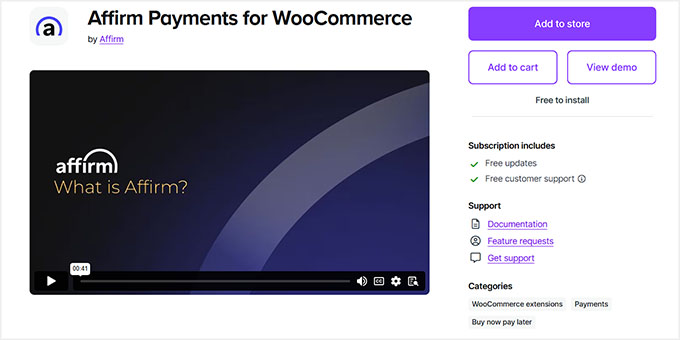
1. Affirm Payments for WooCommerce – Best WooCommerce Installment Payment Plugin for Transparent Financing
| ✅ Pros of Affirm Payments for WooCommerce | ✅ Extremely easy to activate and connect to WooCommerce ✅ Offers flexible installment options ✅ Clear payment breakdown ✅ Interest-free plan (Pay in 4) ✅ Works smoothly across all devices ✅ Transparent display of monthly payments and APR on checkout pages |
| ❌ Cons of Affirm Payments for WooCommerce | ❌ Some purchases can include interest rates up to 30% APR ❌ In some cases, Affirm may perform a soft credit check before approving the transaction ❌ Currently limited to U.S. & Canadian merchants and customers |
| Pricing | Free (transaction fees apply) |
| Best For | WooCommerce stores that want to offer instant financing at checkout with full transparency—no redirects, no complicated setup. |
Affirm Payments for WooCommerce is the best choice when you want to offer customers instant financing without sending them to another site.
It shows payment options right on your product and checkout pages, helping customers feel confident about larger purchases.
My Experience
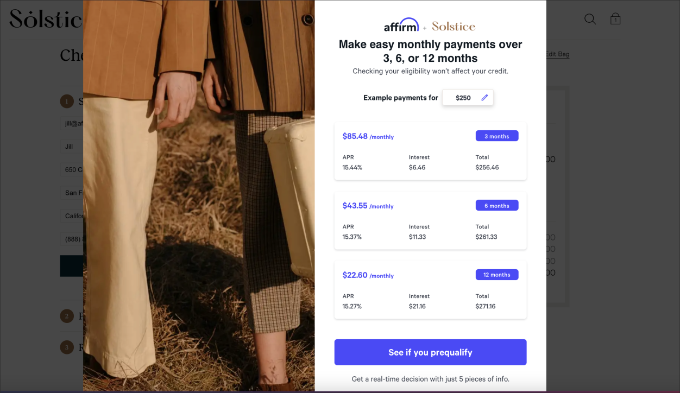
Once I activated the plugin, connecting it to WooCommerce was straightforward. I followed the setup prompts and had it working within minutes.
The plugin offers two main installment options: “Pay in 4” and longer-term plans.
The “Pay in 4” option splits the total into four interest-free payments every two weeks, which is great for customers who want to avoid interest charges.
For bigger purchases, customers can choose longer-term plans with customizable payment terms. They pick what works best for their budget during checkout.
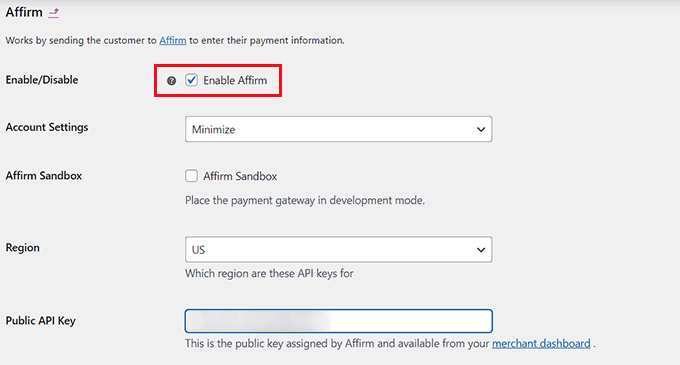
What stood out immediately was how transparent everything felt. Monthly payment amounts and APR rates appear directly on product pages and at checkout, so customers know exactly what they’re agreeing to before they commit.
The interface also adjusts perfectly to mobile and desktop screens. I tested checkout on my phone and laptop, and the experience was smooth on both.
Customers see their payment options before they even add items to their cart. This upfront visibility helps reduce hesitation on expensive products.
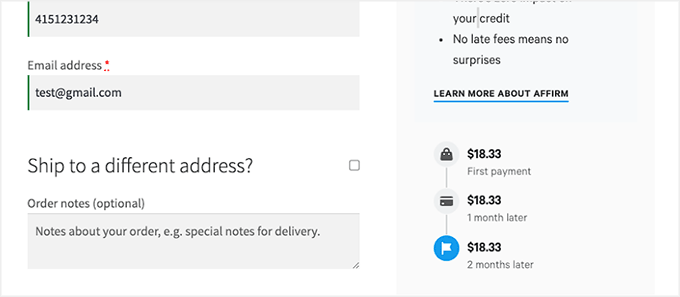
The approval process happens instantly during checkout. Customers don’t leave your site, which keeps the buying experience seamless.
The only downside that I noticed was that some purchases can carry interest rates up to 30% APR. While the “Pay in 4” option is interest-free, longer payment plans may include interest depending on the customer’s approval terms.
To get started with this plugin, see our tutorial on how to accept Affirm payments in WordPress.
Why I Recommend Affirm Payments for WooCommerce: It gives customers a clear, transparent financing option without sending them off-site, helping maintain trust and keeping checkout friction low.
2. WP Simple Pay – Best for Service-Based Businesses
| ✅ Pros of WP Simple Pay | ✅ Pre-built installment plan form templates ✅ Customizable billing intervals — daily, weekly, monthly, or yearly ✅ Works with 13+ payment methods ✅ Enables recurring payments ✅ Built-in support for buy-now, pay-later providers like Klarna and Afterpay ✅ Fully integrated with Stripe |
| ❌ Cons of WP Simple Pay | ❌ The free version has limited customization for installment plans ❌ Free version adds a 3% platform fee in addition to Stripe’s standard transaction fees. ❌ Doesn’t integrate with WooCommerce, making it less suitable for large product stores |
| Pricing | Starts at $49.50/year + Free |
| Best For | Freelancers, service providers, and small shops that want Stripe-powered installment plans without managing a full eCommerce platform |
WP Simple Pay takes a different approach than most WooCommerce plugins. Instead of adding installment options to an existing product catalog, it creates standalone payment forms that work independently.
This makes it ideal for service-based businesses, freelancers, and other merchants who don’t want to set up a full online store.
Over the last couple of years, I have thoroughly tested this tool, and it has always delivered reliable results. To learn more about my experience, take a look at the complete WP Simple Pay review.
My Experience
I started by selecting the pre-built Installment Plan Form template from the dashboard. It loaded instantly with all the basic fields I needed.
From there, I adjusted the billing intervals to test different payment schedules. I could choose daily, weekly, monthly, or yearly options depending on what made sense for the service.
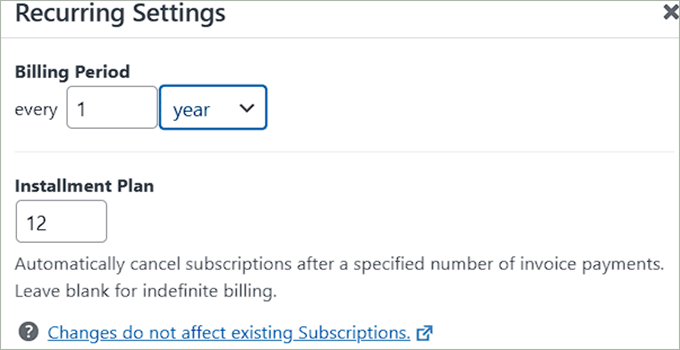
Once I configured the billing frequency, I explored the payment method options.
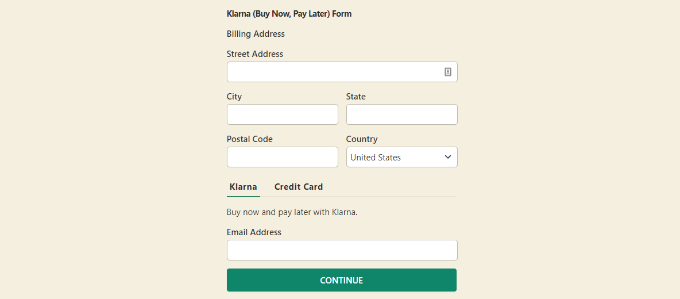
The form supported 13+ payment types, including credit cards, digital wallets, and buy-now, pay-later services like Klarna and Afterpay.
After that, I tested the global currency support. I switched between USD, EUR, and GBP to confirm it worked smoothly across regions. The form handled all three without any issues.
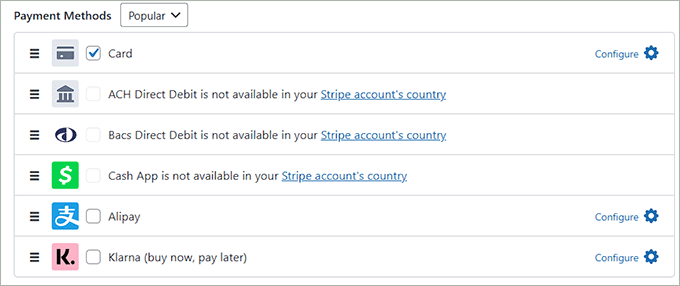
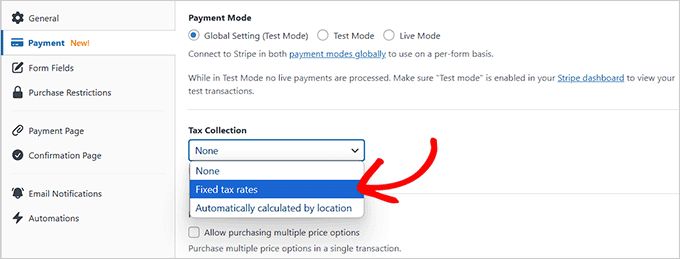
With the payment options set, I turned on automatic tax calculation. It updated the total in real time based on the customer’s location, which saved me from manual calculations.
I also set up a recurring payment schedule to see how partial charges worked. The form broke the total into smaller amounts and charged them automatically on the schedule I created.
When I published the form, it appeared clean and responsive on both desktop and mobile. The layout adjusted perfectly without extra customization.
The one thing that I didn’t like was the limited customization in the free version. Advanced automation and design tweaks required upgrading to a paid plan.
Why I Recommend WP Simple Pay: It’s perfect for service-based businesses that don’t need a full store. You can launch installment payments fast without WooCommerce overhead.
3. Klarna for WooCommerce – Best WooCommerce Installment Payment Plugin for Global Buy Now, Pay Later
| ✅ Pros of Klarna for WooCommerce | ✅ Completely free plugin with built-in installment functionality ✅ Offers interest-free “Pay in 4” plans ✅ Beginner-friendly setup—just connect your Klarna merchant account ✅ Provides transparent payment breakdowns |
| ❌ Cons of Klarna for WooCommerce | ❌ Available only in selected countries and requires a Klarna merchant account ❌ Limited customization options for how installment plans are displayed ❌ Approval process may delay activation for new merchants |
| Pricing | Free (transaction fees apply) |
| Best For | Store owners who want to offer trusted, interest-free installment options from a major fintech brand with international reach |
Klarna stands out as one of the most recognized buy now, pay later solutions globally. It’s ideal for WooCommerce store owners who want to offer flexible payment options backed by a trusted brand that customers already know and use.
I tested the Klarna Payments for WooCommerce plugin to see how well it handles installment plans during checkout.
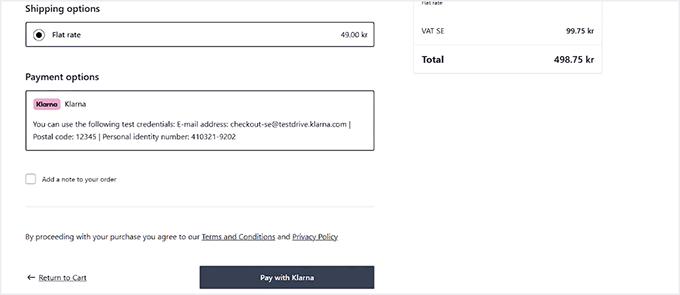
The integration was smooth, and I appreciated that customers could choose to pay upfront, pay later, or split their purchase into smaller payments without leaving my site.
My Experience
Setting up Klarna was easier than I expected. I installed the free plugin and connected my Klarna merchant account using API keys. The entire process took less than 10 minutes.
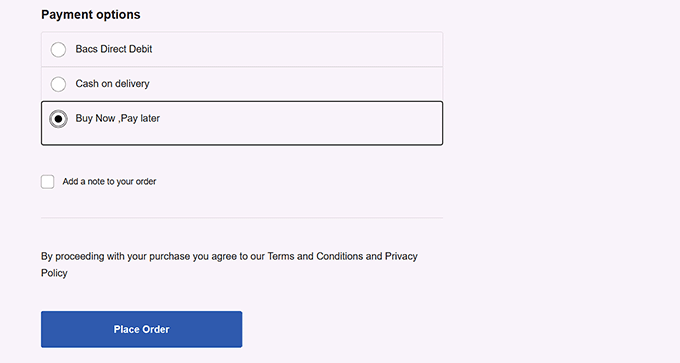
Once activated, Klarna appeared as a payment option at checkout. Customers could choose to pay now, pay later, or split their purchase into four interest-free payments. The flexibility made a noticeable difference in how checkout felt.
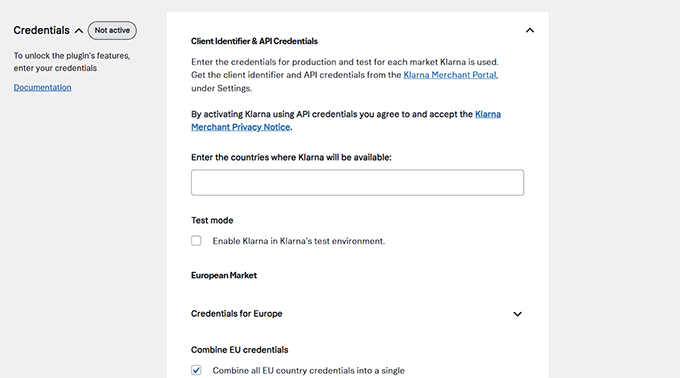
The “Pay in 4” option is completely interest-free for eligible orders. This feature makes expensive products feel more affordable without adding extra costs for buyers.
For higher-ticket items, Klarna also supports extended installment plans up to 24 months in select regions. This gives customers even more flexibility when they need it most.
What impressed me was the transparency of the payment breakdown. Customers could see exactly what they owed and when, right at checkout. There were no hidden fees or confusing terms.
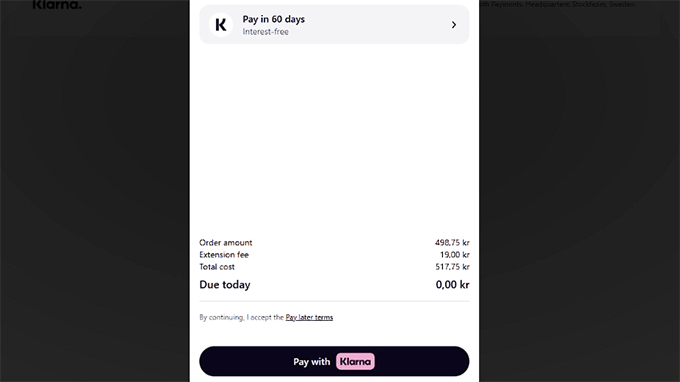
I tested a few checkout scenarios, and the flow stayed smooth every time. Customers didn’t have to leave the site or fill out long forms. They just picked their payment plan and confirmed.
The only limitation was that Klarna is only available in selected countries. You’ll need a Klarna merchant account and must operate in one of their supported regions to use installment payments.
If you’re interested, check out our tutorial on how to accept Klarna payments in WordPress.
Why I Recommend Klarna for WooCommerce: It’s trusted worldwide and makes checkout flexible. Customers can pay how they want without leaving your site.
4. Jifiti Buy Now Pay Later – Best for White-Label Financing

| ✅ Pros of Jifiti Buy Now Pay Later | ✅ Offers fully branded installment payment plans ✅ Provides zero-interest installment options ✅ Connects to trusted banks and lenders like MasterCard and Credit Agricole ✅ Automatically re-routes declined applications to another lender ✅ Boosts approval rates through multi-lender network |
| ❌ Cons of Jifiti Buy Now Pay Later | ❌ Initial white-label setup can be time-consuming for beginners ❌ Customers may experience delays during lender approval ❌ Limited customization beyond brand styling once connected to lenders |
| Pricing | Free (transaction fees apply) |
| Best For | Store owners who want to offer branded financing with their own name while connecting to multiple lenders for better approval rates |
Jifiti Buy Now Pay Later stands out because it lets you offer installment plans under your own brand name. Instead of redirecting customers to a third-party lender’s website, the entire financing experience stays on your WooCommerce store with your logo and colors.
My Experience
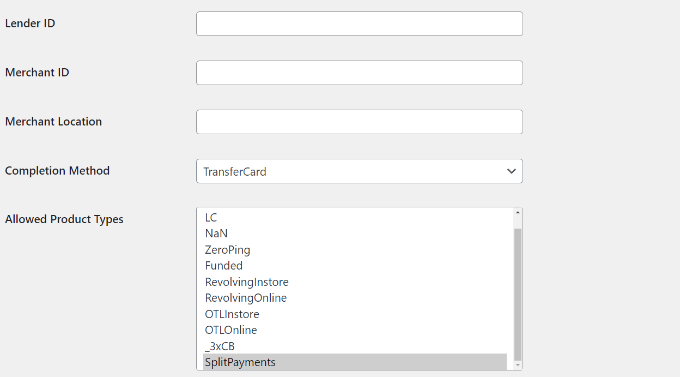
Setting up Jifiti Buy Now Pay Later took a bit longer than simpler plugins. I needed to create a merchant account with Jifiti and wait for lender approval before activating the payment option.
Once approved, the white-label customization tools let me add my store’s branding to the financing flow. Customers saw my logo and colors throughout the entire checkout process, not on a third-party page.
The plugin also automatically connected my store to a multi-lender network.
This means if one lender declines a customer’s application, Jifiti forwards it to another lender right away.
I could offer customers the option to split payments into 3, 4, or more interest-free installments. The zero-interest plans made higher-priced products feel more affordable during testing.
When I tested a sample purchase, the checkout flow stayed on my site. The application went through quickly, and I saw how the system routed requests between lenders behind the scenes.
The integration with major banks like MasterCard, Credit Agricole, and Citizens Pay gave the payment option instant credibility. Customers saw trusted names during the approval process, which helped build trust.
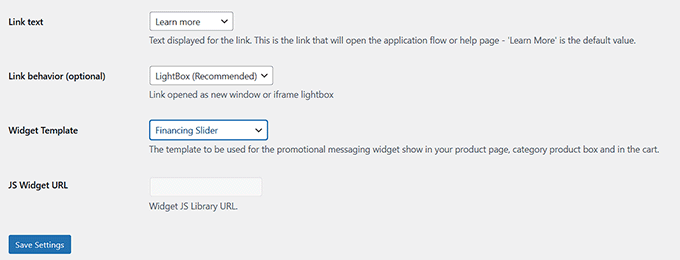
From the dashboard, I could track financing applications and see which lender approved each transaction. This visibility made it easier to understand customer financing patterns.
However, I was a bit annoyed that customers had short delays while waiting for lender approval before completing their payments. This added a few extra seconds to the checkout process.
Why I Recommend Jifiti Buy Now Pay Later: It gives you full brand control over installment payments. The multi-lender network automatically improves approval chances.
5. WooCommerce Deposits – Best for Full Payment Schedule Control
| ✅ Pros of WooCommerce Deposits | ✅ Full control over deposit percentages and payment timing ✅ Create multiple custom installment schedules per product ✅ Flexible time intervals—days, weeks, or months ✅ Add clear descriptions to each payment plan ✅ Works natively with WooCommerce checkout |
| ❌ Cons of WooCommerce Deposits | ❌ No free version available ❌ Limited design customization on product pages ❌ Doesn’t integrate with third-party lenders |
| Pricing | Starts at $219/year |
| Best For | Store owners who need complete control over custom installment schedules without relying on external financing services |
WooCommerce Deposits is perfect if you want total control over how customers pay over time. Unlike third-party lenders, this plugin lets you build your own installment schedules directly in WooCommerce.
I tested it by setting up several custom payment plans. The setup felt smooth, and I could adjust deposit percentages and schedule remaining payments without leaving my dashboard.

My Experience
I started by creating a few installment plans with different deposit amounts. The interface made it easy to set a percentage upfront and decide when the rest was due.
From there, I adjusted the time intervals. I could choose days, weeks, or months depending on what made sense for each product.
When I tested scheduling multiple payments, the plugin handled everything inside WooCommerce. There was no need to connect external services or create new accounts.
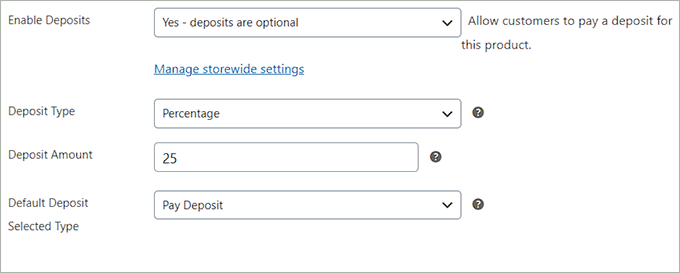
I liked that I could add descriptions to each payment plan. This helped explain the terms clearly to customers during checkout.
Plus, the dashboard showed all active installment schedules in one place. I could see who owed what and when payments were due.
After setting up a few products, I noticed the checkout flow stayed simple. Customers picked their plan, and WooCommerce handled the rest.
Because it works natively with WooCommerce, I didn’t have to worry about redirects or third-party approvals. Everything happened on my site.
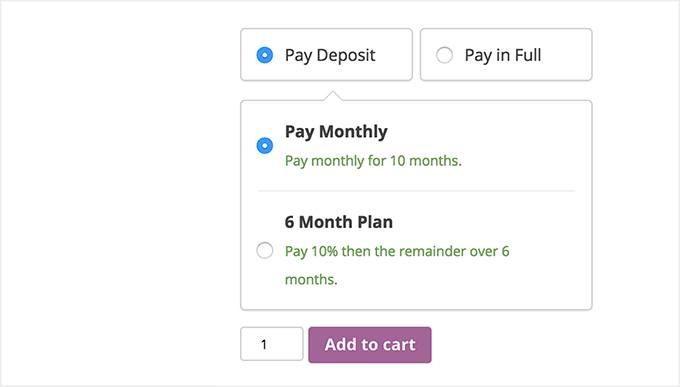
The only downside I noticed was the limited design options for how installment choices appear on product pages. You get functionality, but not much visual customization.
To set up deposits on your site, see our tutorial on how to accept deposit payments in WordPress.
Why I Recommend WooCommerce Deposits: It gives you complete control over the payment schedule. It’s perfect for custom orders and service-based stores.
6. Splitit – Best WooCommerce Installment Plugin for Interest-Free Credit Card Payments
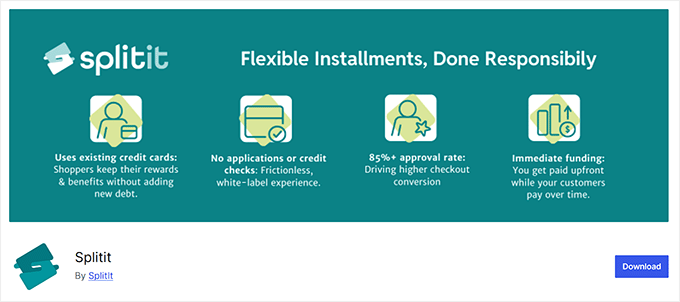
| ✅ Pros of Splitit | ✅ Uses customers’ existing credit cards—no new loan needed ✅ Interest-free monthly installments with familiar payment methods ✅ White-label checkout keeps customers on your site ✅ Flexible installment schedules—monthly or biweekly ✅ PCI DSS Level 1 compliant for secure transactions |
| ❌ Cons of Splitit | ❌ Requires customers to use a supported credit card (prepaid and some debit cards are not accepted). ❌ Customer’s available credit may be reduced while installments are active ❌ Setup may require merchant account approval and configuration |
| Pricing | Free plugin (transaction fees apply) |
| Best For | Stores that want to offer interest-free installment payments using customers’ existing credit cards. |
Splitit stands out if you want to offer installment plans without sending customers to a third-party lender. It lets shoppers split purchases into interest-free monthly payments using the Visa or MasterCard they already have.
I tested the checkout flow to see how it handles card-based installment scheduling. The process felt familiar and quick—customers stayed on my WooCommerce site the whole time, which keeps the experience consistent and professional.
My Experience
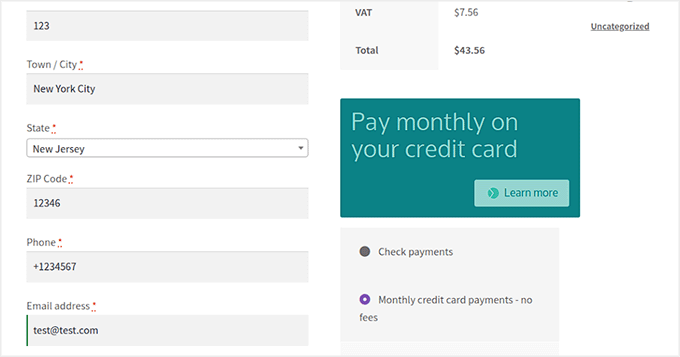
I connected Splitit to my demo store to see how it handles interest-free installments using existing credit cards. The setup was more involved than simpler plugins, but the white-label checkout made it worth the effort.
Once configured, I ran a test purchase to see how customers would experience the flow. The entire process stayed on my site, without a redirect to a lender portal or third-party page.
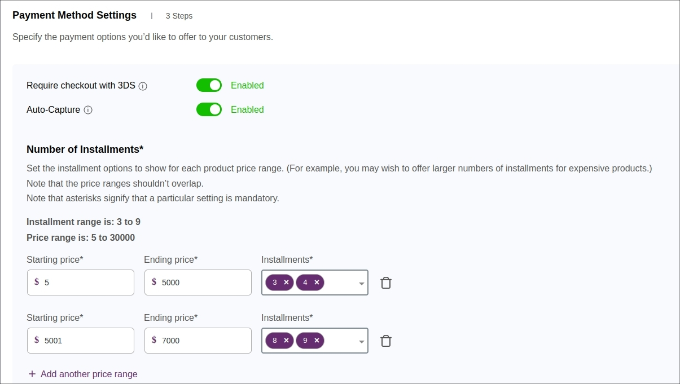
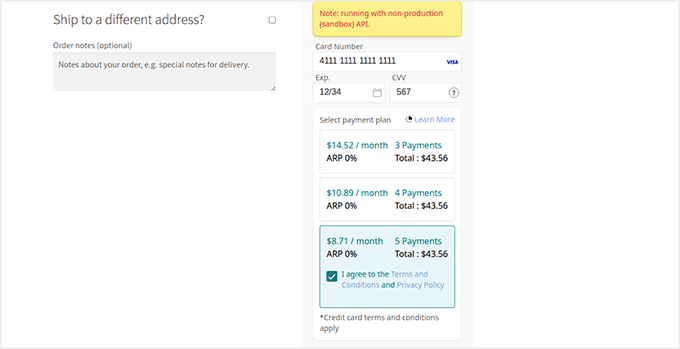
Splitit displayed clear installment options at checkout. I could choose the number of payments and see exactly what I’d owe each month.
The system works by authorizing the full purchase amount on the customer’s credit card. Then it charges one installment at a time, according to the schedule you select.
I appreciated the flexibility in scheduling. You can offer monthly or biweekly installments, depending on your products and customer base.
Splitit is also PCI DSS Level 1 compliant, so security wasn’t a concern. All card data is handled safely without adding risk to my store.
The main limitation I noticed was card compatibility. Only the most popular credit card types (like Visa and MasterCard) are supported, which excludes many debit cards and alternative payment methods.
Another consideration is that the full purchase amount is often blocked on the customer’s card initially. This can reduce their available credit even though they’re paying in installments.
Why I Recommend Splitit: It offers interest-free installments using customers’ own credit cards. Your checkout stays branded and professional.
7. YITH WooCommerce Deposits/Down Payments – Best for Booking-Based Businesses & Custom Products
| ✅ Pros of YITH WooCommerce Deposits/Down Payments | ✅ Perfect for collecting deposits or down payments on bookings and reservations ✅ Lets you automate deposit rules without custom coding ✅ Simple interface that’s easy for beginners ✅ Includes admin controls for tracking balances and managing payment reminders |
| ❌ Cons of YITH WooCommerce Deposits/Down Payments | ❌ Only supports two payments (deposit + balance) ❌ Limited third-party gateway integrations ❌ Paid-only plugin with no free tier |
| Pricing | Starts at $129.99/year |
| Best For | Stores that take reservations or custom orders and need customers to commit with an upfront deposit before final payment |
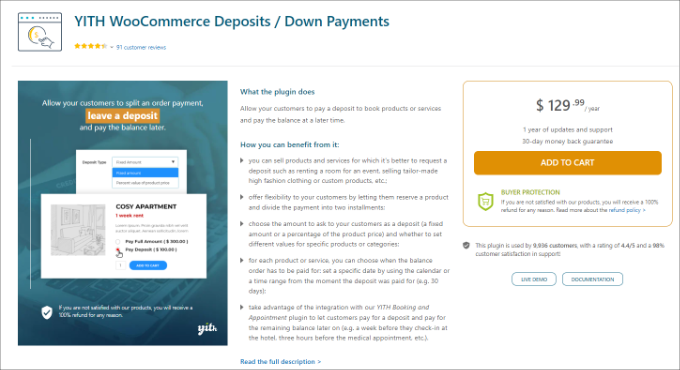
YITH WooCommerce Deposits / Down Payments works differently from most installment plugins that I tested. Instead of splitting payments across many months, it focuses on collecting an upfront deposit to secure a booking or reservation.
I tested it on a demo store selling custom furniture and event bookings. The setup felt natural for situations where you need commitment before delivering a service.
My Experience
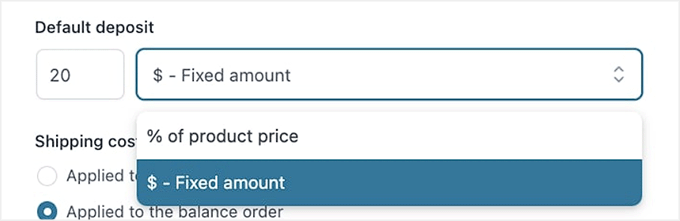
After I installed the plugin, I went straight to the product settings. Here, I could choose between a fixed dollar amount or a percentage for the deposit.
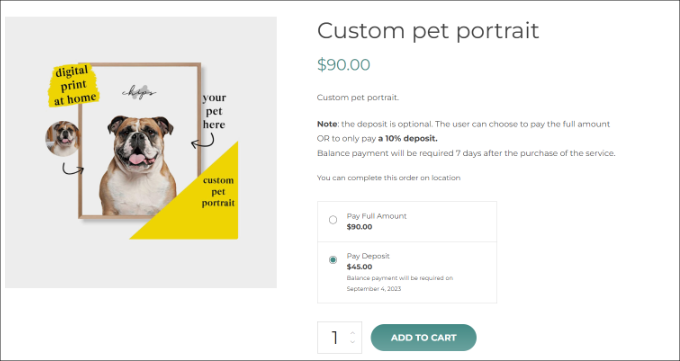
For a $500 custom table, I set a 30% deposit. The product page immediately showed customers they’d pay $150 upfront and $350 later.
I also tested category-level rules. I applied a 25% deposit to all products in the “Made to Order” category without editing each one individually.
The cart page clearly broke down the deposit and remaining balance. Customers saw exactly what they owed now and what they’d pay later.
After checkout, the admin dashboard showed all pending balances in one place. I could see which orders still needed final payment and when they were due.
I also set up automatic email reminders for customers with outstanding balances. The system sent a friendly note three days before the due date.
The plugin worked smoothly with standard WooCommerce payment gateways. I tested it with PayPal and Stripe without any issues.
One limitation I noticed was the two-payment cap. If you need three or more installments, this plugin won’t work for you.
Why I Recommend YITH WooCommerce Deposits/Down Payments: It’s built specifically for bookings and reservations. You get full control over deposit amounts and payment reminders.
What Is the Best WooCommerce Installment Payment Plugin?
After thorough testing, I believe that Affirm Payments for WooCommerce is the best option for most stores. It offers transparent, on-site financing with flexible installment plans that build trust and boost conversions for high-value purchases.
Alternatively, WP Simple Pay works best for freelancers and service-based businesses that don’t need a full WooCommerce store. Klarna for WooCommerce is ideal if you want a globally recognized buy-now, pay-later brand.
Frequently Asked Questions About WooCommerce Installment Payment Plugins
What is a WooCommerce installment payment plugin?
A WooCommerce installment payment plugin lets customers split their purchase into smaller payments over time instead of paying the full amount up front.
Do I need a merchant account to offer installment payments?
Some plugins, like Affirm and Klarna, require a merchant account with their service before you can enable installment payments in your WooCommerce store.
Can I offer interest-free installment plans?
Yes. Plugins like Affirm, Klarna, and Splitit all support interest-free installment options for eligible purchases.
Which plugin is best for custom installment schedules?
WooCommerce Deposits gives you complete control over payment timing and amounts, making it perfect for custom deposit and installment schedules.
Are installment payment plugins free?
Many plugins like Affirm, Klarna, and Splitit are free to install, but they charge transaction fees. Others, like WooCommerce Deposits and YITH, require a yearly subscription.
Can I use installment plugins outside the United States?
Klarna and Splitit support multiple countries, but Affirm is currently limited to merchants and customers in the U.S. and Canada.
Related Guides to Help You Set Up Your WooCommerce Store
If you want to improve your WooCommerce checkout experience even further, check out these helpful WPBeginner articles:
- How to Give a First Purchase Discount in WooCommerce
- How to Setup WooCommerce Conversion Tracking (Step by Step)
- WooCommerce SEO Made Easy – A Step-by-Step Guide to Ranking #1 in Google
- How to Edit WooCommerce Pages (No Coding Required)
- The Ultimate eCommerce Launch Checklist for WordPress
- How to Add Wholesale Pricing in WooCommerce (Step by Step)
- How to Offer Shipment Tracking in WooCommerce (Step by Step)
If you liked this article, then please subscribe to our YouTube Channel for WordPress video tutorials. You can also find us on Twitter and Facebook.




Jiří Vaněk
The services are probably great, unfortunately they are limited to certain geolocations. For example, I will not use these services in the Czech Republic.
Ralph
Thank you for this guide. I don’t see anything for myself as none of these work in my country but i plan opening dot com website for US market and this guide will be helpful then.