


Your best content deserves to be seen. But on many WordPress sites, popular posts quickly get pushed down by newer articles. This means visitors either scroll endlessly or leave after reading just one page.
Popular posts plugins solve this problem by automatically showcasing your top-performing content where visitors can easily find it.
The result? More page views, longer visits, and readers who actually discover the content that can help them most. 📈
After running WordPress sites for several years and testing dozens of popular posts solutions, I’ve learned that the right plugin can transform how people interact with your content.
Here’s why you should trust my recommendations: ✅
- My team and I actively test these plugins in our demo WordPress environments, giving us real-world experience with their performance. (See our editorial process)
- We measure actual results, not just features. Each plugin is tested for engagement improvements, loading speed, and user experience.
- I’ve evaluated 20+ popular posts plugins and spent 200+ hours researching and testing for this guide.
- Our annual WPBeginner surveys gather feedback from thousands of WordPress users about their plugin experiences.
Here are the 8 best popular posts plugins that will help your readers discover your most valuable content and keep them engaged on your site. 🏆
Top Picks for the Best Popular Posts Plugins (Quick Comparison)
If you’re in a rush, don’t worry — I’ve put together a quick overview of the best popular posts plugins for WordPress.
This will help you compare your options at a glance.
| # | Plugin | Best For | Pricing |
|---|---|---|---|
| 🥇 | MonsterInsights | Accurate popular posts based on Google Analytics | $99.60/yr + Free |
| 🥈 | Soliloquy | Manually curated popular post sliders with stunning visual designs | $19.50/yr + Free |
| 🥉 | WordPress Popular Posts | Creating multiple, highly customized popular post sections | Free |
| 4 | Top 10 – WordPress Popular Posts | Showcase performance-optimized popular posts | Free |
| 5 | Relevant | Managing popular, related, featured & latest posts | Free |
| 6 | Trending/Popular Post Slider and Widget | Bloggers and creators who want slider or grid layouts for popular posts | Free |
| 7 | WP-PostRatings | Highlighting top content based on real user feedback | Free |
| 8 | Display Posts | Custom, flexible, popular post listings using shortcodes | Free |
What is a Popular Posts Plugin?
A popular posts plugin is a tool that automatically shows your most viewed or most engaging blog posts on your WordPress site.
Instead of letting your best content get buried under newer posts, these plugins help bring them back into the spotlight.
They track your site’s data — like page views, comments, or social shares — and then highlight the posts your audience loves most.
You can display popular posts in several high-visibility areas on your site, such as:
- Sidebar widgets – Great for keeping popular posts visible on every page
- Below each blog post – Perfect for encouraging readers to continue exploring after they finish reading
- Within your post content – Useful for linking to related popular articles mid-read
- Homepage or landing pages – Helps showcase your best content to new visitors right away
- Footer area – Another subtle spot to promote top posts without being intrusive
I’ve seen that when popular posts are clearly displayed, people tend to stay longer because they quickly find content that interests them.
That’s why, at WPBeginner, we show our most popular posts at the bottom of every article — and it works really well!
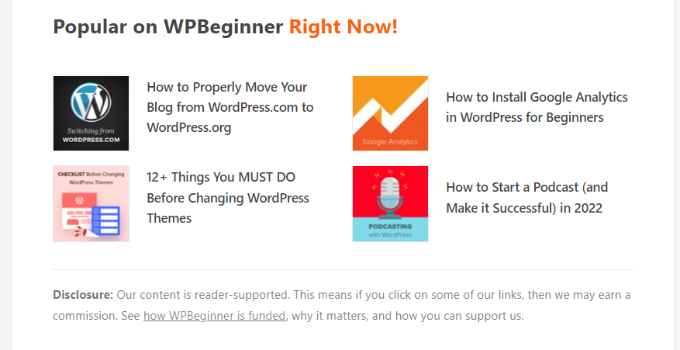
In short, a popular posts plugin is a smart way to boost engagement and help visitors find your best content fast.
Advantages and Disadvantages of Using a Popular Posts Plugin
Just like any tool, popular posts plugins come with their own set of pros and cons. Let’s take a look so you can decide if it’s the right fit for your site.
👍 Advantages
- Boost engagement by encouraging visitors to explore more content.
- Increase page views by linking to your most clicked posts.
- Highlight evergreen content that stays useful over time.
- Save time with automatic tracking and updates.
- Offer flexible display options like widgets, sidebars, or post footers.
👎 Disadvantages
While these plugins can be super helpful, there are a few things to keep in mind before adding one to your site:
- May impact site speed if the plugin runs heavy queries.
- Some plugins come with additional features that you may not need.
- Free versions may limit customization or display settings.
Overall, popular posts plugins are a smart way to keep visitors engaged and help your best content shine.
Just choose a lightweight and well-coded option to avoid performance issues — and you’ll likely see great results.
How I Tested and Reviewed Popular Posts Plugins
My Testing Methodology For Popular Posts Plugins
To make sure I only recommend tools that actually help site owners, I tested every popular posts plugin in a controlled demo environment that closely matched a real WordPress website.
This allowed me to spot performance issues, usability problems, and hidden strengths that might not have shown up from just reading the plugin description.
Here’s exactly what I looked for during the testing process:
- Ease of use: I checked how beginner-friendly the plugin is. Could I set it up without reading a manual or watching a tutorial?
- Display options: I tested where and how the popular posts can be shown — sidebar, after content, inline, or via shortcodes — and whether these options were customizable.
- Performance impact: I monitored site speed with and without the plugin to make sure it doesn’t slow down page loads.
- Design and customization: I looked at how well the plugin blended into my theme. Did it match my site’s design? Could I tweak it with CSS or built-in settings?
- Accurate tracking: I verified whether the plugin is using real data like views or comments, and if it integrates with tools like Google Analytics.
- Plugin compatibility: I tested it alongside other popular plugins (like caching, SEO, and security tools) to see if any conflicts occurred.
- Support and updates: I checked how often it’s updated, and whether documentation or support was available if I needed help.
Other factors I considered:
- My personal experience while using the plugin on real or test sites
- Other customer reviews and complaints (if any)
- Different use cases for bloggers, eCommerce owners, and content-heavy sites
The Best Popular Posts Plugins For WordPress
Many WPBeginner readers have told me that choosing the right popular posts plugin can be overwhelming. There are so many options that look similar on the surface but offer very different features under the hood.
I’ve narrowed it down to the top plugins that make it easy to showcase your best content. Each plugin on this list has a unique strength or ‘superpower.’ Some are built for speed, others for data accuracy, and some for beautiful visual displays.
I’ll highlight the core benefits of each one to help you quickly find the perfect fit for your website’s goals.
1. MonsterInsights – Google Analytics-Powered Popular Posts
🔍 Quick Overview
| Feature | Details |
|---|---|
| WPBeginner Rating | ⭐⭐⭐⭐⭐ (5/5) |
| Active Installs | 3 million+ |
| Ease of Use | Beginner-friendly |
| Best For | Accurate popular posts based on Google Analytics data |
| Free Version | ✅ Yes |
| Starting Price | $99.60/year (Pro) |
MonsterInsights offers the most powerful and easiest way to display popular posts by using your Google Analytics data. This approach goes beyond simple view counts to show content that is proven to engage your visitors, based on data you can trust.
We’ve been using MonsterInsights across our websites for years to track website analytics and monitor visitor behavior. You can read our complete MonsterInsights review for more details about this powerful analytics plugin.
My Experience With MonsterInsights
When I tried the plugin’s Popular Posts feature, I liked that it pulls data directly from Google Analytics instead of using simple view counters.
This makes the results much more accurate because the posts being highlighted were truly the ones visitors cared about.
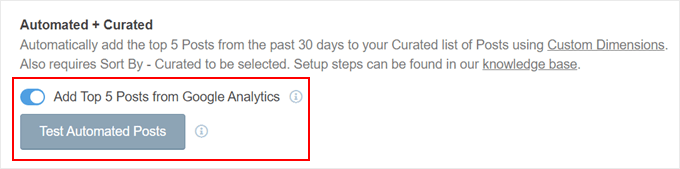
I set it up to show the top 5 posts from the last 30 days, and it worked perfectly.
The Inline Popular Posts feature also impressed me because it added links inside the content in a way that didn’t disturb the reading flow.
The Popular Post Widget works well in sidebars and after blog posts, with designs that fit naturally into most layouts.
It also includes a time filter (day, week, or month), so you can easily highlight trending posts or seasonal content.
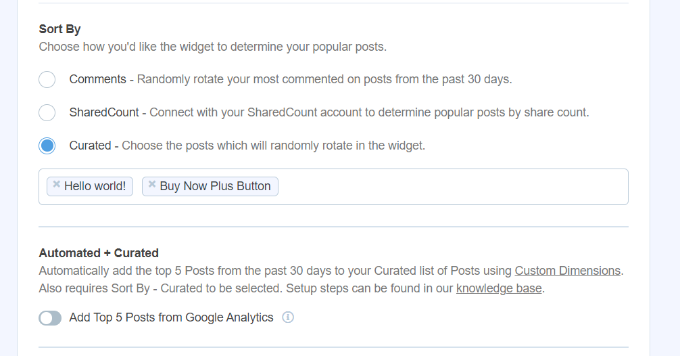
For WooCommerce users, I also checked the Popular Products feature. It provides an easy way to show best-selling items anywhere in the store, and it works well during sales or promotions.
The customization options gave me plenty of control. I could pick from ready-made themes and quickly adjust colors, sizes, and borders to match the site’s design.
You can also switch to manual mode if you want to curate specific posts or use smart sorting by comment count.
✅ Pros of MonsterInsights
- Automatically detects popular content using real Google Analytics data
- Time-based filtering for daily, weekly, or monthly popular posts
- Works for both blog posts and WooCommerce products
- Extensive customization options for styling and layout
- The inline display option integrates seamlessly within the content
❌ Cons of MonsterInsights
- Advanced eCommerce and conversion tracking require a Pro version
- Relies on Google Analytics setup for automatic detection
Why I Recommend MonsterInsights: If you want the most accurate, data-driven approach to displaying popular posts, then MonsterInsights is the best option. It’s perfect for site owners who already use Google Analytics and want their popular posts to reflect real visitor engagement patterns.
2. Soliloquy – Beautiful Popular Posts Sliders

🔍 Quick Overview
| Feature | Details |
|---|---|
| WPBeginner Rating | ⭐⭐⭐⭐.☆ (4.5/5) |
| Active Installs | 2.5 million+ |
| Ease of Use | Beginner-friendly with a drag-and-drop interface |
| Best For | Manually curated popular post sliders with stunning visual design |
| Free Version | ✅ Yes |
| Starting Price | $19.50/year (Basic) – Featured Content requires Developer plan ($99.50/year) |
Soliloquy is my top recommendation for creating beautiful, hand-picked popular post sliders.
If you value visual storytelling and want complete control over what content gets featured, then this plugin gives you the tools to do it without any code.
My Experience With Soliloquy
Using the drag-and-drop builder, I was pleasantly surprised by how quick it was to add a polished popular posts slider. No coding needed, and the results looked professional right away.
Plus, the pre-made templates are a solid starting point, and I appreciate how easily you can customize colors, fonts, and layouts to match your site’s design.
You can read our complete Soliloquy review for more details about this powerful slider plugin.
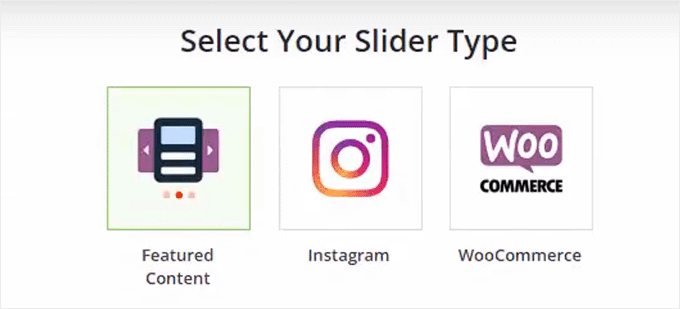
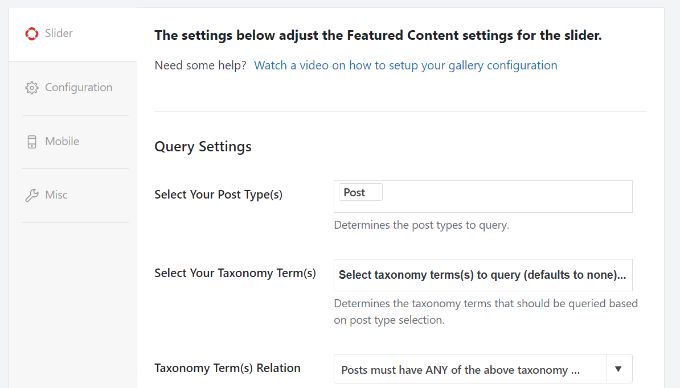
The content filtering options give you complete control over which posts appear in your slider.
You can include or exclude specific posts, order by publish date, and decide whether to show images, titles, excerpts, or all three.
I found this flexibility perfect when I wanted to manually curate my most valuable content rather than relying on automated processes.
What sets Soliloquy apart is its versatility. Ive used it to create sliders for testimonials, WooCommerce products, and even Instagram posts, making it much more than just a popular posts solution.
✅ Pros of Soliloquy
- Drag-and-drop builder makes creating sliders effortless
- Full manual control over which posts appear in sliders
- Professional templates that match most site designs
- Works with multiple content types beyond just blog posts
- Beginner-friendly interface with extensive customization options
❌ Cons of Soliloquy
- Can’t automatically filter posts by views or engagement metrics
- Featured content functionality requires the expensive Developer plan
- Manual curation means more ongoing maintenance work
Why I Recommend Soliloquy: It’s ideal for websites that want visual appeal and to showcase hand-picked content rather than automatically generated popular posts.
3. WordPress Popular Posts – Most Customizable Free Solution
🔍 Quick Overview
| Feature | Details |
|---|---|
| WPBeginner Rating | ⭐⭐⭐⭐.☆ (4.5/5) |
| Active Installs | 100,000+ |
| Ease of Use | Best for technical users. Learning curve for beginners |
| Best For | Creating multiple, highly customized popular post sections |
| Free Version | ✅ Yes – fully free, no paid version |
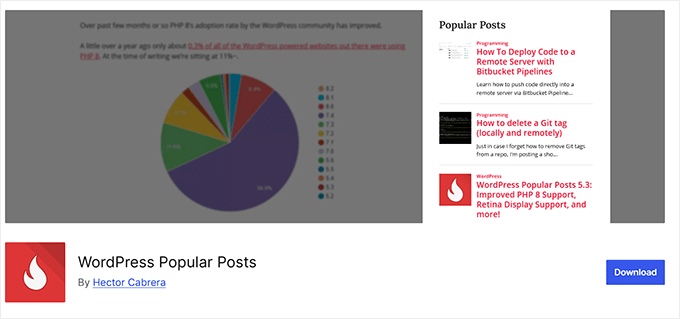
WordPress Popular Posts is the most powerful free solution for creating multiple, unique popular post widgets.
I’ve suggested this tool to several readers whose budget constraints were tight but customization needs were high.
For example, one of my friends recently started a new blog on a very tight budget, so I helped her set this up. That gave me the chance to see how it works in practice.
My Experience With WordPress Popular Posts
The multi-widget support impressed me right away—you can add the same widget multiple times to different areas, each with unique settings.
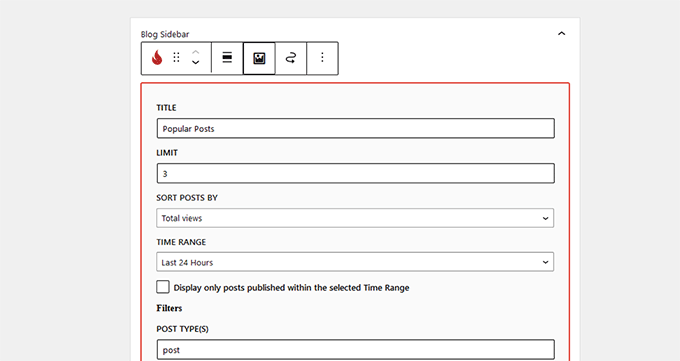
For example, I set one sidebar to show most-viewed posts and another to highlight most-commented posts, and the flexibility was remarkable.
I also appreciate the custom date range options. You can show popular content from the last 7 days, 30 days, or any specific timeframe you choose.
What sets this plugin apart is its built-in Statistics dashboard. It allows you to track the performance of your popular posts directly from your WordPress admin area.
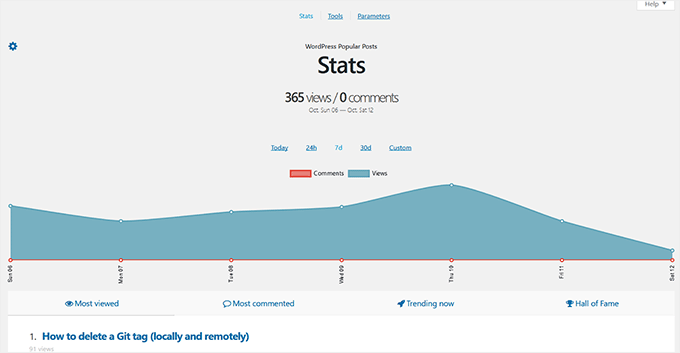
I found this incredibly useful for understanding which content resonates most with visitors.
The ability to filter by most-viewed versus most-commented posts also gives you different perspectives on engagement. For instance, sometimes a post with fewer views but many comments indicates highly engaging content that sparks discussion.
✅ Pros of WordPress Popular Posts
- Completely free with no premium upsells or limitations
- Multi-widget capability for different sections and settings
- Custom post type support for any content type
- Granular control over display elements and timeframes
- Custom CSS styling options for perfect theme integration
❌ Cons of WordPress Popular Posts
- Creates additional database tables that may impact performance
- No Google Analytics integration for more accurate data
- Interface can feel overwhelming for beginners
Why I recommend WordPress Popular Posts: This solution is great for users who need maximum customization flexibility without spending money. It’s perfect for developers, advanced users, or anyone who wants to create multiple popular post displays with different criteria and styling.
4. Top 10 – WordPress Popular Posts – Performance-Optimized Popular Posts
🔍 Quick Overview
| Feature | Details |
|---|---|
| WPBeginner Rating | ⭐⭐⭐⭐.☆ (4.3/5) |
| Active Installs | 20,000+ |
| Ease of Use | Some settings may be complex for beginners |
| Best For | Performance-focused sites using caching plugins |
| Free Version | ✅ Yes – fully free, no premium version |
If site speed is your absolute top priority, then Top 10 – WordPress Popular Posts is the best option. Its core purpose is to display popular posts without slowing down your site, thanks to its powerful built-in caching system.
I first came across it while looking for a reliable solution for a high-traffic site where performance really mattered.
My Experience With Top 10 – WordPress Popular Posts
The built-in caching system impressed me a lot.
Unlike other popular posts plugins that can slow down your database with constant queries, Top 10 handles server load intelligently while still tracking and displaying popular content accurately.
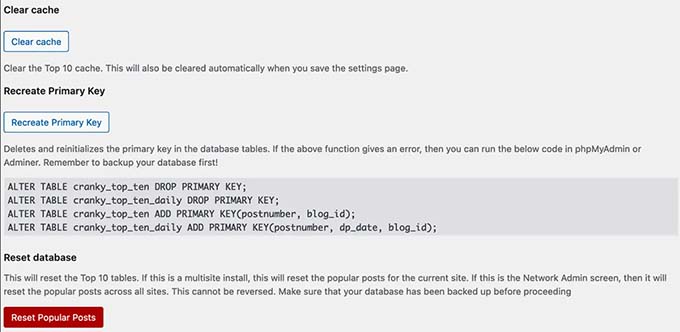
I tested its compatibility with W3 Total Cache and WP Super Cache, and the integration was flawless, with no conflicts or performance hiccups.
Despite its name suggesting you’re limited to 10 posts, you can actually display any number of popular posts you want. I’ve configured it to show everything from 5 to 25 posts depending on the site’s needs.
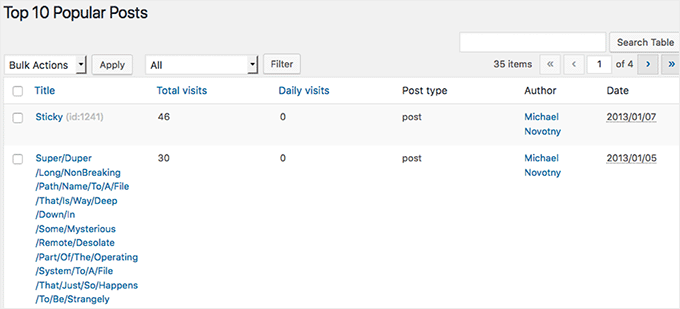
The customizable widget and shortcode options let you place popular posts anywhere on your site with flexible design controls.
Additionally, the date range selection works well for displaying popular posts within specific timeframes, and the display options allow you to include post views, author names, excerpts, and thumbnails.
✅ Pros of Top 10 – WordPress Popular Posts
- Built-in caching system reduces server load significantly
- Seamless compatibility with major WordPress caching plugins
- Flexible display options and unlimited post count
- Shortcode support for placing popular posts anywhere
❌ Cons of Top 10 – WordPress Popular Posts
- The settings panel can overwhelm beginner users
- No Google Analytics integration for more accurate tracking
Why I recommend Top 10 – WordPress Popular Posts: I suggest Top 10 – WordPress Popular Posts if site performance is your top priority. It’s ideal for high-traffic sites.
5. Relevant – All-in-One Post Display Solution
🔍 Quick Overview
| Feature | Details |
|---|---|
| WPBeginner Rating | ⭐⭐⭐⭐ (4/5) |
| Active Installs | 1000+ |
| Ease of Use | Beginner-friendly – clean settings and unified dashboard |
| Best For | Users who want to manage popular, related, featured & latest posts |
| Free Version | ✅ Yes – 100% free with full features |
Relevant is the ultimate ‘all-in-one’ tool for decluttering your WordPress site. Its superpower is combining popular, related, featured, and latest posts into a single, lightweight plugin, so you can simplify your dashboard and avoid managing multiple tools.
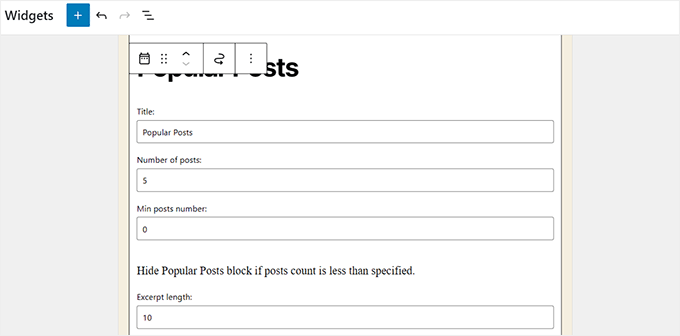
It features a Popular Posts widget that effectively displays content based on comments or page views.
My Experience With Relevant
I started by testing how it places popular posts on a page. You can put them almost anywhere — before the article, after it, or inside a sidebar — with just a shortcode.
I also like the content blocks feature that enables popular post sections before or after your main post content automatically.
The display settings gave me good control over thumbnails, author info, excerpts, and post dates, with just enough customization without feeling overwhelming.
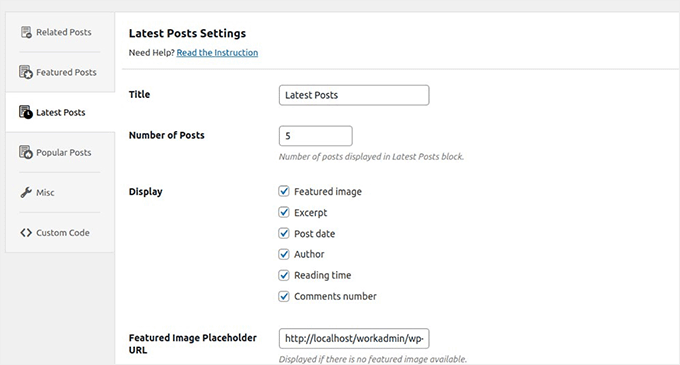
The clean settings interface also made it simple to configure different types of post lists, and having everything managed from one plugin dashboard kept maintenance hassle-free.
✅ Pros of Relevant
- Wraps popular, related, featured, and latest posts in one plugin
- Flexible placement options with widgets, shortcodes, and template tags
- Clean, user-friendly settings interface
- Content blocks for automatic placement within posts
- Completely free with useful display customization options
❌ Cons of Relevant
- Limited advanced customization compared to specialized plugins
- Popular posts tracking may not be as sophisticated as dedicated solutions
Why I recommend Relevant: It’s the best simple solution for displaying multiple types of post lists. It’s perfect for users who prefer managing all their post display needs from one plugin rather than juggling several specialized tools.
6. Trending/Popular Post Slider and Widget – Visual Display Formats

🔍 Quick Overview
| Feature | Details |
|---|---|
| WPBeginner Rating | ⭐⭐⭐⭐ (4/5) |
| Active Installs | 3,000+ |
| Ease of Use | Easy to use but shortcode knowledge is helpful |
| Best For | Bloggers and creators who want slider or grid layouts for popular posts |
| Free Version | ✅ Yes – fully free plugin |
Trending/Popular Post Slider and Widget stands out by offering the most visual variety in a free popular posts plugin.
Its best feature is that it gives you sliders, carousels, and grids without needing to pay a cent.
My Experience With Trending/Popular Post Slider and Widget
I tested this plugin when I wanted to showcase popular posts in more engaging formats than typical text lists, and it delivered exactly what I needed.
The multiple display formats really set this plugin apart from basic popular post solutions. I experimented with sliders, carousels, grid blocks, and plain lists, and each format brings a different visual appeal.
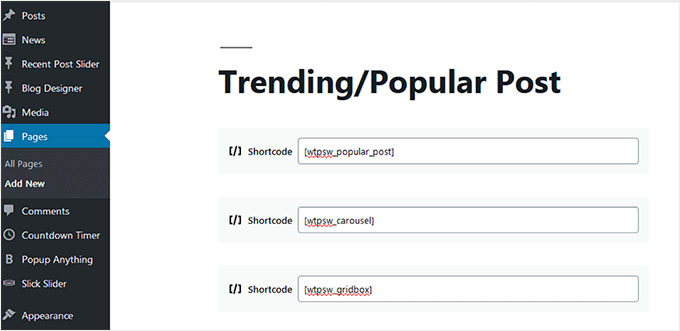
The grid layout works particularly well for image-heavy posts, while the carousel format is perfect for showcasing multiple articles in a compact space.
I found the shortcode support incredibly useful for embedding popular posts within page builders or directly into posts and pages.
The template tag integration also means developers can easily embed trending content into custom theme files using PHP, which adds flexibility for more advanced implementations.
✅ Pros of Trending/Popular Post Slider and Widget
- Multiple visual formats, including sliders, carousels, and grids
- Time-based filtering keeps content fresh and relevant
- Shortcode support for flexible placement throughout your site
- Completely free with visually engaging display options
❌ Cons of Trending/Popular Post Slider and Widget
- Advanced slider and grid formats require shortcode usage, not available in widgets
- Basic widget limited to a simple list format only
- Fewer advanced features compared to specialized popular posts plugins
Why I Recommend Trending/Popular Post Slider and Widget: It’s ideal for visually displaying popular posts without paying for premium slider plugins.
7. WP-PostRatings – Popular Posts Based on User Ratings

🔍 Quick Overview
| Feature | Details |
|---|---|
| WPBeginner Rating | ⭐⭐⭐⭐ (4/5) |
| Active Installs | 40,000+ |
| Ease of Use | Easy to use but may require basic setup/configuration |
| Best For | Highlighting top content based on real user feedback |
| Free Version | ✅ Yes |
WP-PostRatings changes the definition of ‘popular’ by letting your readers decide what the best content is.
Instead of just tracking views, this plugin promotes content based on user ratings. It’s a great choice if you want to build a community-driven site where your audience’s voice matters.
My Experience With WP-PostRatings
When I tried out WP-PostRatings, I found the voting system easy for visitors to use. They could rate posts with stars or other icons I chose, and the results showed up instantly.
The Top-Rated Posts widget made it simple to highlight articles that readers actually liked the most, not just the ones that got the most clicks.
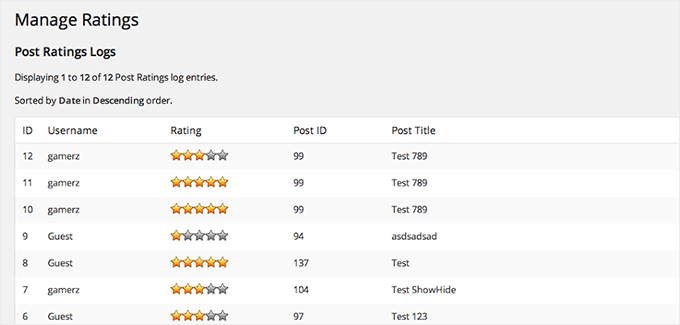
I also found that you can restrict voting to logged-in users or allow everyone to participate.
The rich snippets support adds real SEO value by displaying star ratings in search engine results, which can improve click-through rates from Google.
For detailed instructions, you can see our guide on how to add a post rating system in WordPress.
✅ Pros of WP-PostRatings
- Unique approach using user feedback instead of just view counts
- Top-rated posts widget for displaying highly-rated content
- Rich snippets support improves SEO and search visibility
- Custom voting rules for controlling who can rate posts
- Compatible with other popular posts plugins for combined functionality
❌ Cons of WP-PostRatings
- Requires theme file editing with template tags, which is not beginner-friendly
- No built-in view or comment tracking, focuses only on ratings
- Depends on user engagement to generate meaningful ratings data
Why I Recommend WP-PostRatings: It is a fantastic option to highlight popular posts based on actual user feedback rather than just traffic metrics. It’s ideal for content creators who value reader opinions and want to let their audience directly influence which posts get promoted as most popular.
8. Display Posts – Developer-Friendly Custom Popular Posts
🔍 Quick Overview
| Feature | Details |
|---|---|
| WPBeginner Rating | ⭐⭐⭐☆☆ (3.5/5) |
| Active Installs | 90,000+ |
| Ease of Use | Best for developers; requires shortcode knowledge and custom CSS |
| Best For | Custom, flexible popular post listings using shortcodes |
| Free Version | ✅ Yes |
Display Posts offers unmatched flexibility through its powerful shortcode engine.
This is the ultimate tool for developers who want to build custom post queries from scratch. It gives you a level of control that plugins with pre-set options cannot match.
My Experience With Display Posts
When I tried Display Posts, I quickly built custom lists by using shortcodes. For example, I set it to order posts by comment count, which gave me a neat list of the most discussed articles.
I also experimented with filters for categories and authors, and it worked smoothly.
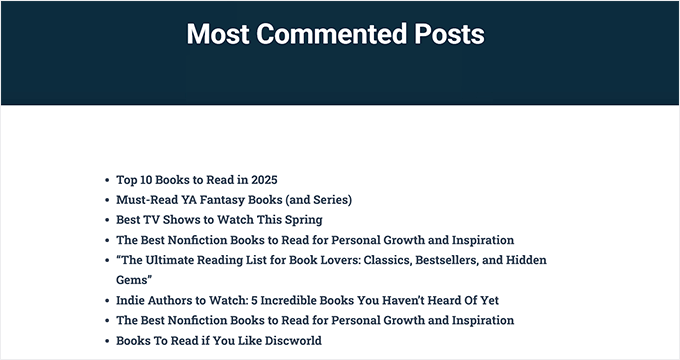
The fact that you can drop these shortcodes anywhere—pages, posts, or widgets—makes it very flexible.
The extensive documentation and tutorials also make it accessible even for complex implementations.
✅ Pros of Display Posts
- Complete control over post queries and display parameters
- Works with any post type, category, or custom field combination
- Shortcode flexibility for placement anywhere on your site
- Excellent documentation for advanced customization
- Perfect for creating unique “popular post” criteria beyond basic views
❌ Cons of Display Posts
- No built-in styling—requires custom CSS for attractive displays
- Multiple shortcode parameters can overwhelm beginners
- More complex setup compared to dedicated popular posts plugins
Why I Recommend Display Posts: The plugin is a good choice for developers or advanced users who want complete control over how popular posts are defined, queried, and displayed. It’s ideal when standard popular posts plugins don’t offer the specific filtering or display options you need for your custom requirements.
My Verdict: Which is the Best WordPress Popular Posts Plugin?
After testing dozens of popular posts plugins over the years, here are my top recommendations for 2026.
1. MonsterInsights
🏆 Best for Data-Driven Popular Posts

I recommend MonsterInsights for any WordPress site using Google Analytics that wants the most accurate popular posts data. It’s the only plugin that pulls real visitor engagement data, so you’re showcasing content that’s genuinely resonating with your audience.
If you want popular posts based on actual visitor behavior rather than simple view counts, this is your best choice.
2. Soliloquy
✨ Best for Visual Appeal

For sites that want beautiful, eye-catching popular post displays, Soliloquy transforms your content into professional slider carousels that immediately grab attention.
The drag-and-drop builder makes creating stunning displays effortless, and the manual control ensures that you showcase exactly the content you want.
3. WordPress Popular Posts
💪 Best for Maximum Customization (Free)

If you want complete control over how your popular posts are displayed without spending money, WordPress Popular Posts is unbeatable.
It’s perfect for developers or advanced users who want maximum flexibility at no cost.
Frequently Asked Questions About Popular Posts Plugins
Here are the answers to some of the most common questions our readers have asked about using WordPress popular posts plugins:
What’s the difference between popular posts and related posts plugins?
Popular posts plugins show your most-viewed or highest-engaging content across your entire site, while related posts plugins display content that’s topically similar to the current post.
Popular posts help showcase your best-performing content to keep visitors exploring, whereas related posts help readers find more content on the same topic they’re already interested in.
Will popular posts plugins slow down my website?
It depends on the plugin and how it tracks popularity. Plugins like Top 10 include built-in caching systems that actually minimize performance impact.
However, some plugins can create additional database queries that may slow your site. That is why I recommend always testing your site speed before and after installing any popular posts plugin, and looking for options with caching features.
Can I manually choose which posts appear as “popular”?
Yes, several plugins offer manual curation options. For example, Soliloquy gives you complete control over which posts appear in your sliders, while WordPress Popular Posts has a manual mode for handpicking specific content.
This is useful when you want to promote certain posts regardless of their actual view counts or when you’re just starting and don’t have enough traffic data yet.
Do I need Google Analytics to use popular posts plugins?
No, most popular posts plugins work independently by tracking views directly in your WordPress database.
However, plugins like MonsterInsights that integrate with Google Analytics provide more accurate data since they capture real visitor behavior rather than just page loads. If you already use Google Analytics, these integrated solutions often give better insights.
Should I show popular posts based on views or comments?
Views give you a broader picture of what content attracts visitors, while comments indicate which posts spark discussion and deeper engagement.
I recommend starting with views, as they capture more user behavior, and then experimenting with comments if you want to highlight content that generates conversation. Some plugins, like WordPress Popular Posts, let you display both types in different areas of your site.
Additional Resources to Grow Your Site
Now that you’ve chosen the perfect popular posts plugin to keep visitors engaged with your best content, you might want to explore other ways to grow your site’s traffic and engagement.
Here are some additional WPBeginner guides that will help you attract more visitors and keep them coming back:
- Important Pages That Every WordPress Blog Should Have
- How to List Future Upcoming Scheduled Posts in WordPress
- WordPress Post Revisions Made Simple: A Step by Step Guide
- How to Add Featured Posts in WordPress Sidebar
- How to Display Random Posts in WordPress (Easy Tutorial)
- What Is the Difference Between Posts vs. Pages in WordPress?
- Important Metrics to Measure on Your WordPress Site
- How to Set Up Google Analytics Goals for Your WordPress Site
If you liked this article, then please subscribe to our YouTube Channel for WordPress video tutorials. You can also find us on Twitter and Facebook.



Olaf
Popular articles make the most sense to me on a blog, primarily to increase the time spent on the site. Like well-done link building, popular articles can effectively capture attention, encouraging users to read something extra that piqued their interest. It’s a great tool for sites where users tend to spend little time. I have several reliable plugins, but from this list, I occasionally like to use WP-PostRatings, as it also allows users to rate the content, giving site owners additional feedback. A great two-in-one plugin.
Dennis Muthomi
I currently have MonsterInsights on my website to showcase my most popular articles within post content. It’s been working well so far, NO ISSUES.
John Fernandez
Great article with a great selection of Wordpress plugins, will try them in making my own top ten hub site!
WPBeginner Support
We hope you find the one that fits your needs best
Admin
Robert Thompson
1. MonsterInsights and 8. WP Tab Widget are the two I’m going to try out. WP Tab seems like the more simplest of the two widgets. Which is what I’m looking for. Nice information. Thanks.
WPBeginner Support
Glad you found our recommendations helpful!
Admin
Andrei
Are there any which track data off-site instead of using the local database?
Miles Atila
Thnks do they come with featured image?
WPBeginner Support
Hi Miles,
Yes they do have featured images option.
Admin
Roc
Hello, please is there any mobile ftp to upload file to website, or better still, is there any way to install WordPress on tablet? If yes, okay how then can i transfer my free WordPress blog to the self-hosted WordPress site when there’s no mobile ftp?
I don’t have PC, but I have created a free WordPress site on my tablet, which have up to over forty blog posts now. I am thinking if I use a web host automatic WordPress installation method, then how can I transfer all my post on free WordPress site via my tablet without having mobile ftp.
Please, I need your help regarding this! What do you think i can do because i don’t have PC. Or should I just wait till I have one PC or what?
Thanks
Roc
Rita
Wow.. thanks for the reviews. I was looking to pick the best one.
Cheers
Ashish Mahar
It’s so long you have published this blog post. Can you make a new or update?
Editorial Staff
Just updated it Ashish
Admin
Patrik Žec
Hello, How to show popular posts in page itself?
JD
I was using WordPes Popular Posts but is no longer allowed by WordPress System
Abbie
How do you do those colored boxes on your posts?
efe peter
Great post the popularity post plugin has help my website page rank
JON Gergeceff
Great information, thx
Abiodun Akintola Lawrence
I love them all, but the one I am using on my site is the Popularity Post Plugin
avgjoegeek
Outbrain and Link Within are two more popular ones. I’ve found that plugins take too big a hit and slow down sites on shared hosts.