


Welcome to the January 2026 edition of WPBeginner Spotlight! This month, we’re looking at new tools to help you clean up your WordPress media library, fine-tune cookie consent banners, and preview design changes faster.
We’re also covering fresh updates across forms, fundraising, and site management, including new features from WPForms, Charitable, WPCode, and Formidable Forms.
Let’s dive in and take a look at what’s new in the WordPress ecosystem.
ℹ️ WPBeginner Spotlight brings you a monthly roundup of the most important WordPress news, updates, and community happenings. 📅✨
Got something to share? Whether it’s a new product launch, a significant update, or an exciting event, reach out to us through our contact form, and your news could be featured in the next edition! 💬
Reclaim WordPress Disk Space and Cut Hosting Costs with WP Media Cleanup
WP Media Cleanup is a new plugin from the team behind Duplicator that helps you find unused WordPress images in your media library and remove them safely.
Whether you manage one site or fifty, it’s a simple way to reclaim disk space, reduce hosting bills, and speed up site maintenance tasks.
It’s helpful because WordPress creates multiple image sizes for every upload (thumbnails, medium, large, and more). Over time, those extra files can pile up and quietly eat up your storage space.
That’s a problem because unused image files can make backups bigger, slow down migrations, and increase hosting storage usage. Manually figuring out which image sizes are safe to delete is also time-consuming and easy to get wrong.
Here’s how WP Media Cleanup helps:
- Scan your site to check media usage across posts, pages, widgets, and theme settings
- Review a clear report of unused image sizes
- Delete in bulk or review items one-by-one (original uploads are never touched)
- Undo if needed (deleted files are kept for 30 days so you can restore them quickly)
Simply run a scan, and it will show you all the unused images and their variations that you can safely delete from your media library.
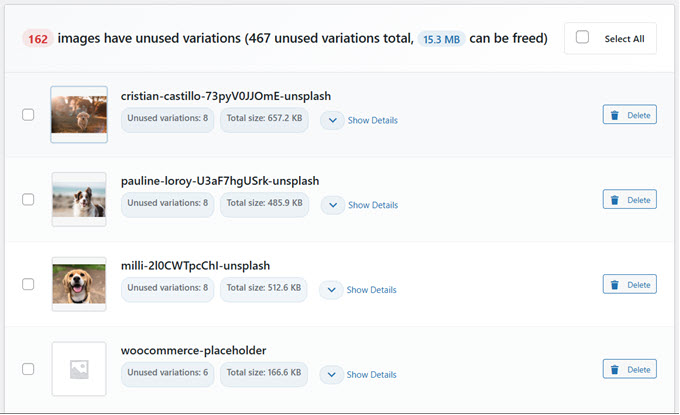
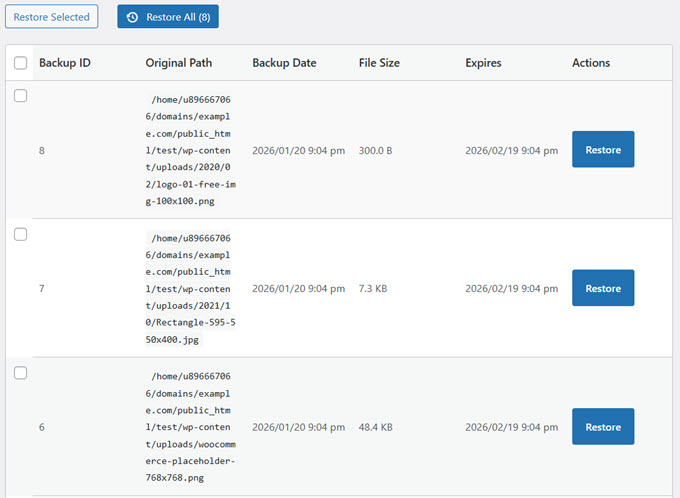
Your deleted images are then moved into a separate temporary location for 30 days.
And the best part is that you can undo your action by simply restoring it if needed.
For more details, read the full announcement.
WP Media Cleanup is available as a standalone plugin (starting at $29/yr). It is also included bundled in the Duplicator Pro Elite plan.
WPForms Launches Quiz Addon to Help Users Build Interactive Quizzes in Minutes
WPForms has officially launched its new Quiz Addon, making it easy for WordPress users to create interactive quizzes without complex setup, third-party tools, or expensive software.
Quizzes are widely used for engagement, education, and lead qualification. However, building them has traditionally required conditional logic, manual scoring, and extra testing to make sure everything works correctly.
The Quiz Addon is designed to simplify quiz setup, scoring, and results tracking in WordPress. Users can get started with the WPForms AI form builder or choose a ready-made quiz template.
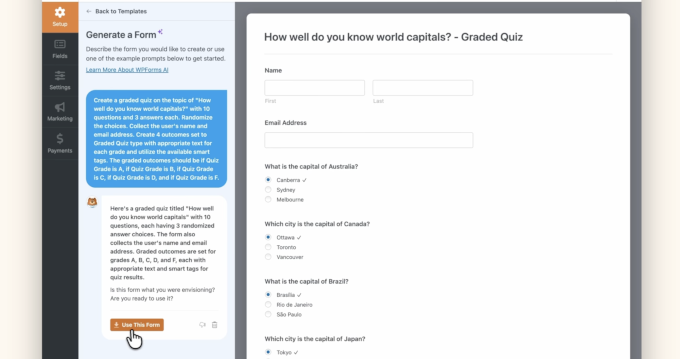
The addon works inside the WPForms drag-and-drop builder, so you can create a quiz and manage entries without leaving WordPress.
WPForms Quiz Addon supports three quiz types:
- Graded quizzes for assessments, training, and educational content.
- Personality quizzes for engagement, recommendations, and lead generation.
- Weighted quizzes for advanced scoring and qualification based on answer values.
Quiz results flow directly into WPForms’ entry management system, where you can view detailed responses, analyze performance, and export results for reporting or collaboration.
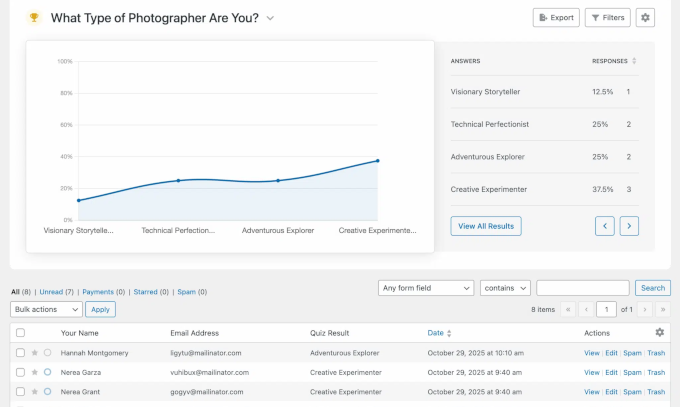
Results can also trigger notifications, email sequences, or CRM integrations based on quiz outcomes.
Considering WPForms’ recent automation integrations with n8n and Make.com, this allows site owners to create smarter workflows based on quiz responses.
The Quiz Addon is included with WPForms Pro and higher plans.
WordPress Shares Big Picture Goals for 2026
Mary Hubbard, Executive Director of WordPress.org, shared big picture goals for 2026 in a recent post.
This year, there will be a strong focus on building momentum, improving collaboration, and making it easier for contributors to participate across the WordPress project.
A key highlight is the return to three WordPress releases per year, with WordPress 7.0 planned to launch alongside WordCamp Asia (April 9, 2026). The release is positioned as a major step into Phase 3: Collaboration.
WordPress 7.0 Update 💡: The new release is expected to bring real-time co-editing to the block editor, along with improvements to media handling, responsive design controls, and new creative tools to make site building faster and more flexible.
Beyond Core development, the roadmap also talks about responsible AI adoption, stronger community onboarding, and more investment in meetups and education programs to support long-term growth.
Charitable Adds Built-In Security, Spam Protection, and Easier Donation Cleanup
Charitable has released new security and spam-prevention features designed to help nonprofits protect their donation forms while keeping the experience smooth for supporters.
Donation spam is a growing issue for fundraising websites because it fills dashboards with fake entries, harms reports, and wastes valuable time. Charitable’s latest updates focus on stopping abuse early while making cleanup easier when spam does slip through.
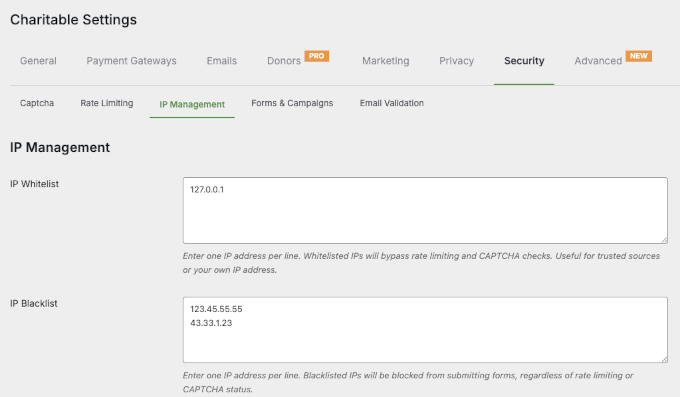
Charitable Lite now includes built-in CAPTCHA support, while Charitable Pro adds advanced controls, such as IP management and rate limiting, for layered protection across donation forms, registrations, and other submission flows.
For organizations managing large campaigns, these updates help keep donor records accurate, reports meaningful, and fundraising workflows distraction-free.
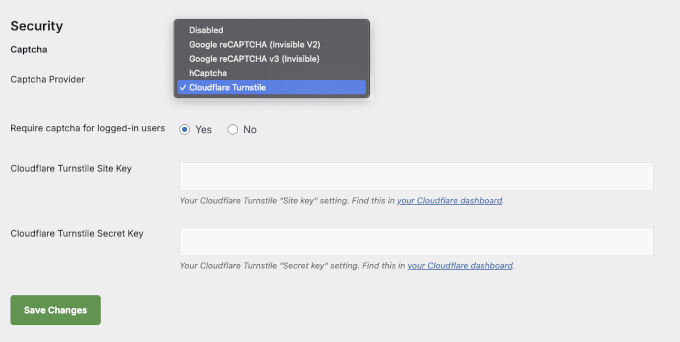
The updates are now available in both Charitable Lite and Charitable Pro.
WPConsent Adds Advanced Display Rules for Cookie Consent Banners
WPConsent, the popular privacy compliance plugin for WordPress, has introduced advanced display rules that let you control when and where cookie consent banners appear. This can help you stay compliant with privacy laws like GDPR and CCPA while cutting down on unnecessary popups.
With this update, you can decide who sees the banner based on login status, user roles, or specific pages. For example, you can hide the popup for admins and other logged-in users while they’re working in the dashboard.
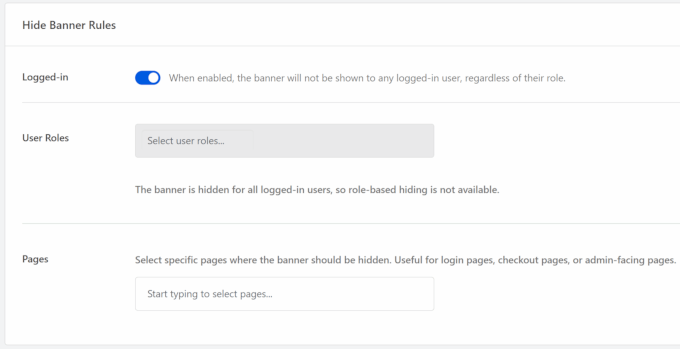
The new controls also help businesses avoid distractions during critical moments, such as checkout or cart pages, where interruptions can negatively impact conversions.
The advanced display rules are available for WPConsent Pro users and higher, giving site owners greater flexibility to show the right message to the right visitor at the right time.
WPCode Adds Live Preview for CSS & SCSS Snippets to Speed Up Design Changes
WPCode has released version 2.3.2, introducing a new Live Preview feature that lets users see CSS and SCSS changes in real time while editing code snippets.
For many WordPress users, making small design changes often means repeatedly saving code, switching tabs, and refreshing pages to see results. This trial-and-error workflow can slow down even simple styling updates.
Live Preview shows changes in a site preview inside the WPCode editor, so you don’t have to save, switch tabs, and refresh to check your work.
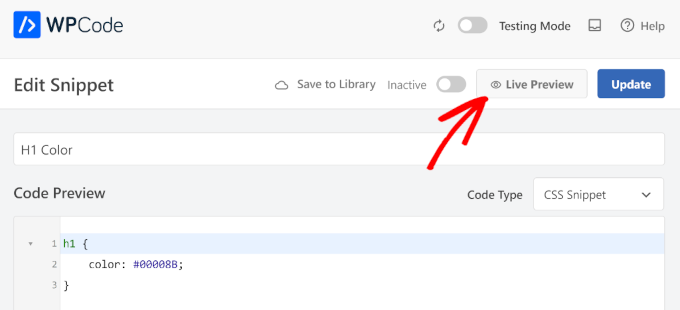
This makes it much easier to fine-tune elements like button colors, font sizes, spacing, and layout tweaks.
Instead of guessing how a change will look, users can adjust values and see the outcome as they type.
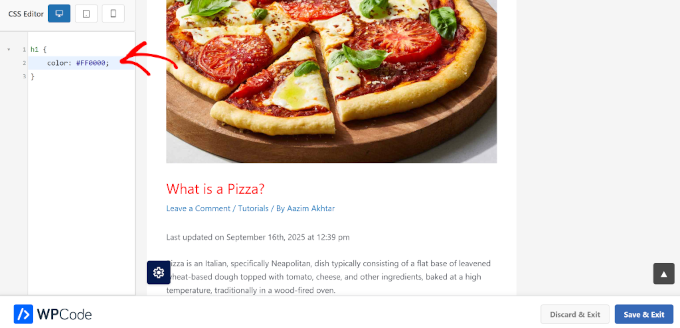
SCSS users benefit even more from this update. With WPCode Pro, SCSS snippets are now compiled automatically and previewed live, eliminating the need for separate build tools or external workflows.
Formidable Forms Adds Built-In Discount Codes to WordPress Payment Forms
Formidable Forms has introduced a new Coupon feature that lets site owners add discount codes directly to WordPress payment forms without creating duplicate forms or manually adjusting prices.
Running promotions with complex forms has traditionally been messy and error-prone. The new feature simplifies promotional pricing by letting users apply coupon codes without manual price changes.
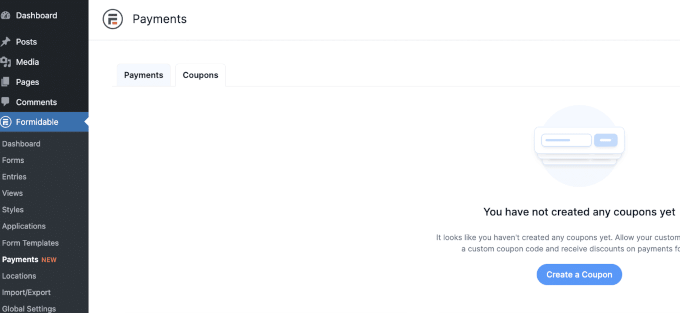
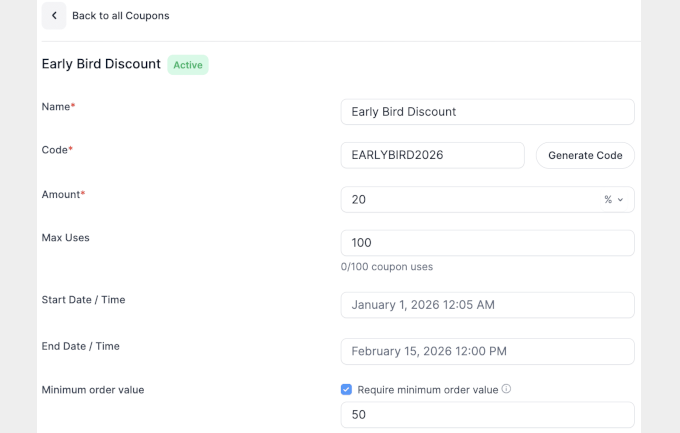
Coupons can be managed from a central dashboard, where site owners can control expiration dates, usage limits, minimum order requirements, and which forms each code applies to. Discounts can start and end on their own based on your dates.
This makes the feature useful for early-bird pricing, limited-time sales, affiliate promotions, and customer-specific discounts.
Coupons can be added to forms as a Coupon field. When users enter a valid coupon, the form will automatically adjust the pricing fields to reflect the discount.
The Coupon feature is available in Formidable Forms Business and Elite plans, giving advanced users a cleaner way to run promotions inside WordPress.
In Other News 🗞️
- FunnelKit Automations introduced new features, including conditional content for transactional emails, redesigned contact import tools with direct API integrations, and a new subscriber preference center. The update also adds smart categories, distraction-free contact pages, and advanced branding options to streamline marketing automation.
- WooCommerce 10.5 arrives February 3 with major performance upgrades, including faster analytics imports and improved checkout reliability. Developers can preview new hooks, caching features, and API changes in the current beta release.
- WordPress.org has launched a new centralized home for its Education programs, making it easier for students to learn, build projects, and start contributing to WordPress. The new portal brings together Campus Connect, WordPress Credits, and Student Clubs with clear paths for getting involved and gaining real-world experience.

Get Your SEO Ready for the AI Era
All in One SEO offers insights into AI keywords to help you rank for mentions in AI platforms like Gemini, ChatGPT, Claude, and more. It comes with a built-in AI content generator, image generator, schema markup, and llms.txt support.
- Advanced Coupons WooCommerce Gift Cards now supports bulk importing gift card codes via CSV. This makes it easier to create, manage, and distribute large gift card campaigns. Store owners can upload existing codes or auto‑generate new ones in bulk, complete with custom values and expiration dates.
- Easy Digital Downloads Pro now includes Campaign Tracker, a built-in tool to track UTM marketing data and attribute revenue directly from your WordPress dashboard. Easily see which campaigns drive the most sales, export detailed reports, and optimize your marketing without relying on Google Analytics.
- WordCamp Asia 2026 has opened applications for its official scholarship program. They offer free tickets and travel support to help more people attend the event. The program is aimed at students, underrepresented community members, and contributors who may not otherwise be able to participate.
New Plugins
- WP Media Cleanup – Helps you find and safely remove unused image sizes from your WordPress media library to reclaim disk space and reduce hosting costs.
- WPChat – Adds a fast, lightweight live chat widget to your WordPress site so you can talk with visitors and customers in real time.
- Sugar Calendar Bookings – Lets you accept appointments and bookings directly on your WordPress site using simple calendar-based scheduling.
That’s all for this month’s WPBeginner Spotlight! Thanks for keeping up with the latest news and updates from the WordPress ecosystem.
Have a product launch or feature update you’d like us to consider for an upcoming issue? Feel free to reach out and share the details.
We’ll be back next month with more WordPress news, updates, and insights.


Have a question or suggestion? Please leave a comment to start the discussion.