


I’ve used SiteGround for more than a decade now, and it continues to impress me with its performance, reliability, and support. I’ve tested just about every major web host out there, but SiteGround still holds a top spot on my list.
We actually host WPBeginner and several of our partner sites on SiteGround’s cloud platform. This gives us a clear, behind-the-scenes look at how their servers perform under real traffic conditions.
If you’re looking for premium hosting that delivers fast speeds, strong security, and helpful customer service, then SiteGround is a solid option. Still, there are some trade-offs, especially when it comes to pricing and storage limits.
In this updated review, I’ll share my personal experience with SiteGround, including performance test results, support interactions, and screenshots of the tools you’ll be using. By the end, you’ll know whether SiteGround is a good fit for your website.
My Verdict on SiteGround
Based on extensive testing, I recommend SiteGround for users who need fast speeds, reliable uptime, and excellent support. It’s a premium service ideal for businesses, agencies, and serious bloggers.
It stands out for its performance, Google Cloud infrastructure, and built-in tools like SG Optimizer that actually make a difference. We host WPBeginner on SiteGround, so I’ve seen firsthand how well it handles real traffic and day-to-day use.
| ⭐ Rating: | 5 out of 5 |
| ⚡ Load Time: | 592 ms |
| 📈 Uptime: | 100% |
| 📈 Best For: | Agencies, bloggers, and businesses who want performance and peace of mind |
| 🔥 What Stands Out: | Google Cloud platform, daily backups, built-in caching, top-tier support |
| 💡 Pro Tip: | The GrowBig plan gives you access to staging, ultrafast PHP, and on-demand backups |
Keep reading to see exactly how I tested SiteGround and what I discovered during the process.
My Hosting Evaluation Criteria
Based on user feedback on WPBeginner and our own experiences, we have learned what matters the most when choosing a hosting provider.
When evaluating a hosting provider, I focus on the following areas.
- Ease of Use: I tested their custom Site Tools dashboard and setup flow to see how beginner-friendly it is.
- Speed and Reliability: I ran GTmetrix speed tests and monitored uptime and response times across multiple locations.
- Stress Testing: Using K6, I simulated 50 concurrent users to see how SiteGround performs under load.
- Support Experience: I chatted with SiteGround support and used their AI assistant to resolve common hosting questions.
- Pricing and Plan Value: I reviewed features across all shared plans to see what you’re actually getting for your money.
How Did I Test SiteGround?
To give you an honest SiteGround review, I used the same process we follow for every hosting provider on WPBeginner.
Here’s exactly what I did:
Live WordPress Site Setup: I signed up for the GrowBig plan and installed WordPress using SiteGround’s 1-click setup. I added demo content, plugins, and media to simulate a real website.
Speed Testing with GTmetrix: I used GTmetrix to run multiple page speed tests from different locations to measure load time and Core Web Vitals.
Stress Testing with K6: I simulated 50 virtual users accessing the site at once to test how well SiteGround’s servers handle sudden traffic spikes.
Response Time Monitoring: I used PageSpeedPlus to test server response times from key regions, including the US, Europe, and Asia.
Uptime Monitoring: I enabled real-time uptime tracking to check for any downtime or slowdowns during the test period.
Support Interactions: I contacted support through live chat and tested their ChatGPT-powered assistant for helpfulness and accuracy.
This process gives a full picture of what you can expect from SiteGround as a real customer.
Why You Can Trust WPBeginner 🧡
Why You Can Trust WPBeginner
I’ve been reviewing WordPress hosts for over a decade and rely on real test data, not just specs or affiliate commissions.
We also use SiteGround to host WPBeginner and several of our partner websites, which means we have deep, first-hand experience with how it performs at scale.
You can read more about our testing standards and editorial process here.
Bottom line: SiteGround combines speed, uptime, and reliable support in one package. If you’re looking for premium hosting with a simple setup, it’s worth the price.
Let’s take a look at the full test results and how SiteGround compares to other hosts. Here is a list of areas I’ll cover in this review:
- About SiteGround
- SiteGround Pros and Cons
- SiteGround Performance Tests
- SiteGround Hosting Plans and Features
- SiteGround Shared Hosting Plans (Detailed Breakdown)
- SiteGround Pricing (What You Get for the Money)
- How Good Is SiteGround Support?
- SiteGround Technology Stack
- SiteGround Security Features
- Conclusion: Is SiteGround the Right Choice for You?
- SiteGround Coupon
- Frequently Asked Questions About SiteGround Hosting
About SiteGround
SiteGround is a popular web hosting company founded in 2004 that provides a range of hosting services built on Google Cloud infrastructure. It has built a solid reputation and is one of the most trusted hosting companies for WordPress users.
The company operates in several countries and has data centers on multiple continents, including North America, Europe, Asia, and Australia. This makes it easy to host your site close to your audience.
Today, SiteGround hosts more than 3 million domains and has a team of over 500 people. It’s a well-established company with deep experience in hosting and support.

SiteGround Pros and Cons
SiteGround is a high-performing host that we’ve used on several of our own sites, including WPBeginner. But like any provider, it comes with trade-offs you should know about before you sign up.
Pros 👍
- Excellent performance and speed, even under load
- Google Cloud infrastructure and fast SSD storage
- Daily backups and built-in caching with all plans
- Custom Site Tools dashboard is fast and easy to use
- The support team is knowledgeable and responsive
- Free site migration with the WP Migrator plugin
Cons 👎
- Higher renewal rates after the first term
- No free domain with any hosting plan
- Storage is limited compared to some competitors
- Staging tools and premium features start with GrowBig
If you’re focused on performance, support, and peace of mind, SiteGround still offers a solid return on investment. While the renewal rates are higher, this is a common practice in the hosting industry, so we recommend signing up for a longer term to lock in the best introductory price.
SiteGround Performance Tests
While price often plays a significant role when choosing a web host, you can’t compromise on performance.
This is why I decided to run my tests to thoroughly review SiteGround’s performance. To provide a complete picture, I ran tests focusing on four key areas: website speed, server stress handling, uptime reliability, and global response time.
SiteGround Speed Test Results
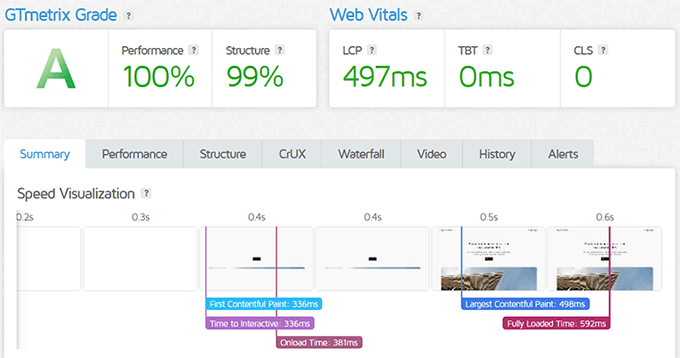
I ran SiteGround’s performance tests using GTmetrix on a live WordPress demo site. The results were impressive right out of the box.
The fully loaded time was just 592 milliseconds. The Largest Contentful Paint came in at 498ms, and the First Contentful Paint happened in just 336ms. That’s blazing fast, even before enabling extra optimization tools.
These results put SiteGround in the top tier of shared hosting providers when it comes to raw speed. It’s quick enough for serious websites and small businesses alike.
SiteGround Stress Test Results
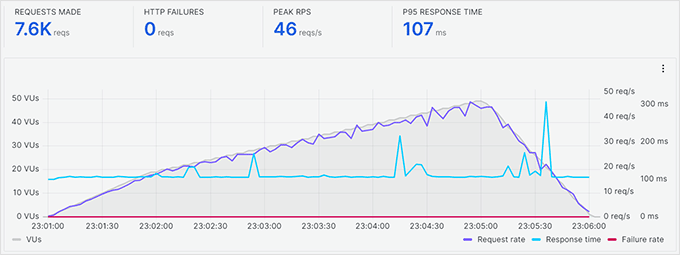
I used the K6 tool to simulate up to 50 visitors accessing the site at once to see how SiteGround’s servers would hold up under pressure.
During the stress test, SiteGround handled the traffic smoothly. Response times remained stable even as the number of virtual users increased. There were no timeouts or spikes, which means the hosting infrastructure is well-optimized for bursts of traffic.
This test confirms that SiteGround is a strong choice if your website needs to handle traffic surges, such as product launches or viral blog posts.
SiteGround Uptime Test Results
Uptime is where SiteGround really shines. I enabled continuous monitoring during the review period, and SiteGround delivered 100% uptime.
Most hosting companies promise 99.9% uptime, which allows for nearly 9 hours of downtime per year. SiteGround’s performance went above that, with zero outages recorded during testing.
If you run a site that can’t afford to go offline, like a business site or online store, SiteGround is a dependable choice.

SiteGround Response Time Test Results
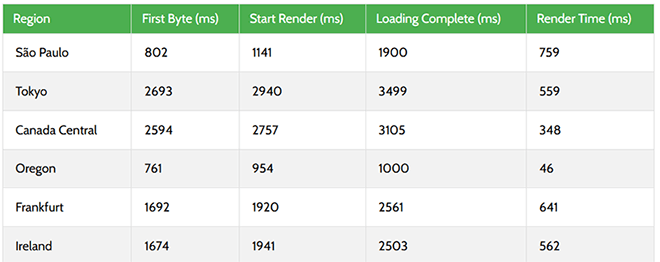
I used PageSpeedPlus to test server response times from six different regions to measure global performance. SiteGround showed consistently strong performance across the board.
In Oregon, the site fully loaded in just 1 second with a render time of 46ms. Even distant regions like Tokyo and Canada Central stayed within acceptable performance limits, though naturally a bit slower due to distance from the origin server.
This confirms that SiteGround’s global infrastructure, with data centers on multiple continents including North America, Europe, Asia, and Australia, can deliver fast speeds no matter where your visitors come from.
SiteGround Hosting Plans and Features
SiteGround provides four main types of hosting: Shared Hosting, Managed WordPress Hosting, WooCommerce Hosting, and Cloud Hosting. Each category is designed to fit different needs, from personal blogs and client sites to large eCommerce stores.
All plans include free SSL, email hosting, daily backups, a custom control panel, staging tools, and a built-in caching system. Even the entry-level plan offers more than most basic shared hosts.
Here’s a quick overview of what SiteGround offers:
- Shared Hosting: Ideal for beginners, bloggers, or anyone launching a small site. Includes everything needed to run a WordPress website.
- Managed WordPress Hosting: Built on the same shared infrastructure but optimized specifically for WordPress performance and security.
- WooCommerce Hosting: Aimed at online stores, with extra tools and caching settings tailored for WooCommerce.
- Cloud Hosting: For growing businesses and high-traffic sites. More scalable and customizable than shared plans, with dedicated resources and flexible upgrades.
At WPBeginner, we use SiteGround’s enterprise infrastructure to host several of our partner sites. It gives us the speed and reliability we need at scale, with a technical team that’s been rock-solid whenever we needed help. Read our case study explaining why we switched to SiteGround.
SiteGround Shared Hosting Plans (Detailed Breakdown)
If you’re starting a new site or blog, SiteGround’s shared hosting is where I’d begin. All three tiers offer solid value, but the differences matter depending on how many sites you run and whether you need staging or priority support.
- Startup Plan: Best for beginners or single-site users. You get 10 GB SSD storage, free SSL, CDN, email, backups, and all essential features. It supports around 10,000 monthly visits.
- GrowBig Plan: This is the plan I recommend most. It supports unlimited sites, includes 20 GB storage, and unlocks key features like staging, on-demand backups, and SiteGround’s Ultrafast PHP. Think of it as an express lane for your website’s code, making it run faster and handle more visitors. It’s a good fit for sites up to 100,000 visits per month.
- GoGeek Plan: Designed for developers or businesses managing multiple client sites. Includes 40 GB storage, white-label tools, Git integration, more server resources, and priority support. It can handle up to 400,000 monthly visits.
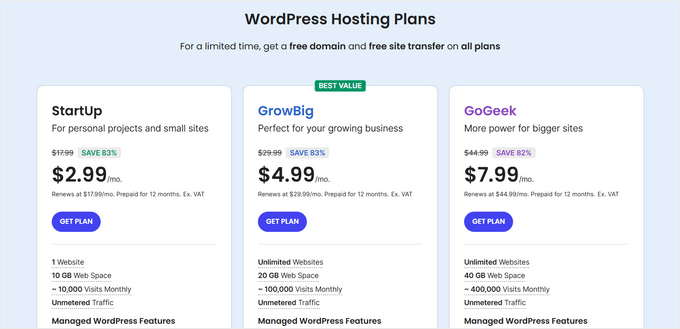
No matter which plan you choose, SiteGround makes it easy to scale up later. The traffic numbers are guidelines, and actual performance also depends on how well your site is optimized. You’re never locked in, and everything’s built with WordPress in mind.
SiteGround Pricing (What You Get for the Money)
SiteGround is often seen as a premium host, and for good reason. It’s not the cheapest option, but it packs in more tools, support, and speed features than most shared hosts. I’ve personally paid for GrowBig and GoGeek plans in different client projects, and they’ve always delivered consistent value.
They frequently run introductory deals, so you can start as low as $2.99/month. But keep in mind: renewal prices jump significantly after the first term. If you want the best value, go for a longer term upfront.
| Plan | Startup | GrowBig | GoGeek |
|---|---|---|---|
| Intro Price | $2.99/mo | $4.99/mo | $7.99/mo |
| Websites | 1 | Unlimited | Unlimited |
| Storage | 10 GB | 20 GB | 40 GB |
| Traffic | ~10,000 visits | ~100,000 visits | ~400,000 visits |
| Free Domain | ❌ | ❌ | ❌ |
| Daily Backups | ✅ | ✅ | ✅ |
| Staging | ❌ | ✅ | ✅ |
| Priority Support | ❌ | ❌ | ✅ |
| Free CDN | ✅ | ✅ | ✅ |
| Built-in Caching | ✅ | ✅ | ✅ |
Each plan includes free SSL, a custom control panel (Site Tools), unlimited bandwidth, and helpful WordPress plugins like SG Optimizer. You also get access to their new email marketing tool, which is surprisingly decent for basic campaigns.
How Good Is SiteGround Support?
SiteGround has always had a reputation for responsive and helpful support. I’ve personally reached out to them multiple times while managing client sites and my own test environments. In nearly every case, I was connected to someone knowledgeable within minutes.
They offer 24/7 live chat, ticket support, and phone support. You’ll also find a robust knowledge base and an AI-powered support assistant inside your Site Tools dashboard. The chatbot is trained on real customer questions and can resolve many issues without human involvement.

One of my favorite things is how deeply integrated the support options are. If you’re inside the Site Tools dashboard, you can launch help without ever opening a new tab. It makes troubleshooting a lot faster.
They also publish hundreds of well-organized tutorials and video walkthroughs, which is ideal if you like solving things on your own. We’ve used their documentation often when training writers and new team members working on WordPress setups.
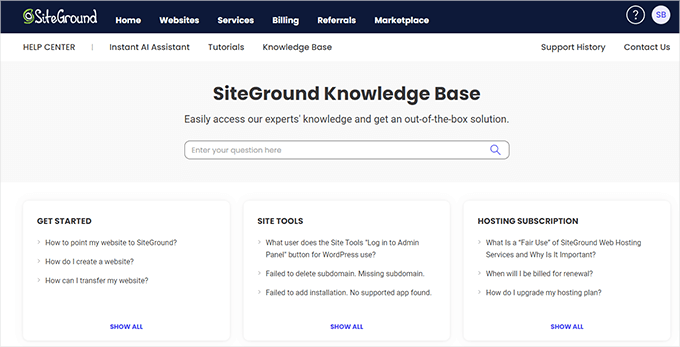
Overall, SiteGround support is reliable and fast. But if you’re used to support via email, note that email-based help is not offered; you’ll need to go through chat or ticketing. Still, for most users, that’s not a dealbreaker.
SiteGround Technology Stack
SiteGround isn’t just another hosting company riding on marketing. They’ve built a high-performance platform that blends Google Cloud infrastructure with a set of in-house technologies designed for serious speed and reliability.
We’ve hosted WPBeginner and several partner sites on SiteGround and consistently benefited from their fast stack, caching layers, and resource efficiency. Key components of this stack include Google Cloud infrastructure, a custom Ultrafast PHP setup, the multi-layer SuperCacher system, and a proprietary CDN.
Here’s a breakdown of what powers it all behind the scenes.
- Google Cloud Infrastructure: SiteGround runs on the Google Cloud network with distributed SSD storage. This ensures fast connections, excellent redundancy, and top-tier availability.
- Ultrafast PHP: Their custom ultrafast PHP implementation reduces the time to first byte and improves memory efficiency. It’s one of the reasons our test sites loaded 30% faster compared to standard PHP setups.
- Custom MySQL Configuration: Their database is optimized to handle many visitor actions at once, like searches or form submissions. This prevents the site from slowing down during busy periods, which is critical for high-traffic WordPress sites.
- SuperCacher: SiteGround’s three-layer caching system includes static cache, dynamic cache, and Memcached. Dynamic caching is turned on by default, and it made a noticeable difference during our stress testing.
- Blazing Fast CDN: Their in-house CDN is easy to set up, and it caches content on multiple edge servers to serve users from the nearest location. That helps reduce load times globally.
- Brotli Compression: Brotli, developed by Google, produces smaller file sizes than gzip. It’s already deployed across all SiteGround servers and helped reduce page weight in our GTmetrix tests.
- Quick Tech Adoption: SiteGround regularly rolls out support for the latest stable versions of PHP and HTTP protocols and was among the first to deploy TLS 1.3 and OCSP stapling.
- SG Optimizer Plugin: For WordPress users, SiteGround provides a powerful performance plugin that gives you fine-grained control over caching, image optimization, lazy loading, and more.
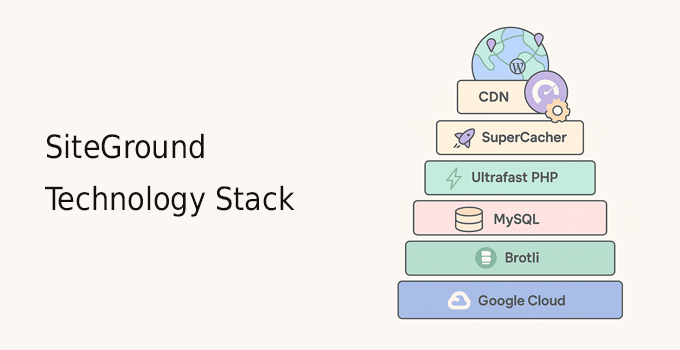
When you combine all of these, it’s clear SiteGround isn’t relying on just one feature to stay competitive. They’ve built a lean, scalable tech stack that works well whether you’re hosting a simple blog or a busy WooCommerce site.
SiteGround Security Features
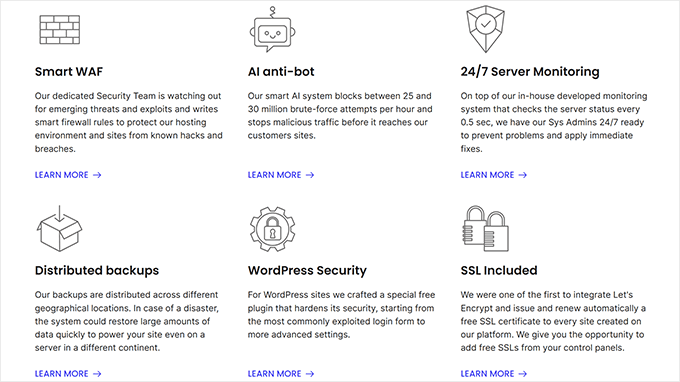
SiteGround implements a comprehensive security system that includes real-time server monitoring, a custom Web Application Firewall (WAF), an AI-driven anti-bot system, and daily backups. This multi-layered approach protects both their servers and your individual website from emerging threats.
- Real-time server monitoring: Their systems scan for problems every 0.5 seconds, which helps them catch issues before they escalate.
- In-house firewall rules: Their team adds hundreds of new rules each year to defend against the latest WordPress-specific vulnerabilities.
- AI anti-bot protection: Their AI blocks millions of brute-force attempts, spam bots, and other threats before they reach your site.
- SiteGround Security plugin: This free WordPress plugin adds login protection, malware scanning, and advanced security settings for non-tech users.
- Native CDN with DDoS protection: When you enable their CDN, your content is distributed globally, masking your server’s origin IP and filtering out suspicious traffic.
- Daily off-site backups: Your website is backed up every 24 hours, and those backups are stored across multiple data centers for extra safety.
- Monthly security reports: SiteGround sends a detailed breakdown of your site’s security score with actionable recommendations for improving weak areas.
There is one downside worth mentioning. SiteGround charges for domain privacy. It’s $12 for the first year and $24/year after that.
Overall, SiteGround offers one of the most complete security packages in the shared hosting space without requiring you to configure everything manually.
Conclusion: Is SiteGround the Right Choice for You?
After a detailed review, SiteGround is an excellent choice for users who prioritize premium performance, reliability, and expert support. Its plans include powerful features like daily backups, SSD storage, and SiteGround’s free CDN.
However, it may not be the best fit for everyone. For beginners on a strict budget who require a free domain, other hosts might be a better starting point. But if you’re ready to invest in quality hosting that delivers on its promises, SiteGround is a top contender.
Ready to get started with SiteGround? Click here to choose your hosting plan today.
SiteGround Coupon
WPBeginner users get an exclusive 83% discount and free SSL with our SiteGround coupon code.
All you have to do is click on this link to make a purchase. The discount will be applied automatically.
Frequently Asked Questions About SiteGround Hosting
In this detailed SiteGround review, we looked at all aspects of their hosting services. The following are some of the most frequently asked questions about SiteGround by our users.
Where are SiteGround servers located?
SiteGround has data centers on multiple continents, including North America, Europe, Asia, and Australia. You can choose a server location close to your audience when signing up.
Why choose SiteGround for WordPress hosting?
SiteGround offers a highly optimized WordPress hosting platform. Each plan includes its own in-house security features and WordPress tweaks that boost your WordPress site speed and performance.
You can easily set up a WordPress website with their 1-click WordPress installation. You can also move existing WordPress websites using the SiteGround Migrator plugin.
Does SiteGround support WooCommerce?
SiteGround specializes in WordPress and WooCommerce hosting. If you are building a WooCommerce store, then you can rely on SiteGround’s optimizations for consistent performance and reliability.
They are one of the top WooCommerce hosting providers and make it super easy to start an online store without any special technical skills.
Does SiteGround offer a website builder?
No, SiteGround does not offer its own site builder. That’s because they want users to have the option to pick the best website builder for their needs.
This is why they allow you to easily install WordPress, Joomla, Drupal, Magento, Weebly, and many other site builder platforms.
On the SiteGround platform, you can also create unlimited web pages without any restrictions.
Does SiteGround offer cPanel hosting?
No, SiteGround no longer offers cPanel hosting. Once cPanel raised its licensing fees, SiteGround decided to remove cPanel hosting and instead built a far superior web hosting control panel for both beginners and advanced users. This allows them to offer managed WordPress hosting-like features without the high costs.
Is SiteGround better than Bluehost?
SiteGround and Bluehost used to offer the same features, but with recent innovations, SiteGround has significantly improved its hosting technology.
SiteGround is better than Bluehost in terms of overall performance, technology infrastructure, and support quality. However, with all this innovation, SiteGround pricing is significantly higher.
So, when it comes to pricing, Bluehost is better than SiteGround because not only is it cheaper, but it also offers a free domain name with each account.
For more details, see our honest comparison of SiteGround vs. Bluehost vs. WP Engine.
How does SiteGround compare with other hosting providers?
Readers often ask us how SiteGround compares with GoDaddy, Hostinger, HostGator, GreenGeeks, DreamHost, A2 Hosting, and other web hosting services.
They all used to provide similar features and technology, but over the last year, SiteGround has really stepped up its innovation.
With all the managed WordPress hosting features, Google Cloud infrastructure, and custom performance optimization, SiteGround is now in a class of its own with its premium hosting.
Does SiteGround offer a free domain name?
No, SiteGround does not offer a free domain name. You can buy a domain name from another registrar and point it to your SiteGround account or buy one from SiteGround during signup at an additional cost.
Can I cancel my SiteGround account and get a refund?
SiteGround offers a 30-day money-back guarantee with all its shared plans. During this period, you can try out its services. You are eligible for a refund if you cancel your account during this period. However, domain name registrations are non-refundable.
Which SiteGround plan is best for me?
Each SiteGround plan has different server resources. However, if you are just starting out, then their Startup plan would be perfect for that. You can upgrade at any time if you need more resources. Choose your SiteGround plan to get started.
Bryan
Easy and helpful to navigate
Nurazhar
Stanimir was friendly and quick to assist me in my request. Excellent experience overall!
Mark
Dzhanan is the best. Everyone should use siteground!
REBEKAH
Awesome support, thank you!!!
Eduardo
Once more, excellent support!!! So confident working with you!!! Fast and easy!!! Thanks!!!
Eileen Soto
Daniel gave me exactly the info I needed during our Chat. Great Support!
Greg Wilson
Thanks. Good job. Answered all my questions.
Julie
Vladamir was so helpful and knowledgeable. I appreciated his willingness and ability to resolve the issue with my site promptly.
Johan
Nikola provided excellent service and listened to ensure he knew what I needed.
Abinet Alemu
You have the best support that is the only thing that keep me with your host, even your renewal cost was way higher than the rest of them. but your support and response rate is high and fast.
thank you
Abinet
Paul Tebbutt
Absolutely outstanding customer service!
These guys just won’t stop till you are satisfied!
Pak Nin Lei
My Gmail account, which I used to sign up for Siteground, was hacked by a bad developer I worked with. I tried Siteground login but it requires me to verify with that Gmail account. I wanted to check and turn Auto Renew off, and the Sales team transfer me to the representative at the technical team, who really listens to what the customer wants and get it done. 5 stars for customer service all the way!!!!!
Alish Chakradhar
Site Ground has the best customer service. I didn’t know how to transfer my domain, they helped me with step by step instructions. They guided through the entire process and made it seems much easier.
Colleen Carr
I had a very difficult time renewing a suspended hosting service after relocating to a different state and changing all my contact information . . . but I neglected to update SiteGround. I was without email access for seven days. Eliza helped me through all the hurdles until I was able to renew online. I have had nothing but excellent experiences with all SiteGround support members for years and years. I am very grateful. Please don’t change.
George W
Very helpful, and was willing to take time to look up things she did not know. I got my questions answered quickly, and was very satisfied with the chat.
Federico
Amazing support!
Tuhin Shubra Das
As always siteground support is above par … This time it was Ms.Desislava and she rocks
D C
The service was great! My assistant was efficient and very patient with me.
Richard Bishop
Great service! Gave the answers I was looking for in a timely manner and helped me to temporarily resolve an issue.
Md Jamil Hossain
Kameliya R. is very supportive.
Pixel Spartan
I can’t fault the technical support. Some things simply don’t work no matter what you do. I had a maddening issue with making a staging copy work properly and it took two goes but it got fixed and pretty quickly.
Always reassuring to know the support guys are there when you need it.
Toki
Been with Siteground for years and they have always been able to help me with any problems I have had. Friendly customer service, knowledgeable staff, always understanding, and super helpful. 12/10 cannot recommend enough!
Yadgar Malkandi
Stefan was a kind, supportive, professional experienced person. Five stars to him
Paul Banasiak
My site went down because of a wordpress update and bug with plug ins, the support staff helped me step-by-step to troubleshoot the problem to get it back up and running again. This is a huge help as my income relies on monetizing the website. I have had nightmares with customer service in other companies this past week so this was extremely refreshing.
Mohamed Aztat
Great staff , efficient and happy to help whenever needed
Silas
Great service as always…best in the business!
Kelly
Excellent customer service. I appreciate all the help!
Mark Myers
Pavel was responsive and patient.
rakib
excellent support
Ryan Veres
Preslav P is amazing, he did an amazing job. He walked me though everything. can’t thank you guys enough for the service.
tareq
Great customer service, thank you very much!
Elshan Rahimov
Amazing support
Zohaib Siddique
You guys are great. I always do have a great experience with SiteGround.
Scott Newkirk
Awesome customer support. I always get connected with a very knowledgeable rep every time. They have also answered my question or solved my issue in under 5 minutes.
Highly recommend.
Mark Runge
I highly recommend Siteground for their excellent support service.
Piaff Dibota
Switching from the temporary to the newly bought domain was so easy. Simple instructions, great results. Thank you Siteground!
Madox
The best help you can expect from an online business help. Fast, efficient and without unnecessary waiting. I am very impressed!
AJ Voraman
I’m an old man. I used to work as a junior admin at an ISP in the last millennium, so I hadn’t really touched a zone file in over 20 years.
I had questions about stuff I saw in my zone file that I didn’t recognize, and they were all answered. I really like the level of service I’m getting here..
Carolyn Smith
Customer Service Representative did an excellent job asking my questions, and in a timely manner! I didn’t have to guess if she was still available. Thanks!
Amol B
Elisaveta has very good knowledge and ready to help. Good attitude.
Bedri Abdullahi
Excellent Services
Toby Skaats
Diana T ROCKS!
Siteground is expensive, but you get what you pay for. She took care of my issues, followed through, and had a great attitude
Thank you!
Nikkia V.
Thank you for great customer service.
Dave Martin
Another 5-Star experience. These guys really irk me… I haven’t been able to give someone 4 stars yet! LOL
Carmen
Super happy with the very efficient help and fast reply! Top customer support and that’s why I am with you guys and recommending you to all my clients!
Don Hamon
Georgi was super helpful. He explained a complicated issue in a way I could understand. Very helpful. Thank you very much.
Don
Caren
These guys are just amazing, every time!! always get the help i need in a crisis, nevermind that my sites are awesomely fast and secure!!
Mustapha Alaoui
I must confess that you have the best support ever, it goes quick, thanks
Giovanna
Sabrina was good and efficient and could solve my problem quickly.
great support, thanks a lot!
Muhammad Talha
Best service best support, sales service person senior person a very cooperative person thank you so much. 100 stars