


Bluehost is one of the biggest web hosting companies in the world and an official WordPress-recommended hosting provider since 2005. But if you’re like most smart people, you don’t make decisions based on endorsements. You want to do your research and see how Bluehost compares to others in the market with real speed test results.
In July 2026, I tested Bluehost the same way I tested 14 other WordPress hosting companies, with an identical WordPress site on a custom domain, the same tools, and the same checklist.
This Bluehost review will show you the real numbers from my rigorous speed test using industry-standard benchmarking tools.
Quick Answer – Is Bluehost Worth It?
Yes, Bluehost is worth it if you are a beginner who’s looking to start a website. It scored 69 out of 100 on our WPBeginner Score, which places it 6th out of our 7 recommended hosts.
In our hosting speed test, Bluehost performed well and the website loaded with a 933 ms LCP (Largest content paint). It is one of the easiest hosts to start with, and WordPress.org has recommended it longer than any other host.
Their entry plan allows you to host up to 10 websites for $2.99 per month, and you get a free domain for the first year. It’s a great pick if you’re launching your first website, blog, or a small online store. However if your priority is raw speed and you have a high traffic eCommerce website, then you may want to look at a more managed WordPress hosting provider like Levamo.
Bluehost at a Glance
| Bluehost Test Summary (July 2026) | |
|---|---|
| WPBeginner Score | 69 / 100 |
| Speed (LCP) | 933 ms |
| Global response time | 599 ms average across 6 regions |
| Uptime | 100% over a 30-day monitoring window |
| Pricing | From $2.99/mo with our link, renews at $9.99/mo |
| Support | 24/7 live chat and “Ask Blu” AI assistant (no phone support on the entry plan) |
| Best for | Beginners building their first website |
You can see how Bluehost ranks against all the hosts I tested in our best WordPress hosting comparison, which uses the same data as this review.
About Bluehost
Bluehost started in 2003 and now powers more than 5 million websites. It has been on WordPress.org’s recommended hosting list since 2005, longer than any other company.

While the official WordPress endorsement matters, I did not let it influence my review. The verdict below comes from what my hosting speed test actually measured.
Pros and Cons of Bluehost
Pros
- Officially recommended by WordPress.org since 2005
- Simplest setup of any host I tested – Bluehost installs WordPress for you at signup
- 10 websites, 10 GB NVMe storage, a free CDN, and AI setup tools on the $2.99 entry plan – most hosts at this price allow one site
- Staging, SSH access, and object caching included on every plan – features some hosts save for higher tiers
- Reasonable renewal at $9.99 per month, with a free domain for the first year
- 100% uptime during our 30-day monitoring window
Cons
- Slower speed than many other hosts we tested – 933 ms LCP, where the fastest host we tested loaded in 358 ms
- Weekly backups only, where DreamHost includes daily backups at a lower price
- No phone support and no domain privacy on the entry plan
- Aggressive upsells during signup – you can uncheck them, but you have to pay attention
- Several “free” extras convert to paid after the first year or first month (more details in the fine print section below)
How I Tested Bluehost (Methodology)
I used the same testing protocol for every hosting company in our comparison. I set up an identical WordPress site with a default theme and test content, including images, on a custom domain with no caching plugins.
Then I ran the same four tests – GTmetrix for speed and LCP, k6 for stress with 50 virtual users at the same time, a response-time test from 6 global regions, and 30 days of Uptime Robot monitoring.
Those four tests make up the performance side of the WPBeginner Score, which counts for 80% of the total. Each test carries a set weight, so no single lucky number can carry a host.
The other 20% of the score comes from value. For that part I look at what the plan really costs and gives you in return – the intro price, the renewal price, how many sites and how much storage you get, the plan limits, and the quality of support.
The full methodology, the exact weights, and every host’s raw numbers are in our best WordPress hosting guide.
Bluehost Performance Test Results
Below you can find my full Bluehost speed test results.
Speed Test – 933 ms LCP
Largest Contentful Paint (LCP) measures how quickly the main content of a page appears. It is the speed number Google’s Core Web Vitals care about most.
My Bluehost test site showed an LCP of 933 ms, and the full page loaded in the same time.

I will be honest about this number. Under one second load time is fine for a starter site with no optimization.
However, when I tested other popular hosts, the median LCP was 659 ms, and the fastest hosting company, Levamo, loaded in 358 ms.
If raw speed is your top priority, Bluehost is not the winner on our data.
Server Response Time – 599 ms Global Average
Speed test tools load the whole page with images included, but that’s only one part of the performance. To see raw server speed, I also measured time to first byte (TTFB) from data centers in 6 regions around the world.
Bluehost averaged 599 ms across the 6 regions.
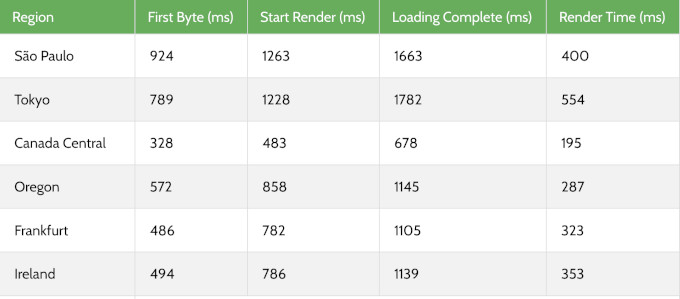
Response times were good in North America and most regions. South America and Japan were noticeably slower.
Our test site ran in Bluehost’s default US location, so this pattern makes sense. If your audience is mostly in the US, then Bluehost speed will be just fine for you.
If your audience is global, then make sure to turn on the included Cloudflare CDN. It serves your content from locations closer to your visitors.
Stress Test – Blocked by Cloudflare Protection
To see how a host behaves under a traffic spike, I send 50 virtual users to the test site with k6 by Grafana Labs and record the P95 response time.
When I ran this on Bluehost’s test site in our latest round, the test could not complete. Bluehost’s built-in Cloudflare integration flagged the synthetic traffic as an attack and blocked it, even after allow-listing.
Our last completed stress run on Bluehost held a 140 ms P95 at 50 concurrent users, with no failed requests.
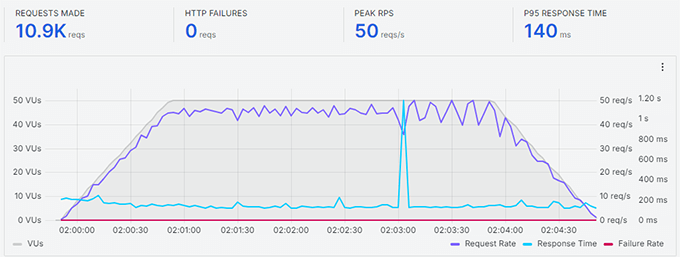
The block itself has an upside. The same protection that stopped my load test is what stands between your site and a real DDoS attack.
But it also means I cannot give you a current under-load number for Bluehost server, and I would rather tell you that than pretend otherwise.
Uptime – 100% Over 30 Days
I monitored the Bluehost test site with UptimeRobot, checking every 5 minutes. Over the 30-day window, it recorded 100% uptime with no incidents.

Bluehost also guarantee their shared hosting with a 99.99% uptime SLA. The fine print is worth knowing because if uptime falls below that, then you can claim a single 5% monthly credit, and you must claim it within 30 days.
In our monitoring window, Bluehost stayed above its own promise.
How Bluehost Compares to Other Hosts We Tested
The speed test numbers on their own do not give you the full picture. Here is how Bluehost performed compared to other similarly priced hosts from our comparison, all tested with the identical setup.
| Host | LCP | Global response | Uptime | Intro / renewal | WPBeginner Score |
|---|---|---|---|---|---|
| Bluehost | 933 ms | 599 ms | 100% | $2.99 / $9.99 | 69 / 100 |
| Hostinger | 659 ms | 227 ms | 100% | $2.69 / $10.99 | 88 / 100 |
| SiteGround | 608 ms | 369 ms | 99.96% | $2.99 / $17.99 | 75 / 100 |
| DreamHost | 986 ms | 658 ms | 100% | $1.99 / $7.99 | 64 / 100 |
The WPBeginner Score weighs performance at 80% and value at 20%. Bluehost’s 69 reflects exactly what you see above – it trails on speed and response time, while its value for a beginner is strong (10 websites where most entry plans give you one).
To see the full rankings, and the raw data for every host we tested, check out our best WordPress hosting guide.
Bluehost’s Infrastructure and Technology
Most other Bluehost reviews skip what’s under the hood on their shared hosting platform, and I believe it’s worth highlighting.
Storage and caching – every plan runs on NVMe SSD storage, which is the faster generation of SSD. You also get two caching layers included, static content caching and object caching, on every plan.
Some hosts charge extra for object caching, so seeing it in the $2.99 plan at Bluehost is a genuine plus.
Data centers – Bluehost recently migrated to the Oracle Cloud data centers which offer state of the art infrastructure. Bluehost allows you to choose from different data center locations across North America, South America, Europe, and Asia during checkout. I recommend choosing the one closest to your audience.
CDN and security – free Cloudflare CDN comes with every plan, along with free SSL from Let’s Encrypt and malware scanning. The Business plan and higher add an extra web application firewall and DDoS protection.
Developer and maintenance tools – every plan includes SSH and WP-CLI access, a one-click WordPress staging site, and managed WordPress updates. Bluehost keeps your WordPress core updated for you, which removes a maintenance task most beginners forget.
Bluehost Hosting Plans and Pricing
Bluehost offers shared, VPS, dedicated, cloud, and WooCommerce hosting. For most readers of this review, the shared WordPress plans are the relevant ones.
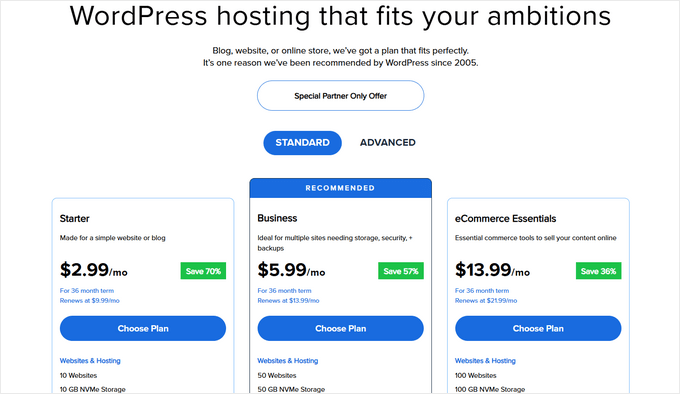
- Starter – 10 websites, 10 GB NVMe storage, 5 email accounts, and capacity Bluehost rates at around 40,000 visits a month. $2.99 per month for the first term with our link, renews at $9.99 per month. Staging, SSH, and object caching are included even here.
- Business – 50 websites, 50 GB NVMe storage, unlimited email accounts, and capacity for around 200,000 visits a month. Starts at $5.99 per month, renews at $13.99. This tier adds phone support, a web application firewall, DDoS protection, and free domain privacy for the first year.
- eCommerce Essentials – 100 websites, 100 GB storage, and capacity for around 400,000 visits a month. Starts at $13.99 per month, renews at $21.99. It auto-installs WooCommerce and bundles commerce add-ons – subscriptions, memberships, paid courses, an affiliate program, and one-click checkout – that would cost real money as separate plugins.
All plans include a free domain for the first year, free SSL, the Cloudflare CDN, malware scanning, the free Yoast SEO plugin, free WPForms plugin, and weekly backups. All plans also come with a 30-day money-back guarantee.
In my experience, a new site will not outgrow the Starter plan for a long time for most small business use-cases.
You can move to the Business plan when you need phone support, domain privacy, or the firewall, and pick eCommerce Essentials only if you are building an online store on day one.
Free and Paid Hosting Addons
Bluehost’s headline price is honest, but several extras start free and quietly become paid. Knowing these up front will save you surprise charges.
- Free domain – free for the first year on 12 or 36-month terms, and you must claim it within 90 days. After year one it renews at the standard domain rate. If you cancel hosting within the 30-day guarantee window, Bluehost deducts a non-refundable domain fee from your refund. This is fairly standard practice across all shared hosts that offer a free domain.
- Professional Email – a one-month free trial that auto-renews at $2.99 per month unless you cancel. Your 5 included cPanel email accounts on Starter are separate and stay free.
- Domain privacy – free for the first year on Business and up. Starter does not include it at all, so your registration details are public unless you pay for it.
- SiteLock and CodeGuard – paid add-ons Bluehost offers for extra security and backups. The included malware scanning and weekly backups cover the basics, so skip these at signup and add them later if you need them.
- Refund rules – the money-back guarantee covers hosting only, runs for 30 days, and excludes add-ons like domains. Bluehost gives no refunds after day 30.
Bluehost for WordPress Beginners
This is where Bluehost really stands out. When you create a Bluehost account, they install WordPress by default, so there is no setup step to get wrong.
The custom dashboard is the clearest I have used on a budget host. Websites, email, domains, and security sit in one place, and cPanel is still there for advanced tasks like databases.
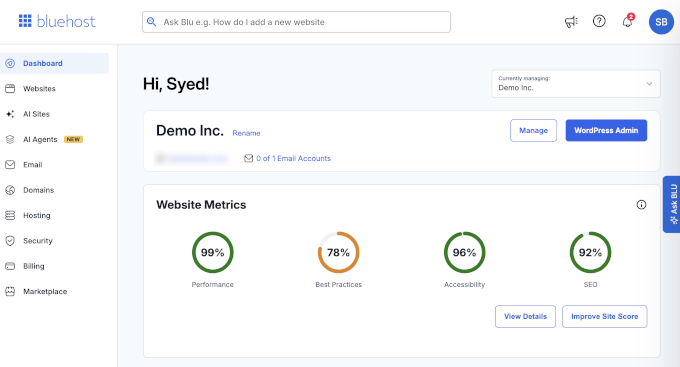
Bluehost has also added AI site creation tools and AI agents that help you build and manage your website. I would treat these as a convenience rather than a reason to choose a host, but for a first-timer they remove real friction.
Bluehost Customer Support
Bluehost offers 24/7 live chat, a large knowledge base with step-by-step guides and videos, and an AI assistant called “Ask Blu” that handles common questions instantly.
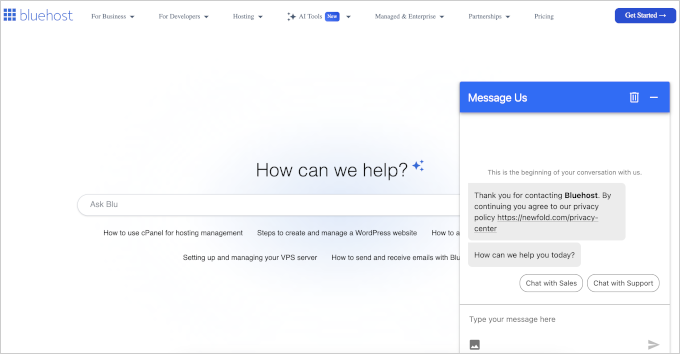
The entry plan does not include phone support, so chat is your only option if you start on the Starter plan. There is also no ticket system, so an issue that needs multiple sessions means re-explaining it in chat.
To be fair, phone support is rare at budget hosting prices, and most hosts at this level stick to chat. Bluehost adds phone on the Business plan or higher. Of all the budget hosts that we tested, SiteGround was one of the few that included phone support on every plan.
Who Should Use Bluehost and Who Should Look Elsewhere
Choose Bluehost if you are building your first website, blog, or small business site and want the simplest possible start. The official WordPress.org recommendation, the automatic install, and 10 websites on the cheapest plan make it the lowest-friction way in.
Its 100% uptime in our monitoring backs the reliability claim.
Look elsewhere if raw speed is your priority, since Hostinger and SiteGround both beat Bluehost by a wide margin in our tests. The same goes if you want daily backups on a budget (DreamHost includes them at $1.99), need phone support on an entry plan (SiteGround), or run a high-traffic site that needs proven performance under load (try Levamo and see our full hosting comparison).
Final Verdict – Is Bluehost the Right Choice for You?
Bluehost is perfect for beginners who are just starting out or someone building a small business website. They’re officially recommended by WordPress.org which is a big endorsement.
My verdict – if this is your first website, visit Bluehost and start on the Starter plan. If speed is your deciding factor or you have outgrown your first site, our best WordPress hosting comparison shows which host won each category on the same tests.
FAQs About Bluehost
1. What are the disadvantages of Bluehost?
Based on our tests, the main ones are speed (933 ms LCP, not as fast as others that we tested), weekly rather than daily backups, no phone support or domain privacy on the entry plan, and upsells during signup. Several free extras also convert to paid after the first year, which the fine print section above covers.
2. Is Bluehost good for beginners?
Yes. This is actually where Bluehost really stands out. Bluehost installs WordPress for you at signup, the dashboard is simple, and 24/7 live chat is there when you get stuck. It is the host we recommend most often to someone building their first site.
3. Can Bluehost handle high traffic?
Bluehost rates the Starter plan for around 40,000 visits per month, which covers most new sites comfortably. In our last completed stress test, Bluehost held a 140 ms P95 response with 50 concurrent users and no failures.
Bluehost’s own Cloudflare protection blocked our most recent re-test, so we could not measure its current under-load behavior. For consistently high-traffic or eCommerce sites, a managed host is the safer pick.
4. Can I make an online store with WooCommerce on Bluehost?
Yes. The eCommerce Essentials plan auto-installs WooCommerce and includes premium commerce add-ons like subscriptions, memberships, and one-click checkout.
For a new store with modest traffic it works well. As your store grows, plan to upgrade, because stores are harder on a server than blogs.
5. Is Bluehost better than GoDaddy?
For WordPress, I believe Bluehost is definitely better than GoDaddy. Bluehost’s onboarding and dashboard are more beginner-friendly, and its pricing is clearer for small sites.
We have not run GoDaddy through our new speed test protocol, so I will not compare speed numbers until we have, but based on my historical experience, I am pretty confident in my answer.
6. How does Bluehost compare with SiteGround and Hostinger?
On our identical tests, both SiteGround and Hostinger were faster. SiteGround loaded in 608 ms and Hostinger in 659 ms, against Bluehost’s 933 ms.
Bluehost counters with the simplest setup and 10 websites on its entry plan. SiteGround costs more at renewal ($17.99 per month), and Hostinger also skips phone support.
The comparison table above has the full numbers, and our SiteGround vs Bluehost comparison goes deeper.
7. Where are Bluehost’s servers located?
Bluehost recently moved to Oracle Cloud, and they now offer server locations across North America, South America, Europe, and Asia that you pick at checkout. Our test site ran in the default US location, which is why our North American response times were strong while Japan and South America lagged.
The included CDN closes most of that gap for global audiences.
8. Which Bluehost plan should I get?
We recommend starting with their Starter plan. It covers 10 websites and roughly 40,000 monthly visits, which is more than a new site needs.
Upgrading later takes a few clicks, so there is no reason to overbuy on day one.
WPBeginner users get an exclusive 70% off on Bluehost with our Bluehost coupon.
Changelog
- July 2026 – Rebuilt the review around our July 2026 test data (speed tested July 21, response time July 24, 30-day uptime window). Added the WPBeginner Score, the comparison table against similarly priced hosts, the infrastructure section, the pricing fine print, and corrected the Starter renewal price to $9.99 per month.
We hope this review helped you with your WordPress hosting research and helps you choose the right WordPress host for your needs. You may also want to see our pick of must-have WordPress plugins for business websites.
If you have any questions or feedback about my Bluehost review, please send me a message. I love hearing from our readers. Also you can scroll below to read real Bluehost user reviews from other business owners from around the world.
Harish Dewangan
I have been using bluehost for almost 6 months now and I can tell you that I haven’t had any issue with it. I opted for bluehost to host my e-commerce website and though it was my first website of any kind it was a breeze using bluehost. I highly recommend it.
Rohidas Gowda
One of the best hosting for wordpress website. Its cpanel function are very nice and it is always uptime (100%).
Marko Ville Jukarainen
Bluehost has been really easy to use! I really appreciate the ease and affordability of it.
Darby
Bluehost is AWESOME! After researching other providers, no one compared to Bluehost. Their customer service is unmatched and have made my job 10x easier. They go above and beyond for their clients!
Bernard Mataigne
I am developing my photography web site on Blue Host. Everything is working well. Had to ask 2 times for help via chat. Response was great. Fast.
David A.
Bluehost is a fantastic hosting service. We’ve been with them about a month and couldn’t be more pleased. One click Wordpress integration and pricing of plans is AWESOME. They get our HIGHEST recommendation, 10 outta 10 for sure!
Peter
Bluehost was super easy to setup and use. Have had no issues! Definitely recommend
BROCK M NELSON
Easy enough for anybody to create a website and enough functionality to make them look spectacular.
Anjuli Tuck
I love Bluehost! Every time I ask for assistance via chat, most of my problems have been solved with one conversation. They are good listeners and really care about your business! Sign up for Bluehost!
Juan Jose Ramirez
Bluehost has been a great hosting service for our website.
It’s easy to use, friendly and fast. Support is great, and they solve any issue within minutes.
LaShanda Smith
I love Bluehost. My first year using Bluehost has been awesome! Great customer service and a unlimited amount of resources are available to make your vision come to life.
tammy
I love bluehost.
Arrassi Mourad
Really very good plans and support services.
LaShanda Smith
I am new to Bluehost and have enjoyed my entire first year using it. I love the features of the site. There are a variety of options that help me accomplish my vision. The customer service at Blue Host is A+.
Michael Shank
Bluehost has provided me with more tools and support than any other hosting platform I have worked with so far. I have used ipage, wix, cti, and godaddy, and they all have been found lacking in comparison. I chose to opt into the private hosting, so that I could host multiple websites without worrying about the load of other people on my server. I cannot be happier, I have built websites for different businesses and hosted them with no issues, no slowness, no downtime. With Cpanel I have the tools I need to interface directly with files, databases, email, and more. I will be customer of Bluehost for years to come.
Jenifer Prince
I transferred 2 domain numbers from another host when I was ready to create my sites because I had read many good reviews about Bluehost. From the first step of transferring my domain names up to current site maintenance it was very easy to do. I don’t know anything about web hosting so it was nice to accomplish these things so easily!
Kelly Wildman
I really like BlueHost!
Erica
I love Bluehost! This is my first blog site and it made it easier. Once I got the hang of the website, it was simple to navigate.
Jenina Mella
Just transferred my website to BlueHost and am really happy with the customer service and how my site is performing.
Macy
Have been using Bluehost for about a year and so far what impressed me the most is their easy platform and customer oriented service. Tech world is not that hard with their help. Hope to see more from them.
Buddhika Bandara
I think i found the perfect place to host my website, I did so many researching about a good hosting provider then finally found Bluehost, recommend for anyone who looking for a “Perfect” web hosting service.
Mike K.
I’ve tried several hosting services in the past but everywhere always fell short. If the price was cheap, it lacked somewhere else or vice versa. Bluehost has been the perfect middle ground where I feel like I was getting the most out of my money. Also the customer service is top notch! Thanks bluehost for being awesome!
Jerry
This coming March will be 2 years I have had my website (Wordpress/Bluehost). I am a relatively smart guy. I can repair about anything and comfortable editing video and audio and other tasks on my Mac Pro computers, and am intuitive with critical thinking skills however I am STILL going in circles trying to get my website up and running properly. When I sign on to Bluehost, and then sign on to Wordpress through Bluehost, everything seems fine until I try and edit my website through the prompt “Edit my Wordpress website”, I click it and it says basically, “you don’t have a wordpress website” “Want to build one?” Very Very frustrating. I think Bluehost seems like a fine hosting environment but my experience has been very disappointing.in that I have paid for this and yet to fully be able to use it. Have not had much luck getting help either. I have eye problems so I can’t stay on the computer for hours and usually just get discouraged with it and shut it down. I have a website, but what good is it when it’s not doing what it should?
Sayan De
I was using another server, then I noticed Bluehost from this blog.
I have ordered Shared Wordpress Hosting and since then my website is up.
They even migrated my site totally for free. They had set up my whole site from backup databases. That’s really great. Whenever I get confused I asked Bluehost Support and unlike others they always available to chat with the customer. And they do solve the problem with only one interaction.
Thanks to WpBeginner and Bluehost, for both of you my website is running smoothly.
Sayan De
I was using another server then I noticed Bluehost from this blog.
And I ordered Basic Wordpress Hosting and My site is up since then.
Whenever I get confused I asked the Bluehost support and unlike others, they take the case instantly and they solve the problem. Thanks to WpBeginner and Bluehost, for both of you my website is running smoothly.
Nasrat ILHAM
I don’t know much about hosting companies, I just selected the Bluehost randomly and I found it a decent company. Thanks Bluehost
David Marks
After helping a company work on their website, I moved all of my domains to Bluehost. I feel the company if fair in the pricing for the amount of storage they allow at each price level. My biggest concern is the return to server speed in which I will get when running a lighthouse speed test. I also tried to use Cloudflare to help and it crashed my site.
Outside of the speed issue, I have been very happy. Customer service has been very helpful and moving domains have been easy. I would like to see the speed issue corrected, but will continue my business with Bluehost.
Thanks for the work you guys do!
Bradley Dorfan
I’m fairly new to using Bluehost and, so far, I haven’t had any issues. They are highly recommended by most of the bloggers I follow, which is why I decided to go with them. I’ve had no need to contact Technical Support so I can’t say whether or not their after-sale service is any good. At the end of the day do your research and go with the host that resonates most with you, which for me was Bluehost.
Olivia Pasquarelli
We’ve been using Bluehost for over a year with no issues or hiccups to host our wordpress site. In my experience, this is the best possible hosting platform and I’m very happy with my site. Their customer service is excellent as well.
Julia Lansdell
I am liking BlueHost so far. I haven’t had any issues so far. Customer Service does take a couple days, is my only concern. It could be better.
Laura Smith
I purchased BlueHost last year when I decided to start my own WordPress blog. BlueHost was recommended to me by a fellow blogger who also sent me a link to a discounted rate for the first year of service. Having tried to set up WordPress on my own proved difficult. BlueHost simplified the process and gave me several helpful tools to help me in setting up my blog. I’ve had no technical issues over the past year that I couldn’t resolve within a few minutes. Whenever new bloggers ask me how to set up a blog, I always point them to BlueHost.
Laura
I purchased a BlueHost subscription when I started my blog last year. It was instrumental in helping me to navigate the set up of my WordPress blog and included features to help me create a professional-looking site. I also like that they offered a special rate that saved me money on my start up costs. Whenever new bloggers ask for advice in starting a blog, I always recommend BlueHost.
Brian Dawson
In early November, my daughter and I embarked on the development of a new web-blog for the purposes of reviewing whiskes. We chose Wordpress and Bluehost platforms and so far have found them intuitive to use.
Helen Wagner
My bluehost doesn’t display my current site done in Wordpress it is blindsbritecincinnati.com. I would like to be able to do html/css coding using only bluehost and do my own coding. Is this possible?
Nattapol Klanwari
I have tried 4 hostings including Bluehost at last for nearly 2 years, finally, the Bluehost is the best solution for my web hosting. There is no hidden cost, I get what it said. It is easy to work on its dashboard. The most important impression for me is the technical service on phone on 7/24 which I can call at any time. The staff is very accomplished and attentive to listen to understand my problems. They are very patient to assist me and be with me until the problems are solved with sometimes remote on my own screen for clear assistance.
Cat Insley
Welp, let’s just start by saying, I am new to Bluehost. I don’t know what experience came before me, but I got great service when I dumped Wordpress and then needed to know what alternatives I had that could be hosted by Bluehost. Their customer service was very helpful. They guided me to another web app, and helped me get started in it.
So far, so good! I’m almost ready to publish….hope my faith in Bluehost holds up.
Nattapol Klanwari
I have tried 4 hostings for nearly 2 years including Bluehost at last. Finally, Bluehost is my best solution to work with permanently. It is easy to understand and work on its dashboard. There is no additional hidden cost, I get what it said. The most important impression for me is the technical service by phone which is 24/7. I can call for technical help at any time. The staff on the phone are very accomplished with paying attention to understand my problems patiently and be with me until the problems are solved.
Vashti Calhoun
I have used Bluehost for over a year now. Customer support and efficient and quick. They’ll politely assist you and solve your problems without you having to be on the phone for hours. The hosting site is very simple to use and navigate. They also have several payment options to accommodate whatever your needs may be. I highly recommend you all follow in my footsteps and use them as your hosting site. I switched from square space using in order to have unlimited style and design capabilities and it was the best decision of my life!
Sallie Rosengrave
I have been with Bluehost for the last 10 months, they host my WP website. As I am green around the gills for all things websites, I have not had any problems with Bluehost. I required tech support a couple of times and my problems have been resolved, the support staff have been really polite and patient with me. So I would recommend them.
Stefan Lakic
I like Bluehost a lot because their panel and the interface is very easy and intuitive to use. The setup of Wordpress is simple and fast… and the support is always available and they were always able to help me with any problem that I had on my websites (plus they were very polite).
I think Bluehost is quite secure and the prices are really good. I am using their hosting for over a year now and I didn’t have any problem so far.
Okereke Divine
Before using Bluehost, I was adviced by some bloggers not to use the host. They had their reasons but I said no, I will give them (bluehost) a try.
That single decision, still makes me smile today.
When I signed up for the bluehost shared hosting, I started with Basic Plan (just to test run their hosting.
I was happy with the result and now I am on their Pro Plan.
Their online chat support is super excellent!
I have recommended them to my friends and I will keep doing that. They are just the best!
Cheaper and reliable!
Thanks bluehost for this great opportunity.
Midori Miller
I absolutely love bluehost. I’m not a coder not an expert of css yet with bluehost it is so simple to build a beautiful wordpress site. I love the staging. Hosting is affordable and has been the best hosting company I have ever used. Having multiple sites on hosting makes it convenient and the price..so affordable. I highly recommend bluehost.
Carol Round
Since I switched to Bluehost from GoDaddy, I’ve been exceedingly pleased with the opportunities to learn more about WordPress and the support of BlueHost when needed. I will never switch to another company. Thank you, BlueHost for being user-friendly and tech support helpful with a smile.
Ashlee
I’ve found Bluehost to be affordable (especially with the built-in email addresses) and I’ve had good interactions with their customer service team!
Alejandra Morales
I’ve been using Bluehost for the last 2 years and it’s an “okay” service with room from improvement.
The interface is friendly until you have to renew your hosting, everything gets complicated and you can not keep your same rate.
IT Support on the other hand is super efficient.
Overall I would recommend.
Cole Newberg
Have had bluehost for about a year now and I honestly cant complain, never had any issues. I definitely reccomend bluehost.
Nikki Swart
I haven’t been with Bluehost for long, but so far I haven’t had any problems. My website is also pretty new and I’m still working on making it better as well. But so far, the support offered by Bluehost has really been helpful, their dashboard is easy to use and the pricing is reasonable for all the added features. So much so that I chose Bluehost over a local provider. As an international client, I’m happy
Vinnie Toaso
I chose WordPress as a platform when starting my technical consulting business. I chose bluehost as a service provider after a lot of research on wpbeginner and elsewhere. I am in my 2nd month of actively managing my word press instance and im quite satisfied. We’ve been setting up a lot of email using the bluehost domain – its intuitive and easy to use. So far were happy. We may be adding digital course content soon, unsure how the current state platform will manage that, to be determined.
Gregg Frank
Bluehost has been fantastic in hosting my site. I’ve had it for over 11 months now and it has been 100% available 100% of the time! I highly recommend it!
Andrea Mulder-Slater
I have been muddling along with the same hosting company for more than 10 years. But last year, I launched a new business and was looking for something more reliable, and so, I took a chance on Bluehost.
Before setting up my account, I had about a billion questions and each one was answered quickly and carefully by incredibly patient and knowledgeable team members.
I am SO happy with the speed and reliability of Bluehost and have since set up two of my clients with them as well. I am now in the process of moving the largest site I own from my old host to Bluehost and have never experienced such friendly and capable tech support.
The best decision I ever made was to visit Bluehost.com.