


Bluehost is one of the biggest web hosting companies in the world and an official WordPress-recommended hosting provider since 2005. But if you’re like most smart people, you don’t make decisions based on endorsements. You want to do your research and see how Bluehost compares to others in the market with real speed test results.
In July 2026, I tested Bluehost the same way I tested 14 other WordPress hosting companies, with an identical WordPress site on a custom domain, the same tools, and the same checklist.
This Bluehost review will show you the real numbers from my rigorous speed test using industry-standard benchmarking tools.
Quick Answer – Is Bluehost Worth It?
Yes, Bluehost is worth it if you are a beginner who’s looking to start a website. It scored 69 out of 100 on our WPBeginner Score, which places it 6th out of our 7 recommended hosts.
In our hosting speed test, Bluehost performed well and the website loaded with a 933 ms LCP (Largest content paint). It is one of the easiest hosts to start with, and WordPress.org has recommended it longer than any other host.
Their entry plan allows you to host up to 10 websites for $2.99 per month, and you get a free domain for the first year. It’s a great pick if you’re launching your first website, blog, or a small online store. However if your priority is raw speed and you have a high traffic eCommerce website, then you may want to look at a more managed WordPress hosting provider like Levamo.
Bluehost at a Glance
| Bluehost Test Summary (July 2026) | |
|---|---|
| WPBeginner Score | 69 / 100 |
| Speed (LCP) | 933 ms |
| Global response time | 599 ms average across 6 regions |
| Uptime | 100% over a 30-day monitoring window |
| Pricing | From $2.99/mo with our link, renews at $9.99/mo |
| Support | 24/7 live chat and “Ask Blu” AI assistant (no phone support on the entry plan) |
| Best for | Beginners building their first website |
You can see how Bluehost ranks against all the hosts I tested in our best WordPress hosting comparison, which uses the same data as this review.
About Bluehost
Bluehost started in 2003 and now powers more than 5 million websites. It has been on WordPress.org’s recommended hosting list since 2005, longer than any other company.

While the official WordPress endorsement matters, I did not let it influence my review. The verdict below comes from what my hosting speed test actually measured.
Pros and Cons of Bluehost
Pros
- Officially recommended by WordPress.org since 2005
- Simplest setup of any host I tested – Bluehost installs WordPress for you at signup
- 10 websites, 10 GB NVMe storage, a free CDN, and AI setup tools on the $2.99 entry plan – most hosts at this price allow one site
- Staging, SSH access, and object caching included on every plan – features some hosts save for higher tiers
- Reasonable renewal at $9.99 per month, with a free domain for the first year
- 100% uptime during our 30-day monitoring window
Cons
- Slower speed than many other hosts we tested – 933 ms LCP, where the fastest host we tested loaded in 358 ms
- Weekly backups only, where DreamHost includes daily backups at a lower price
- No phone support and no domain privacy on the entry plan
- Aggressive upsells during signup – you can uncheck them, but you have to pay attention
- Several “free” extras convert to paid after the first year or first month (more details in the fine print section below)
How I Tested Bluehost (Methodology)
I used the same testing protocol for every hosting company in our comparison. I set up an identical WordPress site with a default theme and test content, including images, on a custom domain with no caching plugins.
Then I ran the same four tests – GTmetrix for speed and LCP, k6 for stress with 50 virtual users at the same time, a response-time test from 6 global regions, and 30 days of Uptime Robot monitoring.
Those four tests make up the performance side of the WPBeginner Score, which counts for 80% of the total. Each test carries a set weight, so no single lucky number can carry a host.
The other 20% of the score comes from value. For that part I look at what the plan really costs and gives you in return – the intro price, the renewal price, how many sites and how much storage you get, the plan limits, and the quality of support.
The full methodology, the exact weights, and every host’s raw numbers are in our best WordPress hosting guide.
Bluehost Performance Test Results
Below you can find my full Bluehost speed test results.
Speed Test – 933 ms LCP
Largest Contentful Paint (LCP) measures how quickly the main content of a page appears. It is the speed number Google’s Core Web Vitals care about most.
My Bluehost test site showed an LCP of 933 ms, and the full page loaded in the same time.

I will be honest about this number. Under one second load time is fine for a starter site with no optimization.
However, when I tested other popular hosts, the median LCP was 659 ms, and the fastest hosting company, Levamo, loaded in 358 ms.
If raw speed is your top priority, Bluehost is not the winner on our data.
Server Response Time – 599 ms Global Average
Speed test tools load the whole page with images included, but that’s only one part of the performance. To see raw server speed, I also measured time to first byte (TTFB) from data centers in 6 regions around the world.
Bluehost averaged 599 ms across the 6 regions.
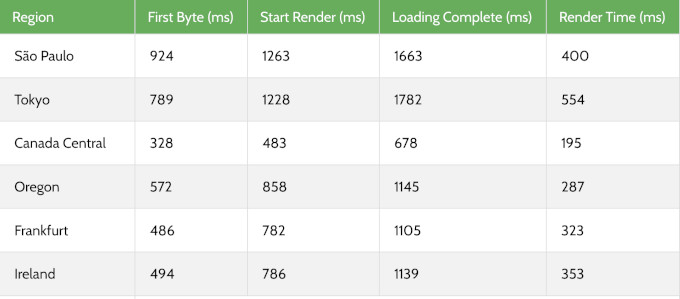
Response times were good in North America and most regions. South America and Japan were noticeably slower.
Our test site ran in Bluehost’s default US location, so this pattern makes sense. If your audience is mostly in the US, then Bluehost speed will be just fine for you.
If your audience is global, then make sure to turn on the included Cloudflare CDN. It serves your content from locations closer to your visitors.
Stress Test – Blocked by Cloudflare Protection
To see how a host behaves under a traffic spike, I send 50 virtual users to the test site with k6 by Grafana Labs and record the P95 response time.
When I ran this on Bluehost’s test site in our latest round, the test could not complete. Bluehost’s built-in Cloudflare integration flagged the synthetic traffic as an attack and blocked it, even after allow-listing.
Our last completed stress run on Bluehost held a 140 ms P95 at 50 concurrent users, with no failed requests.
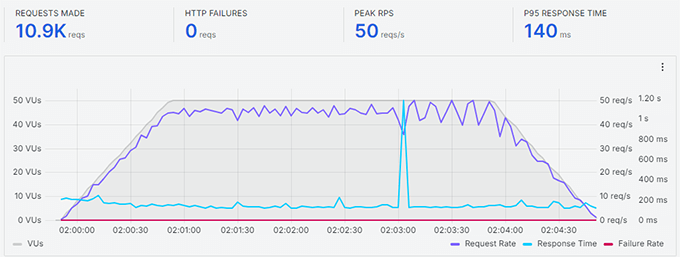
The block itself has an upside. The same protection that stopped my load test is what stands between your site and a real DDoS attack.
But it also means I cannot give you a current under-load number for Bluehost server, and I would rather tell you that than pretend otherwise.
Uptime – 100% Over 30 Days
I monitored the Bluehost test site with UptimeRobot, checking every 5 minutes. Over the 30-day window, it recorded 100% uptime with no incidents.

Bluehost also guarantee their shared hosting with a 99.99% uptime SLA. The fine print is worth knowing because if uptime falls below that, then you can claim a single 5% monthly credit, and you must claim it within 30 days.
In our monitoring window, Bluehost stayed above its own promise.
How Bluehost Compares to Other Hosts We Tested
The speed test numbers on their own do not give you the full picture. Here is how Bluehost performed compared to other similarly priced hosts from our comparison, all tested with the identical setup.
| Host | LCP | Global response | Uptime | Intro / renewal | WPBeginner Score |
|---|---|---|---|---|---|
| Bluehost | 933 ms | 599 ms | 100% | $2.99 / $9.99 | 69 / 100 |
| Hostinger | 659 ms | 227 ms | 100% | $2.69 / $10.99 | 88 / 100 |
| SiteGround | 608 ms | 369 ms | 99.96% | $2.99 / $17.99 | 75 / 100 |
| DreamHost | 986 ms | 658 ms | 100% | $1.99 / $7.99 | 64 / 100 |
The WPBeginner Score weighs performance at 80% and value at 20%. Bluehost’s 69 reflects exactly what you see above – it trails on speed and response time, while its value for a beginner is strong (10 websites where most entry plans give you one).
To see the full rankings, and the raw data for every host we tested, check out our best WordPress hosting guide.
Bluehost’s Infrastructure and Technology
Most other Bluehost reviews skip what’s under the hood on their shared hosting platform, and I believe it’s worth highlighting.
Storage and caching – every plan runs on NVMe SSD storage, which is the faster generation of SSD. You also get two caching layers included, static content caching and object caching, on every plan.
Some hosts charge extra for object caching, so seeing it in the $2.99 plan at Bluehost is a genuine plus.
Data centers – Bluehost recently migrated to the Oracle Cloud data centers which offer state of the art infrastructure. Bluehost allows you to choose from different data center locations across North America, South America, Europe, and Asia during checkout. I recommend choosing the one closest to your audience.
CDN and security – free Cloudflare CDN comes with every plan, along with free SSL from Let’s Encrypt and malware scanning. The Business plan and higher add an extra web application firewall and DDoS protection.
Developer and maintenance tools – every plan includes SSH and WP-CLI access, a one-click WordPress staging site, and managed WordPress updates. Bluehost keeps your WordPress core updated for you, which removes a maintenance task most beginners forget.
Bluehost Hosting Plans and Pricing
Bluehost offers shared, VPS, dedicated, cloud, and WooCommerce hosting. For most readers of this review, the shared WordPress plans are the relevant ones.
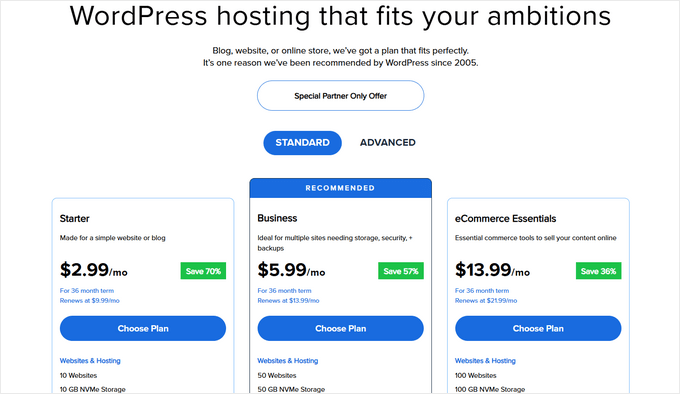
- Starter – 10 websites, 10 GB NVMe storage, 5 email accounts, and capacity Bluehost rates at around 40,000 visits a month. $2.99 per month for the first term with our link, renews at $9.99 per month. Staging, SSH, and object caching are included even here.
- Business – 50 websites, 50 GB NVMe storage, unlimited email accounts, and capacity for around 200,000 visits a month. Starts at $5.99 per month, renews at $13.99. This tier adds phone support, a web application firewall, DDoS protection, and free domain privacy for the first year.
- eCommerce Essentials – 100 websites, 100 GB storage, and capacity for around 400,000 visits a month. Starts at $13.99 per month, renews at $21.99. It auto-installs WooCommerce and bundles commerce add-ons – subscriptions, memberships, paid courses, an affiliate program, and one-click checkout – that would cost real money as separate plugins.
All plans include a free domain for the first year, free SSL, the Cloudflare CDN, malware scanning, the free Yoast SEO plugin, free WPForms plugin, and weekly backups. All plans also come with a 30-day money-back guarantee.
In my experience, a new site will not outgrow the Starter plan for a long time for most small business use-cases.
You can move to the Business plan when you need phone support, domain privacy, or the firewall, and pick eCommerce Essentials only if you are building an online store on day one.
Free and Paid Hosting Addons
Bluehost’s headline price is honest, but several extras start free and quietly become paid. Knowing these up front will save you surprise charges.
- Free domain – free for the first year on 12 or 36-month terms, and you must claim it within 90 days. After year one it renews at the standard domain rate. If you cancel hosting within the 30-day guarantee window, Bluehost deducts a non-refundable domain fee from your refund. This is fairly standard practice across all shared hosts that offer a free domain.
- Professional Email – a one-month free trial that auto-renews at $2.99 per month unless you cancel. Your 5 included cPanel email accounts on Starter are separate and stay free.
- Domain privacy – free for the first year on Business and up. Starter does not include it at all, so your registration details are public unless you pay for it.
- SiteLock and CodeGuard – paid add-ons Bluehost offers for extra security and backups. The included malware scanning and weekly backups cover the basics, so skip these at signup and add them later if you need them.
- Refund rules – the money-back guarantee covers hosting only, runs for 30 days, and excludes add-ons like domains. Bluehost gives no refunds after day 30.
Bluehost for WordPress Beginners
This is where Bluehost really stands out. When you create a Bluehost account, they install WordPress by default, so there is no setup step to get wrong.
The custom dashboard is the clearest I have used on a budget host. Websites, email, domains, and security sit in one place, and cPanel is still there for advanced tasks like databases.
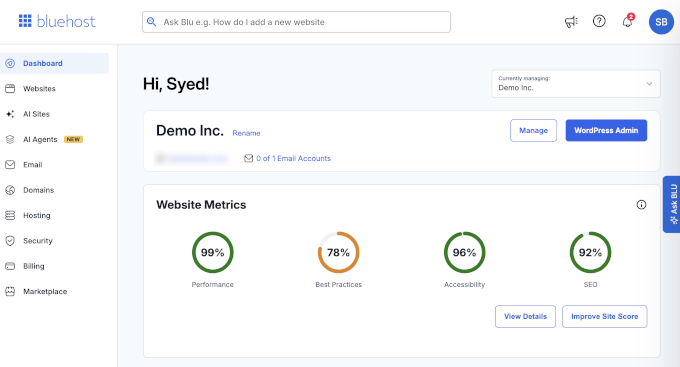
Bluehost has also added AI site creation tools and AI agents that help you build and manage your website. I would treat these as a convenience rather than a reason to choose a host, but for a first-timer they remove real friction.
Bluehost Customer Support
Bluehost offers 24/7 live chat, a large knowledge base with step-by-step guides and videos, and an AI assistant called “Ask Blu” that handles common questions instantly.
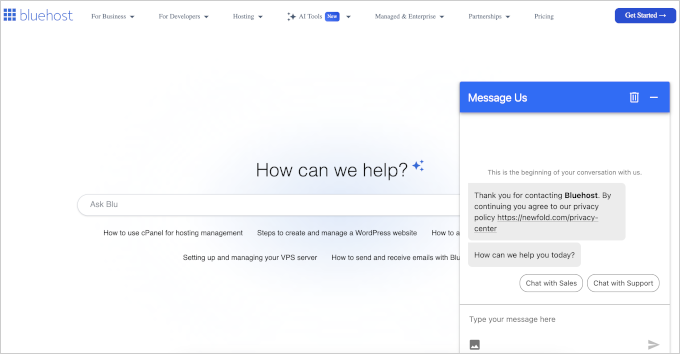
The entry plan does not include phone support, so chat is your only option if you start on the Starter plan. There is also no ticket system, so an issue that needs multiple sessions means re-explaining it in chat.
To be fair, phone support is rare at budget hosting prices, and most hosts at this level stick to chat. Bluehost adds phone on the Business plan or higher. Of all the budget hosts that we tested, SiteGround was one of the few that included phone support on every plan.
Who Should Use Bluehost and Who Should Look Elsewhere
Choose Bluehost if you are building your first website, blog, or small business site and want the simplest possible start. The official WordPress.org recommendation, the automatic install, and 10 websites on the cheapest plan make it the lowest-friction way in.
Its 100% uptime in our monitoring backs the reliability claim.
Look elsewhere if raw speed is your priority, since Hostinger and SiteGround both beat Bluehost by a wide margin in our tests. The same goes if you want daily backups on a budget (DreamHost includes them at $1.99), need phone support on an entry plan (SiteGround), or run a high-traffic site that needs proven performance under load (try Levamo and see our full hosting comparison).
Final Verdict – Is Bluehost the Right Choice for You?
Bluehost is perfect for beginners who are just starting out or someone building a small business website. They’re officially recommended by WordPress.org which is a big endorsement.
My verdict – if this is your first website, visit Bluehost and start on the Starter plan. If speed is your deciding factor or you have outgrown your first site, our best WordPress hosting comparison shows which host won each category on the same tests.
FAQs About Bluehost
1. What are the disadvantages of Bluehost?
Based on our tests, the main ones are speed (933 ms LCP, not as fast as others that we tested), weekly rather than daily backups, no phone support or domain privacy on the entry plan, and upsells during signup. Several free extras also convert to paid after the first year, which the fine print section above covers.
2. Is Bluehost good for beginners?
Yes. This is actually where Bluehost really stands out. Bluehost installs WordPress for you at signup, the dashboard is simple, and 24/7 live chat is there when you get stuck. It is the host we recommend most often to someone building their first site.
3. Can Bluehost handle high traffic?
Bluehost rates the Starter plan for around 40,000 visits per month, which covers most new sites comfortably. In our last completed stress test, Bluehost held a 140 ms P95 response with 50 concurrent users and no failures.
Bluehost’s own Cloudflare protection blocked our most recent re-test, so we could not measure its current under-load behavior. For consistently high-traffic or eCommerce sites, a managed host is the safer pick.
4. Can I make an online store with WooCommerce on Bluehost?
Yes. The eCommerce Essentials plan auto-installs WooCommerce and includes premium commerce add-ons like subscriptions, memberships, and one-click checkout.
For a new store with modest traffic it works well. As your store grows, plan to upgrade, because stores are harder on a server than blogs.
5. Is Bluehost better than GoDaddy?
For WordPress, I believe Bluehost is definitely better than GoDaddy. Bluehost’s onboarding and dashboard are more beginner-friendly, and its pricing is clearer for small sites.
We have not run GoDaddy through our new speed test protocol, so I will not compare speed numbers until we have, but based on my historical experience, I am pretty confident in my answer.
6. How does Bluehost compare with SiteGround and Hostinger?
On our identical tests, both SiteGround and Hostinger were faster. SiteGround loaded in 608 ms and Hostinger in 659 ms, against Bluehost’s 933 ms.
Bluehost counters with the simplest setup and 10 websites on its entry plan. SiteGround costs more at renewal ($17.99 per month), and Hostinger also skips phone support.
The comparison table above has the full numbers, and our SiteGround vs Bluehost comparison goes deeper.
7. Where are Bluehost’s servers located?
Bluehost recently moved to Oracle Cloud, and they now offer server locations across North America, South America, Europe, and Asia that you pick at checkout. Our test site ran in the default US location, which is why our North American response times were strong while Japan and South America lagged.
The included CDN closes most of that gap for global audiences.
8. Which Bluehost plan should I get?
We recommend starting with their Starter plan. It covers 10 websites and roughly 40,000 monthly visits, which is more than a new site needs.
Upgrading later takes a few clicks, so there is no reason to overbuy on day one.
WPBeginner users get an exclusive 70% off on Bluehost with our Bluehost coupon.
Changelog
- July 2026 – Rebuilt the review around our July 2026 test data (speed tested July 21, response time July 24, 30-day uptime window). Added the WPBeginner Score, the comparison table against similarly priced hosts, the infrastructure section, the pricing fine print, and corrected the Starter renewal price to $9.99 per month.
We hope this review helped you with your WordPress hosting research and helps you choose the right WordPress host for your needs. You may also want to see our pick of must-have WordPress plugins for business websites.
If you have any questions or feedback about my Bluehost review, please send me a message. I love hearing from our readers. Also you can scroll below to read real Bluehost user reviews from other business owners from around the world.
Mona Frechette
I agonized for months over the choice of a webhost. Bluehost wasn’t my first choice initially. I signed up with a competitor and had a nasty surprise. Their customer service team couldn’t get my credit card cleared in time to build my website the same day. In fact, they told me to “be patient” for 48 hours.
Well, no way! I was finally ready to take the leap, and if giving them money was an issue, how would the rest of my experience be? I cancelled them immediately and went with Bluehost, and all I can say is “Wow!”
My WordPress website was up and running a few hours later. Their system was exceptionally intuitive and easy to navigate. I expected problems, but lo and behold, up time is phenomenal and guests have nothing but good things to say about my site’s performance. Bluehost is not only cost-effective, it’s a boon for newbies who need a supportive, responsive webhost.
Don’t wait another minute to get started.
Ronnie Ivask
Even tho I haven’t been using it lately, bluehost has been my favourite of it’s kind since always
Mike B
I’ve been with Bluehost for a few months now and I’m extremely happy with the service so far. I had some issues that needed a phone consultation and they delivered in minutes! I’m about to open a second website and there’s no where else I’d consider.
Susan Hobbs
Over the past decades, yes decades I have used quite a few web hosting services for multiple websites. I recently consolidated all of my domains to BlueHost because, quite honestly, they just make it so simple to manage them.
Gone of the headaches of multiple logins and trying to remember which dashboards does what!
And last, but definitely not least, it is very cost-effective.
Chelsea Burrus
We love Bluehost, it makes managing the blog for our organization so easy. 10/10 would recommend!
Tierra Robinson
Bluehost has made creating my own blog site so easy! The plug ins are awesome and it is easy to navigate. Since publishing my website, I have gotten so many compliments on how professional my site looks. I’m excited to see what else I can learn through Bluehost and what other great plug ins and features I can add to make my website the best it can be! Thanks Bluehost!
Joneil
I have not regretted my decision to sign up with bluehost for hosting services. It really is an all in one shop as I was able to register my domain name as well. I liked the fact that it came with WordPress so I was able to build exactly what I wanted in a site without it feeling too basic. I believe where they really excel though is with customer service, the representatives are extremely helpful and I feel like I am dealing with real people which in turn makes me feel valued. I don’t mind having to call customer care whenever I have to resolve an issue or there is a technicality that I just don’t understand as I can tell that they go above and beyond. I readily recommend bluehost to any and everyone.
Lindsey D.
Bluehost has been a lifesaver when it comes to effective and streamlined website hosting. I love their customer support. Any time I’ve had a question or issue arise, they are quick to respond and come up with a solution, all the while being friendly and courteous. I have only great things to say about Bluehost, and would recommend it to anyone!
Matias Escobar
Bueno que decir de tan maravilloso hosting ! Constantemente estoy en la búsqueda de lo mejor para la velocidad y manejo de mi web ! Pero con Bluehost ya no hace falta buscar mas ! Siempre están actualizando sus servicios y la atención 24/7 es como el puntapie final a que todo este de maravilla cada vez que necesito modificar algo que no entiendo ! Desde ya muy agradecido a ser parte de esta comunidad !
PD: no olvidarse nunca de WPbeginer un sitio tan basto que recomiendo usar su buscador para encontrar la información puntual y necesaria
Anthony Dion Briggs
Building and managing a website is more than just a homepage; it’s the hosting company that matters. The interface, ease of use and customer service are the hallmark of a great company. Bluehost is impeccable in these categories and as a bonus, their prices are extremely fair and competitive. There is no place like home with Bluehost!
Michelle Velasquez
Bluehost is the best hosting company one could ever use! It is user-friendly and overall easy to use especially due to their customer service: they go above and beyond for their customers. I always tell all of my clients to use Bluehost as it is the most compatible with domain/email transfers and also all websites. I recommend using them, 100%
Taylor Gallagher
I have loved my experience with Bluehost. I can easily find what I’m looking for and have only needed to chat with Bluehost members once, and had a wonderful experience doing so. I’m very happy I chose Bluehost and plan on being a member for a long time, since I have a website with Bluehost.
Thank you very much.
Michelle Velasquez
Bluehost is user-friendly and overall easy to use, but what makes them unique is their customer service: they go above and beyond for their customers. I advise all of my clients to use Bluehost, as it is the most compatible with all of the websites and domain/email transfers! I recommend this company 100%!
Clifford Latty
Their support was so good. As a first timer and just started my entrepreneurial journey, they help me got off the ground and good start. I would recommend them for anyone who wants to build and host their website.
They returned calls and stayed on the phone with me while I had difficulties – they even remotely trouble shoot my my pitfalls. Bluehost anytime. I am happy I had went along with their service – I will continue to use them.
Erik
Been with Bluehost customer since the summer and everything was going well until I just recently re-upped with them. Since renewing I’ve had a few issues with not being able to get on to my site, but the support has been very helpful and responsive. Not sure if I will be staying with them when I’m up in May of next year, but so far I’ve been happy with the service.
Marc Huber
We looked for a WordPress host as we were preparing to launch a website. We found BlueHost in a listing of top rated websites. It turns out, the listing was right on the money: BlueHost is very affordable, very reliable, and packed with all the features we needed and wanted. We’ve since recommended this host to other friends looking to launch a website.
Connor Woodruff
I started my first website, a personal blog, about 6 months ago. I did a lot a research and Bluehost was at the top of many lists for hosting so I went with them. I’m really glad I did! I have had no issues and t has been very easy for me to set up and maintain my website. I would recommend Bluehost to pretty much anyone.
Carrie Pirtle
Bluehost is a great domain. Easy to use and setup and pricing was reasonable. I have enjoyed using them and would highly recommend them.
Tim Kamer
BlueHost services and support are world class! It is one of the best hosting providers Ive ever used; been a customer for years now.
Nancy Deanne
Bluehost has been a great platform for my new business. It’s easy to use, offers great support and the end product looks amazing.
Mike Stone
I did so much research in deciding on a host for my website and landed on Bluehost. Setting everything up was quick and easy. I had a issue with my theme and contacted Bluehost for help. They were so patient in walking me through how to fix my issue, which had nothing to do with Bluehost. They got me through it even though they didn’t have to. Great service! Glad I chose Bluehost!
Jessica Darrington
I don’t even know where to start about my exceptional experience with Bluehost! On their website, they advertise that they have the best web hosting and they are 100% true in saying that! Bluehost has been with me from the start of a little hobby blog to my now thriving company. It truly was so easy to get it set-up and installed with Wordpress. And their 24/7 support has been a lifesaver! Thank you Bluehost!!
Bryn Jones
We have been using Bluehost for a couple years and support has been amazing. our sites are a little slow recently but that’s not because of blue host. we are working on cleaning up our sites.
great people. would recommend them
Jess Darrington
I don’t even know where to start about my exceptional experience with Bluehost! On their website, they advertise that they have the best web hosting and they are 100% true in saying that! Bluehost has been with me from the start of a little hobby blog to my now thriving company. It truly was so easy to get it set-up and installed with Wordpress. And their 24/7 support has been a lifesaver! Thank you Bluehost!!
Xavier Gregorio
Bluehost was super easy to use. I was able to get my website running in no time.
Nancy
After reading this article i went to their website to subscribe. Unfortunately, i chatted with sales and they told me they charge money for migrating my website to their servers. Migrating is free with all other hosting providers. That is why i decided not to subscribe with them
Sajwal Pageni
It’s not a new thing that blue host is the best hosting service. I manage 5 websites of my own and all are hosted under bluehost since 4 years and till now I am not facing a single problem! So, I recommend everyone to use bluehost.
Stacey Adams
We’ve been using Bluehost since 2008 and wouldn’t use any other firm. They make everything easy from setting up a new site, to managing the content. And they have extremely fair pricing for a small business.
We would highly recommend them to anyone looking (and do!) and to that end, we have even added services they offer to our regular hosting.
Jill keith
Hello,
I like Bluehost customer service the best. They are polite, speak English very well, and are very helpful.
I like your prices also.
I didn’t like the email servers getting blocked by AT&T servers, but I know you didn’t do that.
Something I think all your techies should know that is if a customer can’t delete an empty subdomain folder, they need to delete the upper level url too.
That’s it! Thank you for helping me to earn some pocket money.
Edouard Gambarian
I always receive intelligent service/help when I call.
Thanks to BlueHost
Norm LeDonne
I’ve been using Bluehost for about 6 months. So far, it’s been very good. I haven’t had any problems that I didn’t cause. The platform is stable. I’m happy with it.
Diane Schuirman-Hagedorn
We have had no issues with Bluehost. On the few occasions we’ve needed support responses have been prompt.
Richard Force
Very happy with Bluehost as a web hosting service; I highly recommend their services.
Nina Rice
Word Press is easy to work with and so glad to had Word Press to set up my website.
Keep up the good work!
Carol Knieriem
Bluehost has been good for us as a webhost. We have been very disappointed that there is not a working calendar that we employees can share so we are probably going to seek google apps for non-profits in order to have a user friendly shared calendar.
Rod Kirki
I am a simple user of Bluehost. I have a couple of websites which are not very active due to things taking me away from spending lots of time on them. But, so far, the interaction I have had with the Bluehost staff and customer support, has been really good. I have no beefs.
What would be good tho, is to have a resource that can be accessed which addresses various issues that might lead a customer to contact customer support for tweaking various parameters that only can be done by Bluehost. That would be a very valuable document to have access to and provide us, the customer with a good picture of what is the scope of things which can be changed or altered if needed. This would save us time in resolving things and probably lower the amount of time required to get to the root cause of some issues. What do you think?
osame
how can i use it
Darold Turock
99% up time, 24/7 live customer care, Blue Host has been a life saver for me and my business.
Kathy Dee Zasloff
I have been a Blue Host customer for a long time…I know that I can depend on all the associates to assist me. I am a loyal customer and intend to continue.
Keep up the good work.
Barry Styles
I’ve been using Bluehost for about three years now. As shared-hosting providers go, they are a notch above similar providers. Speed is above average compared to others I’ve used in the past. Though I haven’t needed their support staff a lot in the past few years, the few times I have, they’ve been responsive and friendly. I have just renewed my hosting account for another three years and I can honestly recommend Bluehost to anyone looking for a stable and dependable hosting solution.
Bill Paladino
I always receive intelligent service when I call
GM Sapper
Prices are good, customer service is excellent . My only issue is the spam they always send me. I’mnot a business so their spam is useless to me. Other than that I recommend it strongly.
J Flack
A company that advertises being a Wordpress leader doesn’t support a five year old WP feature called MultiSite.
Each WP install uses a minimum of 5,000 files. If you have six or seven domains using WP, but only getting a few hundred visitors a month (think church, small club) then the installs use up nearly 40,000 files. Multi-site, configured properly, lets a user install WP once, and run multiple sites one that single install.
Bluehost tech support says they don’t support that feature. I can see why it would help both parties if they did.
Dave Ferguson
Thanks for helping me to connect to my email while I was without internet.
Minuard Jordan
Great service and very professional. I think your email Spam Assassin should screen out spam better than it currently does. Thanks for all your qualified help over the years.
Randy Martin
I was a total newbie to this WP/website stuff 2 years ago. Thanks to the help I’ve received from the folks at BlueHost, I have produced a dozen sites for me and my clients. I can always get through when I have a problem and I’ve always gotten perfect and honest answers from them — even when I was the problem!
I have several clients who have hosting support elsewhere so I know what a pain other places can be. I always encourage those clients to switch. And when they do, we are all happy.
I have absolutely no complaints with the folks at BlueHost. I’m quite sure you’ll feel the same way once you get on board.
Casey
Wasn’t particularly happy to learn that I could not earn any affiliate commission unless it reached $100 within nine months. A bit of a rip off, considering I lose all revenue even though I am solely responsible for getting my one client to you.
George Miller
I am hosting 8 websites for clients and my own on bluehost…… have been using bluehost for over 10 years and have always received reliable help whether from chat, phone, or email. I am not a novice but I still run into problems at times and I have always gotten my problem solved with one contact. When i started converting all my sites to joomla! they were always there for my questions, no matter how trivial….. The only thing I can add is there are a good bunch of Good Ole’ boys!!!
Juna Berry Madrone
long waits for customer service. Excellent service when it arrives.
Jerry Zacharias
Completely happy with Bluehost and I would recommend it to others.
Mark
Bluehost has been our host for several years now. They have helped us navigate through many different issues with ease. They are very professional and take the time to help a novice learn the ropes. I have recommended them to anyone seeking a host.