


Are you trying to fix Yoast SEO’s sitemap 404 error in WordPress?
Yoast SEO is one of the most popular SEO plugins for WordPress. Due to a plugin conflict or incorrect WordPress settings, it may show a 404 error when you try to visit your XML sitemap.
In this article, we’ll show you how to easily fix the Yoast SEO XML sitemap 404 error in WordPress.
What’s Causing Yoast SEO Sitemap 404 Error in WordPress?
The Yoast SEO sitemap helps search engines find all the content on your website that you want them to find and index.
Fixing the error ensures that search engines can access your sitemap and discover all the pages and content on your site, which can lead to better search engine visibility and ranking. This will also help to rank your content faster than without a sitemap.
WordPress comes with a default XML sitemap that you can submit to Google Search Console and other search engines.
This XML sitemap can be visited by entering the following URL in your browser’s address bar.
https://example.com/sitemap.xml
However, this default WordPress-generated sitemap is very basic. To fix this, all top WordPress SEO plugins like All in One SEO for WordPress or the Yoast SEO plugin create their own XML sitemaps with more features.
When you use the XML sitemap generated by your WordPress SEO plugin, these plugins rewrite the default WordPress XML sitemap shortcut.
This means the sitemap URL mentioned above will now send users to the sitemaps generated by your WordPress SEO plugin.
Unfortunately, this may cause a 404 error on some websites due to plugin conflicts or incorrect WordPress settings.
That being said, let’s take a look at how to easily fix the WordPress sitemap 404 error in the Yoast SEO plugin.
1. Refresh WordPress Permalink Structure
WordPress comes with an SEO-friendly URL structure (also called permalinks). This URL structure uses a redirect system to tell your web hosting server which page to load when a user enters a URL in their browser.
Normally, these permalinks settings are automatically updated when you make changes to your website.
However, sometimes WordPress may not be able to refresh the permalink structure, which may cause Yoast SEO’s sitemap 404 error to appear.
This can be easily fixed by visiting the Settings » Permalinks page in the WordPress admin area and simply clicking on the ‘Save Changes’ button.
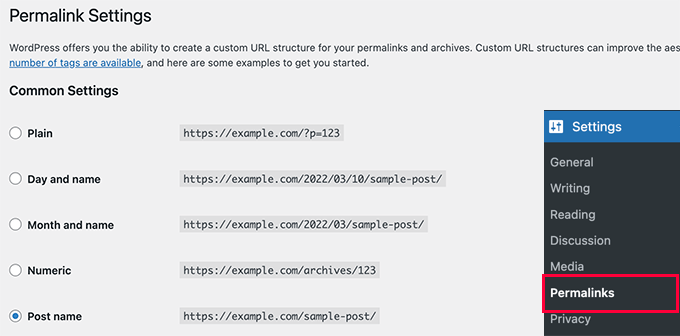
Doing so will refresh the WordPress permalink settings. You can now visit your XML sitemap page to see if this has fixed your problem.
If it didn’t fix the problem, then you can continue reading.
2. Manually Update Permalinks
If refreshing your WordPress permalink structure doesn’t fix the 404 error, then you can manually tell your web server to redirect users to Yoast SEO’s sitemap page.
To do this, you’ll need to add the following code to your .htaccess file.
# Yoast SEO - XML Sitemap Rewrite Fix
RewriteEngine On
RewriteBase /
RewriteRule ^sitemap_index.xml$ /index.php?sitemap=1 [L]
RewriteRule ^locations.kml$ /index.php?sitemap=wpseo_local_kml [L]
RewriteRule ^geo_sitemap.xml$ /index.php?sitemap=geo [L]
RewriteRule ^([^/]+?)-sitemap([0-9]+)?.xml$ /index.php?sitemap=$1&sitemap_n=$2 [L]
RewriteRule ^([a-z]+)?-?sitemap.xsl$ /index.php?yoast-sitemap-xsl=$1 [L]
# END Yoast SEO - XML Sitemap Rewrite Fix
Note: If your WordPress website is installed in a subdirectory or folder (e.g. https://example.com/mywebsite/ ), then you’ll need to use the following code.
# Yoast SEO - XML Sitemap Rewrite Fix
RewriteEngine On
RewriteBase /mywebsite/
RewriteRule ^sitemap_index.xml$ /index.php?sitemap=1 [L]
RewriteRule ^locations.kml$ /index.php?sitemap=wpseo_local_kml [L]
RewriteRule ^geo_sitemap.xml$ /index.php?sitemap=geo [L]
RewriteRule ^([^/]+?)-sitemap([0-9]+)?.xml$ /index.php?sitemap=$1&sitemap_n=$2 [L]
RewriteRule ^([a-z]+)?-?sitemap.xsl$ /index.php?yoast-sitemap-xsl=$1 [L]
# END Yoast SEO - XML Sitemap Rewrite Fix
Don’t forget to replace /mywebsite/ with your subdirectory name.
This code simply tells your web server which pages to display when users access Yoast SEO’s XML sitemaps.
You can now try viewing your XML sitemap to see if this resolves your issue.
3. Switch to an XML Sitemaps Plugin
If the above-mentioned methods didn’t solve the 404 error on Yoast SEO’s XML sitemap page, then you can try using a separate plugin to generate XML sitemaps for your website.
The disadvantage of this approach is that you’ll have to rely on a separate plugin to generate XML sitemaps and Yoast SEO for other SEO features.
First, you need to install and activate the XML Sitemaps plugin. For more details, see our step-by-step guide on how to install a WordPress plugin.
Since you are using Yoast SEO, it will automatically show you a notification to either disable the XML Sitemaps plugin or Yoast SEO’s sitemap functionality.
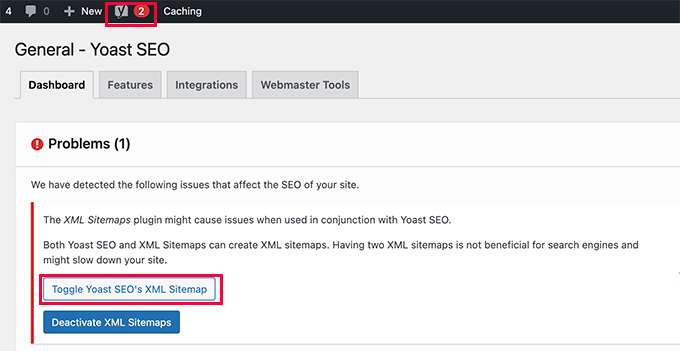
Click on the Toggle Yoast SEO’s XML Sitemap button to continue.
This will bring you to the Features tab under the SEO » General page. From here, you need to scroll down to the XML Sitemaps option and switch it off.
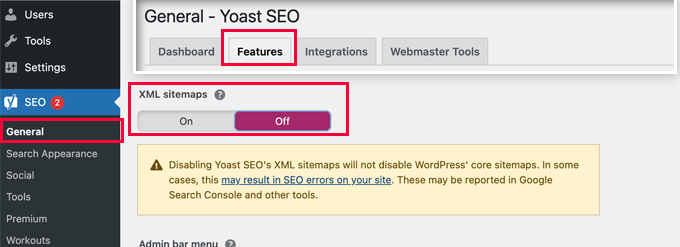
Don’t forget to click on the ‘Save Changes’ button to store your settings.
You can now switch to the Settings » XML-Sitemap page to configure your sitemaps. For most websites, default settings would work out of the box.
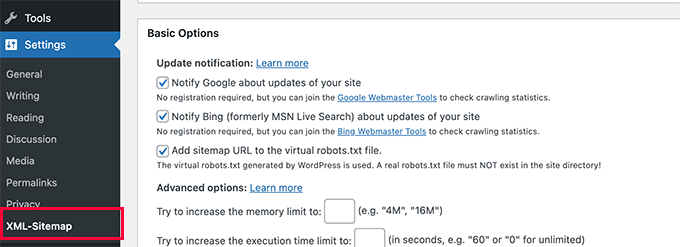
But you can always configure the settings based on your needs.
You can now submit the XML sitemap URL to the Google search console and other search engines.

4. Switch to the All in One SEO for WordPress
If all steps to troubleshoot fail and you don’t want to use a separate plugin to generate XML sitemaps, then this method may help you fix the sitemap 404 error issue.
For this method, you’ll need All in One SEO for WordPress. It is the best WordPress SEO plugin on the market and a much better Yoast SEO alternative.
You can see our Yoast vs All in One SEO comparison for more details on the differences.
All in One SEO (AIOSEO) comes with advanced XML sitemaps with easy-to-manage options that give you full control of what to include or exclude from your XML sitemaps.
First, you need to install and activate the All in One SEO for WordPress plugin. For more details, see our step-by-step guide on how to install a WordPress plugin.
Note: There is also a free version of All in One SEO for WordPress, which includes most XML sitemap features except for video and news sitemaps.
Upon activation, the plugin will walk you through a setup wizard. You can follow our guide on how to properly set up the All in One SEO plugin for WordPress if you need help during setup.

All in One SEO will also allow you to import SEO data from Yoast SEO.
This ensures that all your previous SEO meta tags and titles remain unchanged.
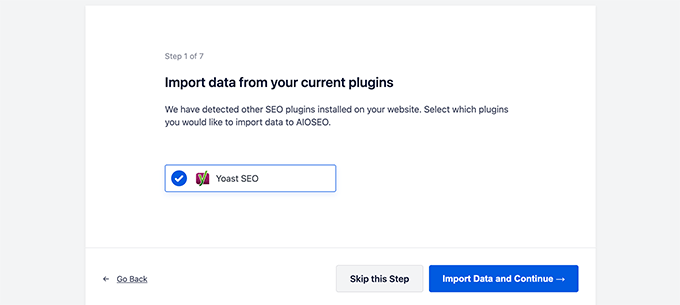
After the initial setup, you can go to All in One SEO » Sitemaps page to configure XML sitemap settings.
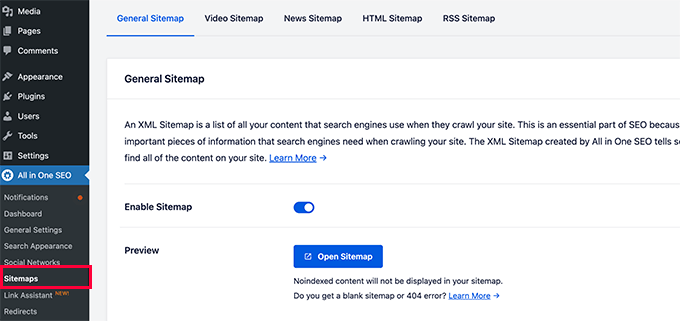
You can click on the Open Sitemap button to see if it fixed the sitemap 404 error in WordPress.
After that, you configure sitemap settings if needed.
For instance, All in One SEO allows you to choose what to include in your sitemaps. You can add or remove post types, taxonomies, individual posts, and pages.
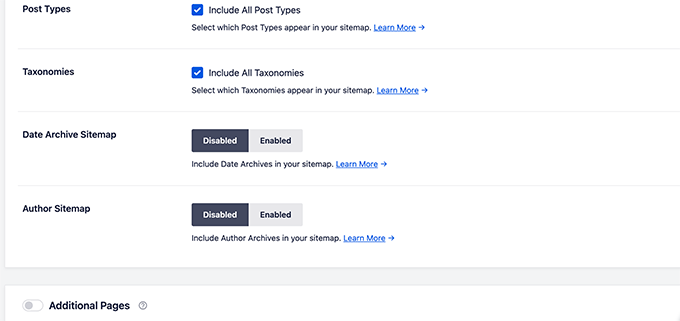
All in One SEO also allows you to create video, news, RSS sitemap, and HTML sitemap for your website.
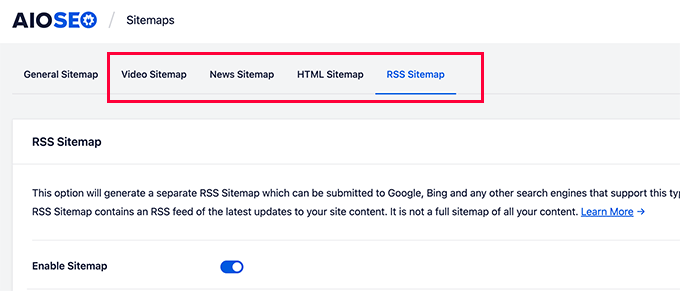
These sitemaps can also be submitted to Google Search Console and other search engines. This helps search engines quickly find newer content on your website.
We hope this article helped you fix the Yoast SEO Sitemap 404 error in WordPress. You may also want to see our complete WordPress troubleshooting guide or see how to fix common WordPress errors.
If you liked this article, then please subscribe to our YouTube Channel for WordPress video tutorials. You can also find us on Twitter and Facebook.




Syed Balkhi says
Hey WPBeginner readers,
Did you know you can win exciting prizes by commenting on WPBeginner?
Every month, our top blog commenters will win HUGE rewards, including premium WordPress plugin licenses and cash prizes.
You can get more details about the contest from here.
Start sharing your thoughts below to stand a chance to win!
D Moran says
I just bought the Genesis Framework theme and then installed the yoast seo plugin and activated. I then tried to generate my sitmap and get this same 404 error.
“Not found, error 404
The page you are looking for no longer exists. Perhaps you can return back to the site’s homepage and see if you can find what you are looking for. Or, you can try finding it by using the search form below.”
Does this mean that the theme I got from Genesis is badly coded? Did I waste my money??
WPBeginner Support says
It is highly unlikely, Genesis Child Themes purchased from StudioPress are very well coded. Try deactivating all your plugin to find out if a plugin is causing this issue.
Admin
Chris Sparks says
I had a similar issue after installing Yoast SEO. I deactivated the plugin, then restarted and the URL system picked up and started working as expected. This seems to be related to how the permalink structure is set up as only one of our sites has experienced this issue.
Thanks for posting!
Kase Dean says
I don’t know what just happened.
But that fixed it!
Thank you
john says
hello I tried fixing the 404 error code and now I get the following messege:
Internal Server Error
The server encountered an internal error or misconfiguration and was unable to complete your request.
and after that i remove the folder of plugin seo and nothing is working again what can i do???
WPBeginner Support says
Do you see an error? Can you access WordPress admin area?
Admin
Eoin Healy says
Another easy way to fix the sitemaps is to simply disable sitemap functionality and enable it again…. works for me every time, doesn’t matter what plugins i have installed.
In Admin, to go SEO > XML SItemaps
Under ‘XML Sitemap’ uncheck ‘Check this box to enable XML sitemap functionality.’, hit save, check the box again and hit save.
Brent G says
Eoin, Thanks for the great solution!!!!
George says
This worked for me as well. Thanks!
Fred Higson says
This worked for me too! Cheers Eoin!
Jeremy Hogan says
So simple and yet so effective. This was the answer for me as well. Thanks!
Tyler says
Great solution, Eoin! Thanks so much for letting us know!
Margot Barrios says
I already fixed using the first option, how would I know if it’s working already? Should I need to wait for Google’s webmaster report? This is where I saw the 404 error on my site.
WPBeginner Support says
yes you should be able to see your sitemap file in Webmaster Tools
Admin
Eric Kuhn says
I replaced the edit files with the XML sitemap fix and completely removed what was there initially. Google webmaster tools has accepted the sitemap however, my sitemap doesn’t show a 404 or anything. Does that mean everything is ok?
WPBeginner Support says
Yes, everything looks OK.
Admin
Melissa says
I tried fixing the 404 error code and now I get the following messege:
Internal Server Error
The server encountered an internal error or misconfiguration and was unable to complete your request.
Please contact the server administrator, and inform them of the time the error occurred, and anything you might have done that may have caused the error.
More information about this error may be available in the server error log.
Additionally, a 500 Internal Server Error error was encountered while trying to use an ErrorDocument to handle the request.
Apache/2.2.23 (Unix) mod_ssl/2.2.23 OpenSSL/1.0.0-fips mod_auth_passthrough/2.1 mod_bwlimited/1.4 FrontPage/5.0.2.2635 Server at artattackfx.com Port 80
I cannot access the WP Admin Site… How can I revert to before I added this code :
# WordPress SEO – XML Sitemap Rewrite Fix
2
3
RewriteEngine On
4
RewriteBase /
5
RewriteRule ^sitemap_index\.xml$ /index.php?sitemap=1 [L]
6
RewriteRule ^([^/]+?)-sitemap([0-9]+)?\.xml$ /index.php?sitemap=$1&sitemap_n=$2 [L]
7
8
# END WordPress SEO – XML Sitemap Rewrite Fix
to the htacess code in YOAST? Please Help.
WPBeginner Support says
As the tutorial suggests you added the code in .htaccess file on your webserver? If yes, then simply edit the .htaccess file and remove the code you added.
Admin
Remi says
I thought I followed to the letter your second suggestion but have the same issue as Melissa. Now waiting for the Webhost for a solution. What about adding a warning in your second solution that it can lead to a 500 Internal Server Error.
WPBeginner Support says
You can also revery back by editing the file your modified through FTP. Connect to your website using an FTP client. Locate the file you modified (.htaccess or class-sitemaps.php) and remove the code you added. Alternately, you can also delete the WordPress SEO folder from your wp-content/plugins/ directory through FTP.
Todd says
Thanks a lot. The first fix worked for me as well.
icejava says
Thanks, I had to apply both fixes to get mine too work! Job well done.
Andy says
Thank you very much for this. Works perfectly!
Toni says
Can anyone advise on how to delete the post-sitemap.xml as I cannot find it in my root directory! I have turned of the generate sitemap in Yoast.
Koen says
Hi,
I have wordpress 3.6 with Avada theme and WordPress SEO by Yoast plugin.
First I got the 404 error page.
Then I applied the .htaccess fix without any result.
Then I applied the class-sitemaps.php fix, now the sitemap returns a blank page.
What to do?
Please help. Avada isn’t a crappy theme, I think.
Cheers, Koen
Frank says
Koen,
I’m having the same problem I was thinking it was a Nginx issue because I’m not hosting on an Apache server.
are you hosted on a Apache server?
glowzar says
I know more than 1 with avada theme an the same problem.
Gbenga Adebayo says
Hi,
Appears i still have a few issues to sort out. Google webmaster reporting http 403 errors with my sitemap. I can’t find the sitemap anymore in my root folder. I can navigate to the sitemap using my browser without getting a 404 error message.
Any suggestions or help is appreciated.
Gbenga Adebayo says
Many thanks! .htaccess addition fixed the error for me
Madhu says
Phew … Thanks again!
I updated my SEO pluggin and the sitemaps had the same issue.
I had to incorporate both the fixes.
Rajesh Thakur says
Thanks First one did worked for me need to clear w3 cache after that and wait a little also disable XML sitemap checkbox and check it again
Erica says
I tried the second set of instructions and it resulted in a “Fatal Error” message and I was unable to access my WP site, or even the login page. Scary!
Nyla says
Hi all
I’m an very frustrated to say that I am too getting 404 error, I’m using kriesi replete theme.
I have tried both options however nither worked
I’m not sure if I’m doing it write, can somebody explain…. In simple terms are we deleting and replacing the existing code on both options? Or just adding? It’s not clear or does it make a difference if the prexisting remains
Thanks in advance
Jonny R says
Awesome thanks, implementing both worked perfectly!
Fin O'Suilleabhain says
Worked like a charm. Grateful for the helpful post.
Ahmed Alahdal says
Thanks for the fix
Joyce says
Thank you so much!
this worked — had to make both changes, (edited the class-sitemaps.php file).
Anudeep says
Thanks a lot!
It worked
Rohin says
Damn helpful.

One of my clients had this problem and just took 5 minutes to solve the issue. Just because of this post.
Thanks a lot.
Ron MacGregor says
I am new to WordPress and have only begun a using the Canyon theme. I got the 404 message as I was attempting to install a “contact info” plugin. Does anyone know if I just begin at the very beginning again, i.e. go through my GoDaddy account to reinstall WordPress and then reinstall the Canyon theme – might that solve the 404 problem?
Editorial Staff says
It is probably the issue with that other plugin.
Admin
Ricky says
Thanks for the fix!
Jack Logan says
I have two sets of websites (WordPress Multisite installs) and I have no issues with sitemaps on one of them and I get a 404 error with category_sitemap.xml on the other one.
I tried both fixes suggested in this post, but they don’t solve the issue. The only thing that works is going to Posts -> Categories – Edit and changing from “Auto detect” to “Always include” on all categories.
The issue here is that I have over 200 sites, and about 8 categories per page, so it would take too long to do it just to get category sitemaps, even though I could use it….
Is there any way to mass change all the categories on WP Multisite to “Always include”. I think this would be a solution that would work for everyone.
Thank you.
Jacques Karsten says
If none of this works try create a file named sitemap_index.xml on your html root through ftp and make sure the permissions are set and the plugin should then take care of the rest.
Kevin says
Thanks!! your suggest worked perfectly!
John says
I did both and it started working. It sounds pretty obvious, but make sure if you copy and paste that you take the line numbers out. I forgot to and broke my .htaccess file for a few minutes.
Hector Torres says
Hi, just wanted to give my thanks, used the second option suggested ad it fixed my 404 error. Thanks!
Adam says
I’m not sure which part worked for me, but I found this page because I was getting the 404, too. I disabled the XML Sitemaps in the plugin, then enabled it and checked the boxes to exclude posts (since I only have pages). Now, it is working perfectly.
Prashant says
Thanks Mate Perfect ! Suggestion for Me !!!!!!!!!!!!!!!!!! Really Greatful Thanks
Ov3rfly says
During research about a similar 404 sitemap xml feed problem, I found a different reason which I would like to share:
WordPress adds a 404 header to all feeds if no posts exist in a site.
More details and a hotfix here:
http://wordpress.org/support/topic/sitemap-xml-feed-is-shown-but-404-header-added-by-wordpress-if-site-has-no-posts
Brad Dalton says
I think there are other issues with this plugin as well.
The attachment pages aren’t all redirecting to the parent page which is something i noticed today.
Editorial Staff says
Create a ticket in the support forum. We haven’t tried that feature yet.
Admin
Michi says
No other comment since April. That has been 5 months since. I have the 404 still in Sept 2012! Was able to fix it with the .htaccess fix. Thanks for posting
Just wondering why this is STILL an issue.
Sandie Wright says
It worked for me! Open the class-sitemaps.php file located in plugins > wordpress-seo > inc folder. then find the code around line 79 and replace the old code with this new code:
/**
* Initialize sitemaps. Add sitemap rewrite rules and query var
*/
function init() {
global $wp_rewrite;
$GLOBALS[‘wp’]->add_query_var( ‘sitemap’ );
$GLOBALS[‘wp’]->add_query_var( ‘sitemap_n’ );
add_rewrite_rule( ‘sitemap_index\.xml$’, ‘index.php?sitemap=1’, ‘top’ );
add_rewrite_rule( ‘([^/]+?)-sitemap([0-9]+)?\.xml$’, ‘index.php?sitemap=$matches[1]&sitemap_n=$matches[2]’, ‘top’ );
$wp_rewrite->flush_rules();
}
Then, go back to your WP admin page and then go to the SEO plugin > XML sitemaps, and then click the button again (XML Sitemap). The 404 should be replaced with your sitemaps! Easy peasy.
Boah says
@SANDIE WRIGHT: I followed your instructions but it did not solve my 404 problem.
raviteja says
thanks you, the rewrite rule itself cured the problem of 404 not available sitemap
Jody says
Thanks for jacking up my site! i tried your code and now i got a 500 internal service error i have been trying for hours to fix! thanks for making my little problem into a HUGE problem!
Editorial Staff says
If you are getting a 500 internal service error, you can simply undo the changes. Not sure why you would get that.
Admin
Brad Dalton says
I’m finding my sitemap gets removed everyday and then indexed again. Here’s what i get every day. http://postimage.org/image/3rb3d8qsr/932c5815/
I don’t think it’s my theme as i’m using Genesis.
Not sure but it may be the way my server is configured.
Editorial Staff says
Has to be a conflict with something else (another plugin or server settings). We are using Genesis on this site as well and do not have that issue.
Admin
Eva says
Hi!
Thank you so much for posting this article! With the first fix, I managed to solve the 404 issue for most sitemaps, though there’s still 1 that is showing the error… Any suggestions of what to do?
I thought about exporting the Yoast SEO settings and reinstalling the plugin to see if that does the trick. Just to be on the safe side: does exporting literally export all settings, even the page/article level SEO customizations OR only the general settings?
Thanks!
Eva
Sara says
Thanks so much – this worked for me.
I know you said the plugin is good, and the problem is in the theme or other plugins, but I tried disabling all plugins and switching to the twenty eleven theme, and the sitemap still gave a 404 error. The only thing that worked for me is editing the htaccess file.
Boah says
… and I tried the same thing. Removed all the plugins, all the themes, and tried it again: 404 error. To make it worse: I’d have an .htaccess file because of IIS. Which options are there for me?
Boah says
Typo: ‘I’d have an’ must be ‘I don’t have an htaccess file’
Rusty Solomon says
I guess SEO Yoast recent update have sitemap problem as I cant see any sitemap on the URL the plugin provide. Let me know if any one has the same issuee and Fix.
Also is there any good plugin avaialble as same as SEO Yoast.
Thanks & Regarsd
Jay Wylie says
Hi, I have tried the first fix, but broke my site in the process. Is there anyway to re-edit my htaccess file, to stop it causing a 500 internal server error?
thanks
Editorial Staff says
You can simply take the code out. Use FTP <
Admin
Boah says
Hi!
I have edited the plugin as suggested but don’t have a .htaccess file. I still do receive a 404 error.
I’ve also add message on the plugin forum. No replies yet. Suggestions are more than welcome!
http://wordpress.org/support/topic/plugin-wordpress-seo-by-yoast-404-when-viewing-xml-sitemap-1
Colin says
Hi Joots, I’m using the latest version of the SEO plugin. I’m going over previous posts and completeing the various fields, “Focus Keyword”, “SEO Title”, etyc, etc but after I update the post and then go back to “Edit” those fields are then blank again. I wondered how I could rectify this?
Thanks,
Colin
Liverpool, UK
Saki_Kawa says
The solution doesn’t resolved my issue.. I still have a blank page at post-sitemap.xml
Does someone have a solution?? Or I need to unistall this plugin and find another one for my sitemap..
Adam Parnala says
Hi, I don’t have any problems with yoast seo plug in as I’m currently using it. I just I want to ask if it is better than the all in one seo plug in? I’m just curious because I found out that a lot of blogs in my niche uses it. Which is better? the all in one seo or yoast seo? (I’m already used to yoast). Oh, can I also ask how to set multiple focus keyword in Yoast seo? because there is only one field and I can’t figure out how to set a few more keywords for it. Sorry for my questions I hope you can answer me. Thanks!
Editorial Staff says
Yoast’s plugin is a more complete SEO plugin.
Admin
yoast says
Anyone here who’s willing to test another (and better) fix with me?
Craig says
I’d be willing to test a better fix for this issue but I’m reluctant to commit to a timeframe as I’m not really good at keeping on top of my todo’s since my stroke. (This is one of the reasons I haven’t returned to work as a PHP coder yet.)
And I’d be *very* interested in helping if I happen to be experiencing any of the issues cited above.
Craig
Shawn Poole says
Hi,
Yoast, if the offer is still good, I would LOVE too! I am not to savvy with all of this but would be willing to allow you to guide me
Boah says
Sure, send me an email!
zifana says
thanks..i use wordpress seo,but not with sitemap,because have no idea to fix this error
Stephen Cronin says
Hmm, I think the second part is going to cause the rewrite rules to be flushed on every page load, which <a href=”http://codex.wordpress.org/Rewrite_API/flush_rules”>the Codex</a> warns not to do due to performance issues:

<blockquote>Because this function can be extremely costly in terms of performance, it should be used as sparingly as possible – such as during activation or deactivation of plugins or themes. Every attempt should be made to avoid using it in hooks that execute on each page load, such as init.</blockquote>
I’m guessing that’s why Joost isn’t doing that by default
Of course, I could be wrong because I don’t know his plugin well enough.
jonbish says
I was under the same impression when this article came through my RSS. I’m pretty sure going to your permalinks settings page would accomplish the same thing without having to flush the rewrite rules every time the page loads.
yoast says
@jonbish Unless you’re running a crappy plugin or theme that DOES flush on every pageload before this plugin gets a chance to get its rewrites in.
wpbeginner says
@yoast @jonbish Yes we understand that this is probably a compatibility issue. Yoast sitemaps work fine on our sites. We had to do this on a client’s site.
yoast says
@wpbeginner @jonbish I know YOU understand, question is: do your readers We’re working on a fix for these kinds of issues in core btw: http://core.trac.wordpress.org/ticket/18450
wpbeginner says
@yoast @jonbish Added a note at the beginning of this article, so users understand as well
yoast says
You’re 100% right Stephen. Something else *is* doing it on each pageload, which forces this “fix”, which isn’t a fix but a workaround for a broken theme or other plugin…
Boah says
And now? It seems a lot of people can’t use your plugni as intended.
JustinVelthoen says
Thanks! I was about to switch to All-In-One because I kept getting sitemap issues.
DrorBekerman says
Do you know what to do when the sitemap returns a blank page?
icejava says
Its probably not blank, just how your browser renders XML (maybe Chrome, mine does it too). View the source code of the page and you shall see the light
Editorial Staff says
This happens for a few reasons. Either you’re running low on memory. Two the file that generates the visual layout in your /wp-content/ directory is not working properly. Perhaps because you blocked the php execution?
Admin